Devart Excel Add-in for Mailchimp: Mailchimp Audiences and Campaigns in Excel
Devart Excel Add-in for Mailchimp connects Microsoft Excel for Windows to your Mailchimp account, so you can load audiences, list members, campaigns and store data into a worksheet, edit them and save the changes back, for $179.95 with one year of updates. It's for email marketers and analysts who report on Mailchimp in Excel or clean up subscriber data in bulk.
Mailchimp's own exports are CSV files that go stale the moment you download them, and changing hundreds of subscriber fields means another import. With the add-in, the worksheet stays connected: refresh it for current numbers, or edit member fields in the grid and commit them straight to Mailchimp.
Quick facts
- Version: 3.2.145, released November 18, 2026 (the shared build of all Devart Excel add-ins; Mailchimp e-commerce objects since version 3.0.0, June 2026)
- Developer: Devart
- Sign-in: Web Login to your Mailchimp account (the API key fills in automatically)
- Excel: Microsoft Excel 2007, 2010, 2013, 2016, 2019, 2021 and 2024, Windows only
- Download: 81.18 MB installer (all Devart Excel add-ins), free Devart account required
- Price: $179.95 with 1 year of support and upgrades, $259.95 with 2 years, $329.95 with 3 years
- Trial: 30 days
- Refunds: the order page promises a 30-day money-back guarantee "if you are not satisfied"; Devart's ordering FAQ describes refunds only for technical problems support can't fix, within 30 days
What we checked: version 3.2.145 and the 81.18 MB installer on the download page, the Excel versions and requirements on the compatibility page, the Mailchimp connection options (web login, merge field handling, read-only mode) in Devart's documentation, the Mailchimp entries in the revision history back to 2015, and the order page, which charged $179.95, $259.95 and $329.95 for 1, 2 and 3 years of support and upgrades, with no discount applied, on November 25, 2026. We didn't connect the add-in to a live Mailchimp account.
Download Free TrialBuy with 1 Year of Updates ($179.95)
Overview
The add-in adds a Devart tab to the Excel ribbon with Get Data, Refresh, Edit Mode, Commit and Rollback. Get Data opens an import wizard: choose Mailchimp, click Web Login and sign in to Mailchimp, then pick an object such as Campaigns, Lists or ListMembers in the visual Query Builder, or write a SQL query. The data arrives as an Excel table that stays linked to Mailchimp, so Refresh brings the latest numbers into the same sheet, charts and pivots included.
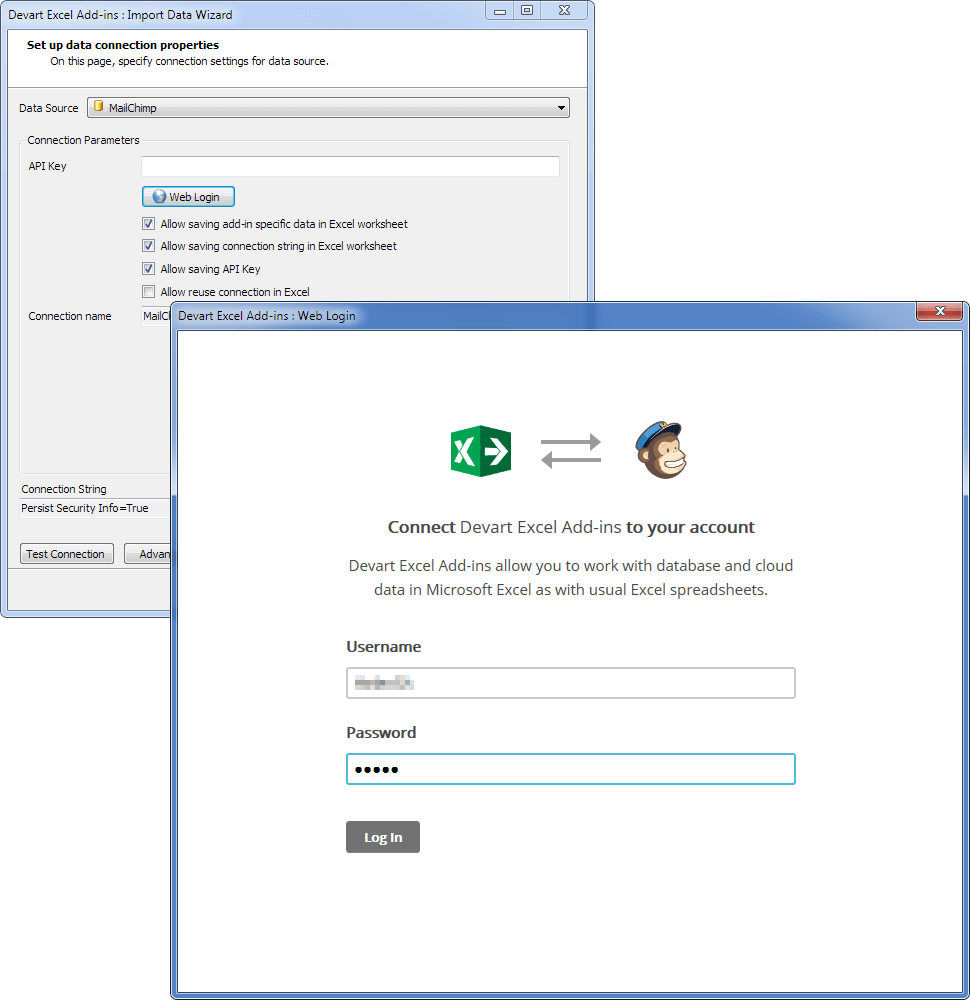
Connecting to Mailchimp: the import wizard with MailChimp selected as the data source and options to save the connection and API key in the workbook, and the Web Login window where you sign in to Mailchimp.
Features
Edit Mailchimp records in a worksheet
Devart Excel Add-in for Mailchimp turns an imported table into an editable view of your account. Click Edit Mode and change cells, add rows or delete them; changes are highlighted and go to Mailchimp only when you click Commit, while Rollback discards them.
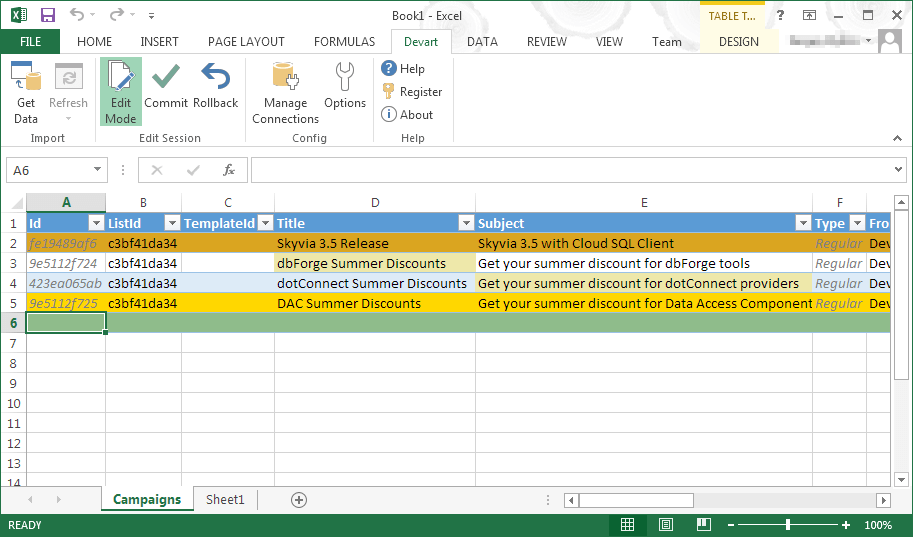
Edit Mode on a Mailchimp Campaigns table: campaign IDs, list IDs, titles and subjects in an Excel table on the Devart ribbon tab, with changed and new rows highlighted before Commit.
Query Builder or SQL
Devart Excel Add-in for Mailchimp imports through a visual Query Builder, where you tick columns and add WHERE and ORDER BY conditions, or through SQL, with complex queries handled locally when the Mailchimp API can't run them. Data preview shows the result before it lands in the sheet.
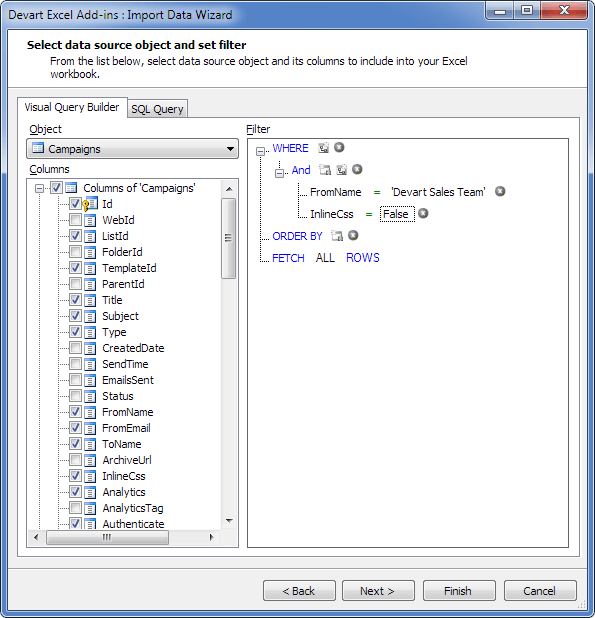
The Visual Query Builder on the Campaigns object: columns such as Id, ListId, TemplateId, Title, Subject and FromName ticked, and a filter on FromName and InlineCss.
Merge fields as columns
Devart Excel Add-in for Mailchimp adds your audiences' merge tags (custom fields such as FNAME or COMPANY) to the ListMembers table as columns. A connection option chooses whether to add none of them, only the tags every audience shares (the default), or all of them, and another chooses tag names or labels as column names.
Campaigns, interests and e-commerce data
Besides audiences and members, Devart Excel Add-in for Mailchimp reads campaigns, A/B testing campaigns and member interest groups, and since June 2026 Mailchimp's e-commerce objects: Stores, Products, ProductVariants, Customers, Orders, OrderLines, Carts, CartLines, PromoRules and PromoCodes.
Validation before commit
Devart Excel Add-in for Mailchimp checks edits against each field's type and required status as you type, flagging cells such as an empty required ListId or text in a number field, so a bulk change doesn't fail halfway through.
Benefits
- Live reports instead of stale exports. Campaign and audience workbooks refresh in one click.
- Bulk edits with Excel tools. Fill-down, find and replace, and formulas work on subscriber data.
- Fewer import mistakes. Changes are highlighted and validated before they reach Mailchimp.
- One place for marketing numbers. Mailchimp data sits next to sales or web data in the same workbook.
Real-World Uses
- Weekly campaign report. A workbook pulls campaigns with their send times and emails sent, and a pivot table summarizes them by audience.
- Audience cleanup. A marketer loads list members, fixes country and company merge fields in bulk and commits them.
- Store data analysis. An online shop owner pulls Mailchimp e-commerce orders and products into Excel to compare email-driven sales with the shop's own data.
- Agency reporting. An agency keeps one workbook per client, connected to that client's Mailchimp account.
Who It's For, and Who Should Skip It
It's for Windows Excel users who handle Mailchimp reporting or subscriber data often enough that CSV exports and re-imports have become a chore.
Skip it if you only export a list now and then: Mailchimp's free export does that. Excel for Mac and Excel for the web can't run it. If you need Mailchimp data in Power BI or SQL tools, Devart's ODBC Driver for Mailchimp fits better, and for scheduled loads into SQL Server there are Devart's SSIS components for Mailchimp.
Usage Guide
- Close Excel, sign in to devart.com (a free account), download the Excel add-ins installer and run it with an administrator account. The installer contains every Devart Excel add-in.
- Open Excel, select the Devart tab and click Get Data.
- Choose Mailchimp as the data source, click Web Login and sign in to your Mailchimp account. Click Test Connection.
- Pick an object (for example ListMembers) and its columns in the Query Builder, add filters if needed, preview and click Finish.
- To change data, click Edit Mode, edit the rows, then click Commit, or Rollback to undo.
- Click Refresh whenever you want current data from Mailchimp.
Before you buy
- Windows Excel only. It needs Excel 2007 to 2024 on Windows, .NET Framework 4.0 and the Visual Studio 2010 Tools for Office Runtime, installed by an administrator.
- What the price buys. Devart's order page describes the license as perpetual with one year of support and upgrades, extendable to three years at purchase. Check whether automatic renewal is ticked at checkout if you don't want the support period renewed.
- Edits are live. A commit changes your real audience, so test bulk edits on a small list first. Mailchimp's own rules (consent, unsubscribes) still apply to what you change.
- Several cloud apps? Devart's Excel Add-in Cloud Pack and Universal Pack bundle this add-in with the others.
Where it falls short
- Merge fields that differ between audiences. If two audiences use the same merge tag name with different types or settings, those tags are left out of ListMembers, whatever the merge-field option says.
- Reading merge fields takes time. Devart's documentation suggests turning merge-field detection off when you don't need it, for speed.
- Big audiences, big sheets. Large lists take a while to load through the API and can approach Excel's row limit; filter in the query.
- Not a campaign editor. You work with data; designing and sending emails stays in Mailchimp.
What Users Say
We found no published user reviews of the Mailchimp add-in on its own. What the release record shows about it and the Excel add-ins line it belongs to:
What the record shows
- A long track record. Mailchimp support arrived in June 2015, merge-field handling in September 2015, and Mailchimp API v3 became the default later; the e-commerce objects were added in June 2026.
- Fixes users asked for. Past builds removed a 100-record limit on A/B testing campaigns and added an interests view showing which subscriber belongs to which group.
- Steady releases. Builds in June (Excel 2024 support), August, September and November 2026.
- User-friendly licensing change. Since January 2025 saved connections are no longer hidden or deleted when a trial or subscription ends.
Comparisons
vs. Mailchimp's CSV export and import
Mailchimp's export and import cost nothing and are fine for occasional work. The add-in earns its price when you report or edit every week: the sheet refreshes instead of being re-exported, and edits go back without building an import file.
vs. Devart ODBC Driver for Mailchimp
The ODBC driver lets Power BI, Excel's Power Query and other tools read Mailchimp, but Power Query doesn't write back. The add-in is the one for editing in Excel.
vs. the Excel Add-in Cloud Pack
If you also work with other cloud apps, Devart's Cloud Pack bundles its add-ins for cloud services, and the Universal Pack holds all 25 Devart Excel add-ins.
Editions and Pricing
There is one edition with full functionality; the price depends on how many years of support and upgrades you buy. Each button opens the order page with that term selected; priority support can be added there.
| License | Support and upgrades | Price | Buy |
|---|
| Excel Add-in for Mailchimp | 1 year | $179.95 | Buy 1 year |
| Excel Add-in for Mailchimp | 2 years | $259.95 | Buy 2 years |
| Excel Add-in for Mailchimp | 3 years | $329.95 | Buy 3 years |
All three prices were read on the order page on November 25, 2026.
FAQs
Does Devart Excel Add-in for Mailchimp work with Excel for Mac?
No. Devart Excel Add-in for Mailchimp supports only Microsoft Excel for Windows, versions 2007 to 2024.
Do I need a Mailchimp API key?
No. Devart Excel Add-in for Mailchimp signs in through Web Login, and the API key is filled in automatically; you can choose whether the workbook saves it.
Can I update subscriber merge fields in bulk?
Yes. Devart Excel Add-in for Mailchimp shows merge fields as ListMembers columns, so you can change them for many members in Edit Mode and commit them in one step.
Does Devart Excel Add-in for Mailchimp read e-commerce data?
Yes. Since version 3.0.0 in June 2026 it reads Mailchimp's Stores, Products, Orders, Carts, Customers and promo objects.
Can I share a workbook that uses the add-in?
Others can open the workbook and see the data, but refreshing or editing it needs Devart Excel Add-in for Mailchimp installed and licensed on their PC and their own Mailchimp sign-in.
What happens when the support period ends?
Devart's order page describes the Excel add-in license as perpetual: the version you have keeps working, and the support period only covers new versions and support, which you can extend.
System Requirements
- Microsoft Excel 2007, 2010, 2013, 2016, 2019, 2021 or 2024 for Windows
- .NET Framework 4.0 or higher
- Visual Studio 2010 Tools for Office Runtime
- An administrator account for installation
- A Mailchimp account and internet access
Conclusion
Worth it for marketers who work on Mailchimp data in Excel every week. At $179.95, Devart Excel Add-in for Mailchimp replaces the export, edit, re-import cycle with a live, editable sheet, and it now covers Mailchimp's e-commerce data too. The one reason to buy is bulk editing and refreshable reporting without CSV files. The main reason not to is light use: if you export a list a few times a year, Mailchimp's own export costs nothing.
Download Free TrialBuy with 1 Year of Updates ($179.95)