Devart Excel Add-in for DB2: Edit IBM DB2 Tables in Excel
Devart Excel Add-in for DB2 connects Microsoft Excel for Windows to IBM DB2 for Linux, UNIX and Windows, so you can pull tables into a worksheet, refresh them with one click, edit rows and commit the changes back to DB2, for $179.95 a year. It's for analysts and DBAs who live in Excel and need DB2 data without exports, and for business users who must fix records in bulk.
Getting DB2 data into Excel usually means an export from a query tool, a CSV that is stale the next day, or an ODBC setup that only reads. Writing changes back is harder still. This add-in puts a Devart tab on the Excel ribbon with Get Data, Refresh, Edit Mode, Commit and Rollback, so the worksheet becomes a live, editable view of a DB2 table.
Quick facts
- Version: 3.2.145, released November 18, 2026 (the shared build of all Devart Excel add-ins; this build fixed key detection for DB2 queries with a table function)
- Developer: Devart
- DB2 servers: DB2 for Linux, UNIX and Windows (LUW) 9.x and higher
- Excel: Microsoft Excel 2007, 2010, 2013, 2016, 2019, 2021 and 2024, Windows only
- Needs: .NET Framework 4.0 or higher, Visual Studio 2010 Tools for Office Runtime, the IBM DB2 .NET Data Provider (from the IBM Data Server Client package), and admin rights to install
- Download: 81.18 MB installer, free Devart account required
- Price: $179.95 for a 1-year subscription (2- and 3-year terms on the order page)
- Trial: 30 days
- Refunds: Devart's ordering FAQ gives refunds within 30 days when a technical problem stops the product working and support can't fix it
What we checked: version 3.2.145 and the 81.18 MB installer on the download page, the DB2 and Excel versions on the compatibility page, the IBM provider requirement in Devart's installation guide, the connection options in its documentation, the revision history, and the order page, which charged $179.95 for a 1-year subscription with no discount applied, on November 24, 2026. We didn't connect the add-in to a DB2 server.
Download Free TrialBuy Now ($179.95 a year)
Overview
After installing the add-in (and IBM's DB2 .NET Data Provider, which it uses to reach the server), a Devart tab appears in Excel. Get Data opens an import wizard: pick DB2 as the source, enter the host (with the port after a colon), user, password, database and schema, then choose a table and columns in the visual Query Builder or type SQL. The rows land in an Excel table you can chart, filter and pivot, and Refresh re-reads them whenever you want current numbers.
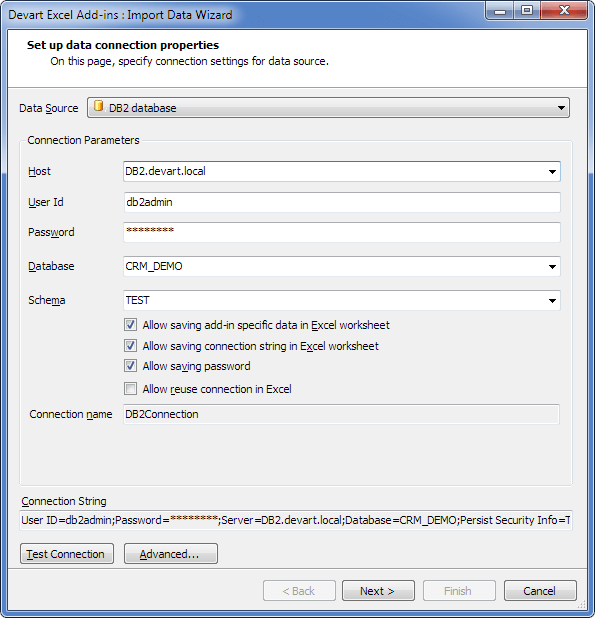
The Devart Excel Add-ins Import Data Wizard set up for a DB2 database: host, user, password, database CRM_DEMO and schema TEST, with options to save the connection and password in the workbook.
Features
Edit DB2 data in the worksheet
Devart Excel Add-in for DB2 has an Edit Mode: click it on the ribbon, change cells, add or delete rows, and every change is highlighted until you click Commit to write it to DB2 or Rollback to discard it.
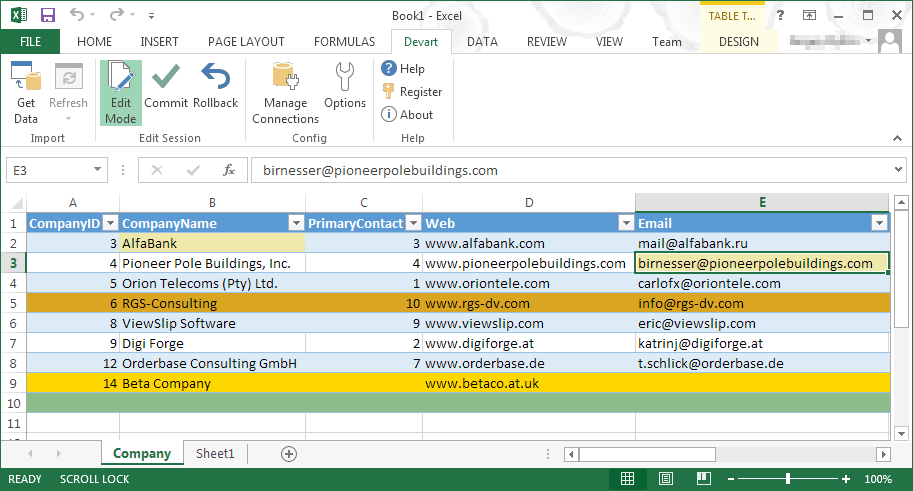
Edit Mode on a Company table: changed cells and rows are highlighted in color, with the Devart ribbon showing Get Data, Refresh, Edit Mode, Commit, Rollback and Manage Connections.
Instant validation before you commit
Devart Excel Add-in for DB2 checks entries as you type and flags errors in the cell, such as text in an integer column or a duplicate primary key value, so bad data is caught before it reaches DB2.
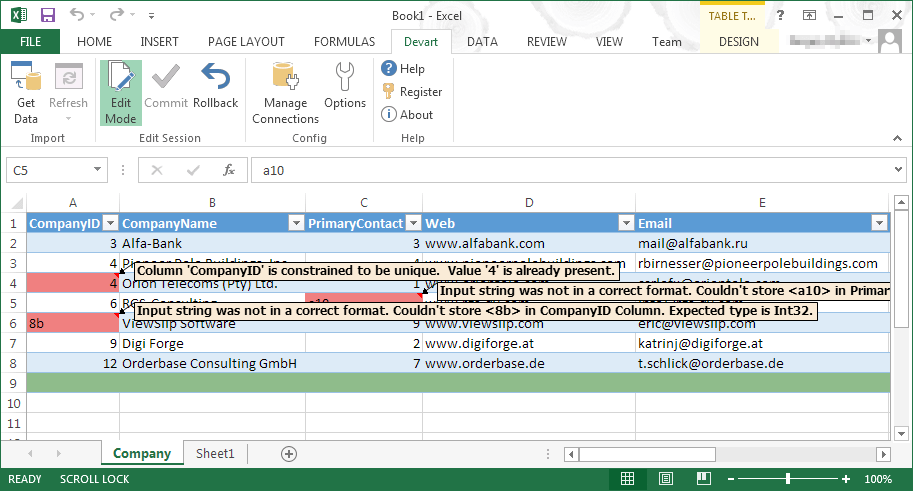
Validation in Edit Mode: cells with a duplicate CompanyID and with text in integer columns are marked red, each with an error note.
Visual Query Builder or SQL
Devart Excel Add-in for DB2 lets you build the import visually, choosing columns from a table and its related tables, adding WHERE conditions and ORDER BY, or switch to the SQL Query tab and write the SELECT yourself. A Data Preview window shows the result before it is imported.
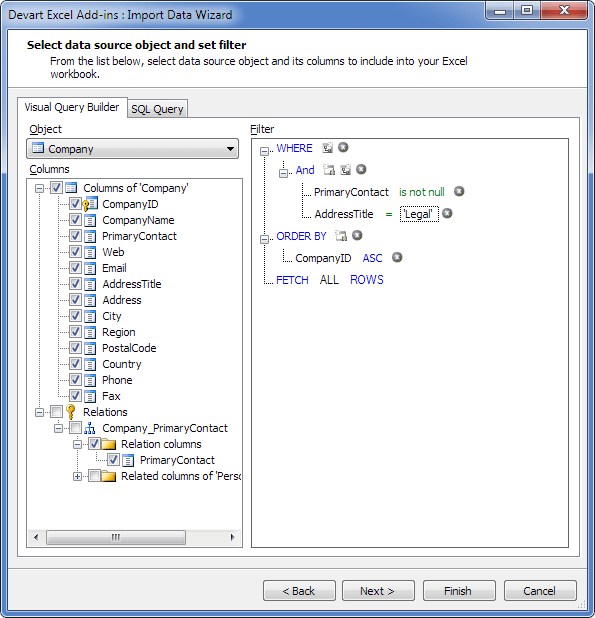
The Visual Query Builder: columns of the Company table and a related table selected on the left, a WHERE filter with two conditions and an ORDER BY on the right.
DB2 security options
Devart Excel Add-in for DB2 supports SSL connections and the DB2 authentication types SERVER, SERVER_ENCRYPT, DATA_ENCRYPT, Kerberos, GSSPlugin and certificate, plus AES encryption, in its advanced connection settings.
Reusable connections
Devart Excel Add-in for DB2 can save the connection, with or without the password, inside the workbook, so a colleague with the add-in can open it and refresh. Since January 2025, saved connections are no longer hidden or deleted when a trial or subscription ends.
Benefits
- Live numbers. Reports and charts built on DB2 data update with one Refresh instead of a new export.
- Bulk fixes in a familiar tool. Fill-down, find-and-replace and formulas work on DB2 rows, then one Commit saves them.
- Safer edits. Highlighting, validation and Rollback make mistakes visible before they hit the database.
- No SQL needed for simple imports. The Query Builder covers tables, related columns and filters.
Real-World Uses
- A finance analyst imports monthly ledger rows from DB2, builds a pivot table, and refreshes it on the first day of each month.
- A data steward cleans up thousands of customer addresses with Excel formulas and commits the corrected rows to DB2 in one go.
- A DBA checks a reference table, spots duplicates with Excel's conditional formatting, and deletes them in Edit Mode.
- A sales operations team keeps a shared workbook with a saved DB2 connection and refreshes territory data before each meeting.
Who It's For, and Who Should Skip It
It's for Excel users on Windows who read or edit IBM DB2 for LUW data regularly: analysts, data stewards and DBAs who prefer a spreadsheet to a query tool.
Skip it if you use Excel for Mac or Excel on the web, which aren't supported. Skip it if your DB2 runs on IBM i or z/OS, which Devart doesn't list. If you only need read-only imports, Excel's own Power Query with IBM's driver may be enough, and if you work with several databases, Devart's Excel Add-in Database Pack covers them together.
Usage Guide
- Install the IBM Data Server Client package, which provides the IBM DB2 .NET Data Provider.
- Download the add-in from the download page (a free Devart account is needed) and install it with an administrator account.
- Open Excel, go to the Devart tab, click Get Data, choose DB2 database, and enter host, user, password, database and schema; click Test Connection.
- Pick a table and columns in the Visual Query Builder or write SQL, preview the data, and click Finish.
- To change data, click Edit Mode, edit the rows, and click Commit (or Rollback); click Refresh to reload.
Before you buy
- IBM's client is required. The add-in needs the IBM DB2 .NET Data Provider from the IBM Data Server Client on each PC.
- Subscription only. The add-in is sold as a 1-, 2- or 3-year subscription, with no perpetual option.
- Refunds are for technical problems. Devart refunds within 30 days only when a problem stops the product working and support can't fix it, so test against your server during the trial.
- Volume discounts. The order page takes 5% off from five copies, 10% from ten and 15% from twenty.
Where it falls short
- Windows Excel only. No Mac or web version.
- LUW only. IBM i and z/OS aren't on the compatibility list.
- Slow DB2-specific development. DB2 shows up in the release notes for an occasional fix; most new work goes to the cloud sources.
- Big tables don't belong in a worksheet. Excel's row limit and memory still apply, so filter imports to what you need.
What Users Say
We found no published user reviews of the DB2 add-in on its own. The reviews that exist cover Devart's Excel add-ins as a line, which share one installer, ribbon and editing model.
What the record shows
- Steady releases. The add-ins have had builds every few months since 2015; in 2026 alone, June (Excel 2024 support), August, September and November.
- User-requested changes. In January 2025 Devart stopped hiding or deleting saved connections after a trial or subscription ends, a common complaint with license-gated add-ins.
- Faster imports. October 2024's build noted a significant speed-up for importing data from relational databases.
Comparisons
vs. Excel Power Query with an IBM driver
Power Query, built into Excel, can import DB2 data for free through IBM's driver and refresh it, but it only reads. Devart's add-in adds editing, validation, Commit and Rollback, which is what the $179.95 a year buys.
vs. Excel Add-in Database Pack
Devart's Excel Add-in Database Pack bundles its database add-ins, DB2 among them, in one subscription; price it if you need three or more databases.
Editions and Pricing
There is one edition with full functionality. The button opens the order page with the 1-year term selected; 2- and 3-year terms and priority support can be chosen there.
| License | Price | Term | Buy |
|---|
| Excel Add-in for DB2 | $179.95 | 1-year subscription | Buy 1 year |
The price was read on the order page on November 24, 2026.
FAQs
Does Devart Excel Add-in for DB2 work with Excel for Mac?
No. Devart Excel Add-in for DB2 supports only Microsoft Excel for Windows, versions 2007 to 2024.
Does Devart Excel Add-in for DB2 need an IBM client?
Yes. Devart Excel Add-in for DB2 needs the IBM DB2 .NET Data Provider, which comes with the IBM Data Server Client package.
Which DB2 versions does Devart Excel Add-in for DB2 support?
Devart Excel Add-in for DB2 supports DB2 for Linux, UNIX and Windows 9.x and higher.
Can Devart Excel Add-in for DB2 delete rows in DB2?
Yes. In Edit Mode, Devart Excel Add-in for DB2 lets you add, change and delete rows; nothing is written until you click Commit.
Can I share a workbook that uses Devart Excel Add-in for DB2?
Yes. Devart Excel Add-in for DB2 can store the connection, and optionally the password, in the workbook; anyone who opens it needs the add-in installed to refresh or edit.
Is there a perpetual license for Devart Excel Add-in for DB2?
No. Devart Excel Add-in for DB2 is sold as a 1-, 2- or 3-year subscription.
System Requirements
- Microsoft Excel 2007, 2010, 2013, 2016, 2019, 2021 or 2024 for Windows
- .NET Framework 4.0 or higher and Visual Studio 2010 Tools for Office Runtime
- IBM DB2 .NET Data Provider (IBM Data Server Client package)
- IBM DB2 for Linux, UNIX and Windows 9.x or higher
- An administrator account to install
Conclusion
Devart Excel Add-in for DB2 is worth $179.95 a year if you regularly need to edit DB2 tables, not just read them, and Excel is where you work. The one reason to buy it is safe two-way editing with highlighting, validation, Commit and Rollback. The main reasons not to are the Windows-only Excel support, the IBM client you still have to install, and the free Power Query route if read-only imports are all you need.
Download Free TrialBuy Now ($179.95 a year)