Devart SSIS Data Flow Components for Adobe Commerce: Magento Store Data in SSIS
Devart SSIS Data Flow Components for Adobe Commerce (formerly SSIS Data Flow Components for Magento) add an Adobe Commerce source, destination and lookup to SQL Server Integration Services 2012 to 2025, for $179.95 a year or $349.95 perpetual (Developer license). You query orders, invoices, customers, products and inventory with SQL inside an SSIS data flow and write changes back to the store. It's for retailers and agencies whose reporting and back-office integration already run in SSIS.
Getting Magento orders into an ERP or a SQL Server warehouse usually means CSV exports, a paid integration extension, or code against the Magento REST API. With these components the store becomes one more source and destination in your SSIS packages, on the same schedule and logging as everything else.
Quick facts
- Version: 5.2.145, released November 19, 2026 (the shared build of all Devart SSIS components; Magento 2.4 support and the Adobe Commerce name since version 3.0.630, September 2024)
- Developer: Devart
- Components: Adobe Commerce Source, Destination and Lookup, plus an Adobe Commerce Connection Manager
- Store versions: Adobe Commerce and Magento Open Source 2.x (Service Version Ver2), with the old 1.x API still selectable
- SSIS: SQL Server Integration Services 2012, 2014, 2016, 2017, 2019, 2022 and 2025
- Download: 616.24 MB installer (all Devart SSIS components), free Devart account required
- Price: Developer $179.95 a year or $349.95 perpetual; Server $449.95 or $899.95; Site (10 to 100 devices) $499.95 or $999.95
- Trial: 30 days
- Refunds: Devart's ordering FAQ gives refunds within 30 days when a technical problem stops the product working and support can't fix it
What we checked: version 5.2.145 and the 616.24 MB installer on the download page, the supported SSIS versions on the compatibility page, the connection options (Service Version, StoreViewCode, local SQL engine) in Devart's documentation, the Magento and Adobe Commerce entries in the revision history, and the order page, which charged $179.95 and $349.95 for Developer, $449.95 and $899.95 for Server, and $499.95 and $999.95 for Site (1-year subscription and perpetual), with no discount applied, on November 24, 2026. We didn't run a package against a live store.
Download Free TrialBuy Developer, 1 Year ($179.95)Buy Developer, Perpetual ($349.95)
Overview
After installing, you add a Devart Adobe Commerce Connection Manager to your package and enter the store's domain, an admin user name and password, and the API version (Ver2 for Adobe Commerce and Magento 2). The Adobe Commerce Source then works like a database source: tables such as Customers, CustomerAddresses, Products, ProductAttributes, InventoryStockItems, SalesOrder, SalesOrderItems, SalesOrderInvoices and SalesOrderCreditMemos show up in its editor, you write or build a SELECT, and connect the output to any SSIS destination.
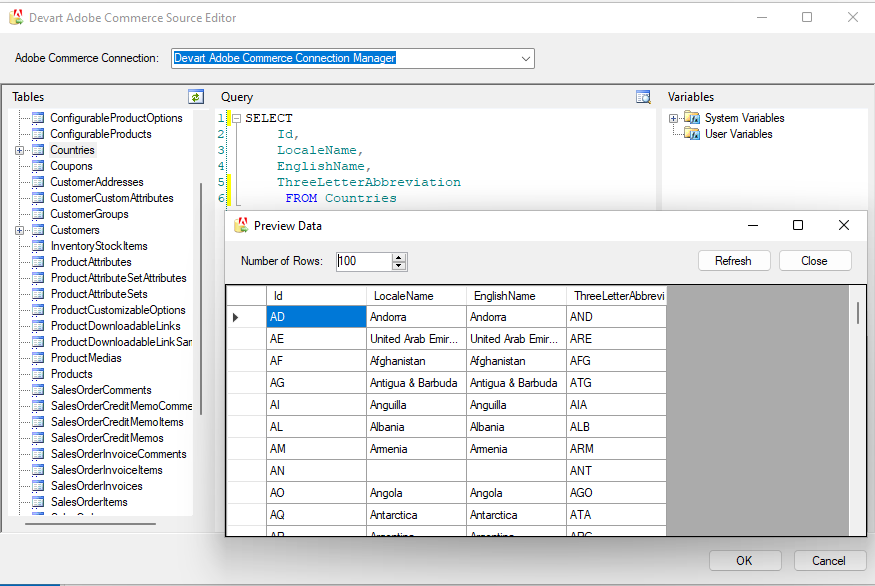
The Devart Adobe Commerce Source Editor: store tables from ConfigurableProducts to SalesOrderItems on the left, a SELECT on Countries in the query pane, and the Preview Data window with country codes and names.
Features
SQL against the store's REST API
Devart SSIS Data Flow Components for Adobe Commerce turn SQL into Adobe Commerce API calls. Simple SELECTs go straight to the API; for grouping, joins, filters and sorting the API can't do, the data is pulled into a local SQL engine and the query runs there. You can turn the local engine off to allow only queries the API runs itself.
Write back with the Destination
The Devart Adobe Commerce Destination runs INSERT, UPDATE and DELETE against store objects, so a package can create or update products, customers or orders from another system. INSERT into SalesOrder has been supported since June 2020, together with an OrderItems field.
Store-view scoping
The Devart Adobe Commerce connection has a StoreViewCode option that sets which store view the data comes from, so prices and stock come from the store view you report on rather than the default one.
A source editor with drag-and-drop and preview
The Devart Adobe Commerce Source lists every store object and its fields next to SSIS system and user variables, builds queries by drag and drop, and previews the rows before you run the package.
Lookups that batch and cache
The Devart Adobe Commerce Lookup checks several input rows per request and caches the results, which cuts API calls when you match SKUs or customer emails coming from another system.
Benefits
- No API code. SQL in an editor replaces scripts against the Magento REST API and its paging.
- One ETL tool. Store data runs in the same SSIS packages, SQL Agent schedules and logging as your ERP and warehouse loads.
- Both directions. Pull orders for reporting and push prices, stock or customers back with the same components.
- Upgrade path. The installer also holds Devart's Shopify, BigCommerce and accounting sources if you add channels.
Real-World Uses
- A retailer loads every new order, order item and invoice into a SQL Server warehouse each hour and joins it with ERP costs for margin reports.
- An operations team updates stock levels in InventoryStockItems from the warehouse system every night through the Destination.
- An agency running several Adobe Commerce stores pulls the same sales report from each by switching the domain and StoreViewCode in package parameters.
- A finance analyst reconciles credit memos against refunds in the payment system with a Lookup on order IDs.
Who It's For, and Who Should Skip It
It's for businesses on Adobe Commerce or Magento Open Source 2 whose data work already runs in SSIS, and for agencies that build SQL Server integrations for those stores.
Skip it if you don't use SSIS: a Magento extension or an integration platform will be simpler. Skip it for a one-off export, which the Magento admin's own export does for free. If you also sell on Shopify or BigCommerce, price the SSIS Universal Bundle instead.
Usage Guide
- Download the installer from the download page (a free Devart account is needed) and run it on the machine with Visual Studio or SQL Server Data Tools and SSIS.
- Start the 30-day trial, or enter your license key during installation.
- In your package, add a Devart Adobe Commerce Connection Manager, enter the store domain, admin user and password, and set the API version to Ver2 (the default is Ver1, for Magento 1.x).
- Add an Adobe Commerce Source to a data flow, pick tables or write a SELECT, and preview the data; set StoreViewCode if you need a specific store view.
- Connect the output to your destination, or add the Adobe Commerce Destination or Lookup, then deploy and schedule the package.
Before you buy
- Set the API version. The connection defaults to Ver1 (Magento 1.x); Adobe Commerce and Magento 2 need Ver2.
- Developer vs. Server. A Developer license covers one developer's workstations; running packages on a production SSIS server needs a Server license, which also covers one developer.
- Refunds are for technical problems. Devart refunds within 30 days only when a problem stops the product working and support can't fix it, so test against your own store during the trial.
- Subscription or perpetual. Perpetual keeps the version you bought; new builds, which follow Adobe Commerce API changes, need an active subscription.
Where it falls short
- Admin password sign-in. Version 2 connections use an admin user name and password; integration tokens and two-factor setups aren't described in the documentation, so check how your store's admin security is configured.
- Complex queries run locally. Joins and aggregates over large order tables are pulled through the API first, which can be slow; filter in the WHERE clause.
- Few store-specific updates. The revision history shows Magento changes in 2017, 2019, 2020 and 2024; between them, the work goes to other sources.
- A heavy install. 616 MB for one source, because the installer carries every Devart SSIS component.
What Users Say
No reviewer has written about the Adobe Commerce components on their own; the reviews on the software review sites cover Devart's SSIS Data Flow Components as a line, which share one installer, editor design and support team with this source.
Capterra and G2
- Capterra rates SSIS Data Flow Components 4.6 out of 5 from 12 reviews, with its best score for likelihood to recommend.
- G2 rates Universal SSIS Components by Devart 4.5 out of 5 from 20 reviews.
- What reviewers like: drag-and-drop package design that works like the built-in SSIS components, fast loading of large data volumes, and support that answers quickly.
- What they complain about: a learning curve for SSIS beginners, gaps in the documentation, troubleshooting that can be frustrating, occasional crashes when opening packages, and, for one reviewer, slow support replies.
The release record backs up the "maintained" part: five builds of the shared installer in 2026 (January, March, June, August and November), SSIS 2025 and Visual Studio 2026 support added in January 2026, and long fix lists in each release.
Comparisons
vs. scripting the Adobe Commerce REST API
The REST API is free, but you handle tokens, paging, search criteria and loading code yourself, and maintain it as the store is upgraded. Devart's components cost $179.95 a year and put that work into SSIS with SQL and a visual editor.
vs. Devart ODBC Driver for Adobe Commerce
Devart's ODBC Driver for Adobe Commerce reaches the same data from Excel, Power BI, Python or any ODBC tool. Choose the SSIS components when the work is scheduled ETL in SSIS, with a destination and cached lookup built for data flows.
vs. the SSIS Universal Bundle
Devart's SSIS Universal Bundle covers every source in the same installer; the product page lists its Developer license at $499.95 a year or $999.95 perpetual, so it pays off from the third source.
Editions and Pricing
There are three licenses. Each button opens the order page with that license and term selected; 2- or 3-year subscriptions and priority support can be chosen there.
All six prices were read on the order page on November 24, 2026.
FAQs
Do Devart SSIS Data Flow Components for Adobe Commerce work with Magento Open Source?
Yes. Devart SSIS Data Flow Components for Adobe Commerce connect to Magento 2 stores, open source or Adobe Commerce, through the version 2 API, and Magento 2.4 support was added in September 2024.
Is this the same product as SSIS Data Flow Components for Magento?
Yes. Devart renamed SSIS Data Flow Components for Magento to Devart SSIS Data Flow Components for Adobe Commerce in version 3.0.630, September 2024.
Which SSIS versions do Devart SSIS Data Flow Components for Adobe Commerce support?
Devart SSIS Data Flow Components for Adobe Commerce work with SQL Server Integration Services 2012, 2014, 2016, 2017, 2019, 2022 and 2025, with Visual Studio 2026 supported since January 2026.
Can Devart SSIS Data Flow Components for Adobe Commerce create orders?
Yes. Devart SSIS Data Flow Components for Adobe Commerce support INSERT into the SalesOrder table, with order items, through the Destination component.
Can I limit a connection to read-only?
Yes. Devart SSIS Data Flow Components for Adobe Commerce have a Readonly connection option that allows only SELECT statements, useful for reporting packages that must never change the store.
Do I need a separate license for the production SSIS server?
Yes. A Developer license of Devart SSIS Data Flow Components for Adobe Commerce covers development and testing; deploying packages to a server needs the Server license or a Site license.
System Requirements
- SQL Server Integration Services 2012, 2014, 2016, 2017, 2019, 2022 or 2025 on Windows
- Visual Studio or SQL Server Data Tools with SSIS projects for designing packages
- An Adobe Commerce or Magento store with an admin user, reachable over the internet
Conclusion
Devart SSIS Data Flow Components for Adobe Commerce are worth $179.95 a year, or $349.95 once, if your store's data has to flow through SSIS into SQL Server, an ERP or a warehouse. The one reason to buy them is that orders, products, customers and stock become SQL tables in your existing packages, readable and writable. The main reasons not to are the admin-password sign-in, slow local processing for big joins, and the Server license production needs; if you don't already use SSIS, choose a tool that doesn't need it.
Download Free TrialBuy Developer, 1 Year ($179.95)Buy Developer, Perpetual ($349.95)