Devart SSIS Data Flow Components for Azure Synapse Analytics: PolyBase Loading Inside SSIS
Devart SSIS Data Flow Components for Azure Synapse Analytics add an Azure Synapse source, destination and lookup to SQL Server Integration Services 2012 to 2025, for $179.95 a year or $349.95 perpetual (Developer license). The destination bulk-loads rows through PolyBase without you staging CSV files by hand, and the source and lookup read the warehouse with SQL. It's for data teams that run their ETL in SSIS and load a dedicated SQL pool in Azure Synapse.
Loading a Synapse dedicated SQL pool row by row is slow, and the fast route, PolyBase from Azure Storage, normally means splitting data into files, uploading them to a storage account and running a load script. If your packages already live in SSIS, this destination does those steps for you inside the data flow.
Quick facts
- Version: 5.2.145, released November 19, 2026 (the shared build of all Devart SSIS components; Azure Synapse support since version 1.6.619, January 2018, under its old name Azure SQL Data Warehouse)
- Developer: Devart
- Components: Azure Synapse Analytics Source, Destination and Lookup, plus an Azure Synapse Analytics Connection Manager
- SSIS: SQL Server Integration Services 2012, 2014, 2016, 2017, 2019, 2022 and 2025
- Bulk load: BulkInsert through PolyBase, with an Azure Storage account and key set in the connection editor
- Download: 616.24 MB installer (all Devart SSIS components), free Devart account required
- Price: Developer $179.95 a year or $349.95 perpetual; Server $449.95 or $899.95; Site (10 to 100 devices) $499.95 or $999.95
- Trial: 30 days
- Refunds: Devart's ordering FAQ gives refunds within 30 days when a technical problem stops the product working and support can't fix it
What we checked: version 5.2.145 and the 616.24 MB installer on the download page, the supported SSIS versions on the compatibility page, the connection and PolyBase storage settings in Devart's documentation, the revision history, and the order page, which charged $179.95 and $349.95 for Developer, $449.95 and $899.95 for Server, and $499.95 and $999.95 for Site (1-year subscription and perpetual), with no discount applied, on November 24, 2026. We didn't run a package against a Synapse workspace.
Download Free TrialBuy Developer, 1 Year ($179.95)Buy Developer, Perpetual ($349.95)
Overview
After installing, you add a Devart Azure Synapse Analytics Connection Manager to your package and enter the server, user, password and database. That is enough for reading and for normal inserts, updates and deletes. For bulk loading you also fill in the Storage tab with an Azure Storage account name, its access key and the protocol, and the destination then uploads the rows to Blob Storage as CSV files and runs PolyBase to pull them into the table.
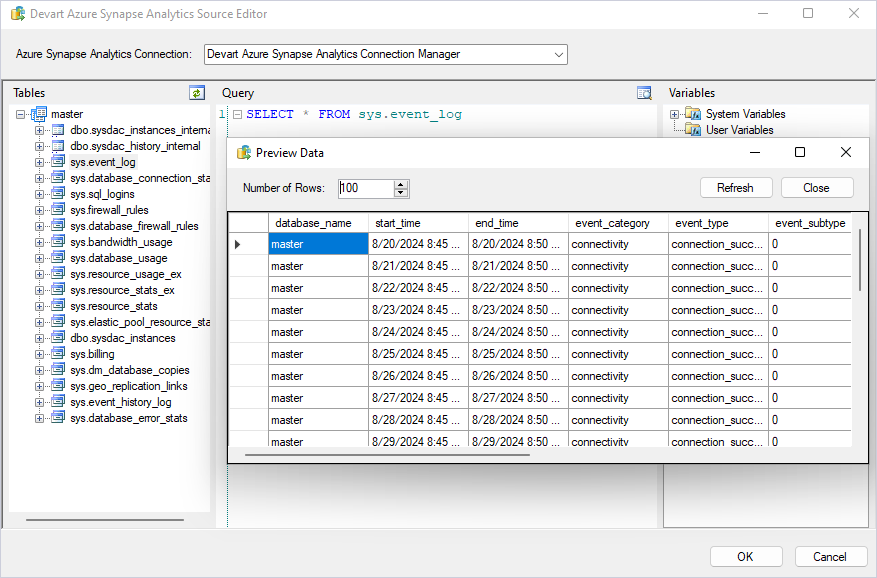
The Devart Azure Synapse Analytics Source Editor: the tables of the connected database on the left, a SELECT on sys.event_log in the query pane, and the Preview Data window showing the returned rows.
Features
PolyBase bulk loading without manual staging
Devart SSIS Data Flow Components for Azure Synapse Analytics load large volumes with a BulkInsert operation that writes the data to Azure Blob Storage as CSV files and imports it with PolyBase, which uses Synapse's massively parallel processing. You don't split files, upload them or write the load script yourself; the destination does it inside the data flow, with batch size, upload batch size, retry count and retry interval as component properties.
All DML operations in the destination
The Devart Azure Synapse Analytics Destination also runs plain INSERT, UPDATE and DELETE, so the same component handles small corrections and synchronization as well as bulk loads.
A source editor with drag-and-drop and preview
The Devart Azure Synapse Analytics Source lists every table and column of the connection, builds a query by drag and drop, inserts SSIS system and user variables into the SELECT, and previews the returned rows before you run the package.
Lookups that batch and cache
The Devart Azure Synapse Analytics Lookup checks several input rows in one SELECT and caches the results, which cuts round-trips to the warehouse when matching keys from another system.
SQL Server-style connection options
The Devart Azure Synapse Analytics connection editor takes the familiar SqlClient-style advanced options: authentication method, encryption, application intent, command timeout and connection pooling settings. TLS connections to Synapse were fixed in the March 2025 build.
Benefits
- Fast loads with no glue scripts. PolyBase speed without a separate staging step to maintain.
- One ETL tool. Synapse loads run in the same SSIS packages, SQL Agent schedules and logging as your other sources.
- Both directions. Read from the warehouse into other systems, or load and correct it, with one set of components.
- Upgrade path. The same installer holds every Devart SSIS source, so adding Snowflake, Redshift or a SaaS app later means a license, not a new tool.
Real-World Uses
- A BI team loads nightly sales extracts from on-premises SQL Server into a Synapse dedicated SQL pool with BulkInsert, then runs its existing Power BI model on the warehouse.
- A data engineer moves a few hundred million history rows into Synapse once, letting the destination handle the CSV staging and PolyBase load instead of writing the scripts.
- A package reads aggregated results from Synapse and writes them to an operational database or a SaaS app with another Devart destination.
- An ETL developer uses the Lookup to check incoming customer keys against a Synapse dimension table before inserting new rows.
Who It's For, and Who Should Skip It
It's for SQL Server shops that build ETL in SSIS and load an Azure Synapse dedicated SQL pool, especially with large batches where row-by-row inserts are too slow.
Skip it if your pipelines run in Azure Data Factory or Synapse pipelines: their Copy activity already stages and loads with PolyBase or COPY with no extra license. Skip it if you don't use SSIS at all, and price the SSIS Universal Bundle first if you need more than two or three sources.
Usage Guide
- Download the installer from the download page (a free Devart account is needed) and run it on the machine with Visual Studio or SQL Server Data Tools and SSIS.
- Start the 30-day trial, or enter your license key during installation.
- In your package, add a Devart Azure Synapse Analytics Connection Manager and enter the server, user, password and database.
- For bulk loads, open the Storage tab and enter the Azure Storage account, its key and the protocol (HTTPS or HTTP).
- Add the Source, Destination or Lookup to a data flow, set the destination's Operation (BulkInsert, Insert, Update or Delete), then deploy and schedule the package.
Before you buy
- Developer vs. Server. A Developer license covers one developer's workstations for building and testing packages. Running packages on a production SSIS server needs a Server license, which also covers one developer.
- You need a storage account for bulk loads. PolyBase loading goes through Azure Blob Storage, so plan for a storage account and its access key next to the Synapse pool.
- Refunds are for technical problems. Devart refunds within 30 days only when a problem stops the product working and support can't fix it, so test with the trial first.
- Subscription or perpetual. Perpetual keeps the version you bought; new builds need an active subscription.
Where it falls short
- Few Synapse-specific changes. The revision history mentions Synapse only for its 2018 debut, the 2023 rename and a 2025 TLS fix; most new work goes to the database and SaaS sources.
- Storage key, not a managed identity. The documented bulk-load setup uses a storage account key; managed identity and serverless SQL pools aren't mentioned in the documentation.
- Windows and SSIS only. No use outside SQL Server Integration Services.
- A heavy install. 616 MB for one source, because the installer carries every Devart SSIS component.
What Users Say
No reviewer has written about the Azure Synapse Analytics components on their own; the reviews on the software review sites cover Devart's SSIS Data Flow Components as a line, which share one installer, editor design and support team with this source.
Capterra and G2
- Capterra rates SSIS Data Flow Components 4.6 out of 5 from 12 reviews, with its best score for likelihood to recommend.
- G2 rates Universal SSIS Components by Devart 4.5 out of 5 from 20 reviews.
- What reviewers like: drag-and-drop package design that works like the built-in SSIS components, fast loading of large data volumes, and support that answers quickly.
- What they complain about: a learning curve for SSIS beginners, gaps in the documentation, troubleshooting that can be frustrating, occasional crashes when opening packages, and, for one reviewer, slow support replies.
The release record backs up the "maintained" part: five builds of the shared installer in 2026 (January, March, June, August and November), SSIS 2025 and Visual Studio 2026 support added in January 2026, and long fix lists in each release.
Comparisons
vs. the built-in OLE DB destination
SSIS can write to Synapse through its own OLE DB or ADO.NET destinations for free, but those insert row by row or in small batches, which is slow on a dedicated SQL pool. Devart's destination adds the PolyBase path, which is where the $179.95 goes.
vs. Azure Data Factory
Data Factory's Copy activity loads Synapse with PolyBase or COPY and is billed per run. It suits cloud-first pipelines; Devart's components suit teams whose packages, schedules and skills are already in SSIS.
vs. the SSIS Universal Bundle
Devart's SSIS Universal Bundle covers every source in the same installer; the product page lists its Developer license at $499.95 a year or $999.95 perpetual, so it pays off from the third source.
Editions and Pricing
There are three licenses. Each button opens the order page with that license and term selected; 2- or 3-year subscriptions and priority support can be chosen there.
All six prices were read on the order page on November 24, 2026.
FAQs
Which SSIS versions do Devart SSIS Data Flow Components for Azure Synapse Analytics support?
Devart SSIS Data Flow Components for Azure Synapse Analytics work with SQL Server Integration Services 2012, 2014, 2016, 2017, 2019, 2022 and 2025, with Visual Studio 2026 supported since January 2026. Unlike Devart's database sources, they don't support SSIS 2008.
Is this the same product as SSIS Data Flow Components for Azure SQL Data Warehouse?
Yes. Devart renamed SSIS Data Flow Components for Azure SQL Data Warehouse to Devart SSIS Data Flow Components for Azure Synapse Analytics in July 2023, after Microsoft's own rename.
Do Devart SSIS Data Flow Components for Azure Synapse Analytics work with Azure SQL Database?
Devart SSIS Data Flow Components for Azure Synapse Analytics are built for Synapse dedicated SQL pools and their PolyBase loading. For Azure SQL Database, Devart sells SSIS Data Flow Components for SQL Server.
Do I need an Azure Storage account?
Only for bulk loading. Devart SSIS Data Flow Components for Azure Synapse Analytics read and run INSERT, UPDATE and DELETE with just the server, user, password and database; the BulkInsert operation also needs a storage account name and key.
Do I need a separate license for the production SSIS server?
Yes. A Developer license of Devart SSIS Data Flow Components for Azure Synapse Analytics covers development and testing; deploying packages to a server needs the Server license or a Site license.
System Requirements
- SQL Server Integration Services 2012, 2014, 2016, 2017, 2019, 2022 or 2025 on Windows
- Visual Studio or SQL Server Data Tools with SSIS projects for designing packages
- An Azure Synapse Analytics dedicated SQL pool and a login
- An Azure Storage account and access key for PolyBase bulk loads
Conclusion
Devart SSIS Data Flow Components for Azure Synapse Analytics are worth $179.95 a year, or $349.95 once, if your ETL runs in SSIS and you load a Synapse dedicated SQL pool in volume. The one reason to buy them is PolyBase speed from inside an SSIS data flow without writing staging scripts. The main reason not to is that Azure Data Factory does the same load without a license if you aren't tied to SSIS, and production servers need the $449.95 Server license.
Download Free TrialBuy Developer, 1 Year ($179.95)Buy Developer, Perpetual ($349.95)