Devart Excel Add-in for SQLite: Edit SQLite Databases in Excel
Devart Excel Add-in for SQLite connects Microsoft Excel for Windows straight to an SQLite database file, so you can load tables into a worksheet, edit them like a spreadsheet and save the changes back, for $179.95 with one year of updates. It's for analysts, testers and developers who keep data in SQLite files and want to view, clean or bulk-edit it in Excel instead of a database tool.
SQLite files are everywhere: application data, mobile app backups, embedded devices, small business tools. Opening one usually means a database browser, an ODBC driver plus Excel's import, or a script. With the add-in you point Excel at the .db file, pick a table, and the rows land in a worksheet that stays connected to the database.
Quick facts
- Version: 3.2.145, released November 18, 2026 (the shared build of all Devart Excel add-ins)
- Developer: Devart
- Databases: SQLite 3 and higher; encrypted files with Devart's built-in encryption, or SEE, CEROD, SQLCipher and SQLiteCrypt with that extension
- Excel: Microsoft Excel 2007, 2010, 2013, 2016, 2019, 2021 and 2024, Windows only
- Download: 81.18 MB installer (all Devart Excel add-ins), free Devart account required
- Price: $179.95 with 1 year of support and upgrades, $259.95 with 2 years, $329.95 with 3 years
- Trial: 30 days
- Refunds: the order page promises a 30-day money-back guarantee "if you are not satisfied"; Devart's ordering FAQ describes refunds only for technical problems support can't fix, within 30 days
What we checked: version 3.2.145 and the 81.18 MB installer on the download page, the Excel versions and requirements on the compatibility page, the SQLite connection options (attached databases, encryption, read-only mode, date format) in Devart's documentation, the revision history, and the order page, which charged $179.95, $259.95 and $329.95 for 1, 2 and 3 years of support and upgrades, with no discount applied, on November 25, 2026. We didn't edit a database with the add-in ourselves.
Download Free TrialBuy with 1 Year of Updates ($179.95)
Overview
The add-in puts a Devart tab on the Excel ribbon with Get Data, Refresh, Edit Mode, Commit and Rollback buttons. Get Data opens an import wizard: you choose SQLite as the data source, browse to the database file, and pick the table and columns in the visual Query Builder or type a SQL query. The rows arrive as an Excel table you can sort, filter, chart and edit, and Refresh re-reads them from the file whenever you need current data.
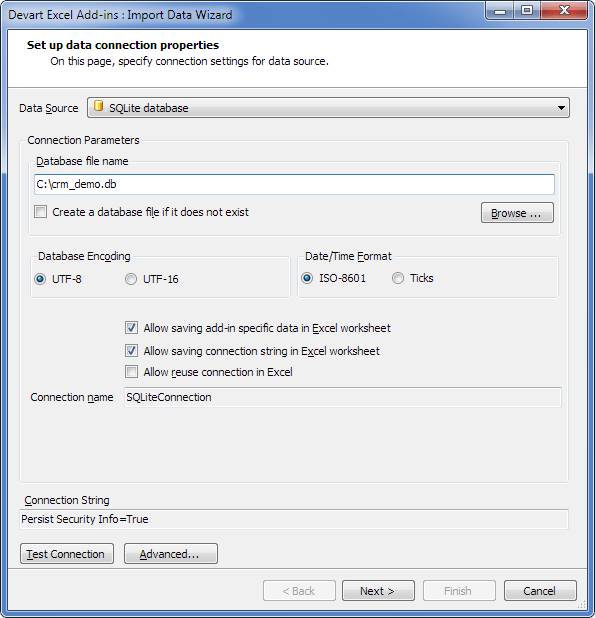
The import wizard's connection page with SQLite database selected: the database file name (C:\crm_demo.db), a check box to create the file if it doesn't exist, UTF-8 or UTF-16 encoding, ISO-8601 or Ticks date format, and options to save the connection in the workbook.
Features
Edit SQLite data in the worksheet
Devart Excel Add-in for SQLite turns an imported table into an editable view of the database. Click Edit Mode, then change cells, add rows at the bottom or delete rows as in any spreadsheet. Changed, new and deleted rows are highlighted, and nothing reaches the database until you click Commit; Rollback throws the edits away.
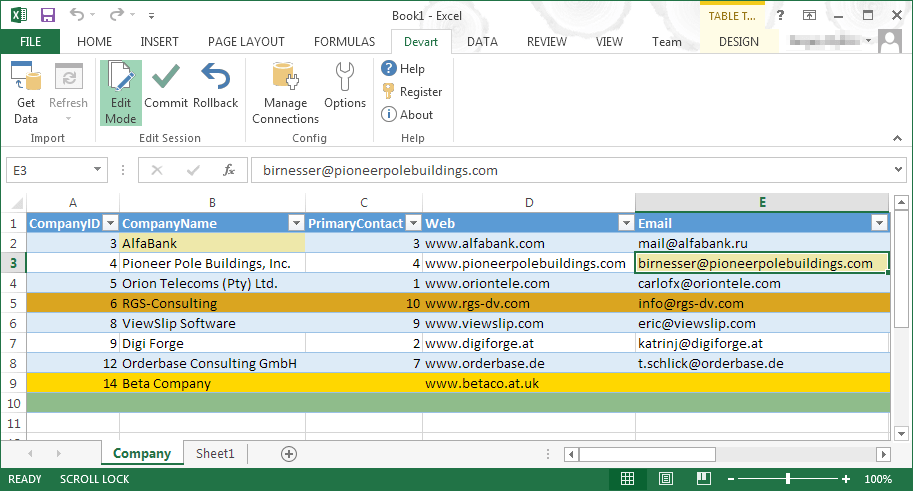
Edit Mode in Devart's database add-ins (Devart uses the same image for all of them): a Company table on the Devart ribbon tab, with an edited cell, a changed row and a new row highlighted in different colors before Commit.
Errors caught before they reach the file
Devart Excel Add-in for SQLite checks each edit against the table's column types and keys as you type. A text value in a number column or a duplicate primary key turns the cell red with a note explaining the problem, so a bulk edit doesn't fail halfway through the commit.
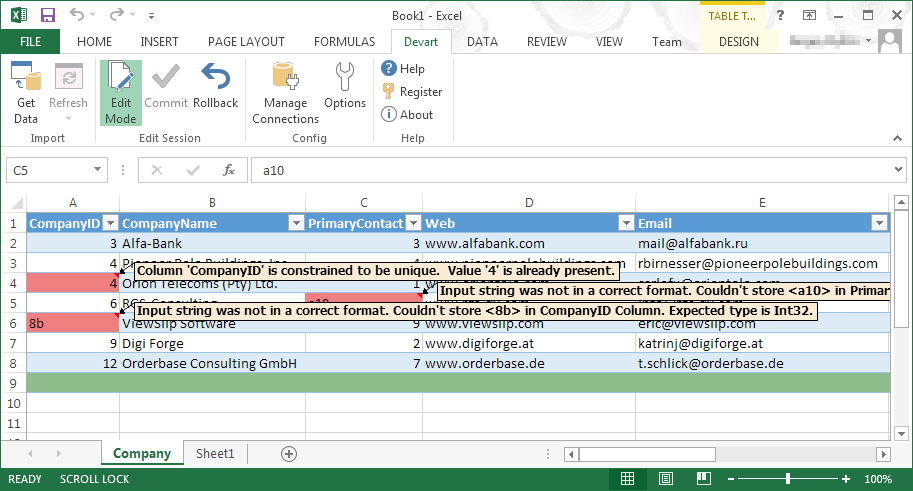
Instant validation (shared image for Devart's database add-ins): cells flagged red with notes such as "Column 'CompanyID' is constrained to be unique" and "Input string was not in a correct format".
Query Builder or SQL
Devart Excel Add-in for SQLite imports either through a visual Query Builder (pick the table, tick columns, add filter and sort conditions) or through your own SQL SELECT, with a data preview before the import. Queries are saved with the table, so Refresh re-runs the same one.
Encrypted and attached databases
Devart Excel Add-in for SQLite opens databases encrypted with its built-in AES-128, AES-192, AES-256, Blowfish, CAST-128, RC4 or Triple DES encryption, added in 2022, and databases encrypted with SEE, CEROD, SQLCipher or SQLiteCrypt when you have that extension. An Attach option adds more database files to one connection, and a Read Only option opens a file without any chance of changing it.
Benefits
- No server, no driver. You only need the file path; there's no ODBC setup or database client.
- Excel skills are enough. Fill-down, find and replace, and formulas work on database rows.
- Safe bulk edits. Highlighted changes, validation and an explicit Commit keep mistakes out of the file.
- Repeatable reports. A workbook with saved connections refreshes from the database in one click.
Real-World Uses
- Fixing application data. A support engineer opens a customer's SQLite database, corrects a few hundred records in Excel and commits them.
- Test data. QA staff build and maintain test tables in Excel and write them into the app's SQLite file.
- Reporting from a desktop tool. An analyst pulls tables from an application that stores its data in SQLite and builds pivot tables and charts that refresh on demand.
- Data cleanup. Duplicates and inconsistent values in a SQLite catalog are found with Excel filters and fixed in place.
Who It's For, and Who Should Skip It
It's for Windows Excel users who work with SQLite files regularly and want to edit, not just read, the data: developers, testers, support staff and analysts.
Skip it if you only need to look at a SQLite file now and then: a free database browser does that. Mac and Excel for the web users can't use it at all. If you need SQLite data in several tools (Power BI, Access, Excel's own Power Query), Devart's ODBC Driver for SQLite covers them all, though without the edit-and-commit workflow.
Usage Guide
- Close Excel, sign in to devart.com (a free account), download the Excel add-ins installer and run it with an administrator account. The installer contains every Devart Excel add-in.
- Open Excel and select the Devart tab on the ribbon, then click Get Data.
- Choose SQLite database as the data source, browse to the database file, set the encoding and date format if needed, and click Test Connection.
- Pick the table and columns in the Query Builder, or switch to the SQL Query tab and type a SELECT. Preview the data and click Finish.
- To change data, click Edit Mode, edit the rows, then click Commit to write them to the file, or Rollback to undo.
- Click Refresh later to reload the table from the database.
Before you buy
- Windows Excel only. The add-in needs Excel 2007 to 2024 on Windows, .NET Framework 4.0 and the Visual Studio 2010 Tools for Office Runtime, installed by an administrator.
- What the price buys. Devart's order page describes the license as perpetual with one year of support and upgrades, extendable to three years at purchase. Check whether automatic renewal is ticked at checkout if you don't want the support period renewed.
- Close the app that uses the file. SQLite locks the file during writes, so a commit can wait or fail while another program writes to the same database.
- Several databases? Devart's Excel Add-in Database Pack and Universal Pack bundle this add-in with the others.
Where it falls short
- Excel's row limit. A worksheet holds about a million rows, so very large tables need a filtered query.
- Tables need a key for editing. Devart's options include a warning for tables without columns that uniquely identify rows, since updates rely on them.
- Third-party encryption costs extra. SEE, CEROD, SQLCipher and SQLiteCrypt files open only with that extension, which you buy separately.
What Users Say
We found no published user reviews of the SQLite add-in on its own. What the release record shows about the Excel add-ins as a line, which share one installer, ribbon and editing model:
What the record shows
- Steady releases. Builds in June (Excel 2024 support), August, September and November 2026, with SQLite fixes in the November build (table names with apostrophes, transactions left open in pooled connections).
- User-friendly licensing change. Since January 2025 saved connections are no longer hidden or deleted when a trial or subscription ends.
- Faster imports. An October 2024 build noted much faster imports from relational databases.
- SQLite-specific work. Built-in encryption arrived in September 2022, and URI-format database paths were fixed in 2026.
Comparisons
vs. DB Browser for SQLite and other free tools
A free SQLite browser opens, queries and edits a file at no cost, and for occasional use it's the obvious choice. The add-in is worth paying for when the work is spreadsheet-shaped: bulk edits with Excel formulas, filters and fill-down, validated before commit, and reports that refresh from the file.
vs. Devart ODBC Driver for SQLite with Power Query
The ODBC driver lets Excel, Power BI and other tools read SQLite through Power Query, but Power Query is read-only. The add-in is the one that writes edits back.
vs. the Excel Add-in Database Pack
If you also work with MySQL, PostgreSQL, Oracle, SQL Server or DB2, Devart's Database Pack bundles their add-ins with SQLite, and the Universal Pack holds all 25 Devart Excel add-ins.
Editions and Pricing
There is one edition with full functionality; the price depends on how many years of support and upgrades you buy. Each button opens the order page with that term selected; priority support can be added there.
| License | Support and upgrades | Price | Buy |
|---|
| Excel Add-in for SQLite | 1 year | $179.95 | Buy 1 year |
| Excel Add-in for SQLite | 2 years | $259.95 | Buy 2 years |
| Excel Add-in for SQLite | 3 years | $329.95 | Buy 3 years |
All three prices were read on the order page on November 25, 2026.
FAQs
Does Devart Excel Add-in for SQLite work with Excel for Mac?
No. Devart Excel Add-in for SQLite supports only Microsoft Excel for Windows, versions 2007 to 2024.
Do I need an ODBC driver or SQLite installed?
No. Devart Excel Add-in for SQLite connects to the database file directly; you only enter its path.
Can Devart Excel Add-in for SQLite open SQLCipher databases?
Yes, if you have the SQLCipher extension. Devart Excel Add-in for SQLite supports SEE, CEROD, SQLCipher and SQLiteCrypt encrypted databases with the matching extension, plus its own built-in encryption without one.
Can it create a new SQLite database?
Yes. Devart Excel Add-in for SQLite has a "Create a database file if it does not exist" option in the connection settings, which creates an empty database at the path you give.
Can I share a workbook that uses the add-in?
Others can open the workbook and see the data, but refreshing or editing it needs Devart Excel Add-in for SQLite installed and licensed on their PC and access to the database file.
What happens when the support period ends?
Devart's order page describes the Excel add-in license as perpetual: the version you have keeps working, and the support period only covers new versions and support, which you can extend.
System Requirements
- Microsoft Excel 2007, 2010, 2013, 2016, 2019, 2021 or 2024 for Windows
- .NET Framework 4.0 or higher
- Visual Studio 2010 Tools for Office Runtime
- An administrator account for installation
- SQLite 3 or later database files
Conclusion
Worth it if you edit SQLite data often and live in Excel. At $179.95, Devart Excel Add-in for SQLite is pricey next to free SQLite browsers, but none of those let you bulk-edit rows with Excel's tools and commit them with validation, or keep refreshable reports on a database file. The one reason to buy is safe, spreadsheet-style editing of SQLite tables. The main reason not to is occasional use: if you open a SQLite file a few times a year, a free browser is enough.
Download Free TrialBuy with 1 Year of Updates ($179.95)