ODBC Driver for Oracle: Connect Excel, Power BI and Access to Oracle Without Installing Oracle Client
Devart ODBC Driver for Oracle is a commercial ODBC driver that gives Excel, Power BI, Tableau, Access, SQL Server and other ODBC tools live read and write access to Oracle Database, on 32-bit or 64-bit Windows, macOS and Linux, with no Oracle Client needed. A single-desktop license costs $179.95 a year, or $349.95 as a perpetual license.
The usual pain with Oracle and ODBC is the client: Oracle's own driver needs an Instant Client on every machine, in the right bitness. Devart's Direct mode drops all of that. You type a host, port and service name, click Test Connection, and the DSN works.
Quick facts
- Version: 6.2.0, released October 16, 2026
- Developer: Devart
- Platforms: Windows x86 and x64 (including Terminal Server), macOS Intel and Apple Silicon, Linux x86 and x64 (DEB and RPM packages)
- Oracle support: Oracle Server 8.0 to 26ai, Express Editions, Oracle Cloud and Oracle RAC
- Connection modes: Direct over TCP/IP (no client), or OCI through an installed Oracle Client or Instant Client
- Security: SSL/TLS, Oracle wallets, SSH tunneling, HTTP/HTTPS tunneling
- Price: $179.95 per year for the Desktop edition (subscription), $349.95 perpetual
- Trial: 30 days, free, activated with a trial key from a Devart account
What we checked: version 6.2.0 (released October 16, 2026) on Devart's download page and revision history, installer sizes of 32.84 MB (Windows EXE), 35.13 MB (MSI), 20.34 MB (macOS PKG) and 4.64 to 6.63 MB (Linux DEB/RPM), and prices on the order page of $179.95 a year for Desktop for Windows, $349.95 for two years, $529.95 for three years, $349.95 perpetual and $999.95 a year for Server Standard, all on November 5, 2026. We didn't install the trial (the download needs a Devart account) or connect it to an Oracle server.
Before you buy
Oracle publishes its own ODBC driver as an add-on package for Instant Client. If you already run Oracle Client on the machine and your tool connects fine, try that first. Devart's driver earns its price when you want no client to install or distribute, a DSN you can set up in a dialog, SSH or HTTP tunneling, or the same driver on Mac and Linux.
The default price is a subscription: the driver works only during the paid term, and it needs an internet connection to activate and to check the license. A perpetual license costs about twice as much, activates offline and keeps the version you bought working.
Download Free TrialBuy Now
Overview
Devart ODBC Driver for Oracle sits between any ODBC application and an Oracle server. The tool sends SQL through the standard ODBC API, the driver handles Oracle's network protocol and data types, and rows come back as if from any other database. It can do that in two ways: Direct mode talks TCP/IP straight to the server on port 1521, while OCI mode goes through an Oracle Client you already have.
It is kept current. Version 6.0 in November 2025 added BOOLEAN support and passwords longer than 30 characters for Oracle 23c and later, REF CURSOR parameters returned as result sets, and a graphical configurator on macOS and Linux. Version 6.1 in April 2026 added Oracle 26ai and the JSON data type, and 6.2.0 in October 2026 improved compatibility with Ubuntu 26, CentOS 10, Node.js, Visual FoxPro and DBeaver.
Features
Direct mode: Oracle access with no client on the machine
Devart ODBC Driver for Oracle connects to Oracle over TCP/IP in Direct mode, so there's no Oracle Client or Instant Client to deploy. You enter a host, port 1521 and a service name or SID. Connect Mode covers Normal plus SysDBA, SysOper, SysASM, SysBackup, SysDG and SysKM, so DBAs can use it for privileged sessions too.

The driver's Windows configuration dialog: host, port 1521, service name, user, Connect Mode set to SysDBA, and the Direct checkbox that turns on client-free mode.
Oracle versions from 8.0 to 26ai, including RAC and Oracle Cloud
Devart ODBC Driver for Oracle supports Oracle Server 8.0, 8i, 9i, 10g, 11g, 12c, 18c, 19c, 21c, 23c and 26ai, including the Express Editions, plus Oracle Cloud (DBaaS) and Oracle RAC. That range matters if you still have an old 11g system next to a new one: one driver reaches both. Newer types are handled as well, including BOOLEAN on 23c and later and JSON on 21c and later.
REF CURSOR results your tools can read
Devart ODBC Driver for Oracle can return REF CURSOR parameters of stored procedures and functions as ordinary result sets, through the EnableResultSets connection option. PL/SQL packages that hand back cursors are common in Oracle shops. The option is off by default because it asks for extra metadata on each call, which adds a small overhead.
Oracle wallets, SSL, SSH and HTTP tunnels
Devart ODBC Driver for Oracle encrypts connections with SSL/TLS, using a wallet path, a wallet registry or individual CA and client certificates, and it supports auto-login wallets. It can also route through an SSH server or an HTTP/HTTPS tunnel with Bearer Token sign-in, and since version 6.1 it can use SSL and SSH at the same time. That lets you reach a database that isn't exposed to your network.
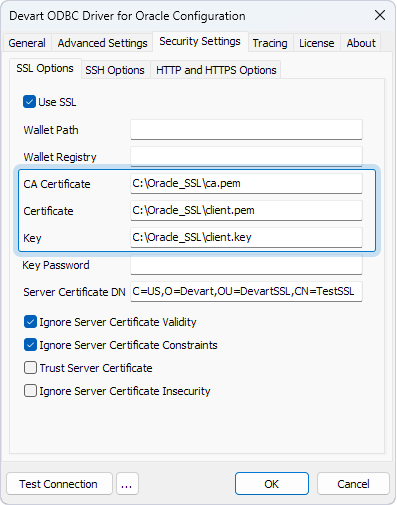
The Security Settings tab: SSL with wallet path and registry, or CA certificate, client certificate and key, next to the SSH and HTTP/HTTPS tabs.
32-bit and 64-bit on Windows, Mac and Linux
Devart ODBC Driver for Oracle installs both a 32-bit and a 64-bit driver on Windows, and ships macOS packages for Intel and Apple Silicon and DEB and RPM packages for Linux. Keep one limit in mind for OCI mode: 64-bit Oracle Client is supported only on 64-bit Windows. Direct mode avoids the question altogether.
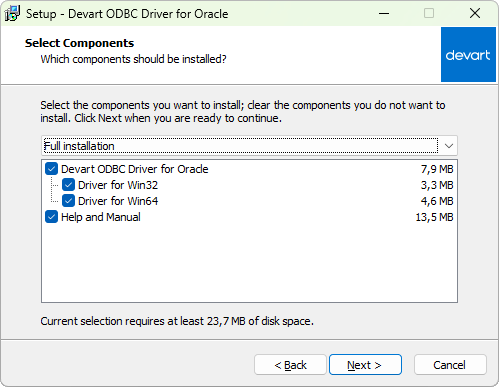
The Windows setup's Select Components page: the driver for Win32, the driver for Win64 and the Help and Manual, about 23.7 MB in all.
Tuning and compatibility switches for awkward tools
Devart ODBC Driver for Oracle has connection options for tools that misbehave: force ODBC 2.x or 3.x behavior, return strings as ANSI or Unicode, map Oracle DATE to a date or a timestamp, set a minimum number of rows per fetch, or make the connection read-only. Connection pooling and bulk updates help with repeated queries and large changes.

The Advanced Settings tab: metadata options, schema, character set, timeouts, Read Only Connection, ODBC behavior, DATE type and string types.
Benefits
- Less to deploy. Hand a user one installer and a DSN instead of a client install.
- Fresh numbers. Excel and Power BI read the live schema, so nobody works from last week's export.
- Old and new Oracle together. An 11g reporting database and a 26ai system can both go through one driver.
- Old software keeps working. A 32-bit application that can't load a 64-bit driver still reaches Oracle.
- A report DSN can be locked down. A Read Only Connection setting keeps it from changing data.
Real-World Uses
- A finance analyst on 32-bit Excel pulls month-end figures from an Oracle ledger into a pivot table, with no IT visit to install a client.
- A SQL Server DBA adds Oracle as a Linked Server and joins its tables with local data in T-SQL.
- A BI team connects Power BI or Tableau to a data mart on a private network through an SSH tunnel.
- A developer on a Mac queries Oracle from Python or PHP through iODBC and Devart's graphical configurator.
- A legacy Access or Visual FoxPro app gets a working Oracle connection without a rewrite.
Who It's For, and Who Should Skip It
It's for analysts, DBAs and developers who want Oracle inside ODBC tools without managing Oracle Client on each machine, and for software vendors who ship an application and don't want to bundle a client with it (Devart sells OEM licenses for that).
Skip it if your machines already have a working Oracle Client, since Oracle's own ODBC package then does the basic job. Skip it too if your code can use a native Oracle library, or if your BI tool's built-in Oracle connector does what you need. If you need several data sources, price Devart's ODBC Universal Bundle (from $499.95 a year for all its ODBC drivers) before buying drivers one at a time.
Usage Guide
- Get the installer. Sign in to or create a Devart account on the download page, then download the EXE or MSI for Windows, the PKG for macOS, or the DEB or RPM package for your Linux distribution. Only one version of the driver can be installed at a time, so remove an older one first.
- Install and activate. On Windows, run the wizard, choose components, and enter your trial or purchased key on the license page, or choose to activate later. The driver must be activated even for the trial.
- Create a DSN. Open ODBC Data Sources (32-bit or 64-bit, matching your application), choose User DSN or System DSN, click Add and pick Devart ODBC Driver for Oracle.
- Enter the connection. For Direct mode, tick Direct and fill in host, port 1521, a service name or SID, user and password. Click Test Connection.
- Connect your tool. In Excel use Data, Get Data, From Other Sources, From ODBC, or pass a connection string from code:
DRIVER={Devart ODBC Driver for Oracle};Direct=True;Host=myServer;Service Name=myServiceName;User ID=myUsername;Password=...

On macOS, the same General tab in Devart's graphical configurator, here with an Oracle home and server name instead of Direct mode.
Where It Falls Short
- The trial takes paperwork. The installer sits behind a Devart sign-in, and the driver won't work until you enter a trial key.
- The price is per seat and per platform. Desktop for Windows, macOS and Linux are separate purchases, and a shared server needs Server Standard at $999.95 a year.
- Activation shows up in the change log. Past fixes include re-activating the driver under another Windows user and license validation for a Linked Server in SQL Server Management Studio.
- Linux DSN handling depends on unixODBC. Version 6.2.0 had to add a workaround for unixODBC 2.3.13 and 2.3.14, so keep the driver current if your distribution updates it.
- Error messages draw complaints. Reviewers say error messages and error handling could be more specific, which matters when a connection fails on a user's desk.
What Users Say
Reviews of the Oracle driver
Capterra lists ODBC Driver for Oracle on its own, with a 5.0 rating from only two reviews, so treat that number lightly. One Capterra reviewer valued how quickly a simple wizard got them connected and how it avoided the difficulties of Oracle's own driver, then added the complaint you'd expect:
"Is expensive. Yearly charges for updates kind of suck." Capterra reviewer
On TrustRadius, one reviewer of the Oracle driver gave it 7 out of 10 and wrote: "Devart ODBC is well suited for applications where there is a lot of transactions and traffic." Others were split on value and support:
- "This is a cost effective tool. It is worth the price." TrustRadius reviewer
- "Support has been great so far but still, it could be better." TrustRadius reviewer
- "User Interface could be better. Error Messages and error handling could be improved." TrustRadius reviewer
Ratings for the whole Devart ODBC line
Review sites mostly group Devart's drivers as one product, so these figures from November 2026 are a guide to the vendor rather than to the Oracle driver:
- Capterra: 4.7 out of 5 from 26 reviews of Devart ODBC Drivers
- Software Advice: 4.7 out of 5 from 26 users, with 4.5 for ease of use and 4.4 for customer support
- TrustRadius: a much lower 5.2 out of 10 from 58 ratings
The recurring picture: people like the quick setup, the reliability ("almost no connection failures," one TrustRadius reviewer wrote) and the transfer speed. The complaints are about price, a separate license for each user, thin how-to documentation and vague error messages.
Comparisons
Devart ODBC Driver vs. Oracle's own ODBC driver
Oracle's driver comes as an ODBC package you add to Instant Client Basic or Basic Light, so the client is part of the deal on every machine. Devart's driver adds a client-free Direct mode, a graphical DSN setup on all three platforms, SSH and HTTP tunneling, verified compatibility with more than 200 tools, and a support team with nightly builds.
Direct mode vs. OCI mode
Direct mode is the simple choice for most people: nothing to install beyond the driver. OCI mode makes sense if you already rely on an Oracle Client setup that you manage centrally.
Desktop vs. Server editions
Desktop covers one computer used by one person at a time, directly or remotely. Server Standard covers one server with up to 6 cores used by many people in one company, such as a web, application or report server. Server Enterprise removes the core limit. Site and OEM licenses are quoted on request.
Editions and Pricing
| Edition | Subscription | Perpetual | Who can use it |
|---|
| Desktop (Windows, macOS or Linux) | $179.95 per year | $349.95 | One user at a time on one computer |
| Server Standard | $999.95 per year | $1,999.95 | Many users on one server with up to 6 cores |
| Server Enterprise, Site, OEM | On request | On request | Any core count, whole company, or redistribution |
Each license is for one platform and includes a year of support and upgrades. A Desktop subscription paid up front costs $349.95 for two years and $529.95 for three. Priority support is an optional extra, and Devart takes 5, 10 or 15 percent off for 5, 10 or 20 copies.
FAQs
Do I need Oracle Client to use the Devart ODBC driver?
No. Devart ODBC Driver for Oracle connects directly over TCP/IP in Direct mode, with nothing else installed. Oracle Client is only needed if you choose OCI mode.
Does the Devart Oracle ODBC driver work with Oracle 26ai?
Yes. Devart ODBC Driver for Oracle added Oracle 26ai in version 6.1, released in April 2026, and still supports servers as old as Oracle 8.0.
Can I use it with 32-bit Excel or Access?
Yes. Devart ODBC Driver for Oracle installs a 32-bit and a 64-bit driver on Windows. Create the DSN in the 32-bit ODBC Data Sources tool so a 32-bit application can see it.
Can the driver connect with a SID instead of a service name?
Yes. Devart ODBC Driver for Oracle has a Use SID option in the DSN dialog and both SID and Service Name connection string parameters.
What happens when my subscription ends?
Devart ODBC Driver for Oracle on a subscription works only for the term you've paid for, and it checks the license status online. A perpetual license keeps the version you bought working indefinitely.
Do I need a separate license for Windows and Linux?
Yes. Devart sells ODBC Driver for Oracle licenses per platform: Desktop for Windows, Desktop for macOS and Desktop for Linux are separate items at the same price.
Can I put the driver on a server for a Power BI gateway?
Not with the Desktop license. Devart ODBC Driver for Oracle on a computer used by several people at once needs Server Standard for up to 6 cores, or Server Enterprise beyond that.
System Requirements
- Windows: x86 or x64, including Windows Terminal Server. About 24 MB of disk space for both drivers and the help
- macOS: Intel or Apple Silicon
- Linux: x86 or x64, DEB or RPM package
- Oracle: Server 8.0 to 26ai, Oracle Cloud. No client needed in Direct mode; OCI mode needs Oracle Client 8.0 to 23c or Instant Client
- Installed versions: one version of the driver at a time
Conclusion
Devart ODBC Driver for Oracle is worth $179.95 a year if the thing you're paying to avoid is Oracle Client: no installs across a team and no bitness mismatches. It's also a good buy for 32-bit tools, for Oracle reached through SSH, and for Mac and Linux users who want a dialog instead of editing odbc.ini. It's well maintained, with releases in April and October 2026. The main reason not to buy is that on a machine with a working Oracle Client, Oracle's own driver does the basic job. Run the 30-day trial against your own server and tool first, and choose a perpetual license if you'd rather not depend on a yearly subscription.
Download Free TrialBuy Now