Kernel for Access Database Repair: Rebuild a Corrupt MDB or ACCDB File
Kernel for Access Database Repair is a $99 Windows tool from KernelApps that repairs corrupt Microsoft Access MDB and ACCDB files and rebuilds their tables, queries, forms, reports and macros in a new database. It's for Access owners whose file fails with "Unrecognized database format" and whose built-in Compact and Repair has already given up.
An Access file holds everything in one place, so one bad write can take the whole application with it. The trial runs the full repair and shows you the recovered tables, which tells you what you'd get before you pay. It won't let you save them.
Quick facts
- Version: 25.0.0.0, listed by the vendor as October 2025
- Developer: KernelApps Pvt. Ltd. (Kernel Data Recovery)
- Platform: Windows 365, 11, 10, 8.1, 8, 7 and older, Windows Server 2022, 2019 and older
- Works with: MDB and ACCDB files from Access 95 through 2021
- Price: $99 for the Home License on the order page
- Trial: repairs and previews, but saving needs a license
- Guarantee: 30 days money back
What we checked: installer file version 25.0.0.0 (19.1 MB, digitally signed by KernelApps Private Limited), and the order page, which showed $99 for the Home License, on November 9, 2026. We didn't repair a damaged database ourselves, so results here are the vendor's and its users' claims.
Download Free TrialBuy Now
Overview
Access files get damaged by crashes, power loss, network drops on a shared database and failing disks. Microsoft's Compact and Repair handles light damage and costs nothing, so try it on a copy first. When it fails, or Access refuses to open the file at all, you need something that reads the file's structure without Access's help.
Kernel for Access Database Repair does that. You pick the damaged file and a mode, and the program lists every table it can rebuild, with the rows on the right and the table's column and row count underneath. Saving writes a new MDB or ACCDB and leaves your original untouched.

The preview after a repair: recovered tables on the left, the selected table's rows on the right, and its column and row count below.
Features
Two repair modes
Kernel for Access Database Repair offers a Standard mode for most damage and a Template mode that works from a template file you supply, for damage the Standard mode can't handle.
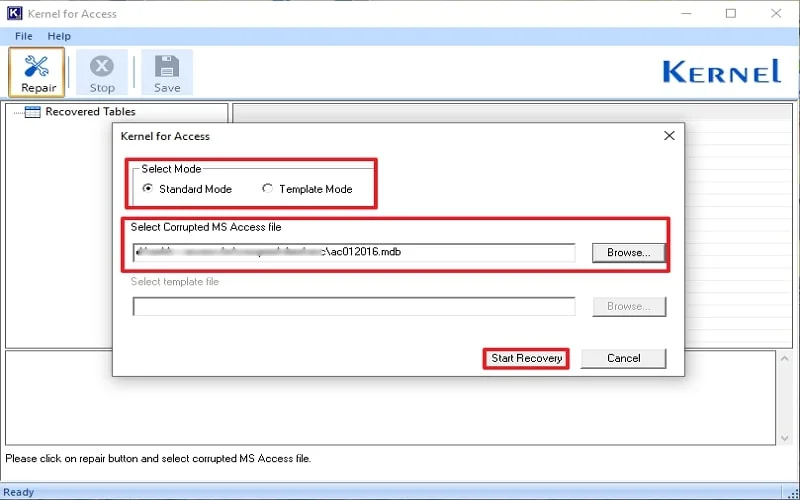
Choosing the mode and the corrupt file. The template box stays greyed out in Standard mode.
Recovers the whole application, not only the data
Kernel for Access Database Repair rebuilds tables, table relationships, queries, indexes, forms, reports, macros and modules, along with links to external tables. It also brings back OLE and MEMO fields, so embedded pictures and long text columns aren't lost.
Deleted records and encrypted files
Kernel for Access Database Repair can return deleted records to the rebuilt database, and KernelApps says it repairs password-protected files even when you've forgotten the password.
Handles common Access error messages
Kernel for Access Database Repair targets failures such as "Unrecognized database format", "The database cannot be opened because the VBA project contained in it cannot be read" and "Microsoft Access has detected that this database is in an inconsistent state".
Benefits
- You see the result first. The trial's preview uses your own file, so you aren't buying on faith.
- The original stays put. The repair writes a new file, so a failed attempt costs nothing.
- Forms and macros come back too. For a database that runs a business, the design is often worth more than the rows.
Real-World Uses
- A shared back-end file damaged when a user's connection dropped mid-write.
- An old MDB that a current version of Access won't open.
- A file after a power cut, where Compact and Repair stops with an error.
- Deleted rows you need back from a database with no recent backup.
- A locked database from a former colleague, where nobody has the password.
Who It's For, and Who Should Skip It
Buy it if Compact and Repair has failed, you have no usable backup, and the trial's preview shows your tables. Skip it if you have a recent backup, since restoring is free and certain. IT firms working on customers' files need the Technician license, because the Home License is for personal use only, and a business should look at Corporate. There's no Mac version, and Access itself is Windows-only anyway.
Usage Guide
- Copy the damaged file somewhere safe and close Access.
- Download and install the demo, then launch Kernel for Access.
- Click Repair, choose Standard mode and browse to your MDB or ACCDB file.
- Click Start Recovery and wait for the tables to appear.
- Click through the tables and check that the rows are right.
- If they are, buy a license, activate the program, click Save and choose a name and location.
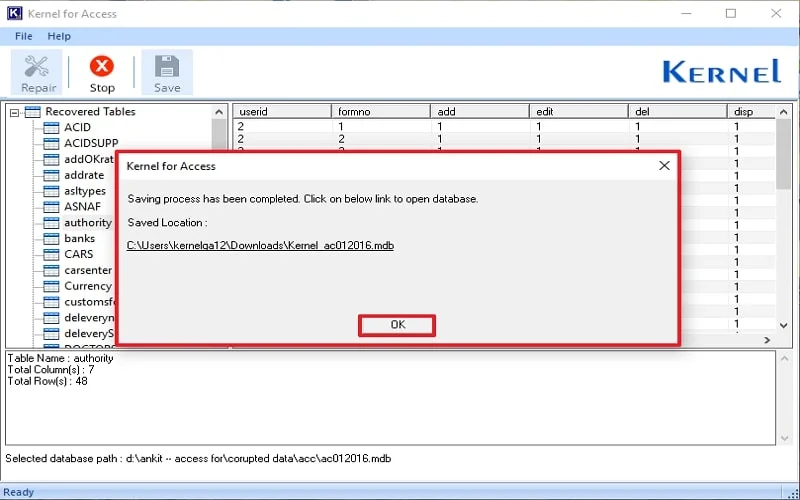
After saving, the program shows the location of the rebuilt database with a link to open it.
Before you buy
- Try Compact and Repair on a copy first. It's built into Access and is sometimes all you need.
- Check the license length. KernelApps' table gives the Home License 1 year of validity and updates, Corporate 2 years, and Technician a lifetime.
- Open forms and reports after the repair. Rows are easy to confirm in the preview; design objects need a real test once saved.
Where it falls short
- The trial can't prove the output. Unlike Kernel's mail tools, it saves nothing, so you can't test a rebuilt database before paying.
- Independent evidence is missing. Almost all praise sits on the vendor's own site, and we found no outside test of this version.
- The vendor's specs lag its claims. The specifications stop at Access 2021, while the feature list also mentions Office 365.
What Users Say
Independent feedback on this product is scarce, so read the numbers below as marketing and let the trial decide.
On the vendor's page
KernelApps shows 4.9 out of 5 from 546 reviews collected on its own site, with 93% rated Excellent.
"I've been using Microsoft Access for years, and suddenly, my database became inaccessible. I was panicking, but this Access Database Repair tool came to the rescue. It quickly repaired all my data without any loss. The interface is simple and user-friendly, so I didn't need any technical knowledge to repair the Access database. Highly recommended!!" - Amanda Martin
Kernel Data Recovery on Trustpilot
Kernel Data Recovery's Trustpilot page shows 4.9 out of 5 from 166 reviews, read through a page summarizer. Those reviews rate the company rather than this product, and about 2% of them are one-star. None of the reviews we could read mention the Access tool.
The pattern: the praise is about rescued files and ease of use, and it all comes from channels the vendor controls or collects for. The preview on your own file is better evidence than any of it.
Comparisons
Kernel for Access vs Compact and Repair
Compact and Repair is free and built in, and it's the right first step. It works from inside Access, so it fails when Access can't read the file at all. Kernel for Access reads the file itself, offers a template mode for badly broken structures and can bring back deleted records.
Editions and Pricing
| License | Price | Validity and updates | For |
|---|
| Home (this listing) | $99 on the order page | 1 year | Personal use |
| Corporate | $199 | 2 years | Multiple machines at one location |
| Technician | $299 | Lifetime | Multiple machines at multiple locations |
FAQs
Can Kernel for Access Database Repair fix a database that won't open at all?
Yes, that's its purpose. Kernel for Access reads the MDB or ACCDB directly, so a file that Access rejects can still be scanned and previewed.
Does Kernel for Access keep my original file?
Yes. Kernel for Access creates a new, repaired copy and doesn't change the damaged file.
Which file format does Kernel for Access save to?
Kernel for Access saves in the same format you gave it, so an MDB comes back as an MDB and an ACCDB as an ACCDB.
Is there a file size limit in Kernel for Access?
No. KernelApps lists no file size limit and unlimited file recovery for all three licenses.
Can I use the Home License of Kernel for Access at work?
No. KernelApps restricts the Home License to personal use, and business use needs Corporate or Technician.
What's the difference between Kernel for Access and Kernel Access Password Recovery?
Kernel for Access rebuilds damaged databases. Kernel Access Password Recovery is a separate product that recovers a lost password from a healthy MDB file.
System Requirements
- Windows 365, 11, 10, 8.1, 8, 7, Vista, XP and older, Windows Server 2022, 2019 and older
- Intel Pentium compatible processor (x86 or x64) or equivalent
- 64 MB RAM minimum and 150 MB of disk space
Conclusion
Kernel for Access Database Repair is worth $99 when Compact and Repair has failed and the preview shows your tables. The reason to buy is that it reads files Access itself won't touch and restores the forms and macros along with the data. The reason not to is a good backup, which beats any repair tool. Independent reviews are missing, so judge it by what the trial finds in your own file.
Download Free TrialBuy Now