Short answer
Work on a copy, then try Access's own Compact and Repair Database and, if that fails, import every object into a new blank database. Those two free steps fix most light damage. If Access still can't open the file, run the free demos of DataNumen Access Repair ($199.95) and Kernel for Access Database Repair ($99) on the copy: both scan the file without Access's help and show you the recovered tables before you pay.
Buy the one whose preview shows your data. If your forms, reports and VBA code matter as much as the tables, Kernel is the better fit, since DataNumen recovers data and queries only. If Access files are only one of the Office files you rescue, DataNumen Office Repair ($499.95) includes the Access tool.
At a glance
| Fact | DataNumen Access Repair | Kernel for Access Database Repair | DataNumen Office Repair |
|---|
| Price at checkout | $199.95, one user, one-time | $99, Home License (1 year) | $499.95, one user, one-time |
| Files | MDB, ACCDB (Access 95 to 2021 and Microsoft 365) | MDB, ACCDB (Access 95 to 2021) | Access, Excel, Outlook, PowerPoint and Word files |
| Tables, records, queries | ✓ | ✓ | ✓ |
| Forms, reports, macros, VBA modules | ✗ | ✓ | ✗ |
| Deleted records | ✓ | ✓ | ✓ |
| Password-protected databases | ✓ | ✓ | ✓ |
| Batch repair of many files | ✓ | Not listed | ✓ |
| Access must be installed | No | Not stated by the vendor | No, for the Access tool |
| Free trial | Full scan and preview, no save | Full scan and preview, no save | Shows whether files can be recovered |
| Latest build | 4.52, April 2024 | 25.0, November 2025 | 6.0, January 2024 |
| Money-back period | 30 days, reason required | 30 days | 30 days, reason required |
What we checked
- We went through the free repair steps built into Microsoft Access and noted when each one helps and when it can't.
- We put each paid tool in the cart and read the price and product name on the order page.
- We checked each vendor's installer for its date and size, and its product page for what it recovers and what it leaves out.
- We read each tool's trial limits, license terms and refund rules, and the reviews we could find.
What we checked: order page prices of $199.95 for DataNumen Access Repair, $99 for the Kernel for Access Home License and $499.95 for DataNumen Office Repair, and installers dated April 4, 2024 (DataNumen Access Repair, 15.97 MB), November 17, 2025 (Kernel for Access, 19.15 MB) and January 21, 2024 (DataNumen Office Repair, 61.98 MB), all on November 16, 2026. We compared features, trials and prices, and didn't repair a damaged database ourselves.
Signs your Access database is corrupt
An Access file holds tables, queries, forms and code in one file, so a single bad write can take the whole thing down. The usual triggers are a PC losing its network connection while a shared back-end file is open, a power cut or crash mid-save, a failing disk, and a file growing close to Access's 2 GB size limit. The error messages that tell you the file itself is damaged include:
- "Unrecognized database format"
- "The database needs to be repaired or isn't a database file"
- "Microsoft Access has detected that this database is in an inconsistent state"
- "The database cannot be opened because the VBA project contained in it cannot be read"
Step 1: make a copy and clear the lock file (free)
Before you try any repair, close Access on every PC that uses the database and copy the damaged file somewhere safe. Every step below should run on a copy, so a failed attempt never costs you the original. While everyone is out, look in the database's folder for a lock file with the same name and an .laccdb (or .ldb for MDB files) extension. A lock file left behind by a crash can keep the database marked as in use. Delete it only when you're sure nobody has the database open.
Step 2: run Compact and Repair Database (free)
Compact and Repair Database is built into Access and is the first real fix to try. It rewrites the file and repairs minor damage to tables and indexes.
- Start Access and open a new blank database (not the damaged one).
- On the Database Tools tab, click Compact and Repair Database.
- In the "Database to Compact From" window, pick the copy of your damaged file.
- Give the repaired file a new name and save it.
- Open the new file and check row counts in your most important tables.
If the database still opens, you can also run it on an open file from File, Info, Compact & Repair Database. Compact and Repair works through Access itself, which is its weakness: if Access can't read the file's structure at all, it stops with an error.
Step 3: import everything into a new database (free)
When a database opens but one form, report or table keeps throwing errors, moving the healthy objects into a clean file often fixes it.
- Create a new blank database.
- On the External Data tab, choose New Data Source, From Database, Access.
- Browse to the copy of the damaged file and choose to import tables, queries, forms, reports, macros and modules into the current database.
- Select all objects on every tab. If the import stops on one object, run it again without that object.
- Relink any linked tables and check the startup settings in the new file.
If the error is about the VBA project, starting Access with the /decompile switch on a copy of the file (msaccess.exe "C:\path\copy.accdb" /decompile), then compiling the code again from the VBA editor's Debug menu, clears damaged compiled code. Don't forget the obvious free fix either: a backup, or a previous version of the file from File History or your cloud drive, beats any repair.
When to stop and use a repair tool
Move on to a dedicated repair tool when Access refuses to open the file at all, Compact and Repair ends with an error, the import fails on the tables themselves, or rows are missing after a repair. Don't keep running Compact and Repair on your only copy: each pass rewrites the file.
DataNumen Access Repair: for data you can't recreate
- Price: $199.95 for one user, one-time, with lower per-license prices for 2 or more
- Runs on: Windows, 32-bit and 64-bit; Microsoft Access not required
- Best for: a back-end database full of records, or a folder of damaged MDB and ACCDB files
DataNumen Access Repair reads the damaged MDB or ACCDB file byte by byte without asking Access to open it, then writes the recovered tables, records, queries, indexes and relationships to a new file beside the original, so Orders.mdb becomes Orders_fixed.mdb. MEMO, OLE and autonumber fields come back too, and so do deleted tables and records, which are switched on by default. It handles password-protected databases, can write the output in Access 95/97 or 2000 format for old applications, and has a Batch Repair tab that searches a drive for MDB and ACCDB files and repairs the whole list.
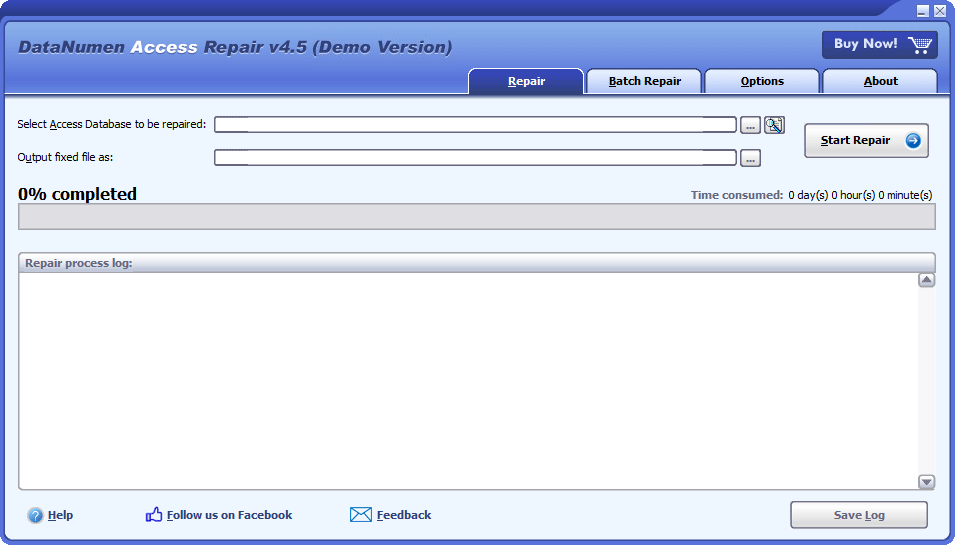
DataNumen Access Repair's Repair tab: the damaged database, the output file name, progress and the repair log.
DataNumen Access Repair stops at the data. Forms, VBA modules and macros aren't recovered, so a front end full of screens and code needs a backup or a rebuild. The demo runs the whole repair and previews what it found, so you know before you pay. Free upgrades last one month, and the 30-day refund requires a detailed reason and possibly the original file. The vendor estimates about an hour for a 2 GB database.
What we like
- Works when Access can't open the file, and without Access installed
- Batch repair for many databases at once
- Brings back deleted records and old-format output
Watch out for
- No forms, reports, macros or VBA code
- Twice the price of Kernel's Home License
- Latest build dates from April 2024, and nearly all reviews are on the vendor's site
Download DataNumen Access Repair DemoBuy DataNumen Access Repair
Kernel for Access Database Repair: when forms and code matter too
- Price: $99 for the Home License at checkout (personal use, 1 year of validity and updates)
- Runs on: Windows 11, 10, 8.1, 8 and 7, and Windows Server 2022 and 2019
- Best for: a database whose forms, reports and macros you'd otherwise have to rebuild
Kernel for Access Database Repair rebuilds tables, relationships, queries, indexes, forms, reports, macros and modules into a new MDB or ACCDB, in the same format you gave it, and leaves the damaged file untouched. It has two modes: Standard for most damage, and Template mode, which uses a healthy template file you supply when the structure is too broken for Standard. It also brings back OLE and MEMO fields and deleted records, and KernelApps says it repairs password-protected files when you've forgotten the password.
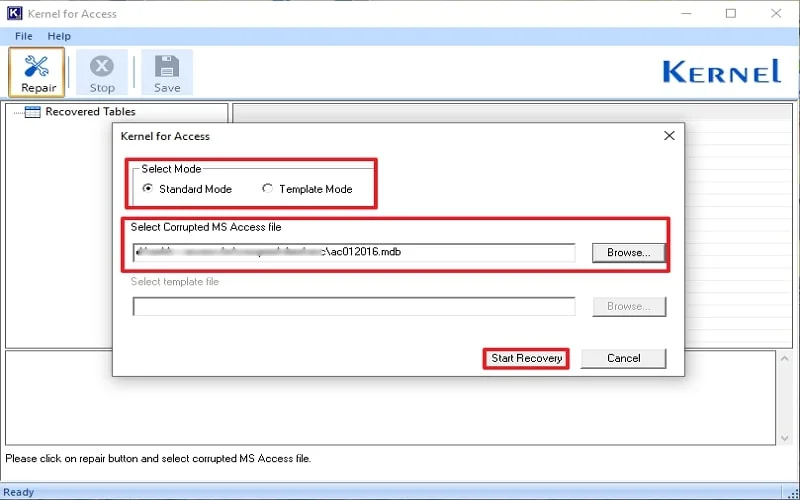
Kernel for Access: choose Standard or Template mode, pick the corrupted MDB, then Start Recovery.

After the scan: recovered tables on the left, rows of the selected table on the right, and its column and row count below.
Kernel's licenses are where to look closely. The $99 Home License is for personal use and runs for one year; KernelApps lists Corporate at $199 with 2 years and Technician at $299 with a lifetime term. A business needs Corporate. The trial previews the rebuilt tables but saves nothing, and you can't confirm that forms and reports work until you've paid and saved.
What we like
- Recovers forms, reports, macros and modules, not only data
- Lowest entry price, with a Template mode for badly broken files
- Newer build, dated November 2025
Watch out for
- Home License is personal use only and expires after a year
- You can't test the rebuilt forms before paying
- No batch mode listed, and the praise is on the vendor's own site
Download Kernel for Access TrialBuy Kernel for Access Database Repair
DataNumen Office Repair: if Access is one of many broken Office files
- Price: $499.95 for one user, one-time
- Includes: DataNumen Access Repair, Excel Repair, Outlook Repair, PowerPoint Recovery and Word Repair
- Best for: help desks and consultants who see damaged files of every Office type
DataNumen Office Repair is a launcher for five of DataNumen's tools, and its Access button starts the same DataNumen Access Repair described above, with the same engine and limits. It only makes sense if you also repair PST mailboxes, workbooks, documents or presentations. Bought one by one at checkout, the five tools cost $669.75, so the suite saves $169.80, but only if you'd really buy at least the Access and Outlook tools anyway.

DataNumen Office Repair 6.0: one button per recovery tool, plus the help files.
What we like
- One license for Access, Excel, Outlook, PowerPoint and Word files
- $169.80 less than the five tools bought separately
- Each tool keeps its own batch mode
Watch out for
- $300 more than Access Repair alone for an Access-only problem
- Same no-forms, no-VBA limit for Access
- PowerPoint support is PPTX only
Download DataNumen Office Repair DemoBuy DataNumen Office Repair
Price compared
Price at checkout for one user (USD)
Kernel for Access (Home, 1 year)$99
DataNumen Access Repair$199.95
DataNumen Office Repair (5 tools)$499.95
Order page prices checked on November 16, 2026. Kernel's Corporate License, needed for business use, is listed at $199.
DataNumen Office Repair vs its five tools bought separately (USD)
DataNumen Office Repair suite$499.95
Access + Outlook + Excel + Word + PowerPoint tools$669.75
Separate prices at checkout on November 16, 2026: Access Repair and Outlook Repair $199.95 each, Excel Repair, Word Repair and PowerPoint Recovery $89.95 each.
Which should you choose?
| Your situation | Do this | Why |
|---|
| Access shows an error but still opens the file | Compact and Repair, then import into a new database | Free, and it fixes light damage |
| A shared back end with records you can't recreate | DataNumen Access Repair | Reads files Access rejects, recovers deleted rows, no Access needed |
| A front end where forms, reports and VBA matter | Kernel for Access Database Repair | The only one here that rebuilds forms, macros and modules |
| Several damaged databases after a disk failure | DataNumen Access Repair | Batch Repair searches a drive and fixes them in one run |
| A help desk that also sees broken PSTs and workbooks | DataNumen Office Repair | Five tools for $169.80 less than buying them separately |
| You have a recent backup | Restore it | Free, complete, and no tool beats it |
Who should skip each one:
- Skip DataNumen Access Repair if what you lost is mostly forms and code, or if Compact and Repair already worked.
- Skip Kernel for Access's Home License for a business database: the license is personal use only, so price in Corporate at $199.
- Skip DataNumen Office Repair if Access is the only file type you need to fix.
What commonly goes wrong
- Repairing the only copy. Every repair, Access's own included, should run on a copy so you can try another method afterwards.
- Deleted rows coming back. DataNumen recovers deleted tables and records by default. Untick those options if you only want the live data, or check for old rows before going live.
- Trusting the preview for everything. Both trials show tables and rows. Neither proves that forms, reports or code will work, so test those once you have the saved file.
- A file near 2 GB. Access databases are capped at 2 GB, and files that approach it are prone to damage. After a repair, split the database or move large tables out.
- Shared files on unreliable networks. The same dropped connection that broke the file will break it again. Split the database into a front end per user and a back end on the server.
What users say
DataNumen Access Repair
DataNumen's product page shows 4.90 out of 5 from 1,654 votes, its own count, and the testimonials there are ones the vendor chose to publish.
- Thora Hampton, United States, November 2020: "Some of my Access database files are corrupt. I try to use 'Compact and Repair Database' feature in MS Access but not working. Your repair tool helps to recover my data! Thanks a lot!"
- James Murphy, Anything Online: "even though at first I thought this was a lot of money to spend on a small program, DataNumen Access Repair did recover our database so now I'm very happy ;)"
- SnapFiles, one user review, 4 stars, February 26, 2019, for version 2.6: "Repaired my .mdb database (58Mb). Thanks! :)"
Kernel for Access Database Repair
KernelApps shows 4.9 out of 5 from 546 reviews collected on its own site. Kernel Data Recovery's Trustpilot page rates the company 4.9 out of 5 from 166 reviews, none of which we found mentioning the Access tool.
- Amanda Martin, on the vendor's page: "I've been using Microsoft Access for years, and suddenly, my database became inaccessible. I was panicking, but this Access Database Repair tool came to the rescue."
The pattern: independent reviews of Access repair tools are scarce, and almost all praise sits on the vendors' own pages. The recurring hesitation is price for a small program, which James Murphy says out loud. Treat the free preview on your own file as the review that counts.
FAQs
How do I repair a corrupt Access database for free?
Copy the file, then use Access's Compact and Repair Database from the Database Tools tab of a blank database. If the file opens but objects fail, import all objects into a new blank database. Those free steps fix light damage; DataNumen Access Repair and Kernel for Access are for files Access can't open.
Can an Access database that won't open be repaired?
Often, yes. DataNumen Access Repair and Kernel for Access Database Repair both read the MDB or ACCDB file directly instead of through Access, so they can scan a file that Access rejects with "Unrecognized database format", and their free demos show what they found.
Will DataNumen Access Repair recover my forms and VBA code?
No. DataNumen Access Repair recovers tables, records, queries, indexes and relationships, but not forms, VBA modules or macros. Kernel for Access Database Repair lists forms, reports, macros and modules among the objects it rebuilds.
Do I need Microsoft Access installed to repair an MDB file?
Not for DataNumen Access Repair, which works without Access and uses Access's engine only when it is present. Kernel for Access doesn't state a requirement either way, so check with its trial on your PC.
Can I use the Kernel for Access Home License at work?
No. Kernel for Access Database Repair's Home License is for personal use. Businesses need the Corporate License ($199, 2 years) or Technician ($299, lifetime) as listed by KernelApps.
Is DataNumen Office Repair worth it just for Access?
No. DataNumen Office Repair costs $499.95 and its Access tool is the same DataNumen Access Repair sold alone for $199.95. The suite pays off only if you also repair Outlook, Excel, Word or PowerPoint files.
How long does an Access repair take?
It depends on the file size. DataNumen estimates about an hour for a 2 GB database with DataNumen Access Repair, faster on a quicker PC with other programs closed. Small files take minutes.
Can I get my money back if the repair fails?
Both vendors offer 30 days. DataNumen Access Repair's refund needs a detailed reason and may require the original corrupt file. Kernel for Access lists a 30-day money-back guarantee.