DataNumen Access Repair: Rescue the Tables From an Access Database That Won't Open
DataNumen Access Repair is a $199.95 Windows tool that rebuilds corrupt Microsoft Access MDB and ACCDB databases and saves the recovered tables, records, queries, indexes and relationships to a new database file. It's for the person who sees "Unrecognized database format" or "The database needs to be repaired or isn't a database file" and finds that Access's own Compact and Repair doesn't help.
A shared database on a network drive, a power cut halfway through a write, and the next morning nobody can open the order system. Compact and Repair is free and worth trying first. This is the tool for when it fails or can't even open the file.
Quick facts
- Version: 4.52 installer dated April 4, 2024 (the product page still shows 4.5, released November 2, 2023)
- Developer: DataNumen, Inc. (the product was formerly called Advanced Access Repair)
- Platform: Windows, 32-bit and 64-bit. Microsoft Access doesn't have to be installed
- Files: MDB and ACCDB from Access 95 to 2021, Access for Office 365 and Microsoft 365
- Recovers: tables and records, queries, indexes, relationships, MEMO, OLE and autonumber fields, deleted tables and records
- Price: $199.95 for one user, one-time at checkout
- Trial: free demo that scans the database and previews the recovered tables and objects, but doesn't save the fixed file
- Guarantee: 30 days
- What we checked: installer file version 4.52 (15.97 MB, digitally signed by DataNumen, Inc.) downloaded from the vendor, with an April 4, 2024 file date; the $199.95 order page price, with no auto-renewal shown. We didn't run a repair on a damaged database. Checked on November 8, 2026.
Before you buy
- Run the demo on your own file. It goes through the whole repair and shows the tables it found. If your data is in the preview, the full version will write it out.
- Data, not the application. Forms, VBA modules and macros aren't recovered. If the database is a front end full of forms and code, you'll get the tables back and need to rebuild or re-import the rest from a backup.
- Upgrades and support run for one month. After that, a new version needs the Annual Support and Maintenance Plan or a paid upgrade fee.
- A refund needs a reason. The 30-day guarantee is real, but you must explain the reason in detail, and DataNumen may ask for the original corrupt file to verify it. The company offers to sign an NDA if the data is confidential.
Download Free Trial Buy Now
Overview
DataNumen has sold this program for about two decades, first as Advanced Access Repair. The idea is simple: it never touches your damaged file. It reads it byte by byte, rebuilds what it can, and writes a new database beside it, so MyAccessDB.mdb becomes MyAccessDB_fixed.mdb.
It reads the file directly instead of asking Access to open it, which is why it can work on databases that Access refuses outright. If Access is installed, the tool uses its Jet engine during the repair, so you may see Access start and close on its own. That's expected.
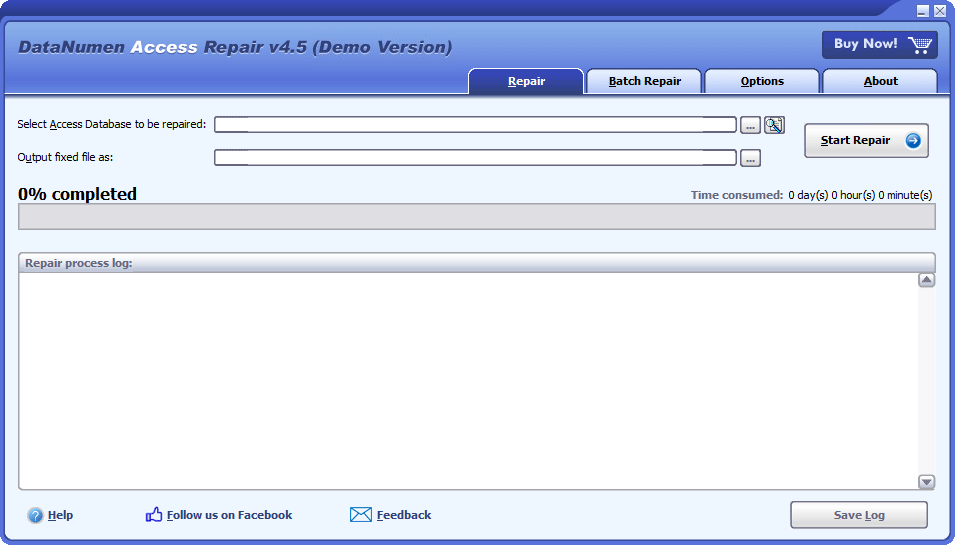
The Repair tab in the version 4.5 demo: the damaged database, the output file, progress and the repair log.
Features
Rebuilds tables, queries and relationships
DataNumen Access Repair recovers the structure and records of every table it can find, plus queries (including action queries such as Delete, Insert Into and Update), indexes and relationships. MEMO, OLE and autonumber fields come back too, which matters when other tables point at those autonumber IDs.
Brings back deleted tables and records
DataNumen Access Repair can also recover tables and records that were deleted, as long as the space hasn't been reused. Both options are on by default. Turn them off if you want only the live data and not a pile of old rows you removed on purpose.
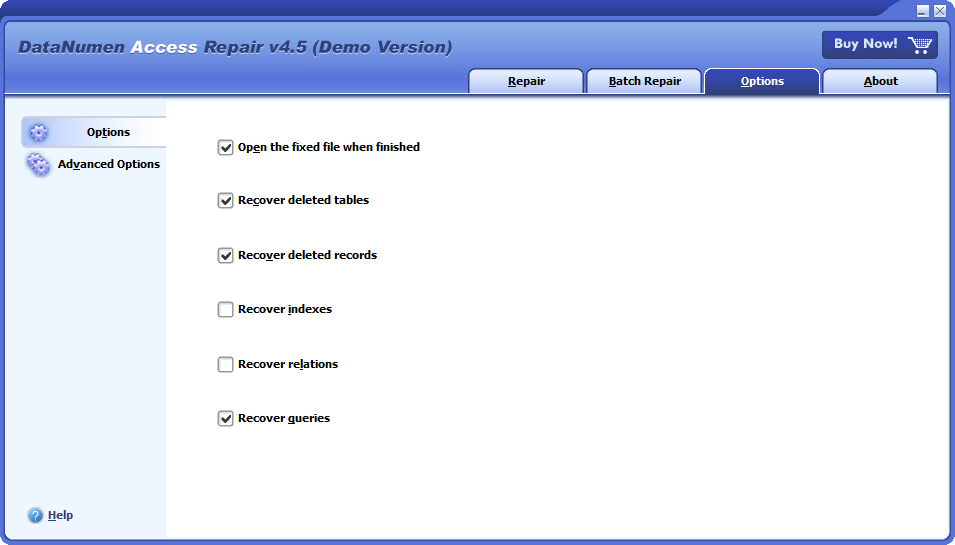
The Options tab. Deleted tables, deleted records and queries are ticked by default. Indexes and relations are not.
Works on password-protected databases
DataNumen Access Repair recovers password-encrypted Access databases as well, so a protected file that also got damaged isn't a dead end.
Output for old Access versions
DataNumen Access Repair can write the fixed database in Access 2000 format, or in Access 95/97 format if you set "Output database format" under Options, Advanced Options. That helps when the database feeds an old application that can't read newer files.
Batch repair and file search
DataNumen Access Repair has a Batch Repair tab: add databases by hand or search a drive for MDB and ACCDB files, then repair the whole list in one run with a status for each. It also adds a repair command to the Windows Explorer right-click menu.
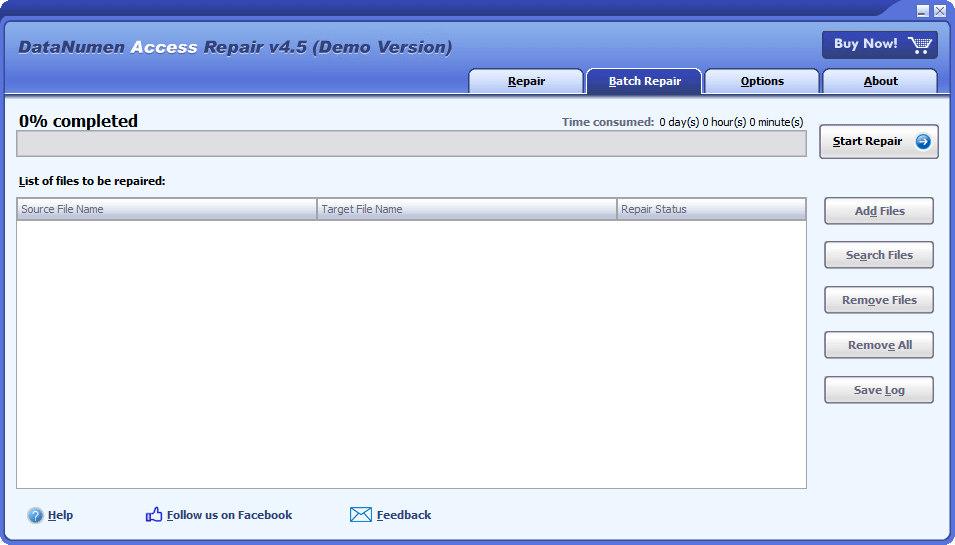
The Batch Repair tab, with Add Files and Search Files buttons and a status column for each database.
Benefits
- The business keeps running. An Access back end often holds orders, members or stock. Getting the tables out quickly matters more than anything else.
- No risk to the original. The damaged file is only read, so you can still try other tools or send it to a specialist afterwards.
- You know before you pay. The demo runs the full scan, so the purchase decision is based on your own file, not a sales claim.
Real-World Uses
- A split database on a shared drive. The back-end file got damaged when a PC lost its network connection mid-save. Repair the back end, then relink the front end to the fixed file.
- Records deleted by mistake. Someone ran a delete query on the wrong table. Repair a copy with "Recover deleted records" on and pull the rows back.
- An old MDB from a retired system. A database from Access 97 that no longer opens anywhere. Recover it and save the output in the format the old application expects.
- A folder of damaged files after a disk failure. Search the drive for MDB and ACCDB files and repair them together.
Who It's For, and Who Should Skip It
It suits small businesses, IT support staff and database consultants who look after Access databases with data that isn't backed up anywhere else, and who need the tables back today.
Skip it if Compact and Repair already opened the file, or if a recent backup exists: restoring a backup is free and complete. Skip it if what you lost is mainly forms, reports' code and macros, since those aren't recovered. A Mac user needs a Windows PC to run it. And if you only need the occasional single file and price is the main concern, $199.95 is a lot for one repair, so check the preview carefully before you buy.
Usage Guide
- Install the demo. Close Access and any other program that might be using the database.
- Work on a copy of the damaged file, not the only one you have.
- On the Repair tab, type the path, browse for the file, or use the search button to find MDB and ACCDB files on the PC.
- Check the output name (
_fixed is added for you) and change the folder if you like.
- Click Start Repair. A large file takes time: the vendor says a 2 GB database typically needs about an hour.
- Read the preview of the recovered tables. If your data is there, order the full version and repair the file again to get the fixed database.
- Open the fixed file in Access, check the row counts in your key tables, and re-import forms and code from a backup or an older copy.
Where it falls short
- Indexes and relations are off by default. You get faster, simpler output, but you need to tick them in Options if you want them rebuilt.
- Deleted rows may come back with the live ones. Useful when you need them, confusing when you don't. Check for old data before you put the fixed file back into use.
- The product page lags the software. It still lists version 4.5 while the installer is 4.52, so don't judge how current the tool is from the page alone.
- Few independent reviews. Almost all published feedback is on the vendor's site, and its 93.34% recovery figure is its own test.
What Users Say
Independent English reviews of this product are scarce. DataNumen's product page shows 4.90 out of 5 from 1,654 votes, which is the vendor's own count, and most of the quotes below are testimonials the vendor chose to publish. SnapFiles is the one download site we found with a user review.
Testimonials on DataNumen's page
Thora Hampton, United States, November 2020: "Some of my Access database files are corrupt. I try to use 'Compact and Repair Database' feature in MS Access but not working. Your repair tool helps to recover my data! Thanks a lot!"
Margaret Messick, Costume Inventory Resources, Davis, CA, June 16, 2015: "DataNumen Access Repair recovers more data than any other product I have used. It has helped me save many databases that have been corrupted. I am very pleased to have found this product."
James Murphy, Anything Online: "In fact I found your solution in the first 10 mins! Anyway even though at first I thought this was a lot of money to spend on a small program, DataNumen Access Repair did recover our database so now I'm very happy ;)"
Ruff Dog: "Wow your guys software is awesome I downloaded the trial software and it was able to show me all of the tables that I had in exact. This sofware rocks and helped me so much."
Kevin O'Leary, FETAC, Dublin, Ireland: "Thanks for getting back to me. I've since bought the software and got the link to download the software straight away. I installed it and it worked brilliantly! Many Thanks"
On SnapFiles
SnapFiles shows one user review, 4 stars, posted February 26, 2019 for version 2.6 under the title "Successfully fixed my corrupted .mdb file": "Repaired my .mdb database (58Mb). Thanks! :)"
The pattern: people come to it after Compact and Repair has failed, the demo preview convinces them, and they're relieved to get their tables back. The one recurring hesitation is the price for what looks like a small program, which James Murphy says out loud. There's no body of independent criticism to weigh, so treat the preview as your real review.
Comparisons
DataNumen Access Repair vs. Access's Compact and Repair
Compact and Repair is free and built into Access: open a blank database, then Database Tools, Compact and Repair Database, and pick the damaged file. It fixes minor table damage. If compiled VBA is the problem, starting Access with the /decompile switch can help, and Microsoft's stand-alone JETCOMP utility can compact files that Access won't open. DataNumen Access Repair is for when all of those fail.
DataNumen's own recovery test
The vendor's chart gives its tool an average recovery rate of 93.34%, against 12.50% for the repair function built into Access and about 10% for tools such as Stellar Phoenix Access Recovery, Kernel Access Repair, SysTools Access Recovery and Recovery Toolbox for Access. These are figures from DataNumen's own test set, so use them as a claim to check with the demo, not as a result.
Editions and Pricing
There's one edition with everything included. The $199.95 price on the order page is for a single user. DataNumen's own buy page lists lower per-license prices for larger orders:
| User licenses | Price per license (US$) |
|---|
| 1 | 199.95 |
| 2 - 9 | 149.95 |
| 10 - 24 | 119.95 |
| 25 - 49 | 99.95 |
| 50 - 99 | 69.95 |
| 100 - 199 | 49.95 |
| 200 - 499 | 39.95 |
| 500+ | 29.95 |
FAQs
Does DataNumen Access Repair need Microsoft Access installed?
DataNumen Access Repair doesn't need Access on the PC. If Access is installed, it uses Access's Jet engine during the repair, which is why Access may open and close in the background.
Will DataNumen Access Repair recover my forms and VBA code?
DataNumen Access Repair recovers tables, records, queries, indexes and relationships. Forms, VBA modules and macros aren't supported, so keep a copy of your front end or rebuild those parts.
How long does DataNumen Access Repair take on a large database?
DataNumen Access Repair examines every byte of the file, so time grows with size. The vendor's guide is about an hour for a 2 GB database, faster on a PC with a quicker CPU and more memory, and with other programs closed.
Can DataNumen Access Repair save the fixed database in Access 97 format?
Yes. In DataNumen Access Repair, open Options, then Advanced Options, and set "Output database format" to MS Access 95/97 format before you repair the file.
Why are my deleted records back after the repair?
DataNumen Access Repair recovers deleted tables and records by default. Untick "Recover deleted tables" and "Recover deleted records" on the Options tab and repair again if you only want the current data.
Can DataNumen Access Repair open a password-protected database?
Yes. DataNumen Access Repair supports password-encrypted Access databases, so you don't have to remove the password first, which you couldn't do on a file Access won't open anyway.
Do I get new versions of DataNumen Access Repair after I buy it?
Free upgrades last one month from purchase. After that, DataNumen Access Repair upgrades need the Annual Support and Maintenance Plan or an upgrade fee, which the vendor describes as a fraction of the product price.
System Requirements
- Windows, 32-bit or 64-bit
- Intel or equivalent processor, x86 or x64
- 64 MB of memory minimum, 2 GB recommended
- 23 MB of disk space
- Microsoft Access not required
Conclusion
Worth $199.95 when an Access database holds data you can't recreate and Compact and Repair has failed. The reason to buy is that the demo runs the whole repair and shows your own tables before you pay, and it works without Access installed. The main reason not to is a database whose value lies in forms and VBA code, which it doesn't recover, or a recent backup that makes the purchase unnecessary. Independent reviews are thin, so let the preview decide.
Download Free Trial Buy Now