Kernel Import PST to Thunderbird: Turn Outlook PST Files into Mailboxes Thunderbird Can Open
Kernel Import PST to Thunderbird is a Windows tool that reads Outlook PST files, repairs damaged ones, and saves the mail as MBOX files that Mozilla Thunderbird (and other MBOX mail programs) open directly. It costs $69 for a lifetime Home license, $199 for Corporate and $299 for Technician.
It's for people leaving Outlook for Thunderbird, often because they're dropping a Microsoft 365 subscription or moving to Linux, who have years of mail in PST files and find that Thunderbird's own import wants Outlook installed on the same PC.
Quick facts
- Price: Home $69, Corporate $199, Technician $299 (one-time, lifetime license and updates)
- Developer: KernelApps Private Limited (Kernel Data Recovery), Noida, India
- Version: the trial installs Kernel for Outlook PST Repair 26.0 (December 2025); the product page still lists version 20.3
- Runs on: Windows 11, 10, 8.1, 8 and 7; Windows Server 2022 back to 2003
- Reads: PST files from Outlook 97 through Outlook 2021 and Microsoft 365, including corrupted, encrypted and password-protected files
- Saves to: MBOX for Thunderbird, plus DBX, EML, PDF and new PST files, or uploads to Gmail, Yahoo Mail, AOL, Outlook.com, Microsoft 365 and Exchange
- Free trial: previews the PST contents only; importing to Thunderbird needs a license
- Refund: 30-day money-back guarantee
- What we checked: the trial download (Kernel-PST-Demo.exe, 41 MB, which installs Kernel for Outlook PST Repair Evaluation Version 26.0, validly signed by KernelApps Private Limited, file dated December 22, 2025) and the three licenses on the order page on November 28, 2026 (Home $69, Corporate $199, Technician $299, one-time with no renewal). We didn't convert a PST file.
Before you buy
- Try the free route first if Outlook still works. Thunderbird's Import tool can bring in mail from an Outlook installation on the same Windows PC. Kernel's tool is for when Outlook is gone, the PST won't open, or the import fails.
- The trial only shows, it doesn't save. You can open your PST file and browse every item, which proves it's readable, but nothing goes to Thunderbird until you buy.
- Thunderbird gets mail, not your whole Outlook. The tool writes MBOX files, which hold email. Thunderbird keeps contacts and calendars elsewhere, so plan to move those separately.
- The download is named PST Repair. The trial installs Kernel for Outlook PST Repair, the program this product is built on, with Thunderbird among its saving options.
- Sale on November 28, 2026: the order page took 30% off all three licenses that day (Home $48.30). The prices on this page are the regular ones.
Download Free TrialBuy Home LicenseBuy Corporate LicenseBuy Technician License
Overview
Outlook and Thunderbird store mail in different ways. Outlook keeps a whole mailbox in one PST file; Thunderbird keeps each folder as an MBOX file. Moving from one to the other means converting, and Thunderbird's built-in importer does that only by talking to a working copy of Outlook on the same machine. If you have the PST file but not Outlook, or the PST file is damaged, you need a converter.
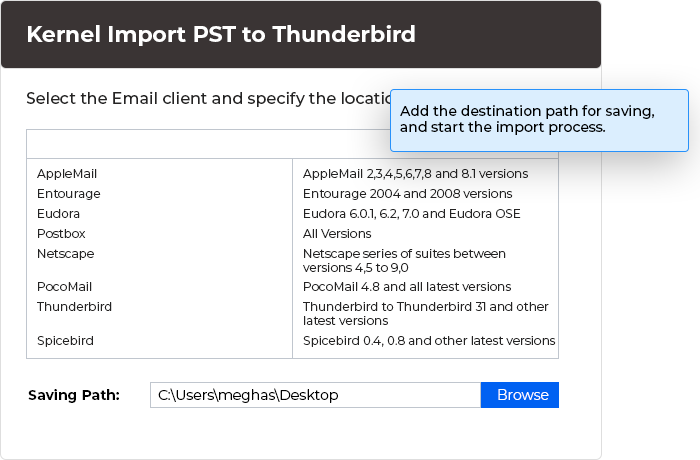
Kernel Import PST to Thunderbird reads the PST file on its own, scans and repairs it if needed, recovers deleted items, and shows the folder tree with a preview pane. You choose Thunderbird as the saving option, pick a folder for the output, and it writes MBOX files you then bring into Thunderbird. Thunderbird's login isn't involved at any point.
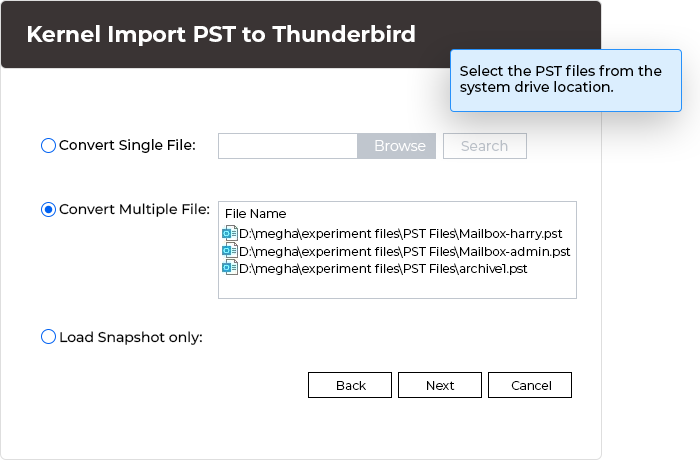
Adding several PST files at once with Convert Multiple File (Kernel's callout on the right).
Features
Repairs the PST before converting
Kernel Import PST to Thunderbird fixes PST files damaged by crashes, malware or sudden shutdowns, and recovers deleted items, before it saves anything. Encrypted and password-protected PST files are supported too. This is the part Thunderbird's own importer can't do.
Batches and large files
Kernel Import PST to Thunderbird adds several PST files at once and has no file size limit, so a decade of archive files can go through in one session. A split option keeps very large recovered PST output manageable.
Preview with attachments
Kernel Import PST to Thunderbird shows each message with its sender, recipients, subject and date, and lets you open attachments in the preview. It's the fastest way to confirm a PST file is the one you think it is.
The preview pane after a scan, with column filters and the selected message below.
Filters that skip what you don't want
Kernel Import PST to Thunderbird filters by date, item type and folders to include or exclude, and can skip data already migrated, so a second pass doesn't create duplicates.
Other targets from the same license
Kernel Import PST to Thunderbird can also upload PST mail to Gmail, Yahoo Mail, AOL or Outlook.com, to Microsoft 365 or Exchange mailboxes, or save it as DBX, EML, PDF or a fresh PST file.
Benefits
- No Outlook required. Convert on any Windows PC, then carry the MBOX files to Thunderbird on Windows, Mac or Linux.
- Damaged files aren't a dead end. The repair step handles damaged PST files before the conversion, in the same pass.
- Pay once. All three licenses are lifetime licenses with free updates.
Real-World Uses
- A retiree dropping Microsoft 365 moves twelve years of family mail from Outlook PST files into Thunderbird on a new laptop.
- A small office switching its PCs to Linux converts every user's PST archive to MBOX on one Windows machine, then copies the files across.
- After a hard drive failure, an IT technician recovers a corrupted PST file and hands the user an MBOX version that opens in Thunderbird.
- A researcher opens an old PST archive from a former job, previews it, and converts only the folders and years she needs.
Who It's For, and Who Should Skip It
Kernel Import PST to Thunderbird is for Windows users moving their own PST archives to Thunderbird (Home license), IT departments doing it for staff (Corporate) and service providers converting for clients (Technician), especially when the PST files are damaged or Outlook is no longer installed.
Skip it if Outlook is still on the PC and the PST opens normally: Thunderbird's Import tool can usually bring the mail across for free. Skip it if you're converting an OST file (Kernel sells Import OST to Thunderbird for that), or if you only need a handful of messages, which you can forward or save one by one.
Usage Guide
- Install and launch. Run Kernel-PST-Demo.exe on a Windows PC. Outlook and Thunderbird don't need to be on the same machine.
- Add the PST files. Choose a single file or several, or search a drive for them.
- Preview. Browse the folders and open a few messages and attachments to check them.
- Choose Save MBOX file. Pick it from the right-hand panel and set any filters (date, folder, item type).
- Pick Thunderbird. Select Thunderbird as the target client and choose where to save the MBOX files.
- Bring them into Thunderbird. When the save completes, add the MBOX files to Thunderbird, for example with an MBOX import add-on such as ImportExportTools NG.
Tips
- Copy the PST file before you start, especially a damaged one, so you always have the original.
- Use the date filter if you only want recent years in Thunderbird and keep the rest in the original PST.
- Export your Outlook contacts as a CSV file separately; Thunderbird's address book imports CSV.
Where it falls short
- Getting the MBOX into Thunderbird is still a manual step. The tool writes MBOX files; it doesn't open your Thunderbird profile and add them for you.
- No real trial run. Because the trial can't save, you won't see the result in Thunderbird until after you've paid.
- A stale product page. Kernel's page still shows version 20.3 from April 2020, while the installer is version 26.0 from December 2025, which makes the product look older than it is.
- Windows only. Mac and Linux users need a Windows PC or virtual machine for the conversion.
What Users Say
On Kernel's product page
Kernel's page shows 4.9 out of 5 from 441 reviews collected on its own site, and features this one from Rosi Garcia: "The PST to Thunderbird Converter from Kernel is truly a lifesaver! Effortlessly migrated a large batch of files without a hitch." These are testimonials the vendor gathers and chooses.
On Trustpilot (Kernel Data Recovery, all products)
Kernel Data Recovery holds a 4.9 out of 5 TrustScore from 167 reviews, almost all five stars, with about 2% one-star ratings. The recurring theme is support. One buyer, mckr (April 2026), wrote that "Vikram was great with helping us solve an installation problem with Kernel MBOX to PST," a sister product working in the opposite direction. R Duncan (January 2026) called Kernel's PST Converter Pro "a fabulous product".
What the reviews add up to
We found no independent review of this exact tool. What exists says Kernel's PST engine is dependable and its support answers quickly when installation or setup goes wrong. Since the trial won't save, open your PST file in it and check that every folder shows up: if it previews, it will convert.
Comparisons
Kernel Import PST to Thunderbird vs. Thunderbird's built-in Import
Thunderbird's Import tool is free and can bring mail across from an Outlook installation on the same Windows PC. It can't repair a damaged PST file, and it relies on Outlook being there. Kernel's tool works from the PST file alone and repairs it, for $69.
Kernel Import PST to Thunderbird vs. Kernel for Outlook PST Repair
Both install the same program. Kernel for Outlook PST Repair, also listed on this site, is sold as a PST repair tool that saves to a new PST; Import PST to Thunderbird is the license sold for the MBOX/Thunderbird route. Buy the one that matches your goal.
Kernel Import PST to Thunderbird vs. Kernel Import OST to Thunderbird
Choose by the file you have. A PST file is a personal folders file you can move between PCs; an OST file is the offline cache of an Exchange or IMAP account, which needs Kernel's OST tool.
Editions and Pricing
All three licenses run the same program, with lifetime validity and free updates; they differ in who may use them. Prices are the regular ones from the order page on November 28, 2026.
| License | Price | For | Validity | Buy |
|---|
| Home | $69 | Personal use only | Lifetime | Buy Home |
| Corporate | $199 | One organization, multiple systems | Lifetime | Buy Corporate |
| Technician | $299 | Data recovery and service companies working for several organizations | Lifetime | Buy Technician |
FAQs
Do I need my Thunderbird password to import PST files with Kernel?
No. Kernel Import PST to Thunderbird saves the PST data as MBOX files on your disk, so no Thunderbird account credentials are needed.
Can Kernel Import PST to Thunderbird open a password-protected PST file?
Yes. Kernel Import PST to Thunderbird supports encrypted, password-protected, corrupted and otherwise inaccessible PST files.
Which Outlook versions' PST files does it support?
Kernel Import PST to Thunderbird reads PST files from Outlook 97 through Outlook 2021 and Office 365 Outlook.
Can I use the MBOX files with Thunderbird on a Mac or Linux?
Yes. MBOX is a standard format, so the files Kernel Import PST to Thunderbird writes on Windows can be copied to Thunderbird on macOS or Linux.
Will the free version convert a few emails?
No. Kernel Import PST to Thunderbird's evaluation version lets you add PST files and preview their items, but saving to Thunderbird requires the full version.
Is the Home license a subscription?
No. Kernel Import PST to Thunderbird's Home license is a one-time $69 purchase with lifetime validity and updates, and the order page showed no automatic renewal on November 28, 2026.
System Requirements
- Windows 11, 10, 8.1, 8 or 7; Windows Server 2022, 2019, 2016, 2012, 2008 R2, 2008, 2003 R2 or 2003
- Intel Pentium-compatible (x86 or x64) processor
- 256 MB RAM minimum
- 50 MB free disk space, plus room for the MBOX output
Conclusion
Kernel Import PST to Thunderbird is a fair buy at $69 for a lifetime license if you're leaving Outlook with PST files that Thunderbird's own importer can't reach, because Outlook is gone or the files are damaged. Its strength is the repair engine underneath; its weakness is that the trial won't save anything, so you pay before you see the result in Thunderbird. If Outlook still runs on your PC, try Thunderbird's free import first.
Download Free TrialBuy Home LicenseBuy Corporate LicenseBuy Technician License