Kernel Zimbra Mailbox Backup: Turn Zimbra TGZ Exports into Outlook PST, PDF or EML Files
Kernel Zimbra Mailbox Backup is a Windows tool from KernelApps that opens the TGZ files Zimbra exports and saves the mail, contacts, calendars, tasks and briefcase items as Outlook PST, PDF, EML, MSG, DOC, DOCX, HTML or MHT. The Home license is $69, Corporate $199 and Technician $499, all lifetime licenses paid once; the free trial saves 25 items per folder.
It's for anyone leaving Zimbra for Outlook, and for admins who need a readable archive of Zimbra mailboxes for compliance or a departing employee. It works on export files, not on a live server: you export the mailbox from Zimbra first, then convert it here.
Quick facts
- Price: Home $69 (personal use, 5 machines); Corporate $199 (one organization, 25 machines); Technician $499 (consultants and service providers, unlimited systems). All lifetime, one-time payments.
- Developer: KernelApps Private Limited (Kernel Data Recovery, nucleustechnologies.com), Noida, India
- Version: 25.1
- Runs on: Windows 11, 10, 8.1, 8 and 7, Windows Server 2022, 2019 and older
- Input: a Zimbra TGZ export (no need to unzip it), a folder of extracted TGZ exports, or a single extracted folder
- Output: PST (split from 1 GB to 50 GB), PDF, EML, MSG, DOC, DOCX, HTML, MHT
- Free trial: saves 25 items per folder
- Guarantee: 30-day money-back guarantee
- What we checked: the installer from Kernel's download link (kernel-zimbra-mailbox-backup.exe, "Kernel Zimbra Mailbox Backup", file version 25.1, 47 MB, validly signed by KernelApps Private Limited, file dated December 2, 2025) and the prices on the order page (Home $69, Corporate $199, Technician $499, one-time payments with no automatic renewal) on November 27, 2026. We didn't convert a TGZ file ourselves.
Before you buy
- It reads TGZ exports only. It doesn't sign in to a Zimbra server. Export each mailbox from the Zimbra web client (Preferences, Import/Export) or have your admin export them; to move live mailboxes straight into Microsoft 365, Kernel sells a separate Zimbra to Office 365 Migration tool.
- One TGZ at a time, or a folder of extracted ones. For bulk jobs, extract all the TGZ files into one folder and add it with "Add Extracted Folders".
- No restore back to Zimbra. It converts out of Zimbra; Zimbra's own import or command-line tools bring a TGZ back in.
Download Free TrialBuy Home LicenseBuy Corporate LicenseBuy Technician License
Overview
Zimbra's web client can export a whole mailbox, or chosen folders, as one compressed TGZ file. That's a good backup for Zimbra itself, but no other mail program opens it, and many companies leaving Zimbra end up with a stack of TGZ files and no Zimbra server to read them. Kernel Zimbra Mailbox Backup opens those files directly, shows the mailbox tree with every message, and writes it out in a format the rest of the world can use: PST for Outlook, PDF for records, EML or MSG for other clients.
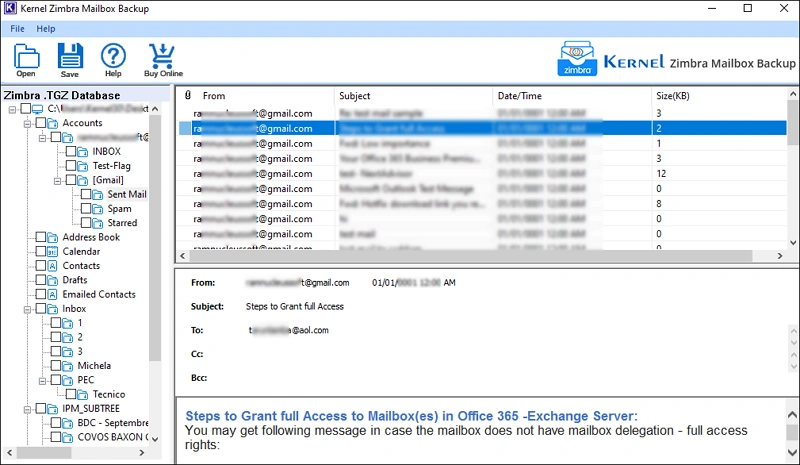
A loaded TGZ file: the folder tree (Inbox, Drafts, Calendar, Contacts, Address Book and other folders), the message list and a preview of the selected email.
Features
Opens TGZ files without unzipping
Kernel Zimbra Mailbox Backup reads a Zimbra TGZ file as it is, with no size limit, so you don't need 7-Zip or a Linux box to unpack it first. It also takes a folder of TGZ exports you've already extracted, which is how you process many mailboxes in one go.
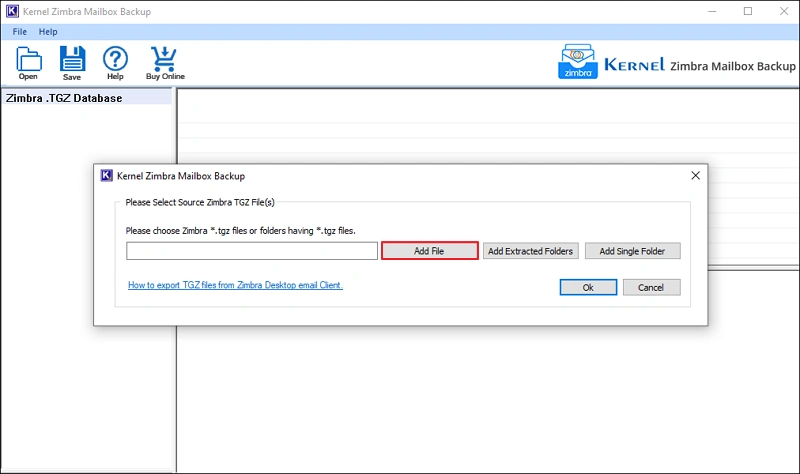
The source dialog: Add File for a TGZ, Add Extracted Folders for bulk jobs, Add Single Folder, and a link to how to export TGZ files from Zimbra Desktop.
Preview before you save
Kernel Zimbra Mailbox Backup shows each folder's messages with sender, subject, date and size, and the full message below, so you can confirm you have the right export and that nothing is missing before converting.
Eight output formats and PST splitting
Kernel Zimbra Mailbox Backup saves to PST, PDF, EML, MSG, DOC, DOCX, HTML or MHT. For PST it can split the output at a size you set, from 1 GB up to 50 GB, which keeps big mailboxes usable in Outlook.
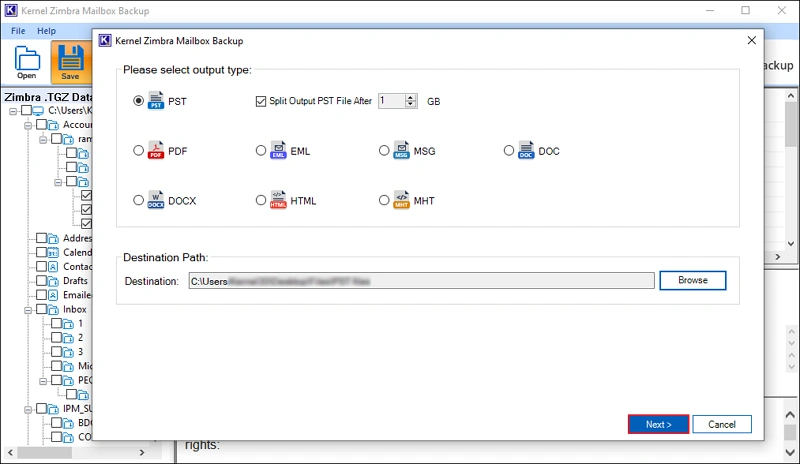
Choosing the output: PST with "Split Output PST File After 1 GB", the other seven formats, and the destination path.
Date and category filters
Kernel Zimbra Mailbox Backup can limit a conversion to one or more date ranges and to chosen item types: email, tasks, calendar, contacts and briefcase. Want only last year's mail as PDF for an audit? Set the range, untick the rest.
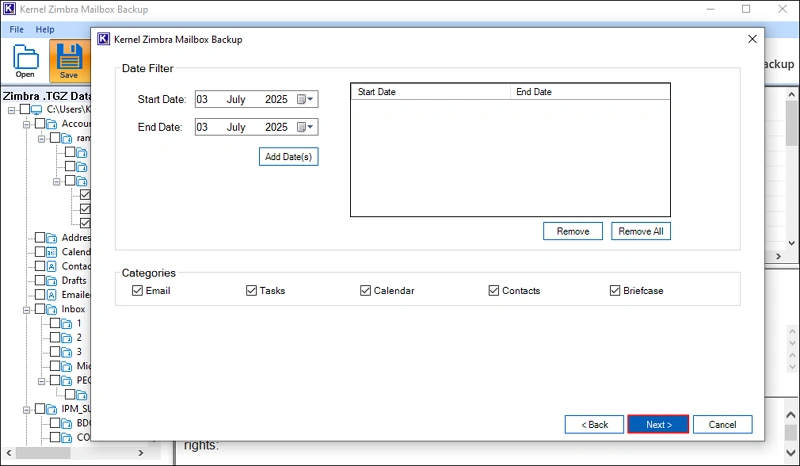
The filter step: start and end dates (several ranges can be added) and categories Email, Tasks, Calendar, Contacts and Briefcase.
Folder structure and metadata kept
Kernel Zimbra Mailbox Backup recreates the mailbox's folder hierarchy in the output and keeps each item's sender, recipients, dates and attachments. The output file takes the TGZ file's name, and the summary lists each source with its status when the job ends.
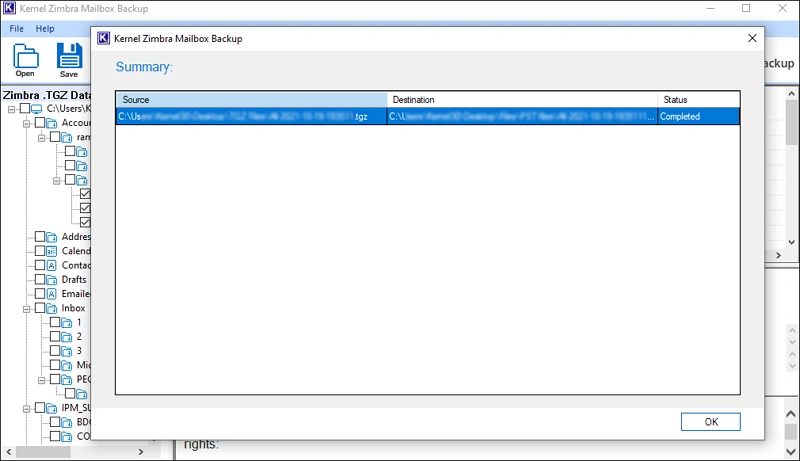
The summary at the end: the source TGZ, the destination PST file and the status Completed.
Benefits
- Your Zimbra mail stays readable after Zimbra is gone. PST and PDF open anywhere, years from now.
- A cheap way out of Zimbra. $69 for a lifetime Home license is less than most per-mailbox migration services.
- No server access needed. Anyone with the TGZ files can do the conversion, on any Windows PC.
- Selective archives. Date and category filters produce exactly the slice an auditor or lawyer asks for.
Real-World Uses
- Company moving to Microsoft 365: users export their mailboxes as TGZ, IT converts them to PST and imports them into Outlook.
- Hosting provider closing Zimbra: download every mailbox as TGZ before the deadline, then convert at leisure.
- Ex-employee archive: keep a departed staff member's mailbox as PST or PDF instead of paying for the account.
- Compliance request: export one year of mail to PDF with the date filter.
Who It's For, and Who Should Skip It
Good fit: Zimbra users and admins with TGZ exports who need PST, PDF or EML files; small IT providers converting mailboxes for several clients (Technician license).
Skip it if: you need to move live mailboxes server to server (a migration tool such as Kernel's Zimbra to Office 365 Migration does that without exports); you only have a handful of messages, which you can forward or save one by one; or you're on a Mac, as this is Windows-only.
Usage Guide
- In Zimbra, open Preferences, then Import/Export, choose the folders (Advanced Settings) and export the mailbox as a TGZ file.
- Install Kernel Zimbra Mailbox Backup on a Windows PC and launch it.
- Click Add File and select the TGZ file (or Add Extracted Folders for several exports), then click OK.
- Browse the folder tree and click messages to preview them; tick the folders you want and click Save.
- Pick the output type (and a PST split size if you like) and a destination folder.
- Set date ranges and item categories if needed, click Next, and wait for the summary to show Completed.
Tip: test with the trial on your real export
The trial converts 25 items from every folder, so you can check that the TGZ opens, that folders and attachments come through, and how non-English text and calendar items look in your chosen format before you buy.
Where it falls short
- Exports first. Every mailbox needs a TGZ export, which is slow for large mailboxes and depends on users or an admin doing it.
- Dated look. The interface is the classic Kernel layout: functional, small, and plain.
- No server-side features. No scheduling, no incremental runs and no restore, since it works on files.
- Little independent coverage. We found no third-party reviews of this specific tool, so rely on the trial.
What Users Say
On Kernel's product page
Kernel features two testimonials on the product page:
"My Zimbra mailbox size was massive, and I wanted a tool to back up all emails locally. This tool handled the backup job perfectly. The tool's performance is excellent. I also liked the date filter, which helped me extract emails year-wise and keep things organized." (Robert Smith, IT Admin)
"I needed to switch from Zimbra to Outlook and needed a Zimbra TGZ to PST converter. This tool converted my mailbox file to Outlook PST accurately. I had years of data in my mailbox, but the tool handled everything smoothly without any issues." (David Croft, Software Engineer)
These are testimonials chosen by the vendor, not independent reviews.
On Trustpilot (Kernel Data Recovery, all products)
Kernel Data Recovery scores 4.9 out of 5 from 167 reviews, almost all five stars, with about 2% one-star ratings. The reviews cover Kernel's whole range rather than one tool, and the most common theme is support:
"Exchange Suite allowed me to recover an offline mailbox. I reached out to support, and they provided immediate assistance. Highly recommended." (Jon, September 2026)
"Securely migrate slack direct message to Teams. Overall migration accuracy is good. Thanks for support" (Ashok Kumar, August 2026)
Another buyer, Tom (May 2026), wrote that he bought the wrong version for his needs and support moved him to the correct one, and a reviewer in April 2026 said the company's chat was "real, not automated".
The criticism worth knowing: an older one-star review of Kernel's Google backup tool said "It kind of worked great but then choked up with large mailboxes." (DL, July 2024)
The pattern: Kernel's buyers mostly praise responsive support and straightforward steps, and the date filter comes up in the vendor's own testimonials. The complaint to watch for across Kernel's mail tools is very large mailboxes. There's no independent review of this exact tool, so the 25-items-per-folder trial is the real check.
Comparisons
Kernel Zimbra Mailbox Backup vs Kernel Zimbra to Office 365 Migration
Both come from Kernel. Zimbra Mailbox Backup ($69 and up) converts TGZ export files on your PC into PST, PDF and other files. Zimbra to Office 365 Migration connects to the Zimbra server and moves live mailboxes straight into Microsoft 365, which suits a company-wide move but costs more. If you already have TGZ files, or just want an archive, Mailbox Backup is the cheaper fit.
Editions and Pricing
| License | Price | Use | Installations | Buy |
|---|
| Home | $69 one-time, lifetime | Personal use only | 5 machines | Buy Home |
| Corporate | $199 one-time, lifetime | One organization | 25 machines | Buy Corporate |
| Technician | $499 one-time, lifetime | Consultants and service providers, several organizations | Unlimited systems | Buy Technician |
Prices are from the order page on November 27, 2026. Kernel's store shows them as discounts from higher list prices ($119, $299 and $699). Each button orders that license; all three have the same features.
FAQs
Can Kernel Zimbra Mailbox Backup connect to my Zimbra server?
No. Kernel Zimbra Mailbox Backup works only with TGZ export files (zipped or extracted). Export the mailbox from Zimbra first, or use a migration tool that connects to the server.
Does Kernel Zimbra Mailbox Backup convert contacts and calendars too?
Yes. Kernel Zimbra Mailbox Backup converts email, contacts, calendar items, tasks and briefcase items, and its category filter lets you leave any of them out.
Can I convert many Zimbra mailboxes at once?
Yes, with a workaround: Kernel Zimbra Mailbox Backup loads one TGZ file at a time, but if you extract several TGZ files into one folder, "Add Extracted Folders" processes them together.
Do I need Outlook installed to create PST files?
No. Kernel Zimbra Mailbox Backup writes PST files itself; Outlook is only needed to open them afterwards.
Can I rename the output file?
Kernel Zimbra Mailbox Backup names the output after the TGZ file; rename it afterwards if you need to.
Is the Home license limited in time?
No. Kernel lists all three Zimbra Mailbox Backup licenses as lifetime, with a one-time payment and no renewal at checkout.
How do I put a TGZ backup back into Zimbra?
Kernel Zimbra Mailbox Backup doesn't restore to Zimbra. Use Zimbra's own Import/Export page or its command-line tools to import a TGZ file into a mailbox.
System Requirements
- Windows 11, 10, 8.1, 8, 7, Vista or XP; Windows Server 2022, 2019 and older
- 1 GB RAM minimum
- 512 MB disk space for the program, plus room for the output
- A Zimbra TGZ export file or extracted TGZ folders
Conclusion
Kernel Zimbra Mailbox Backup is worth it if you hold Zimbra TGZ exports and need them as PST, PDF or EML files: it opens them without unzipping, previews everything, filters by date and item type, and the $69 Home license is lifetime. The Corporate license makes sense for a company archiving staff mailboxes, the Technician license for IT providers. The reason to look elsewhere: it doesn't talk to a Zimbra server, so if you'd rather move live mailboxes than export them first, a server-to-server migration tool fits better. Run the trial on a real export first.
Download Free TrialBuy Home LicenseBuy Corporate LicenseBuy Technician License