Kernel Zimbra to Office 365 Migration: Move Zimbra TGZ Mailbox Exports into Microsoft 365
Kernel Zimbra to Office 365 Migration is a Windows tool from KernelApps that reads Zimbra mailbox exports (TGZ files or their extracted folders) and uploads the mail, contacts, calendars and tasks straight into Microsoft 365 mailboxes, archive mailboxes or public folders. The trial moves 25 items per folder; the Home license is $99, Corporate $199 and Technician $299, each a one-time payment.
It's for the small business or IT consultant leaving a Zimbra mail server (self-hosted or from a hosting company) for Microsoft 365, who has the Zimbra exports in hand and wants them in the new mailboxes with the folders intact.
Quick facts
- Price: Home $99; Corporate $199 (business use within one organization); Technician $299 (for service providers working for clients)
- Developer: KernelApps Private Limited (Kernel Data Recovery, nucleustechnologies.com), Noida, India
- Version: 25.1
- Runs on: Windows 11, 10, 8.1, 8 and 7, Windows Server 2022 to 2003
- Source: a Zimbra TGZ export, its extracted folders, or a single folder
- Destination: Microsoft 365 user mailbox, archive mailbox or public folder; or files (PST, EML, PDF, HTML and more)
- Free trial: migrates 25 items per folder
- Guarantee: 30-day money-back guarantee
- What we checked: the installer from Kernel's download link (kernel-zimbra-to-office-365.exe, "Kernel Zimbra to Office 365 Migration Setup", file version 25.1, 47 MB, validly signed, file dated December 2, 2025) and the prices on the order page (Home $99, Corporate $199, Technician $299, all one-time payments with no automatic renewal) on November 25, 2026. We didn't run a migration ourselves.
Before you buy
- It works from exports, not from a live Zimbra server. Each user's mailbox has to be exported to a TGZ file first (Zimbra web client: Preferences, Import/Export). If the server is already gone and you have no exports, this tool can't help.
- You'll need Microsoft 365 admin access. The connection asks for a Tenant ID, Client ID and secret value, which means registering an app in Microsoft Entra ID before the first run.
- Test with the trial. It moves 25 items from every folder into your real tenant, so you can check folders, dates and attachments before paying.
Download Free TrialBuy Home LicenseBuy Corporate LicenseBuy Technician License
Overview
Zimbra lets each user export their whole mailbox, or chosen folders, as a single .tgz archive. Microsoft 365 has no way to import that file. Kernel Zimbra to Office 365 Migration opens the TGZ directly (no need to unpack it), shows the mailbox in a familiar folder tree with a message preview, and then copies the items you pick into a mailbox in your Microsoft 365 tenant, keeping the folder hierarchy.
The same program can also save a Zimbra export as PST, EML, PDF or HTML files instead, which is useful for keeping an offline copy of a mailbox nobody needs live any more.
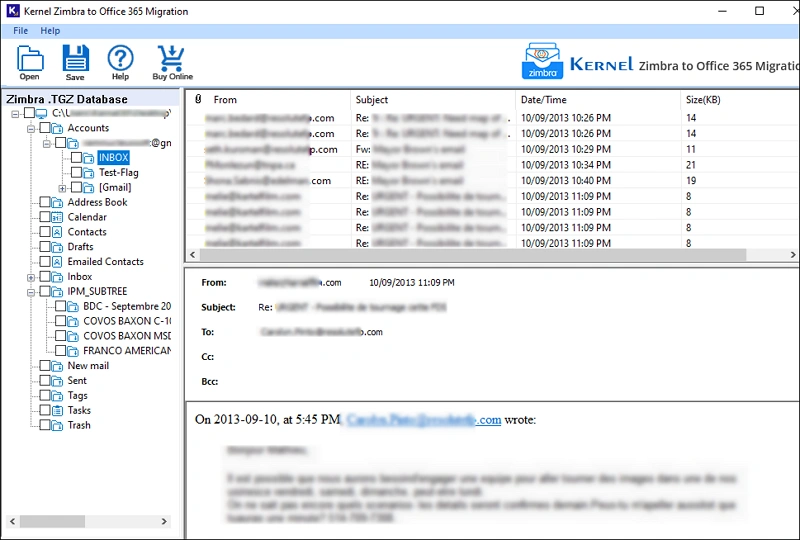
A Zimbra .TGZ database opened in the program: the mailbox folders (Inbox, Sent, Contacts, Calendar, Tasks and custom folders) on the left, the message list and the selected email's preview on the right.
Features
Direct upload into Microsoft 365
Kernel Zimbra to Office 365 Migration copies emails with attachments, contacts, calendars, tasks and Briefcase items from a Zimbra export into a Microsoft 365 user mailbox, archive mailbox or public folder. It connects with modern authentication through your tenant's app registration, and a mapping screen lets you choose the destination mailbox and type for each source.
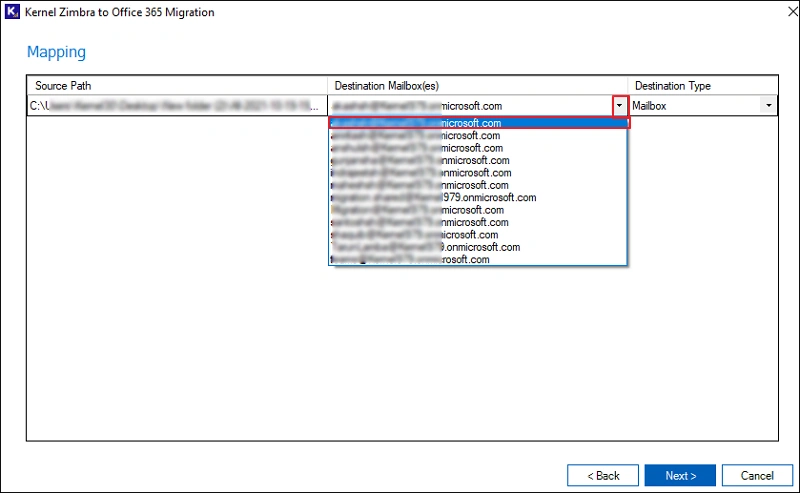
The Mapping step: the Zimbra source on the left, a drop-down of the tenant's Microsoft 365 mailboxes, and the destination type (Mailbox).
Three ways to add a mailbox
Kernel Zimbra to Office 365 Migration takes a TGZ file as it is, the folder you get by extracting it, or a single folder from inside it. For several users at once, Kernel's method is to extract all the TGZ files into one folder and add that folder, which migrates them in one batch.
Only the mail you want
Kernel Zimbra to Office 365 Migration filters by item type (email, calendar, contacts, tasks), by folder and by date range, so you can move just the last year of email and leave old archives behind.
Save to files instead
Kernel Zimbra to Office 365 Migration has a second destination, Backup, that writes the Zimbra data to PST, PDF, EML, MSG and other formats with the original formatting kept.
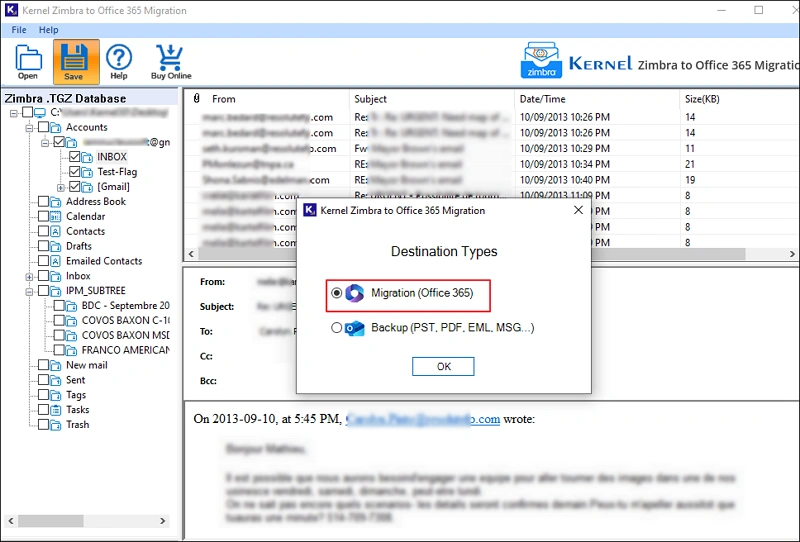
After choosing folders and clicking Save: Migration (Office 365) or Backup to PST, PDF, EML, MSG and other files.
Benefits
- No IMAP sync to babysit. It reads the exports offline, so it doesn't depend on the old Zimbra server staying up or on per-user passwords.
- Folders arrive as folders. The hierarchy, including custom subfolders, carries over to the Microsoft 365 mailbox.
- One tool, two jobs. Migrate the active users to Microsoft 365 and save the departed users' mailboxes as PST archives with the same program.
Real-World Uses
- A small office leaving hosted Zimbra. Each user exports a TGZ; the admin migrates them into the new Microsoft 365 mailboxes in one batch.
- Selective move. Only the last two years of email go to Microsoft 365, keeping the new mailboxes lean.
- Archiving former staff. Mailboxes of people who've left are saved to PST rather than given a paid Microsoft 365 license.
- An IT consultant's migration kit. The Technician license covers jobs done for several client companies.
Who It's For, and Who Should Skip It
Kernel Zimbra to Office 365 Migration suits small and mid-size organizations and IT consultants moving from Zimbra to Microsoft 365 who can produce TGZ exports and have admin rights in the tenant.
Skip it if the Zimbra server is still running and you'd rather copy mail live: an IMAP-to-Microsoft 365 migration (Microsoft's own IMAP migration in Exchange admin, or Kernel's IMAP tools) works without exports. Skip it if you're moving to Google Workspace or another IMAP host rather than Microsoft 365, and if you're a single user without admin access to the tenant.
Usage Guide
- Export each Zimbra mailbox to a TGZ file (Zimbra web client: Preferences, Import/Export, Advanced Settings).
- Download the installer (47 MB), install it and launch Kernel Zimbra to Office 365 Migration.
- Click Open and add the TGZ file, its extracted folder or a single folder; preview the mailbox.
- Tick the folders to migrate and click Save; choose Migration (Office 365).
- Enter the Tenant ID, Client ID and secret value of your Microsoft 365 app registration, then map each source to a destination mailbox and type.
- Apply the item-type and date filters and start the migration; check the completion report.
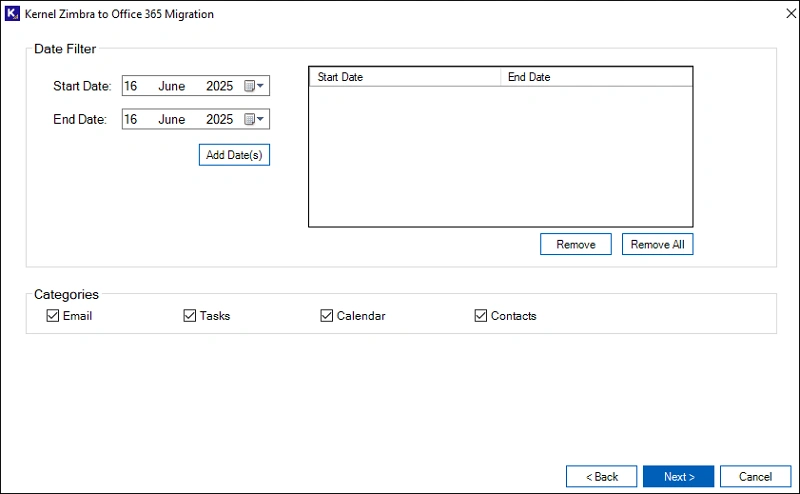
The filter step before migration: add one or more date ranges and tick the categories to move (Email, Tasks, Calendar, Contacts).
Where it falls short
- Exports first, always. Every user's TGZ has to be made by hand in Zimbra, which is the slowest part of a migration with many users.
- App registration needed. Non-technical buyers will need help with the Microsoft Entra ID app and its permissions.
- Microsoft 365 only. It doesn't migrate to Exchange on-premises, Google Workspace or another IMAP server; the other destination is files.
- License details are thin. Kernel's buy page describes the three licenses by audience (home, one organization, service providers) without a mailbox count.
What Users Say
Testimonials on Kernel's product page
- "I didn't want to migrate everything, just emails from the past year. The option to add a start & end date made that super easy." (Amanda J. Davis, Australia)
- "I'm not very technical, so I was worried about doing the migration myself. But the tool was super simple. The steps were clear, and every task was easy to follow." (Mary K. Kurz, USA)
- "I had a large TGZ file and thought it would take hours, but it was done way faster than expected. There were no errors or missing emails either." (Kurlo, USA)
On Trustpilot (Kernel Data Recovery, all products)
Kernel Data Recovery scores 4.9 from 167 reviews, 94% five stars and about 2% one star; Trustpilot notes the company hasn't recently invited customers to review. Migration buyers often mention the hands-on help:
- Mukesh Sharma (April 2026) wrote that he hit several errors with a Kernel migration product and that support stayed with him on a Zoom call until the migration started.
- "The tools are straightforward to use and cover a wide range of data migration and recovery needs." (Vasu Giri, May 2026)
- "It kind of worked great but then choked up with large mailboxes." (DL, July 2024, 1 star, about Kernel's G Suite backup tool)
The vendor testimonials stress ease and the date filter. Trustpilot shows that Kernel's support will walk you through a migration live, and one older complaint warns about very large mailboxes. There's little independent coverage of this specific tool, so the trial run into your tenant is the real test.
Comparisons
Kernel Zimbra to Office 365 Migration vs Microsoft's IMAP migration
Microsoft 365's built-in IMAP migration is free and copies mail from a running Zimbra server, but it moves email only (no contacts or calendars) and needs each user's IMAP credentials. Kernel's tool works offline from exports and moves contacts, calendars and tasks too.
Kernel Zimbra to Office 365 Migration vs Kernel Email Migrator
Kernel Email Migrator moves PST, OST, MSG, EML and IMAP accounts into Microsoft 365 but doesn't read Zimbra TGZ exports. For Zimbra, this tool is the direct route.
Editions and Pricing
| License | Price on the order page | Meant for | Buy |
|---|
| Home | $99, one-time | Home users | Buy Home |
| Corporate | $199, one-time | Business use within one organization | Buy Corporate |
| Technician | $299, one-time | Service providers migrating for clients | Buy Technician |
All licenses have the full feature set; the free trial differs only in the 25-items-per-folder limit.
FAQs
How do I get a TGZ file out of Zimbra?
In the Zimbra web client, open Preferences, choose Import/Export, open Advanced Settings, pick the folders and export them; Zimbra saves a .tgz file that Kernel Zimbra to Office 365 Migration opens directly.
Can Kernel Zimbra to Office 365 Migration move several users at once?
Yes. Kernel Zimbra to Office 365 Migration migrates several mailboxes in one batch when you extract their TGZ files into a single folder and add that folder.
Does Kernel Zimbra to Office 365 Migration move contacts and calendars?
Yes. Kernel Zimbra to Office 365 Migration carries emails with attachments, contacts, calendars, tasks and Briefcase items, and you can select item types individually.
Can it migrate into an archive mailbox or public folder?
Yes. Kernel Zimbra to Office 365 Migration's mapping step offers a user mailbox, an archive mailbox or a public folder as the destination type.
Does Kernel Zimbra to Office 365 Migration work with Exchange on-premises?
No. Kernel Zimbra to Office 365 Migration's migration target is Microsoft 365 (Exchange Online); for on-premises Exchange you'd save to PST and import that.
What does the trial limit?
The Kernel Zimbra to Office 365 Migration trial migrates 25 items per folder; filters, preview and the connection all work.
Can I get a refund?
KernelApps offers a 30-day money-back guarantee.
System Requirements
- Windows 11, 10, 8.1, 8 or 7, or Windows Server 2022, 2019, 2016, 2012, 2008 R2, 2008, 2003 R2 or 2003
- Intel Pentium-compatible (x86 or x64) processor
- 128 MB RAM minimum
- 500 MB of free disk space
- A Microsoft 365 tenant with an app registration (Tenant ID, Client ID and secret value)
Conclusion
Kernel Zimbra to Office 365 Migration is worth $99 to $299 if you're moving Zimbra users to Microsoft 365 and can get their TGZ exports: it brings mail, contacts and calendars across offline with the folders intact, and filters what goes. The main reason not to buy is when the Zimbra server is still up and email alone is enough, because Microsoft's free IMAP migration covers that. Run the trial into a test mailbox, then pick Corporate for your own company or Technician for client work.
Download Free TrialBuy Home LicenseBuy Corporate LicenseBuy Technician License