Kernel MSG Viewer Pro: Open Outlook MSG Files Without Outlook and Save Them as PDF
Kernel MSG Viewer Pro is a Windows tool from KernelApps that opens saved Outlook .msg emails without Outlook and converts them in bulk to PDF, EML, MBOX, PST, Word or HTML, with file-naming rules and attachment extraction built in. The free edition views MSG files and exports 25 items per folder; the Personal license is $39 and Corporate $199, each a one-time payment.
It's for the person who's been sent a stack of .msg files and has no Outlook, and for the legal, HR or admin worker who needs hundreds of saved emails turned into neatly named PDFs.
Quick facts
- Price: free viewer; Personal $39; Corporate $199 (one-time payments)
- Developer: KernelApps Private Limited (Kernel Data Recovery, nucleustechnologies.com), Noida, India
- Version: 26.0
- Runs on: Windows 11, 10, 8.1, 8 and 7, Windows Server 2022, 2019 and older; Outlook is not required
- Writes: PDF, PST, EML, MSG, MBOX, DOC, DOCX, HTML and MHT; attachments to a separate folder; email addresses to CSV, XLSX or Outlook CSV
- Free edition: views any number of MSG files and exports 25 items per folder
- Guarantee: 30-day money-back guarantee
- What we checked: the installer from Kernel's download link (kernel-msg-viewer.exe, "Kernel MSG Viewer Setup", file version 26.0, 45 MB, validly signed, file dated March 11, 2026) and the prices at checkout (Personal $39 and Corporate $199, both one-time payments with no automatic renewal) on November 25, 2026. We didn't run a conversion ourselves.
Before you buy
- Try the free viewer first. The download is the free Kernel MSG Viewer; buying Pro turns it into the full version. If all you need is to read a few MSG files, the free edition already does that.
- Pro is about bulk output. The paid licenses remove the 25-items-per-folder export limit and the limit on attachment extraction.
- It reads MSG files, not mailboxes. For a whole Outlook PST, Kernel's PST Converter Pro is the right tool.
Download Free VersionBuy Personal LicenseBuy Corporate License
Overview
An .msg file is one Outlook email saved on its own, which is what you get when someone drags a message out of Outlook onto the desktop or attaches an email to another email. On a PC without Outlook, Windows doesn't know what to do with it. Kernel MSG Viewer Pro opens a folder of them in an Outlook-like three-pane window, so you can read each message with its headers and attachments, and then exports the lot in the format you need.
Its strongest use is PDF: it turns a folder of emails into one PDF per message, named by date, sender and subject in whatever order you pick, with the attachments saved alongside. That's exactly the kind of tidy, non-editable record lawyers, auditors and HR teams ask for.
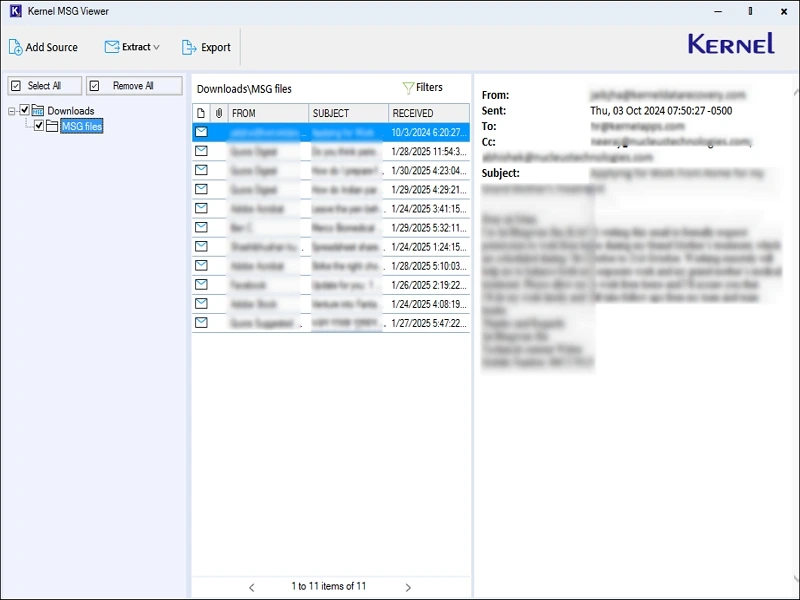
The main window: a Downloads\MSG files folder with 11 messages listed by sender, subject and date, and the selected email in the preview pane (blurred in Kernel's screenshot).
Features
MSG to PDF with your own file names
Kernel MSG Viewer Pro exports to PDF and eight other formats (PST, EML, MSG, MBOX, DOCX, DOC, HTML, MHT). For each output file you choose a naming convention such as Date-From-Subject or Subject-Date, so a folder of a thousand PDFs sorts itself.
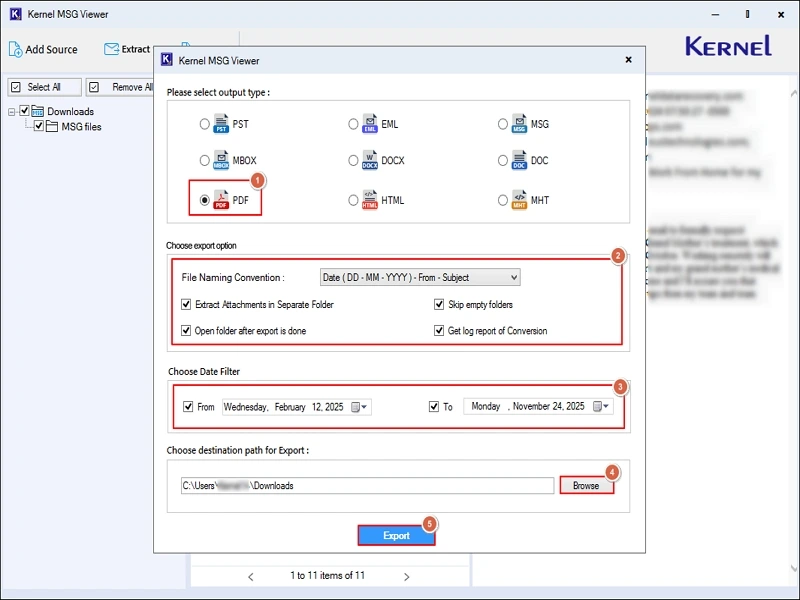
The export dialog: PDF selected, the "Date (DD-MM-YYYY) - From - Subject" naming convention, attachments saved to a separate folder, a From and To date filter, and the destination path.
Finds the MSG files for you
Kernel MSG Viewer Pro scans a chosen folder and loads every MSG file it finds, so you don't have to select them by hand, and Kernel sets no limit on their number or size.
Filters to pick the right emails
Kernel MSG Viewer Pro sorts and filters the loaded messages by From, To, CC, BCC, subject, body, read status, attachments and date, and the export itself takes a date range and can skip empty folders.
Attachments and addresses
Kernel MSG Viewer Pro saves attachments in a separate folder (in the free edition, 25 items per folder), and its Extract menu collects the email addresses from the messages into CSV, XLSX or Outlook CSV.
A log for every run
Kernel MSG Viewer Pro can write a conversion log and open the output folder when it finishes, so you can check a large job instead of trusting it blindly.
Benefits
- No Outlook, no problem. Read and convert MSG files on any Windows PC.
- Evidence-ready PDFs. Consistent names and a non-editable format suit legal, compliance and HR records.
- A free tier that's genuinely useful. Viewing costs nothing; you pay only for bulk export.
Real-World Uses
- A legal or HR file: turn a folder of saved emails into date-named PDFs with attachments beside them.
- Emails sent as attachments: open .msg files a colleague forwarded, on a PC without Outlook.
- Moving saved emails to Thunderbird: export MSG files to EML or MBOX.
- Collecting contacts: pull every address from a set of saved emails into a spreadsheet.
Who It's For, and Who Should Skip It
Kernel MSG Viewer Pro suits Windows users who receive or keep emails as separate .msg files and need to read them or file them as PDFs, especially in law, HR, compliance and administration.
Skip Pro if you only need to read the occasional MSG file: the free viewer does that. Skip it if you have Outlook and a few emails to save, since Outlook prints to PDF. And for whole mailboxes in PST or OST files, use a PST or OST converter instead.
Usage Guide
- Download the installer (45 MB), install it and launch Kernel MSG Viewer.
- Click Add Source and choose the folder with your MSG files; the program finds them.
- Click a message to preview it; use Filters to narrow the list.
- Click Export, pick PDF (or another format), the naming convention and the options.
- Set the date range if needed, choose the destination, and click Export.
- For unlimited export, buy a license and register the program with the key Kernel emails you.
Where it falls short
- Little said about the licenses. Kernel's page compares Free, Personal and Corporate by features but doesn't spell out a term or machine count for the paid licenses; ask Kernel's sales team if that matters to you.
- Corporate costs five times Personal, and the feature chart doesn't make the difference obvious.
- Thin outside coverage. Apart from Kernel's own testimonial, there are few published reviews of this tool.
What Users Say
On Kernel's product page
"I needed to access the legacy MSG emails without Outlook & this MSG to PDF converter delivered. It retained all the metadata & folder structure intact when converting to PDF. The Interface is clean, simple & and easy to follow." (Karen David, Legal Consultant)
On Trustpilot (Kernel Data Recovery, all products)
Kernel Data Recovery scores 4.9 from 167 reviews, 94% of them five stars and about 2% one star. The reviews are short and mostly praise support:
- "Does exactly what is says, easy to use, and excellent support." (Andrew Murdoch, February 2026)
- "I purchased the wrong version for my needs and the helped me transfer over to the correct version" (Tom, May 2026)
- "The tools are straightforward to use and cover a wide range of data migration and recovery needs." (Vasu Giri, May 2026)
Kernel's support has a strong reputation; reviews of the MSG Viewer itself are few, so the free edition is the best way to judge it.
Comparisons
Free Kernel MSG Viewer vs MSG Viewer Pro
Both are the same program. The free edition opens, previews and filters MSG files without limits and exports or extracts 25 items per folder; Personal and Corporate remove those caps.
Kernel MSG Viewer Pro vs Outlook
Outlook opens MSG files and prints them to PDF one at a time, for free if you already have it. It can't batch-convert a folder, name PDFs by rule, or export to MBOX or EML; MSG Viewer Pro does all of that without Outlook installed.
Editions and Pricing
| Edition | Price at checkout | Export and extraction | Buy |
|---|
| Free MSG Viewer | $0 | 25 items per folder | Free download |
| Personal | $39, one-time | Unlimited | Buy Personal |
| Corporate | $199, one-time | Unlimited, for business use | Buy Corporate |
FAQs
Is Kernel MSG Viewer really free?
Yes. Kernel MSG Viewer opens and previews MSG files for free with no limit on their number; only exporting and attachment extraction stop at 25 items per folder until you buy Pro.
Do I need Outlook to use Kernel MSG Viewer Pro?
No. Kernel MSG Viewer Pro reads MSG files on its own and runs on a Windows PC without Outlook or Microsoft Office.
Can Kernel MSG Viewer Pro save each email's attachments too?
Yes. Kernel MSG Viewer Pro has an option to save attachments in a separate folder next to the PDFs, and an Extract menu that saves attachments on their own.
Can I convert only emails from a certain period?
Yes. Kernel MSG Viewer Pro's export screen has From and To date fields, and its filters narrow the list by sender, recipient, subject and other fields first.
Does it run on a Mac?
No. Kernel MSG Viewer Pro is a Windows program.
Can I get my money back?
KernelApps offers a 30-day money-back guarantee, though the free edition lets you test the export on 25 items per folder before paying.
System Requirements
- Windows 11, 10, 8.1, 8 or 7, or Windows Server 2022, 2019 and older
- Intel Pentium-compatible (x86 or x64) processor
- 1 GB RAM minimum
- 512 MB of free disk space
- No Outlook required
Conclusion
Kernel MSG Viewer Pro is worth $39 if you regularly turn saved Outlook emails into PDFs or other formats: automatic file discovery, rule-based PDF names and attachments in their own folder make a tedious job quick, and none of it needs Outlook. If you just need to read a few .msg files, don't buy anything; the free viewer covers that. The main reason to hesitate is how little Kernel says about the paid licenses' terms, so start with the free edition and upgrade once you know you need bulk export.
Download Free VersionBuy Personal LicenseBuy Corporate License