Kernel Document Converter: Batch-Convert Word, Excel, PDF, XPS and EPUB Files Offline
Kernel Document Converter is a Windows desktop tool from KernelApps that converts whole folders of documents between more than 20 formats (DOCX, XLSX, ODS, PPTX, PDF, XPS, EPUB, HTML and images) without uploading anything. The Home license costs $29 a year and covers 250 documents on 2 PCs; unlimited Corporate ($99 a year) and Technician ($299 lifetime) licenses are also sold.
It's for the office worker or IT admin who has a pile of old XPS files, OpenDocument spreadsheets or Word files to turn into PDF (or the other way round) and doesn't want to paste confidential documents into an online converter one at a time.
Quick facts
- Price: Home $29 a year (250 documents, 2 PCs); Corporate $99 a year (unlimited documents); Technician $299 lifetime
- Developer: KernelApps Private Limited (Kernel Data Recovery, nucleustechnologies.com), Noida, India
- Version: 26.1
- Runs on: Windows 11, 10, 8.1, 8 and 7, Windows Server 2022, 2019 and older
- Input and output: DOC, DOCX, RTF, TXT, XLS, XLSX, ODS, CSV, PPT, PPTX, PDF, XPS, OXPS, JPEG, PNG, BMP, TIFF, GIF, EMF, SVG, EPUB, HTML, MHTML, XHTML
- Free trial: converts the first 50 files and extracts email addresses from the first 50
- Works offline: no internet connection needed to convert
- Guarantee: 30-day money-back guarantee
- What we checked: the installer from Kernel's download link (kernel-document-converter.exe, file version 26.1, 182 MB, validly signed, file dated May 1, 2026), the license terms on Kernel's order page, and the prices at checkout (Home $29 and Corporate $99 with a 12-month renewal, Technician $299 lifetime, no Black Friday discount) on November 24, 2026. We didn't run a conversion ourselves.
Before you buy
- The Home license counts documents. It converts 250 documents in one year on up to 2 PCs, and the program shows how many you've used and how many are left. If you have a big archive, the Corporate license (unlimited, 1 year) or the Technician license (unlimited, lifetime) is the better fit.
- Home and Corporate renew yearly. Both are 12-month licenses that renew automatically at checkout; only the Technician license is a one-time purchase.
- Try your own files first. The trial converts 50 files with no other limit, so you can check how your layouts, tables and fonts come through before you pay.
- It's a 182 MB download, much larger than Kernel's other converters, so allow for it on a slow connection.
Download Free TrialBuy Home LicenseBuy Corporate LicenseBuy Technician License
Overview
Most document converters do one job: PDF to Word, or Word to PDF. Kernel Document Converter takes the opposite approach and treats every supported format as both input and output, so the same program turns XPS into PDF, ODS into XLSX, DOCX into EPUB or PPTX into images. You load files or whole folders on the left, preview any of them on the right, then pick one target format for the batch.
Two extras set it apart from a plain converter: it pulls every email address out of the documents into a spreadsheet or text file, and it keeps a running count of the documents your license has used, with a list of each converted file.
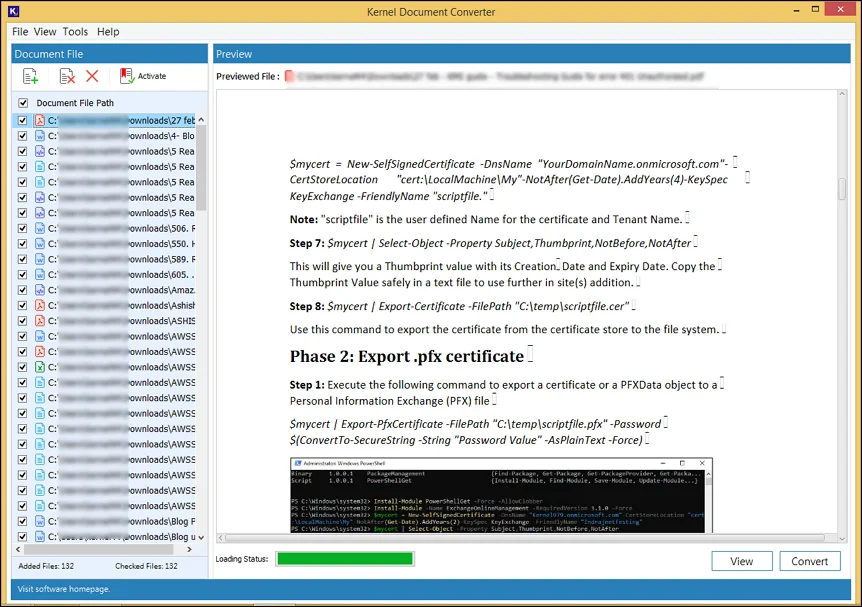
The main window: ten DOCX, XPS and ODS files queued on the left, a page preview with zoom and search on the right, and the Extract Email Address and Convert buttons.
Features
One batch, eight output families
Kernel Document Converter converts a whole batch to document formats (DOCX, DOC, RTF, TXT), spreadsheets (XLSX, XLS, ODS, CSV), presentations (PPTX, PPT), PDF, XPS, images (JPEG, PNG, BMP, TIFF), EPUB e-books or web pages (HTML, MHTML). You choose the destination folder, the format and an optional page filter, and you can keep the source folder hierarchy in the output.
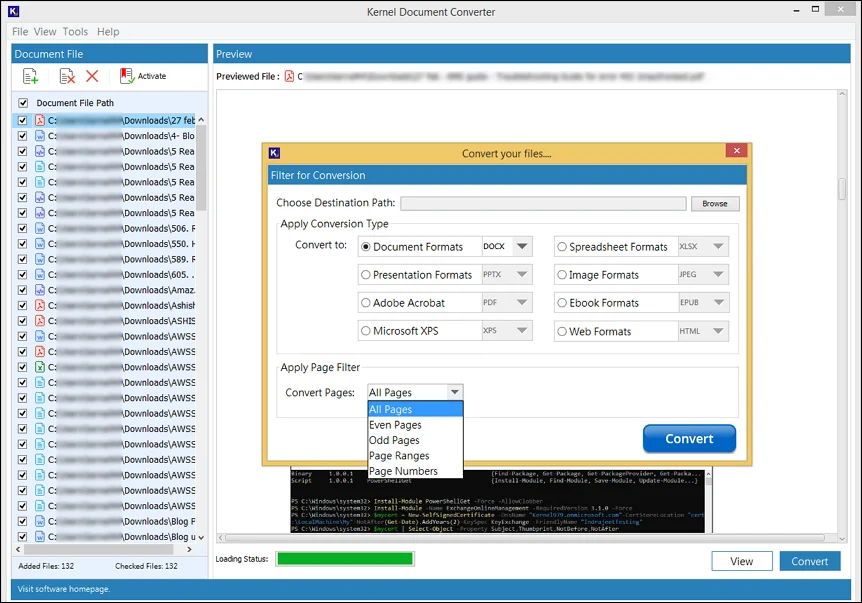
The Filter for Conversion dialog: destination path, eight format families with a drop-down each, the page filter and "Save data within hierarchy".
Page filters for long documents
Kernel Document Converter converts all pages, only odd or even pages, or a page range or list of page numbers, which helps when you need a chapter of a manual as images or the first pages of a report as PDF.
Password-protected files and an error log
Kernel Document Converter detects locked documents and asks for each password before converting them; it doesn't crack passwords. With "Get Error Log Report" turned on in the Tools menu, it records every file that failed, for example because of corruption or a wrong password, so a large batch doesn't fail silently.
Email address extraction
Kernel Document Converter extracts all email addresses, or only unique ones, from the loaded documents and saves them as XLSX, XLS, CSV or TXT. It's handy for building a contact list from old correspondence or invoices you already hold; use it only on documents you have the right to process.
License tracking inside the program
Kernel Document Converter shows the registered email, activation time, license duration and type, and how many documents have been used and remain, with a list of every file counted. On the document-limited Home license this tells you exactly when you're about to run out.
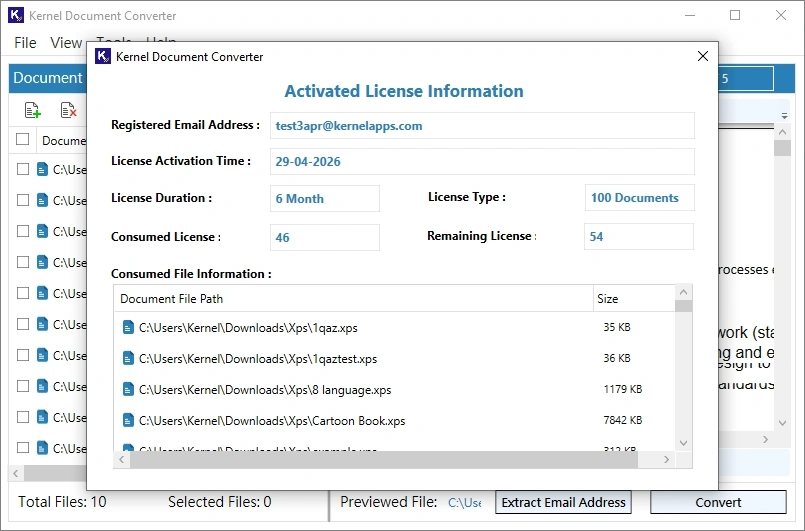
The Activated License Information window on a test license: 46 of 100 documents used, 54 remaining, and the list of converted files.
Real-World Uses
- Retiring XPS and OXPS files: turn years of Windows "Microsoft XPS Document Writer" printouts into PDF in one run.
- Moving from LibreOffice to Microsoft 365: convert a folder of ODS spreadsheets to XLSX and keep the subfolder structure.
- Publishing a handbook as an e-book: export DOCX chapters to EPUB, or to HTML for an intranet.
- Slides as images: render PPTX decks to PNG or JPEG for a website or a training portal.
Who It's For, and Who Should Skip It
Buy it if you regularly convert mixed batches of office documents on Windows and want to keep them on your own PC. The Corporate license makes sense for a team, and the Technician license for consultants who convert clients' files.
Skip it if you convert a handful of files a year (Microsoft Word and LibreOffice already save to PDF, and LibreOffice opens ODS, XPS is readable in Windows' XPS Viewer), if you need to edit PDFs rather than convert them, or if you're on a Mac. Also note that the $29 Home plan's 250-document cap goes quickly with large archives.
Usage Guide
- Download and run the installer, then launch Kernel Document Converter.
- Click the add-file icon and choose individual documents or a folder. The left pane lists each file with a check box.
- Click a file to preview it; use zoom, page navigation and the search box to check it's the right one.
- Click Convert, choose the destination path, pick the format family and the exact format, and set the page filter.
- Tick Save data within hierarchy to mirror your folder structure, then click Start.
- To collect email addresses instead, click Extract Email Address and choose XLSX, XLS, CSV or TXT.
Where it falls short
- Format fidelity varies by direction. Converting a PDF or XPS back into an editable DOCX or XLSX is inherently harder than the other way round; complex layouts may need tidying afterwards. Test those directions in the trial.
- Windows only, with no command-line or scheduled mode listed, so it isn't built for unattended server conversion.
- No independent reviews yet. We found no hands-on tests outside Kernel's own pages.
What Users Say
KernelApps on Trustpilot (4.9 out of 5, 167 reviews)
We found no independent reviews of Kernel Document Converter itself. KernelApps' Trustpilot page covers all its products, mostly the email converters, and its reviewers mainly praise support:
- "I purchased the wrong version for my needs and the helped me transfer over to the correct version" (Tom, May 2026, "Excellent customer support")
- "The Kernel team was extremely helpful in resolving an issue I had with OST to PST conversion." (Drew J, March 2026)
- "Kernel PST Converter Pro is a fabulous product and makes converting Outlook emails to PDF very easy." (R Duncan, January 2026)
Trustpilot notes KernelApps hasn't invited reviews recently. For this converter, the 50-file trial is the best test.
Editions and Pricing
| License | Price | Documents and PCs | Term | Buy |
|---|
| Free trial | $0 | First 50 files | - | - |
| Home | $29 | 250 documents, 2 PCs | 1 year, renews yearly | Buy Home |
| Corporate | $99 | Unlimited documents, up to 250 PCs | 1 year, renews yearly | Buy Corporate |
| Technician | $299 | Unlimited documents and PCs, for serving clients | Lifetime | Buy Technician |
FAQs
Does Kernel Document Converter upload my files anywhere?
No. Kernel Document Converter is a desktop program that converts files on your PC and works without an internet connection, which matters for contracts, HR files and other confidential documents.
What happens when the Home license reaches 250 documents?
Kernel Document Converter tracks the documents used against the license; once the 250 are used, you need a new or larger license to convert more. The Corporate and Technician licenses have no document limit.
Can Kernel Document Converter convert XPS to PDF?
Yes. Kernel Document Converter reads XPS and OXPS files and converts them to PDF, DOCX, images or the other supported formats, in batches.
Can it open password-protected Word or PDF files without the password?
No. Kernel Document Converter asks for the password of each protected file and converts it once unlocked; it isn't a password-removal tool.
Is there a Mac version of Kernel Document Converter?
No. Kernel Document Converter runs on Windows desktop and server versions only.
How is the license delivered?
Kernel emails the download link and activation key automatically, usually within 15 minutes of purchase. Companies and schools can also pay by purchase order at checkout.
System Requirements
- Windows 11, 10, 8.1, 8 and 7; Windows Server 2022, 2019 and older
- Intel Pentium-compatible (x86, x64) processor
- 64 MB RAM minimum, more recommended
- 300 MB of free disk space
Conclusion
Kernel Document Converter is worth it if you convert mixed batches of office files on Windows and want them to stay on your PC: one tool covers XPS, ODS, EPUB, Office formats and PDF, with page filters, password support and an error log. Watch the license terms: the $29 Home plan is a yearly subscription capped at 250 documents, so for real archives the $99 Corporate or $299 lifetime Technician license is the honest price. Run the 50-file trial on your hardest documents first.
Download Free TrialBuy Home LicenseBuy Corporate LicenseBuy Technician License