Kernel PST to MBOX Converter: Move Outlook PST Files to Thunderbird, Apple Mail and Other MBOX Clients
Kernel PST to MBOX Converter is a Windows tool from KernelApps that turns Outlook PST files into MBOX files for Thunderbird, Apple Mail and other MBOX-based mail programs, without Outlook installed. The trial converts 25 items per folder; the Home license is $49, Corporate $199 and Technician $299, each a one-time payment.
It's for the person leaving Outlook who has years of mail locked in a .pst file, and for the IT technician who has to hand a stack of PST archives over to users on Thunderbird or a Mac.
Quick facts
- Price: Home $49 (1 machine, 1 year); Corporate $199 (10 machines, 2 years); Technician $299 (unlimited machines, lifetime)
- Developer: KernelApps Private Limited (Kernel Data Recovery, nucleustechnologies.com), Noida, India
- Version: 25.1
- Runs on: Windows 11, 10, 8.1, 8 and 7, Windows Server 2022, 2019 and older; Outlook is not required
- Reads: ANSI and Unicode PST files from Outlook 97 through Office 365, in bulk
- Writes: MBOX, plus PST, EML, MSG, DOCX, DOC, PDF, HTML and MHT; email addresses to XLSX, CSV or Outlook CSV
- Free trial: converts 25 items per folder
- Guarantee: 30-day money-back guarantee
- What we checked: the installer from Kernel's download link (kernel-pst-to-mbox-converter.exe, "Kernel PST to MBOX Converter Setup", file version 25.1, 21 MB, validly signed, file dated December 12, 2025) and the prices on the order page (Home $49, Corporate $199, Technician $299, all one-time payments with no automatic renewal) on November 25, 2026. We didn't run a conversion ourselves.
Before you buy
- "1 year" on the Home license is the license validity Kernel lists, not a subscription. The order page charges once and sets up no renewal. If you want the tool to keep working for good, the Technician license is the one Kernel lists as lifetime.
- Run the trial on your own PST. It converts 25 items from every folder, which is enough to see whether the folders, dates and attachments come through in Thunderbird or Apple Mail.
- It converts files, not live accounts. It reads PST files on disk; it doesn't log into Outlook.com, Exchange or Gmail.
Download Free TrialBuy Home LicenseBuy Corporate LicenseBuy Technician License
Overview
Outlook keeps your mail in a single PST file, and almost nothing except Outlook can read it. Thunderbird, Apple Mail, SeaMonkey, Postbox and many others use MBOX instead: one plain file per folder. Kernel PST to MBOX Converter sits between the two. You add one or more PST files, it shows the folders and messages in an Outlook-style window, and it writes each folder out as an MBOX file you can import into the new mail program.
Because it works from the file alone, it also helps when Outlook is gone: an old PC's PST copied to a new laptop, or a backup archive nobody can open any more.
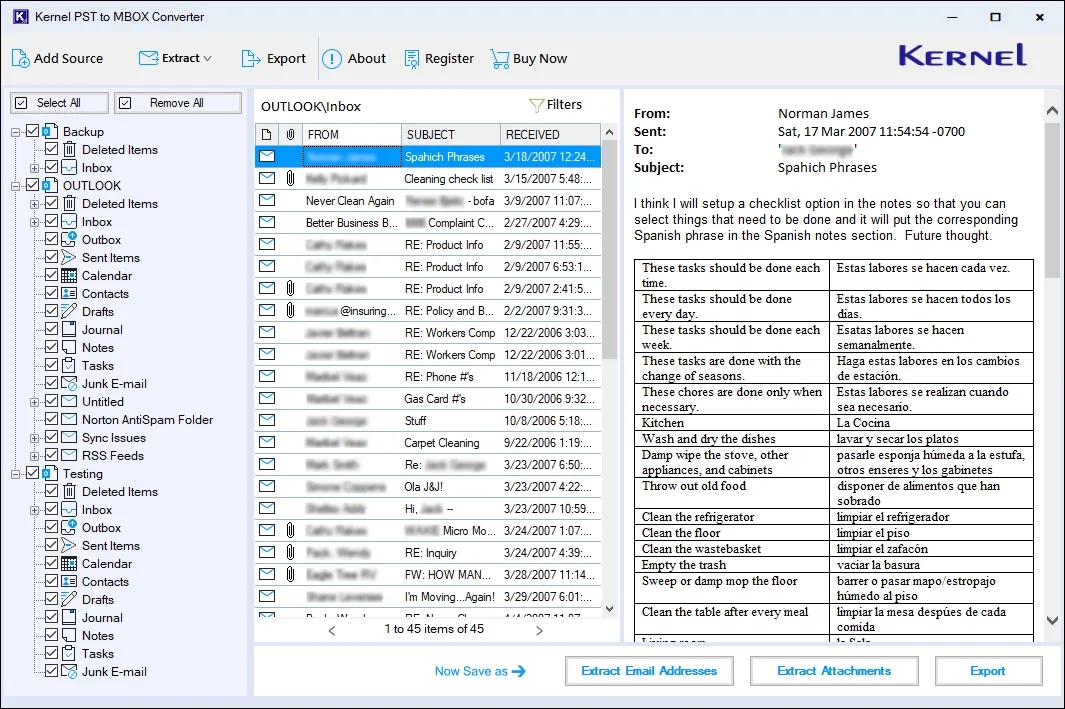
The main window after adding PST files: three PST files' folder trees on the left, the Inbox list in the middle and the selected email in the preview pane, with Extract Email Addresses, Extract Attachments and Export buttons at the bottom.
Features
Many PST files to MBOX in one run
Kernel PST to MBOX Converter takes several PST files at once and converts each into its own set of MBOX files, keeping the folder hierarchy, the email properties (signatures, hyperlinks, metadata) and the attachments. Kernel states no size limit, and it reads both the old ANSI and the newer Unicode PST format. A search option finds PST files in a chosen folder or across the whole PC, so you don't have to dig through AppData yourself.
Preview and filter before you convert
Kernel PST to MBOX Converter shows every folder, email, contact, calendar item and attachment in a preview pane before anything is written. Its filters narrow the list by From, To, CC, BCC, subject, words in the body, read or unread, with or without attachments, and date range, so you can export only one project's mail or the last five years.
Eight other output formats
Kernel PST to MBOX Converter isn't limited to MBOX. The same export screen saves PST data as PST, EML, MSG, DOCX, DOC, PDF, HTML or MHT, with options to skip empty folders, open the output folder when it's done and write a log of the conversion.
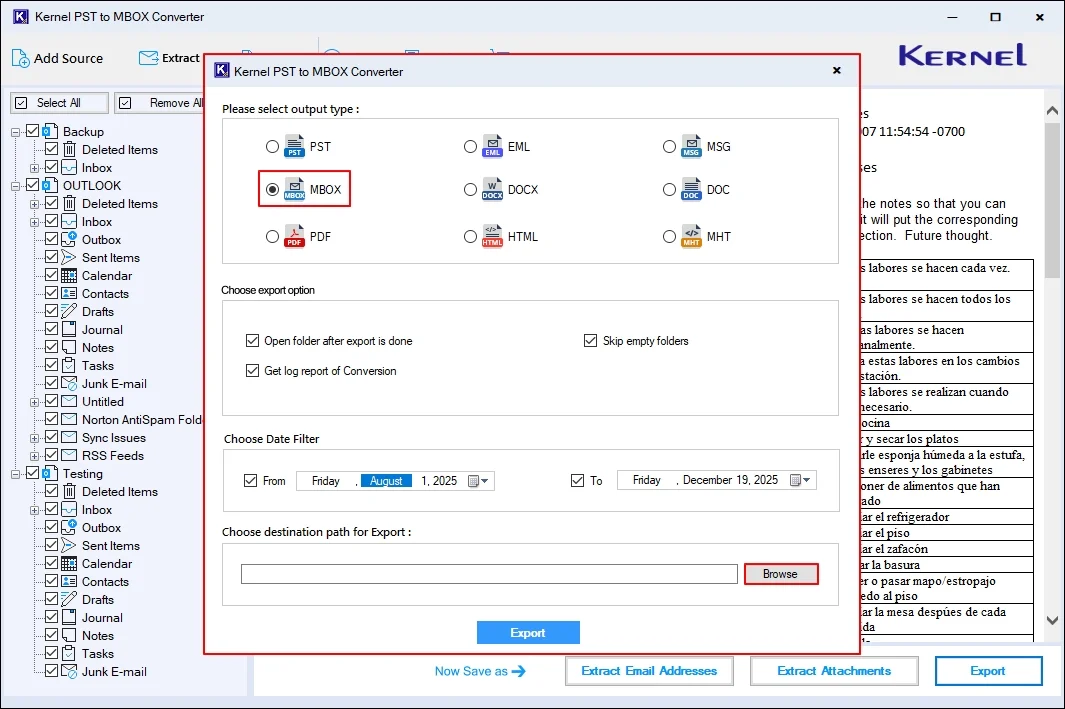
The export dialog: nine output types (PST, EML, MSG, MBOX, DOCX, DOC, PDF, HTML, MHT), the open-folder, skip-empty-folders and log options, a From/To date filter and the destination path.
Email addresses and attachments pulled out separately
Kernel PST to MBOX Converter can extract every email address from the messages, contacts, calendar, tasks and journal of a PST into XLSX, CSV or Outlook's own CSV format, and save all the attachments into a folder on their own, including attachments that have no file extension. That's handy when you're closing an old mailbox and want its contacts and files kept outside any mail program.
A log of anything that failed
Kernel PST to MBOX Converter writes a TXT log in its installation folder listing any item that couldn't be exported and why, so a big archive doesn't fail quietly.
Benefits
- No Outlook needed. You can do the conversion on the Mac user's old PC, a spare machine or a technician's laptop.
- Folders survive the move. Your Inbox subfolders arrive in Thunderbird as the same subfolders, rather than one giant heap.
- Selective moves. The date and sender filters let you carry over only what's worth keeping.
- A single tool for other formats too. PDF and EML output covers the "we also need a record of this" request that usually comes with a migration.
Real-World Uses
- Leaving Outlook for Thunderbird. Export the PST to MBOX, then import the files with Thunderbird's ImportExportTools NG add-on.
- Switching from Windows to a Mac. Convert the old Outlook archive to MBOX and import it into Apple Mail on the new Mac.
- Opening an orphaned archive. A PST from a former employee or a retired PC, with no Outlook profile left, previewed and converted from the file alone.
- Handing over a mailbox. A technician converts a client's several PST files in one run and extracts the address list for the new mail setup.
Who It's For, and Who Should Skip It
Kernel PST to MBOX Converter suits Windows users and IT technicians who need Outlook PST data in an MBOX mail client, especially with several PST files or large archives.
Skip it if you still have Outlook and Thunderbird on the same PC and a small mailbox: Thunderbird's import wizard can pull mail straight from an Outlook profile for free. Skip it too if your mail lives in an Outlook.com, Exchange or Microsoft 365 account rather than a PST file; an IMAP copy or a cloud migration tool fits better. And Mac users need a Windows PC for the conversion itself.
Usage Guide
- Download the installer (21 MB), install it and launch Kernel PST to MBOX Converter.
- Click Add Source, browse to one or more PST files (or search the PC for them) and click Add Files.
- Check the folders you want in the tree and preview the emails; set filters if you only need part of the mailbox.
- Click Export, choose MBOX, set the date range and options, pick a destination and click Export.
- When it finishes, the output folder opens; import the MBOX files into Thunderbird, Apple Mail or your new mail client.
- To go past 25 items per folder, buy a license and register the program with the key Kernel emails you.
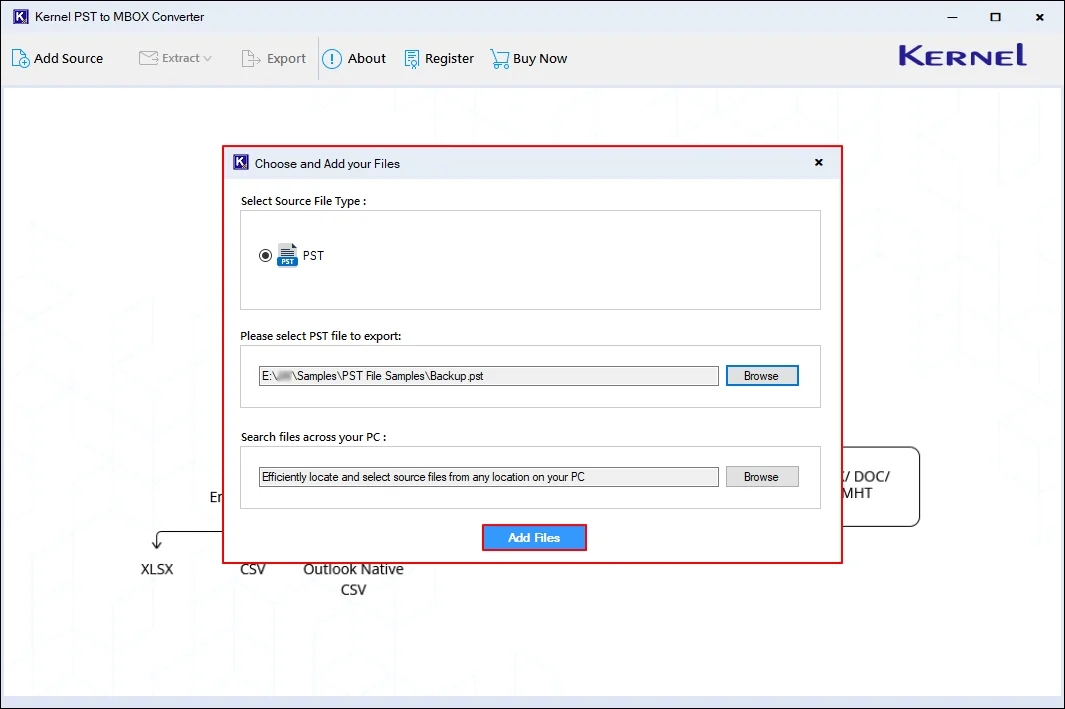
The Add Source dialog: browse to a PST file or search for PST files anywhere on the PC, then click Add Files.
Where it falls short
- No import step. It writes MBOX files; getting them into Thunderbird or Apple Mail is a separate import you do in that program.
- Windows only. There's no Mac version of this converter, even though most MBOX users are on Macs.
- Short Home license. The $49 Home license is listed with one year of validity for one machine; Corporate and Technician cost four to six times as much.
- Few reviews of this tool. It's one of Kernel's newer converters, and outside reviews of it specifically are scarce.
What Users Say
On Trustpilot (Kernel Data Recovery, all products)
Kernel Data Recovery has a TrustScore of 4.9 from 167 reviews on Trustpilot, 94% of them five stars and about 2% one star. Trustpilot notes the company hasn't recently invited customers to review. Most reviews praise the support staff rather than one product:
- "Does exactly what is says, easy to use, and excellent support." (Andrew Murdoch, February 2026)
- "I purchased the wrong version for my needs and the helped me transfer over to the correct version" (Tom, May 2026)
- "great customer service, thanks again Vikram!" (mckr, April 2026, after an installation problem with Kernel's MBOX to PST tool)
- "The tools are straightforward to use and cover a wide range of data migration and recovery needs." (Vasu Giri, May 2026)
The critical side
The few low ratings are older and about other Kernel tools, but they show the usual risks:
- "It kind of worked great but then choked up with large mailboxes." (DL, July 2024, 1 star, about Kernel's G Suite backup tool)
- "Horrible UX - old style WIndows Access DB screen styles." (Josh Bergs, December 2020, 2 stars)
- "was not sent the activation code for 18hours" (tom, December 2022, 1 star)
The pattern: people like that Kernel's tools work and that support answers fast, often on a Zoom call. The complaints are about very large jobs, a dated interface and slow license delivery. With no detailed independent review of the PST to MBOX Converter itself, run the trial on your own PST before you pay.
Comparisons
Kernel PST to MBOX Converter vs Thunderbird's free import
Thunderbird's Import tool can copy mail from Outlook for free, but only from an Outlook profile installed on the same Windows PC. Kernel PST to MBOX Converter reads loose PST files with no Outlook at all, handles several at once, and filters by date and sender. If Outlook and Thunderbird already sit side by side, try the free import first.
Kernel PST to MBOX Converter vs Kernel PST Converter Pro
Kernel PST Converter Pro is Kernel's broader PST tool, also aimed at Office 365 and other targets. If MBOX (and the odd PDF or EML export) is all you need, PST to MBOX Converter is the cheaper, focused choice.
Editions and Pricing
| License | Price on the order page | Machines | Validity | Buy |
|---|
| Home | $49, one-time | 1 | 1 year | Buy Home |
| Corporate | $199, one-time | 10 | 2 years | Buy Corporate |
| Technician | $299, one-time | Unlimited | Lifetime | Buy Technician |
All three licenses have the same features: unlimited conversion, free updates and Kernel's 24x7 support. Corporate clients, schools and government offices can pay by purchase order at checkout.
FAQs
Does Kernel PST to MBOX Converter need Outlook installed?
No. Kernel PST to MBOX Converter reads PST files directly and runs on a Windows PC without Outlook.
Can Kernel PST to MBOX Converter convert OST files?
No. Kernel PST to MBOX Converter takes PST files only; its Add Source dialog offers PST as the one source type. For an Exchange or Microsoft 365 OST cache file, Kernel sells a separate OST to PST converter.
Which mail programs can use the MBOX files?
Kernel PST to MBOX Converter's MBOX output works with MBOX clients such as Thunderbird, Apple Mail, SeaMonkey, Postbox, Eudora, Opera Mail and Evolution, each through that program's own import.
Does Kernel PST to MBOX Converter run on a Mac?
No. Kernel PST to MBOX Converter is Windows-only, so convert on a Windows PC and copy the MBOX files to the Mac.
What does the trial leave out?
The Kernel PST to MBOX Converter trial has every feature but converts only 25 items per folder.
What happens when the Home license's year is over?
Kernel lists one year of validity for the Home license and two for Corporate; the order is a one-time charge with no automatic renewal. The Technician license is the only one listed as lifetime.
Can I get a refund?
KernelApps offers a 30-day money-back guarantee on its licenses.
System Requirements
- Windows 11, 10, 8.1, 8 or 7, or Windows Server 2022, 2019 and older
- Intel Pentium-compatible (x86 or x64) processor
- 512 MB RAM minimum
- 1 GB of free disk space
- PST files from Outlook 97 to Office 365 (Outlook itself not required)
Conclusion
Kernel PST to MBOX Converter is worth $49 if you're moving an Outlook archive to Thunderbird or Apple Mail and don't have Outlook running next to the new mail program: it reads loose PST files, keeps the folders and attachments, and lets you filter what goes across. The reason to buy is the no-Outlook bulk conversion; the reason to hold off is that Thunderbird's free import may already be enough if Outlook is still installed. Run the 25-items-per-folder trial first, and pick Technician only if you'll use it for many clients.
Download Free TrialBuy Home LicenseBuy Corporate LicenseBuy Technician License