Kernel XPS Converter: Turn XPS and OXPS Files into PDF, Word, Excel or Images in Bulk
Kernel XPS Converter is a Windows tool from KernelApps that converts XPS and OXPS documents, the files Windows' "Microsoft XPS Document Writer" printer creates, into PDF, Word, Excel, PowerPoint, images, EPUB and web pages, a whole folder at a time and fully offline. The Home license costs $19 (100 files on 2 PCs for a year); Corporate is $99 and Technician $299.
It's for anyone who opened a folder of old .xps or .oxps files and found that nothing they use will open them, or who needs those "printed" documents back as editable Word files or shareable PDFs.
Quick facts
- Price: Home $19 (100 files, 2 PCs, 1 year); Corporate $99 (unlimited files, 100 PCs, 2 years); Technician $299 (unlimited, lifetime)
- Developer: KernelApps Private Limited (Kernel Data Recovery, nucleustechnologies.com), Noida, India
- Version: 26.1
- Runs on: Windows 11, 10, 8.1, 8 and 7, Windows Server 2022, 2019 and older; works offline
- Converts to: PDF, DOC, DOCX, RTF, TXT, ODT, XLS, XLSX, CSV, ODS, PPT, PPTX, PNG, JPEG, BMP, TIFF, GIF, EMF, SVG, EPUB, HTML, MHTML, XPS and OXPS
- Free trial: converts 5 files, to PDF, XPS, OXPS or EPUB only, with a watermark
- Guarantee: 30-day money-back guarantee
- What we checked: the installer from Kernel's download link (kernel-xps-converter.exe, "Kernel XPS Converter Setup", file version 26.1, 158 MB, validly signed, file dated March 6, 2026), the license terms on Kernel's order page, and the prices at checkout (Home $19, Corporate $99, Technician $299, each a one-time payment with no automatic renewal) on November 25, 2026. We didn't run a conversion ourselves.
Before you buy
- The trial is a small taste. It converts 5 files, only to PDF, XPS, OXPS or EPUB, and stamps a watermark, so you can judge the layout but not the Word or Excel output.
- The Home license is capped. 100 files over one year on two PCs. For a large archive, Corporate (unlimited, two years) is the better deal.
- It's a 158 MB download, large for a converter, so allow for it on a slow connection.
- Need other formats too? Kernel Document Converter handles XPS plus Word, Excel, PDF and EPUB inputs in one program.
Download Free TrialBuy Home LicenseBuy Corporate LicenseBuy Technician License
Overview
XPS was Microsoft's answer to PDF. Every Windows PC since Vista has a "Microsoft XPS Document Writer" printer, and Windows 8 and later save its output as OXPS, so plenty of people "printed" receipts, statements and reports to XPS without thinking about it. Since Windows 10 version 1803 the XPS Viewer is no longer installed by default, and almost nothing outside Windows reads the format. Kernel XPS Converter opens those files, shows each page in a preview with search and zoom, and writes them out in a format the rest of the world uses.
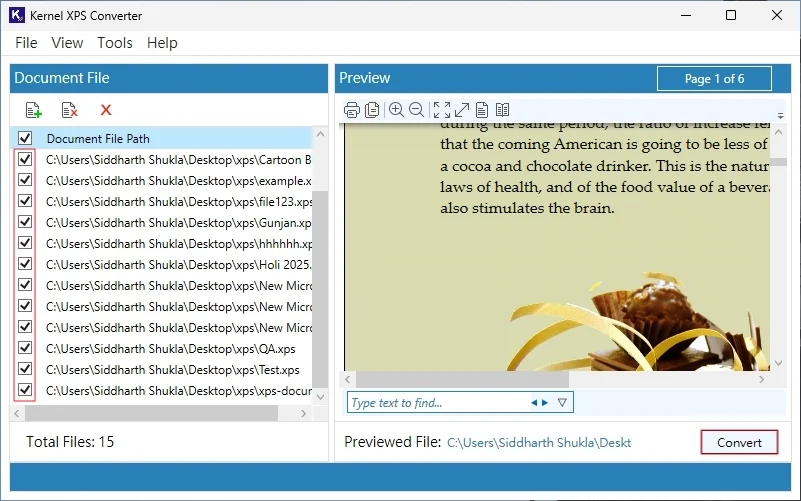
The main window: 15 XPS files ticked in the Document File list, page 1 of 6 of one file in the preview with print, zoom and find tools, and the Convert button.
Features
Eight families of output formats
Kernel XPS Converter converts to document formats (DOCX, DOC, RTF, TXT, ODT), spreadsheets (XLSX, XLS, CSV, ODS), presentations (PPTX, PPT), PDF, XPS and OXPS, images (JPEG, PNG, BMP, TIFF, GIF, EMF, SVG), EPUB e-books and web pages (HTML, MHTML). You pick the family and the exact format from a drop-down, then the destination folder.
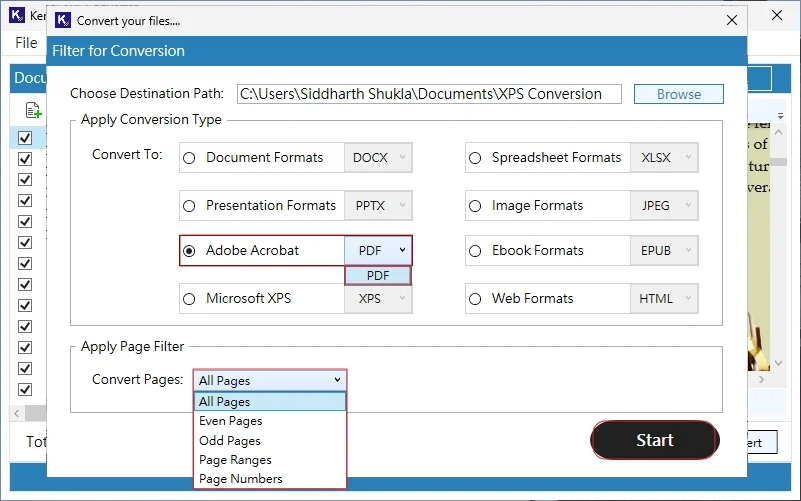
The Filter for Conversion dialog: destination path, eight conversion types with Adobe Acrobat (PDF) selected, and the page filter (all, even, odd, page ranges or page numbers).
Page filters
Kernel XPS Converter converts all pages, only odd or even pages, a range, or a list of page numbers, which is handy when you need just the summary page of each statement as an image or a PDF.
Batch conversion with a preview
Kernel XPS Converter loads as many XPS and OXPS files as you add, lets you tick the ones to convert, and previews any of them with page navigation and text search before you commit.
Offline and private
Kernel XPS Converter does all the work on your PC with no internet connection, so bank statements and contracts never go to an online converter. Kernel also says it handles password-protected XPS files.
Benefits
- Old "printed" documents become usable again, as PDFs anyone can open or as Word and Excel files you can edit.
- Cheap for a one-off job. $19 covers 100 files, which is a typical personal XPS backlog.
- No uploads. Sensitive documents stay on your machine.
Real-World Uses
- Old receipts and statements: convert a folder of XPS "prints" from years ago to PDF for your records or your accountant.
- Getting text back: turn an XPS report into DOCX to edit it instead of retyping.
- Tables into spreadsheets: export XPS pages with tables to XLSX to work with the numbers.
- Images for a website or slide: save selected pages as PNG or JPEG.
- Office clean-up: a Corporate license lets an admin convert a department's XPS archive in one pass.
Who It's For, and Who Should Skip It
Kernel XPS Converter suits Windows users with more than a handful of XPS or OXPS files who want them as PDF or editable files without an online service.
Skip it for one or two files: Windows' optional XPS Viewer can open them and print to "Microsoft Print to PDF" for free. Skip it if you also need to convert Word, Excel or PDF files in the same batch (Kernel Document Converter covers those), and if you're on a Mac, since it's Windows-only.
Usage Guide
- Download the trial installer (158 MB), install it and launch Kernel XPS Converter.
- Add single or multiple XPS or OXPS files.
- Tick the files to convert and preview any of them.
- Click Convert, choose the destination folder, the format family and format, and the page filter.
- Click Start; the program reports when the conversion is complete.
Where it falls short
- The trial can't test the formats most people pay for. Word, Excel and image output only appear after you buy, so lean on the 30-day guarantee if the result disappoints.
- Home and Corporate expire, and Home stops at 100 files.
- Kernel's own page is inconsistent on price: the Upgrade button on the product page says $29, while the order page and checkout charge $19 for Home.
- Few independent reviews of this tool exist; most feedback on Kernel is about its support.
What Users Say
On Trustpilot (Kernel Data Recovery, all products)
Kernel Data Recovery scores 4.9 from 167 reviews, 94% five stars and about 2% one star. None of the visible reviews is about the XPS Converter; they mostly praise support across Kernel's tools:
- "Does exactly what is says, easy to use, and excellent support." (Andrew Murdoch, February 2026)
- "The tools are straightforward to use and cover a wide range of data migration and recovery needs." (Vasu Giri, May 2026)
- "I purchased the wrong version for my needs and the helped me transfer over to the correct version" (Tom, May 2026)
With so little written about this exact tool, the trial and the 30-day guarantee are the practical safeguards.
Comparisons
Kernel XPS Converter vs Windows' own tools
Windows' XPS Viewer (an optional feature on Windows 10 and 11) opens XPS and OXPS files and can print them to PDF, one at a time, for free. It can't convert to Word, Excel or images, or work through a folder. Kernel XPS Converter is for volume and for editable output.
Kernel XPS Converter vs Kernel Document Converter
Kernel Document Converter ($29 a year for 250 documents) converts XPS too, along with Word, Excel, PowerPoint, PDF and EPUB inputs. If XPS is your only problem, XPS Converter is cheaper; if you have mixed files, Document Converter does it all.
Editions and Pricing
| License | Price at checkout | Term and PCs | Files | Buy |
|---|
| Home | $19 | 1 year, 2 PCs | Up to 100 | Buy Home |
| Corporate | $99 | 2 years, 100 PCs | Unlimited | Buy Corporate |
| Technician | $299 | Lifetime, unlimited PCs | Unlimited | Buy Technician |
Each is a one-time payment at checkout with no automatic renewal.
FAQs
What's the difference between XPS and OXPS, and does Kernel XPS Converter handle both?
OXPS is the standardized version of XPS that Windows 8 and later produce from the XPS Document Writer. Kernel XPS Converter reads and writes both.
Will the converted Word file look like the XPS page?
Kernel XPS Converter aims to keep the layout, fonts, tables and images, but XPS is a fixed-page format, so complex pages can need tidying in Word. Since the trial only outputs PDF, XPS, OXPS and EPUB, keep the 30-day guarantee in mind for Word output.
How do I open XPS files for free on Windows 11?
Add "XPS Viewer" under Settings, System, Optional features, then open the file and print it to "Microsoft Print to PDF". Kernel XPS Converter is worth paying for when there are many files or you need Word, Excel or image output.
What happens when the Home license's 100 files are used up?
Kernel XPS Converter's Home license covers up to 100 files in its one-year term; after that you need a new license, or the unlimited Corporate or Technician license.
Does Kernel XPS Converter need an internet connection?
No. Kernel XPS Converter works completely offline once installed.
Is there a Mac version?
No. Kernel XPS Converter runs on Windows only.
System Requirements
- Windows 11, 10, 8.1, 8 or 7, or Windows Server 2022, 2019 and older
- Intel Pentium-compatible (x86 or x64) processor
- 512 MB RAM minimum
- 1 GB of free disk space
Conclusion
Kernel XPS Converter is worth $19 if you have a backlog of XPS or OXPS files to turn into PDFs or editable documents: it batch-converts offline, previews every page, and offers far more output formats than Windows' own viewer. The catch is a trial that can't show Word, Excel or image output and a Home license capped at 100 files for a year, so buy Home for a one-off clean-up and Corporate for an office archive. If your files are a mix of XPS and other formats, look at Kernel Document Converter instead.
Download Free TrialBuy Home LicenseBuy Corporate LicenseBuy Technician License