Kernel Excel Split and Merge: Break Up Huge Workbooks or Combine Many Into One
Kernel Excel Split and Merge is a $29 one-time license for two small Windows tools from KernelApps: Kernel Excel Splitter, which cuts large XLS and XLSX workbooks into smaller files by rows, file size or sheet, and Kernel Excel Merge, which combines many workbooks into one. Neither needs Microsoft Excel installed, and the free trials process the first 25 items of each sheet.
It's for the person whose 500,000-row export makes Excel crawl, who has to send each region its own slice of a report, or who receives forty monthly files that need to become one workbook before Friday.
Quick facts
- Price: Home $29, Corporate $99, Technician $199, all one-time payments
- What you get: Kernel Excel Splitter and Kernel Excel Merge, sold under one license
- Developer: KernelApps Private Limited (Kernel Data Recovery, nucleustechnologies.com), Noida, India
- Version: 26.0 for both tools (updated February 2026)
- Runs on: Windows 11, 10, 8.1 and older, Windows Server 2022, 2019 and older
- Files: XLS and XLSX from Excel 95 to Excel 2021; split output as XLSX, XLS, CSV, XML or ODS
- Free trial: splits or merges the first 25 items of each sheet
- Guarantee: 30-day money-back guarantee
- What we checked: both installers from Kernel's download links (kernel-excel-splitter.exe and kernel-excel-merge.exe, file version 26.0, about 11 MB each, validly signed, dated February 19, 2026), the license table on both order pages, and the checkout prices ($29, $99 and $199, each a one-time payment with no renewal, no Black Friday discount) on November 24, 2026. We didn't split or merge a workbook ourselves.
Before you buy
- Read the license tiers. Kernel's order page lists the Home license for 1 PC, 25 Excel files and 1 year of updates; Corporate for 100 PCs, 500 files and 2 years of updates; Technician for unlimited PCs and files with lifetime updates. If you handle more than a couple of dozen workbooks, Corporate is the realistic choice.
- Two programs, one license. The same license is sold on both the Excel Splitter and the Excel Merge order pages. Each tool has its own installer; the Download button below gets the Splitter.
- Excel can already do some of this. Power Query merges files from a folder for free, and a short macro can split by rows. This tool is worth it when you don't want to build either.
Download Free TrialBuy Home LicenseBuy Corporate LicenseBuy Technician License
Overview
Excel handles about a million rows per sheet, but long before that a workbook gets slow to open, crashes when you filter, and is too large to email. Splitting it into parts fixes that; merging does the reverse when data arrives in many small files. Both jobs are tedious by hand and easy to get wrong: a copied range that misses the last rows, a header row forgotten in part seven.
Kernel's two tools turn each job into a short wizard: add files, pick how to split or merge, choose a folder, click the button. They read and write the files themselves, so they run on a PC or server without Excel, and they keep a CSV log of what they did.
Features
Split by rows, by size or by sheet
Kernel Excel Splitter cuts a workbook three ways: every N rows, at a file-size limit, or one file per sheet. You can split all sheets or a range of sheets, repeat the first rows as headers in every part (so each file still has its column names), and put the parts in their own folder.
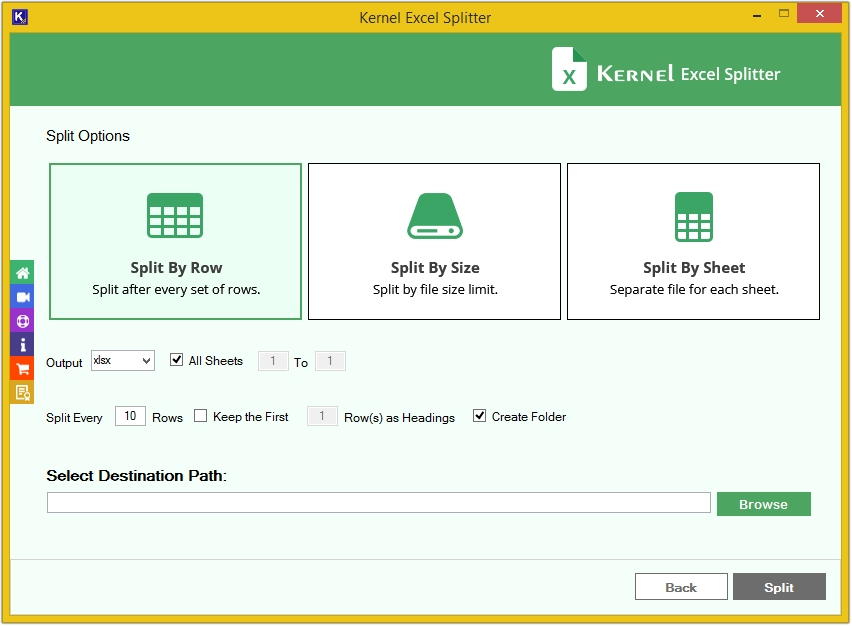
Kernel Excel Splitter's options: split by row, size or sheet, output format (XLSX here), sheet range, "Split Every 10 Rows", "Keep the First 1 Row(s) as Headings" and "Create Folder".
Five output formats for the parts
Kernel Excel Splitter saves the pieces as XLSX, XLS, CSV, XML or ODS. CSV output is useful when the parts go into a database import or a system with an upload size limit; ODS suits LibreOffice users.
Merge into one sheet or one workbook
Kernel Excel Merge combines any number of XLS and XLSX files two ways: everything stacked into a single worksheet, or each file as its own worksheet inside one workbook. Kernel says cell formatting, formulas and structure are kept.
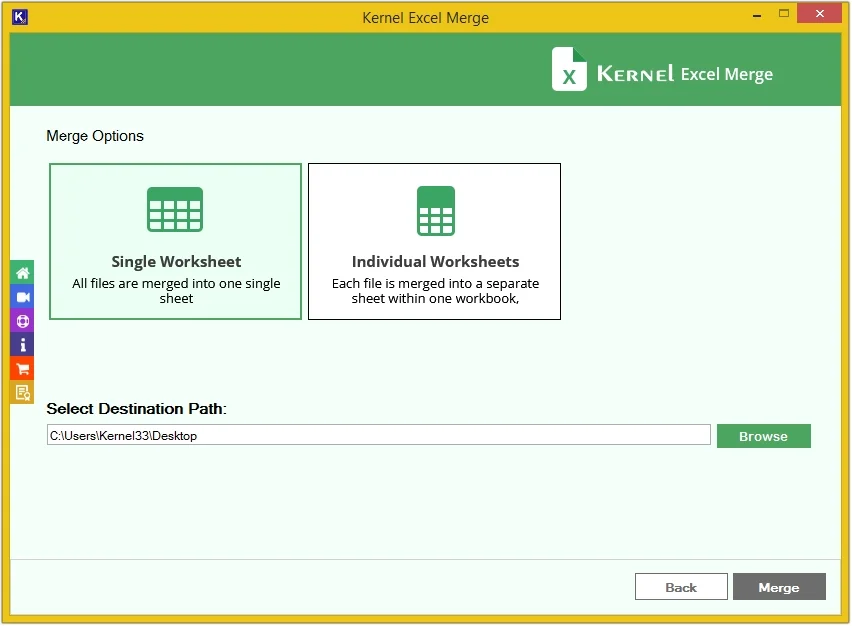
Kernel Excel Merge's two modes, Single Worksheet and Individual Worksheets, with the destination folder below.
Batches, logs and no Excel required
Both Kernel tools take many workbooks in one run, and Excel Splitter has no file-size limit (Kernel's FAQ cites a 2 GB workbook). Each run can be saved as a CSV summary with the source path, destination path, record count and status of every file, and an Open Folder Location button jumps to the output.
Real-World Uses
- A CRM export too big to open: split it every 100,000 rows with the header repeated, and each part opens in seconds.
- One report per branch: a workbook with a sheet per region becomes one file per region to email out.
- Upload limits: split a price list by file size so each CSV fits a web shop's import limit.
- Month-end consolidation: merge 30 daily sales files into one sheet for a pivot table, or into one workbook with a tab per day.
Who It's For, and Who Should Skip It
Buy it if you split or merge workbooks often, work on a PC without Excel, or simply want a two-minute wizard instead of Power Query or VBA. At $29 or $99 one-time, it pays for itself the first afternoon it saves.
Skip it if you're comfortable with Power Query (free in Excel) or macros, if you need to merge by matching keys like a database join (these tools stack and split, they don't look up), or if you use a Mac. Heavy users should skip the Home tier and go straight to Corporate for its higher file count.
Usage Guide
- Download and install Kernel Excel Splitter (and Kernel Excel Merge from its own page if you need it), then launch it.
- In Excel Splitter, click Split, then Add File and select one or more workbooks; click Next.
- Choose Split By Row, Split By Size or Split By Sheet, set the output format, the sheet range, the row count and the number of header rows to keep.
- Click Browse to pick the destination and Split to start.
- In Excel Merge, add the files, choose Single Worksheet or Individual Worksheets, set the destination and click Merge.
- Save the CSV summary if you need a record of the run, and use Open Folder Location to see the output.
Where it falls short
- Formulas across parts. When you split by rows, a formula that refers to rows now in another file can't keep working; check summaries and lookups after a split.
- Simple merge logic. Excel Merge stacks or collects sheets. It doesn't de-duplicate rows or align columns that appear in a different order in each file.
- No independent reviews. We found no hands-on tests outside Kernel's own pages, so the 25-item trial on your own files is the real test.
What Users Say
On Kernel's product pages
Kernel's Excel Splitter page quotes a system administrator, Galileo Morron: "Our quarterly financial reports often exceed 500K rows, causing Excel to crash daily." He adds that the batch processing "handles 20+ files at once, preserving all formulas, structure, and cell formatting." The Excel Merge page quotes Katty D. Kohls, a software engineer, whose firm collected survey data in many files: "The Kernel Excel Merge tool helped consolidate Excel files without losing any data."
These are testimonials the vendor chose to show, not independent reviews.
KernelApps on Trustpilot (4.9 out of 5, 167 reviews)
KernelApps' Trustpilot reviews cover all its products, mostly email converters, and the common thread is responsive support, for example "I purchased the wrong version for my needs and the helped me transfer over to the correct version" (Tom, May 2026, "Excellent customer support"). Trustpilot notes the company hasn't invited reviews recently.
Editions and Pricing
| License | Price (one-time) | PCs and files | Updates | Buy |
|---|
| Free trial | $0 | First 25 items per sheet | - | - |
| Home | $29 | 1 PC, 25 Excel files | 1 year | Buy Home |
| Corporate | $99 | 100 PCs, 500 Excel files | 2 years | Buy Corporate |
| Technician | $199 | Unlimited PCs and files, for serving clients | Lifetime | Buy Technician |
FAQs
Do I need Microsoft Excel installed to use Kernel Excel Split and Merge?
No. Kernel Excel Splitter and Kernel Excel Merge read and write XLS and XLSX files themselves, so they run on a PC or Windows Server without Office.
Is the Kernel Excel Split and Merge license a subscription?
No. All three licenses are one-time payments with no automatic renewal at checkout. What differs is the update period: 1 year for Home, 2 years for Corporate and lifetime for Technician.
Can Kernel Excel Splitter split a 2 GB workbook?
Yes. Kernel says Excel Splitter has no file-size restriction and gives a 2 GB Excel file as an example.
Can Kernel Excel Splitter save the parts as CSV?
Yes. Kernel Excel Splitter saves split parts as XLSX, XLS, CSV, XML or ODS, chosen in the Output box.
Does Kernel Excel Merge work on a Mac?
No. Kernel Excel Merge and Kernel Excel Splitter are Windows programs only.
Which Excel versions are supported?
Kernel Excel Split and Merge opens files from Excel 95, 97, 2000, XP, 2003, 2007, 2010, 2013, 2016, 2019 and 2021, in both XLS and XLSX formats.
System Requirements
- Windows 11, 10, 8.1 and older; Windows Server 2022, 2019 and older
- Intel Pentium-compatible (x86, x64) processor
- 1 GB RAM minimum
- 512 MB of free disk space
Conclusion
Kernel Excel Split and Merge is a fair buy if you split or combine workbooks regularly and want a wizard rather than Power Query or VBA: two tools, no Excel needed, five output formats, and a one-time price. The catch is the Home tier's 25-file and 1-PC limits, so most working users should look at the $99 Corporate license. If you only need to do this once, Excel's own tools will get you there for free.
Download Free TrialBuy Home LicenseBuy Corporate LicenseBuy Technician License