Kernel Video Repair: Fix Corrupt MP4, MOV and MKV Files on Windows
Kernel Video Repair is a $49 one-time-purchase Windows tool from KernelApps that repairs corrupt and unplayable video files (MP4, MOV, MKV, AVI, MTS, ProRes and more than 25 formats in all) from phones, cameras, drones, dash cams and CCTV. A $29 one-year license is also sold, and the free trial repairs and saves the first 30 seconds of each video so you can see the result before you pay.
It's for the moment a wedding clip, a drone flight or a dash-cam recording suddenly shows a black screen, stutters, has no sound or won't open at all with "the file is not a movie file", and you have no other copy.
Quick facts
- Price: $49 lifetime license (home use), or $29 for one year that renews yearly
- Developer: KernelApps Private Limited (Kernel Data Recovery, nucleustechnologies.com), Noida, India
- Version: 20.12 (Windows); a separate Kernel Mac Video Repair edition exists for macOS
- Runs on: Windows 11, 10, 8.1 and older, Windows Server 2022, 2019 and older
- Formats: MP4, MOV, MKV, AVI, AVCHD, MTS, M4V, MPEG, MJPEG, WMV, FLV, WEBM, 3GP, 3G2, TS, F4V, ProRes, RSV, MXF and more
- Free trial: repairs your files and lets you preview and save the first 30 seconds of each video
- Guarantee: 30-day money-back guarantee
- What we checked: the Windows installer from Kernel's download link (kernel-video-repair.exe, file version 20.12, 89 MB, digitally signed by KernelApps Private Limited) and the prices on the order page ($49 lifetime with no renewal, $29 for one year with a 12-month renewal, no Black Friday discount) on November 24, 2026. We didn't repair a damaged video ourselves.
Before you buy
- Run the free trial on your own file first. Whether a video can be repaired depends on how badly it's damaged. The trial shows you the first 30 seconds of the repaired file, which is the honest test before paying.
- Keep a healthy clip from the same camera. For badly damaged MP4 and MOV files, the tool needs a working video recorded on the same device with the same settings as a reference.
- It repairs files, it doesn't recover deleted ones. If the video was deleted or the card was formatted, you need a recovery tool first; copy the files from the SD card to your PC before repairing them.
- The Windows build is older. Version 20.12 dates from December 2022. Kernel keeps selling and supporting it, and the Mac edition lists macOS Tahoe 26 support.
Download Free TrialBuy Lifetime LicenseBuy 1-Year License
Overview
A video file is more than its picture and sound. It carries a header, an index of where each frame sits, and metadata such as the codec, frame rate and duration. When a camera loses power mid-recording, a transfer is cut off or a card develops errors, those parts are often what breaks: the frames are still there, but players can't find or decode them. Kernel Video Repair rebuilds those structures so the file plays again, keeping the original encoding, frame rate and format.
The program is deliberately simple. You add files, click Repair Files and choose where to save; there are no settings to tune. That makes it quick for a one-off rescue, but it also means there's little you can do if the automatic repair fails, other than add a better reference file.
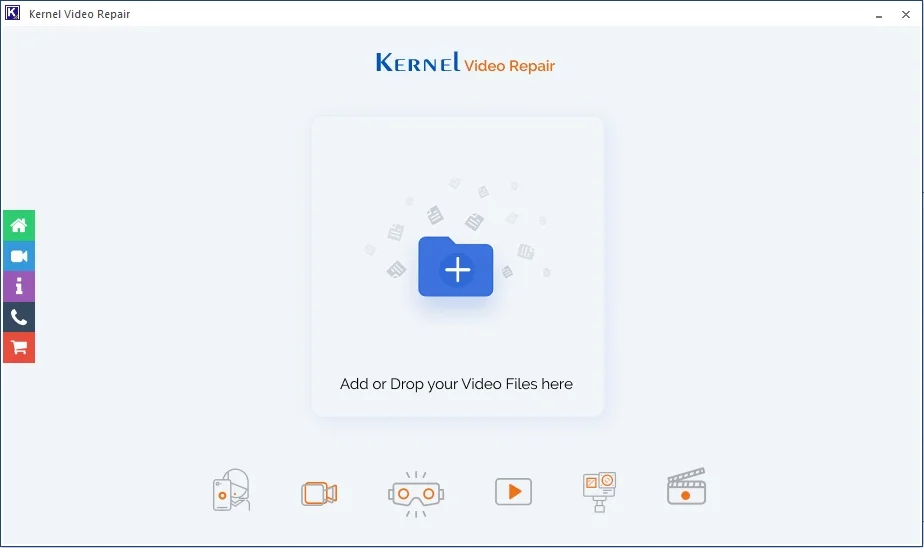
The start screen: drag corrupt videos onto the drop area or click the folder to browse.
Features
Repairs the common playback failures
Kernel Video Repair fixes videos that show a black screen, stutter, flicker, look grainy or blurry, stop partway (truncated files), play without sound, or have audio out of sync. It also handles the "file is not a movie file" and "video cannot be played" errors caused by damaged headers, indexes and metadata, and it restores the file's metadata (thumbnail, frame rate, language and name) in the original format.
Reference-video repair for badly damaged MP4 and MOV
Kernel Video Repair can use a healthy video as a template when a file is too damaged to read its own structure. The reference must come from the same device with the same configuration; the tool takes the format, encoding and bitrate from it and rebuilds the damaged file's missing metadata. The screen shows "No reference file needed" when the file's structure is still readable.
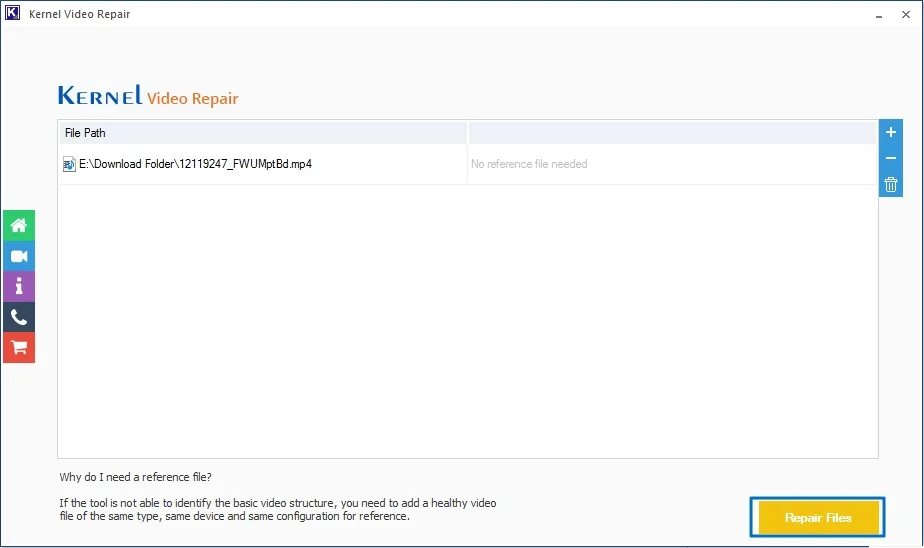
A corrupt MP4 added to the list, with the reference-file column ("No reference file needed") and the Repair Files button.
Batch repair with no file-size limit
Kernel Video Repair repairs many files of the same or different formats in one run, using multiple threads, and handles large files such as 60 GB 4K recordings, 8K, VR and 360-degree videos. A progress window shows each file's status and where it was saved, and the results can be saved as a CSV report.
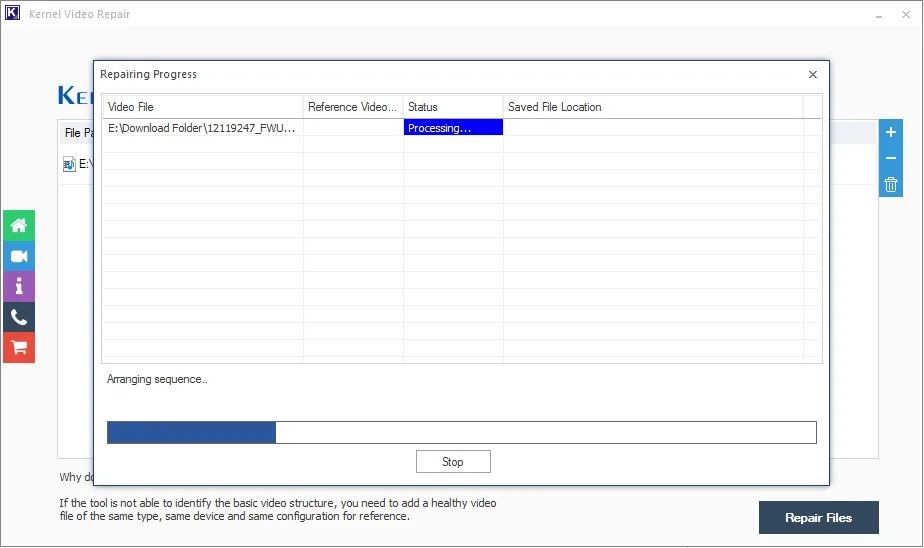
The Repairing Progress window: each video with its reference file, status and saved location.
Videos from almost any camera
Kernel Video Repair supports footage from Canon, Nikon, Sony, Fujifilm, Panasonic, Olympus, GoPro, Insta360, Samsung, Kodak and Blackmagic cameras, plus iPhone and Android phones, drones, dash cams and CCTV recorders, stored on SD cards, hard disks, SSDs or USB drives.
Real-World Uses
- The camera died mid-shot: a battery failure leaves an MP4 with no index. Add a short clip from the same camera as the reference and repair it.
- A drone or GoPro clip freezes: copy it off the card, repair it, and check the 30-second trial preview before buying.
- A dash-cam or CCTV file won't open after an accident or a power cut, and you need the footage for an insurer.
- A video editor's client sends broken files: queue a folder of MOV and MTS clips and repair them in one batch.
Who It's For, and Who Should Skip It
Buy it if you have one or more irreplaceable videos that won't play and the trial preview shows them fixed. At $49 for a lifetime license, it costs less than most rivals' yearly plans.
Skip it if your videos were deleted rather than damaged (you need data recovery software), if the trial preview of your file is still broken (the paid version runs the same repair), or if you only need to fix one file once and a free tool such as VLC's AVI fix or ffmpeg remuxing already plays it. Mac users need the separate Mac edition.
Usage Guide
- Download and run the installer, then launch Kernel Video Repair.
- Copy the damaged videos from the camera card or phone to your PC.
- Drag the files onto the start screen, or click the folder icon to browse. Use the + and trash buttons on the right to add or remove files.
- If a file needs a reference, add a healthy video from the same device and settings.
- Click Repair Files and choose a folder for the repaired videos.
- Open the repaired videos from the link to the saved location. In the trial, check the first 30 seconds; with a license you get the full video.
Where it falls short
- No guarantee on severe damage. Kernel says repair time and results depend on the size, format and level of corruption; a file whose video data is overwritten can't be rebuilt.
- Few controls. There's no frame-level preview or manual repair option. If the automatic repair and the reference video don't work, there's nothing else to try in the program.
- Thin independent testing. Most published "reviews" of Kernel Video Repair come from companies selling competing repair tools, so judge it on the trial result for your own file.
What Users Say
On Kernel's product page (4.9 out of 5, 485 reviews)
Kernel's own page shows an average of 4.9 from 485 reviews and quotes these:
- "I have used this video repair software to repair client videos. As a professional photographer and video creator, I recommend this product." (quoted from SoftwareSuggest)
- "After reviewing the software, we come to the conclusion that Kernel Video Repair utility is highly effective in repairing video files of all formats." (Accurate Reviews)
- "Ensuring security and effectiveness! This Video Repair tool not only fixed my video but also prioritized the integrity and security of my data throughout the entire repair process." (Silvia carter, "A reliable solution for video repair!")
Trustpilot (4.9 out of 5, 167 reviews for KernelApps)
KernelApps' Trustpilot page covers all its products, and most reviews are about its email tools (OST to PST, MBOX to PST, Exchange Suite). The recurring theme is support: "great customer service, thanks again Vikram!" (mckr, April 2026), and "I purchased the wrong version for my needs and the helped me transfer over to the correct version" (Tom, May 2026, "Excellent customer support"). Trustpilot notes the company hasn't invited reviews recently.
The vendor-page ratings are high but are collected by the vendor, and independent hands-on tests of this tool are scarce. The free trial is the most reliable review you'll get.
Editions and Pricing
| License | Price | Term | Buy |
|---|
| Free trial | $0 | Saves the first 30 seconds of each video | - |
| 1-Year License | $29 | 12 months, renews yearly | Buy 1-Year |
| Lifetime License | $49 | One-time, no renewal | Buy Lifetime |
The lifetime license is the better buy: it costs $20 more than one year and never renews. Kernel also sells a Video Suite that bundles Video Repair with its Video Converter and Photo Repair.
FAQs
Can Kernel Video Repair fix a video directly on my SD card?
Kernel Video Repair works on files on your Windows PC. Copy the videos from the SD card, camera or phone to a local drive first, then add them to the tool.
Is there a file-size limit in Kernel Video Repair?
No. Kernel Video Repair handles large 4K files, and Kernel's FAQ gives a 60 GB 4K video as an example it supports.
What can I do with the free trial of Kernel Video Repair?
The Kernel Video Repair trial has every feature (batch repair, large files, reference-video repair, CSV reports), but you can only preview and save the first 30 seconds of each repaired video. The full license gives you the complete video.
Does Kernel Video Repair work on a Mac?
The Windows program doesn't. Kernel offers a separate Kernel Mac Video Repair for macOS, from Catalina 10.15 to Tahoe 26.
Can I get a refund if Kernel Video Repair doesn't fix my file?
Kernel offers a 30-day money-back guarantee. Running the free trial first avoids the need: if the 30-second preview is still broken, the paid license won't fix it either.
System Requirements
- Windows 11, 10, 8.1 and older; Windows Server 2022, 2019 and older
- Intel Pentium-compatible (x86, x64) processor
- 4 GB RAM minimum
- 500 MB of free disk space
Conclusion
Kernel Video Repair is worth $49 if the free trial brings your broken video back: it's a one-time price, it repairs whole folders at once, and the reference-video mode handles the common "camera died while recording" MP4 and MOV files. The reason to hold off is that the outcome depends on your file, not the license, and the Windows version hasn't changed since 2022, so test first and buy only once the 30-second preview plays.
Download Free TrialBuy Lifetime LicenseBuy 1-Year License