Kernel CSV Merge Tool: Combine Many CSV Files into One Excel Workbook Without Copy-Paste
Kernel CSV Merge Tool is a small Windows program from KernelApps that merges any number of CSV files into one Excel workbook, either stacked in a single worksheet or with each file on its own sheet, offline and with no file size limit. The Home license costs $29 (25 files, one PC, one year); Corporate is $99 and Technician $199.
It's for the analyst, bookkeeper or office manager who gets a CSV export from every branch, bank account or month and spends an afternoon pasting them together in Excel.
Quick facts
- Price: Home $29 (25 CSV files, 1 PC, 1 year); Corporate $99 (500 files, 100 PCs, 2 years); Technician $199 (unlimited, lifetime)
- Developer: KernelApps Private Limited (Kernel Data Recovery, nucleustechnologies.com), Noida, India
- Version: 26.0
- Runs on: Windows 11, 10, 8.1 and older, Windows Server 2022, 2019 and older; works offline
- Output: one Excel workbook, as a single worksheet or one worksheet per CSV file
- Input: CSV files from Excel, Google Sheets, Outlook, Gmail, Linux and other sources; comma or semicolon delimited; UTF-8 and ANSI encodings
- Free trial: merges the first 25 records of each CSV file
- Guarantee: 30-day money-back guarantee
- What we checked: the installer from Kernel's download link (kernel-csv-merge.exe, "Kernel CSV Merge Setup", file version 26.0, 11 MB, validly signed, file dated February 19, 2026), the license terms on Kernel's order page, and the prices at checkout (Home $29, Corporate $99, Technician $199, each a one-time payment with no automatic renewal) on November 25, 2026. We didn't run a merge ourselves.
Before you buy
- The Home license counts files. It merges 25 CSV files in a year on one PC. If you merge a monthly batch of 30 branch reports, you need Corporate (500 files) or Technician (unlimited).
- It merges, it doesn't clean. The merge options are just "single worksheet" or "one sheet per file", with no settings for mapping columns or removing duplicates, so line your columns up first if you want one tidy table.
- Excel and free tricks may be enough. Power Query in Excel can combine a folder of CSVs, and the Windows
copy command can join same-format files. The tool earns its price on large files and for people who don't want to learn either.
Download Free TrialBuy Home LicenseBuy Corporate LicenseBuy Technician License
Overview
CSV is the format almost every system exports: banks, shops, CRMs, Google Sheets, Outlook contacts. Getting one is easy; getting thirty into one spreadsheet is the chore. Kernel CSV Merge Tool is a three-screen wizard for that job: add the files, choose "Single Worksheet" or "Individual Worksheets", pick where to save, and click Merge. At the end it shows every file with its record count and a Success or Failed status, which you can save as a report.
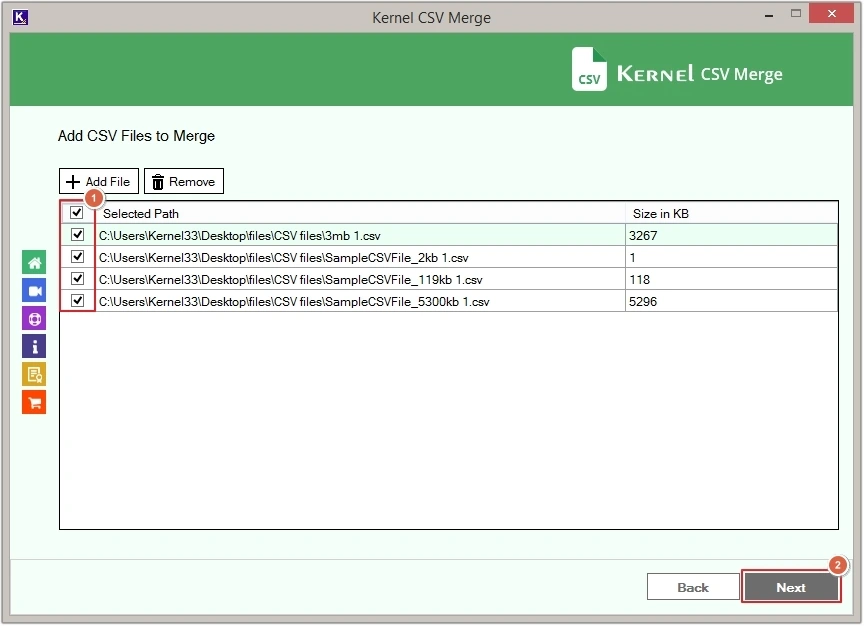
The first screen: three CSV files added with their size in KB, Add File and Remove buttons, and Next.
Features
One sheet, or one sheet per file
Kernel CSV Merge Tool either appends every file into a single worksheet, for one long table, or places each CSV on its own worksheet in one workbook, for a tidy collection you can flip through.
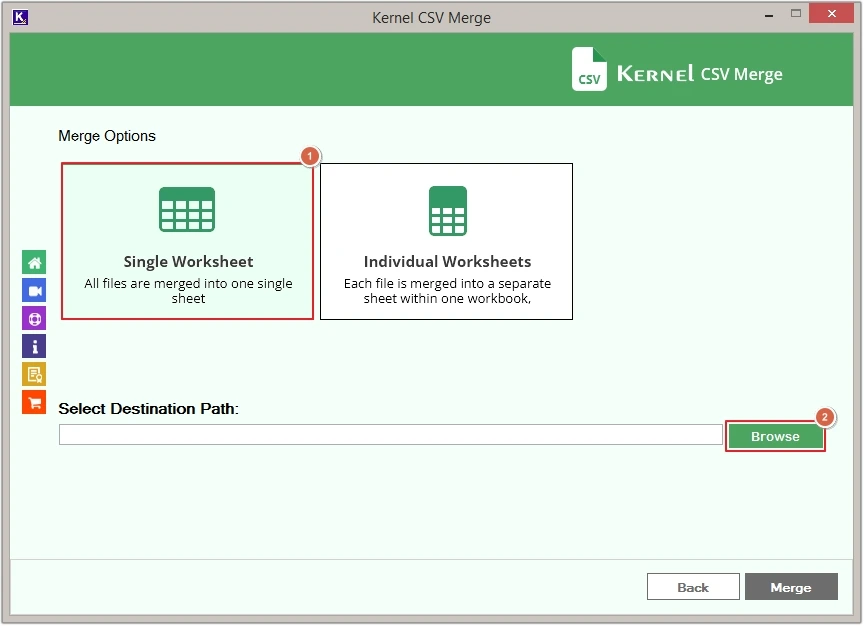
The Merge Options screen: Single Worksheet (all files in one sheet) or Individual Worksheets (each file on its own sheet), and the destination path.
Handles the CSV variants that trip Excel up
Kernel CSV Merge Tool detects each file's character encoding and reads UTF-8 and ANSI files, comma- and semicolon-delimited files, and exports from Excel, Google Sheets, Outlook, Gmail, Linux tools and PowerShell. Mixed encodings are the usual reason accented names turn into garbage after a manual merge.
No size limit, no upload
Kernel CSV Merge Tool sets no limit on file size or number (within your license), and runs entirely offline, so customer lists and financial exports never go to an online merger.
A merge report you can keep
Kernel CSV Merge Tool ends each run with a process summary: source path, total records and merge status for every file, plus totals of successful and failed files. Save Reports writes it to a CSV, which is useful proof of what went into a month-end workbook.
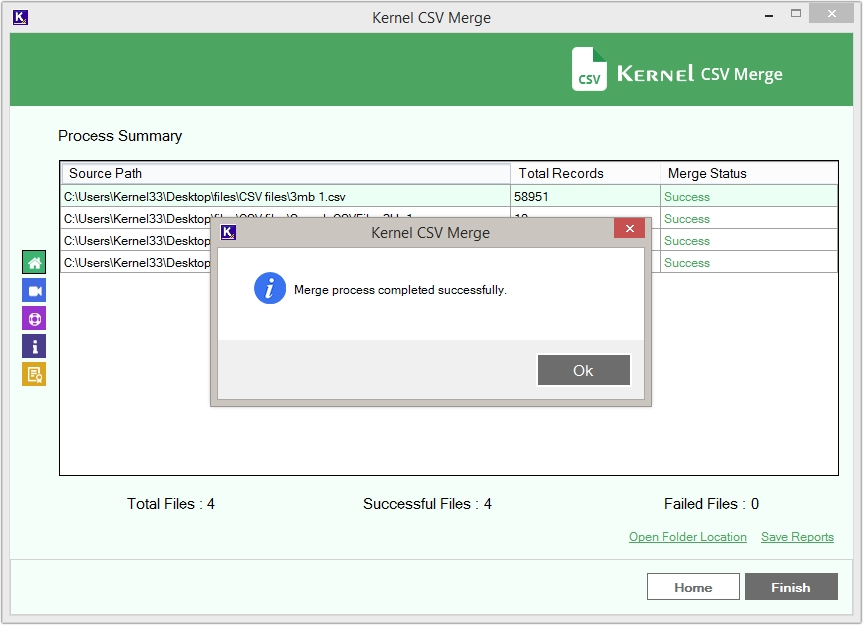
The Process Summary: three files with 58,951, 1,000 and 50,000 records, all "Success", the completion message, and the Open Folder Location and Save Reports links.
Benefits
- Minutes instead of an afternoon for recurring merges of many exports.
- Fewer silent errors. No missed file, no row pasted twice, and a record count to check against.
- Nothing to learn. No formulas, Power Query steps or command lines.
Real-World Uses
- Branch or store reports: combine each location's daily sales CSV into one sheet for a pivot table.
- Bank and card statements: stack twelve monthly CSV exports into one year for your accountant.
- CRM and mailing lists: join contact exports from several systems before importing them elsewhere.
- Historical datasets: append years of weekly exports into one archive workbook.
Who It's For, and Who Should Skip It
Kernel CSV Merge Tool suits Windows users who merge CSV exports regularly and want a point-and-click tool, especially with large files or mixed encodings.
Skip it if you're comfortable with Excel's Power Query (Data, Get Data, From Folder), which combines a folder of CSVs for free and refreshes with one click. Skip the Home license if you merge more than 25 files a year. And skip it if you need column mapping or duplicate removal, which it has no settings for.
Usage Guide
- Download the trial installer (11 MB), install it and launch Kernel CSV Merge.
- Click the Merge tab, then Add File and select your CSV files.
- Tick the files to merge and click Next.
- Choose Single Worksheet or Individual Worksheets, click Browse for the destination, and click Merge.
- Check the Process Summary, click Save Reports if you want a record, and open the folder to see the workbook.
Where it falls short
- Excel's row limit still applies. A single worksheet holds 1,048,576 rows, so a "millions of rows" merge into one sheet won't fit; use Individual Worksheets or split the job.
- No cleanup settings. There are no options for mapping columns, removing duplicates or filtering rows.
- Licenses that run out. Home (25 files, 1 year) and Corporate (500 files, 2 years) both expire.
- Little independent feedback. The only reviews are three testimonials on Kernel's own page.
What Users Say
Testimonials on Kernel's product page (rated 5.0 from 3 reviews there)
- "This tool cut my 4-hour manual process with files in GBs and millions of data items to a few minutes." (Gavin Harris, Financial Analyst)
- "Putting together reports from 30+ branches used to take forever because everyone labeled columns differently (like revenue, sales, etc.). This CSV merge tool automatically merged all data without any alteration or errors." (Josh Morris, Software Engineer)
- "As a project manager, I have to arrange reports from different departments into a single big report, which often takes almost the entire day. But using this CSV merger tool, I was able to merge all the CSV files into a single workbook in just a few hours." (Matthew Taylor, Project manager)
On Trustpilot (Kernel Data Recovery, all products)
Kernel Data Recovery scores 4.9 from 167 reviews, 94% five stars and about 2% one star, mostly praising support across its tools:
- "Does exactly what is says, easy to use, and excellent support." (Andrew Murdoch, February 2026)
- "I purchased the wrong version for my needs and the helped me transfer over to the correct version" (Tom, May 2026)
The praise is all from Kernel's own page or about Kernel in general, so treat it as a starting point; the trial on your own files tells you more.
Comparisons
Kernel CSV Merge Tool vs Excel Power Query
Power Query (built into Excel 2016 and later) combines every CSV in a folder, can fix column types and match headings, and refreshes when new files arrive, all for free. It takes some learning and can struggle with very large files. Kernel CSV Merge Tool is simpler and quicker to start, but does less.
Kernel CSV Merge Tool vs Kernel Excel Split and Merge
Kernel Excel Split and Merge works on XLS and XLSX workbooks and also splits them. If your sources are Excel files, use that; for CSV exports, use CSV Merge.
Editions and Pricing
| License | Price at checkout | Term and PCs | CSV files | Buy |
|---|
| Home | $29 | 1 year, 1 PC | 25 | Buy Home |
| Corporate | $99 | 2 years, 100 PCs | 500 | Buy Corporate |
| Technician | $199 | Lifetime, unlimited PCs | Unlimited | Buy Technician |
Each is a one-time payment at checkout with no automatic renewal.
FAQs
Does Kernel CSV Merge Tool output a CSV or an Excel file?
Kernel CSV Merge Tool saves the result as an Excel workbook (XLSX), with all data on one worksheet or each source file on its own worksheet. Save it as CSV from Excel afterwards if you need a single CSV.
Can it merge CSV files with different column headings?
Yes, Kernel CSV Merge Tool merges files with different headings, but it has no settings for mapping columns, so for one clean table it's safest to align the headings first, or use Individual Worksheets to keep each file separate.
Do I need Excel installed?
Kernel CSV Merge Tool doesn't list Excel as a requirement for merging; you need Excel or another spreadsheet program to open the workbook it creates.
What does "25 files" mean on the Home license?
Kernel CSV Merge Tool's Home license merges up to 25 CSV files during its one-year term on one PC. Corporate raises that to 500 files over two years, and Technician has no limit.
Can I merge semicolon-separated files from European Excel?
Yes. Kernel CSV Merge Tool reads comma- and semicolon-delimited CSV files and detects UTF-8 and ANSI encodings.
Is there a Mac version?
No. Kernel CSV Merge Tool runs on Windows only.
System Requirements
- Windows 11, 10, 8.1 or older, or Windows Server 2022, 2019 and older
- Intel Pentium-compatible (x86 or x64) processor
- 1 GB RAM minimum
- 512 MB of free disk space
Conclusion
Kernel CSV Merge Tool is worth $29 if you regularly combine a handful of CSV exports and want it done in three clicks, offline, with a record count for every file. It's a simple tool that does one job, so it's not for people who already use Power Query or who need columns mapped and duplicates removed. Watch the license limits: Home covers 25 files in a year, so pick Corporate or Technician for recurring monthly batches. Try the free version on your own files first.
Download Free TrialBuy Home LicenseBuy Corporate LicenseBuy Technician License