Kernel Email Migrator: Upload PST, OST, MSG and EML Files to Microsoft 365, and Move Mail Between IMAP Accounts
Kernel Email Migrator is a Windows tool from KernelApps that uploads Outlook PST and OST files and loose MSG and EML emails into Microsoft 365 mailboxes, and (in the Technician edition) moves mail from Gmail, Zoho, GoDaddy and other IMAP accounts to Microsoft 365 or to another IMAP account. The 15-day trial migrates 50 items per folder; the Personal license is $99, Corporate $399 and Technician $999, each a one-time payment.
It's for the small-business admin or IT consultant who has to get old Outlook data files, or a whole team's mailboxes, into Microsoft 365 without uploading PSTs through Microsoft's own import service.
Quick facts
- Price: Personal (called Home License at checkout) $99 (up to 50 PST/OST files, 250 GB of MSG/EML, 2 years); Corporate $399 (up to 1,000 PST/OST files, 1 TB, lifetime); Technician $999 (unlimited, lifetime, adds IMAP migrations)
- Developer: KernelApps Private Limited (Kernel Data Recovery, nucleustechnologies.com), Noida, India
- Version: 26.1
- Runs on: 64-bit Windows 11, 10, 8.1, 8 and 7, Windows Server 2025 to 2008; needs .NET Framework 4.6+ and the Visual C++ 2015-2022 runtime
- Migrates: PST, OST, MSG and EML to Microsoft 365; IMAP, Gmail, Zoho, GoDaddy and webmail to Microsoft 365; IMAP to IMAP; Zoho to Gmail and Gmail to Zoho
- Free trial: 15 days; 50 items per folder from PST/OST, 50 MSG/EML files, 100 items per folder from IMAP
- Guarantee: 30-day money-back guarantee
- What we checked: the installer from Kernel's download link (kernel-email-migrator.exe, "Kernel Email Migrator Setup", file version 26.1, 78 MB, validly signed, file dated October 26, 2026) and the prices on the order page (Personal $99, Corporate $399, Technician $999, all one-time payments with no automatic renewal) on November 25, 2026. We didn't run a migration ourselves.
Before you buy
- IMAP migrations are Technician-only. Kernel's license table limits the Gmail, Zoho, GoDaddy, webmail and IMAP-to-IMAP jobs to the $999 Technician license. Personal and Corporate cover PST, OST, MSG and EML uploads to Microsoft 365.
- The Personal license runs for two years and caps PST/OST at 50 files. Corporate and Technician are listed as lifetime.
- It wants a strong PC. Kernel recommends 8 GB of RAM, a 4-core 64-bit processor and 5 GB free for data and logs.
Download Free TrialBuy Personal LicenseBuy Corporate LicenseBuy Technician License
Overview
Microsoft 365 has its own PST import, but it means uploading files to Azure storage with AzCopy and writing a mapping CSV. Kernel Email Migrator replaces that with a desktop wizard: you create a project and a job, pick a migration type, add the source files or accounts, map each one to a Microsoft 365 mailbox (automatically when the names match, or from a CSV), set filters and run the job now or on a schedule. Jobs can be paused, resumed, rerun, and repeated incrementally so only new mail goes across the second time.
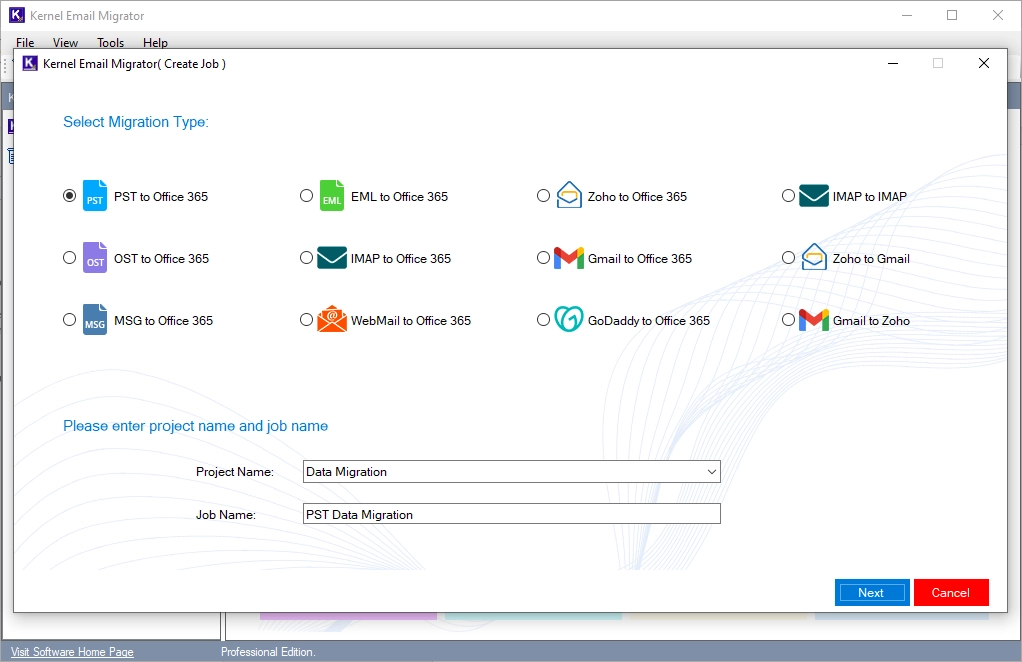
Creating a job: twelve migration types, from PST, OST, MSG and EML to Office 365 through IMAP to IMAP, Zoho to Gmail and Gmail to Zoho, plus the project and job names.
Features
PST and OST straight into Microsoft 365
Kernel Email Migrator uploads Outlook PST and OST files into Microsoft 365 user mailboxes with emails, attachments, contacts, calendars, tasks, notes, journals and the folder structure. It talks to Microsoft 365 through the Microsoft Graph API, and Kernel says no mail passes through its own servers.
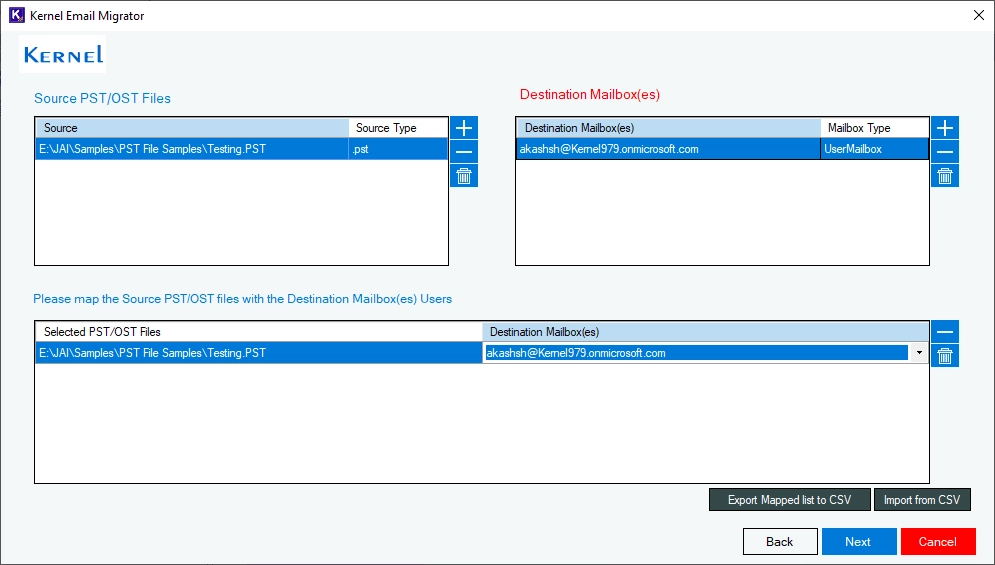
Mapping: source PST/OST files on the left, Microsoft 365 destination mailboxes on the right, and the mapping list with Export Mapped list to CSV and Import from CSV.
Loose MSG and EML emails too
Kernel Email Migrator also uploads folders of individual MSG and EML messages to Microsoft 365, keeping headers, signatures, inline images and attachments.
Mailbox-to-mailbox migrations (Technician)
Kernel Email Migrator's Technician license adds live account moves: IMAP, Gmail, Zoho, GoDaddy and webmail to Microsoft 365, any IMAP server to another, and Zoho to Gmail or Gmail to Zoho. Kernel lists Gmail, Exchange, Zimbra, Dovecot, Yahoo, iCloud, Proton Mail, Fastmail, MDaemon and many other IMAP servers.
Filters, scheduling and incremental runs
Kernel Email Migrator filters by date range, item type (email, tasks, calendar, contacts) and folder, can skip empty and deleted-items folders, and has a "skip previously migrated items" switch for incremental passes. Jobs can run immediately or on a daily, weekly or monthly schedule, and each produces a summary report you can export to CSV.
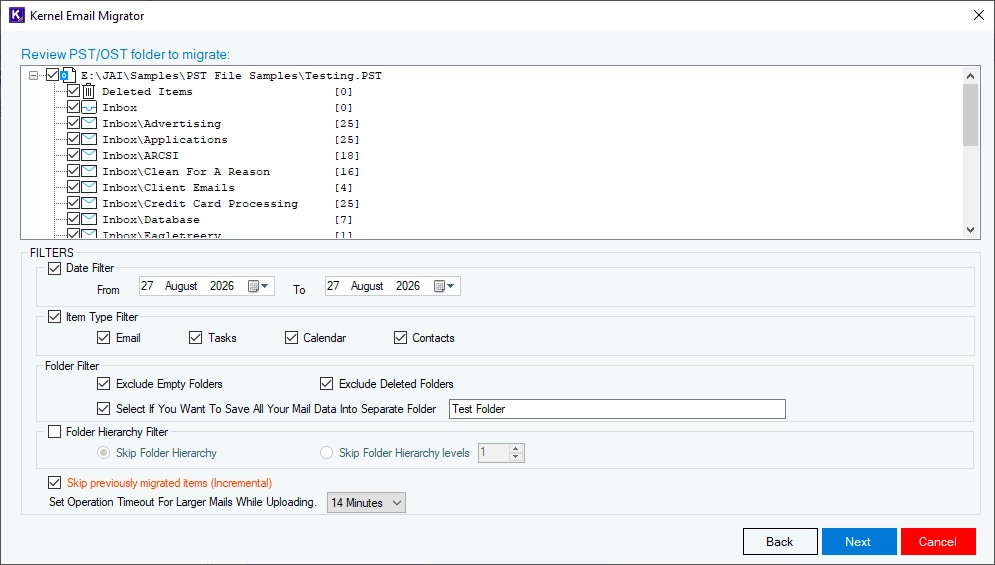
The filter step: the PST's folders with item counts, date and item-type filters, folder exclusions, an option to put everything in a separate folder, and Skip previously migrated items (Incremental).
Benefits
- No AzCopy, no SAS keys. The upload goes from the desktop wizard straight into the mailbox.
- Cut-over without a gap. Run the bulk migration early, then an incremental pass on the switch-over day.
- Off-hours runs. Scheduling avoids Microsoft 365 throttling during the working day.
- An audit trail. Per-job reports show migrated and failed folders with item counts.
Real-World Uses
- Moving a small office's Outlook archives to Microsoft 365. Map each person's PST to their new mailbox and run one job.
- Rescuing a departed user's OST. Upload an orphaned OST cache file into a shared or archive-holder mailbox.
- Leaving Gmail or Zoho for Microsoft 365 (Technician). Migrate the accounts live, then run an incremental job at cut-over.
- Consolidating after a merger (Technician). Move mailboxes from the acquired company's IMAP host to your own server.
Who It's For, and Who Should Skip It
Kernel Email Migrator suits IT admins and consultants who need PST, OST, MSG or EML data inside Microsoft 365 mailboxes, and consultants who also move IMAP accounts for clients and can justify the Technician license.
Skip it if you only have one PST to bring into your own mailbox: Outlook's Import/Export wizard does that for free. Skip the cheaper licenses if your real job is Gmail or another IMAP account to Microsoft 365, since only Technician covers it; Microsoft's free IMAP migration or a per-mailbox cloud service may cost less. And if you're moving between two Microsoft 365 tenants, Kernel's Office 365 Migration is the right tool.
Usage Guide
- Download the installer (78 MB), install it and launch Kernel Email Migrator.
- Create a project and a job, and select the migration type (for example PST to Office 365).
- Add the source PST/OST files or folders, connect to Microsoft 365 and add the destination mailboxes.
- Map each source to a mailbox, by hand, automatically or from a CSV.
- Set the date, item-type and folder filters, and tick the incremental option for repeat runs.
- Run the job now or schedule it; when it finishes, open or export the migration report.
Where it falls short
- The price jump for IMAP. Gmail, Zoho and IMAP migrations sit only in the $999 Technician license, ten times the Personal price.
- Heavy requirements. 8 GB RAM and four cores are recommended, plus .NET and Visual C++ runtimes.
- Microsoft 365 is the only file destination. It doesn't upload PSTs to Exchange on-premises or Google Workspace.
- Time estimates are vague. Kernel's FAQ sends you to support for a migration timeline instead of giving throughput figures.
What Users Say
On Trustpilot (Kernel Data Recovery, all products)
Kernel Data Recovery scores 4.9 from 167 reviews, 94% five stars and about 2% one star; Trustpilot notes the company hasn't recently invited customers to review. Several reviews come from migration buyers:
- Vasu Giri (May 2026) describes using Kernel's PST backup, SharePoint, OneDrive backup and email migration tools and calls them reliable for business use: "The tools are straightforward to use and cover a wide range of data migration and recovery needs."
- Paul (February 2026) was testing the demo of Kernel Migration for IMAP for a legacy IMAP to Office 365 move, ran into configuration problems, and was connected to help through live chat.
- Mukesh Sharma (April 2026) hit several errors with a Kernel migration product, and support stayed on a Zoom call with him until the migration started.
- "Does exactly what is says, easy to use, and excellent support." (Andrew Murdoch, February 2026)
The critical side
- "It kind of worked great but then choked up with large mailboxes." (DL, July 2024, 1 star, about Kernel's G Suite backup tool)
- "Horrible UX - old style WIndows Access DB screen styles." (Josh Bergs, December 2020, 2 stars)
The recurring theme is setup: migrations need the right Microsoft 365 permissions and settings, and buyers lean on Kernel's support (live chat, phone or Zoom) to get the first job running. Praise centres on reliability once configured; the complaints are about very large mailboxes and a dated interface. Independent, detailed reviews of Email Migrator itself are scarce, so use the 15-day trial on a real mailbox.
Comparisons
Kernel Email Migrator vs Microsoft 365's PST import service
Microsoft's network upload is free but has you upload PSTs to Azure storage with AzCopy, build a CSV mapping file and wait for Microsoft to process the import. Kernel Email Migrator does it from one wizard, adds filters, scheduling and incremental runs, and also handles OST, MSG and EML, which Microsoft's service doesn't take.
Kernel Email Migrator vs Kernel Zimbra to Office 365 Migration
Email Migrator reads PST, OST, MSG and EML files and IMAP accounts. For Zimbra TGZ exports, Kernel Zimbra to Office 365 Migration is the tool to use.
Editions and Pricing
| License | Price on the order page | Covers | Validity | Buy |
|---|
| Personal | $99, one-time | Up to 50 PST/OST files, 250 GB MSG/EML | 2 years | Buy Personal |
| Corporate | $399, one-time | Up to 1,000 PST/OST files, 1 TB MSG/EML, one organization | Lifetime | Buy Corporate |
| Technician | $999, one-time | Unlimited files and data, IMAP/Gmail/Zoho migrations, multi-client use | Lifetime | Buy Technician |
All three include batch migration, the scheduler, migration reports and 24x7 technical support by chat, email and phone.
FAQs
Can Kernel Email Migrator migrate Gmail to Microsoft 365?
Yes, but only with the Technician license. Kernel Email Migrator's Personal and Corporate licenses cover PST, OST, MSG and EML uploads; Gmail, Zoho, GoDaddy, webmail and IMAP jobs need Technician.
Does Kernel Email Migrator need Outlook installed?
No. Kernel Email Migrator reads PST and OST files directly; it needs internet access, .NET Framework 4.6 or later and the Visual C++ 2015-2022 runtime.
Can Kernel Email Migrator resume a failed job?
Yes. Kernel Email Migrator saves every job, so a failed or interrupted one can be selected and run again, and the incremental option skips what already arrived.
Does it migrate contacts and calendars?
Yes. Kernel Email Migrator moves contacts and calendar items during PST, OST and MSG migrations to Microsoft 365.
Which Microsoft 365 plans does it work with?
Kernel Email Migrator supports Microsoft 365 Enterprise E1, E3 and E5, Exchange Online Plan 1 and 2, Microsoft 365 Business Premium, Office 365 Business Essentials, Office 365 A1, A3 and A5, and Office 365 F1.
What does the 15-day trial allow?
The Kernel Email Migrator trial runs for 15 days and migrates 50 items per folder from PST or OST files, 50 MSG or EML files, and 100 items per folder from IMAP accounts.
Can I get a refund?
KernelApps offers a 30-day money-back guarantee.
System Requirements
- 64-bit Windows 11, 10, 8.1, 8 or 7, or Windows Server 2025, 2022, 2019, 2016, 2012, 2008 R2 or 2008
- Intel-compatible x64 processor, 4 cores recommended
- 8 GB RAM recommended
- 500 MB for installation plus 5 GB free for data and logs
- Internet connection, .NET Framework 4.6 or later, Microsoft Visual C++ 2015-2022 Redistributable
Conclusion
Kernel Email Migrator is worth the $99 Personal or $399 Corporate license if your job is getting PST, OST, MSG or EML data into Microsoft 365 mailboxes: it turns Microsoft's AzCopy routine into a wizard with mapping, filters, scheduling and incremental runs. The reason to hesitate is the Technician-only IMAP support, which makes Gmail or Zoho moves a $999 purchase. Run the 15-day trial against one real mailbox, and buy the license that matches your file count.
Download Free TrialBuy Personal LicenseBuy Corporate LicenseBuy Technician License