Kernel Import PST to Gmail: Upload Outlook PST Files into Gmail, Google Workspace and Other IMAP Mailboxes
Kernel Import PST to Gmail is a Windows tool from KernelApps that uploads the mail in Outlook PST files into Gmail and Google Workspace accounts, or into Yahoo, AOL, Outlook.com and other IMAP mailboxes, without Outlook installed. The trial imports 10 items per folder; the Home license is $69, Corporate $199 and Technician $299, each a one-time payment.
It's for the person switching from Outlook to Gmail who wants years of old mail searchable in the new inbox, and for the admin loading several staff members' PST archives into Google Workspace.
Quick facts
- Price: Home $69 (personal use, 1 year, 50 mailboxes); Corporate $199 (one organization, 2 years, 1,000 mailboxes); Technician $299 (service providers, lifetime, unlimited)
- Developer: KernelApps Private Limited (Kernel Data Recovery, nucleustechnologies.com), Noida, India
- Version: 23.2
- Runs on: Windows 11, 10, 8.1, 8 and 7, Windows Server 2022 to 2003; Outlook is not required
- Destinations: Gmail and Google Workspace, plus Yahoo, AOL, Outlook.com and other IMAP servers
- Sign-in: IMAP with a Gmail app password (2-step verification must be on)
- Free trial: imports 10 items per folder
- Guarantee: 30-day money-back guarantee
- What we checked: the installer from Kernel's download link (kernel-import-pst-to-gmail.exe, "Kernel Import PST to Gmail Setup", file version 23.2, 38 MB, validly signed, file dated June 13, 2025) and the prices on the order page (Home $69, Corporate $199, Technician $299, all one-time payments with no automatic renewal) on November 25, 2026. We didn't run an import ourselves.
Before you buy
- Gmail needs an app password. Turn on 2-step verification in your Google account and create an app password for the tool. A Google Workspace admin may have to allow IMAP and app passwords for your users.
- An older program. Version 23.2 is the current release, and Kernel's screenshots show an even older interface. It's maintained (the installer was rebuilt in June 2025) but not one of Kernel's newest tools.
- Free alternative for Workspace. Google's own GWMMO tool imports PST files into Google Workspace for free if you have Outlook installed. Kernel's tool earns its price with no-Outlook imports, many PSTs at once, filters and non-Google IMAP targets.
Download Free TrialBuy Home LicenseBuy Corporate LicenseBuy Technician License
Overview
Gmail can't open a PST file, and Google's free importer (GWMMO) only works for Google Workspace and needs Outlook on the PC. Kernel Import PST to Gmail connects to Gmail over IMAP instead. You add one or more PST files as the source, add one or more Gmail or other IMAP accounts as destinations, map each PST to an account (by hand or from a CSV), set filters, and the tool copies the folders and messages into the mailbox, where each Outlook folder becomes a Gmail label.
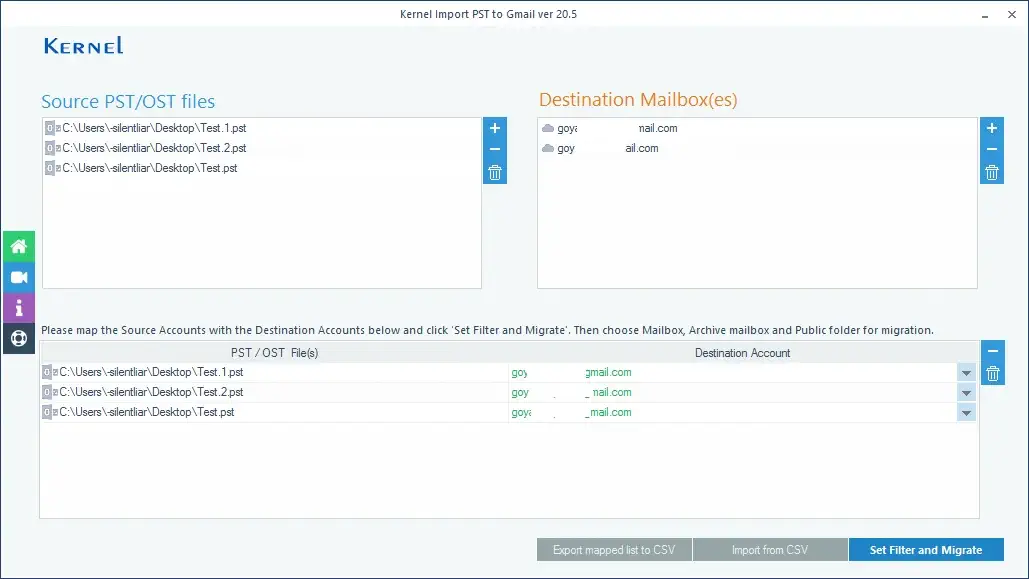
Mapping in an earlier version (20.5): three source PST files, two Gmail destination mailboxes, and the mapping list with Export mapped list to CSV, Import from CSV and Set Filter and Migrate.
Features
Many PST files into many accounts
Kernel Import PST to Gmail adds several PST files and several destination accounts in one session and maps them in pairs, so an admin can load a whole team's archives in a single run. A CSV import fills the mapping for large jobs, and the mapping can be exported to CSV for reuse.
Gmail, Workspace and other IMAP mail
Kernel Import PST to Gmail works with any IMAP mailbox, not only Google's: Kernel lists Yahoo, AOL, Outlook.com and private IMAP servers as destinations, which makes it useful for moving an Outlook archive to almost any webmail service.
Filters and incremental runs
Kernel Import PST to Gmail lets you pick folders, set a date range, exclude the Deleted Items and empty folders, put everything under one separate folder, and skip items already migrated, so a second run only adds what's new.
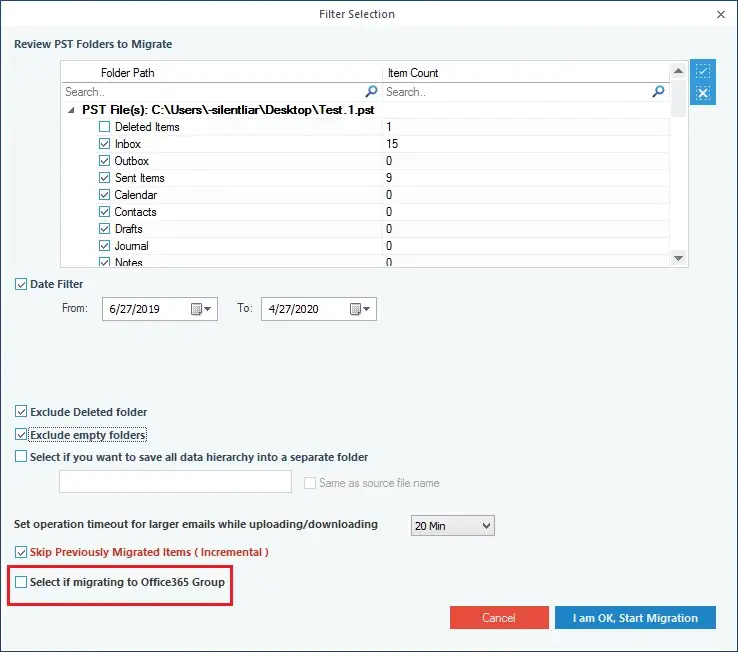
The Filter Selection window: PST folders with item counts, a From/To date filter, exclude deleted and empty folders, a separate-folder option, an upload timeout setting and Skip Previously Migrated Items (Incremental).
Progress and a saved report
Kernel Import PST to Gmail shows each folder's status and item count while it runs and offers to save the summary to CSV when the job completes.
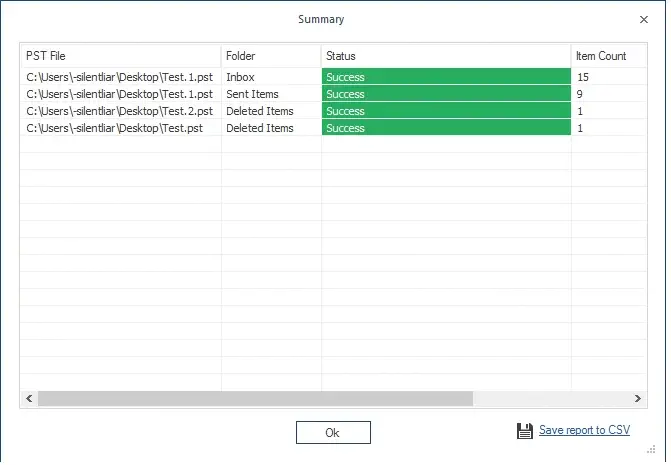
The summary after a run: each PST folder with its status (Success) and item count, and a Save report to CSV link.
Benefits
- No Outlook needed. Import from PST backups on a PC that has never had Outlook.
- Your old mail, searchable in Gmail. Folders arrive as labels, with attachments and dates intact.
- Works for non-Google mailboxes too. The same tool covers Yahoo, AOL and Outlook.com.
- Re-runnable. The incremental option means a failed or partial import can be finished without duplicates.
Real-World Uses
- Switching from Outlook to Gmail. Upload your archive PST so old mail sits next to new mail in one inbox.
- A small business moving to Google Workspace. Map each employee's PST to their new account and import them in one batch.
- Restoring archived email. Push an old PST backup into a Workspace mailbox for legal or customer-history lookups.
- Moving to a non-Google webmail. Import PSTs into a Yahoo, AOL or company IMAP account.
Who It's For, and Who Should Skip It
Kernel Import PST to Gmail suits Windows users and small-business admins who need Outlook PST data inside Gmail, Google Workspace or another IMAP mailbox, especially without Outlook installed or with several PSTs to move.
Skip it if you're on Google Workspace and still have Outlook: Google's free GWMMO does the job. Skip it if your Google account can't use app passwords (some Workspace domains block them). And if the target is Microsoft 365 rather than Gmail, Kernel Email Migrator is the right tool.
Usage Guide
- In your Google account, turn on 2-step verification and create an app password; make sure IMAP is enabled in Gmail settings.
- Download the installer (38 MB), install it and launch Kernel Import PST to Gmail.
- Click Add under Add Source and choose the PST files.
- Click Add under Add Destination and connect each Gmail or IMAP account (server imap.gmail.com, port 993, SSL, your address and app password).
- Map each PST to its account, click Set Filter and Migrate, choose folders, dates and options, and start the migration.
- When it completes, save the summary report to CSV and check the labels in Gmail.
Where it falls short
- Dated interface and hints. The program's IMAP connection help still mentions Gmail's old "less secure apps" setting, which Google has retired; use an app password instead.
- IMAP speed limits. Gmail limits how much can be uploaded over IMAP per day, so very large archives may take more than one session.
- Short Home license. The $69 Home license is listed for personal use and one year; business use needs Corporate.
- Not a recent release. Version 23.2 has been current since 2023.
What Users Say
On Kernel's product page
Kernel's page shows a 4.9 out of 5 rating from 440 reviews it collects itself, with testimonials such as:
"Impressed by the commitment to data security; this tool exceeded my expectations. The encrypted transfer ensured a secure process, and there was zero data loss during the PST to Gmail migration." (Rosi Garcia)
On Trustpilot (Kernel Data Recovery, all products)
Kernel Data Recovery scores 4.9 from 167 reviews, 94% five stars and about 2% one star; Trustpilot notes the company hasn't recently invited customers to review. Reviews mostly praise support:
- Jonathan French (October 2026) needed help with Kernel's Gmail backup tool, and support found his Gmail backup data in the Outlook folder.
- "Does exactly what is says, easy to use, and excellent support." (Andrew Murdoch, February 2026)
- "The tools are straightforward to use and cover a wide range of data migration and recovery needs." (Vasu Giri, May 2026)
The critical side
- "It kind of worked great but then choked up with large mailboxes." (DL, July 2024, 1 star, about Kernel's G Suite backup tool)
- "Horrible UX - old style WIndows Access DB screen styles." (Josh Bergs, December 2020, 2 stars)
Kernel's support gets most of the praise, and its Google-related tools draw the main complaint: big mailboxes can stall. With little independent coverage of this tool, test the 10-items-per-folder trial against your own Gmail account first.
Comparisons
Kernel Import PST to Gmail vs Google Workspace Migration for Microsoft Outlook (GWMMO)
GWMMO is free and Google's own, but it only works for Google Workspace accounts (not free Gmail) and needs Outlook installed on the PC. Kernel's tool works with free Gmail, Workspace and other IMAP mail, needs no Outlook, and maps many PSTs to many accounts.
Kernel Import PST to Gmail vs Kernel Email Migrator
Kernel Email Migrator takes PST, OST, MSG and EML into Microsoft 365. For Gmail and other IMAP destinations, Import PST to Gmail is the matching tool and costs less.
Editions and Pricing
| License | Price on the order page | Use | Validity and mailboxes | Buy |
|---|
| Home | $69, one-time | Personal use | 1 year, 50 mailboxes | Buy Home |
| Corporate | $199, one-time | One organization, multiple systems | 2 years, 1,000 mailboxes | Buy Corporate |
| Technician | $299, one-time | Service providers, multiple organizations | Lifetime, unlimited | Buy Technician |
All licenses import unlimited PST files with no file size limit and include 24x7 technical support by chat, email and phone.
FAQs
Can Kernel Import PST to Gmail work with a free Gmail account?
Yes. Kernel Import PST to Gmail connects to free Gmail and Google Workspace accounts over IMAP, using an app password created after turning on 2-step verification.
Where do the imported emails appear in Gmail?
Kernel Import PST to Gmail recreates each PST folder as a Gmail label with the same hierarchy, or puts everything under one folder if you choose that option.
Does Kernel Import PST to Gmail need Outlook installed?
No. Kernel Import PST to Gmail reads PST files directly and runs without Outlook.
Does it import contacts and calendars into Google?
Kernel Import PST to Gmail copies the PST's mail folders over IMAP, which carries email. Kernel's page also mentions contacts, calendars and tasks; check them in the trial, because IMAP itself only stores messages.
Why does the Gmail account fail to connect?
Kernel's FAQ lists the usual causes: a normal password instead of an app password, IMAP disabled in Gmail settings, or Workspace restrictions on third-party access.
What does the trial limit?
The Kernel Import PST to Gmail trial imports 10 items per folder; all filters and mapping work.
Can I get a refund?
KernelApps offers a 30-day money-back guarantee.
System Requirements
- Windows 11, 10, 8.1, 8 or 7, or Windows Server 2022, 2019, 2016, 2012, 2008 R2, 2008, 2003 R2 or 2003
- Intel Pentium-compatible (x86 or x64) processor
- 256 MB RAM minimum
- 50 MB of free disk space
- Internet connection; a Gmail or IMAP account with IMAP enabled
Conclusion
Kernel Import PST to Gmail is worth $69 if you want an Outlook archive inside a free Gmail account, or need to load several PSTs into Workspace or another IMAP mailbox without Outlook: it maps, filters and resumes imports, which Gmail alone can't do. The reasons to hold back are its age and the app-password setup, and Workspace users with Outlook can try Google's free GWMMO first. Run the 10-items-per-folder trial against your account before buying.
Download Free TrialBuy Home LicenseBuy Corporate LicenseBuy Technician License