Kernel IMAP Backup: Save Gmail, Yahoo, Zoho and Other IMAP Mailboxes to PST, PDF or EML, and Restore Them
Kernel IMAP Backup (the program calls itself Kernel IMAP Backup and Restore) is a Windows tool from KernelApps that copies the mail in one or many IMAP mailboxes, such as Gmail, Yahoo, Outlook.com, Zoho Mail, AOL, Zimbra or your company's own mail server, to PST, EML, MSG, MHT, HTML, DOC, DOCX or PDF files on your PC, and puts PST files back into IMAP accounts. The Home license is $99, Corporate $199 and Technician $799, each a one-time payment; the free trial saves 10 items per folder.
It's for the person who wants an offline copy of a webmail account before closing it or running out of storage, and for the admin who has to archive a dozen staff mailboxes from a hosting provider that's about to shut down.
Quick facts
- Price: Home $99 (personal use, 50 mailboxes, 1-year license); Corporate $199 (several PCs at one location, 1,000 mailboxes, lifetime); Technician $799 (several locations, unlimited mailboxes, Backup + Restore, lifetime). One-time payments.
- Developer: KernelApps Private Limited (Kernel Data Recovery, nucleustechnologies.com), Noida, India
- Version: 25.0, which added the Restore module and faster backups
- Runs on: Windows 11, 10, 8.1, 8 and 7, Windows Server 2022 to 2003; a separate Mac version is sold on its own
- Backs up to: PST, EML, MSG, MHT, HTML, DOC, DOCX and PDF
- Sources: any IMAP server, including Gmail and Google Workspace, Yahoo, Outlook.com, Office 365, Zoho Mail, AOL, Zimbra, Amazon WorkMail, GoDaddy, iCloud Mail and Dovecot servers
- Free trial: saves 10 items per folder
- Guarantee: 30-day money-back guarantee
- What we checked: the installer from Kernel's download link (kernel-imap-backup.exe, "Kernel IMAP Backup and Restore", file version 25.0, 58 MB, validly signed by KernelApps Private Limited, file dated February 20, 2025) and the prices on the order page (Home $99, Corporate $199, Technician $799, one-time payments with no automatic renewal) on November 27, 2026. We didn't back up a mailbox ourselves.
Before you buy
- The Home license runs for one year. It's a one-time payment with no renewal charge, but Kernel's buy page lists its validity as 1 year, while Corporate and Technician are lifetime licenses.
- Restoring PST files needs the Technician license. The buy page lists Home and Corporate as backup licenses; the Technician license is the "IMAP Backup & Restore" bundle.
- Gmail and Yahoo need an app password. Both block plain-password IMAP sign-ins, so turn on 2-step verification and create an app password for the tool, and make sure IMAP is enabled in the account's settings.
- Windows and Mac are separate purchases. The Windows Home license doesn't cover the Mac edition.
Download Free TrialBuy Home LicenseBuy Corporate LicenseBuy Technician License
Overview
Webmail feels permanent until it isn't: a hosting plan lapses, a former employer closes your account, Google storage fills up, or a provider changes its terms. Most providers offer no "download everything" button that produces files you can open in Outlook or archive as PDFs. Kernel IMAP Backup signs in to the mailbox over IMAP, lists every folder with its item count, and writes the messages to the format you pick, keeping the folder structure.
The start screen offers two jobs: Backup (IMAP to files) and Restore (PST or OST files into IMAP accounts). Both use the same pattern: add accounts, set filters, start, and save a CSV report at the end.
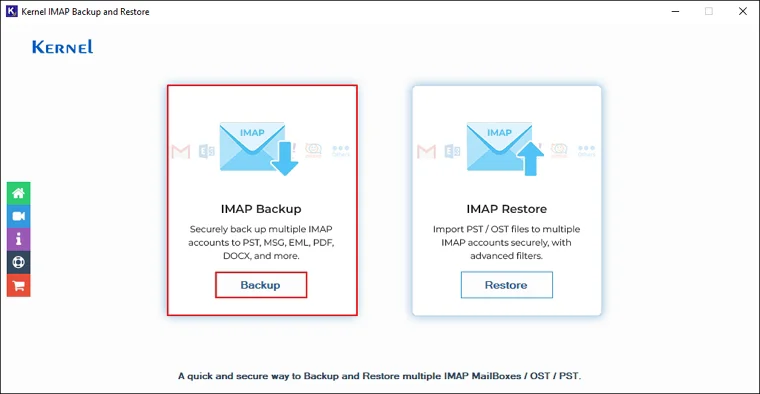
The start screen: IMAP Backup (to PST, MSG, EML, PDF, DOCX and more) and IMAP Restore (PST or OST files into IMAP accounts).
Features
Eight output formats
Kernel IMAP Backup saves a mailbox as an Outlook PST file, as individual EML or MSG messages, as MHT or HTML pages, as Word DOC or DOCX documents, or as PDF. PST is the choice if you'll open the mail in Outlook later; PDF suits records you need to keep or hand to a lawyer or accountant. PST output can be split at a size you set (from 1 GB up) so a large mailbox doesn't end up as one huge file.
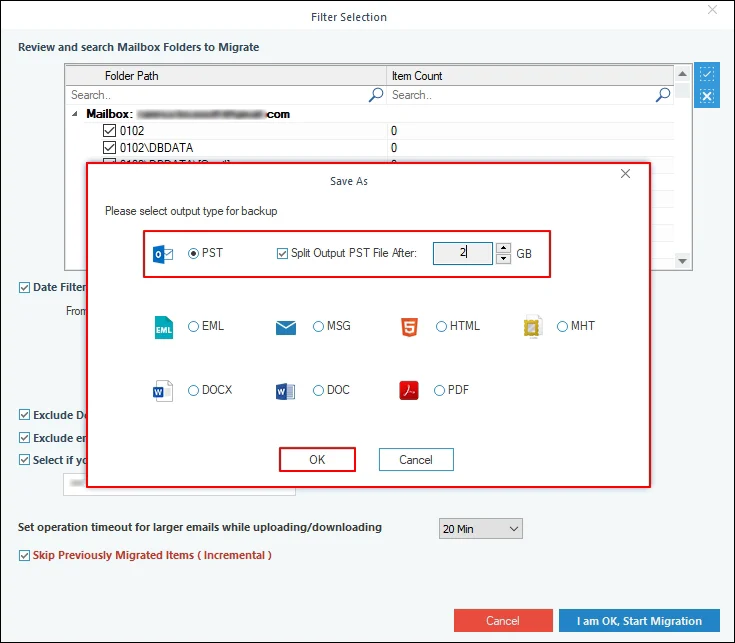
The Save As dialog: PST with "Split Output PST File After 2 GB" ticked, plus EML, MSG, HTML, MHT, DOCX, DOC and PDF.
Many mailboxes in one run
Kernel IMAP Backup adds accounts one at a time (server name, address, password and port; the tool suggests the server details for common providers) or in bulk from a CSV file, using the sample CSV it provides. That's what makes it practical for an office closing a hosted mail plan: list every user in the CSV and back them all up in one job.
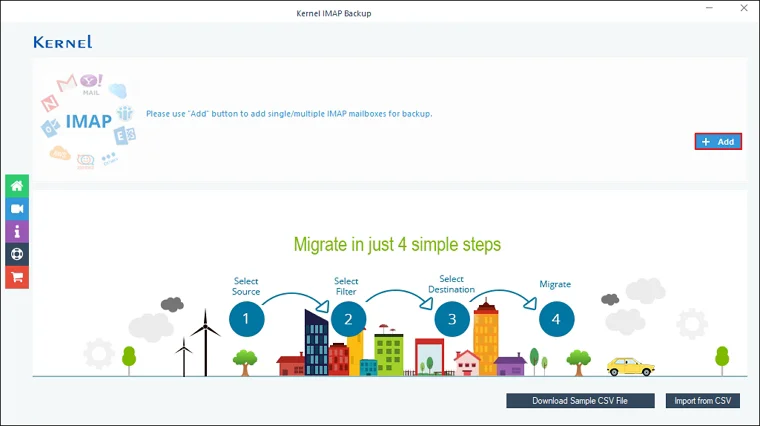
The Backup screen before any account is added: the Add button, plus Download Sample CSV File and Import from CSV at the bottom.
Filters and incremental backups
Kernel IMAP Backup shows each folder with its item count, so you can untick what you don't need. A date range limits the backup to a period, the Deleted and empty folders can be left out, everything can go under one separate folder, and a timeout setting helps with very large messages. Skip Previously Migrated Items (Incremental) means a monthly re-run only adds new mail instead of copying everything again.
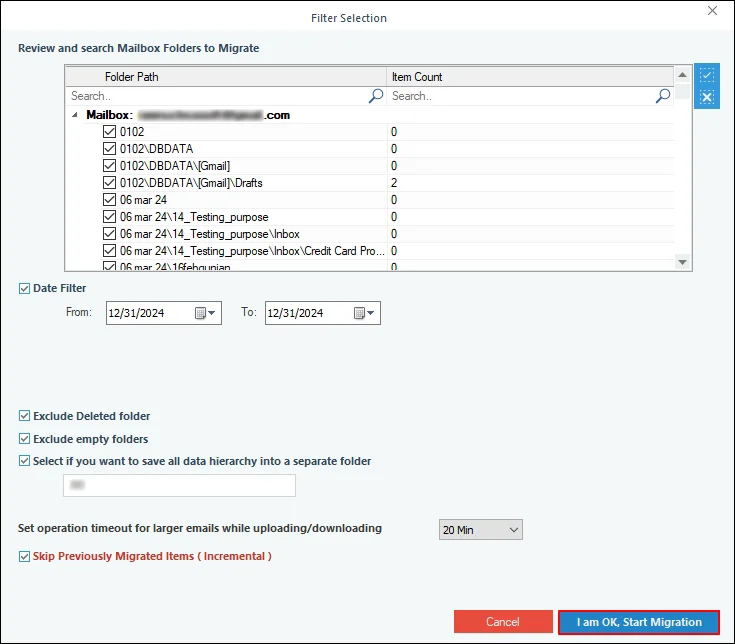
Filter Selection: the mailbox's folders with item counts, a From/To date filter, Exclude Deleted folder, Exclude empty folders, a separate-folder option, a 20-minute timeout and Skip Previously Migrated Items (Incremental).
Restore PST files into IMAP accounts
Kernel IMAP Backup's Restore module (new in version 25.0) does the reverse: it uploads PST or OST files into one or more IMAP mailboxes with the same filters, can keep the source file name as the top folder, and can target an Office 365 Group. It's how you move an old Outlook archive into a Gmail or Zoho account, or put a backup back after a provider switch. On the buy page, restore comes with the Technician license.
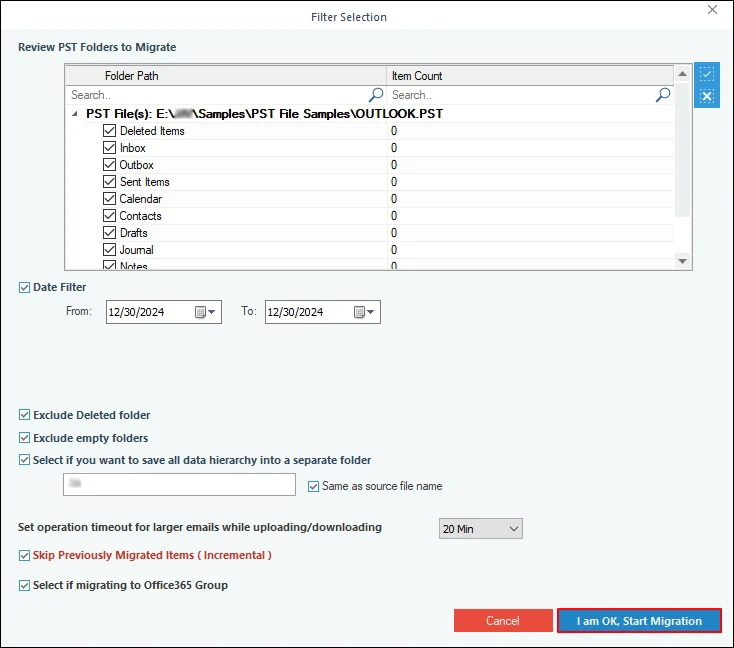
Restore filters for a PST file: folders such as Inbox, Sent Items, Calendar and Contacts, a date filter, "Same as source file name" and "Select if migrating to Office365 Group".
A report for every run
Kernel IMAP Backup lists every folder's status and item count as it works and asks you to save the summary to CSV at the end, with the mailbox, folder, status, item count and any errors. For an admin, that file is the proof that each mailbox was archived.
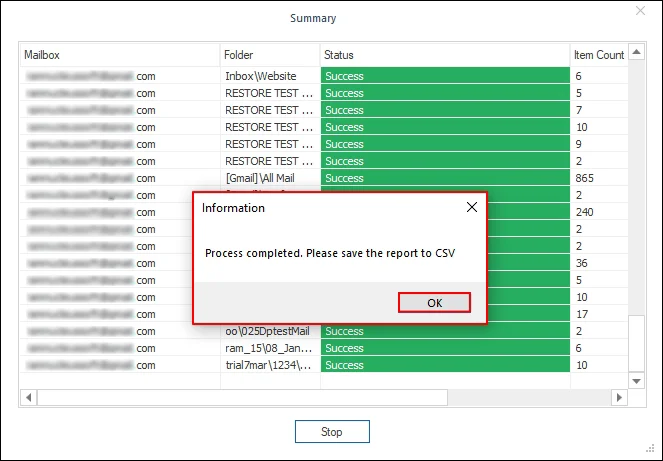
The Summary window: each folder marked Success with its item count, and the "Process completed. Please save the report to CSV" message.
Benefits
- Your mail outlives the account. A PST or PDF copy on your own drive doesn't depend on a provider staying in business or keeping your account open.
- Files you can actually use. PST opens in any Outlook; PDF and DOCX open anywhere and suit legal or tax records.
- No Outlook needed. The tool talks to the server directly, so you don't have to set up each account in a mail client and export it by hand.
- Cheap repeat runs. Incremental mode turns it into a routine archive job rather than a one-off rescue.
Real-World Uses
- Leaving a web host: a small business moving off its cPanel or GoDaddy mail backs up every staff mailbox from a CSV list before the plan ends.
- Freeing Gmail storage: save mail older than three years to PST with the date filter, check it in Outlook, then delete it online.
- Records for a dispute: export one folder of correspondence to PDF for a lawyer or an insurance claim.
- Switching providers: back up a Yahoo account to PST, then use Restore (Technician license) to put it into a Zoho or Gmail account.
- A departing employee: archive the mailbox to PST before the account is deleted.
Who It's For, and Who Should Skip It
Good fit: people and small offices with mail on IMAP providers who want an offline archive in PST or PDF, IT staff closing or migrating hosted mailboxes, and consultants who back up mail for clients (the Technician license).
Skip it if: you only have one Gmail account and are happy with an MBOX file, since Google Takeout exports Gmail for free; you use Thunderbird already, which keeps a local copy of IMAP mail at no cost; or you need a scheduled, hands-off cloud backup service with versioning, which this desktop tool isn't. For Microsoft 365 tenants, Kernel's dedicated Office 365 tools handle archive mailboxes and public folders better.
Usage Guide
- Download and install the trial, then launch Kernel IMAP Backup and Restore and click Backup.
- Click Add and enter the server name, email address, password (an app password for Gmail and Yahoo) and port, or import many accounts from a CSV file.
- Select the account(s) and click Set Filter and Migrate.
- Tick the folders you want, set a date range if needed, choose whether to skip deleted and empty folders, and tick the incremental option for repeat runs.
- Click I am OK, Start Migration, pick the output format (and a PST split size), and choose where to save.
- When the summary says the process is complete, save the report to CSV and open a few backed-up messages to check them.
Tip: run the trial on your biggest folder
The trial saves 10 items from every folder, which is enough to check the sign-in, the folder list, the item counts and how attachments and non-English text come out in your chosen format. Try it on the account and folders you care most about before you pay.
Where it falls short
- Large mailboxes can be slow or stall. IMAP downloads one message at a time and providers throttle heavy use; the tool's timeout setting exists for that reason, and one Trustpilot reviewer said a Kernel Google backup tool "choked up with large mailboxes".
- Older-style interface. It works, but it looks like the enterprise utility it is, with small text and many checkboxes.
- Few independent reviews. G2 and PeerSpot list the product but have too few reviews to rate it, so the trial is your real test.
What Users Say
On Kernel's product page
Kernel's own page shows 4.9 out of 5 from about 460 reviews collected on its site. The featured one:
"The demo version was tested with numerous IMAP email clients, and its performance was fantastic. The software's simple yet effective graphical user interface (GUI) proved to be highly beneficial during the testing process." (Joshua Norman)
These are reviews gathered and displayed by the vendor, so treat them as testimonials rather than an independent score.
On Trustpilot (Kernel Data Recovery, all products)
Kernel Data Recovery scores 4.9 out of 5 from 167 reviews, almost all five stars, with about 2% one-star ratings. Reviews are about Kernel's whole range rather than this tool, and the most common theme is support:
"Exchange Suite allowed me to recover an offline mailbox. I reached out to support, and they provided immediate assistance. Highly recommended." (Jon, September 2026)
"Securely migrate slack direct message to Teams. Overall migration accuracy is good. Thanks for support" (Ashok Kumar, August 2026)
Another buyer, Tom (May 2026), wrote that he bought the wrong version for his needs and support moved him to the correct one, and a reviewer in April 2026 noted that the company's chat was "real, not automated".
The criticism worth knowing: an older one-star review of Kernel's Google backup tool said "It kind of worked great but then choked up with large mailboxes." (DL, July 2024)
On review sites
G2 lists Kernel IMAP Backup but says it doesn't have enough reviews to give buying insight, and PeerSpot hasn't collected any. On GoodFirms, a single business reviewer rated it positively for backing up from an IMAP server and said they bought the Corporate license after a chat with support.
The pattern: buyers praise how simple the steps are and how responsive Kernel's support is, including help choosing the right license. The weak spot is very large mailboxes, where IMAP throttling can slow or interrupt a run. With so little independent coverage of this exact tool, the 10-items-per-folder trial is the best evidence you'll get.
Comparisons
Kernel IMAP Backup vs Google Takeout
Google Takeout exports Gmail for free, but only Gmail, only as one MBOX file, and only the whole mailbox or chosen labels with no date filter. Kernel IMAP Backup handles any IMAP provider, many accounts at once, eight output formats including PST and PDF, date filters and incremental runs. If you have one Gmail account and can work with MBOX, Takeout is enough.
Kernel IMAP Backup vs Thunderbird
Thunderbird is free and keeps a full local copy of IMAP mail, but you set up each account by hand and the files are MBOX. Kernel's tool is quicker for many accounts and writes PST, PDF or DOCX directly, which matters if the archive has to open in Outlook or be printed.
Editions and Pricing
| License | Price | Use | Mailboxes and validity | Buy |
|---|
| Home | $99 one-time | Personal use only; backup | 50 mailboxes, 1 year | Buy Home |
| Corporate | $199 one-time | Several PCs at one location; backup | 1,000 mailboxes, lifetime | Buy Corporate |
| Technician | $799 one-time | Several locations and client work; backup and restore | Unlimited mailboxes, lifetime | Buy Technician |
Prices are from the order page on November 27, 2026. Kernel's store shows them as discounts from higher list prices ($149, $299 and $999); what you pay at checkout is the figure above. Each button orders that license.
FAQs
Can Kernel IMAP Backup back up a Gmail account?
Yes. Kernel IMAP Backup connects to Gmail over IMAP (imap.gmail.com, port 993). Enable IMAP in Gmail's settings and use an app password created after turning on 2-step verification; your normal Google password won't work.
Does Kernel IMAP Backup keep attachments and folder structure?
Yes. Kernel IMAP Backup saves attachments with the messages and recreates the mailbox's folder hierarchy in the output, with the messages' metadata kept.
What happens when the Home license's one year ends?
Kernel IMAP Backup's Home license is sold as a one-time payment with a validity of one year, and nothing renews automatically at checkout. If you need it beyond a year, the Corporate license is lifetime for $100 more.
Is there a Mac version of Kernel IMAP Backup?
Yes, Kernel sells a separate Mac edition (Intel Macs, with Java required) with its own Home and Corporate licenses. The licenses on this page are for the Windows version.
Can Kernel IMAP Backup skip mail I've already backed up?
Yes. Tick "Skip Previously Migrated Items (Incremental)" and Kernel IMAP Backup copies only messages that aren't in the earlier backup, which keeps monthly runs short.
Does Kernel IMAP Backup need Outlook installed?
No. Kernel IMAP Backup writes PST files itself; you only need Outlook later if you want to open them there.
Can I get a refund?
Kernel offers a 30-day money-back guarantee on its licenses. Check the trial first, since a refund depends on Kernel's refund policy conditions.
System Requirements
- Windows 11, 10, 8.1, 8 or 7; Windows Server 2022, 2019, 2016, 2012, 2008 R2, 2008, 2003 R2 or 2003
- Intel Pentium-compatible processor (x86 or x64)
- 4 GB RAM minimum
- 100 MB free disk space for the program, plus room for the backups
- Internet connection and IMAP access to the mailbox; PST output works with Outlook 2021 to 97
Conclusion
Kernel IMAP Backup is worth it if you need IMAP mail turned into files you control, PST for Outlook or PDF for records, across several accounts or providers, with filters and incremental runs. The Corporate license at $199 is the better value for anything beyond a one-off personal backup, since it's lifetime and covers 1,000 mailboxes; the Technician license adds restore for consultants. The main reason not to buy: for a single Gmail account, Google Takeout or Thunderbird does the job for free. Run the trial on your largest folder first.
Download Free TrialBuy Home LicenseBuy Corporate LicenseBuy Technician License