Kernel Outlook Password Recovery: Open a Password-Protected Outlook PST File When You've Forgotten the Password
Kernel Outlook Password Recovery is a Windows tool from KernelApps that unlocks password-protected Outlook data files (PST). It finds a password that opens the file, removes the password, or sets a new one, for one or many PST files at once. It's free for PST files up to 500 MB; the $39 Home license removes the size limit, and a $149 lifetime bundle adds Kernel's PST repair tool.
It's for anyone who set a password on an Outlook data file years ago and can't remember it, inherited a former colleague's protected archive, or received a locked PST and needs to get at the mail inside.
Quick facts
- Price: free for PST files up to 500 MB; Home license $39 (no size limit, 1-year license); Corporate bundle $149 (lifetime, includes Kernel for Outlook PST Repair). One-time payments.
- Developer: KernelApps Private Limited (Kernel Data Recovery, nucleustechnologies.com), Noida, India
- Version: 25.0, which added bulk recovery for several PST files at once
- Runs on: Windows 11, 10, 8.1, 8 and 7, Windows Server 2022, 2019 and older
- Works with: PST files from Outlook 97 to Outlook 2021 and Microsoft 365, 32- and 64-bit
- Three jobs: Recover Password, Remove Password, Set New Password
- Guarantee: 30-day money-back guarantee on the paid licenses
- What we checked: the installer from Kernel's download link (Nucleus-PST-Password-Demo.exe, "Kernel Outlook Password Recovery", file version 25.0, 42 MB, validly signed by KernelApps Private Limited, file dated January 30, 2026) and the prices on the order page (Home $39 and the Outlook Password Recovery + PST Repair bundle $149, one-time payments with no automatic renewal) on November 27, 2026. We didn't unlock a PST file ourselves.
Before you buy
- Try it free first. If your PST file is under 500 MB, the free version does the whole job and you don't need to pay at all.
- It unlocks PST data files, not your email account. It can't recover the password for an Outlook.com, Microsoft 365 or Exchange sign-in, only the optional password set on a .pst file.
- The password it shows may not be your original. Outlook's PST password check accepts other strings that match it, so the tool often gives you a different, short password that still opens the file. That's expected, not a fault.
- Back up the PST before removing a password. The tool itself asks you to confirm you have a backup before it removes one.
Download Free TrialBuy Home LicenseBuy Corporate Bundle (with PST Repair)
Overview
Outlook lets you put a password on a PST data file, and plenty of people did, then forgot it. Outlook offers no reset: without the password the file won't open, along with every email, contact and calendar item inside. Kernel Outlook Password Recovery reads the protected file, works out a password Outlook will accept, and shows it to you, usually within seconds, or strips the protection off the file entirely so it opens with no password.
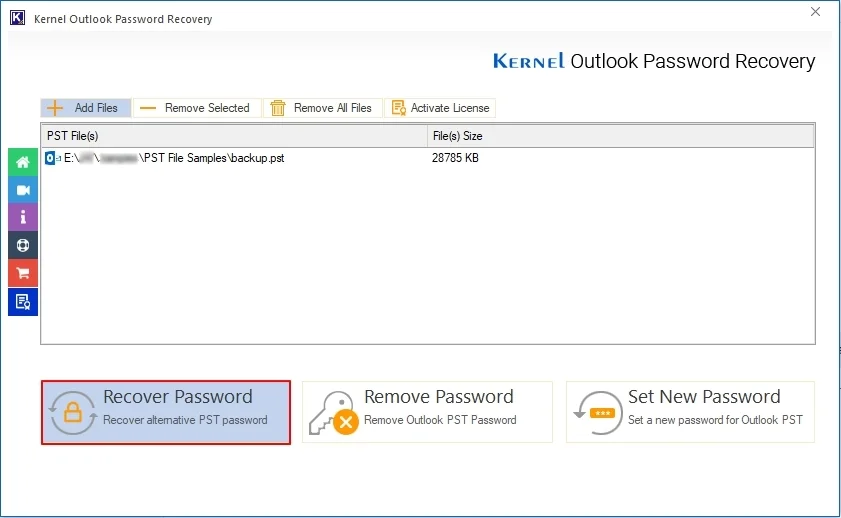
A PST file (28,785 KB) added and ready, with the three options: Recover Password, Remove Password and Set New Password.
Features
Recover a working password
Kernel Outlook Password Recovery finds a password that unlocks the PST, however long or complex the original was, including passwords with symbols and non-English characters. Kernel calls it an "alternate" password: it may not match what you typed years ago, but Outlook accepts it.
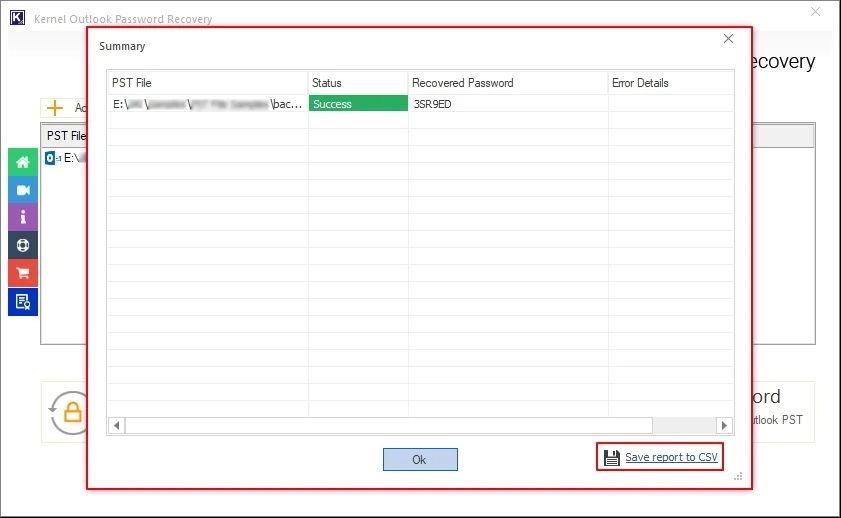
The result: the PST file, status Success and the recovered password (3SR9ED), with a link to save the report to CSV.
Remove the password completely
Kernel Outlook Password Recovery can strip the password from the PST so it opens in Outlook with no prompt at all. Before it does, it asks you to confirm you have a backup of the file, and it reports success or errors for each file when it's done.
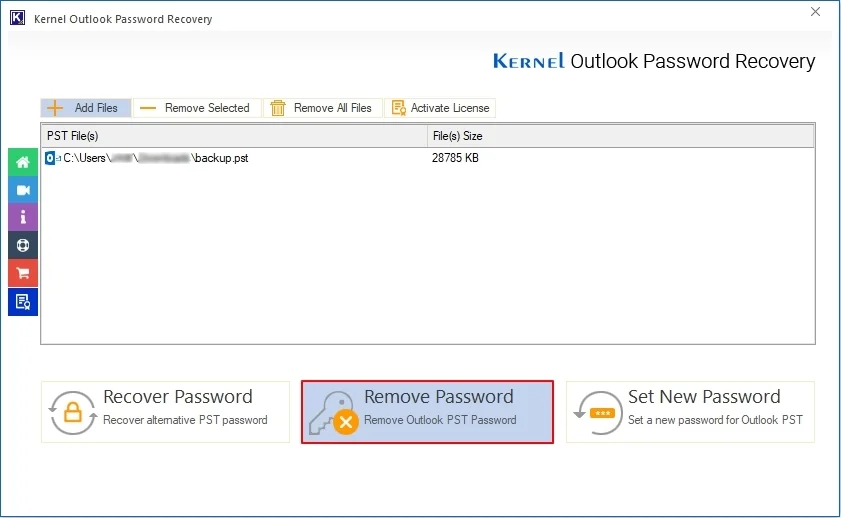
The Remove Password option selected for a PST file.
Set a new password
Kernel Outlook Password Recovery can also put a fresh password on a PST, useful after the old one leaked or when a company policy asks for stronger passwords on archived mail.
Several PST files in one go
Kernel Outlook Password Recovery (version 25.0) adds several PST files at once and processes them as a batch, then offers to save a CSV report listing each file, its status and the recovered password. That's handy for an admin facing a folder of old, locked archives from former staff.
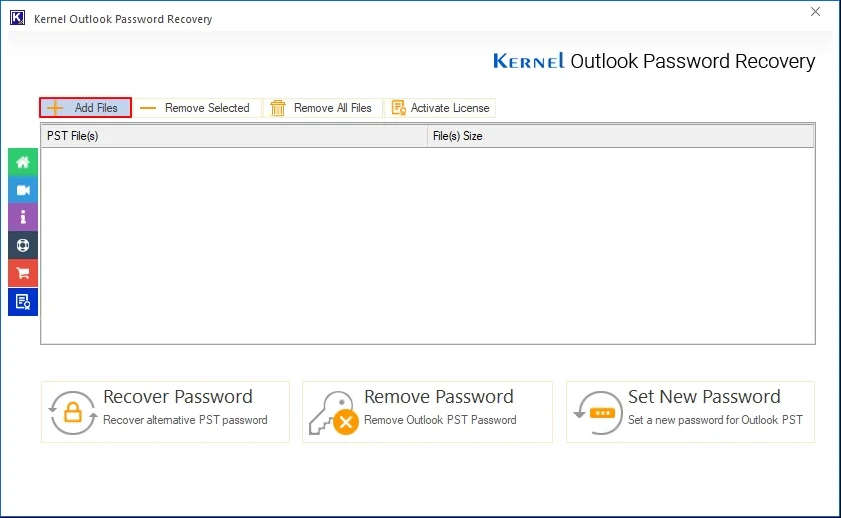
The start window: Add Files, Remove Selected, Remove All Files and Activate License, with the PST list empty.
Benefits
- Your old mail is readable again without rebuilding anything or contacting Microsoft, who can't help with a PST password anyway.
- Free for most single files. Many personal PST archives are under 500 MB.
- No changes to the mail. Recovering a password leaves the PST's contents untouched.
- Batch jobs and a report make it practical for IT staff, not only home users.
Real-World Uses
- Your own old archive: a PST from an old PC that you password-protected a decade ago.
- A former employee's mailbox export: the person has left, the PST is locked, and the mail is needed for a client dispute.
- Before a migration: remove passwords from a batch of PST files so an import tool can read them.
- After a security scare: set a new password on archived PSTs that shared an old, leaked password.
Who It's For, and Who Should Skip It
Good fit: Windows users with a locked PST over 500 MB, IT staff unlocking several archives, and anyone who also wants a PST repair tool (the $149 bundle).
Skip it if: your PST is under 500 MB (the free version is enough); you forgot your email account password rather than a PST file password (use your provider's account recovery instead); or the PST is damaged rather than locked, in which case you need a repair tool such as Kernel for Outlook PST Repair. There's no Mac version, and Outlook for Mac doesn't store its mail in PST files.
Usage Guide
- Download and install the free version, then launch Kernel Outlook Password Recovery.
- Click Add Files and select one or more PST files.
- Click Recover Password (or Remove Password / Set New Password).
- For removal, confirm you have a backup of the file when asked.
- When the summary shows Success, note the password, then click Save report to CSV if you want a record.
- Open the PST in Outlook (File, Open & Export, Open Outlook Data File) and enter the password shown, or none if you removed it.
Where it falls short
- The 500 MB free limit catches many business archives, and the Home license is listed as valid for one year.
- One alternate password, not the original. As MakeUseOf noted, Kernel gives a single password to try rather than a list of candidates.
- Free alternatives exist. NirSoft's PstPassword shows candidate passwords for free with no size limit, though it doesn't remove or reset the password.
- PST only. It doesn't handle OST files, Outlook account passwords or other Office documents.
What Users Say
MakeUseOf (Gavin Phillips, updated May 2022)
MakeUseOf's guide to recovering Outlook passwords tested Kernel's tool alongside the free PstPassword:
"Kernel Outlook PST Password Recovery Tool is a limited free utility. The major limitation is the size of the PST file the tool will unlock."
"I tested using several different password strengths, and each PST file was unlocked."
"The free version of Kernel Outlook PST Password Recovery removes the password with ease." The reviewer also pointed out that, "Unlike PstPassword, Kernel only grants a single password hash to try."
On Kernel's product page
Kernel's page shows 4.9 out of 5 from 373 reviews collected on its own site. The featured one:
"The ability to swiftly and effectively remove passwords from PST files is a total game-changer! Thanks to this tool, I was spared the frustration of being locked out of my account." (Janine Daniel)
These are reviews the vendor collects and displays, so read them as testimonials.
On Trustpilot (Kernel Data Recovery, all products)
Kernel Data Recovery scores 4.9 out of 5 from 167 reviews, almost all five stars, with about 2% one-star ratings. The reviews cover Kernel's whole range rather than one tool, and the most common theme is support:
"Exchange Suite allowed me to recover an offline mailbox. I reached out to support, and they provided immediate assistance. Highly recommended." (Jon, September 2026)
"Securely migrate slack direct message to Teams. Overall migration accuracy is good. Thanks for support" (Ashok Kumar, August 2026)
Another buyer, Tom (May 2026), wrote that he bought the wrong version for his needs and support moved him to the correct one, and a reviewer in April 2026 said the company's chat was "real, not automated".
The criticism worth knowing: an older one-star review of Kernel's Google backup tool said "It kind of worked great but then choked up with large mailboxes." (DL, July 2024)
The pattern: the one independent hands-on test unlocked every PST it tried and found removal easy, and the main complaint is the 500 MB cap on the free version. Kernel's support gets steady praise across its range. Since the free version is the full tool for smaller files, you can see whether it works on your PST before spending anything.
Comparisons
Kernel Outlook Password Recovery vs NirSoft PstPassword
PstPassword is free, tiny and has no size limit; it shows several candidate passwords for a PST. Kernel's tool gives one password but can also remove the password or set a new one, handles several files at once, and writes a report. If you only need to open one file, try PstPassword or Kernel's free version first; pay for Kernel when the file is over 500 MB and you want the password removed for good.
Kernel Outlook Password Recovery vs Stellar Password Recovery for Outlook
Stellar's tool also recovers PST passwords, and Stellar's range is better known in the US. Kernel's free 500 MB tier and $39 price make it the cheaper start; compare the two trials if one fails on your file.
Editions and Pricing
| Edition | Price | Size limit | License term | Buy |
|---|
| Free version | $0 | PST files up to 500 MB | Freeware | Download above |
| Home | $39 one-time | No limit | 1 year | Buy Home |
| Corporate bundle (Password Recovery + Outlook PST Repair) | $149 one-time | No limit | Lifetime | Buy Bundle |
Prices are from the order page on November 27, 2026. Each button orders that license. The bundle is what Kernel's upgrade page sells as its Corporate option, and it includes Kernel for Outlook PST Repair, which recovers mail from damaged PST files.
FAQs
Is Kernel Outlook Password Recovery really free?
Yes, for PST files up to 500 MB. Kernel Outlook Password Recovery's free version recovers, removes and resets passwords on those files with no other limit; larger files need the $39 Home license.
Can Kernel Outlook Password Recovery recover my Microsoft 365 or Outlook.com password?
No. Kernel Outlook Password Recovery only unlocks passwords set on PST data files. For an email account, use the provider's password reset.
Why is the recovered password different from the one I set?
Kernel Outlook Password Recovery reports a password that Outlook's PST check accepts, which is often not your original. It opens the file just the same, or you can remove the password instead.
Does removing the password change my emails?
No. Kernel Outlook Password Recovery only changes the password protection; the messages, contacts and calendar items stay as they were. Keep a backup anyway, as the tool advises.
Does Kernel Outlook Password Recovery work with OST files?
No. Kernel Outlook Password Recovery works on PST files. OST files are cached copies of a server mailbox and aren't protected by a PST password.
Which Outlook versions are supported?
Kernel Outlook Password Recovery supports PST files from Outlook 97 through Outlook 2021 and Microsoft 365, 32-bit and 64-bit.
What happens after the Home license's year?
Kernel lists the Home license as valid for one year with a one-time payment; nothing renews automatically at checkout. The $149 bundle is a lifetime license.
System Requirements
- Windows 11, 10, 8.1, 8, 7, Vista or XP; Windows Server 2022, 2019 and older
- 1 GB RAM minimum
- 512 MB disk space
- PST files from Outlook 97 to 2021 or Microsoft 365 (Outlook doesn't need to be installed)
Conclusion
Kernel Outlook Password Recovery is worth trying first for any locked PST, because the free version is the complete tool for files under 500 MB and an independent test unlocked every file it tried. Pay the $39 for a bigger file, or the $149 bundle if you also deal with damaged PSTs. The reason to look elsewhere: if you only need the password once, NirSoft's free PstPassword may be enough, and if you forgot an email account password rather than a PST file password, this isn't the right tool.
Download Free TrialBuy Home LicenseBuy Corporate Bundle (with PST Repair)