Kernel Duplicate File Finder: Find Identical Files Byte by Byte and Clear Them Out Safely
Kernel Duplicate File Finder is a Windows tool from KernelApps that scans folders, drives and USB devices for identical files, comparing their contents byte by byte, and lets you move the extra copies to a folder, send them to the Recycle Bin or delete them. The Personal license is $29 for life on two PCs and the Corporate license $79; the free trial finds and lists duplicates but won't remove them.
It's for the PC owner whose drive is full of copied photo folders, re-downloaded installers and "Report (2).docx" files, and who wants a plain, offline tool that shows exactly what will go before anything is touched.
Quick facts
- Price: Personal $29 (home use, 2 computers); Corporate $79 (organizations, unlimited computers). Both lifetime, one-time payments.
- Developer: KernelApps Private Limited (Kernel Data Recovery, nucleustechnologies.com), Noida, India
- Version: 21.04 (April 2021)
- Runs on: Windows 11, 10, 8.1, 8 and 7, Windows Server 2022 to 2003
- Compares: file contents byte by byte, not just names or sizes
- File types: images (including RAW), audio, video, archives, databases, text, Microsoft Office, PDF and web files, or all files
- Free trial: scans and lists duplicates; moving or deleting them needs a license
- Guarantee: 30-day money-back guarantee
- What we checked: the installer from Kernel's download link (duplicate-file-finder.exe, "Kernel Duplicate File Finder", file version 21.04, 15 MB, validly signed by KernelApps Private Limited, file dated April 6, 2021) and the prices on the order page (Personal $29, Corporate $79, one-time payments with no automatic renewal) on November 27, 2026. We didn't run a scan ourselves.
Before you buy
- It hasn't been updated since April 2021. Kernel still sells and supports it and lists Windows 11, but version 21.04 is the current release, so don't expect new features.
- Exact duplicates only. It finds files with identical contents; it won't catch resized or edited copies of a photo, which need a "similar image" finder.
- Run the free scan first. The trial shows every duplicate it finds, so you can see how much space you'd recover before paying.
Download Free TrialBuy Personal LicenseBuy Corporate License
Overview
Duplicate files pile up quietly: a phone backup copied twice, a Downloads folder full of the same PDF, photo folders duplicated "just in case" before a reinstall. Name-based tools miss copies that were renamed and flag different files that share a name. Kernel Duplicate File Finder compares the actual bytes, groups identical files together, highlights the extras and leaves the decision to you, with a summary that shows exactly which files will be moved or deleted.
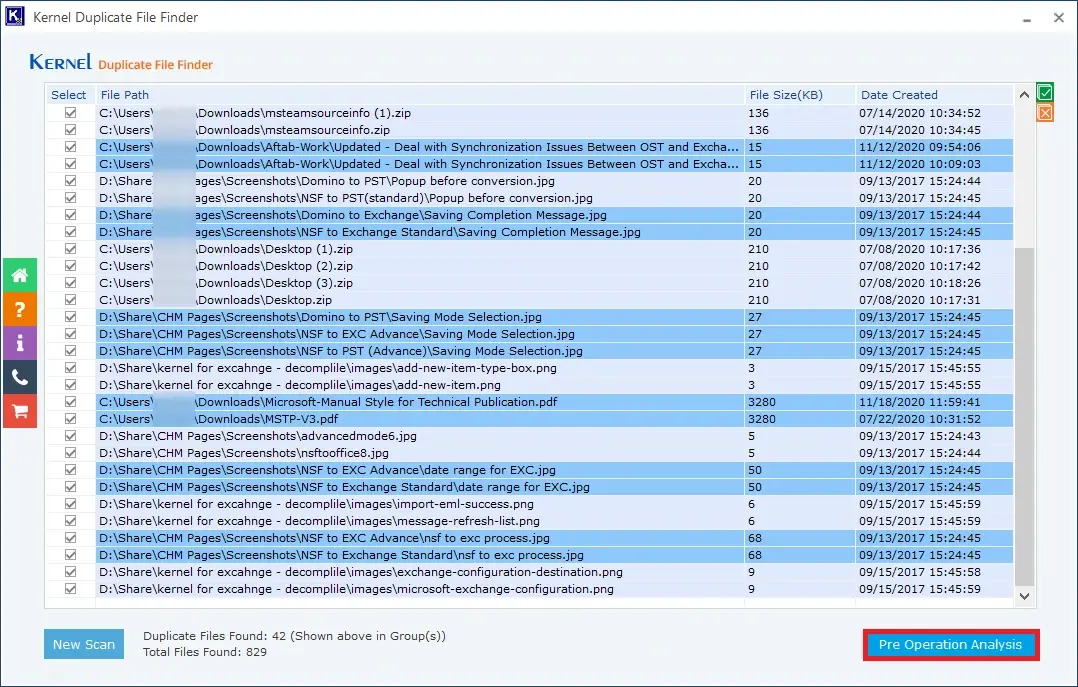
Scan results: duplicate groups highlighted with file path, size and date created, "Duplicate Files Found: 42 (Shown above in Group(s))" and the Pre Operation Analysis button.
Features
Byte-by-byte comparison
Kernel Duplicate File Finder confirms a duplicate by comparing file contents, so a renamed copy is caught and two different files called "invoice.pdf" are not confused. Each group of identical files is listed together, with the copies highlighted in blue.
Choose what to scan
Kernel Duplicate File Finder scans any number of folders and drives in one go, including external disks and USB sticks. Before the scan you pick the file types (images, audio, video, archives, databases, text, Office, Adobe, web files, or all files), set a minimum and maximum size in KB, and choose whether to skip hidden files.
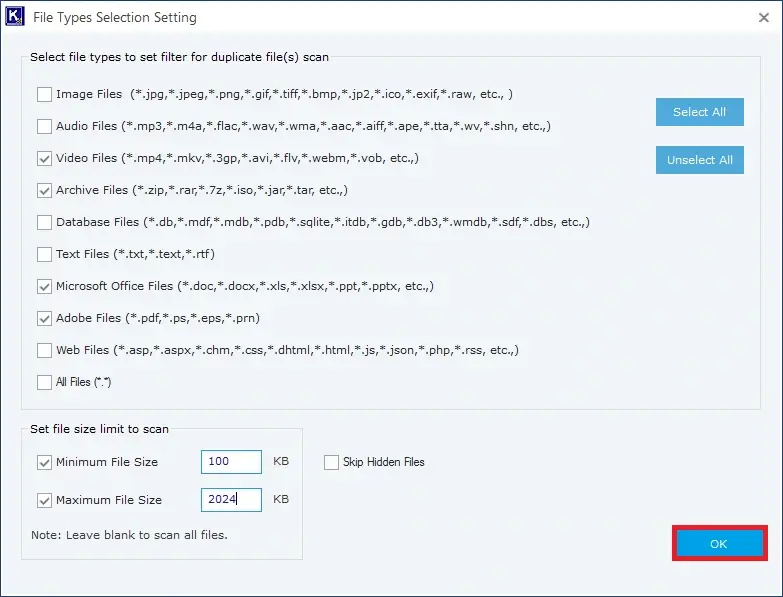
File Types Selection Setting: file type groups with their extensions, Minimum and Maximum File Size in KB and Skip Hidden Files.
Review before anything is removed
Kernel Duplicate File Finder lets you untick any file you want to keep, then shows a Duplicate Files Selection Summary with the files that will be processed struck through. Only after you click Proceed does it act. Kernel's page also lists an option to keep the oldest or the newest copy.
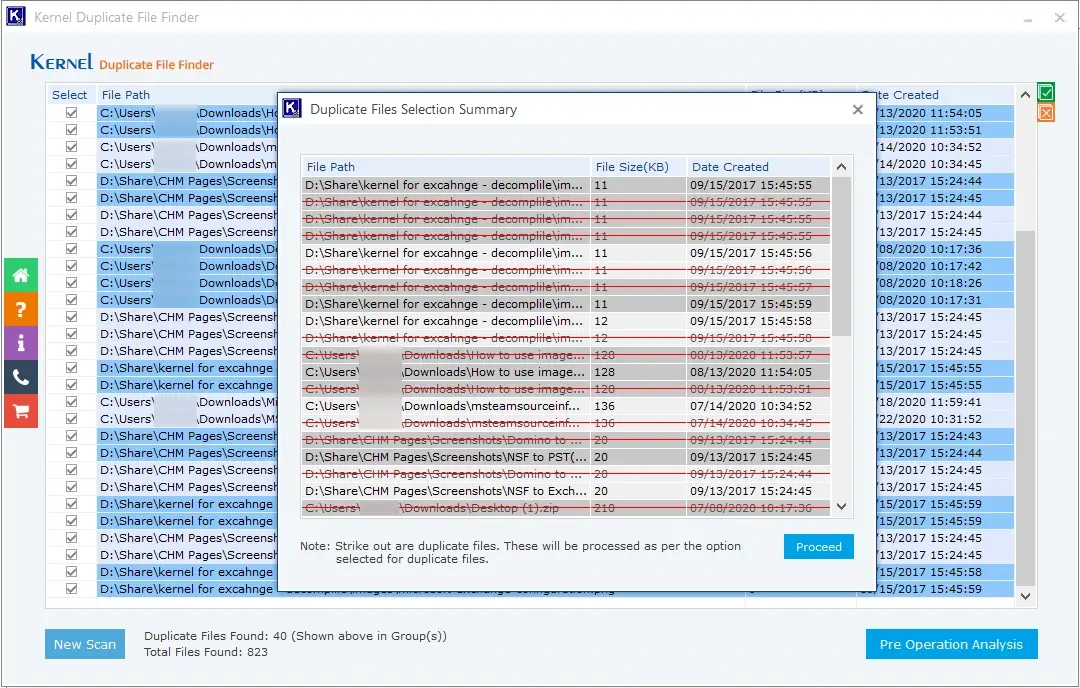
The selection summary: files marked for removal are struck out, with a Proceed button and a note that they will be processed as per the option selected.
Move, Recycle Bin or delete
Kernel Duplicate File Finder can move duplicates to a separate folder (the safest choice if you want to check them later), send them to the Recycle Bin, or delete them permanently to free the space at once.
Simple start
Kernel Duplicate File Finder opens on a single Add Folder(s) button, with shortcuts for common file groups; there are no settings to learn before the first scan, and everything runs offline on your PC.
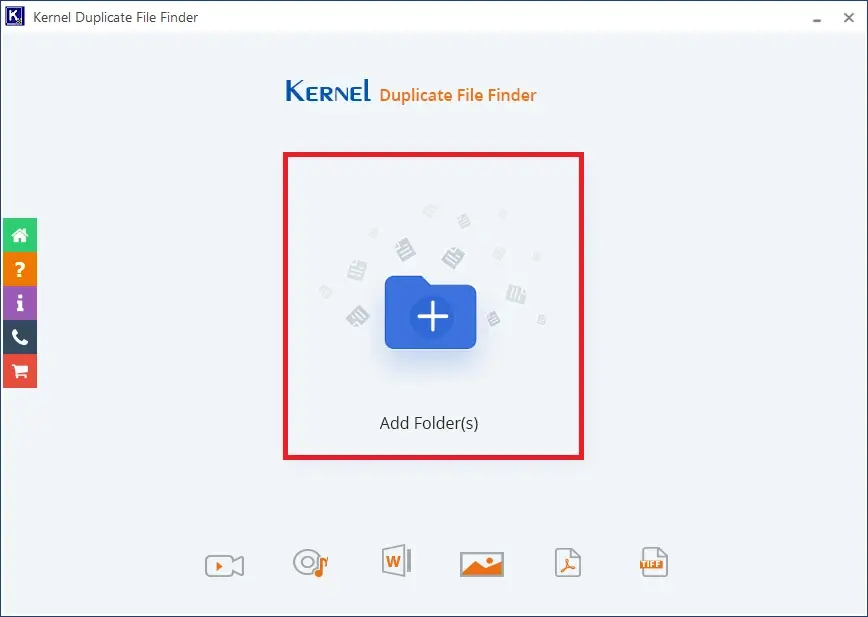
The start screen: Add Folder(s), with icons for video, audio, documents, images, PDF and archive files.
Benefits
- Space back without guesswork. Byte-level matching means you only remove true copies.
- Cheap and permanent. $29 once, for two PCs, with no subscription.
- Safe by design. A review step, a summary and the Recycle Bin option make mistakes recoverable.
- Private. It's a desktop tool; nothing is uploaded anywhere.
Real-World Uses
- Photo library clean-up: scan Pictures and an external drive for identical JPG and RAW files after years of phone imports.
- Full system drive: find large duplicate videos and ISO files with the minimum-size filter set to a few hundred MB.
- Shared office folders: clear the copies of the same documents saved by several people (Corporate license).
- Before a backup: remove duplicates first so the backup is smaller and faster.
Who It's For, and Who Should Skip It
Good fit: Windows users who want a simple, paid-once duplicate cleaner with a clear review step, and small offices that need one license for every PC.
Skip it if: you need to find similar photos (resized, edited or burst shots), which byte comparison can't do; you want a tool that's actively developed; or you'd rather pay nothing, as free tools such as AllDup, Auslogics Duplicate File Finder or Czkawka also find exact duplicates. There's no Mac version.
Usage Guide
- Install the trial and launch Kernel Duplicate File Finder.
- Click Add Folder(s) and add the folders or drives to scan; add more with the + button.
- Pick file types and size limits in File Types Selection Setting, then click OK and Start Scan.
- Review the groups; untick any file you want to keep.
- Click Pre Operation Analysis, choose move, Recycle Bin or delete, check the summary and click Proceed (licensed version).
Tip: move first, delete later
For a first clean-up, move duplicates to a folder on another drive (or use the Recycle Bin) rather than deleting them permanently. Live with it for a week; if nothing is missing, delete the folder.
Where it falls short
- No updates since 2021. It works on current Windows per Kernel, but it's a finished product rather than a growing one.
- No similar-image detection and no audio-tag matching, which newer competitors offer.
- The free version only lists. Free competitors remove duplicates at no cost.
- No independent reviews. We found no third-party test of this tool; judge it with the free scan.
What Users Say
On Kernel's product page
Kernel's page shows 4.9 out of 5 from about 440 reviews collected on its own site. The featured one:
"Lifesaver alert! This duplicate file finder cleared up my messy files, giving my device a space boost. I highly recommend it - super easy and effective!" (Blanche Davis)
These are reviews the vendor collects and shows, so treat them as testimonials. Searches for independent reviews mostly turn up other products with the same generic name, so check that any rating you read is for Kernel's tool.
On Trustpilot (Kernel Data Recovery, all products)
Kernel Data Recovery scores 4.9 out of 5 from 167 reviews, almost all five stars, with about 2% one-star ratings. The reviews cover Kernel's whole range rather than one tool, and the most common theme is support:
"Exchange Suite allowed me to recover an offline mailbox. I reached out to support, and they provided immediate assistance. Highly recommended." (Jon, September 2026)
"Securely migrate slack direct message to Teams. Overall migration accuracy is good. Thanks for support" (Ashok Kumar, August 2026)
Another buyer, Tom (May 2026), wrote that he bought the wrong version for his needs and support moved him to the correct one, and a reviewer in April 2026 said the company's chat was "real, not automated".
The criticism worth knowing: one-star reviews are rare (about 2%), and the ones that exist concern Kernel's mail tools, such as a July 2024 complaint that a Google backup tool slowed down on very large mailboxes.
The pattern: Kernel's buyers mostly rate its support highly, and the one featured user of this tool praises how easy it is. There's no independent test, and the tool hasn't changed since 2021, so the free scan, which shows every duplicate it finds, is the honest way to decide.
Comparisons
Kernel Duplicate File Finder vs free duplicate finders
Free tools such as AllDup and Auslogics Duplicate File Finder also compare file contents and remove duplicates at no cost, and some add similar-image matching. Kernel's tool is simpler, with fewer options, a clear selection summary and Kernel's 24x7 support, and it costs $29. If you're comfortable with a more complex free tool, you don't need it.
Personal vs Corporate
Both licenses have the same features and are lifetime. Personal covers two computers for home use; Corporate covers unlimited computers in an organization for $79.
Editions and Pricing
| License | Price | Use | Computers | Buy |
|---|
| Personal | $29 one-time, lifetime | Home users | 2 | Buy Personal |
| Corporate | $79 one-time, lifetime | Organizations and professional users | Unlimited | Buy Corporate |
Prices are from the order page on November 27, 2026. Kernel's store shows them as discounts from $49 and $199. Each button orders that license.
FAQs
Is Kernel Duplicate File Finder free?
Partly. Kernel Duplicate File Finder's free version scans and lists every duplicate; to move or delete them you need the $29 Personal or $79 Corporate license.
Does Kernel Duplicate File Finder work on Windows 11?
Yes. Kernel lists Windows 11 and 10 among the supported systems for Kernel Duplicate File Finder, along with Windows 8.1 to 7 and Windows Server.
Can Kernel Duplicate File Finder find similar photos?
No. Kernel Duplicate File Finder finds files with identical contents. Edited, resized or re-saved copies of a photo are different files to it.
Will Kernel Duplicate File Finder delete my original?
Kernel Duplicate File Finder deletes only the files you leave ticked, after a summary you confirm. Keep one copy of each group unticked, and use the Recycle Bin or move option if you're unsure.
Can it scan an external drive or USB stick?
Yes. Kernel Duplicate File Finder scans internal drives, external hard disks, USB drives and connected devices, several at once.
Is the license a subscription?
No. Both Kernel Duplicate File Finder licenses are lifetime, one-time payments; nothing renews at checkout.
System Requirements
- Windows 11, 10, 8.1, 8, 7, Vista or XP; Windows Server 2022, 2019, 2016, 2012 R2, 2012, 2008 R2, 2008, 2003 R2 or 2003
- 64 MB RAM minimum (128 MB recommended)
- 50 MB disk space
Conclusion
Kernel Duplicate File Finder is worth $29 if you want a plain, safe duplicate cleaner that compares file contents, shows exactly what it will remove and never charges again. The free scan tells you, before you pay, how much space you'd get back. The reasons not to buy: it hasn't been updated since 2021, it can't spot similar photos, and capable free tools exist if you don't mind more complexity.
Download Free TrialBuy Personal LicenseBuy Corporate License