Kernel IMAP to Office 365: Move Gmail, Yahoo, Zoho and Other IMAP Mailboxes into Microsoft 365
Kernel IMAP to Office 365 is a Windows migration tool that copies whole IMAP mailboxes (Gmail, Yahoo Mail, Zoho Mail, AOL, GoDaddy, Rackspace, a cPanel or company mail server) into Microsoft 365 or Exchange, with folders intact. It's licensed by mailbox count: $99 for 50 mailboxes, $199 for 100 and $349 for 250, as one-time purchases.
It's for the admin of a small or mid-sized business that is leaving a hosting provider's mail server or a pile of free webmail accounts and wants every user's old mail waiting in their new Microsoft 365 mailbox, without setting up Outlook profiles one by one.
Quick facts
- Price: $99 for 50 mailboxes, $199 for 100 mailboxes, $349 for 250 mailboxes (one-time, no automatic renewal)
- Developer: KernelApps Private Limited (Kernel Data Recovery), Noida, India
- Version: 26.0 for Windows
- Runs on: Windows 11, 10, 8.1 and older, Windows Server 2022 back to 2003
- Sources: any IMAP account; Kernel names Gmail, Yahoo Mail, AOL, Outlook.com, Zoho Mail, GoDaddy, Rackspace, GroupWise and Lotus Notes IMAP
- Destinations: Microsoft 365 user mailbox, archive mailbox, shared mailbox, public folder or Microsoft 365 group, plus hosted or on-premises Exchange
- Free trial: migrates 10 items per folder
- Refund: 30-day money-back guarantee, for migrations that fail even with support's help
- What we checked: the installer from Kernel's download link (kernel-imap-to-office-365.exe, 70 MB, file version 26.0, validly signed by KernelApps Private Limited, file dated August 3, 2026) and the three mailbox licenses on the order page ($99, $199 and $349, each a one-time charge with no renewal) on November 28, 2026. We didn't migrate a live mailbox.
Before you buy
- Microsoft has a free IMAP migration. The Exchange admin center can pull IMAP mail into Microsoft 365 from a CSV of addresses and passwords. Kernel's tool earns its price when you want filters, per-mailbox mapping to archive, shared or group mailboxes, incremental re-runs and a report, or when the admin center's batches keep failing.
- IMAP carries mail only. Expect email folders to move, not contacts or calendars, which IMAP servers don't expose.
- You need admin access to the tenant. For Modern Authentication you register an app and enter its Tenant ID, Client ID and client secret, and each source account must have IMAP access turned on (Gmail has a setting for it).
- Count your mailboxes. The licenses cap the number of mailboxes, so a 60-user move needs the 100-mailbox license.
- Pro features are a separate edition. Kernel describes scheduled jobs, batch jobs and uploads of offline PST, OST, EML and MSG files as part of "IMAP to Office 365 Pro", so check the edition before you count on them.
Download Free TrialBuy 50 MailboxesBuy 100 MailboxesBuy 250 Mailboxes
Overview
Moving a company off an old IMAP host is mostly tedious work: every user has years of folders, and the usual do-it-yourself route means adding both accounts to Outlook, waiting for a sync and dragging folders across, mailbox by mailbox. Kernel IMAP to Office 365 replaces that with one window on one PC. You add the IMAP accounts on the left and the Microsoft 365 accounts on the right, pair them up, choose where each mailbox should land and press start. The program logs in to both sides over the network, so nothing needs installing on the users' machines and Outlook isn't involved.
The interface is the plain, wizard-style Kernel layout used across its migration tools: a source list, a destination list, a mapping grid and a filter page. It isn't pretty, but every step is visible, and the folder-selection screen shows item counts per folder before anything moves.
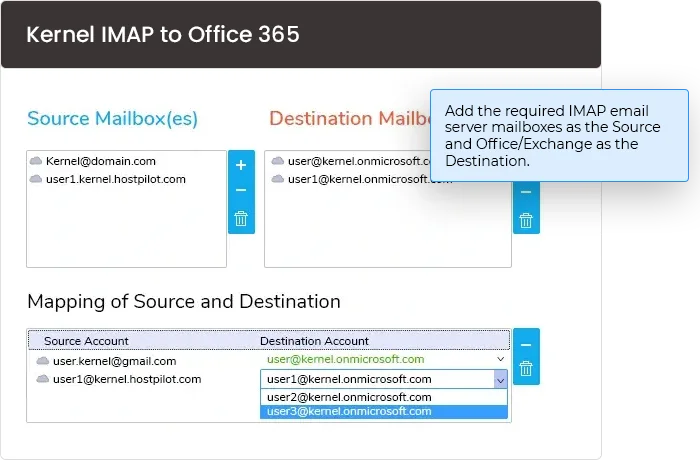
Source IMAP mailboxes on the left, Microsoft 365 destination mailboxes on the right, and the grid that maps one to the other (with Kernel's callout).
Features
Bulk mailbox setup from a CSV file
Kernel IMAP to Office 365 adds accounts one at a time or in bulk: download the sample CSV from the home screen, fill in the source and destination logins, and import it. The tool then lists the mapped pairs ready to migrate, which is the practical way to handle 50 or 250 users.
Five places to put the mail
Kernel IMAP to Office 365 can send each IMAP mailbox to a user's primary mailbox, the online archive, a shared mailbox, a public folder or a Microsoft 365 group. That helps when an old shared inbox such as info@ or sales@ should become a shared mailbox or a group rather than somebody's personal mail. Hosted and on-premises Exchange servers work as destinations too.
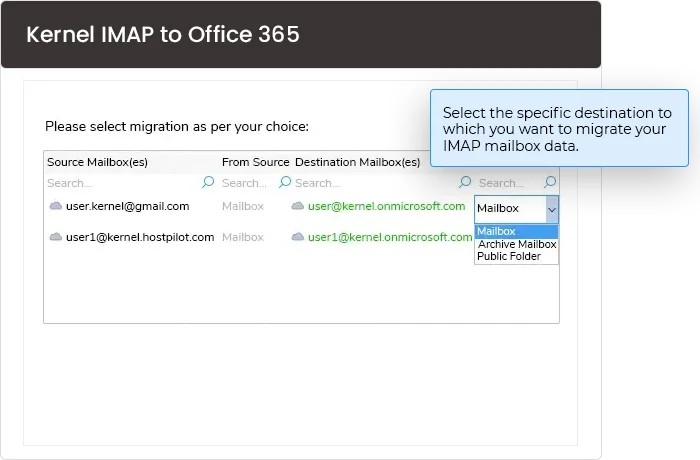
The destination drop-down for each mapped pair: Mailbox, Archive Mailbox or Public Folder.
Filters and incremental re-runs
Kernel IMAP to Office 365 lets you tick the folders to move, limit the run to a date range, skip deleted and empty folders, and set a timeout for very large messages. The "Skip Previously Migrated Items (Incremental)" option means you can move the bulk of the mail a week early, then run it again on cut-over day to pick up only what arrived since.
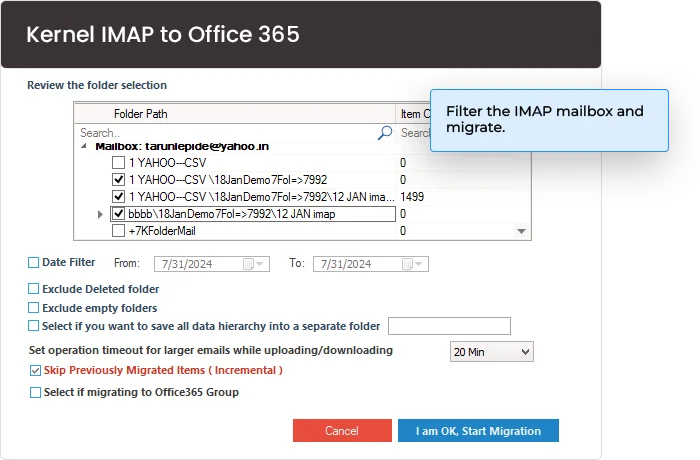
The folder tree with item counts, the date filter, exclude options, the incremental checkbox and "I am OK, Start Migration".
A report for every job
Kernel IMAP to Office 365 ends each run with a summary you can save as CSV, listing the source login, the folders exported, the item count and the status for each mailbox. It's the document you hand to a client or keep for the ticket.
Benefits
- No per-user desktop work. One admin PC does the whole move, so users don't need Outlook profiles or instructions.
- Less downtime. The incremental option makes a two-pass migration practical: bulk first, delta on the day the MX record changes.
- A cheap way to test. The trial moves 10 items per folder for real, which is enough to prove the logins, permissions and folder mapping before paying.
- Predictable cost. One payment per batch of mailboxes, not a monthly per-user fee.
Real-World Uses
- An accounting firm with 30 staff on a web host's cPanel mail moves everyone to Microsoft 365 Business Standard and keeps fifteen years of client correspondence.
- An IT contractor consolidates a client's mix of Gmail and Zoho Mail accounts into one Microsoft 365 tenant, using a CSV for the logins.
- A company turns its old info@ and orders@ IMAP inboxes into a Microsoft 365 shared mailbox and a group, so several people can work from them.
- After a merger, the acquired company's GoDaddy mailboxes go into the parent company's tenant, with a second incremental pass the weekend of the switch.
Who It's For, and Who Should Skip It
Kernel IMAP to Office 365 suits small and mid-sized businesses and the consultants who migrate them: tens to a few hundred mailboxes, an admin who can create Microsoft 365 users and an app registration, and a need to get every folder across without babysitting Outlook.
Skip it if you're moving one personal account: Outlook can sync both accounts and you can drag the folders across for free. Skip it too if your source is a Microsoft 365 tenant (Kernel sells a tenant-to-tenant tool for that), if you need contacts and calendars from Google Workspace (an API-based Google Workspace migration covers those, IMAP doesn't), or if you have thousands of users and want a cloud service with scheduling and dashboards, where hosted migration services fit better.
Usage Guide
- Install and launch. Run kernel-imap-to-office-365.exe on a Windows PC with a steady connection and open the IMAP to Office 365 tile.
- Add the source. Enter each IMAP account (server, port, login) or import them from the sample CSV.
- Add the destination. Sign in to Microsoft 365 with an admin account, or use Modern Authentication with your Tenant ID, Client ID and client secret, which lists all users.
- Map the mailboxes. Pair each IMAP mailbox with a Microsoft 365 user and choose Mailbox, Archive Mailbox or Public Folder.
- Filter. Pick folders and a date range, exclude deleted and empty folders, and tick the incremental option for later re-runs.
- Start and save the report. Click "I am OK, Start Migration", watch the progress, then download the CSV report.
Tips
- Run the trial on one real mailbox first. Ten items per folder is enough to see the folder names land where you expect.
- Change the source passwords to temporary ones for the migration, or use app passwords where the provider offers them, rather than collecting users' everyday passwords.
- Plan two passes: the full run a few days ahead, then the incremental run after you switch the domain's MX records.
Where it falls short
- Mail only. Contacts, calendars and tasks don't travel over IMAP, so they need a separate export and import.
- Setup takes some Microsoft 365 knowledge. Registering an app for Modern Authentication and granting it rights is the step most likely to stall a first-time user. Kernel's support chat helps here, and buyers on Trustpilot mention it often.
- Speed is out of your hands. Both the IMAP host and Microsoft 365 throttle connections, and Kernel itself notes that time depends on mailbox sizes and the network. Big mailboxes on a slow host can take a long time.
- The refund is conditional. Kernel refunds when a migration problem persists after support has looked at it, not for a change of mind, and only partly if you bought the wrong tool.
- Dated spec box. The product page still shows a July 2024 release date beside version 26.0, though the installer itself was rebuilt in August 2026.
What Users Say
On Kernel's product page
Kernel's page for the tool shows 4.9 out of 5 from 452 reviews collected on its own site. These are testimonials the vendor gathers and displays, so read them as such rather than as an independent score.
On Trustpilot (Kernel Data Recovery, all products)
Kernel Data Recovery holds a 4.9 out of 5 TrustScore from 167 reviews, nearly all five stars, with about 2% one-star ratings. The reviews cover the whole product range, and the recurring theme is quick, human support. One reviewer, Paul (February 2026), began: "I am testing with the Demo version of the Kernel Migration for IMAP." He needed to move from legacy IMAP to Office 365, hit configuration problems, and got through them with help in the chat window.
Another buyer, Drew J (March 2026), wrote that "The Kernel team was extremely helpful in resolving an issue I had with OST to PST conversion," while noting that the tool only worked after several attempts. It's a different Kernel product, but the same pattern: the software works, and setup questions get answered.
What the reviews add up to
There is very little independent coverage of this exact tool: no magazine test and no G2 or Capterra reviews with enough volume to judge. What exists praises the simple steps and the support desk, and the problems people report are configuration ones (authentication, permissions) rather than lost mail. The 10-items-per-folder trial is the best evidence you'll get, so use it.
Comparisons
Kernel IMAP to Office 365 vs. Microsoft's IMAP migration in the Exchange admin center
Microsoft's built-in IMAP migration costs nothing and runs in the cloud: you upload a CSV of source addresses and passwords and create a batch. It moves email only and gives you few choices about where it lands. Kernel's tool adds per-mailbox destinations (archive, shared mailbox, public folder, group), folder and date filters, incremental re-runs and a CSV report, and runs from a PC you control. If the free batches work for you, keep your $99.
Kernel IMAP to Office 365 vs. Kernel IMAP Backup
Kernel IMAP Backup, also listed on this site, saves IMAP mailboxes to PST, PDF and other files and can restore PST into IMAP. Choose it to archive accounts before closing them. Choose IMAP to Office 365 when the mail should end up live in Microsoft 365 mailboxes.
Kernel IMAP to Office 365 vs. Kernel Email Migrator
Kernel Email Migrator uploads PST, OST, MSG and EML files to Microsoft 365. It's the right tool when the old mail already sits in files; IMAP to Office 365 is for mail that still lives on a server.
Editions and Pricing
All three licenses are the same program; they differ only in how many mailboxes you can migrate. Prices are from the order page on November 28, 2026.
Kernel's buy page also sells IMAP-to-IMAP and IMAP-to-Google-Workspace licenses at the same prices. Those are different modules; the buttons above order the IMAP to Office 365 licenses.
FAQs
Does Kernel IMAP to Office 365 move contacts and calendars from Gmail?
No. Kernel IMAP to Office 365 reads accounts over IMAP, and IMAP only exposes mail folders. Export contacts and calendars from the old service separately and import them into Outlook or Microsoft 365.
Can Kernel IMAP to Office 365 migrate to an on-premises Exchange server?
Yes. Kernel IMAP to Office 365 lists hosted and on-premises Exchange as destinations besides Microsoft 365.
Do I need a Microsoft 365 global admin account?
Kernel IMAP to Office 365 needs an account with Exchange administrator rights in the tenant, or an app registration for Modern Authentication (Tenant ID, Client ID and client secret). If the secret expires, you can create a new one and reconnect.
Can I run the migration twice without duplicating mail?
Yes. Kernel IMAP to Office 365 has a "Skip Previously Migrated Items (Incremental)" option, so a second run copies only new items.
Is the license a subscription?
No. Kernel IMAP to Office 365 licenses were one-time charges on the order page on November 28, 2026, with no automatic renewal. The license limits the number of mailboxes, not the time you have to use it.
What happens if the migration doesn't work for my server?
Kernel IMAP to Office 365 comes with 24x7 support, and Kernel promises a full refund if the problem remains after its support team has examined it. It doesn't refund a change of mind or a purchase made without trying the demo first.
Does it run on a Mac?
No. Kernel IMAP to Office 365 is a Windows program. Kernel's buy page sells a Mac version only of its IMAP-to-IMAP migration module.
System Requirements
- Windows 11, 10, 8.1 or older; Windows Server 2022, 2019, 2016, 2012, 2008 R2, 2008 or 2003
- Intel Pentium-compatible (x86 or x64) processor
- 2 GB RAM recommended
- 500 MB free disk space
- Internet access to the IMAP server and to Microsoft 365, plus admin rights in the tenant
Conclusion
Kernel IMAP to Office 365 is worth $99 if you're moving a few dozen IMAP mailboxes into Microsoft 365 and want the job done from one PC, with filters, a second incremental pass and a report at the end. The best reason to buy it is that it handles mapping to archive, shared and group mailboxes that Microsoft's free IMAP batches don't. The main reason not to is that the free route may already be enough, and neither tool moves contacts or calendars. Test it with the 10-items-per-folder trial before you buy.
Download Free TrialBuy 50 MailboxesBuy 100 MailboxesBuy 250 Mailboxes