Kernel Import OST to Thunderbird: Convert an Orphaned Outlook OST File to MBOX for Thunderbird or Apple Mail
Kernel Import OST to Thunderbird is a Windows tool that opens Outlook OST files, including orphaned and corrupted ones left behind by a deleted Exchange or IMAP profile, and saves their mail as MBOX files for Thunderbird and other MBOX clients such as Apple Mail. A lifetime Home license costs $69; Corporate is $199 and Technician $299.
The typical buyer has an OST file and nothing else: the work account that created it is closed, Outlook won't open it, and they'd rather read the old mail in a free mail program than pay for Outlook again.
Quick facts
- Price: Home $69, Corporate $199, Technician $299 (one-time, lifetime license and free updates)
- Developer: KernelApps Private Limited (Kernel Data Recovery), Noida, India
- Version: 26.0 for Windows, released December 2025
- Runs on: Windows 11, 10, 8.1, 8 and 7; Windows Server 2022 back to 2003 (no Mac version)
- Reads: Exchange and IMAP OST files from Outlook 97 through Outlook 2024 and Microsoft 365, healthy, corrupted or orphaned, without Outlook installed
- Saves to: MBOX for Thunderbird, Apple Mail, Entourage, Eudora, Postbox, SeaMonkey, The Bat! and other MBOX clients; also PST, DBX, EML, MSG, PDF, DOC, or uploads to Microsoft 365, Exchange, Gmail and other webmail
- Free trial: the evaluation version previews every item and saves the first 25 items per folder
- Refund: 30-day money-back guarantee
- What we checked: the trial download (Nucleus-OST-PST-Demo.exe, 40 MB, which installs Kernel for OST to PST Evaluation Version 26.0, validly signed by KernelApps Private Limited, file dated December 23, 2025) and the three licenses on the order page on November 28, 2026 (Home $69, Corporate $199, Technician $299, one-time with no renewal). We didn't convert an OST file.
Before you buy
- If the account still exists, you may not need it. If the mailbox is still reachable over IMAP, Thunderbird can connect to it and download the mail itself. Kernel's tool is for OST files whose account or profile is gone.
- It converts; you import. The tool writes MBOX files to a folder you choose, and you then bring them into Thunderbird yourself.
- The download is named OST to PST. The trial installs Kernel for OST to PST, the program this product is built on, with MBOX and Thunderbird among its saving options.
- Windows only. Kernel says so plainly: convert on a Windows PC, then copy the MBOX files to your Mac or Linux machine.
- Sale on November 28, 2026: the order page took 30% off all three licenses that day (Home $48.30). The prices on this page are the regular ones.
Download Free TrialBuy Home LicenseBuy Corporate LicenseBuy Technician License
Overview
An OST file is the offline copy Outlook keeps of a server mailbox. Unlike a PST file, it's bound to the profile and account that made it, so it becomes unreadable to Outlook when that account is closed, the profile is rebuilt or the PC is reinstalled. Thunderbird can't read OST files either, at any point.
Kernel Import OST to Thunderbird bridges the two. It opens the OST file directly, scans and repairs it, and shows the mailbox in a folder tree with a preview pane, with simple and advanced property views. You choose MBOX as the output and Thunderbird as the client, set filters if you only want part of the mail, and it writes one MBOX file per folder, keeping the From, To, Subject and Cc details of each message.
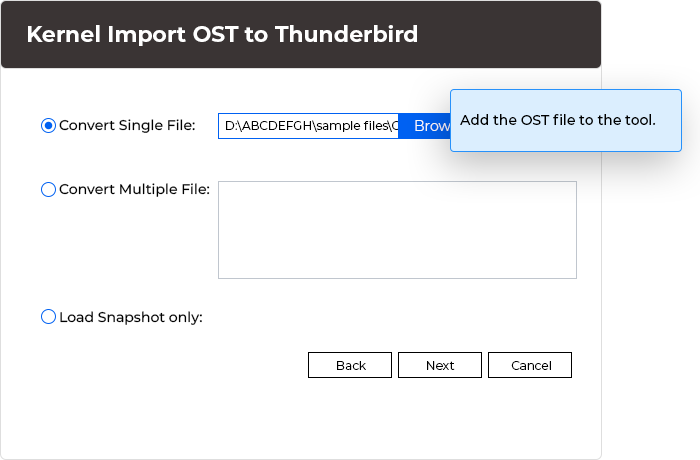
The first screen: add one OST file, several files, or reload a saved snapshot of a previous scan.
Features
Reads OST files Outlook has given up on
Kernel Import OST to Thunderbird opens orphaned OST files with no Exchange connection, repairs corrupted ones, and handles OST files created by IMAP accounts as well as Exchange. It's the core reason to buy it.
MBOX for more than Thunderbird
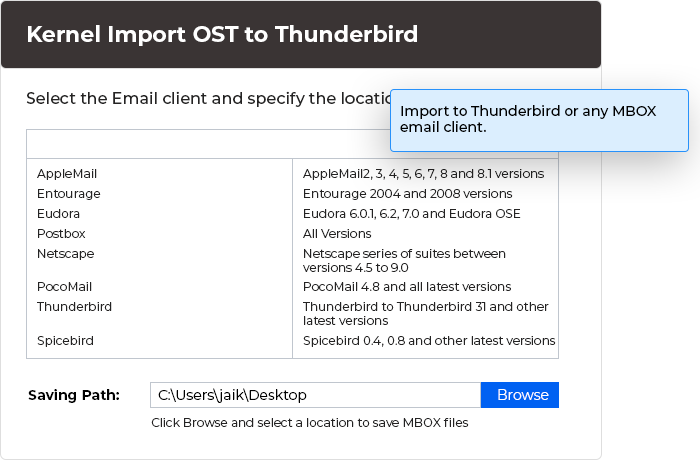
Kernel Import OST to Thunderbird writes standard MBOX, so the output also works in Apple Mail, Entourage, Eudora, Postbox, SeaMonkey, Opera Mail, PocoMail, Claws Mail, Evolution, Sylpheed and The Bat!, the list Kernel publishes. Mac users can convert on a Windows PC and import the files into Apple Mail.
Preview and filter before converting
Kernel Import OST to Thunderbird shows each message in a preview pane and filters by date range, sender or recipient, so you can convert one year or one correspondent instead of the whole mailbox.
The preview after a scan: a message list with column filters and the selected email below.
The same OST, other destinations
Kernel Import OST to Thunderbird can also save the OST data as PST, DBX, EML, MSG, TXT, RTF, HTML, MHTML, PDF, DOC or DOCX, or send it straight to Exchange, Microsoft 365, GroupWise, Domino, Gmail, Google Workspace, Yahoo, AOL, Hotmail or a company IMAP server.
Benefits
- Keeps old mail readable for free. After a one-time purchase, the mail lives in Thunderbird or Apple Mail with no Outlook subscription.
- Rescues files with no account behind them. Former employees, closed hosting accounts and reinstalled PCs leave OST files nobody else can open.
- Lifetime license. All three editions include lifetime validity and free updates.
Real-World Uses
- A consultant who left a company keeps the OST file from her old laptop and converts it to read her project mail in Thunderbird.
- A Mac user switching from Outlook converts the OST file on a borrowed Windows PC and imports the MBOX files into Apple Mail.
- An IT technician recovers a corrupted OST file after a profile rebuild and gives the user an MBOX archive.
- A family archivist converts a late relative's work OST file, filtered to personal correspondents only, into Thunderbird.
Who It's For, and Who Should Skip It
Kernel Import OST to Thunderbird is for Windows users, and Mac users with access to a Windows PC, who hold an OST file they can't open any other way and want the mail in Thunderbird or another MBOX client.
Skip it if the original mailbox still works: add the account to Thunderbird and let it download the mail. Skip it if your file is a PST rather than an OST; Kernel's Import PST to Thunderbird is the matching tool. And if you need the mail back in Outlook rather than Thunderbird, a plain OST-to-PST converter is the simpler buy.
Usage Guide
- Install and launch. Run Nucleus-OST-PST-Demo.exe on a Windows PC. Outlook isn't needed.
- Add the OST file. Use Convert Single File or Convert Multiple File and browse to the file.
- Preview the data. Check the folders and open a few messages in the simple or advanced view.
- Choose MBOX. Select MBOX as the saving option and apply date, sender or recipient filters if needed.
- Pick Thunderbird. Select Thunderbird as the email client and set where the MBOX files should go.
- Import into Thunderbird. When the conversion finishes, add the MBOX files to Thunderbird, for example with an MBOX import add-on such as ImportExportTools NG.
Tips
- Find the OST file before you buy: Outlook usually keeps it in the user's AppData\Local\Microsoft\Outlook folder.
- Work on a copy of the file, never the only one you have.
- Use the trial's 25 items per folder to check that names, dates and attachments come through before you pay.
Where it falls short
- Mail first. MBOX carries email. Contacts and calendars need other formats, so plan a separate route for them if they matter.
- A manual last step. The tool doesn't add the MBOX files to your Thunderbird profile; you import them yourself.
- Windows only. There's no Mac or Linux build of the converter itself.
- Dated look and confusing name. The interface is the old Kernel wizard, and the title bar says "Kernel for OST to PST", not the product you bought.
- Not always first-time smooth. One Trustpilot buyer of the same OST engine said it worked only after several attempts.
What Users Say
On Kernel's product page
Kernel's page shows 4.9 out of 5 from 441 reviews collected on its own site, and features this one from Liam Payne: "An exceptional tool with numerous advanced features. I particularly appreciate the filter and saving options." Treat these as vendor testimonials.
On Trustpilot (Kernel's OST engine)
Kernel Data Recovery holds a 4.9 out of 5 TrustScore from 167 reviews. Kanika Sharma (August 2026) described the classic orphaned-OST case: "I needed to convert my old OST file to PST after I could no longer access the original Outlook profile." She found the converter easy to use and said it handled all her old OST files.
Drew J (March 2026) reported a rougher start, although support sorted it out: "The Kernel team was extremely helpful in resolving an issue I had with OST to PST conversion." He needed several conversion attempts before it worked.
What the reviews add up to
The OST engine underneath gets good marks for recovering files from lost profiles, and Kernel's support for fixing first-run problems. We found no independent test of the Thunderbird output in particular, so use the trial and check a converted folder in Thunderbird before buying.
Comparisons
Kernel Import OST to Thunderbird vs. Kernel Import PST to Thunderbird
Both end in MBOX files for Thunderbird. Import OST to Thunderbird reads OST files (offline copies of Exchange or IMAP mailboxes, often orphaned); Import PST to Thunderbird reads PST personal folders files and can repair them. Buy the one for the file you have.
Kernel Import OST to Thunderbird vs. Kernel for OST to PST
Both install the same program. Kernel for OST to PST, also listed on this site, is sold for getting OST mail back into Outlook as a PST file. Choose it if you're staying with Outlook; choose Import OST to Thunderbird if you're leaving it.
Kernel Import OST to Thunderbird vs. Kernel Import OST to Gmail
Kernel Import OST to Gmail uploads the same OST content to a Gmail or Google Workspace account instead of writing local MBOX files. Pick Gmail for webmail access from any device, Thunderbird for a local archive.
Editions and Pricing
All three licenses run the same program, with lifetime validity and free updates. Prices are the regular ones from the order page on November 28, 2026.
| License | Price | For | Validity | Buy |
|---|
| Home | $69 | Personal use | Lifetime | Buy Home |
| Corporate | $199 | Business use within one organization | Lifetime | Buy Corporate |
| Technician | $299 | Organizations providing services to customers | Lifetime | Buy Technician |
FAQs
Can Kernel Import OST to Thunderbird convert an OST file without Outlook?
Yes. Kernel Import OST to Thunderbird reads the OST file directly, so neither Outlook nor the original Exchange account is needed.
Does Kernel Import OST to Thunderbird work with OST files from IMAP accounts?
Yes. Kernel Import OST to Thunderbird supports OST files created by Exchange accounts and by IMAP accounts configured in Outlook, including files from Outlook 2019 and later.
Can I use the output in Apple Mail on a Mac?
Yes. Kernel Import OST to Thunderbird writes standard MBOX files, which Apple Mail can import. The conversion itself has to run on Windows.
Which Thunderbird versions are supported?
Kernel says Kernel Import OST to Thunderbird supports all Thunderbird versions, old and current, since the output is plain MBOX.
How much does the trial convert?
Kernel Import OST to Thunderbird's evaluation version previews the whole mailbox and saves the first 25 items of each folder.
Do I pay again for updates?
No. Kernel Import OST to Thunderbird's licenses include lifetime validity and free updates, and the order page showed no automatic renewal on November 28, 2026.
System Requirements
- Windows 11, 10, 8.1, 8 or 7; Windows Server 2022, 2019, 2016, 2012, 2008 R2, 2008, 2003 R2 or 2003
- Intel Pentium-compatible (x86 or x64) processor
- 128 MB RAM minimum
- 50 MB free disk space, plus room for the MBOX output
Conclusion
Kernel Import OST to Thunderbird is worth $69 if you have an orphaned or damaged OST file and want the mail in Thunderbird or Apple Mail rather than Outlook: it opens files Outlook won't, and the lifetime license means no further costs. The main drawbacks are the Windows-only converter and the manual import at the end. If the original account still works, connect it to Thunderbird directly and skip the purchase.
Download Free TrialBuy Home LicenseBuy Corporate LicenseBuy Technician License