Kernel OLM to Office 365: Upload an Outlook for Mac Archive to Microsoft 365 from Windows
Kernel OLM to Office 365 is a Windows tool that opens Outlook for Mac archive files (OLM) and uploads their mail, contacts, calendars and tasks straight into a Microsoft 365 or Exchange mailbox, folders intact. The Home license is $99 one-time (Corporate $199, Technician $299), with lifetime updates.
The usual buyer has left a Mac, or left a job, with an OLM export of their Outlook for Mac mailbox, and now has a Microsoft 365 account on a Windows PC. Outlook for Windows can't open OLM files at all, so the mail is stuck until something converts it.
Quick facts
- Price: Home $99, Corporate $199, Technician $299 (one-time, lifetime license and updates)
- Developer: KernelApps Private Limited (Kernel Data Recovery), Noida, India
- Version: 19.11 for Windows, installer dated April 2023
- Runs on: Windows 11, 10, 8.1, 8, 7 and Windows 365; Windows Server 2022 back to 2008 R2
- Reads: OLM files from Outlook for Mac, one or many at once, with no size limit
- Sends to: Microsoft 365 and Exchange, Gmail, iCloud and Apple Mail, or files (PST, DBX, MBOX, EML, MSG, TXT, RTF, HTML, PDF)
- Free trial: previews everything and saves 5 items per folder
- Guarantee: 30-day money-back guarantee on the vendor's buy page
- What we checked: the trial installer (35.7 MB, dated April 26, 2023) installs "Kernel for OLM to PST - Evaluation Version 19.11", which the OLM to Office 365 license activates; Home, Corporate and Technician licenses at checkout on November 28, 2026 ($99, $199, $299). We didn't upload a real OLM file to a Microsoft 365 tenant.
Download Free TrialBuy Home License ($99)
Overview
Kernel OLM to Office 365 is Kernel's OLM converter sold with Microsoft 365 as the headline destination. The steps are short: pick the OLM file (or a folder of them), let it scan, preview the mailbox, choose Office 365 as the output and sign in. The same window also offers the file formats, so one license covers an upload today and a PST backup tomorrow. Kernel sells the converter separately as Kernel for OLM to PST, which is at a newer version (26.0); the Office 365 download is still the 19.11 build.
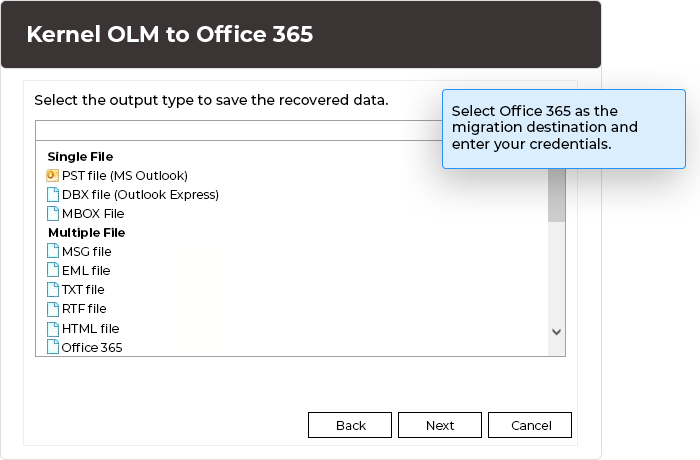
The output step (a vendor illustration of the dialog): single-file formats, multiple-file formats, and Office 365 at the bottom of the list.
Features
Direct upload to Microsoft 365 or Exchange
Kernel OLM to Office 365 signs in to a Microsoft 365 or Exchange mailbox and uploads the OLM mail, contacts, calendars, tasks and attachments into it, keeping the folder hierarchy and item properties, so there's no intermediate PST to import.
Several OLM files in one session
Kernel OLM to Office 365 takes a single OLM file or a batch, and its Search button finds every OLM file in a folder you point it at, which helps when an export was split into several archives.
Preview and filters
Kernel OLM to Office 365 shows every item before anything is saved and filters by From, To, Subject and date, so you can upload only recent mail or only one sender's messages.
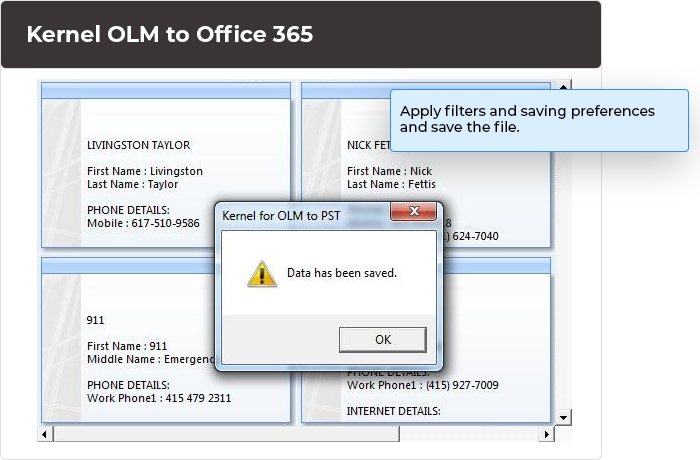
After saving: converted contacts in the preview pane and the "Data has been saved" confirmation (vendor illustration).
Other destinations from the same license
Kernel OLM to Office 365 also saves to PST (with an optional size split such as 1 GB or 2 GB), DBX, MBOX, EML, MSG, TXT, RTF, HTML and PDF, and can send mail to Gmail, iCloud or Apple Mail. A file analysis report charts item types, mail flow by date and the busiest senders.
Benefits
- No Mac needed. The conversion runs on the Windows PC you now use.
- One step, not two. Mail goes from OLM to the cloud mailbox without exporting a PST and importing it.
- Lifetime license. The Home license is a one-time $99 with updates, not a subscription.
Real-World Uses
- Mac to PC switch: a consultant who exported Outlook for Mac before selling the MacBook uploads ten years of mail into the new Microsoft 365 account.
- Leaving a job: an OLM archive of a former mailbox goes into a personal Microsoft 365 mailbox, filtered to keep only the last few years.
- IT help desk: a technician moves several Mac users' OLM exports into their new Exchange Online mailboxes (that's what the Technician license covers: work for multiple organisations).
Who It's For, and Who Should Skip It
It suits someone on Windows with an OLM file and a Microsoft 365 mailbox to fill. If you still have the Mac with Outlook on it, you may not need any tool: add the Microsoft 365 account to Outlook for Mac and drag the folders across. If you only need a PST, Kernel for OLM to PST is the same engine at a newer version. Readers who want a cheaper PST-only converter can look at Stellar Converter for OLM Standard ($39 a year), which doesn't upload to Microsoft 365 in that edition.
Usage Guide
- Download and install the trial on a Windows PC.
- Launch it and choose Convert Single File (Browse) or Convert Multiple File, or use Search to find OLM files in a folder.
- Wait for the scan, then preview the folders and items.
- Choose Office 365 as the output, apply filters, and enter the Microsoft 365 credentials.
- Click Finish and wait for "Data is Saved", then check the mailbox in Outlook or Outlook on the web.
Before you buy
- The trial saves only 5 items per folder (one paragraph on Kernel's page says 25), enough to check that the upload works with your account.
- Home is for personal use; Corporate covers several machines at one location; Technician covers several locations or client work.
- The download is version 19.11 from April 2023. It runs on Windows 11 according to Kernel, but it isn't as recently updated as Kernel for OLM to PST.
Download Free TrialBuy Home License ($99)
Where it falls short
- Older build. The Office 365 download hasn't changed since April 2023, while the same converter sold as OLM to PST is at version 26.0.
- The screenshots are illustrations. Kernel's page shows redrawn step pictures rather than the full program window, so the trial is the way to see the real interface.
- Pricier than PST-only converters. If a PST you import into Outlook yourself is enough, there are cheaper options.
- Windows only for this product page, even though Kernel advertises a Mac version too.
What Users Say
On Kernel's own product page
Kernel shows a 4.9 out of 5 average from 453 reviews on the product page (515 on the buy page). The highlighted review, from Dane Gagai: "Transitioning from Mac Outlook to Office 365 was made seamless with the assistance of that tool. I successfully transferred all my data without encountering any errors, highlighting the tool's effectiveness in facilitating a smooth migration process." The page lists 94% Excellent and 6% Good, which tells you these are curated.
Independent sources
We found no independent review of Kernel OLM to Office 365 itself. Kernel Data Recovery as a company holds a 4.9 out of 5 TrustScore on Trustpilot from 167 reviews, mostly short positive notes about its email tools, with about 2% one-star ratings.
The pattern
What feedback exists says the upload works and keeps folders; nobody independent has tested it at length, and the build is older than its sister product, so use the trial on your own OLM file before paying.
Comparisons
Kernel OLM to Office 365 vs Kernel for OLM to PST
Both open OLM files and save to the same formats; Kernel for OLM to PST is the newer build (26.0) and is priced for PST conversion, while OLM to Office 365 is licensed around the Microsoft 365 upload. If you want PST, buy the newer one; if the point is getting mail into Microsoft 365 directly, this is the listing for that.
Kernel OLM to Office 365 vs Stellar Converter for OLM
Stellar Converter for OLM Standard ($39 for one year) converts OLM to PST, MSG and EML; direct export to Microsoft 365 needs its Technician edition. Kernel's Home license includes the Microsoft 365 upload and is a one-time $99.
Editions and Pricing
Each button orders that license at checkout. Prices checked on November 28, 2026; all are one-time charges with lifetime license and updates.
| License | Price | Use | Buy |
|---|
| Home | $99 | Personal use only | Buy Home |
| Corporate | $199 | Multiple machines at a single location | Buy Corporate |
| Technician | $299 | Multiple machines at multiple locations | Buy Technician |
FAQs
Does Kernel OLM to Office 365 need Outlook installed?
No. Kernel OLM to Office 365 reads the OLM file itself and uploads to Microsoft 365 over the internet, so neither Outlook for Mac nor Outlook for Windows has to be installed.
Will Kernel OLM to Office 365 remove anything from my OLM file?
No. Kernel OLM to Office 365 copies the data and leaves the OLM file unchanged, so you can still open it in Outlook for Mac.
Is there a size limit on the OLM files Kernel OLM to Office 365 can upload?
No. Kernel says Kernel OLM to Office 365 has no file or folder size limit; very large archives just take longer to upload.
How do I know Kernel OLM to Office 365 finished the upload?
Kernel OLM to Office 365 shows a "Data is Saved" message when the job ends, and the folders then appear in the Microsoft 365 mailbox in Outlook or Outlook on the web.
Can Kernel OLM to Office 365 upload to Gmail instead?
Yes. Kernel OLM to Office 365 can also send OLM mail to Gmail, iCloud or Apple Mail, or save it as PST, MBOX, EML, MSG and other files.
System Requirements
- Windows 11, 10, 8.1, 8, 7 or Windows 365; Windows Server 2022, 2019 and older
- Intel Pentium-compatible (x86, x64) processor
- 512 MB of RAM and 50 MB of disk space
- Internet connection and a Microsoft 365 or Exchange account for the upload
Conclusion
Kernel OLM to Office 365 does the one job it's named for: getting an Outlook for Mac archive into a Microsoft 365 mailbox from a Windows PC, for a one-time $99. Buy it if that direct upload is what you need and you don't want to fiddle with a PST import. Skip it if a PST is enough (Kernel for OLM to PST is the newer build of the same engine) or if you still have the Mac and can drag folders across in Outlook for Mac. Either way, try the free trial on your own OLM file first.
Download Free TrialBuy Home License ($99)