Kernel Google Workspace to Office 365: Move Gmail Mailboxes, Groups and Google Chat to Microsoft 365
Kernel Google Workspace to Office 365 is a Windows migration tool that copies a Google Workspace (G Suite) organisation's mailboxes, contacts, calendars and Google Groups into Microsoft 365, and with a second module moves Google Chat messages and Spaces into Microsoft Teams. It is priced by mailbox count: $149 for 25 mailboxes, up to $999 for 500, as a one-time charge.
The buyer is an IT admin or a small consultancy moving a company off Google Workspace. Microsoft's own IMAP-based migration moves mail but leaves calendars, contacts, groups and chat to other methods; this tool does them from one console, with user mapping, filters and a report at the end.
Quick facts
- Price: mailbox migration $149 (25 mailboxes), $199 (50), $299 (100), $599 (250), $999 (500); Google Chat to Teams from $299 (25 users). One-time charges with no renewal at checkout
- Developer: KernelApps Private Limited (Kernel Data Recovery), Noida, India
- Version: 26.1 for Windows, installer dated November 26, 2026
- Runs on: Windows 11 and 10 and Windows Server 2022 and 2019 (and older versions)
- Moves: Gmail mail with labels, contacts, calendars and appointments, tasks, Google Groups, and Google Chat direct messages and Spaces
- Destinations: Microsoft 365 primary, archive or shared mailboxes, public folders, Microsoft 365 Groups, and Teams chats
- Free trial: full program, migrates 10 items per folder
- Guarantee: 30-day money-back guarantee on the vendor's buy page
- What we checked: the trial installer is version 26.1 (44 MB), signed by KernelApps Private Limited and dated November 26, 2026; every mailbox and chat tier listed here at checkout on November 28, 2026 ($149 for 25 mailboxes). We didn't run a migration between live tenants.
Download Free TrialBuy 25 Mailboxes ($149)
Overview
Kernel Google Workspace to Office 365 is a desktop program, not a cloud service: you install it on a Windows PC or server, sign in to both tenants as an administrator, and the data travels through that machine. On the Google side it connects through a service account and its P12 key file, which you create in the Google Cloud console before you start (the program's login screen walks you through it). On the Microsoft side it supports modern authentication with admin credentials.
The home screen offers two jobs: Mailbox Migration and Google Chat Migration. Each is licensed separately, so a company that only wants mail pays only for the mailbox tier.
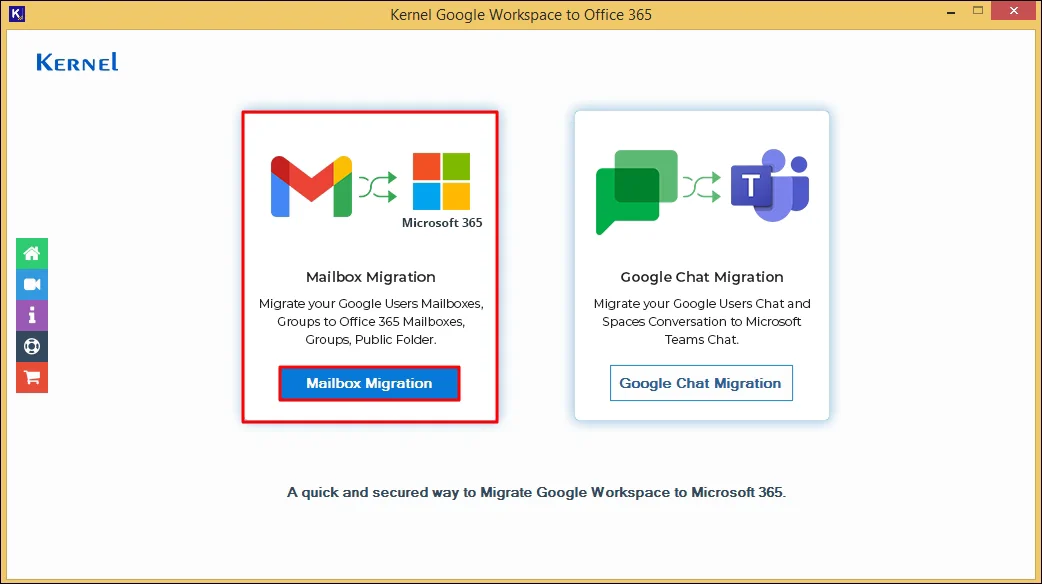
The home screen: Mailbox Migration (Gmail to Microsoft 365) on the left, Google Chat Migration (to Teams) on the right.
Features
Bulk mailbox migration with CSV mapping
Kernel Google Workspace to Office 365 lists every user mailbox in the Google tenant once you sign in with a super-admin account, or takes a single mailbox, and you can also load users and groups from a CSV file. Each Google mailbox is mapped to a Microsoft 365 user, and several mailboxes migrate at the same time in parallel instances.
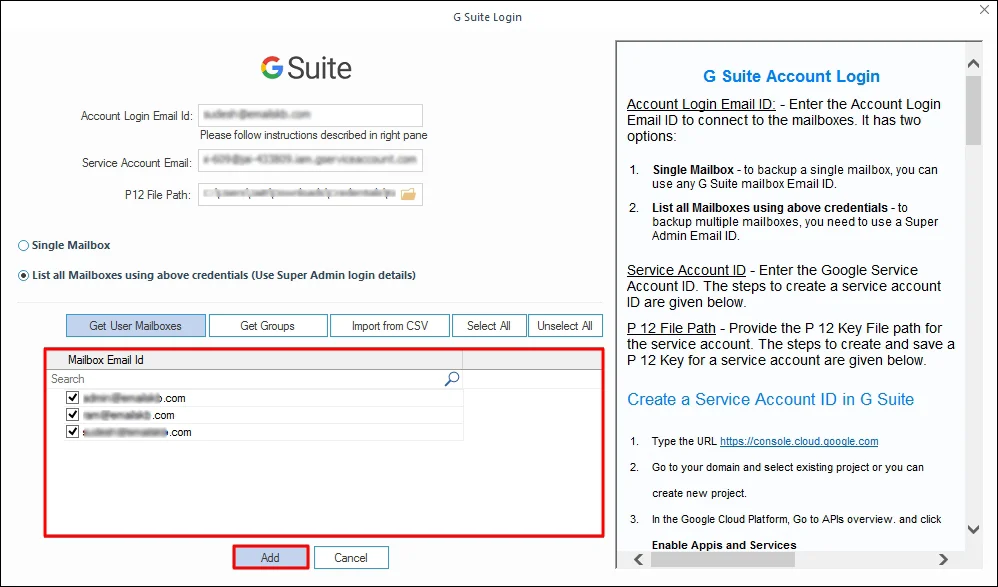
Adding the Google side: account, service account email and P12 key path, then the list of user mailboxes to add.
Choose where each mailbox lands
Kernel Google Workspace to Office 365 can put a Google mailbox into a Microsoft 365 primary mailbox, an archive mailbox, a shared mailbox or a public folder, and Google Groups go to Microsoft 365 Groups. A folder option keeps all migrated data under one named folder, which helps when users already have mail in the new mailbox.
Filters and incremental re-runs
Kernel Google Workspace to Office 365 lets you untick folders, set a date range and pick item types (email, contacts, calendar). A "Skip Previously Migrated Emails (Incremental)" box means a second pass after the MX record switch copies only what arrived since the first run, which is how a staged cutover works.
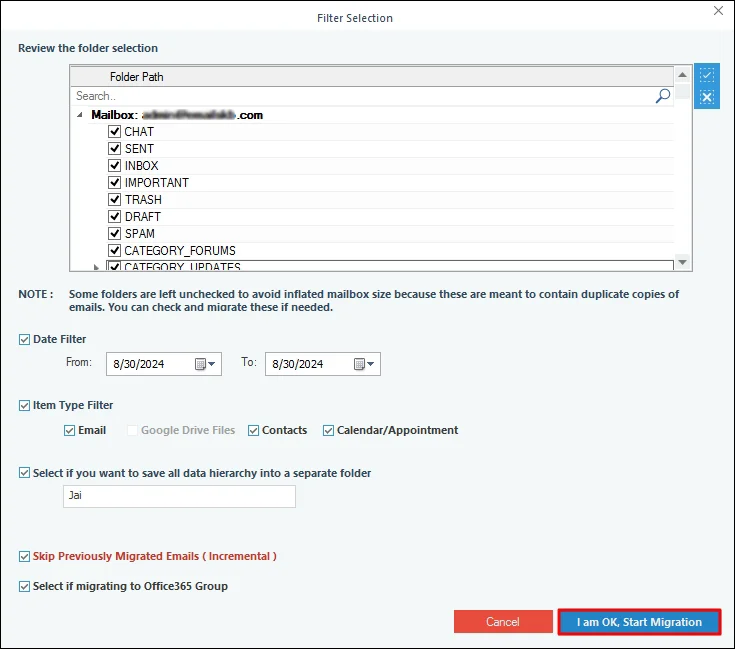
The filter step: folder selection, date filter, item types, and the incremental and Office 365 Group options.
Google Chat and Spaces to Microsoft Teams
Kernel Google Workspace to Office 365 includes a Google Chat module that moves one-to-one messages, group conversations and Spaces into Teams chats, with replies, mentions, reactions, inline images, links and timestamps. Users are matched by email or from a CSV file, and unmatched users are shown in red before anything moves.
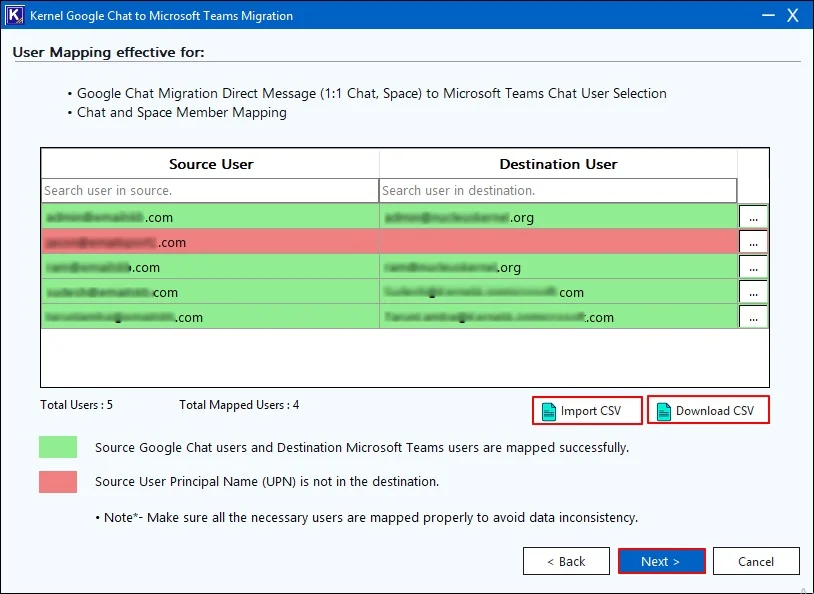
Chat migration user mapping: green rows are matched, the red row has no Teams user yet.
Live status and a CSV report
Kernel Google Workspace to Office 365 shows each mailbox and folder as it migrates, with item counts and a Successful, Processing or Pending status, and saves a CSV report with folder-level results and remarks for failed items, so you can prove the move to the business.
Benefits
- One tool for the whole move. Mail, calendars, contacts, groups and chat come across in the same console, instead of IMAP for mail and manual exports for the rest.
- Pay for the size you are. A 20-person office pays $149, not an enterprise per-user subscription.
- Cutover without a gap. The incremental option lets you migrate in advance, switch mail delivery, then catch up the last few days.
- The old tenant stays intact. It copies through the APIs and doesn't delete or change anything in Google Workspace.
Real-World Uses
- A 30-person firm switching to Microsoft 365 Business Premium: the 50-mailbox license moves everyone's mail and calendars over a weekend, with a catch-up run on Monday.
- An IT consultant doing several small migrations a year buys the tier that fits each client and keeps the CSV report as the hand-over record.
- A team that lives in Google Chat: the chat module keeps a year of Spaces discussions searchable in Teams instead of exporting them to files.
- A merger: mailboxes from an acquired company's Google tenant go into shared mailboxes or public folders while accounts are sorted out.
Who It's For, and Who Should Skip It
It fits admins of small and mid-sized Google Workspace tenants who want a predictable one-time price and are comfortable creating a Google service account. A single person moving one Gmail account to Outlook doesn't need it: Outlook's built-in Gmail import or an IMAP copy is free for that. It also doesn't move Google Drive files (the item filter shows Drive greyed out), so a company with lots of Drive data needs a separate drive migration tool as well. Very large tenants that want a hosted, hands-off service may prefer a migration service with a project manager over a desktop program.
Usage Guide
- Download and install the trial on a Windows PC or server with at least 8 GB of RAM and a 4-core processor.
- In the Google Cloud console, create a service account for your domain, enable the Gmail, Calendar and Contacts APIs, and download its P12 key.
- Launch the program and choose Mailbox Migration.
- Add the source: your super-admin email, the service account email and the P12 key path, then Get User Mailboxes (or Import from CSV) and Add.
- Add the destination: sign in to Microsoft 365 as an admin and fetch its mailboxes.
- Check the source-to-destination mapping and select the mailboxes to move.
- Set the filters, tick the incremental option for later passes, and click "I am OK, Start Migration".
- Watch the status screen, then save the CSV report.
Before you buy
- Licenses are counted per mailbox (or per user for chat). Buy the tier at or above your user count; the buy page tops out at 500, and for more Kernel points you to its sales team.
- Mailbox and chat migration are separate licenses. Buy both if you need both.
- Calendar and contact migration only works once those Google APIs are enabled for your service account.
- Run the trial first: it migrates 10 items per folder, enough to see that your folders, labels and calendars come across the way you expect.
Download Free TrialBuy 25 Mailboxes ($149)
Where it falls short
- Setup is technical. The Google service account, P12 key and API permissions are the step most people get stuck on, and nothing moves until they are right.
- Chat migration depends on one admin account. Kernel says the Global Admin used for Teams must hold an active Microsoft 365 license with Teams, keep it after the migration, and that files go to that admin's OneDrive for users whose OneDrive isn't provisioned yet.
- Speed is limited by the APIs. Google and Microsoft throttle large transfers, so a big tenant can take days, and the time depends on mailbox size and your connection.
- No Google Drive files. Drive content needs another product.
- Windows only, and the spec sheet on the product page lags behind the installer (it still lists version 24.2).
What Users Say
Independent review sites
Independent reviews of this exact product are scarce. G2 has a single review of Kernel G Suite to Office 365 migration tool, rated 3.5 out of 5: the reviewer called the move smooth but said moving the data was time consuming. Kernel Data Recovery as a company holds a 4.9 out of 5 TrustScore on Trustpilot from 167 reviews, mostly short five-star notes about its migration and recovery tools, such as Vasu Giri (May 2026): "During email migration tasks, the software maintained data integrity, including folder structure and attachments." About 2% of the Trustpilot ratings are one star.
On Kernel's own product page
Kernel shows a 4.9/5 average from 451 reviews on its product page. James (USA) writes: "Our company planned to move all mailboxes from Google Workspace to Microsoft 365. Kernel G Suite to Office 365 Migration transferred all mailboxes and folders with complete data. The migration process went smoothly." Sophia (Australia): "We wanted Google Chat conversations and Google Spaces messages in Microsoft Teams. With Kernel Google Workspace to Microsoft 365 migration tool, we securely migrated all our Google Chat Direct Messages and Spaces to Microsoft Teams Chat." These are the vendor's selection, so read them as such.
The pattern
Praise centres on complete mailboxes and folder structure and on the chat module; the one critical note is about how long large moves take. With so few independent reviews, the trial run on a couple of real mailboxes is the best evidence you can get.
Comparisons
Kernel Google Workspace to Office 365 vs Microsoft's built-in migration
Microsoft's Exchange admin center can migrate Google Workspace mail for free, and newer versions also bring calendars and contacts, but it is set up per batch in PowerShell or the admin center, gives little filtering and doesn't touch Google Chat. Kernel adds a point-and-click console, CSV mapping, date and folder filters, incremental passes and the chat module, for a one-time fee. For a handful of mailboxes and an admin who knows Exchange, the free route is enough; for chat, filters or a clear report, the Kernel tool earns its price.
Kernel Google Workspace to Office 365 vs Kernel IMAP to Office 365
Kernel IMAP to Office 365 copies mail from any IMAP server, Gmail included, but only mail. The Google Workspace tool talks to Google's own APIs, so it also moves contacts, calendars, groups and chat. Use IMAP to Office 365 for mixed hosts (Zoho, cPanel, Yahoo); use this one for a Google tenant.
Editions and Pricing
Each button orders that license at checkout. Prices checked on November 28, 2026; all are one-time charges.
FAQs
Does Kernel Google Workspace to Office 365 need the Google and Microsoft domains to match?
No. Kernel Google Workspace to Office 365 maps each Google user to a Microsoft 365 user by hand or from a CSV file, so the two tenants can use different domain names.
Will Kernel Google Workspace to Office 365 create duplicates if I run it twice?
Not if you tick the incremental option. Kernel Google Workspace to Office 365 then skips items it already migrated and copies only new ones, which is how you do a final catch-up after switching mail delivery.
Does Kernel Google Workspace to Office 365 delete anything from Google Workspace?
No. Kernel Google Workspace to Office 365 reads the source through Google's APIs and copies the data; the Google mailboxes stay as they were until you close the old tenant yourself.
Can I migrate only the last year of email with Kernel Google Workspace to Office 365?
Yes. Kernel Google Workspace to Office 365 has a date filter (from and to dates) and folder and item-type filters, so you can move recent mail first and the archive later.
Is the Kernel Google Workspace to Office 365 license a subscription?
No. At checkout the Kernel Google Workspace to Office 365 tiers are one-time charges with no renewal, licensed by the number of mailboxes (or chat users) you can migrate.
Does Kernel Google Workspace to Office 365 move Google Drive files?
No. Kernel Google Workspace to Office 365 covers mail, contacts, calendars, tasks, groups and Google Chat. Kernel sells Google Drive migration as a separate product.
Can a refund be had if Kernel Google Workspace to Office 365 doesn't work for my tenant?
Kernel's buy page offers a 30-day money-back guarantee. Run the free trial on a few real mailboxes first, since it shows whether your setup works before you pay.
System Requirements
- Windows 11, 10 or older; Windows Server 2022, 2019 or older
- Minimum 4-core processor and 8 GB of RAM
- 2 GB of free disk space
- Internet connection, a Google Workspace super-admin account with a service account and P12 key, and a Microsoft 365 admin account (a Teams-licensed Global Admin for chat migration)
- Works with all Google Workspace plans and all Microsoft 365 and Exchange Online plans
Conclusion
Kernel Google Workspace to Office 365 is worth buying for a small or mid-sized company leaving Google Workspace that wants mail, calendars, contacts, groups and Google Chat moved by one tool for a one-time $149 to $999. The best reason to buy it is the chat module plus incremental passes, which Microsoft's free migration doesn't give you. The main reason to hesitate is the setup: you need to be comfortable with a Google service account and API permissions, and Drive files need another tool. Try it on two or three mailboxes with the free trial before you buy the tier that fits your user count.
Download Free TrialBuy 25 Mailboxes ($149)