Kernel Office 365 to Google Workspace: Move Microsoft 365 Mailboxes, Groups and OneDrive to Google
Kernel Office 365 to Google Workspace is a Windows migration tool that moves a Microsoft 365 tenant's user and shared mailboxes, Microsoft 365 Groups and OneDrive files into Google Workspace mailboxes, groups and Google Drive. Mailbox migration costs $149 for 25 users (up to $999 for 500), OneDrive migration starts at $249, all as one-time charges.
It is the reverse of the more common move: for the company that decided Google Workspace is cheaper or simpler and needs years of Outlook mail, calendars and OneDrive folders to arrive in Gmail and Drive with permissions intact.
Quick facts
- Price: mailbox migration $149 (25 users) to $999 (500); OneDrive to Google Drive $249 (25) to $1,149 (500); full packages $1,299, $2,399 and $3,999. One-time charges with no renewal at checkout
- Developer: KernelApps Private Limited (Kernel Data Recovery), Noida, India
- Version: 25.0 for Windows (the program calls itself Kernel Office 365 to G Suite Migrator), installer dated February 5, 2026
- Runs on: Windows 11, 10, 8.1, 8 and Windows 365; Windows Server 2022 to 2008
- Moves: mail, calendars, contacts, tasks and notes from user and shared mailboxes; Microsoft 365 Groups with members; OneDrive files with folder structure, versions and sharing permissions
- Free trial: 15 days, 100 mails per folder of one mailbox and 25 to 30 OneDrive files (up to 20 MB) per user
- Guarantee: 30-day money-back guarantee on the vendor's buy page
- What we checked: the trial installer is version 25.0 (97 MB), signed by KernelApps Private Limited and dated February 5, 2026; all 13 mailbox, OneDrive and package licenses at checkout on November 28, 2026 ($149 for 25 mailboxes). We didn't run a migration between live tenants.
Download Free TrialBuy 25 Mailboxes ($149)
Overview
Kernel Office 365 to Google Workspace is built around projects and jobs. A project holds the connection to both tenants; each job is one batch of users, mailboxes or drives with its own mapping, filters and schedule. That structure suits a migration done in waves (one department a night) rather than everything at once. You pick Office 365 as the source and Google Workspace as the destination on the home screen, sign in to both as admin, and the wizard takes you through users, groups, items, filters and schedule.
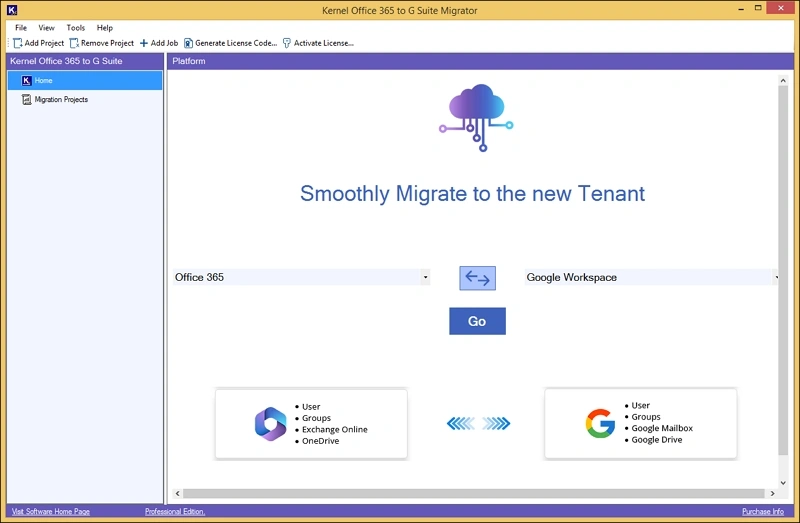
The home screen: Office 365 (users, groups, Exchange Online, OneDrive) on the left, Google Workspace (users, groups, mailbox, Drive) on the right.
Features
Mailboxes, shared mailboxes and groups
Kernel Office 365 to Google Workspace copies each user's mail folders (Inbox, Sent, Drafts, Deleted, Junk and custom folders), calendar events and meetings, contacts, tasks and notes into the matching Google mailbox, keeps read and flag status and attachments, and moves shared mailboxes and Microsoft 365 Groups with their members and conversations.
User mapping, and user creation on the spot
Kernel Office 365 to Google Workspace matches users with the same alias automatically and marks the rest in red. You map those by hand or with Import CSV, and if a person doesn't exist in Google Workspace yet, the Create Users button makes the account from inside the tool. Export CSV saves the mapping for the next wave.
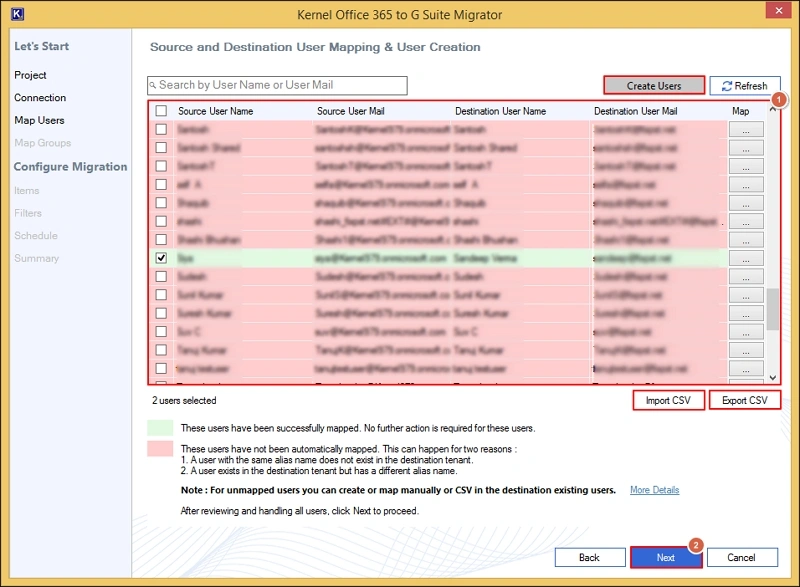
User mapping: the green row is matched, red rows still need a Google account, with Create Users, Import CSV and Export CSV buttons.
OneDrive to Google Drive
Kernel Office 365 to Google Workspace moves OneDrive files and folders, including My files and shared items, with their structure, version history and sharing permissions (owner, editor, viewer). OneDrive migration is licensed separately from mailboxes, or together in the packages.
Filters, scheduling and incremental runs
Kernel Office 365 to Google Workspace can include or exclude folders, ignore duplicate mails, limit by modification date and pick item types (emails, calendar, contacts, tasks). Jobs run at once or on a daily, weekly or monthly schedule, and later runs copy only new or changed items.
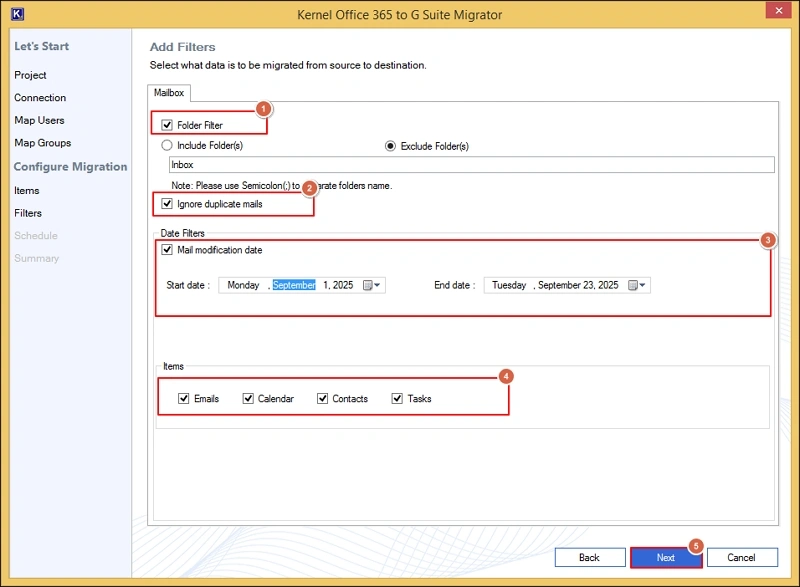
The filter step for a mailbox job: folder filter, ignore duplicate mails, date range and item types.
Reports and job control
Kernel Office 365 to Google Workspace shows live progress, lets you pause, stop, re-run or remove a job, retries failed items, and saves a CSV report per session with counts, statuses and error remarks for every mailbox and folder.
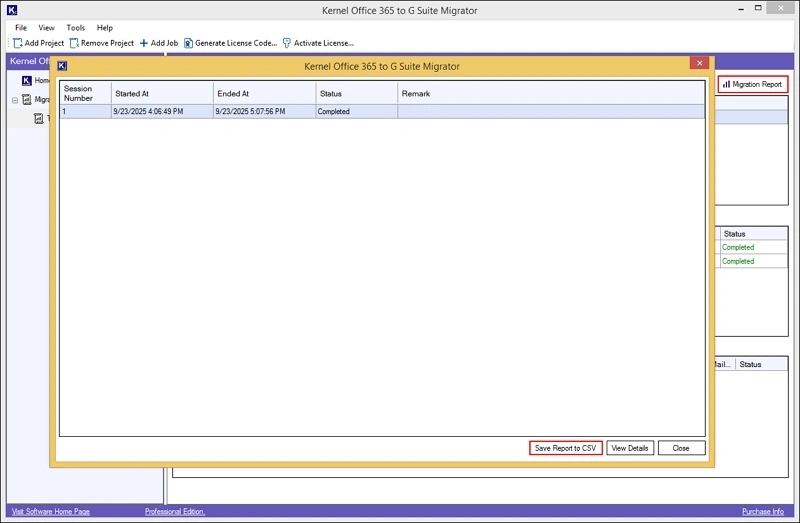
The migration report: each session's start, end and status, with Save Report to CSV.
Benefits
- Migrate in waves. Projects and scheduled jobs let you move one team at a time out of hours, with the mapping saved between waves.
- Files keep their sharing. OneDrive permissions come across, so people don't spend the first week asking for access again.
- No pre-work in Google Admin for every user. Missing accounts and groups are created during mapping.
- A fixed price. The mailbox tier for a small office costs less than a month of many per-user migration services.
Real-World Uses
- A nonprofit moving to Google Workspace for Nonprofits: the 50-user mailbox license and the 50-user OneDrive license move mail and files before the Microsoft subscription lapses.
- A school moving staff from Microsoft 365 A1 to Google Workspace for Education runs one job per department over several evenings.
- A company split: a spun-off team leaves the parent's Microsoft 365 tenant for its own Google Workspace, with only their mailboxes and OneDrives mapped.
- An MSP uses the CSV mapping export as the record of who went where.
Who It's For, and Who Should Skip It
It suits admins of small and mid-sized Microsoft 365 tenants moving everyone to Google Workspace, especially when OneDrive files must come along. One person moving a personal Outlook.com or a single Microsoft 365 mailbox to Gmail doesn't need it: Google's own Data Migration service in the Admin console handles simple mail moves free. It doesn't move SharePoint sites or Teams chats; only mailboxes, groups and OneDrive. Very large tenants (well over 500 users) will be talking to Kernel's sales team or a managed migration service anyway.
Usage Guide
- Download and install the trial on a Windows PC or server with at least 8 GB of RAM (16 GB recommended), .NET Framework 4.6 or later and the Visual C++ 2015-2022 x86 runtime.
- Launch it, pick Office 365 as the source and Google Workspace as the destination, and click Go.
- Add a project, then add a job inside it.
- Connect the source and destination tenants with admin accounts.
- Choose the migration type (mailbox or OneDrive), map users and groups, and create any that are missing.
- Pick the items, set filters, then start now or schedule the job.
- When the job ends, open Migration Report and save it to CSV.
Before you buy
- Mailbox and OneDrive migration are separate licenses. If you need both for more than about 50 users, compare the price of the two tiers with Package 1 ($1,299, 100 users with groups, mailbox and OneDrive).
- Each tier sets a user limit (25, 50, 100, 250 or 500). Buy the one at or above your head count.
- The trial is limited to 15 days and small samples (100 mails per folder of one mailbox, 25 to 30 OneDrive files per user), enough to test the connection and mapping, not a full user.
Download Free TrialBuy 25 Mailboxes ($149)
Where it falls short
- Heavy for a desktop tool. Kernel asks for a 4-core processor and 8 GB of RAM at minimum (8 cores and 16 GB recommended) plus 5 GB free for data and logs, and the installer is 97 MB.
- No SharePoint or Teams content. Team sites and chats stay behind unless you use another tool.
- Speed depends on throttling. Microsoft and Google both limit API traffic, so large mailboxes and drives take time however fast your connection is.
- Few independent reviews. Almost everything public about this product comes from Kernel itself, so the trial is your real test.
What Users Say
On Kernel's own product page
Kernel's page quotes two administrators. Michael Adams, IT Administrator: "Our organization had over 500 mailboxes to migrate from Microsoft 365 to G Suite. This tool simplified everything from mapping users to preserving folder structures & hierarchy. The most impressive thing about the tool is its accuracy. Not a single permission or file went missing." David Lee, System Administrator: "As a consultant working with multiple enterprises, I have used various migration tools. But Kernel Office 365 to Google Workspace migration tool stands out because of its user-friendly setup & ability to run multiple jobs simultaneously." These are the vendor's chosen testimonials.
Independent sources
We found no independent review of this specific product on G2, Capterra or Trustpilot. Kernel Data Recovery as a company holds a 4.9 out of 5 TrustScore on Trustpilot from 167 reviews, mostly about its email migration and recovery tools, with about 2% one-star ratings.
The pattern
The praise is about mapping, folder structure and running several jobs at once. There isn't enough independent feedback to say how it copes with very large tenants, so test with a real mailbox and a real OneDrive before you buy the bigger tiers.
Comparisons
Kernel Office 365 to Google Workspace vs Google's Data Migration service
Google Workspace's free Data Migration service (in the Admin console) can pull mail, and with the newer service calendars and contacts, from Microsoft 365. It has no OneDrive-to-Drive with permissions, no job scheduling and little filtering. Kernel's tool adds OneDrive, group migration, user creation, schedules and CSV reports. For mail only and a few users, start with Google's free option; for files and a staged project, the Kernel tool is the better fit.
Kernel Office 365 to Google Workspace vs Kernel Google Workspace to Office 365
They are mirror products. Kernel Google Workspace to Office 365 goes the other way and adds Google Chat to Teams, but no Drive files; this one adds OneDrive to Google Drive but no chat. Each is licensed separately.
Editions and Pricing
Each button orders that license at checkout. Prices checked on November 28, 2026; all are one-time charges.
FAQs
Does Kernel Office 365 to Google Workspace keep OneDrive sharing permissions?
Yes. Kernel Office 365 to Google Workspace carries over sharing settings and owner, editor and viewer roles on OneDrive files and folders, as long as the people they were shared with exist in Google Workspace (the tool can create them during mapping).
Can Kernel Office 365 to Google Workspace move shared mailboxes?
Yes. Kernel Office 365 to Google Workspace migrates shared mailbox content as well as personal mailboxes, along with Microsoft 365 Groups and their members.
Does Kernel Office 365 to Google Workspace delete data from Microsoft 365?
No. Kernel Office 365 to Google Workspace copies data; the Microsoft 365 mailboxes and OneDrives stay as they are until you remove them.
Can I run Kernel Office 365 to Google Workspace again to pick up new mail?
Yes. Kernel Office 365 to Google Workspace runs delta migrations that copy only items added or changed since the last run, and you can schedule them daily, weekly or monthly until the cutover.
Is Kernel Office 365 to Google Workspace a subscription?
No. At checkout every Kernel Office 365 to Google Workspace license is a one-time charge with no renewal, set by the number of users you can migrate.
Does Kernel Office 365 to Google Workspace migrate Teams chats or SharePoint sites?
No. Kernel Office 365 to Google Workspace covers mailboxes, groups and OneDrive. Teams and SharePoint content needs a different tool.
System Requirements
- Windows 11, 10, 8.1, 8, Windows 365; Windows Server 2022, 2019, 2016, 2012 or 2008 (32-bit or 64-bit)
- Minimum 4-core processor (8-core recommended) and 8 GB of RAM (16 GB recommended)
- 500 MB for installation plus 5 GB free for data and logs
- .NET Framework 4.6 or later and Microsoft Visual C++ 2015-2022 Redistributable (x86)
- Internet connection and admin accounts for both tenants; works with all Microsoft 365 and Google Workspace plans
Conclusion
Kernel Office 365 to Google Workspace is a sensible buy for a small or mid-sized organisation leaving Microsoft 365 for Google, particularly when OneDrive files and their sharing must come along. The best reason to buy it is the combination of OneDrive migration, user creation and scheduled waves in one tool at a one-time price. The main reason to hesitate is that public feedback is almost all from Kernel itself and the trial only moves small samples, so run it against a real user and a real OneDrive first. If you only need mail for a few people, Google's free migration may be enough.
Download Free TrialBuy 25 Mailboxes ($149)