Kernel Import OST to Gmail: Get Mail out of an Orphaned Outlook OST File and into Gmail
Kernel Import OST to Gmail is a Windows tool that opens Outlook OST files, even orphaned or damaged ones that Outlook can no longer use, and uploads their mail, contacts and calendars to a Gmail or Google Workspace account with the folder structure intact. The Home license costs $69 (50 mailboxes, one year of use and updates); Corporate is $199 and Technician $299.
The typical buyer has an OST file left behind by an old work laptop or a deleted Exchange or Microsoft 365 profile, no longer has the server account, and wants that mail somewhere they can search it, which for many people means Gmail.
Quick facts
- Price: Home $69, Corporate $199, Technician $299 (one-time charges, no automatic renewal)
- Developer: KernelApps Private Limited (Kernel Data Recovery), Noida, India
- Version: 26.0 for Windows, released December 2025
- Runs on: Windows 11, 10, 8.1, 8 and 7; Windows Server 2022 back to 2003
- Reads: OST files from Outlook 97 through Outlook 2024 and Microsoft 365, healthy, corrupted or orphaned, with no Outlook installation needed
- Sends to: Gmail and Google Workspace, plus Microsoft 365, Exchange, GroupWise and Domino, or files (PST, MBOX, DBX, EML, MSG, PDF, HTML and more)
- Free trial: the evaluation version previews every item and saves the first 25 items per folder
- Refund: 30-day money-back guarantee
- What we checked: the trial download (Nucleus-OST-PST-Demo.exe, 40 MB, which installs Kernel for OST to PST Evaluation Version 26.0, validly signed by KernelApps Private Limited, file dated December 23, 2025) and the three licenses on the order page on November 28, 2026 (Home $69, Corporate $199, Technician $299, one-time with no renewal). We didn't import an OST file into a Gmail account.
Before you buy
- The trial is Kernel's OST to PST program. The download installs Kernel for OST to PST, the converter this product is built on, with Gmail among its saving options. Don't be surprised by the name in the title bar.
- The Home license lasts one year. Kernel's comparison table gives Home 1 year of validity and updates for up to 50 mailboxes, Corporate 2 years for 1,000 mailboxes and Technician a lifetime license with no mailbox limit. None of them renews automatically.
- Gmail has a storage quota. A free Gmail account shares 15 GB with Drive and Photos, so a large OST file can fill it. Check the size of the file first.
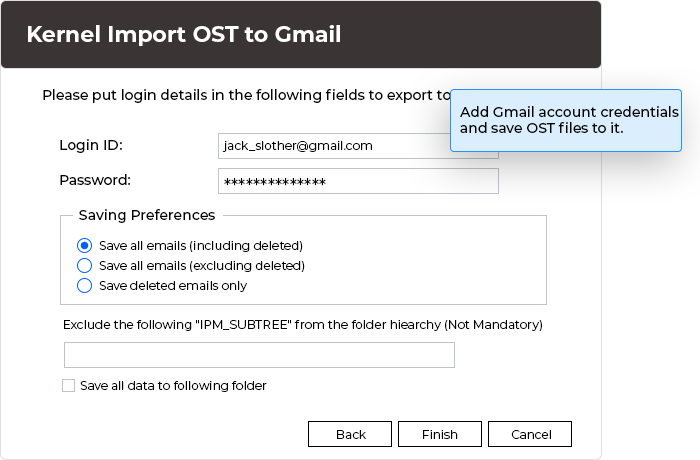
- Google may refuse a plain password. If the sign-in fails, Google's usual fix is an app password, which needs 2-Step Verification turned on.
- Sale on November 28, 2026: the order page took 30% off all three licenses that day (Home $48.30). The prices on this page are the regular ones.
Download Free TrialBuy Home LicenseBuy Corporate LicenseBuy Technician License
Overview
An OST file is Outlook's offline copy of a server mailbox. It's tied to the profile and account that created it, so once the account is gone or the profile is deleted, Outlook won't open it, and Outlook's own import tools don't accept OST files at all. The mail is still in there; you just need something that can read the file without Outlook.
Kernel Import OST to Gmail does that. You point it at one or more OST files (or let it search a drive for them), it scans them, repairs what it can, and shows the whole folder tree with a preview pane. Then you choose Gmail as the destination, sign in to the account, apply filters if you only want part of the mailbox, and the tool uploads the items into Gmail with the original folders kept.
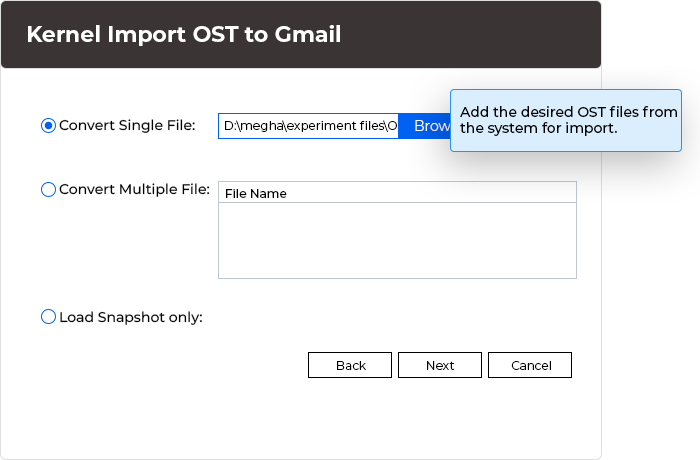
Step one: add a single OST file, several files, or load a saved snapshot of an earlier scan.
Features
Opens orphaned and corrupted OST files
Kernel Import OST to Gmail reads OST files without the original Exchange profile, including corrupted ones, and recovers deleted items along with the rest of the mailbox. That makes it useful for exactly the files Outlook refuses.
Finds and batches OST files
Kernel Import OST to Gmail can add several OST files at once, and its Search option scans a chosen drive for OST files when you don't know where Outlook kept them (they're usually buried in the user's AppData folder).
Preview before you upload
Kernel Import OST to Gmail shows each item with its date, sender, recipients, subject and body in a preview pane, with a simple and an advanced properties view. You can confirm it's the right mailbox before anything leaves your PC.
The preview pane: a list of messages with filters on each column and the selected email shown below.
Filters for a partial import
Kernel Import OST to Gmail filters by sender, recipient, subject, item type, folder name and date range, so you can send only one year of mail or only the Inbox and Sent Items to Gmail.
Other destinations when Gmail isn't the end point
Kernel Import OST to Gmail can also save OST data straight to Google Workspace, Microsoft 365, Exchange, GroupWise or Domino, or write it to PST, MBOX, DBX, EML, MSG, TXT, RTF, HTML, MHTML and PDF files. One purchase covers the "rescue this OST" job whatever the target turns out to be.
Benefits
- Rescues mail Outlook won't open. An orphaned OST file stops being a dead end.
- No Outlook needed. You can run it on any Windows PC, even one without Office.
- Searchable in Gmail. Once the mail is in Gmail, it's reachable from a phone or any browser, which an OST file on a backup drive never is.
Real-World Uses
- A freelancer's former client closed her Exchange account; the OST file on her laptop goes into her personal Gmail so she keeps the project history.
- A small company moving from Exchange to Google Workspace imports departed employees' OST files into an archive Workspace account.
- A support technician recovers a corrupted OST file after a failed Outlook update and uploads the mail to the user's Gmail while Outlook is reinstalled.
- Someone cleaning out an old PC finds a 2019 OST file and moves only the Inbox and Sent Items, filtered by date, into Gmail.
Who It's For, and Who Should Skip It
Kernel Import OST to Gmail is for anyone holding an OST file whose account no longer exists and who wants the contents in Gmail or Google Workspace: home users with the $69 license, IT staff with the Corporate license, and data-recovery shops with the Technician license.
Skip it if the original account still works: just sign in to that mailbox in Outlook, export to PST with Outlook's own tool, or forward what you need. Skip it too if your mail is in a PST file rather than an OST file; Kernel sells a separate Import PST to Gmail tool. And on a Mac, it won't run at all.
Usage Guide
- Install and launch. Run Nucleus-OST-PST-Demo.exe on a Windows PC. Outlook doesn't need to be installed.
- Add the OST files. Choose Convert Single File or Convert Multiple File, browse to the files, or use Search to find them on a drive.
- Check the preview. Click through the folders and open a few messages to confirm the content.
- Pick Gmail. Select the Gmail option in the right-hand panel and enter the account's login.
- Filter. Set the date range, folders or item types you want.
- Import. Start the upload and wait for the confirmation message. With the trial, only the first 25 items per folder are saved.
Tips
- Copy the OST file somewhere else before you start, so a failed scan never touches the original.
- Test with the trial on a small folder first to see how the labels land in Gmail.
- If Gmail won't accept the sign-in, create an app password in your Google account and use it instead of your normal password.
Where it falls short
- Short Home license. One year of validity, then you'd buy again: fine for a one-off rescue, poor value if you convert OST files regularly.
- Gmail limits apply. Large mailboxes can hit Gmail's storage quota or its upload throttling, which no tool controls.
- Old-fashioned interface. The wizard looks like it's from the Windows 7 era and the product name in the title bar differs from what you bought, which confuses some buyers.
- Works for most, not always first time. One Trustpilot buyer of the same engine reported getting it to work only after several attempts.
What Users Say
On Kernel's product page
Kernel's page shows 4.9 out of 5 from 438 reviews gathered on its own site. Its featured review, from Andrew Dawson, reads: "I've successfully migrated my data to my Gmail account using the software. No time or data was lost, resulting in an excellent overall experience." These are vendor-collected testimonials.
On Trustpilot (Kernel's OST tools)
Kernel Data Recovery holds a 4.9 out of 5 TrustScore from 167 reviews. Two recent ones concern the OST to PST engine this product runs on. Kanika Sharma (August 2026) wrote: "I needed to convert my old OST file to PST after I could no longer access the original Outlook profile." She found it easy to use and said it converted all her old OST files.
Drew J (March 2026) was more mixed: "The Kernel team was extremely helpful in resolving an issue I had with OST to PST conversion." He added that he had paid about $50 and only got it working after several conversion attempts.
What the reviews add up to
Buyers say it does recover old OST files and that Kernel's support is quick, and the main complaint is a fiddly first run rather than lost data. We found no independent test of the Gmail import itself, so let the trial's 25 items per folder show you the result before you pay.
Comparisons
Kernel Import OST to Gmail vs. Kernel for OST to PST
Both install the same program. Kernel for OST to PST, also listed on this site, is sold for converting OST files to PST and other formats; Import OST to Gmail is the license sold for uploading OST content to Gmail. If you need both a PST copy and a Gmail upload, compare the two license tables before buying.
Kernel Import OST to Gmail vs. Google Workspace Migration for Microsoft Outlook
Google's free migration tool for Workspace imports Outlook data from a working profile or a PST file into a Workspace account. It can't read an orphaned OST file and doesn't work with a free Gmail account. Kernel's tool handles both cases.
Kernel Import OST to Gmail vs. Kernel Import PST to Gmail
Kernel Import PST to Gmail is the same idea for PST files. Choose by the file you have: OST (offline copy tied to an Exchange or IMAP profile) or PST (a personal folders file).
Editions and Pricing
The three licenses run the same program and differ in who may use it, how long it's valid and how many mailboxes it covers. Prices are the regular ones from the order page on November 28, 2026.
| License | Price | For | Validity and updates | Buy |
|---|
| Home | $69 | Personal use, up to 50 mailboxes | 1 year | Buy Home |
| Corporate | $199 | One organization, multiple PCs, up to 1,000 mailboxes | 2 years | Buy Corporate |
| Technician | $299 | Service providers working for several organizations, unlimited mailboxes | Lifetime | Buy Technician |
FAQs
Can Kernel Import OST to Gmail open an OST file without the original Outlook profile?
Yes. Kernel Import OST to Gmail reads orphaned OST files directly, with no Exchange connection or Outlook profile, and recovers corrupted ones too.
Does Kernel Import OST to Gmail need Outlook installed?
No. Kernel Import OST to Gmail only needs the OST file and the Gmail account's login.
Does it import contacts and calendars as well as email?
Kernel Import OST to Gmail is described as moving the entire OST contents, including emails, contacts and calendars, with the original mailbox hierarchy. Check the trial's result for contacts and calendar entries if they matter to you.
Can I import into a Google Workspace account instead of personal Gmail?
Yes. Kernel Import OST to Gmail has a separate Google Apps option for direct OST to Google Workspace migration.
How many OST files can one license handle?
Kernel Import OST to Gmail has no file size limit and imports unlimited OST files; the license limits mailboxes (50 for Home, 1,000 for Corporate, unlimited for Technician).
Does the Home license renew automatically after a year?
No. The Kernel Import OST to Gmail licenses were one-time charges with no automatic renewal on November 28, 2026. The Home license's one-year validity means you'd buy again to keep using it later.
Does it work on a Mac?
No. Kernel Import OST to Gmail is a Windows program. Mac users can run it in a Windows virtual machine or on another PC.
System Requirements
- Windows 11, 10, 8.1, 8 or 7; Windows Server 2022, 2019, 2016, 2012, 2008 R2, 2008, 2003 R2 or 2003
- Intel Pentium-compatible (x86 or x64) processor
- 128 MB RAM minimum
- 50 MB free disk space, plus room for the scan
- Internet access for the Gmail upload
Conclusion
Kernel Import OST to Gmail is worth $69 if you have an OST file that Outlook won't open and you want the mail in Gmail: it reads orphaned and damaged files without Outlook and uploads them with folders intact, and the same license can also write PST or other formats. The main reason to hesitate is the one-year Home license and a dated interface; if your original account still works, you don't need it at all. Run the trial on your actual file first, since it shows exactly what it can recover.
Download Free TrialBuy Home LicenseBuy Corporate LicenseBuy Technician License