URL Logger: Catch Webhooks, Keep a Record of Every Call, and Act on It
URL Logger is a $100-a-year webhook receiver for Windows and Linux from DB Software Laboratory. Other systems call a URL on your server; URL Logger writes each call (headers, body and any uploaded files) to a database, answers the caller, and can start a script or program to process it. It's for admins and developers who need incoming webhooks to land somewhere reliable.
The usual story: a shop, payment provider or form service can "call a URL when something happens", and you need that event inside your own network, with a record you can check later when someone asks whether order 234 ever arrived. Writing and hosting a small web service for that is the part URL Logger replaces.
Quick facts
- Version: 3.0.0.0, installer dated September 8, 2026
- Developer: DB Software Laboratory (etl-tools.com), United Kingdom
- Platform: Windows 64-bit and Linux 64-bit (.deb); the vendor offers special builds for other systems on request
- Interface: a web browser, on port 3333 by default; webhooks arrive under /webhooks/ on the same port
- Repository: SQLite by default; PostgreSQL, MySQL, Microsoft SQL Server or Oracle
- Price: $100 for a one-year single-computer licence. The order renews automatically
- Trial: 30 days, fully functional, no registration or credit card
- What we checked: the 40 MB url_logger_64.zip downloaded from the vendor on November 11, 2026 contains a setup file reporting version 3.0.0.0; $100.00 for the one-year licence on the order page, with auto-renewal switched on, on November 11, 2026. We read the manual and its screenshots but didn't send webhooks to it ourselves
Download Free TrialBuy Now
Before you buy
The outside world has to reach it. URL Logger listens on your own server, so a cloud service can only call it if that port is reachable from the internet (a firewall rule, reverse proxy or tunnel). Setting that up is your job, and so is HTTPS: the manual shows how to turn SSL on with your own certificate files.
It doesn't check who's calling. The URL form has no field for a shared secret or signature check. If a provider signs its webhooks, verifying the signature means writing it into the JavaScript step yourself.
The star rating isn't about this product. The 4.9 Capterra badge on the vendor's logger pages belongs to its shared review profile, where the reviews discuss Advanced ETL Processor. We found no independent reviews of URL Logger.
Overview
URL Logger is one of the vendor's eight Event Loggers, small server programs built on its Deep Bin framework that each capture one kind of event into a repository database. This one is an HTTP endpoint. You list the URL patterns you expect, and each matching call becomes a row in the event log, with status, method, URL, host name and time, plus the full headers, body and file list in its details view.

The vendor's example: when an order completes, the order system calls a URL; URL Logger's event handler and filter write it to the repository database, where users review it and ETL software processes it.
Features
URL Logger matches calls by method and URL pattern
Each URL Logger entry names an HTTP method (GET, POST and so on) and a URL to monitor, with wildcards: /order/** catches /webhooks/order/234 and anything else below it, and /** catches everything. Entries can be switched on and off individually, so you can add a new endpoint without touching the others.
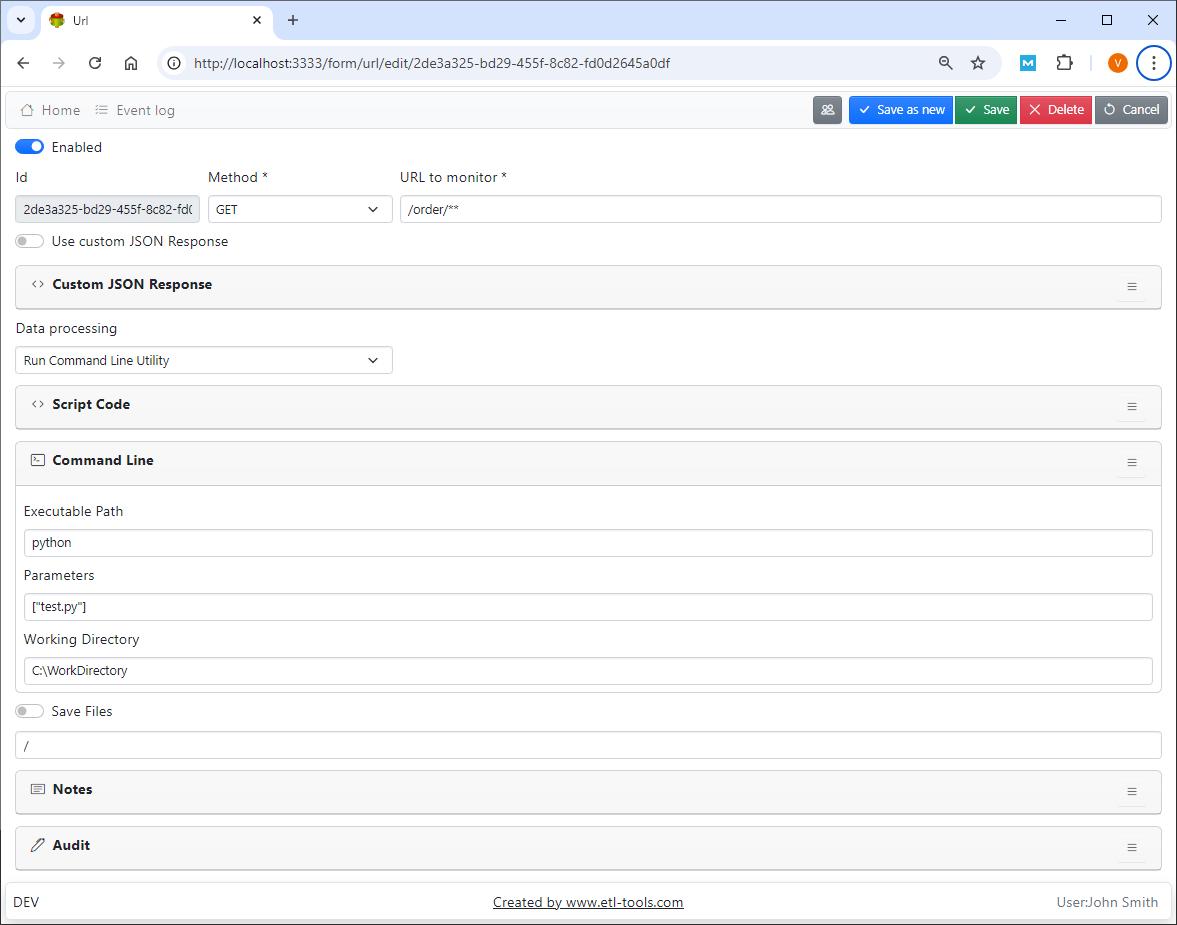
A URL entry for GET /order/** with Data processing set to "Run Command Line Utility": executable python, parameters ["test.py"], and a working directory.
URL Logger records the whole request
URL Logger stores the headers and body of every matching call as JSON, along with the details of uploaded files (field name, original file name, encoding, MIME type and size), the host name and the time. The event log grid can be searched, filtered and refreshed, and each row opens a read-only details view, which is what you want when a partner insists they sent something.

Details of a multipart POST to /webhooks/files: the headers, a one-key JSON body, and the two zip files that came with it.
URL Logger saves uploaded files to a folder
URL Logger can save the files sent with a call to a folder you name (C:\Data in the manual's example), ready for another program to pick up. This works only when the request body is multipart form data, the format web forms use for uploads.
URL Logger answers with your own JSON
By default URL Logger replies {"status":"success"}. Turn on "Use custom JSON Response" and it returns whatever JSON you type instead, which matters for services that check the reply. For replies that depend on the request, such as a URL verification challenge, the manual shows a script that builds its own response.
URL Logger hands each call to your processing
URL Logger's "Data processing" setting can do nothing, run a command line program, or run JavaScript. The script receives the log ID, method, URL, headers and body, and its return value (200 or 500) becomes the HTTP status. The manual's examples write the body to a JSON file and start a Python script without waiting, launch an Advanced ETL Processor Enterprise package with the log ID as a parameter, and update fields of the logged record in the repository.
Benefits
- An audit trail for integrations. Every call is kept with its full contents, so "did it arrive, and what was in it?" has an answer.
- Less code to own. Receiving, storing and replying are configured, not written; you only script the part that's specific to you.
- Hand-off to existing tools. If you already run Python scripts or Advanced ETL Processor packages, URL Logger becomes their trigger.
- Several endpoints, one service. Orders, file drops and test calls can each have their own entry and processing.
Real-World Uses
- Order fulfilment. The shop calls /webhooks/order/<id> when an order completes; URL Logger records it and starts the job that books the shipment.
- Partner file delivery. A partner POSTs zip files as multipart form data; URL Logger saves them to a folder and logs who sent what, and when.
- Debugging a third-party webhook. Point the service at a
/** entry for a day and read exactly which headers and payloads it sends. - Kicking off an ETL run on demand. Another system calls a URL when its export is ready, and URL Logger launches the Advanced ETL Processor package that loads it.
Who It's For, and Who Should Skip It
URL Logger fits an admin or integration developer at a small or mid-sized company who has a server inside the network, receives webhooks from a handful of services, and wants them stored in a real database rather than lost in an application log.
Skip it if you'd rather not expose a server port at all: a hosted automation service receives webhooks in the cloud with nothing to open. Skip it too if you need high-volume API traffic with authentication, rate limits and routing; that's a job for an API gateway. And if you only need to look at a webhook once while developing, a free online request inspector is enough.
Usage Guide
- Install it. On Windows, run the setup from the zip. On Linux, run
sudo apt install ./url-logger-amd64.deb, then sudo systemctl enable etl-tools-url-logger and sudo systemctl start etl-tools-url-logger. - Sign in at
http://localhost:3333 with the default account from the installation page, then change the password and the security key. - Add a URL. Choose the method and a pattern such as
/order/**, leave Data processing on "Do Nothing", and save. - Test it by opening
http://localhost:3333/webhooks/order/234 in a browser: you should get {"status":"success"} and a new row in the event log. - Add processing: a command line, a script, or Save Files with a folder.
- Open the port to the caller, turn on SSL with your certificate, and give the caller the full URL.

The event log: two POST calls to /webhooks/files with their status, host name, logger and time.
Where it falls short
- Scripts can hang. The manual warns that a script "might hung" and to always set a timeout; a slow script also delays the reply to the caller unless you start the work in the background as its examples do.
- Short documentation. Most of the manual is screenshots and code samples, with little explanation of options or error handling.
- Settings in a text file. Port, SSL and the repository database are changed in the .env file, followed by a service restart.
- SQLite is for small volumes. The vendor recommends another repository database for high-load systems.
Comparisons
URL Logger vs the vendor's other Event Loggers
All eight loggers cost $100 a year and share the same browser interface, users and repository. They differ in what they listen to: URL Logger waits for HTTP calls, the email loggers poll a mailbox (IMAP4 or Microsoft 365), and others subscribe to Kafka, RabbitMQ or MQTT, watch folders, or receive HL7 messages. Pick the one that matches how the other system can reach you.
URL Logger vs Advanced ETL Processor Enterprise
Advanced ETL Processor Enterprise runs scheduled, multi-step data jobs. URL Logger only receives and records calls. The vendor's own examples pair them: URL Logger catches the webhook and starts an ETL package with the log ID.
Editions and Pricing
| Licence | Price | Term | Covers |
|---|
| Single Computer Annual Licence | $100 | One year, renews automatically | One computer |
| Free trial | $0 | 30 days | All features, no registration |
FAQs
What address do I give the service that sends the webhook?
URL Logger receives calls under /webhooks/ on its web port, so an entry for /order/** answers at http://your-server:3333/webhooks/order/..., or https once SSL is on. The host name must be one the sending service can reach.
Can URL Logger run a Python script for each webhook?
Yes. URL Logger can run any command line program, Python included, with your parameters and working directory, and its JavaScript option can write the request body to a JSON file and start the script in the background so the caller gets its reply straight away.
Does URL Logger accept file uploads?
Yes, when they're sent as multipart form data. URL Logger records each file's name, type and size in the log and, with Save Files on, writes the files to the folder you choose.
Can URL Logger log to SQL Server instead of SQLite?
Yes. URL Logger's repository can be PostgreSQL, MySQL, Microsoft SQL Server or Oracle as well as the default SQLite file, which the vendor recommends replacing on busy systems. You switch by changing the connection settings in the .env file and restarting.
Do I need a separate URL Logger licence for each endpoint?
No. One URL Logger licence covers one computer, and you can define as many URL entries on it as you need.
Is URL Logger a one-time purchase?
No. URL Logger is sold only as a one-year licence at $100 that renews automatically each year unless you cancel it.
System Requirements
- Windows 64-bit, or 64-bit Linux that installs .deb packages
- About 40 MB for the installer
- A web browser for the admin interface
- A port the sending systems can reach (3333 by default)
- Repository: the built-in SQLite file, or PostgreSQL, MySQL, Microsoft SQL Server or Oracle
Conclusion
URL Logger is worth $100 a year if you run your own server, receive webhooks from a few services, and want every call stored in a database and passed to a script or ETL job without writing a web service. The reason to buy it is the full record of each call plus the hand-off to your own processing. The reason to hesitate is that exposing the port, securing it and checking signatures are left to you, so use the 30-day trial to wire up one real webhook end to end first.
Download Free TrialBuy Now