AD FastReporter: Active Directory Reports Without Scripts
AD FastReporter is a Windows desktop tool from Albus Bit that turns your Active Directory into ready-made reports: more than 250 built-in reports on users, computers, groups, Exchange, contacts, printers, GPOs and OUs. The free edition generates and shows reports; the Pro license costs $149 for one person (perpetual, with a year of updates) and adds export, a report archive, custom filters and scheduled email reports.
If you've ever been asked for "every enabled account that hasn't logged on in 90 days, with its manager and groups, in Excel, by Friday", you know the routine: a PowerShell script, a CSV, an hour of tidying in Excel. AD FastReporter is built to make that a two-minute job, and to repeat it every week without you touching it.
Quick facts
- Version: 26.10.30, released October 30, 2026
- Developer: Albus Bit SIA (Latvia)
- Platform: Windows 7 and later, including Windows 11 and Windows Server 2022, on a domain-joined workstation; needs Microsoft .NET Desktop Runtime 8
- Reports: 250+ built-in report forms in 8 categories, 370 fields
- Price: Pro from $149 (Individual), $547 (Company), $672 (Consultant/MSP)
- License: perpetual, with one year of updates and support
- Free version: yes, with no time limit; a 7-day Pro trial key is available on request
- Refunds: none, so test the free version and the Pro trial first
- What we checked: installer ADFastReporter_26.10.30.exe (16.8 MB, file version 26.10.30, digitally signed by ALBUS BIT SIA) downloaded from albusbit.com, and the prices on the order page ($149 Individual, $547 Company, $672 Consultant/MSP) on November 15, 2026. We didn't run it against a live domain.
Download Free VersionBuy Individual LicenseBuy Company LicenseBuy Consultant/MSP License
Overview
AD FastReporter installs on your own PC, not on a domain controller. It runs as the domain user you're logged in as, so there's nothing to configure on the server side: open it, pick a report category, pick a report, press Generate. You can also add connections to other domains your workstation can reach, with their own credentials and an OU filter.
Every field in a report has a readable name, a description and its LDAP attribute, and values are converted to plain text: dates are dates, flags are "Yes"/"No", and last logon is collected from all domain controllers rather than one. Albus Bit releases updates often. In 2026 alone the release notes list a Windows Server 2025 report, LAPS coverage reports (computers with and without a managed local admin password) and, in October, an "all users with last logon and group membership" export aimed at SOX and access reviews.
Features
250+ ready-made reports in eight categories
AD FastReporter comes with report forms for Users, Computers, Groups, Exchange, Contacts, Printers, Group Policy Objects and Organizational Units. On the user side that means inactive, locked-out and disabled accounts, recently created or modified accounts, bad password attempts in the last 30 days, "password never expires", "must change password", users without a photo and more. Computer reports cover stale and unmanaged machines, operating systems and, since 2026, LAPS status. You can add or remove any of the 370 fields from a built-in report before running it.
Export to seven formats and send by email (Pro)
AD FastReporter Pro exports any report to Excel (XLSX), CSV (including append mode), PDF, HTML, XML, ODS and JSON, and can email it straight from the app as a message or an XLSX, CSV or HTML attachment. The HTML export form can be customized. The free edition shows reports on screen but can't export them.
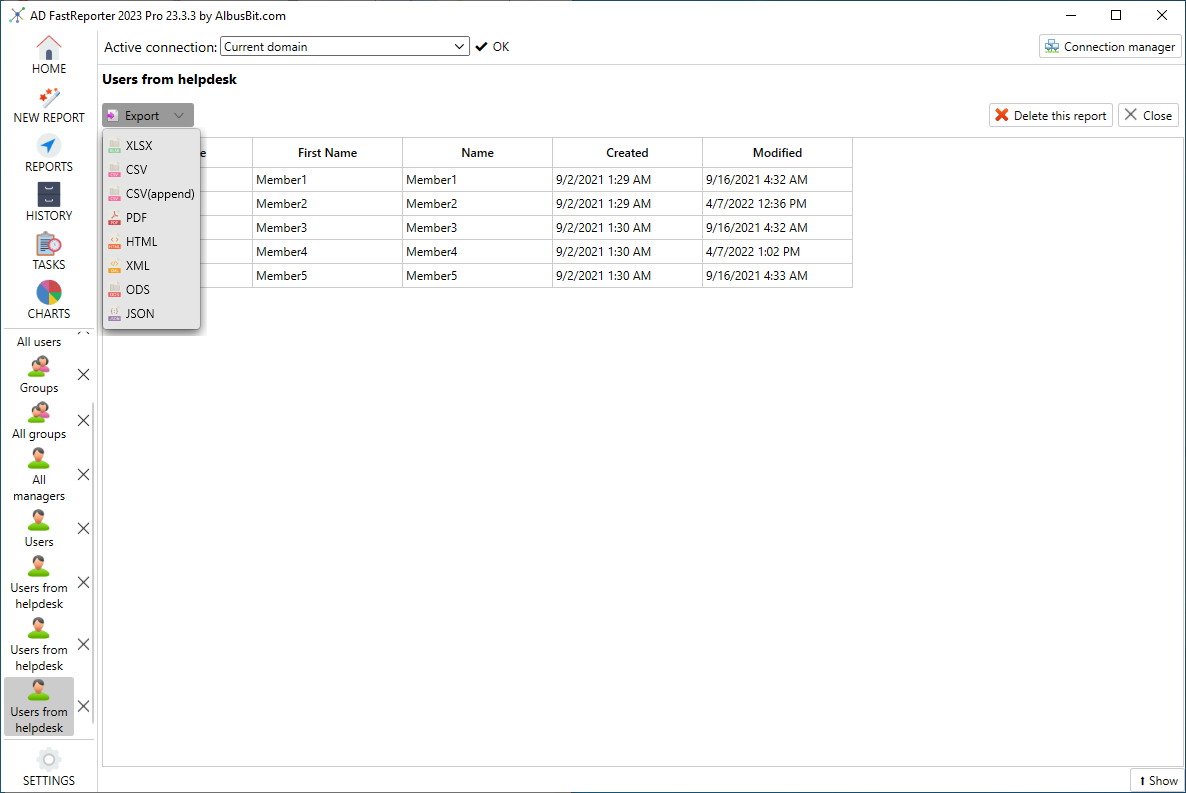
The Export menu on a generated report, listing XLSX, CSV, CSV (append), PDF, HTML, XML, ODS and JSON (vendor screenshot of version 23.3.3).
A filter manager for custom reports (Pro)
AD FastReporter Pro builds custom reports with a point-and-click filter manager: pick a field, pick an operation (contains, is, greater than...), type a value, and nest AND/OR groups as deep as you need. You can start from one of the built-in reports or from scratch, and you never write an LDAP query yourself. Custom fields let you add your own LDAP attributes to the report categories you choose.
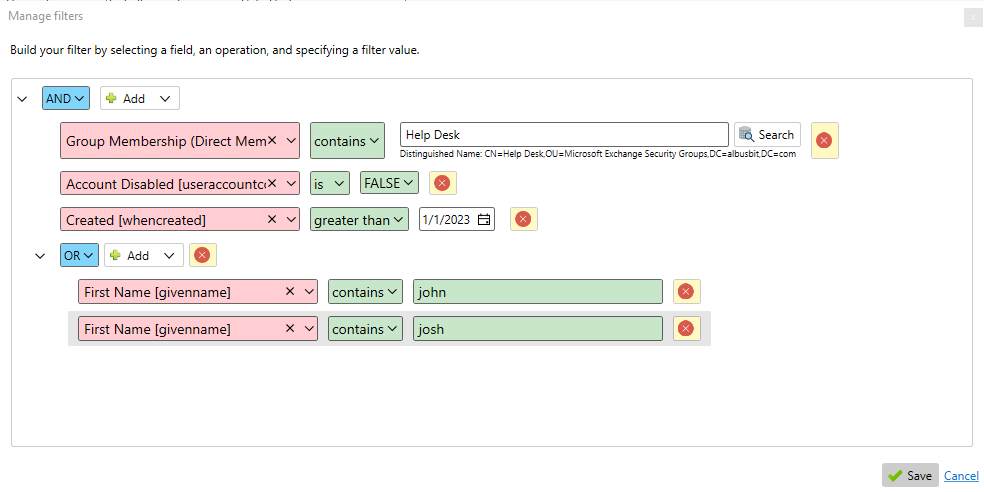
The Manage filters dialog: members of "Help Desk", not disabled, created after 1/1/2023, with first name containing "john" or "josh".
A report archive you can go back to (Pro)
AD FastReporter Pro saves every generated report in a local SQLite database, with who ran it, how many records it returned and which filter it used. That gives you a history: open last quarter's "all managers" report next to today's and see what changed, or show an auditor exactly what the report said on a given day. Storage can be turned off if you don't want it.
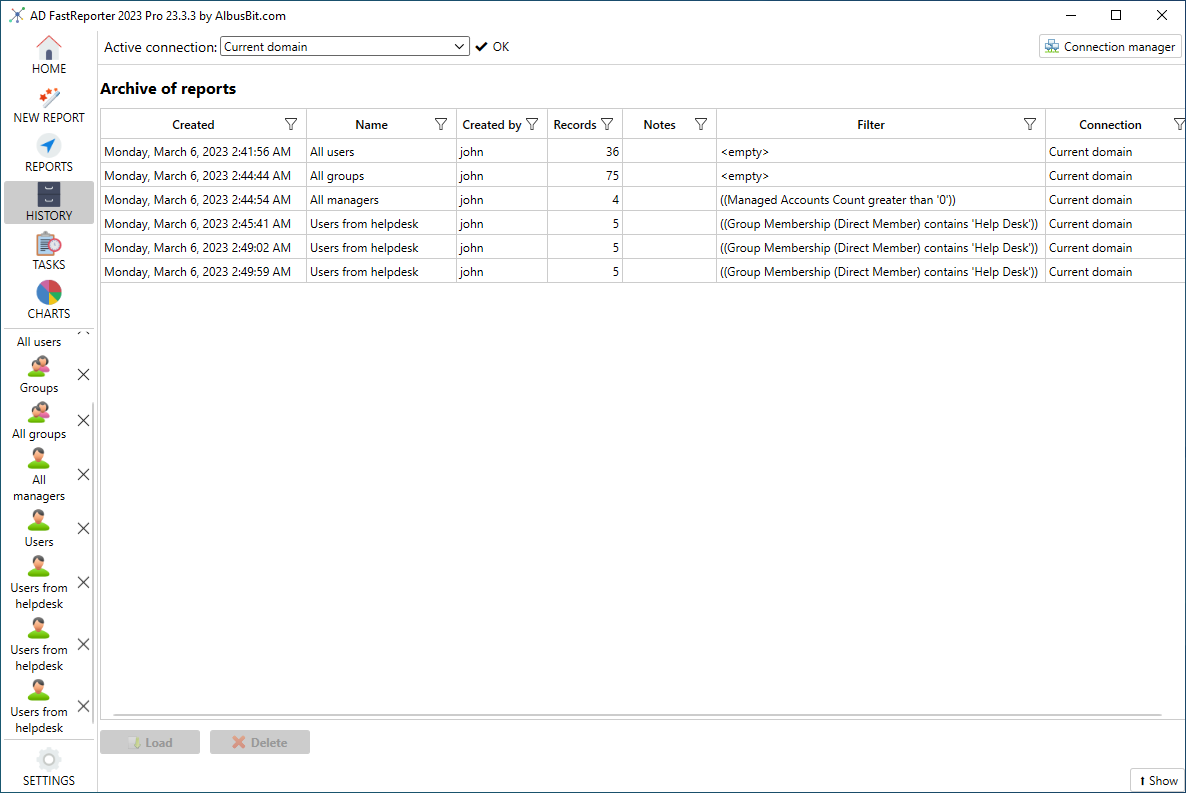
The History view: six saved reports with their creation time, record count, filter and connection (vendor screenshot of version 23.3.3).
Scheduled reports that arrive by themselves (Pro)
AD FastReporter Pro turns any report into a task: choose the connection and report, whether to store it, an export folder and file name mask (%REPORT_NAME%_%DATE%), the email recipients and a schedule. Tasks run through Windows Task Scheduler, and each has an ID you can also start from the command line, so you can call it from your own scripts.
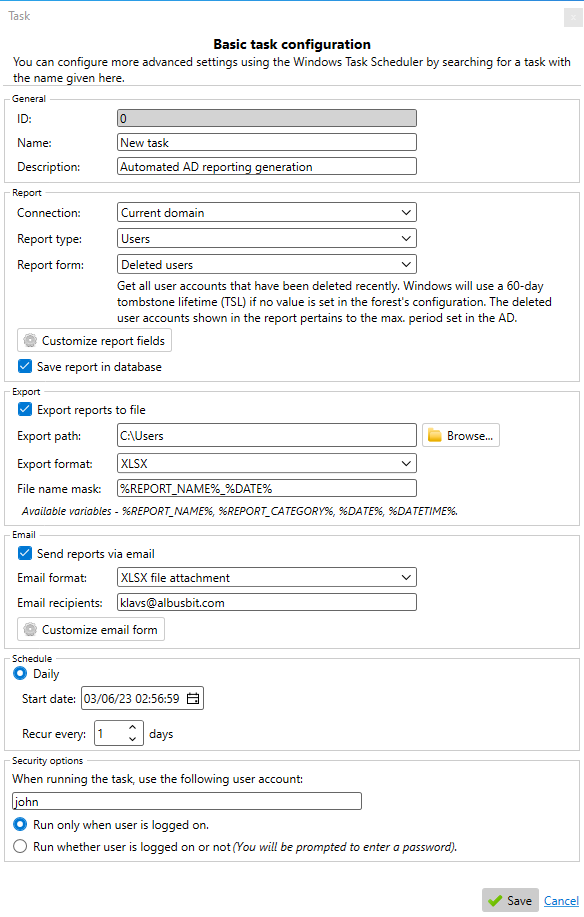
A daily task that runs the "Deleted users" report, saves it, exports it as XLSX and emails it.
Benefits
- Answers in minutes, not scripts. Reports that would each take a custom PowerShell export are already built and tested, and the values come out readable.
- Evidence for audits. The archive and scheduled exports give you dated reports you can hand to an internal or regulatory auditor.
- Nothing to deploy. No agent, no server service and no database server: a 16 MB installer on your own PC.
- Predictable cost. A one-time license that keeps working; you only pay again if you want another year of updates.
Real-World Uses
- Quarterly access reviews: schedule the "all users with last logon and group membership" report and send it to each department head as an Excel file.
- Stale account cleanup: list enabled users and computers that haven't logged on in 90 days before you disable them (with a tool such as AD Admin, since AD FastReporter only reports).
- Security checks: find accounts with "password never expires", reversible encryption or recent bad password attempts, and machines without LAPS.
- MSP reporting: with the Consultant/MSP license, keep a connection per client domain and run the same monthly report pack for each.
- Exchange housekeeping: list mailboxes, proxy addresses, send-on-behalf permissions and distribution group memberships.
Who It's For, and Who Should Skip It
A good fit: Windows admins and IT teams in small and mid-sized organizations who need regular Active Directory reports for management or auditors, and MSPs who report on several client domains. It also suits admins who used CJWdev's ADinfo, which is no longer supported.
Skip it if: you only need a report now and then (the free edition or a PowerShell one-liner will do), your directory is Entra ID only with no on-premises AD, you need to change objects rather than report on them (look at a management tool such as AD Admin), or you need real-time change auditing with "who changed what" event logs, which takes an event-log auditing product rather than a reporting tool.
Usage Guide
- Install Microsoft .NET Desktop Runtime 8 if it isn't already on the PC, then run the AD FastReporter installer on a domain-joined workstation.
- Launch it. It connects to your current domain as you; add other domains under Settings > Connections.
- Click Reports, choose a category (Users, Computers...) and a report form, or search for one.
- Adjust the fields if you want more columns, then press Generate.
- With Pro, use Export for a file, or open Tasks to schedule the same report with an email.
- To try Pro, request a trial key on the vendor's site with a work email address and enter it under Settings > License.
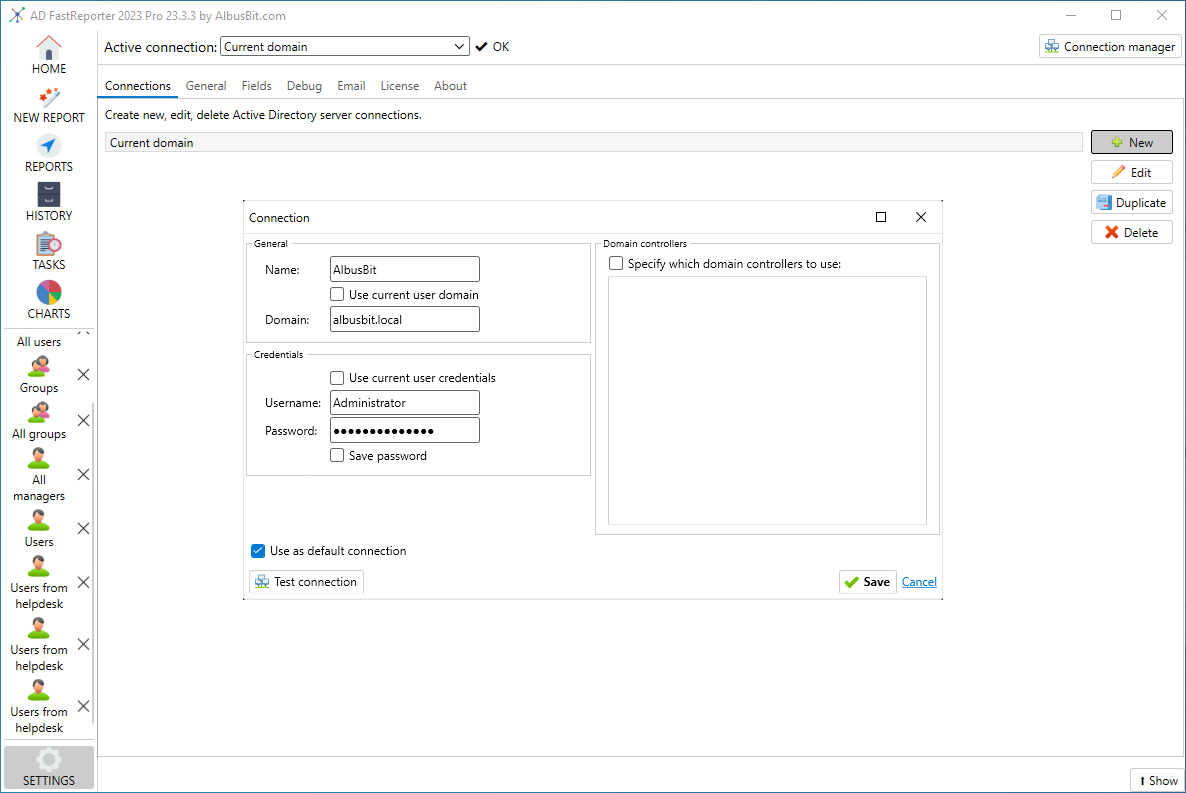
Adding a second domain connection with its own username and password, and optionally specific domain controllers.
Before you buy
- No refunds. Albus Bit doesn't refund purchases, so run your own reports in the free version and the 7-day Pro trial first.
- The Pro trial key is checked by hand and needs a corporate or professional email address.
- The license is perpetual, but updates and support last one year. The order page sets up a yearly renewal for them; early renewal costs roughly half the original price.
- Reports only show what your account is allowed to read in AD.
Where it falls short
- Reporting only. You can't disable, move or edit accounts from a report; one long-time user asked for exactly that.
- The free edition can't export, which is what most people need a report for.
- Interface quirks: open reports appear as tabs down the left-hand side, and at least one Pro user found it easy to close the whole app when he meant to close one report.
- Windows only, and no web interface: each person runs it on their own PC (the Company license lets everyone install it).
- No independent ratings yet on Capterra or Software Advice, so most feedback comes through the vendor and BitsDuJour.
What Users Say
From the BitsDuJour discount page
Terry Hall (USA): "I've been using AD FastReporter and it is a godsend! Super easy to use, has a great capacity for building custom reports and completes its reports waaaay faster than my PowerShell scripts." He added a wish: "My hope is that they can extend the app so that you can set it to take actions based on the reports (e.g. suspend all accounts that haven't been logged into for over 120 days, etc), but just for reporting to get an insight into the state of your AD assets and users it is very much worth your time to give it a try!"
Brandon Hill (USA), after six months of Pro: "I happened into it in my search for continued support with ADinfo by CJWdev, who vanished into thin air somewhere. Due to his disappearance I was stuck without a tool and an impending regulatory audit and AD FastReporter came to the rescue." And the criticism: "I don't care for the tabbed viewing of reports. It's not super clear to me that a report is opened in a tab and I find myself very consistently closing out of the entire application to exit out of a single report." His summary: "Overall Great Job, still needs a few small tweaks."
Customer quotes on the vendor's page
David from TX, United States (originally on Spiceworks): "I downloaded this and ran a few reports. It's very fast and lightweight. Most of the reports are something that I could do myself by building my own export scripts, but each report would take some time to develop on my own." He bought it after trying it: "It only took a few minutes for me to realize the value."
Waynne, Netcare: "The mix of built in reports is quite comprehensive.I like that you have added export to Excel which is missing from other AD reporting tools I have tried."
Jian An Lim, Ensyst: "The report I like the most is finding "last logon time", "last logon machine" and etc. This requires accessing all domain controller hence it has been written to the job neatly."
From the trade press
Timothy Warner reviewed it for 4sysops: "Albus Bit AD FastReporter is a lightweight, affordable desktop application that lets you generate premade or custom Active Directory (AD) reports and export them to a variety of different formats." The German site WindowsPro also covered the free edition, noting that it focuses on reports for the essential AD objects rather than trying to be a full management suite.
The themes are consistent: people like the speed, the ready-made reports and Excel export, and several came to it to replace scripts or an abandoned tool. The complaints are about the tabbed interface and the lack of actions. Reviews are few, and Capterra and Software Advice list it with no reviews yet.
Comparisons
AD FastReporter vs PowerShell scripts
PowerShell's Active Directory module can produce any of these reports for free, and it's the right choice for a one-off. AD FastReporter wins when reports are regular: last logon across all domain controllers, nested group membership and readable values are already done, and the archive, Excel formatting and email delivery come built in.
AD FastReporter Free vs Pro
Both editions run all 250+ reports in all eight categories with all 370 fields and several domain connections. Only Pro exports to files, stores reports, builds custom filters, schedules reports, makes charts, customizes HTML exports, adds the extra in-depth fields and report forms, and comes with guaranteed updates and priority support.
Editions and Pricing
All three Pro licenses have the same features; they differ in who may use the software. Each is perpetual, with one year of updates and support. Prices are what the order page showed on November 15, 2026, before sales tax.
| License | Price | Who can use it | Buy |
|---|
| Free | $0 | Anyone; view reports, no export | |
| Pro Individual | $149 | One person on their PC | Buy Individual |
| Pro Company | $547 | Any number of employees of your company | Buy Company |
| Pro Consultant/MSP | $672 | All your employees, at any number of client sites | Buy Consultant/MSP |
FAQs
Does AD FastReporter need to be installed on a domain controller?
No. AD FastReporter installs on any domain-joined Windows workstation and queries Active Directory over LDAP as the logged-on user. No agent or service goes on the domain controllers.
Does AD FastReporter need domain admin rights?
No. AD FastReporter runs in the context of your own domain account and reads whatever that account is allowed to read, so no extra configuration or service account is needed.
Can AD FastReporter report on just one OU?
Yes. AD FastReporter connections can be limited to an OU or container, so every report on that connection covers only that part of the directory.
Does AD FastReporter work with Azure AD / Entra ID?
AD FastReporter reports on on-premises Active Directory over LDAP. Cloud-only Entra ID objects aren't covered; synced objects show up as they exist in your local AD.
What happens when the year of updates ends?
AD FastReporter Pro keeps working with every feature of the version you have. Renewing gets you new versions and support again; renewing before expiry is cheapest (about half the license price), within 45 days after expiry costs a little more, and after that it's the regular price.
Where does AD FastReporter store saved reports?
AD FastReporter keeps its archive in an embedded SQLite database on the PC. Since version 26.2.20 the database lives in ProgramData, so scheduled tasks running under a service account can use it too.
Can my organization buy AD FastReporter with a purchase order or quote?
Yes. Albus Bit provides PDF quotes on request and accepts purchase orders and bank transfer as well as card payments. Tax-exempt US organizations pay sales tax at checkout and can then claim it back from 2Checkout with their exemption certificate.
System Requirements
- Windows 7 or later, including Windows 11 and Windows Server 2022
- Microsoft .NET Desktop Runtime 8 (LTS)
- A domain-joined workstation with a connection to Active Directory
- About 17 MB for the installer
Conclusion
AD FastReporter is worth $149 if Active Directory reports are a regular part of your job. The reason to buy is the Pro combination of export, archive and scheduling: the quarterly access review or stale-account list stops being a chore and starts arriving in your inbox. The reason not to is scope: it only reports, it has no refunds, and if you need a report twice a year, PowerShell or the free edition is enough. Start with the free version, request the Pro trial for your scheduled reports, and buy the license that matches how many people will use it.
Download Free VersionBuy Individual LicenseBuy Company LicenseBuy Consultant/MSP License