AD Group Manager Web: Let Managers Run Their Own AD Groups
AD Group Manager Web is an on-premises web portal from Albus Bit where department managers add and remove members of the Active Directory groups they own, in a browser, with no admin rights and no help-desk ticket. It installs as one IIS site on your Windows Server and costs $1,295 a year per server with unlimited users and groups.
Every IT team knows the ticket: "please add the new hire to Finance-Team and the VPN group". The manager knows who belongs in the group; IT just types it in. AD Group Manager Web hands that typing to the manager, while IT decides what they may touch and gets a full log of what they did.
Quick facts
- Version: 26.11.03, released November 3, 2026
- Developer: Albus Bit SIA (Latvia)
- Server: Windows Server 2016 or later with IIS and the ASP.NET Core 10 Hosting Bundle; embedded SQLite database, no SQL Server
- Managers use: any modern browser on Windows, macOS, Linux or mobile
- Price: $1,295 per year for one server; $1,590 per year with the Self-Service Portal password reset module
- Trial: 30 days, all features, key sent to a business email address; there's also a live demo on the vendor's site
- Refunds: none
- What we checked: installer ADGroupManagerWeb_26.11.03.exe (20.9 MB, file version 26.11.03, digitally signed by ALBUS BIT SIA) downloaded from albusbit.com, and the order page prices ($1,295 a year, and $1,590 a year for the bundle, both renewing every 12 months) on November 15, 2026. We didn't install it on a server.
Download Free TrialBuy Annual LicenseBuy with Self-Service Portal
Overview
AD Group Manager Web uses what's already in Active Directory. Set a group's Managed By field in ADUC (or the Exchange co-manager attribute for several managers, or a security group as manager) and that person sees the group in the portal. There are no schema extensions, no agents and no cloud component: the site talks to your domain controllers over LDAP and needs no internet connection after installation.
Managers sign in automatically with Windows Authentication (Kerberos) or with their AD username and password. They see only their groups, search for people to add, and add or remove several members at once. Albus Bit puts setup at about 15 minutes: enable IIS, install the hosting bundle, run the installer and edit a few lines in appsettings.json.
Features
Each manager sees only their own groups
AD Group Manager Web finds every group the signed-in user manages, directly, through a manager group or through nested membership, and lists only those. Each shows its type (security or distribution), scope, member count and dates, and managers can pick columns and, if IT allows it, export the list to Excel or PDF. A search box finds a group by name.
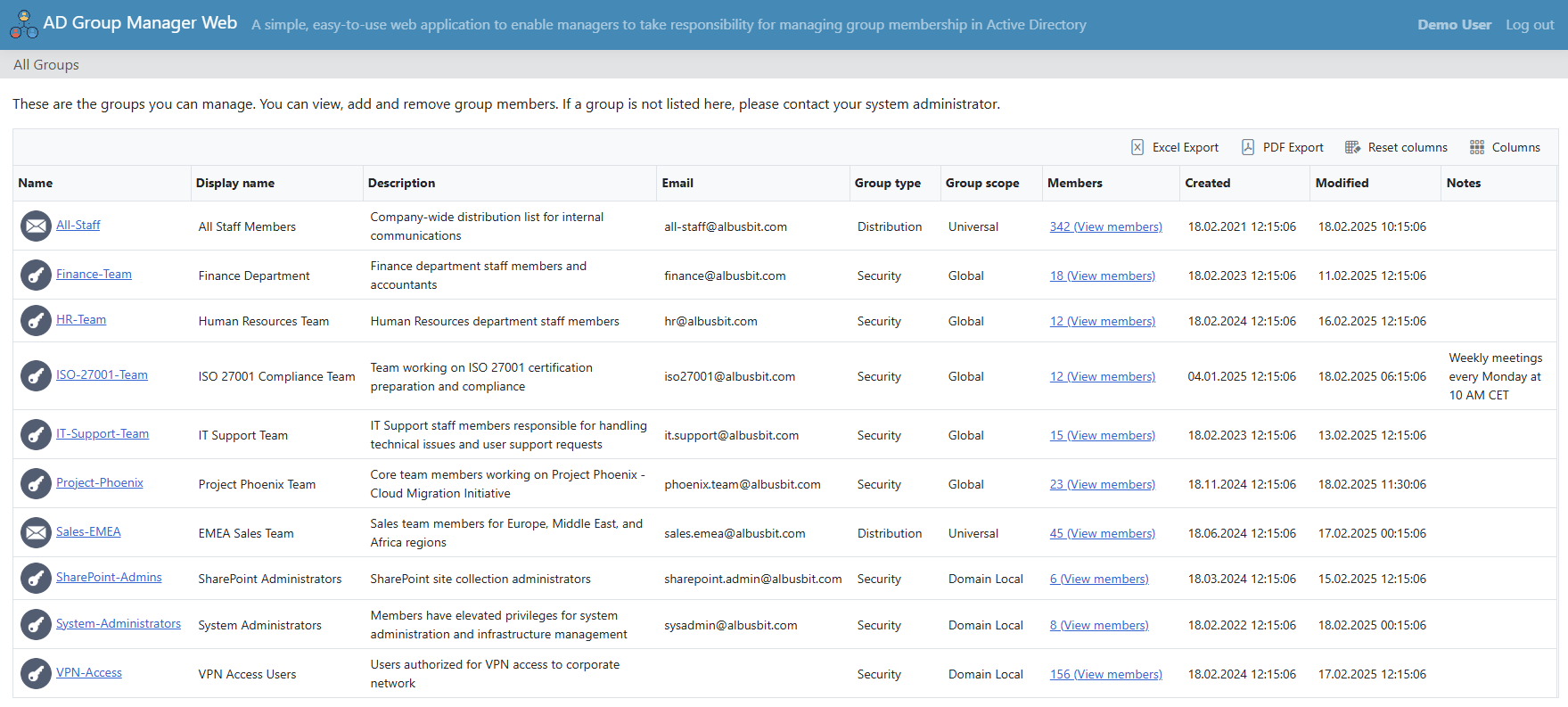
The All Groups page for a demo manager: ten security and distribution groups with scope, member counts and Excel/PDF export.
Add and remove members, including temporary access
AD Group Manager Web shows each member's details (status, department, job title, email and whatever fields IT turns on), and managers add or remove several people in one go. IT decides whether users, computers, groups and contacts can be added. With time-limited memberships enabled, a manager can add a contractor for a set number of hours or days and AD removes them automatically; that needs Windows Server 2016 or later with the PAM feature enabled.
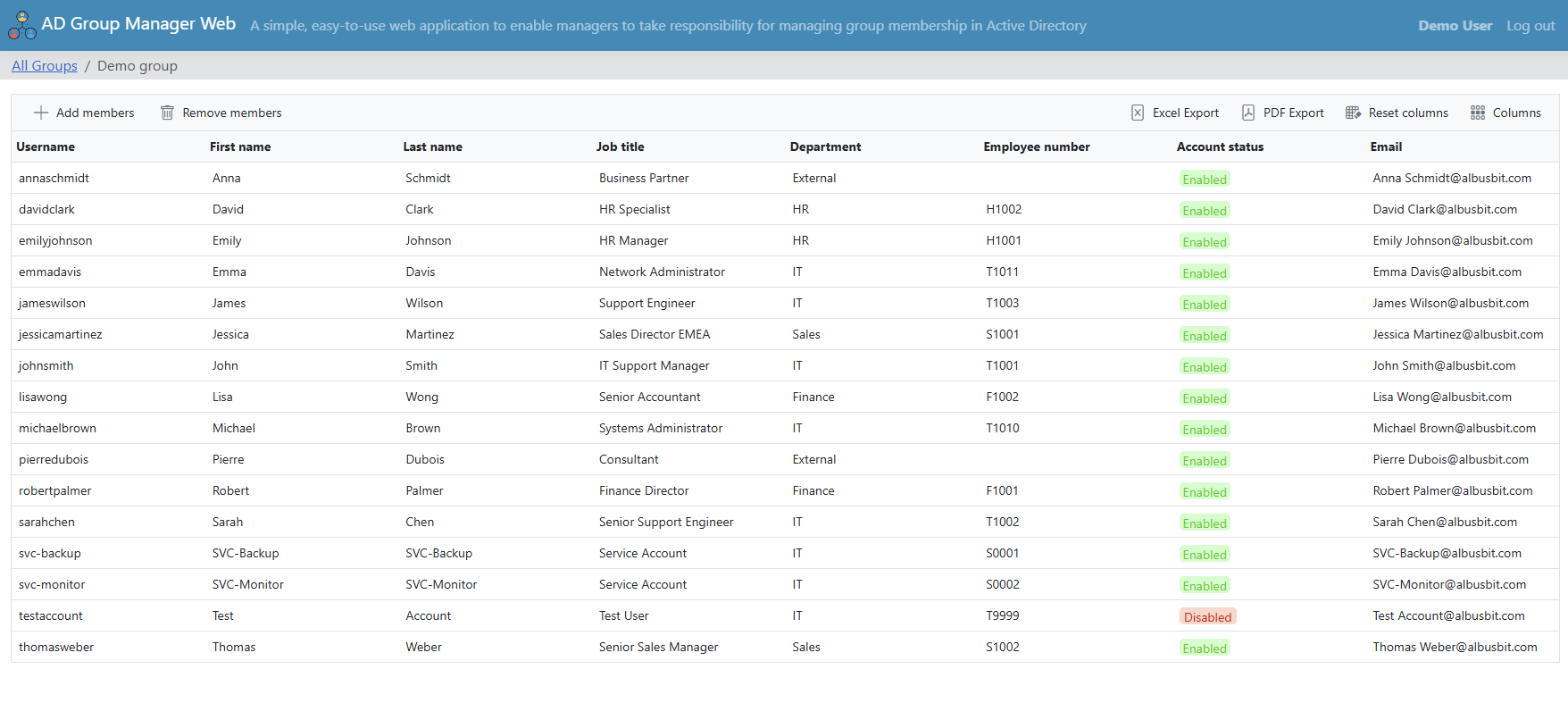
A group's member list with job title, department, employee number and account status, and the Add members / Remove members buttons.
Audit log, notifications and scheduled reports
AD Group Manager Web records every addition, removal and edit with the manager, member, group, details and time, filterable and exportable for HIPAA, SOX or GDPR evidence. IT can turn on instant emails for four event types and send daily, weekly or monthly summary reports as HTML with a PDF attached. Since November 2026 there's also a scheduled report of groups whose manager account is disabled, so orphaned groups get a new owner.
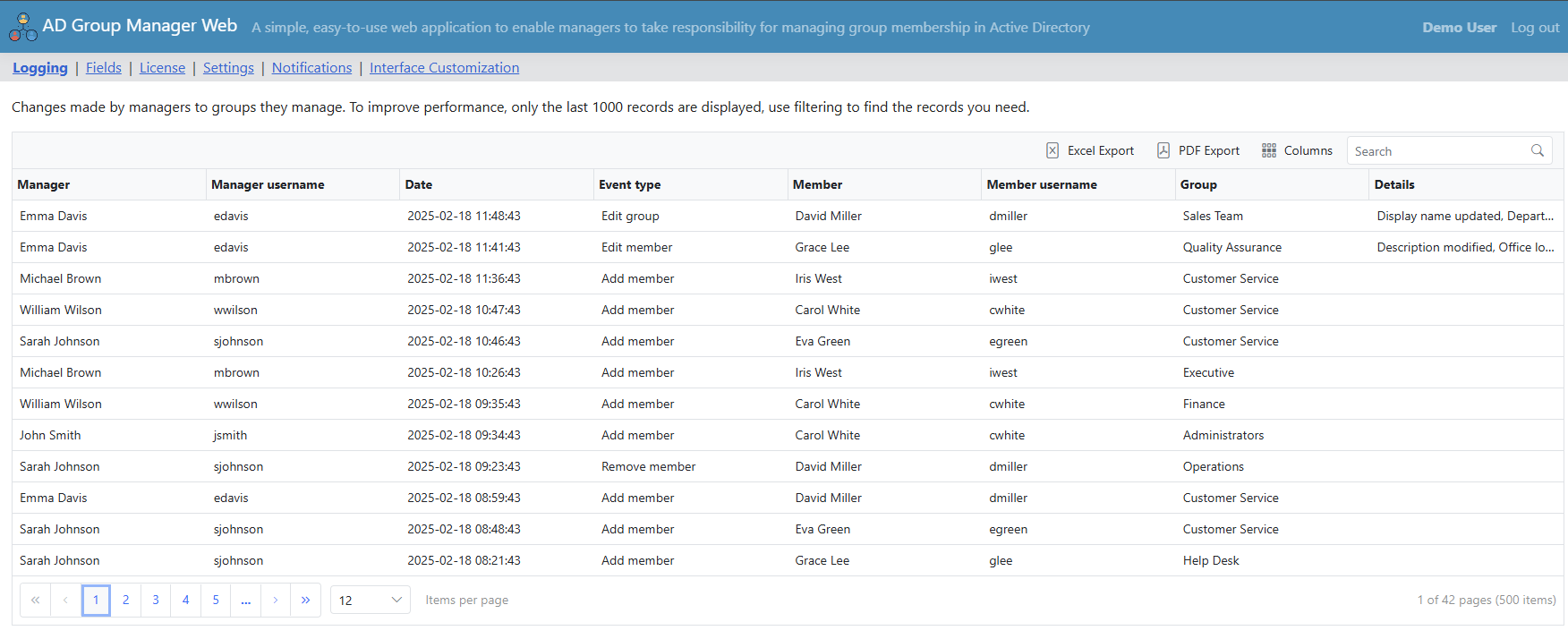
The admin Logging page: which manager added, removed or edited which member in which group, and when.
Access requests with manager approval
AD Group Manager Web can let ordinary users find groups (only in the OUs IT allows) and ask to join with a short reason. The group's manager is emailed and approves or denies in the portal, or the request simply opens an email to the manager, whichever IT prefers. Admins see all requests by status and can handle any of them.
An admin panel that sets the limits
AD Group Manager Web's admin panel decides which AD fields managers see and which they may edit, whether they can export, the minimum search length and whether wildcards are allowed. An optional check confirms the manager actually has "write members" rights on the group before any change. You can also brand the portal with your logo, title and colors and translate every label.
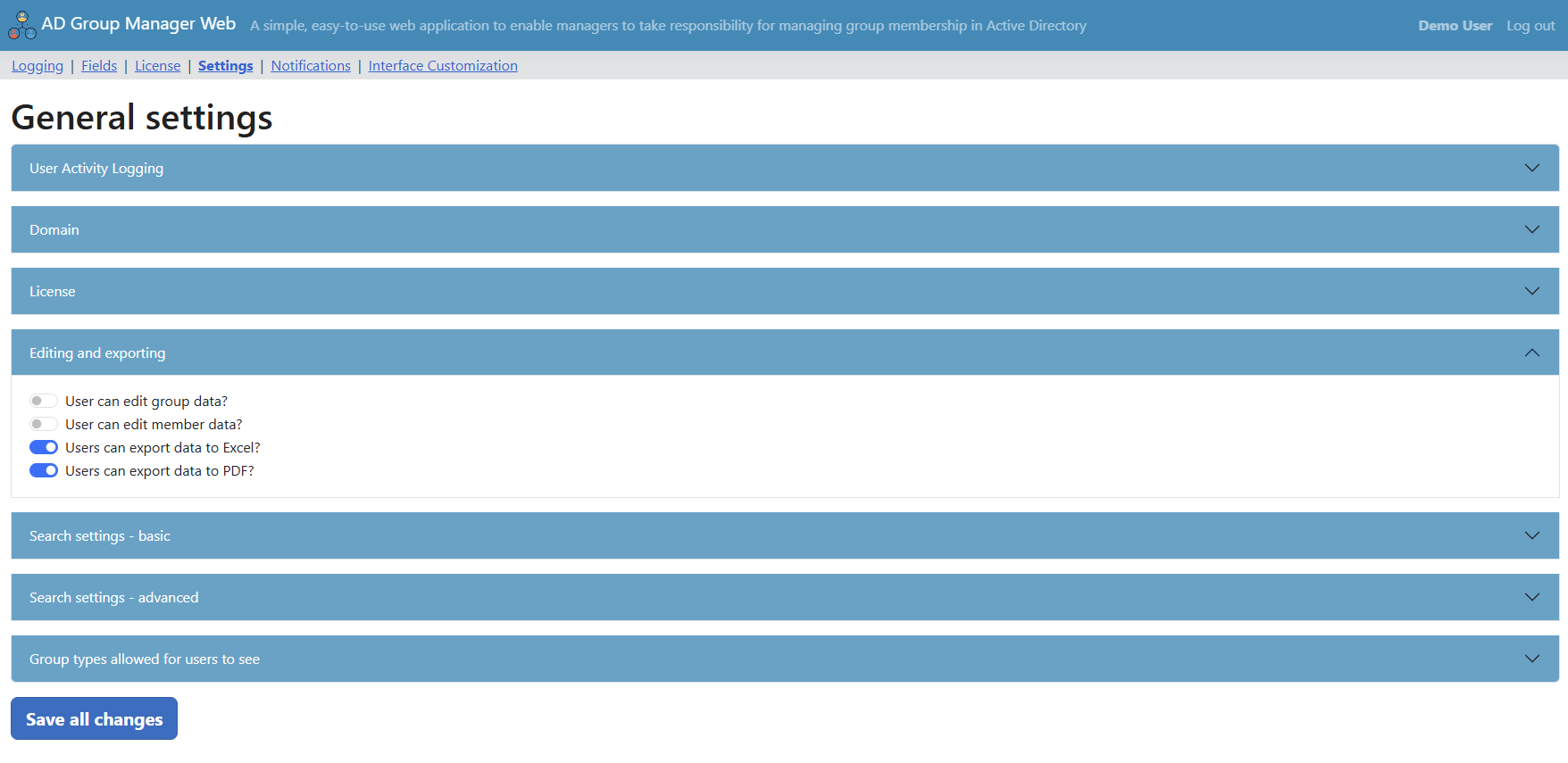
General settings: editing of group and member data switched off, Excel and PDF export switched on.
Benefits
- Fewer tickets. Group membership requests go to the person who knows the answer.
- Faster access for staff. No queue between the manager's decision and the change.
- Accountability. Owners are named in AD and every change is logged, which auditors like.
- Small footprint. One IIS site, a SQLite file, no schema changes and nothing leaving your network.
Real-World Uses
- Department shares: the finance manager adds new staff to the groups behind the finance file shares.
- Distribution lists: team leads keep their mailing lists current without emailing IT.
- Project access: a project lead gives a contractor two weeks in the project group, and it expires on its own.
- Access reviews: monthly reports show each manager's groups and recent changes for sign-off.
Who It's For, and Who Should Skip It
A good fit: organizations with on-premises Active Directory and enough group requests to clog the help desk, such as hospitals, schools, local government and mid-sized companies, especially those that want everything to stay on-premises.
Skip it if: your groups live only in Entra ID or Microsoft 365, you need full identity lifecycle management (user provisioning, dynamic groups, attestation campaigns), where suites such as ManageEngine ADManager Plus or Netwrix Directory Manager go further, or you're a very small shop where IT handles a few group changes a month: $1,295 a year is a lot to save a few minutes.
Usage Guide
- On a domain-joined Windows Server 2016 or later, enable the IIS Web Server role and install the ASP.NET Core 10 Hosting Bundle.
- Run the AD Group Manager Web installer; its IIS Quick Setup creates the site and application pool.
- Name the administrators (AD users or a group) in appsettings.json and choose Windows or Basic authentication.
- In ADUC, set the Managed By field on the groups you want to delegate.
- Open the portal as admin to choose visible and editable fields, notifications and export options, then send managers the URL.
- Enter the trial or purchased license key under the admin panel's License page.
Before you buy
- It's a subscription. The license works for 12 months and must be renewed to keep using the software; the order page renews it every year.
- No refunds: use the 30-day trial on your own domain first. The trial key also enables the Self-Service Portal module.
- With Windows Authentication you need a service account with read access and "write members" on the delegated groups; with Basic authentication each manager's own rights apply.
- One license covers one server installation.
Where it falls short
- On-premises AD only: no Entra ID or Microsoft 365 groups.
- Groups only: it isn't a user provisioning or deprovisioning tool.
- Scheduled reports had a bug: versions 26.5.26 to 26.9.16 failed to generate the report PDF, so the emails weren't sent; 26.11.03 fixes it, so upgrade if you're on one of those.
- The activity log page shows only the last 1,000 records; older ones need filtering to find.
- No independent reviews appeared on review sites, so the trial and live demo are the way to judge it.
Comparisons
AD Group Manager Web vs ManageEngine ADManager Plus
ADManager Plus is a full AD lifecycle suite (user provisioning, Microsoft 365, Exchange, GPOs, 200+ reports) built for IT technicians, and its delegation features need the Professional edition. AD Group Manager Web does one job, self-service group membership for non-technical managers, and installs as a single IIS site.
AD Group Manager Web vs PowerShell or ADUC delegation
You can delegate "write members" in AD and give managers ADUC or a script, but that means installing admin tools on managers' PCs and training them. The portal gives the same rights in a browser, with a log, notifications and limits on what they can see.
Editions and Pricing
Both options are annual subscriptions for one server with unlimited users and groups, all updates and email support during the year. Prices are from the order page on November 15, 2026, before sales tax.
| Option | Price | What you get | Buy |
|---|
| Annual License | $1,295 / year | AD Group Manager Web | Buy Annual |
| Bundle (AD Web Suite) | $1,590 / year | Plus the Self-Service Portal: password reset, password change, profile and My Groups | Buy Bundle |
If you already own AD Group Manager Web, Albus Bit adds the Self-Service Portal for $295 a year, prorated to your renewal date, through a link it emails you.
FAQs
Does AD Group Manager Web change the Active Directory schema?
No. AD Group Manager Web uses only standard attributes (managedBy, msExchCoManagedByLink and member) and keeps its own settings and logs in a local SQLite file.
Can a group have more than one manager in AD Group Manager Web?
Yes. AD Group Manager Web reads Exchange's multi-value co-manager attribute, and you can also make a security group the manager so every member of it (including nested members) can manage the group.
Does AD Group Manager Web need internet access?
No. AD Group Manager Web needs LDAP or LDAPS to a domain controller, optionally the Global Catalog and SMTP, and HTTP/HTTPS from managers' browsers. It sends no telemetry.
Can I monitor AD Group Manager Web with Zabbix or PRTG?
Yes. Since version 26.9.2 AD Group Manager Web has an anonymous /health address that returns HTTP 200 while the application runs, for monitoring tools such as Zabbix, PRTG, Nagios or Uptime Kuma.
Which languages does AD Group Manager Web support?
AD Group Manager Web ships with English, German and French wording, and every label can be translated or renamed in the admin panel.
What happens if I don't renew AD Group Manager Web?
AD Group Manager Web is licensed for 12 months at a time; to keep using it after that, the subscription has to be renewed. Albus Bit suggests setting a reminder 30 days before it expires.
Can we pay by purchase order or remove VAT?
Yes. Albus Bit accepts purchase orders and bank transfers and provides PDF quotes. EU companies with a valid VAT number can enter it at checkout to remove VAT, and US tax-exempt organizations can claim sales tax back from 2Checkout after the order.
System Requirements
- Windows Server 2016, 2019, 2022 or later, joined to the domain (or with network access to a domain controller)
- IIS with the Web Server role and the ASP.NET Core 10 Hosting Bundle
- About 50 MB for the application, plus space for logs and the SQLite database
- Active Directory on Windows Server 2003 or higher
- Managers: any modern browser (Chrome, Edge, Firefox, Safari); domain-joined PCs for Kerberos single sign-on
Conclusion
AD Group Manager Web is worth $1,295 a year if group membership requests are a steady part of your help desk's day. The reason to buy is a focused, on-premises portal that managers can use without training, with the logging and limits IT needs; it's far simpler to run than a full identity suite. The reason not to is scope and cost: it's an ongoing subscription, it covers groups only and only on-premises AD, and there are no refunds. Run the 30-day trial with two or three real managers before you decide.
Download Free TrialBuy Annual LicenseBuy with Self-Service Portal