NTFS Permissions Auditor: Who Can Open What on Your File Servers
NTFS Permissions Auditor is a Windows desktop tool from Albus Bit that scans your file shares, reads every folder's permissions, resolves nested Active Directory groups and shows you who can access each folder, and which folders each user can reach. The free edition runs unlimited audits; the Pro license costs $299 for one person (perpetual, with a year of updates) and adds export, change reports and scheduled audits.
Ask "who can read the HR share?" and Windows Explorer's Security tab gives you five groups and no names. Ask "what can this departing employee still open?" and you're writing Get-Acl scripts and expanding group nesting by hand. NTFS Permissions Auditor answers both questions in one scan.
Quick facts
- Version: 26.10.8, released October 8, 2026
- Developer: Albus Bit SIA (Latvia)
- Platform: Windows 10 and later, including Windows 11 and Windows Server 2022; needs Microsoft .NET Desktop Runtime 10 (x64)
- Audits: local folders, UNC shares and DFS paths; no agents on file servers
- Price: Pro from $299 (Individual), $1,099 (Company), $1,349 (Consultant/MSP)
- License: perpetual, with one year of updates and support
- Free version: yes, no time limit and no email required; Pro can be tried free for 7 days
- Refunds: none
- What we checked: installer NTFSPermissionsAuditor_26.10.8.exe (14.1 MB, file version 26.10.8, digitally signed by ALBUS BIT SIA) downloaded from albusbit.com, and the order page prices ($299 Individual, $1,099 Company, $1,349 Consultant/MSP) on November 15, 2026. We didn't audit a live file server.
Download Free VersionBuy Individual LicenseBuy Company LicenseBuy Consultant/MSP License
Overview
You install NTFS Permissions Auditor on your own workstation, create an audit profile with the folders or shares to scan, and press Start. It reads each folder's access control list, looks up every group in Active Directory (including groups inside groups) and builds a permission map. Basic audits need only read access to the folders and to AD; an optional "Advanced File System Access" mode uses backup privileges, with admin rights, to read folders your account is locked out of.
The tool is actively developed. The October 2026 releases redesigned the HTML export with a search box and color-coded permissions, and the summer releases made large scans steadier: groups such as Domain Users with tens of thousands of members no longer exhaust memory, and the "database is locked" crash on big audits was fixed.
Features
Folder view: who has access to this folder
NTFS Permissions Auditor's folder view mirrors your share tree. Click a folder to see its path, owner, whether it inherits permissions, and every permission entry: user or group, Allow or Deny, what it applies to and the level (Full Control, Modify, Read and Execute...). Expand a group to see its nested members and the parent group they inherit access through.
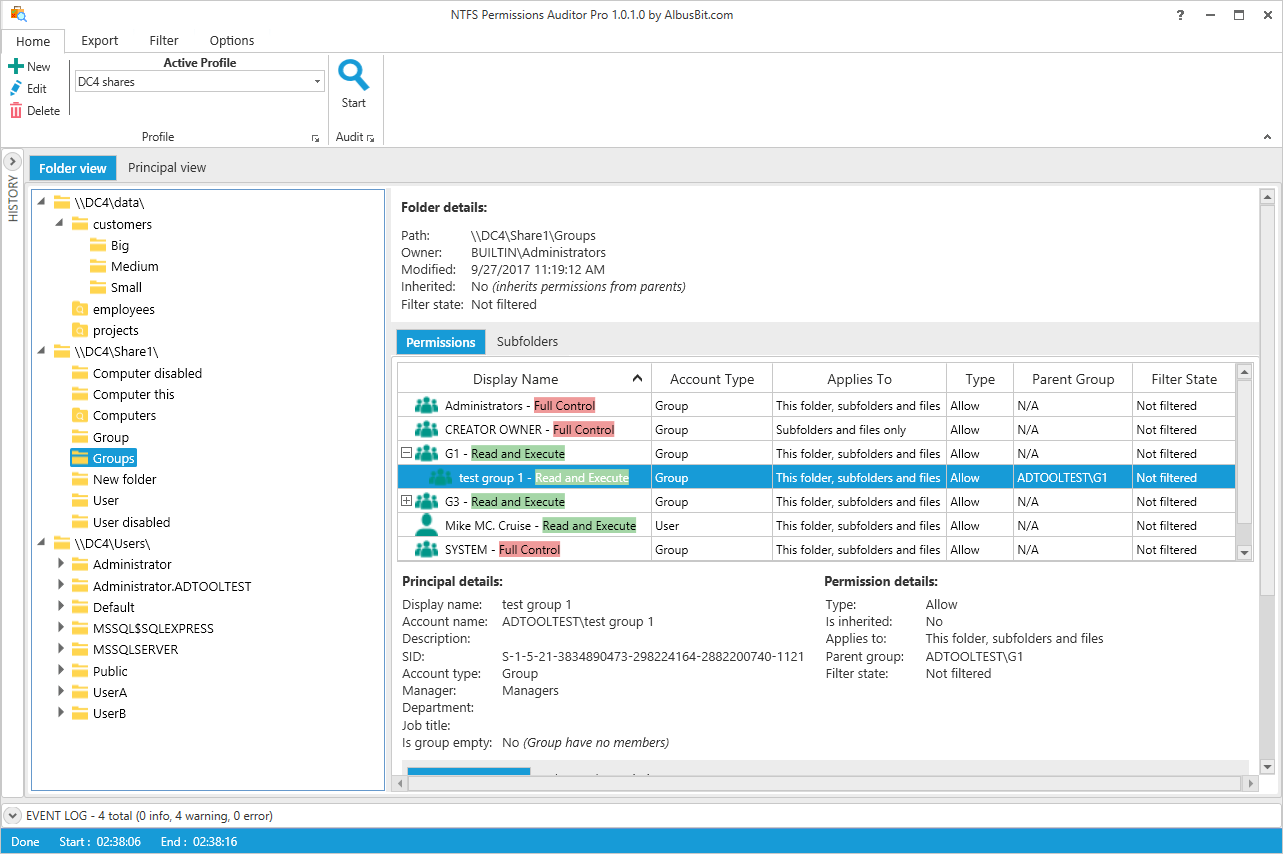
Folder view: the permissions on \\DC4\Share1\Groups, with group G1 expanded to show its nested member "test group 1" (vendor screenshot of an earlier version).
Account view: what this user or group can reach
NTFS Permissions Auditor's account view turns the same data around. Expand any user or group to list every folder it can access, including access that only comes through nested group membership and never shows in the folder's own ACL. Account details (display name, SID, department, manager, job title) come from AD. This is the view for offboarding checks and access reviews.
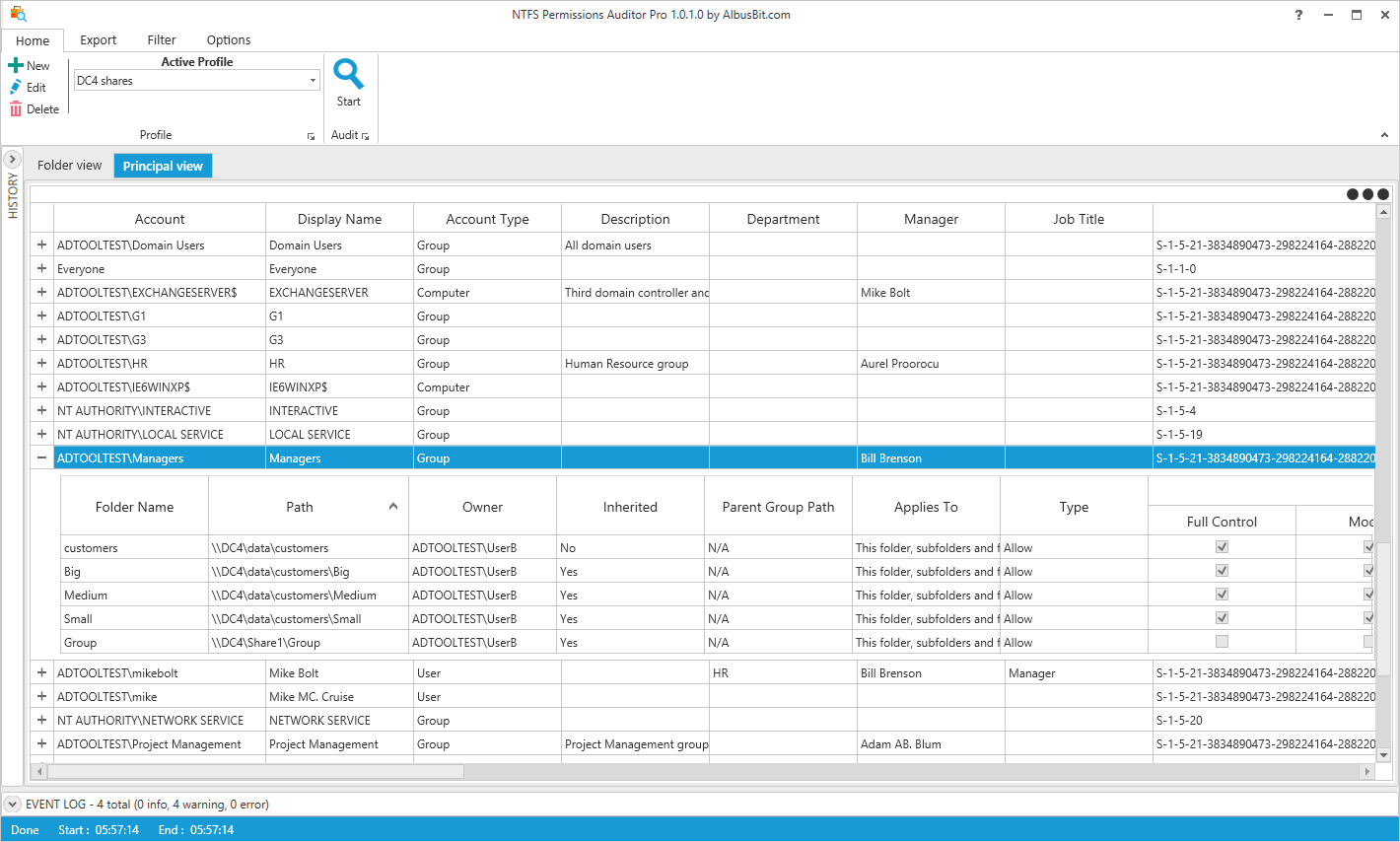
Account view (then called Principal view): the Managers group expanded to the five folders it has Full Control on (vendor screenshot of an earlier version).
Share discovery across a server or a domain
NTFS Permissions Auditor finds the shares for you: enter a server name to list all its shares, or a domain name to find every computer and share in it. You can also import a list of paths from a text file, exclude folders by path or name pattern, skip system folders and reparse points, limit the depth and leave out disabled accounts.
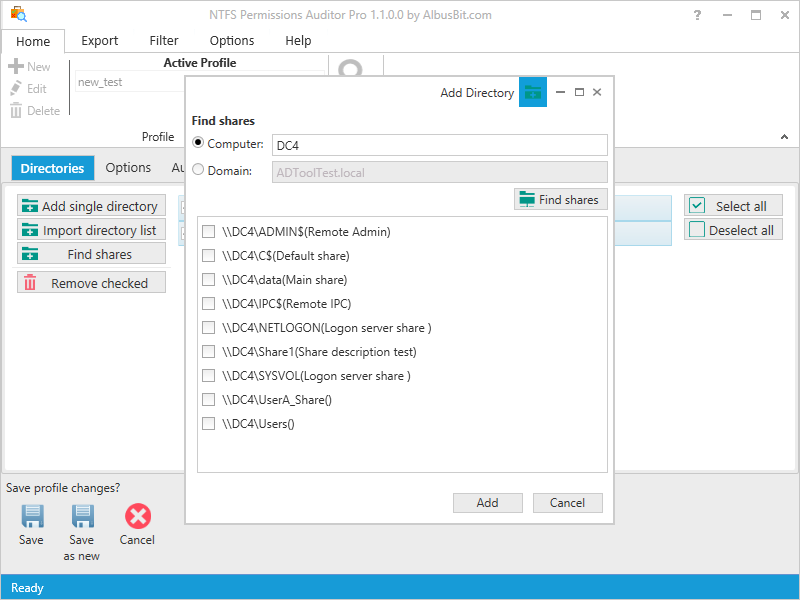
The Find shares dialog listing the shares on server DC4, with the option to search a whole domain instead.
Change reports: what's different since last time (Pro)
NTFS Permissions Auditor Pro stores each audit and compares any two of them. The change report lists folders added or removed, permissions added, removed or changed, inheritance and owner changes, and group membership changes. Run it as a scheduled task in change detection mode and you're emailed only when something changed.
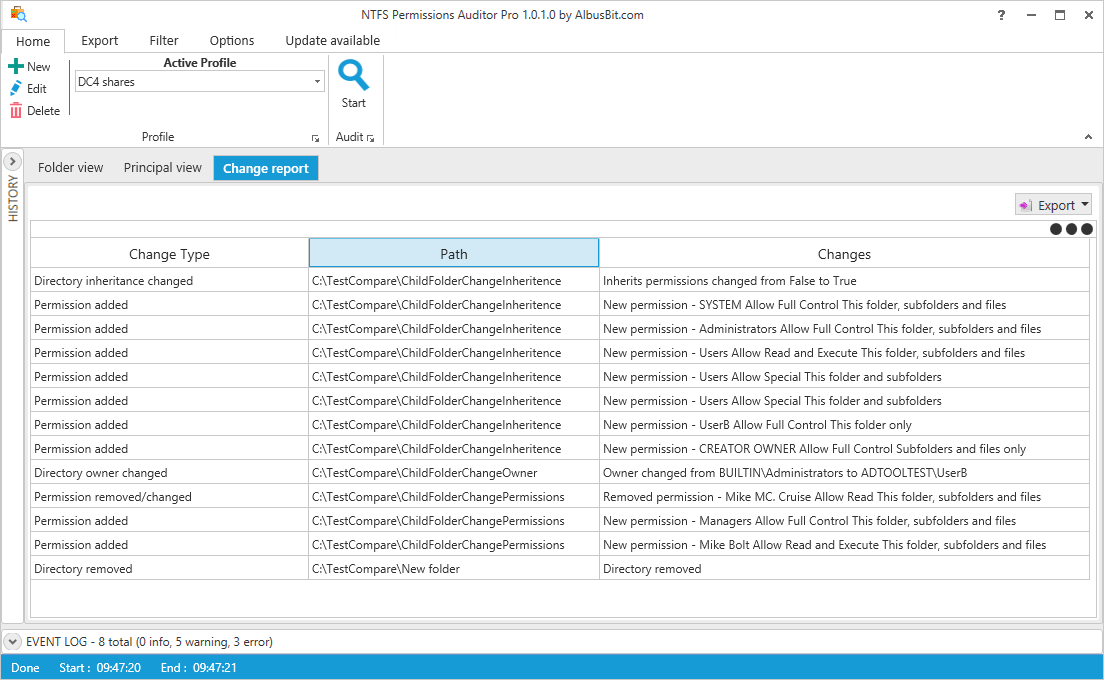
A change report between two audits: an inheritance change, new permissions, an owner change, a removed permission and a deleted folder.
Export, filters and NIS2 reports (Pro)
NTFS Permissions Auditor Pro exports either view to Excel, CSV, HTML, XML or PDF with the columns you choose. Its filter manager has more than 20 fields with AND/OR logic, so you can ask for "every folder where Mike King has Full Control or Modify, including through a group" or "folders open to Everyone", applied during the scan or afterwards. For EU organizations under NIS2 there's a compliance dashboard and a NIS2 report PDF; everyone else can hide those features.
Benefits
- Real names, not just groups. Nested group resolution shows the actual people behind a permission.
- Minutes instead of a scripting project. The vendor puts a PowerShell audit of ten shares at three to four hours; here it's a profile and a click.
- Proof for auditors. Dated exports and change reports document who had access and when it changed.
- Nothing installed on servers. It runs from one workstation, which matters on locked-down file servers.
Real-World Uses
- Offboarding: open the account view for a leaver and confirm every share they could reach is covered by the accounts you're disabling.
- Cleaning up "Everyone" access: filter for folders where Everyone or Domain Users has Modify or Full Control.
- Monthly access review: schedule an audit of the finance and HR shares and email the change report to the security team.
- File server migration: export the permission map before and after a move to prove nothing was lost or widened.
- MSP audits: with the Consultant/MSP license, run the same audit profile at each client site.
Who It's For, and Who Should Skip It
A good fit: Windows admins and security teams with on-premises file servers who need to answer "who has access" for audits, compliance (SOX, HIPAA, PCI DSS, GDPR, NIS2) or offboarding, and MSPs who audit client file servers.
Skip it if: your files live in SharePoint or OneDrive rather than NTFS shares, you need to know who opened or changed a file (that's file-access auditing from event logs, a different kind of tool), or you want to change permissions in bulk, since this tool reports and doesn't edit ACLs. For a one-off look at one server, the free edition is enough.
Usage Guide
- Install Microsoft .NET Desktop Runtime 10 (x64), then run the NTFS Permissions Auditor installer on a domain-joined workstation.
- Create a profile with New, and add folders with Add single directory, Import directory list or Find shares.
- Set exclusions and, if needed, alternative credentials for another domain.
- Press Start and wait for the audit to finish; warnings appear in the event log at the bottom.
- Browse the folder view and account view. With Pro, use Export, filters and the History panel to compare audits.
- For regular checks, configure SMTP in the settings and create a scheduled task.
Before you buy
- No refunds: Albus Bit asks you to try first. Audit your real shares with the free edition, then use the 7-day Pro trial for exports and change reports.
- Updates and support last a year. The order page sets up a yearly renewal for them; renewing before expiry costs about half the license price, and the software keeps working if you don't.
- Version 26 needs .NET Desktop Runtime 10 and Windows 10 or later, so it won't run on older Windows Server builds.
Where it falls short
- The free edition can't export, so any report you need to hand to someone means buying Pro.
- Read-only: it finds bad permissions but you fix them elsewhere.
- Snapshots, not live monitoring: change reports compare two scans, so a change made and reverted between scans won't appear, and it can't tell you who made a change.
- The Company license is a big step from $299 to $1,099.
- Very few independent reviews: TrustRadius, Slashdot and AlternativeTo list it with no user reviews yet.
What Users Say
From the trade press
Timothy Warner, a Microsoft Cloud and Datacenter MVP, reviewed it for 4sysops under the title "No-Nonsense file system security auditing and reporting": "Albus Bit NTFS Permissions Auditor is a lightweight, easy-to-use permissions analysis tool that helps you enforce the IT security principle of least privilege."
From customers
Yogesh, of Cytel, quoted on the vendor's page: "NTFS Permissions Auditor is very good product."
That's honestly all the published feedback there is. The product has a long track record (version 1.1 was already out in 2018), but user-review sites haven't collected ratings for it, so the free edition is your best review: scan one real share and see whether the account view answers your questions.
Comparisons
NTFS Permissions Auditor vs PowerShell Get-Acl
Get-Acl is free and fine for one folder. It doesn't expand nested groups, doesn't give you a per-user view, and leaves formatting, history and comparisons to you. NTFS Permissions Auditor does all of that out of the box.
Free vs Pro
Both editions audit an unlimited number of folders with the folder and account views. Pro adds export with custom fields, filtering during and after the audit, automatic storage of results, change reports, scheduled audits with email, NIS2 reports, guaranteed updates and priority support.
Editions and Pricing
The three Pro licenses have the same features and differ only in who may use the software. Each is a one-time purchase with a year of updates and priority support. Prices are from the order page on November 15, 2026, before sales tax.
| License | Price | Who can use it | Buy |
|---|
| Free | $0 | Anyone; audit and view, no export | |
| Pro Individual | $299 | One person on their PC | Buy Individual |
| Pro Company | $1,099 | Any number of people in your company | Buy Company |
| Pro Consultant/MSP | $1,349 | Your employees at any client site | Buy Consultant/MSP |
FAQs
Does NTFS Permissions Auditor need administrator rights?
Not for normal audits. NTFS Permissions Auditor needs read access to the folders and to Active Directory. Admin rights are only needed for the optional Advanced File System Access mode, which uses backup and restore privileges to read folders your account can't open.
Can NTFS Permissions Auditor scan DFS namespaces?
Yes. NTFS Permissions Auditor accepts DFS paths such as \\domain.com\dfs\share the same way as any UNC path.
Does NTFS Permissions Auditor show share permissions as well as NTFS permissions?
Yes. NTFS Permissions Auditor's HTML export includes a Share Permissions section alongside the folder ACLs.
Can NTFS Permissions Auditor audit another domain?
Yes. Each NTFS Permissions Auditor profile can use alternative credentials, which covers cross-domain and restricted-access file servers.
Where does NTFS Permissions Auditor keep its data?
NTFS Permissions Auditor stores profiles, filters, tasks, settings, the license and saved audits in one SQLite file. Since version 26.10.2 you can move it to a shared folder under Settings > General, so several Windows accounts can use the same history and license.
How does NTFS Permissions Auditor handle huge groups like Domain Users?
NTFS Permissions Auditor still audits the full membership, but groups above a member limit (1,000 by default, adjustable) aren't expanded inline on every folder, which keeps memory in check on large servers.
Can my organization pay by purchase order?
Yes. Albus Bit accepts purchase orders and bank transfer and provides PDF quotes on request. US tax-exempt organizations can claim back sales tax from 2Checkout after the order.
System Requirements
- Windows 10 or later, including Windows 11 and Windows Server 2022
- Microsoft .NET Desktop Runtime 10 (x64)
- Read access to the folders being audited and to Active Directory
- About 15 MB for the installer
Conclusion
NTFS Permissions Auditor is worth it if you look after Windows file servers and someone regularly asks who has access to what. The account view with nested groups resolved is the reason to use it at all, and the free edition gives you that with no time limit. Pay $299 for Pro when you need exports and change reports for auditors; the main reasons to hold back are no refunds and the steep jump to the Company license. Scan a real share with the free version first.
Download Free VersionBuy Individual LicenseBuy Company LicenseBuy Consultant/MSP License