AD Admin 2 Pro: Find Stale Accounts and Fix Them in Bulk
AD Admin 2 is a Windows desktop tool from Albus Bit for finding Active Directory users, computers and groups and acting on many of them at once: disable, delete, move to an OU, change groups, unlock and more. The free edition already includes search and all 17 actions; AD Admin 2 Pro costs $299 for one person (a one-time license) and adds scheduled clean-up tasks, an action history, custom fields and export.
Active Directory Users and Computers is fine for one account. It's painful for "disable every user who hasn't logged on in 90 days, move them to the Disabled OU and strip their groups". AD Admin 2 turns that into a search, a select-all and one button, and Pro can repeat it every night on its own.
Quick facts
- Version: 26.9.17
- Developer: Albus Bit SIA (Latvia)
- Platform: 64-bit Windows 10 (1607+), Windows 11, Windows Server 2016 to 2025; needs Microsoft .NET Desktop Runtime 10 (x64)
- Actions: 17 bulk actions on users, computers and groups
- Price: Pro $299 (Individual), $1,099 (Company), $1,349 (Consultant/MSP), one-time payment
- Updates: minor updates and support for life; major updates free for one year
- Free version: yes; a 7-day Pro trial key is available on request
- Refunds: none
- What we checked: installer ADAdmin_26.9.17.exe (13.2 MB, file version 26.9.17, digitally signed by ALBUS BIT SIA) downloaded from albusbit.com, and the order page prices ($299, $1,099 and $1,349, with no renewal) on November 15, 2026. We didn't run actions against a live domain.
Download Free VersionBuy Individual LicenseBuy Company LicenseBuy Consultant/MSP License
Overview
AD Admin 2 opens on a "What do you want to do?" screen: type an action such as "Unlock account" or pick one from your favorites and recent actions, and it walks you through finding the accounts and filling in the parameters. Behind that are an Explore view for searching, a History of everything done from the tool, Tasks for scheduled jobs and Charts for an overview of the domain.
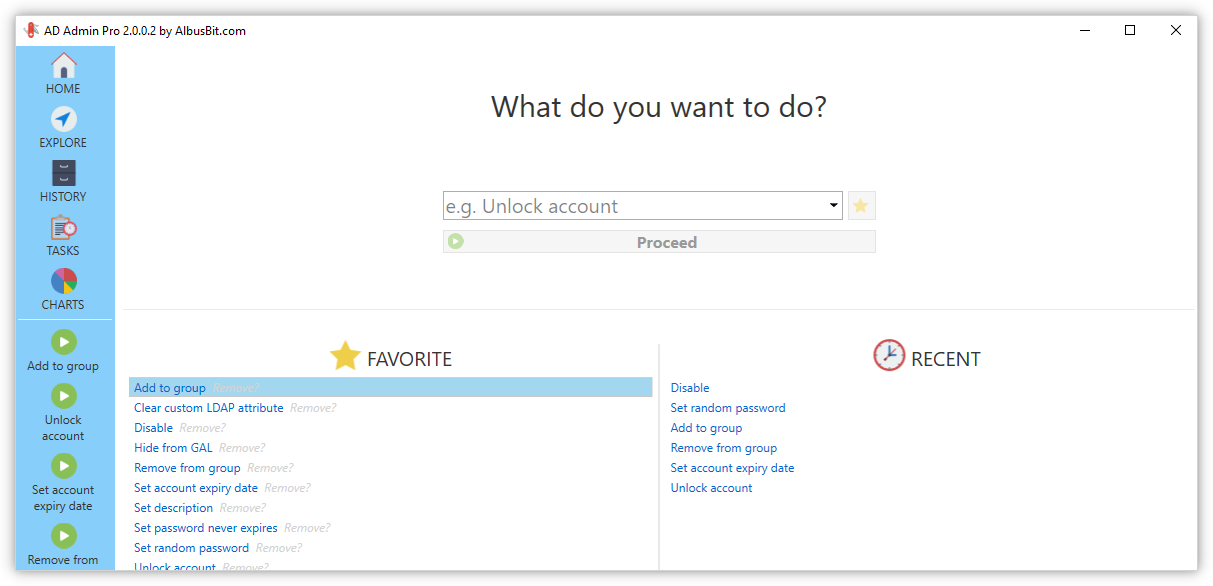
The home screen with an action search box, favorite actions and recently used actions (vendor screenshot of version 2.0.0.2).
It runs from your workstation with your own domain account, or with other credentials per connection, and can manage several domains, switching between them at any time. Last logon is calculated from all domain controllers, so the "inactive for 90 days" list you act on is accurate.
Features
Search templates and a filter manager
AD Admin 2 finds accounts with built-in search templates (such as "Users whose accounts expired") or your own, saved for reuse. Each template has its search paths (whole domain or chosen OUs) and filters built with AND/OR groups, and you choose the result columns. You can also import a list of accounts from a CSV file and act on exactly those.
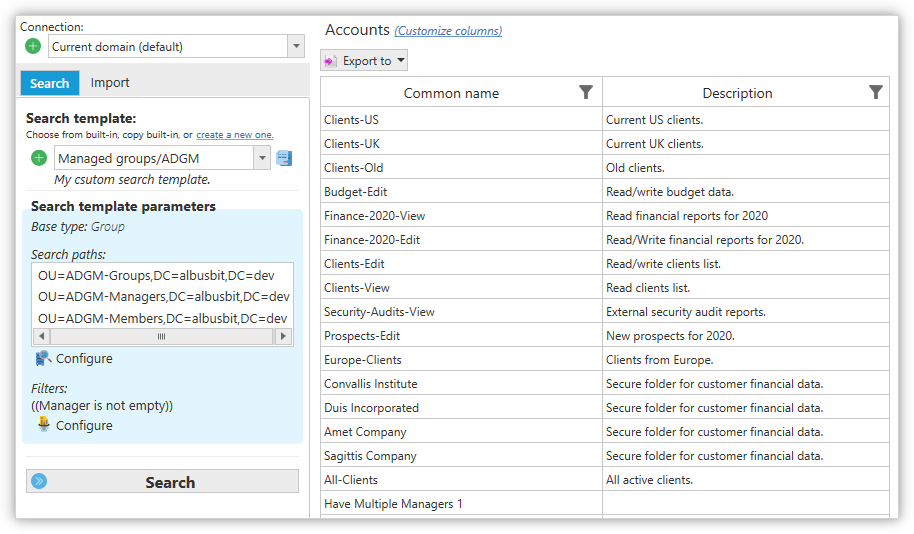
A custom search template limited to three OUs, filtered to groups whose Manager isn't empty, with the matching groups listed on the right.
17 actions on many accounts at once
AD Admin 2 applies an action to every account you select: disable, enable, delete, move to OU, set description, set expiry date, add to group, remove from group, remove from all groups, hide from the GAL, set a random password, set "password never expires", delete the home drive, clear a custom LDAP attribute, disable OWA, unlock, or run an external script. All 17 are in the free edition.
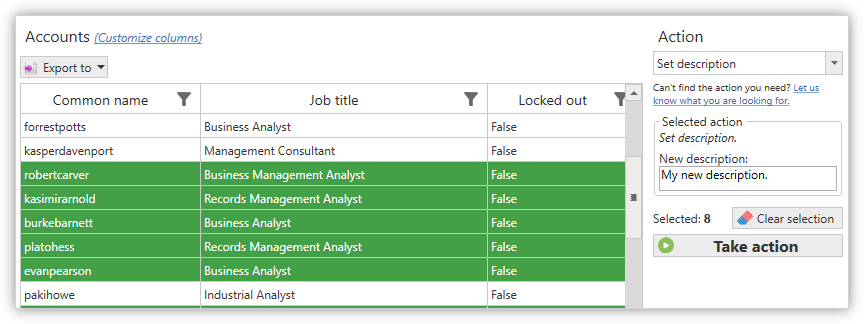
Eight selected accounts and the "Set description" action with its new text, ready for Take action.
Scheduled clean-up tasks (Pro)
AD Admin 2 Pro combines a search template and an action into a task, such as "disable users whose accounts expired, every day", and registers it in Windows Task Scheduler through its command-line tool. You can fine-tune the schedule there, and the task history window shows each run and what it did.
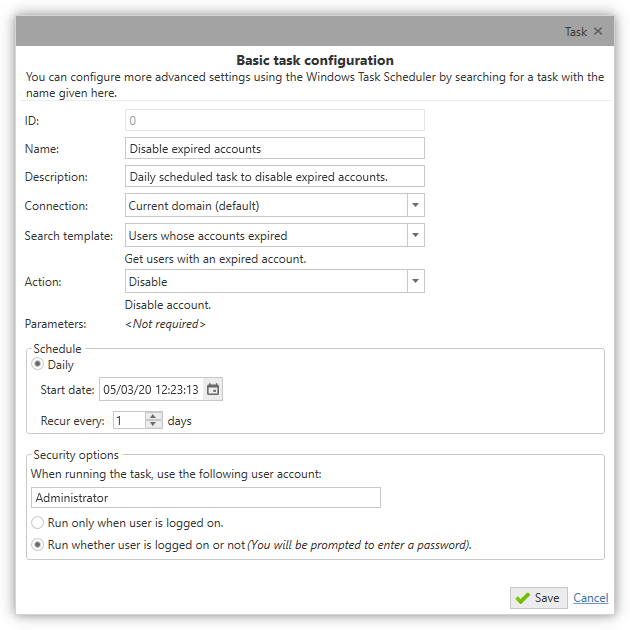
A daily task that finds "Users whose accounts expired" and disables them, running as Administrator whether or not anyone is logged on.
Action history and export (Pro)
AD Admin 2 Pro logs every action taken from the tool with the date, user, computer, action, parameters and target object, so you can answer "who disabled this account, and when?". The log can be filtered and exported to CSV, and search results export to Excel, CSV, HTML or PDF. Pro also lets you add your own fields beyond the 50-plus built in, for use in both columns and filters.
Charts of your domain
AD Admin 2 draws pie charts from ten data sources: accounts created, user account status, user activity, last password change, password expiration, who can change passwords, who can log on without a password and group types. Pro exports charts as images.
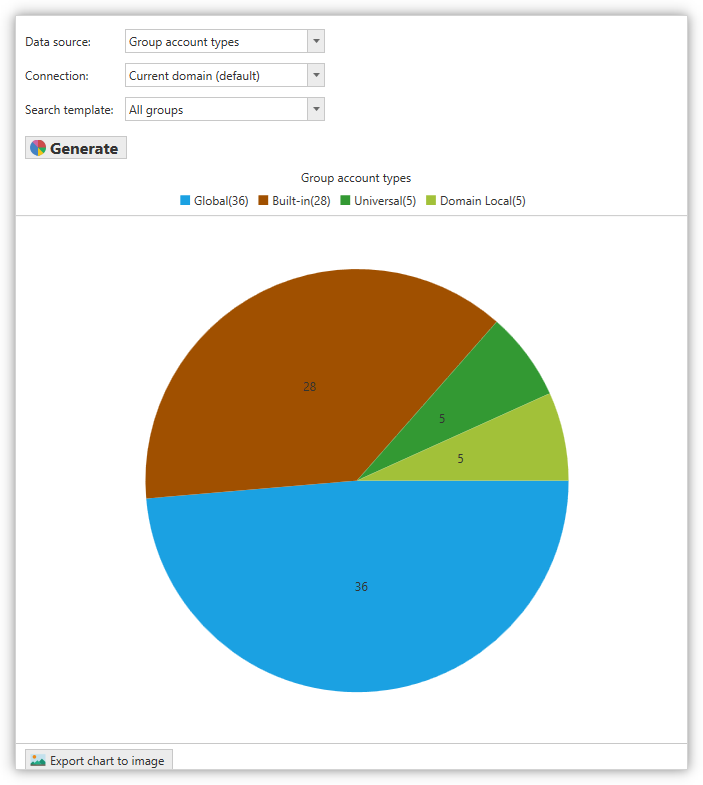
A "Group account types" chart: 36 global, 28 built-in, 5 universal and 5 domain local groups.
Benefits
- A cleaner, safer directory. Stale accounts are an easy way in for attackers; this makes removing them routine.
- Less clicking. One action on fifty accounts instead of fifty trips through ADUC.
- No scripting needed, but an "external script" action is there when you want one.
- A record of changes. The Pro history shows who did what, which ADUC doesn't.
Real-World Uses
- Quarterly clean-up: find users and computers inactive for 90 days, disable them, move them to a Disabled OU and remove their group memberships.
- Leavers from HR: import the list of leavers from a CSV file, set a random password, hide them from the GAL and disable OWA.
- Help desk: search for locked-out accounts and unlock them in one go.
- Contractors: set an account expiry date on a whole group of temporary staff, then schedule a daily task that disables expired accounts.
Who It's For, and Who Should Skip It
A good fit: admins of small and mid-sized on-premises Active Directory domains who want bulk changes and scheduled clean-up without writing PowerShell, and MSPs working across client domains.
Skip it if: your users live only in Entra ID, you need approval workflows and delegated help-desk roles (that's a larger identity-management suite), or you mainly need reports for auditors, where Albus Bit's AD FastReporter is the better fit. If you're comfortable with PowerShell and rarely clean up, the free edition or your own scripts will do.
Usage Guide
- Install Microsoft .NET Desktop Runtime 10 (x64), then run the AD Admin 2 installer on a 64-bit workstation in the domain.
- Launch it; it connects to your current domain. Add other domains or credentials in the connection manager.
- Go to Explore, pick a search template or create one, and press Search.
- Select the accounts, choose the action on the right, fill in its parameters and press Take action.
- With Pro, open Tasks to schedule the same search and action, and check History afterwards.
Before you buy
- No refunds. Use the free edition and the 7-day Pro trial (requested with a work email address) before you pay.
- Actions change your directory. Try new searches on a test OU first, and remember that Delete and "Delete home drive" can't be undone from the tool.
- Your account needs the AD rights for each action; the tool doesn't grant any.
Where it falls short
- No public changelog for AD Admin 2, unlike Albus Bit's other tools, so it's hard to see what each update changed.
- 64-bit Windows 10 or later only because of .NET 10; older admin workstations won't run it.
- The free edition can't export results or keep a history of what it changed.
- No independent reviews turned up on review sites or IT blogs, so you're relying on the trial.
- No undo: the history records changes but doesn't roll them back.
Comparisons
AD Admin 2 vs Active Directory Users and Computers
ADUC is free and already installed, and it can do multi-select edits on a few attributes. AD Admin 2 adds real last logon across all DCs, saved searches with complex filters, 17 ready actions (including GAL and OWA settings), CSV import, charts and, in Pro, scheduling and an audit trail.
Free vs Pro
Both editions search users, computers and groups, run all 17 actions, draw charts, save templates, connect to other domains, import from CSV, build custom filters and get real last logon. Pro adds custom fields, scheduled tasks, action and task history, export to Excel, CSV, HTML and PDF, chart image export, guaranteed updates and priority support.
Editions and Pricing
All three Pro licenses cover unlimited domains and enabled users and have the same features; they differ in who may install the software. Each is a one-time payment with lifetime support and minor updates, plus free major updates for the first year. Prices are from the order page on November 15, 2026, before sales tax.
| License | Price | Who can use it | Buy |
|---|
| Free | $0 | Anyone; search, actions and charts | |
| Pro Individual | $299 | One person | Buy Individual |
| Pro Company | $1,099 | Any number of employees | Buy Company |
| Pro Consultant/MSP | $1,349 | Your employees at unlimited locations | Buy Consultant/MSP |
FAQs
Is AD Admin 2 Pro a subscription?
No. AD Admin 2 Pro is a perpetual license paid once. It includes lifetime support and minor updates; major updates are free for the first year and paid after that.
Does AD Admin 2 limit the number of users or domains?
No. Every AD Admin 2 Pro license covers unlimited domains with an unlimited number of enabled users; the license tiers only differ in how many people may install it.
Does AD Admin 2 run on Windows Server 2012?
Only with Extended Security Updates. AD Admin 2 needs .NET Desktop Runtime 10, which supports Windows Server 2012 and 2012 R2 only with ESU; Server 2016 and later are supported normally.
Can AD Admin 2 act on a list of accounts from HR?
Yes. AD Admin 2 imports items from a CSV file and lets you run any of its actions on them, in both the free and Pro editions.
Can AD Admin 2 manage Exchange settings?
Partly. AD Admin 2 can hide accounts from the Global Address List and disable Outlook on the web (OWA); it isn't a full Exchange management tool.
Is there a German reseller?
Yes. Albus Bit names ccpsoft as its official German reseller (sales@ccpsoft.de), and provides PDF quotes on request for organizations that need one before ordering.
System Requirements
- 64-bit Windows 10 version 1607 or later, Windows 11, or Windows Server 2016, 2019, 2022 or 2025 (2012/2012 R2 only with Extended Security Updates)
- Microsoft .NET Desktop Runtime 10 (x64)
- Access to an Active Directory domain, with rights for the actions you run
- About 14 MB for the installer
Conclusion
AD Admin 2 is a generous free tool and a fair one-time purchase. The free edition alone, with all 17 bulk actions and accurate last logon, covers occasional clean-ups. Pay $299 for Pro when you want clean-up to happen on a schedule and need a record of what changed. The reasons for caution are no refunds, no public changelog and no independent reviews, so try it on a test OU first and decide on what you see.
Download Free VersionBuy Individual LicenseBuy Company LicenseBuy Consultant/MSP License