Active Table Editor: Let Staff Edit Database Records Without Handing Them SQL Server Management Studio
Active Table Editor is a $120-a-year Windows front end for editing database tables from DB Software Laboratory. An administrator connects it to SQL Server, Oracle, MySQL, PostgreSQL, SQLite, Firebird or any ODBC database and builds grids, data entry forms, menus and reports, and each user only sees and changes what their group is allowed to.
It solves a familiar office problem: someone in accounts needs to fix a customer record or add this month's price list, the database has no admin screen for it, and the only tool on hand is a full database client that would let them drop a table. Active Table Editor sits in between.
Quick facts
- Version: 5.3.8.1, released October 31, 2026
- Developer: DB Software Laboratory (etl-tools.com), United Kingdom
- Platform: Windows only (64-bit and 32-bit builds, experimental Windows on Arm support)
- Databases: SQL Server (including SQL Server CE), Oracle, MySQL, PostgreSQL, SQLite, Interbase/Firebird, OLE DB and ODBC
- Price: $120 per year for one computer, $1,000 per year for a site licence. The order renews automatically each year
- Trial: 30 days, fully functional, no registration
- Refunds: the vendor's pricing page states a 30-day refund policy
- What we checked: the 41 MB ATEditor_64.zip downloaded from the vendor on November 8, 2026 contains a setup file reporting version 5.3.8.1; $120.00 for the single licence and $1,000.00 for the site licence on the order page, with auto-renewal switched on, on November 8, 2026. We read the vendor's documentation but didn't build a form ourselves
Download Free TrialBuy Now
Before you buy
Count your computers. A single licence covers one computer. If several staff will edit data from their own PCs, compare the price of several single licences with the $1,000-a-year site licence, which covers any number of computers at one location.
Plan where the repository lives. All forms, menus, users and reports are stored in a repository database, which is a Microsoft Access file by default. The vendor's own documentation warns that an Access repository "tends to get corrupted over time" in production and supports SQL Server, Oracle, PostgreSQL, MySQL and Interbase/Firebird instead. Set that up before your users start.
Overview
Active Table Editor has two sides. Administrators work in the Management bar: Connections, Menu Items (grids, forms, reports), Menu Designer, Users, Groups and a free-hand SQL screen. Users log in and see only their own menu, for example Customers, Price List and Products, each opening a grid, a form or a report.
It's actively maintained: the version history lists 148 releases, with master-detail screens added in February 2026, images in grids in February 2026, and SQL Server sign-in improvements including Microsoft Entra options in July 2026.

A Customers grid grouped by the Regularcustomer field, with the selected record's fields shown in a panel on the right.
Features
Active Table Editor gives each user a safe editing grid or form
A menu item opens a table as a grid (with grouping, search and export to Excel), as a data entry form, or as a master-detail screen. Users add, edit and delete records through it; they never see the tables they weren't given.
Active Table Editor has a form designer with lookup lists
Logged in as an administrator, you switch any record layout into the form designer and move, add or delete fields. Combo boxes can hold a fixed list of values, load their values from the database through another menu item, or filter that list automatically by another field, such as cities by country.

A Customers data entry form (Customer ID, Category, Company Name, Title, Contact Name); the arrow from the vendor's manual points to the button that opens the form designer.
Active Table Editor controls who can view, add, change or delete
Security is role-based. Every user belongs to at least one group and has one menu assigned. For each menu item, a group gets No Access, View, Insert, Update or Delete rights, so the sales team can view prices while only the office manager can change them. Admin tools appear only to the Administrators group.
Active Table Editor designs printable reports
A report wizard walks through the data source, a query builder, fields, groups, layout and style, and the report designer handles the rest. Reports can be attached to forms with parameters linked to the current record, exported to PDF from the preview, and use images from the web.
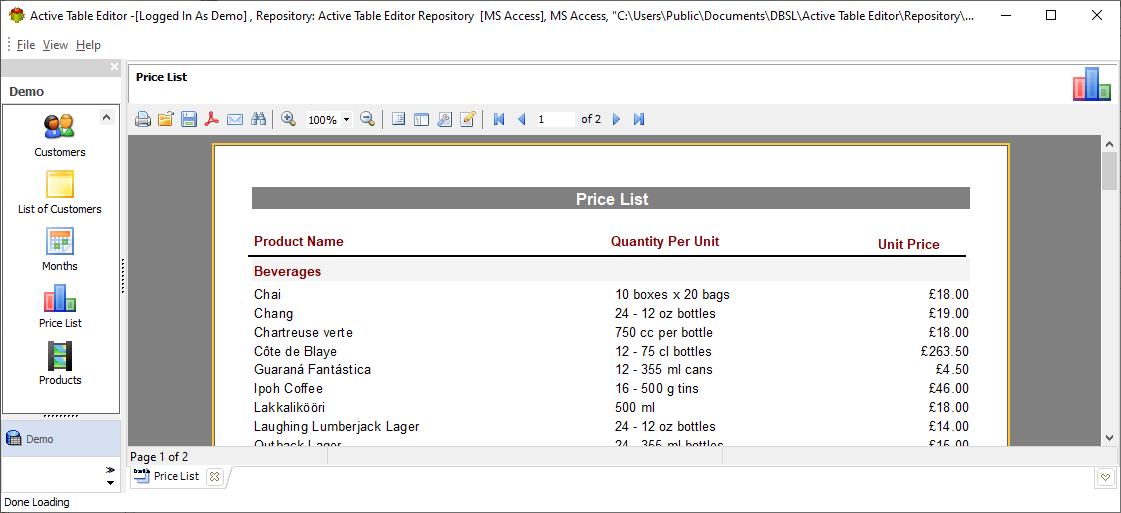
A user's view: the Demo user's menu on the left (Customers, List of Customers, Months, Price List, Products) and the Price List report in the preview.
Active Table Editor includes a SQL editor and stored procedure buttons
Administrators get a free-hand SQL screen with tabs, auto-complete, a table list with incremental search, a result grid and an execution log. For users, a menu item can run a stored procedure at the press of a button, which keeps calculations inside the database.

The SQL screen running "select * from Categories": connections and tables on the left, results and a single-record panel in the middle, the execution log below. Labels are from the vendor's manual.
Benefits
- No custom app to build. A simple maintenance screen for a few tables takes configuration, not a development project.
- Fewer accidents. Users get the tables and actions they need and nothing else, with delete rights only where you grant them.
- One tool for many databases. The same forms approach works on SQL Server, Oracle, MySQL, PostgreSQL and Firebird.
Real-World Uses
- A small distributor lets two office staff maintain the product and price tables in SQL Server, while only the manager can delete products.
- An IT team exposes the lookup tables of an in-house application (cities, categories, status codes) so business users can keep them current without raising tickets.
- A finance department enters monthly adjustments through a form, then prints a grouped report with a button that runs the month-end stored procedure.
Who It's For, and Who Should Skip It
Active Table Editor suits a database administrator or IT person who needs to give non-technical Windows users a controlled way to edit records, without building a custom application.
Skip it if you need imports on a schedule, file processing or data transformations: the vendor says plainly not to choose it for ETL automation and points to Advanced ETL Processor Enterprise. Skip it if your users work on Macs, Linux or in a browser, since it's a Windows desktop program; the vendor's Deep Bin is its low-code database app builder for Windows and Linux. And if you just need to browse and query a database yourself, a plain database client is simpler.
Usage Guide
- Download the 64-bit trial (or the 32-bit build for old 32-bit drivers), unzip it and run the setup as administrator.
- Start Active Table Editor and log in as Administrator; the default password is "Administrator", so change it straight away.
- Run the Repository Creation Wizard (Tools menu) to move the repository to SQL Server or another server database, rather than the default Access file.
- Under Management, add a Connection to your database and test it.
- Create Menu Items for the tables your users need (grids, forms, reports) and adjust the layouts in the form designer.
- Create a Menu, then Groups with access rights, then Users assigned to that menu and those groups. Log in as one of them to check what they see.
Tips
- A desktop shortcut can log a user in automatically (ATEditor.exe User=...; Password=...), hide the Outlook bar, or open one item by its ID, which is handy for a single-purpose data entry station. Keep in mind that a password in a shortcut is visible to anyone at that PC.
- The vendor's short video tutorials cover forms, lookups, import and export, and reports.
Where it falls short
- Windows desktop only. No web or mobile access for users.
- Access by default. The out-of-the-box repository is an Access file that the vendor itself says can corrupt over time.
- A dated interface. The Outlook-style sidebar and toolbars look like early-2000s Windows software.
- Thin documentation in places. Several manual pages are short checklists, and some video tutorials are several years old, so expect to use the vendor's support forum.
What Users Say
There are no independent user reviews of Active Table Editor itself yet. Review sites list DB Software Laboratory's tools under one profile, where the written reviews are about its ETL product, Advanced ETL Processor; the vendor shows that profile at 4.9 out of 5 from 16 reviews on Capterra. What those customers say about the company carries over: they praise a support forum that replies within hours and developers who add features on request, and they find the interface old-fashioned.
On the vendor (GetApp, about Advanced ETL Processor)
Alan J., Logistics and Supply Chain, 51-200 employees: "If you have a problem or scenario you cannot solve, go to their support forum and you normally get a reply back in a few hours."
Teun M., Computer Software, 11-50 employees: "Don't be put off by the look & feel of this tool. It feels a little bit Windows XP-esque."
With so little feedback on Active Table Editor itself, the 30-day trial against a copy of your own database is the best way to judge it.
Comparisons
Active Table Editor vs a full database client
A database client (SQL Server Management Studio, a generic SQL tool) gives one technical person access to everything. Active Table Editor is for the opposite case: many non-technical users, each limited to specific tables, forms and actions, with an administrator in control. It does include a SQL screen, but only for administrators.
Active Table Editor vs Deep Bin
Both come from DB Software Laboratory. Active Table Editor is the Windows table editor with forms, menus, reports and permissions. Deep Bin is the vendor's low-code database app builder and data editor, which also runs on Linux. If you need Linux users, look at Deep Bin; for Windows-only offices, Active Table Editor covers the editing and reporting.
Editions and Pricing
| Licence | Price at checkout | Computers | Included |
|---|
| Single licence | $120 per year | 1 | One year of updates and support |
| Site licence | $1,000 per year | Unlimited at one physical site | One year of updates and support |
There's one edition, so the only choice is how many computers. A site licence covers the buyer's employees and agents at one location, such as one building or a group of nearby buildings. You can upgrade from a single to a site licence by paying the difference.
Buy Single Licence ($120/yr)Buy Site Licence ($1,000/yr)
FAQs
Does every Active Table Editor user need a licence?
Active Table Editor is licensed per computer, not per user: a single licence covers one computer, and the site licence covers any number of computers at one physical site. The licence terms count computers, not named users.
Can Active Table Editor work with an existing SQL Server database?
Yes. Active Table Editor connects to existing SQL Server (including SQL Server CE), Oracle, MySQL, PostgreSQL, SQLite, Interbase/Firebird, OLE DB and ODBC databases. It edits your tables in place and keeps its own settings in a separate repository.
Can Active Table Editor import data from Excel?
Yes. Active Table Editor can import data into tables and export grids to Excel, so users don't have to type in data that already exists in a spreadsheet. For large or scheduled imports, the vendor's ETL tools are the better fit.
Does Active Table Editor work in a web browser?
No. Active Table Editor is a Windows desktop program, with 64-bit and 32-bit builds and experimental support for Windows on Arm.
Can I limit an Active Table Editor user to viewing data only?
Yes. Active Table Editor sets rights per group and menu item: No Access, View, Insert, Update or Delete. A group with only View rights can open a grid or report but can't change anything.
Does Active Table Editor stop working after a year?
Active Table Editor is sold as an annual licence that renews automatically and includes a year of updates and support. Ask the vendor what your licence allows after the year if you don't plan to renew.
System Requirements
- Windows (64-bit and 32-bit builds; Windows on Arm experimental)
- A supported database: SQL Server, Oracle, MySQL, PostgreSQL, SQLite, Interbase/Firebird, or any OLE DB or ODBC source
- Oracle Client for Oracle; the Firebird client is included in the setup
- A server database for the repository is recommended for production use
Conclusion
Active Table Editor is worth $120 a year if you need to give a few Windows users safe, limited editing access to a database without commissioning a custom app. Forms with lookup lists, per-group rights, reports and stored-procedure buttons cover most back-office maintenance screens, and the product is still updated several times a year.
The main reason not to buy it: it's Windows desktop software with a dated look and almost no independent reviews, and it needs some setup (move the repository off Access, build menus and groups) before users see any benefit. Try it for 30 days against a copy of your database; if one maintenance screen works for your staff, the rest follow the same pattern.
Download Free TrialBuy Now