Nero Recode: Convert Your Videos, Music and Own Discs for Any Device
Nero Recode 2027 is a $47.95 one-time-purchase converter for Windows 10 and 11 that turns video and audio files, and DVDs, AVCHD discs and Blu-rays that aren't copy-protected, into formats ready for your phone, tablet, smart TV, game console or music player. It's for people who want device presets and a simple three-step workflow rather than tweaking codec settings by hand.
You've got a shelf of home-made DVDs, camcorder discs, odd WMV and AVI files from an old PC, and a FLAC music folder your phone won't play. Recode's job is to make all of it play on the device in your hand.
Quick facts
- Developer: Nero AG, Germany
- Version: Nero Recode 2027 (build 29.5.1.4 in Nero's own 2027 screenshots)
- Platform: Windows 11 and 10 only
- Price: $47.95 at checkout, a one-time license for one PC
- Also in: Nero Platinum Suite 2027, a yearly subscription
- Input: video and audio files, audio CDs, DVD-Video, AVCHD and Blu-ray discs without copy protection
- Output examples: MP4, MKV, AVI, MOV, WMV, MPEG-2; MP3, AAC, WAV, OGG, FLAC; device profiles
- Trial: 7 days, all features, started from the Nero Start app with a free Nero account
- Guarantee: 30-day money-back guarantee
- What we checked: on November 13, 2026 the order page listed "Nero Recode 2027" at $47.95 as a lifetime license with no renewal. The trial is an 8 MB web installer (Nero-Recode-2026-3.0.2.13.exe, dated October 20, 2025) that downloads the latest version during setup. We didn't install the trial or convert files with it.
Before you buy
- No copy-protected discs. Nero's support states that its software "cannot be used to copy commercially protected DVDs, CDs, or Blu-rays." If you want to back up bought movies, Recode won't do it.
- Free alternatives exist. HandBrake converts files and unprotected discs for free. Recode's case is its simpler device presets, one-click disc-to-device conversion and audio CD handling.
- Check the suite. Nero Platinum Suite 2027 ($59.95 a year) includes Recode plus Nero Video, Burning ROM and more.
- The license is verified online, and the web installer contains a partner browser-search offer (SearchOnSite). Read each setup screen.
Download Free TrialBuy Now
Overview
Recode has been Nero's converter for many years, and its design hasn't changed much because it works: a start screen where you drop files or insert a disc, then one window with three questions down the left side. For which device? (phone, tablet, music player, console, TV or disc format), To which quality? (a slider from smallest size to best quality, with an optional maximum file size), and Where do you want to store? Click OK and the job runs.
Behind that simple front are the details power users want: custom profiles with your own resolution, frame rate and resize method, NVIDIA CUDA hardware acceleration, HEVC (H.265) input, a job queue, and per-title audio and subtitle choices when ripping a disc. The 2027 version can keep DVD subtitles as separate SUB/IDX files instead of burning them into the picture.
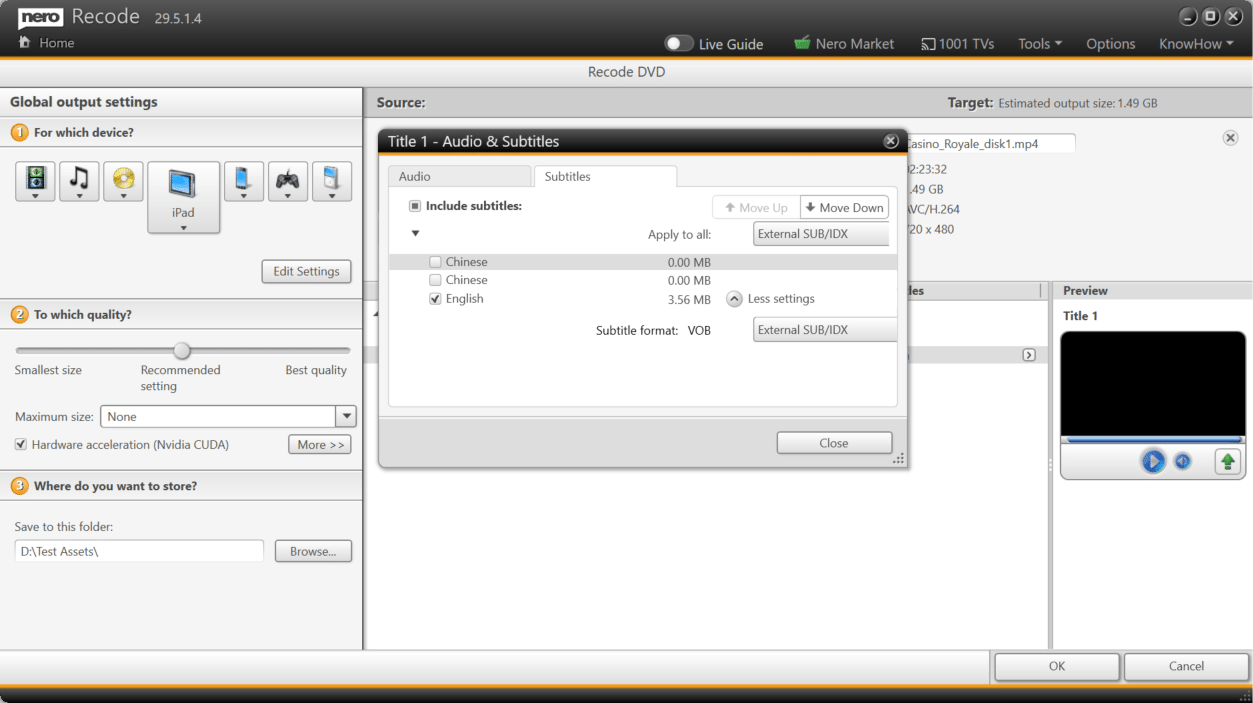
Nero Recode 29.5.1.4 ripping a DVD: device, quality and destination settings on the left (iPad selected, NVIDIA CUDA acceleration on), and the title's Audio & Subtitles dialog with the English track exported as External SUB/IDX.
Features
Rip your own DVDs, AVCHD discs and Blu-rays
Nero Recode imports DVD-Video, AVCHD and Blu-ray discs and converts their titles to files, choosing the audio track and subtitle languages per title. It's meant for discs you made or have the rights to: Nero's software doesn't get past the copy protection on commercial movies.
Convert video and audio for any device
Nero Recode converts files to the right format for smartphones, tablets, smart TVs, PlayStation, Xbox and MP3 players, using ready-made device profiles, or to formats such as MP4, MKV, AVI, MOV, WMV and MPEG-2 for video and MP3, AAC, WAV, OGG and FLAC for audio. It accepts HEVC (H.265) sources, and its "smart compression" setting trades file size against quality with one slider.
One-click disc and CD to device
Nero Recode's 1-click conversion takes a video disc or audio CD straight to a connected device: plug in the phone, pick the tracks, and they're converted and copied. Gracenote adds album art so your music sorts by cover.
Job lists and custom profiles
Nero Recode lets you queue several conversions in a job list and leave them running, and save your own output profile (resolution, frame rate, resize method, codec) to reuse on future files.
Quick fixes: trim, crop, rotate
Nero Recode has simple one-click tools to trim, crop and rotate, so a phone video recorded sideways can be fixed during conversion without opening an editor. Nero's product images also show an "Enable Nero AI upscaling" option in the output profile for raising resolution.
Benefits
- No codec homework. Pick the device and quality; Recode picks the settings.
- Your old media stays watchable. Home DVDs and camcorder discs become files that play anywhere and outlive the disc.
- Batch it overnight. Queue a whole folder or several discs and let it run.
- Pay once. $47.95, no subscription.
Real-World Uses
- Saving home-made DVDs. Rip wedding and holiday DVDs you burned years ago to MP4 before the discs fail, keeping subtitles as SUB/IDX.
- Camcorder archives. Convert AVCHD discs and files from an old camcorder to MP4 for a phone or TV.
- Music for the car or phone. Convert a FLAC library to MP3 or AAC, or rip audio CDs straight to a connected device.
- Old formats. Turn WMV, AVI and MPEG-2 files into MP4 that current devices play.
Who It's For, and Who Should Skip It
Good fit: Windows users with home-made discs, camcorder footage and mixed media files who want device presets and a simple interface, and who prefer a one-time license.
Skip it if: you want to rip commercial, copy-protected movies (Recode won't); you're on a Mac; or you're comfortable with free tools, since HandBrake for video and a free audio converter cover most of the same jobs. If you'd also burn or edit, Platinum Suite gives you Recode with the rest.
Usage Guide
- Install and start the trial. Run the web installer from Nero's Download Center, sign in to Nero Start with a free Nero account, and click the rocket icon on the Recode card.
- Add media. Drag files onto Recode's start screen, or choose to rip a DVD, Blu-ray or AVCHD disc.
- Pick the device. Under "For which device?" choose a phone, tablet, console, TV or audio player, or Edit Settings for a custom profile.
- Set quality and size. Move the quality slider and, if needed, set a maximum file size. Tick hardware acceleration if your graphics card supports it.
- Choose tracks. For a disc, open each title's Audio & Subtitles settings and pick languages and subtitle format.
- Convert. Pick the destination folder and click OK, or add more jobs to the queue first.
Where it falls short
- No scheduling. Expert Reviews noted you "can't schedule processing to start at a certain time or when the system's idle", though Recode can shut down or hibernate the PC after the last job.
- SUB/IDX support varies. Nero itself warns that not every player supports external SUB/IDX subtitles.
- Few current reviews. Most independent reviews of Recode cover old versions inside Nero suites, and recent user ratings on download sites are mixed, with complaints about price and bundled extras.
- Online license check. Nero's requirements list an internet connection to verify the license.
What Users Say
Recode is mostly reviewed as part of Nero's suites, so the independent material is older. Here's what we found.
Expert Reviews (Nero 14 Platinum review, Simon Handby, September 30, 2013)
"It has a neat interface in which you choose the source file then select the device or DVD format for which you want the output files optimised."
"We like the ability to continue creating jobs even after Recode has begun processing the queue, and the way you can set the PC to hibernate or shut down at the end of the last job. However, it's a shame you can't schedule processing to start at a certain time or when the system's idle."
GadgetSpeak (Nero Platinum 2016 review)
"Nero Recode allows you to convert content between different formats for use on a range of devices that we have come to rely on for our entertainment needs." The review rated it "far superior" to the older software it replaced.
Trustpilot (Nero, TrustScore 3.0 from about 350 reviews, November 13, 2026)
Nero's Trustpilot page covers the company and its suites. The quotes came to us through a page summarizer.
- Pat (Canada, 5 stars, November 2026): "They update the software for the music/video customer needs."
- Marty Hovey (US, 5 stars, November 2026): "I usually try Nero first for a solution to a project."
- Michelle (US, 1 star, September 2026): "This download is deceptive and requires many purchases to use it."
The pattern
Reviewers consistently like Recode's device-first interface and job queue. The complaints are about Nero more broadly: the push toward extra purchases, the web installer's offers, and the price next to free converters.
Comparisons
Nero Recode vs Nero Platinum Suite 2027
Recode is one of more than 20 programs and tools in Nero Platinum Suite 2027, which costs $59.95 a year at checkout and renews automatically, against $47.95 once for Recode alone. If converting is all you do, buy Recode and own it. If you'd also burn discs, edit video or back up, the suite costs about the same for the first year.
Nero Recode vs HandBrake
HandBrake is free and very capable for video, but it has no audio-only conversion, no CD ripping and a steeper settings screen. Recode is easier for non-technical users and handles music and one-click device transfer too. Neither breaks commercial copy protection.
Editions and Pricing
| Product | Price at checkout | License | What you get |
|---|
| Nero Recode 2027 | $47.95 | One-time, 1 PC | The converter only |
| Nero Platinum Suite 2027 | $59.95 per year | Subscription, renews automatically | Recode plus about 20 other Nero programs and tools |
FAQs
Can Nero Recode rip commercial DVDs and Blu-rays?
No. Nero Recode can't copy commercially protected DVDs, CDs or Blu-rays; Nero's support says its software is for content you own the copyright to or have permission to copy. It rips home-made and other unprotected discs.
Is Nero Recode a subscription?
No. Nero Recode 2027 is a one-time $47.95 license for one PC, listed at checkout as a lifetime license. Only Platinum Suite is a yearly subscription.
Does Nero Recode use my graphics card?
Yes. Nero Recode offers hardware acceleration, shown as NVIDIA CUDA in its settings, and Nero lists support for NVIDIA CUDA, AMD and Intel Quick Sync with at least 256 MB of video memory.
Can Nero Recode convert HEVC (H.265) videos from my phone?
Yes. Nero Recode imports HEVC files. Nero recommends 64-bit Windows, an Intel Core i7-6700 or better and 8 GB RAM for HEVC, plus the free VC 2015 x64 redistributable for faster software decoding.
Is there a Mac version of Nero Recode?
No. Nero Recode runs on Windows 11 and 10 only.
Can I keep DVD subtitles without burning them into the video?
Yes. Nero Recode 2027 can save selected DVD subtitle tracks as external SUB/IDX files next to the video, so you can switch them on or off in a player that supports the format.
System Requirements
- Windows 11 or Windows 10 (64-bit for HEVC)
- 2 GHz AMD or Intel processor (Intel Core i7-6700 or better for HEVC)
- 1 GB RAM (8 GB for HEVC)
- 5 GB disk space for a typical installation
- DirectX-compatible graphics card
- DVD or Blu-ray drive for ripping discs
- Internet connection to verify the license
Conclusion
Nero Recode 2027 is worth $47.95 if you want an easy, device-first converter on Windows for your own discs, camcorder footage and music, and you'd rather pay once than learn HandBrake's settings. The reason to buy it: it turns DVDs, Blu-rays, CDs and stray file formats into something your phone or TV plays, in three steps. The reason not to: it won't touch copy-protected movies, and free converters do much of the same job if you don't mind more settings. Try it on your own files with the 7-day trial.
Download Free TrialBuy Now