Nero MediaHome: One Windows Library for Your Photos, Videos and Music
Nero MediaHome 2027 Unlimited is a $44.95 one-time-purchase media manager for Windows 10 and 11 that gathers your photos, videos, music, movies and TV series into one library, sorts photos by date, faces, places and AI tags, and plays or streams everything to your TV and phone. A cheaper Nero MediaHome 2026 Standard license costs $22.95. It's for people with years of family photos and music scattered across folders, phones and USB drives who want them in one place on their own PC, not in a cloud.
If your photo collection lives in "New Folder (3)", "Phone backup 2019" and three USB sticks, MediaHome's job is to pull it together, date it, find the faces, and let you show it on the living-room TV without uploading anything.
Quick facts
- Developer: Nero AG, Germany
- Version: Nero MediaHome 2027 (build 29.5.1.2 in Nero's own screenshots of the new Folder view)
- Platform: Windows 11 and 10 only, plus free Nero companion apps for iOS and Android
- Editions: MediaHome 2027 Unlimited $44.95 and MediaHome 2026 Standard $22.95, both one-time licenses for one PC. An old free edition (MediaHome Free, from 2020) is still on Nero's download page
- Also in: Nero Video 2027 and Nero Platinum Suite 2027
- Trial: 7 days, all features, started from the Nero Start app with a free Nero account
- Guarantee: 30-day money-back guarantee
- What we checked: on November 13, 2026 the order page listed "Nero MediaHome 2027 Unlimited" at $44.95 and "Nero MediaHome 2026 Standard" at $22.95, both as lifetime licenses. The trial is an 8 MB web installer (Nero-MediaHome-2026-3.0.2.19.exe, dated October 20, 2025) that downloads the latest version during setup. We didn't install the trial or import a library with it.
Before you buy
- There's no 2027 Standard edition on sale. The cheaper Standard license is the 2026 version. Nero's own guidance is that the Standard version is limited in DVD-Video playback, disc burning and format support, and that Unlimited is the one to buy if managing, playing and streaming your library is the main job.
- You may already own it. Nero Video includes MediaHome, and so does Nero Platinum Suite 2027 ($59.95 a year). Don't buy it twice.
- The license is checked online. Nero's requirements say the software needs an internet connection to verify the license, even though your media stays on your PC.
- The web installer contains a partner browser-search offer (SearchOnSite). Read each setup screen.
Download Free TrialBuy 2027 UnlimitedBuy 2026 Standard
Overview
MediaHome started life in 2013 as the rebranded Kwik Media organizer, and it has been the media hub of Nero's suites ever since. It works in three steps that Nero calls Import, Organize and Enjoy: bring media in from your PC, phone, USB drives and audio CDs; sort and tag it; then play it, turn it into slideshows and discs, or stream it around the house.
The left pane lists My Photos, My Videos, My Slide Shows, Music, Movies and TV Shows. Photos show on a Timeline by day or month, and tabs switch to AI Tags, Faces, Places and Find. The 2027 version adds a Folder view beside the Library view, so you can browse your own folder structure instead of only Nero's categories, a long-standing request from users.
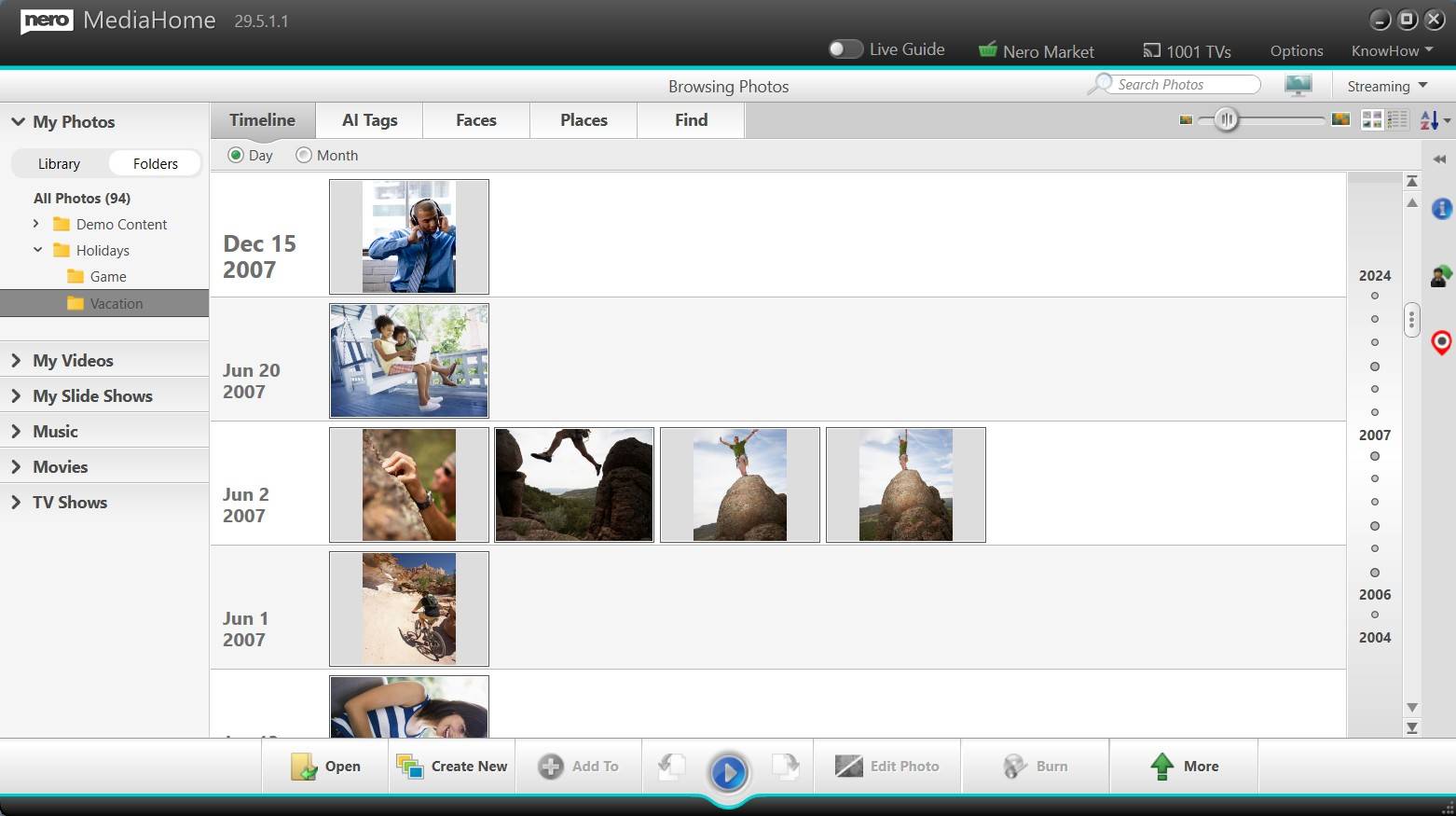
Nero MediaHome 29.5.1.1 with the new Folder view: the Library/Folders switch at top left, a Holidays folder with Game and Vacation subfolders, and that folder's photos on the timeline grouped by date.
Features
Library and folder browsing
Nero MediaHome sorts your collection by recording date, faces, locations, favorites, ratings and your own keywords, and since the 2027 version you can also browse it by your real folders. It can take in your existing Windows Media Player and iTunes libraries, and it handles movies and TV series as their own categories.
Faces, places and AI tags
Nero MediaHome recognizes faces so you can name people once and find every photo of them, places photos on a map by location, and works with Nero AI Photo Tagger to tag photos by what's in them. Nero stresses that this runs locally on your PC, with no upload to a cloud.
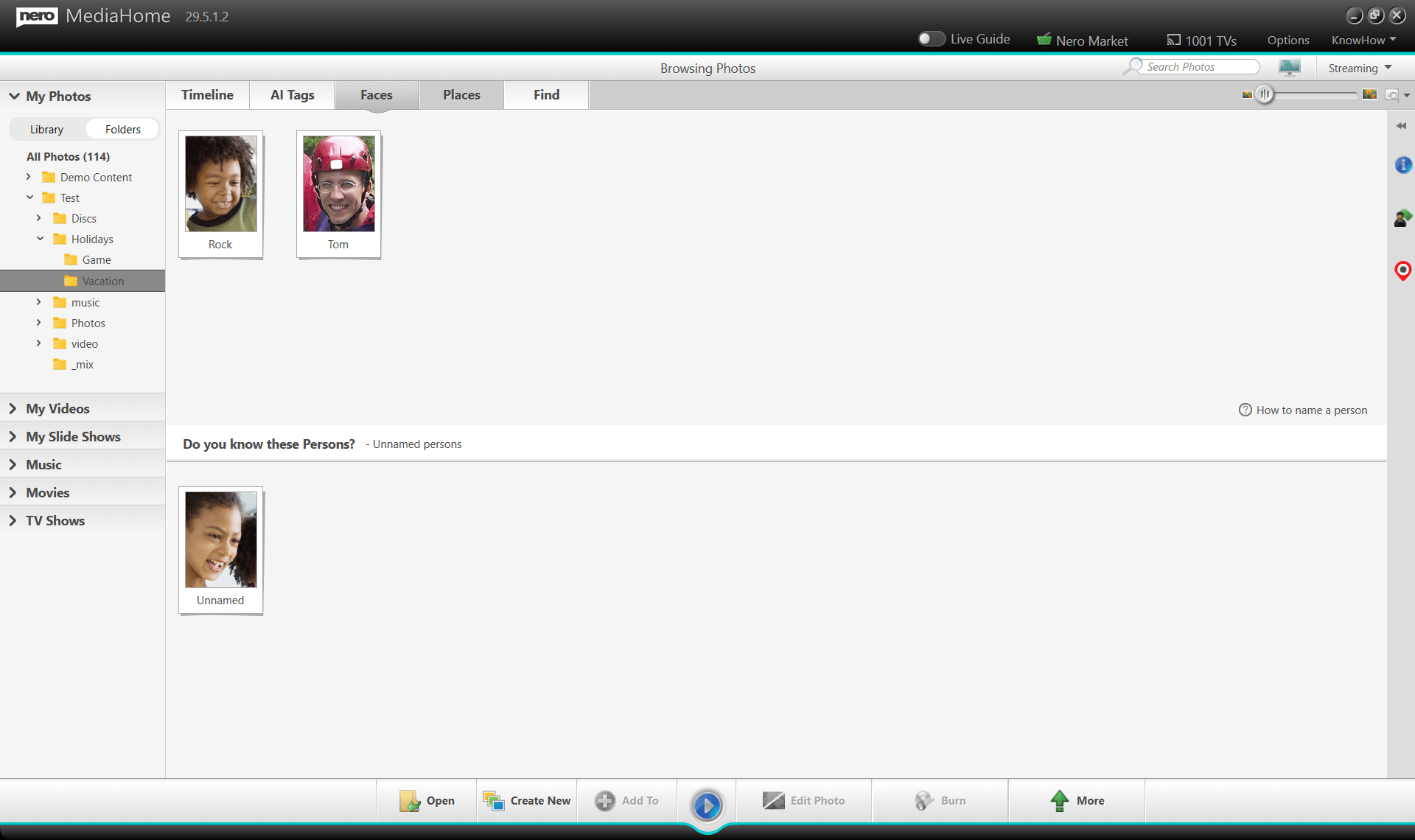
MediaHome 29.5.1.2's Faces tab inside a folder: two named people and a "Do you know these Persons?" prompt for an unnamed face.
Photo info, dates and comments
Nero MediaHome's Info panel shows each photo's size, resolution, storage location and rating. The New Year update of December 2025 added one-click editing of the "Date taken" field (useful for scanned prints) and a comment field for notes and stories, plus slideshow thumbnail zoom.
Slideshows, photo fixes and discs
Nero MediaHome enhances photos with automatic tools and effects, builds slideshows from photos and videos with music, templates and credits, and makes playlists and albums. It burns slideshows and clips to DVD-Video or Blu-ray with menus, and music to audio CDs and MP3 discs with album art from Gracenote. It can also hand a photo to Nero's online AI tools (upscale, restore, colorize, remove background) with one click; those are Nero web services, separate from MediaHome itself.
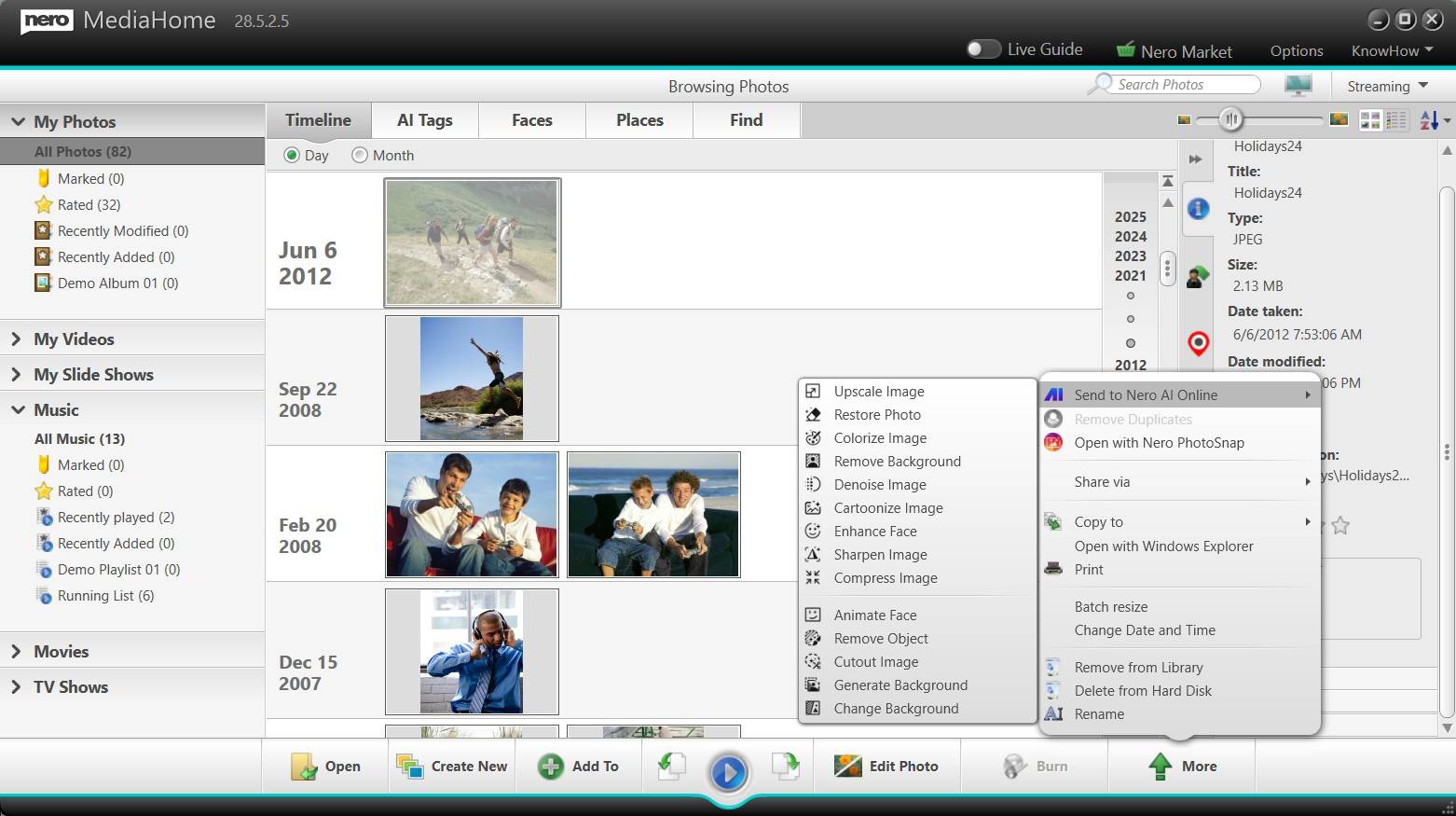
The right-click menu in MediaHome 28.5.2.5 (the 2026 version): Send to Nero AI Online with Upscale, Restore, Colorize, Remove Background and more, plus Share via, Copy to, Batch resize and Change Date and Time.
Playback, CD ripping and streaming
Nero MediaHome plays video files, DVD-Video discs, music, photos and slideshows, and rips audio CDs with album art. It streams your library to TVs, Xbox, PlayStation and other devices on the home network, and the free Nero Streaming Player app turns your iOS or Android phone into the remote. The free WiFi Sync app moves files between phone and PC.
Benefits
- Private by design. Face recognition and tagging happen on your PC, not on someone's servers.
- Finally findable. A timeline, faces and places turn thousands of untitled files into something you can browse.
- One license, no rent. $44.95 once, against a monthly fee for most cloud photo services.
- The TV becomes the photo album. Streaming to a smart TV or console needs no extra server software.
Real-World Uses
- Sorting decades of family photos. Import every folder and phone backup, fix the dates on scanned prints, name the faces, and browse by person.
- A family evening slideshow. Pick a holiday's photos, add music and a template, and stream it to the TV.
- Digitizing a CD collection. Rip the discs with album art and keep the music in the same library as your photos.
- A gift DVD for grandparents. Burn a slideshow to DVD-Video with a menu for a living-room player.
Who It's For, and Who Should Skip It
Good fit: Windows users with big local photo, music and video collections who want them organized and playable on a TV, without a cloud subscription.
Skip it if: you own Nero Video or Platinum Suite (MediaHome is included); you're on a Mac; your photos already live happily in Google Photos or iCloud with search and sharing built in; or you only need a free viewer, where the Windows Photos app or the old MediaHome Free may do. Home-theater enthusiasts streaming big movie libraries to many devices will find Plex or Jellyfin more capable servers.
Usage Guide
- Install and start the trial. Run the web installer from Nero's Download Center, sign in to Nero Start with a free Nero account, and click the rocket icon on the MediaHome card for the 7-day trial.
- Add your media. Point MediaHome at your photo, video and music folders, connect a phone or USB drive, or insert an audio CD to rip.
- Organize. Browse the Timeline, name people in Faces, check Places, rate favorites and add keywords. Switch to Folders to see your own folder tree.
- Create. Select photos and click Create New for a slideshow, or Burn to put a slideshow on DVD or music on CD.
- Stream. Turn on Streaming, then open the library from your TV, console or the Nero Streaming Player app.
Where it falls short
- Location detection can miss. Tom's Guide found the automatic location function "did not work especially well", sometimes placing photos wrongly, though the map makes corrections easy.
- It can pull in clutter. The same review found the browser "picked up a lot of irrelevant image files" that had to be removed from the library.
- Simple editing. Expert Reviews called the photo editing basic, mostly crops, straightening, red-eye and color fixes. For real retouching you need another program.
- Firewall fiddling. Tom's Guide's WiFi Sync test only worked after adjusting Windows firewall settings.
- Old reviews only. We found no recent independent review of MediaHome on its own, so test it on your library during the trial.
What Users Say
MediaHome is rarely reviewed on its own; most coverage comes from reviews of Nero's suites, and some of it is years old. Here's what we found.
Tom's Guide (Nero 2017 Platinum review, Jackie Dove, May 2, 2017)
"Nero's MediaHome and MediaBrowser modules gather all of your device assets in one place, making metadata and playback available in a clear, unambiguous, discrete layout."
"MediaHome lets you identify people in your footage and pinpoint places where the video was shot. However, the automatic location function did not work especially well in my testing; in some cases, it indicated the wrong locations, and in others, it didn't identify a location at all."
Expert Reviews (Nero 14 Platinum review, Simon Handby, September 30, 2013)
On the first MediaHome: "The new package is much quicker to load and includes a home media server that can stream music, photos and videos to any DLNA or UPnP devices on your network, such as a smart TV or games console."
And the criticism: "Otherwise, MediaHome is little changed from its rather simplistic predecessor." The review faulted the limited photo editing and the music player. Much has been added since (faces, AI tags, folders), but the editing is still basic.
Trustpilot (Nero, TrustScore 3.0 from about 350 reviews, November 13, 2026)
Nero's Trustpilot reviews are about the company and its suites rather than MediaHome alone. The quotes came to us through a page summarizer.
- Kristi (5 stars, February 2026): "I am working with Nero Platinum for years and enjoy all the improvements in the last years!"
- Torsten (4 stars, March 2026): "Nero Support was always friendly and was ultimately able to resolve the issues."
- Fi Stewart (UK, 1 star, December 2025): on a boxed Unlimited license, "What it doesn't tell you is that you need to verify it every 30 days."
- Wayne Lawrence (US, 2 stars, March 2026): "Nero is great" "but their payment service not so much," after an activation code didn't arrive.
The pattern
Reviewers like having everything in one clear library and streaming to the TV. The recurring complaints are basic editing, imperfect automatic location tagging, and, at the company level, online license checks and order or activation hiccups.
Comparisons
Unlimited vs Standard
Both are one-time licenses for one PC. MediaHome 2027 Unlimited ($44.95) is the current version with full DVD-Video playback, burning and format support, and the new Folder view. MediaHome 2026 Standard ($22.95) is last year's version and, by Nero's own description, limited in DVD-Video playback, burning and format support. Take Standard only if you want a cheap organizer and viewer and don't play or burn discs.
MediaHome alone vs Nero Video or Platinum Suite 2027
Nero Video 2027 ($55.95 once) includes MediaHome, so if you'd also edit video, it costs only $11 more than MediaHome Unlimited. Nero Platinum Suite 2027 ($59.95 a year, renewing automatically) adds MediaHome to more than 20 other Nero tools, including Burning ROM, Recode and BackItUp. Buy MediaHome alone if organizing and playing your media is all you need.
Editions and Pricing
| Edition | Price at checkout | License | Differences | Buy |
|---|
| MediaHome 2027 Unlimited | $44.95 | One-time, 1 PC | Current version, full playback, burning and format support | Buy Unlimited |
| MediaHome 2026 Standard | $22.95 | One-time, 1 PC | Previous version, limited DVD-Video playback, burning and formats | Buy Standard |
FAQs
Is Nero MediaHome free?
Nero MediaHome 2027 isn't free: Unlimited costs $44.95 and the 2026 Standard edition $22.95, both one-time. Nero's download page still offers the old MediaHome Free from 2020, which lacks the newer features such as Folder view.
Does Nero MediaHome upload my photos to the cloud?
No. Nero MediaHome keeps your library and its face and AI tagging on your PC. Only if you choose "Send to Nero AI Online" does a photo go to Nero's web services, and it needs an internet connection to verify the license.
Can Nero MediaHome stream to my smart TV or PlayStation?
Yes. Nero MediaHome streams photos, music and videos to TVs, Xbox, PlayStation and other devices on your home network, and the free Nero Streaming Player app for iOS and Android works as the remote.
Can Nero MediaHome import my iTunes library?
Yes. Nero MediaHome can integrate Windows Media Player and iTunes media libraries directly, so you don't have to re-add your music.
Does Nero MediaHome work with OneDrive?
Yes. Nero MediaHome supports OneDrive Files On-Demand, so online-only files show in the library and download when needed. It requires Windows 10 version 16299.15 or later and OneDrive build 17.3.7064.1005 or later.
What PC do I need for face recognition?
Nero's AI photo tagging and face features need 64-bit Windows 10 or 11, with 8 GB RAM and a 6th-generation or newer Intel Core processor recommended. Basic library and playback run on far less.
System Requirements
- Windows 11 or Windows 10
- 2 GHz AMD or Intel processor, 1 GB RAM (8 GB recommended for AI tagging)
- 5 GB disk space for a typical installation
- DirectX-compatible graphics card
- Local network for media server and streaming features
- CD, DVD or Blu-ray recorder for burning; HEVC Video Extensions for HDR playback
- Internet connection to verify the license
Conclusion
Nero MediaHome 2027 Unlimited is worth $44.95 if you have a large photo and music collection on a Windows PC and want it organized, searchable by face and place, and playable on your TV without a cloud subscription. The reason to buy it: local AI tagging, folder browsing and home streaming in one program you own. The reason not to: if you'd also edit video, Nero Video includes MediaHome for $11 more, and if you only need a viewer, free tools will do. Pick the $22.95 Standard license only if you never play or burn discs. Try it on your own library first with the 7-day trial.
Download Free TrialBuy 2027 UnlimitedBuy 2026 Standard