Flip PDF Plus Pro: Turn a Flat PDF into a Book People Actually Read
You spent weeks on the catalog. The photos are gorgeous, the layout is perfect, and you email it out as a PDF. Most people never open it, and the ones who do scroll past page three on their phone and give up. A PDF is a document, not an experience.
Flip PDF Plus Pro turns that same PDF into a page-flipping digital book that opens in any web browser, on a computer, phone or tablet, with realistic page turns. Then it lets you go further: drop a YouTube video onto a product page, add background music, make a "Call us" button that dials your phone number, pop up a gallery when someone clicks a photo, animate a headline. When you're done, publish it to the web, embed it on your site, or package it as a Windows program, Mac app or Android app.
Quick facts
- Version: 7.1.11, released October 8, 2026
- Developer: FlipBuilder
- Runs on: Windows 11, 10, 8 and 7 (a Mac version is available separately)
- Output: HTML5 flipbooks, WordPress plug-in, Windows EXE, Mac app, Android APK
- Limits: up to 1,000 pages and 1 GB per flipbook
- License: one license code activates 2 computers
- Bonus: one year of free FlipBuilder hosting for up to 1,000 books
- Price: $399 USD, one-time payment
- Trial: free, but adds a FlipBuilder watermark and imports only 12 pages
- Guarantee: 60-day money-back guarantee
What we checked: installer version 7.1.11 (222 MB) downloaded from FlipBuilder on October 16, 2026, checkout price $399.00 on October 16, 2026, and the three editions' prices and limits on FlipBuilder's order page the same day. We didn't publish a flipbook with the full version.
Overview
The workflow comes down to four steps: import a PDF, design the book, add multimedia, and publish. FlipBuilder says you can have a realistic page-flip book ready in under 10 minutes, with no coding or design skills. The depth is in the Multimedia Editor, where you add videos, audio, links, shapes and animations to individual pages.
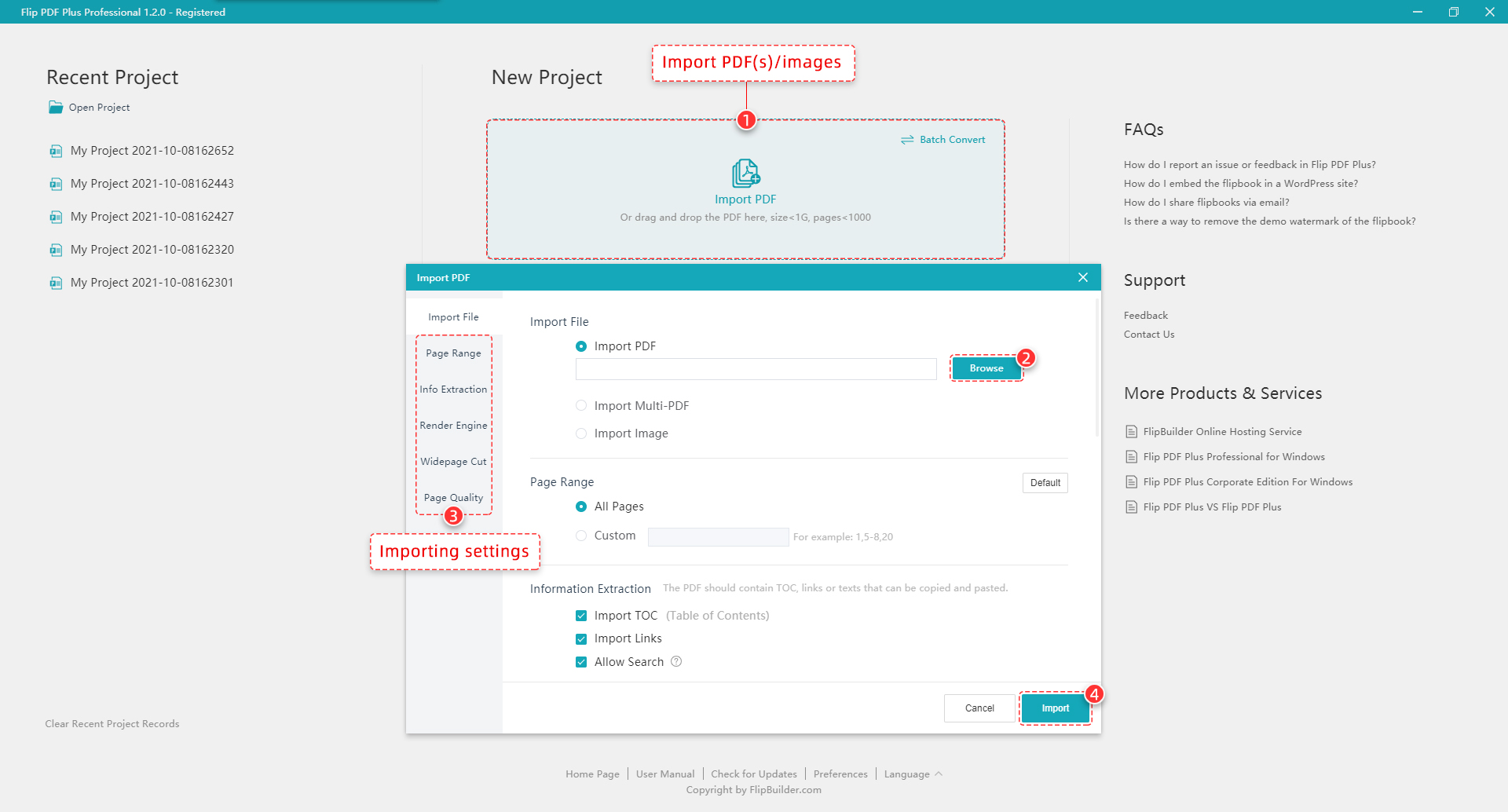
Step 1: importing a PDF. Choose a page range and import the PDF's table of contents, links and searchable text.
Flipbooks are built from your PDF, so your layout stays exactly as designed. When you import, Flip PDF Plus Pro can also bring in the PDF's table of contents and links and make the text searchable inside the flipbook. That's a big step up from a static image of each page.
Features
Convert one PDF, merge several, or batch-convert many
Import a single PDF, merge several PDFs into one book, or import images. If you have a whole stack of brochures, batch conversion turns them into flipbooks one after another, without converting each one by hand.
Make it look like your brand
Pick from built-in templates (the toolbar layout), themes (background and colors) and animated scenes. Add your logo, a loading logo or loading video, and choose which toolbar buttons readers see, such as print, download and share. Save your setup as your own template to reuse on every future book, or share it with colleagues.
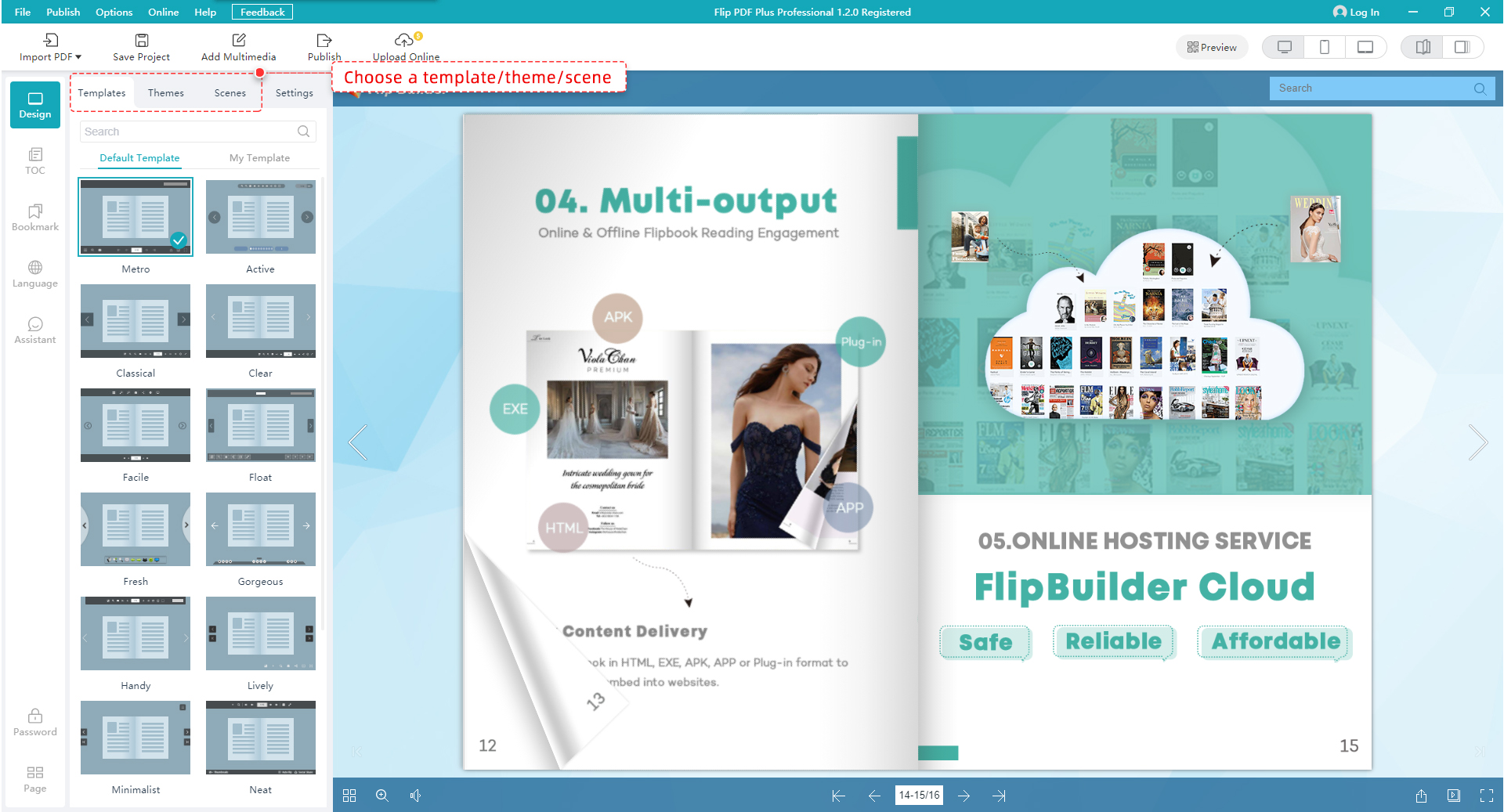
Step 2: the Design view. Choose a template, theme or scene on the left and see the flipbook update on the right.
Embed video, audio, images and text on any page
The Multimedia Editor puts real media on the page: YouTube and Vimeo videos, online or local video files, background music or sound effects, images and GIFs, and text. There are also 90+ shapes, a shape and line brush, and a QR code generator, so print readers can jump to your website too.
Make pages clickable with trigger actions
Turn any element into a button. When a reader clicks it, it can:
- Open a link to your website or online store
- Go to any page in the book
- Make a phone call to your number
- Pop up a window showing a web page inside the book
- Pop up images, such as a product gallery
- Play animation effects or show or hide other elements
Animate with a real timeline
Choose from hundreds of entrance, attention and exit effects, such as rotate, zoom and bounce. Then fine-tune them on an animation timeline: drag sliders to set when each effect starts and how long it lasts, and copy, align or remove timing across many elements at once.
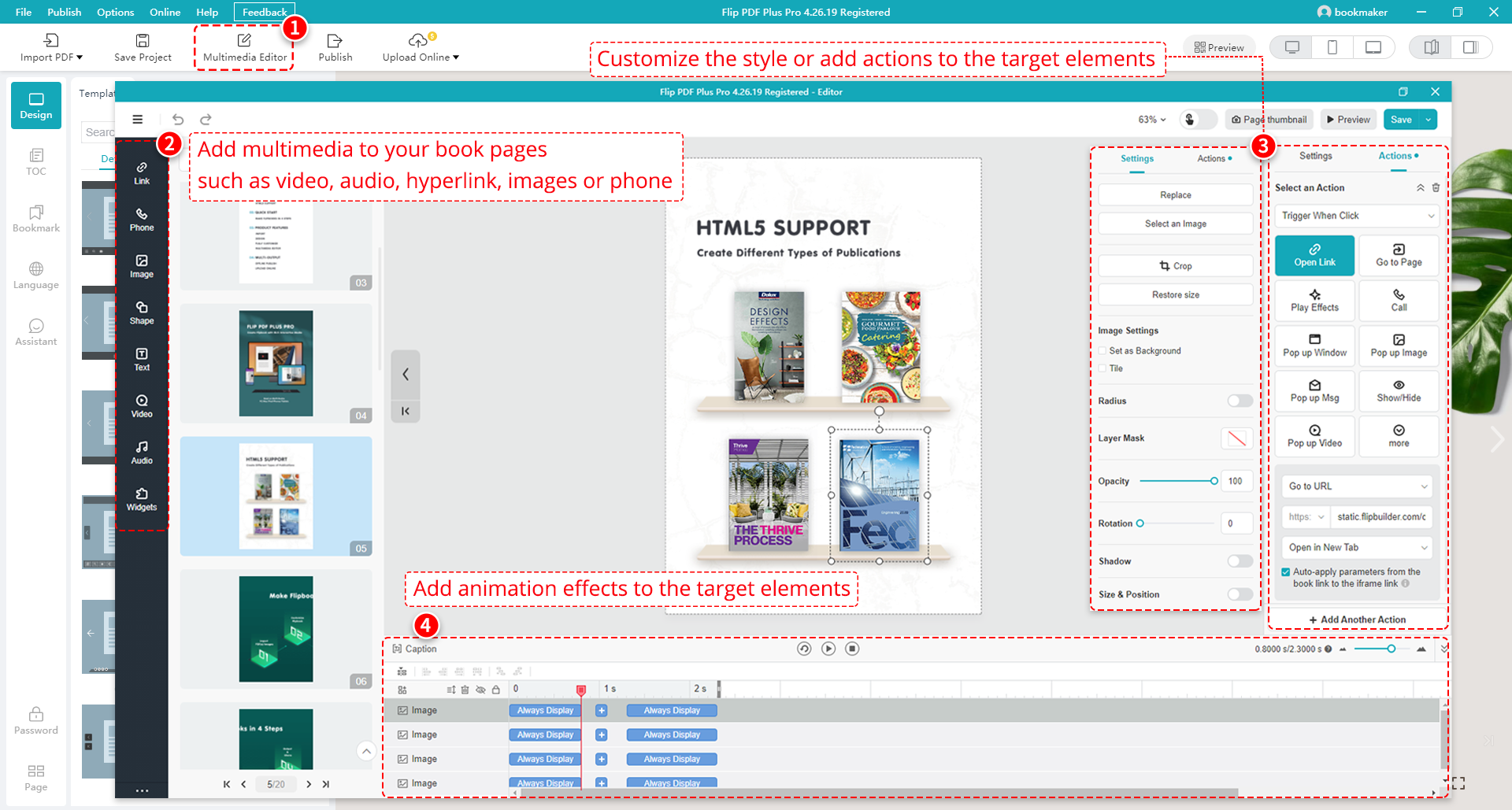
Step 3: the Multimedia Editor. Add links, phone, images, shapes, text, video and audio, set trigger actions on the right, and time animations along the bottom.
A voice assistant that reads your pages
The built-in Assistant adds narration to book pages, with text that scrolls along in sync. It's useful for meeting presentations, children's storybooks and language-learning material.
Publish online, offline, or as an app
One book, many formats:
- HTML to upload to your own web server, readable in any browser on PC, Mac, iPhone, iPad and Android
- WordPress plug-in to post the book on your WordPress site
- FlipBuilder hosting: upload straight from the program, without FTP or other upload tools, and get a link and embed code
- EXE for offline reading on Windows, and APP for Mac
- APK to install as an Android app, with your own icon
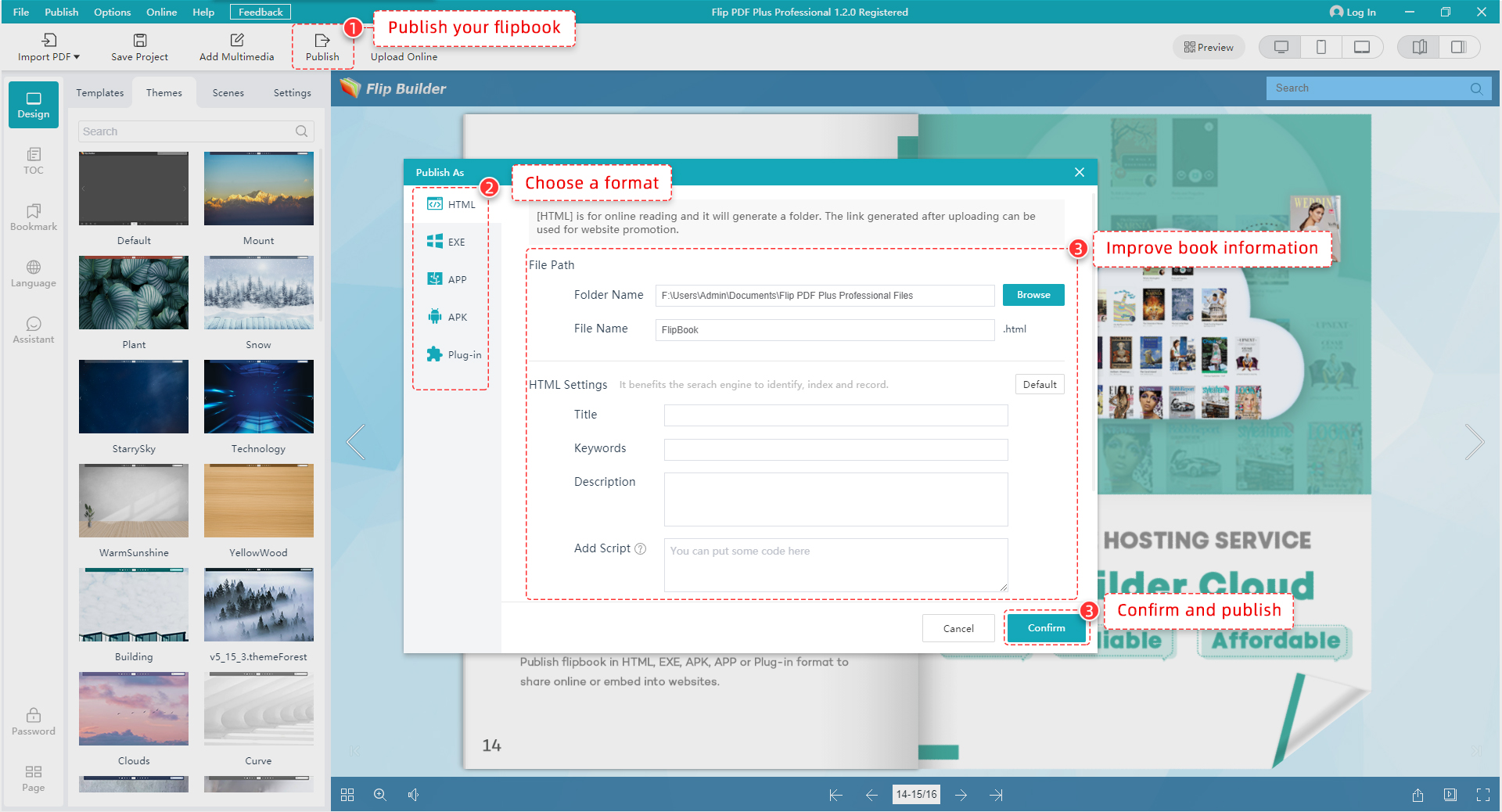
Step 4: publishing. Choose HTML, EXE, APP, APK or a WordPress plug-in, and fill in the title, keywords and description for search engines.
Sell ebooks and measure readers
Set prices on your book and let readers buy through a built-in shopping cart. Connect Google Analytics 4 and every page is tracked automatically: traffic, page views, time spent and bounce rate, page by page.
Keep private books private
Protect a flipbook with one password or several, or give each reader their own authorization ID. Books on FlipBuilder's hosting are stored on Amazon S3.
Benefits
People actually flip through it
A page-turning book in the browser is more inviting than a PDF download, and video, audio and clickable buttons give readers a reason to stay.
Your catalog becomes a sales tool
Product photos that link to your store, a phone button on the contact page, and pop-up galleries move readers from reading to buying.
One source, every channel
The same book goes on your website, into WordPress, onto an offline USB stick as an EXE, or into an Android app.
You can see what works
With Google Analytics 4 page tracking, you can see which pages readers linger on and where they drop off, and improve the next edition.
Pay once
Pro is a one-time purchase, not a subscription, and the license covers 2 computers.
Real-World Uses
Product catalogs and brochures
Turn the print catalog into an online one where every product photo links to its store page, a short demo video plays on the page, and the back cover has a tap-to-call button for the sales team.
Digital magazines and newsletters
Publish each issue as a flipbook on your site, embed it in a blog post, and use Google Analytics to see which articles readers spend time on.
Training manuals and course material
Add how-to videos next to the steps they explain, narrate pages with the voice assistant, and password-protect the book for employees or students only.
Children's storybooks
Add a narrator who reads each page aloud with scrolling text, background music and a few gentle animations, then publish it as an Android app for tablets.
Selling ebooks
Set a price on your book and use the built-in shopping cart, so readers can preview pages and buy without leaving the flipbook.
Who it's for
- Marketers and small businesses publishing catalogs, brochures and lookbooks
- Publishers producing digital magazines and newsletters
- Trainers and educators who want multimedia course books
- Authors selling ebooks directly
- Agencies and teams: the license covers 2 computers
Usage Guide
- Install and launch Flip PDF Plus Pro. The installer is about 222 MB.
- Import your PDF. Click Import PDF, browse to your file, or drag and drop it. Choose all pages or a range, and tick Import TOC, Import Links and Allow Search to bring them across. Use Batch Convert for several files.
- Design the book. In the Design view, pick a template, theme and scene. Use the left-hand tabs to add a table of contents, bookmarks, multiple languages, the voice assistant or a password. In Settings, add your logo and choose toolbar buttons.
- Add multimedia. Open the Multimedia Editor and drag links, images, text, shapes, video and audio onto pages. Select an element to give it a trigger action, and use the timeline to time its animation.
- Preview in desktop, tablet and phone layouts using the preview buttons.
- Publish. Click Publish, choose HTML, EXE, APP, APK or Plug-in, add a title, keywords and description, and click Confirm. Or click Upload Online to publish to FlipBuilder's hosting.
Tip: test with a short PDF
The free trial imports only 12 pages and adds a FlipBuilder watermark. That's plenty to try the editor and publishing options. Use a short sample of your real document to see how it looks before you buy.
Tip: build a template once
Your toolbar, theme, logo, background sound, TOC settings and even the assistant can all be saved in a template. Set it up carefully once, and every future book starts on-brand.
What Users Say
"Exceptional interactive PDF presentation system." (5 out of 5)
Pros: "It's stable and feature-rich, and does far more than I initially planned for online PDF presentations."
Cons: "It's a little complex to learn all the features, in part due to a slightly unconventional user interface."
Allen C., Technology Strategy Consulting, Publishing (review of Flip PDF Plus on Capterra)
"Love this product" (5 out of 5)
Pros: "I love the one time fee and unlimited usage, the option to host my own flipbooks with my own URL and without the FlipBuilder watermarks makes my flipbooks more professional."
Cons: "I don't think there are any negatives to Flip PDF"
Darren G., Managing Director, Printing (review of Flip PDF Plus on Capterra)
"Long Time User" (5 out of 5)
Pros: "I like Flip Builder's straightforward UI and robust publishing options. I like being able to own the software instead of a subscription."
Cons: "Templates are a bit outdated looking. I like that Google Analytics can be integrated but would rather have GTM."
Lisa F., Owner, Design (review of Flip PDF Plus on Capterra)
"Epub3 export functionality" (4 out of 5)
Pros: "The Android APK export is so helpful. The Windows and Mac executables too are good for desktop users."
Cons: "My only disappointment with it is the omission of the epub3 export and also the exported HTML 5 format is almost unmodifiable in other HTML applications."
Anthony A., CEO, Online Media (review of Flip PDF Plus on Capterra)
On Capterra, Flip PDF Plus has an average rating of 4.5 out of 5 from 108 reviews.
Comparisons
Pro vs. Flip PDF Plus vs. Corporate
FlipBuilder sells three editions. Flip PDF Plus ($149) converts PDFs to flipbooks but has no Multimedia Editor, so no video, audio, trigger actions or animations. Pro ($399) adds that editor, 6 more templates, a 2-computer license and a year of free hosting. Corporate ($699) covers 4 computers, doubles the free hosting to 2 years and adds a library of free commercial images. If you only need page-flipping copies of your PDFs, Flip PDF Plus is enough; Pro is the one to buy for interactive books.
vs. sharing a plain PDF
A PDF is free and universal, but it's static, awkward on phones, and tells you nothing about who read it. A flipbook reads well on any screen, holds video and clickable buttons, and reports page-by-page statistics through Google Analytics.
vs. subscription flipbook websites
Online flipbook services charge every month and keep your books on their platform. Flip PDF Plus Pro is a one-time purchase that runs on your PC. You can host the output on your own server, use FlipBuilder's hosting, or publish offline formats that need no internet at all.
Editions and Pricing
| Edition | Price (one-time) | Computers | Free hosting | What it adds |
|---|
| Flip PDF Plus | $149 | 1 | None (hosting is $9.99 a month or $99 a year) | PDF to flipbook, 17 templates, links and TOC import, all output formats |
| Flip PDF Plus Pro | $399 | 2 | 1 year, then $99 a year or pay-as-you-go | Multimedia and animation editor, 23 templates, video, audio, trigger actions, phone-call buttons |
| Flip PDF Plus Corporate | $699 | 4 (each extra seat $50) | 2 years, then $99 a year or pay-as-you-go | Everything in Pro, plus 30,000+ free images for commercial use |
Hosting covers up to 1,000 books per account. Upgrading to a higher edition later costs the difference; FlipBuilder handles that through its contact form.
Every purchase is covered by a 60-day money-back guarantee.
FAQs
What does Flip PDF Plus Pro do?
It converts PDFs into page-flipping digital books and lets you add video, audio, links, animations and other interactive elements before publishing them online or offline.
Can readers view flipbooks on phones?
Yes. HTML flipbooks open in the browser on PC, Mac, iPhone, iPad and Android, and adapt to the screen. Nothing needs to be installed.
Can I add YouTube videos?
Yes. Add a YouTube or Vimeo ID, an online video link or a local video file to any page.
Can I combine several PDFs into one flipbook?
Yes. Use Import Multi-PDF to merge them, or Batch Convert to turn many PDFs into separate books.
What are the size limits?
Up to 1,000 pages and 1 GB per flipbook.
How do I put a flipbook on my website?
Publish as HTML and upload the folder to your server, use the WordPress plug-in output, or upload to FlipBuilder's hosting and paste the embed code into your page.
Can I make a flipbook work offline?
Yes. Publish as an EXE for Windows, an APP for Mac, or an APK for Android.
Can I password-protect a book?
Yes, with one or more passwords, or with per-reader authorization IDs.
What's the catch with the free trial?
It imports only 12 pages and adds a FlipBuilder watermark. Registering with a license code removes both limits.
How many computers can I use it on?
Two. One Pro license code activates 2 computers.
System Requirements
- Operating system: Windows 11, 10, 8 or 7
- Download size: about 222 MB
- For readers: any modern web browser on PC, Mac, iPhone, iPad or Android. Offline EXE, APP and APK versions run on Windows, Mac and Android
- Input: PDF files or images, up to 1,000 pages and 1 GB per book
Conclusion
Flip PDF Plus Pro is for anyone whose PDFs deserve more attention than they get. It keeps your layout exactly as designed, wraps it in a realistic page-turning book, and lets you add the things a PDF can't do: video, sound, clickable actions, animations, a shopping cart and page-level analytics. Then it publishes the result wherever your readers are. It's a one-time purchase rather than a subscription, and the 12-page trial is enough to see how one of your own documents looks as a flipbook.
Download Free TrialBuy Now