Flip PDF Plus Pro for Mac: Interactive Flipbooks with Video, Audio and Animation
Flip PDF Plus Pro for Mac is a $399 one-time macOS app from FlipBuilder that turns PDF files into page-flipping HTML5 books and lets you put videos, audio, clickable buttons and animations right on the pages. It's for marketers, publishers, trainers and schools on a Mac who want catalogs, brochures and course books that do more than a PDF can, and one license covers 2 Macs.
A plain PDF just sits there. A Flip PDF Plus Pro book turns its pages like a magazine, plays a product video when the reader taps a button, links every item to your shop, and tells you in Google Analytics which pages people actually read.
Quick facts
- Version: 7.2.9, released October 26, 2026 (this update optimized the Flip PDF Plus series for Apple Silicon Macs)
- Developer: FlipBuilder
- Runs on: macOS 10.9 or later with 4 GB RAM, Intel and Apple Silicon. The Windows version is sold separately.
- Price: $399, one-time payment, one license code for 2 computers (both Macs)
- Online hosting: one year of FlipBuilder's Hosting Add-on free for up to 1,000 books, then $99 a year or pay-as-you-go
- Limits per flipbook: up to 1,000 pages and 1 GB
- Free trial: all features, but flipbooks carry a FlipBuilder watermark and you can import only 12 pages
- Guarantee: 60-day money-back guarantee
What we checked: the price of Flip PDF Plus Pro for Mac on the order page ($399.00, no discount) and the 394 MB Mac installer (Flip_PDF_Plus_Pro_for_Mac.dmg, dated October 26, 2026) on FlipBuilder's download server, both on October 28, 2026. We didn't install it or build a flipbook on a Mac ourselves.
Download Free TrialBuy Now
Overview
Flip PDF Plus Pro is the middle of FlipBuilder's three editions, and the one the vendor labels "Best Value". It does everything the $149 Flip PDF Plus does (import, design and publish a page-flip book) and adds the Multimedia and Animation Editor, 6 extra templates, a second license seat and a free year of hosting.
The work happens in four steps: import a PDF (with its table of contents, links and searchable text), design the book with a template, theme and scene, enrich pages in the multimedia editor, and publish as HTML, ZIP, a Mac app, a Windows EXE or a WordPress plug-in, or upload straight to FlipBuilder's servers.
The Mac app uses the same window layout as the Windows version, with FlipBuilder's own toolbar rather than a Mac-style interface. A few features differ between the two: the Mac version has 3 widepage cut modes instead of 5, can't publish Android APK apps and lacks the GPL Ghostscript render engine, but it can give an exported Windows EXE a custom icon.
Features
Video, audio, images and shapes on any page
Flip PDF Plus Pro's multimedia editor places a YouTube or Vimeo video (by ID), an online video link, embed code or a local video file on a page, plus audio clips, images, GIFs and text. You also get 90+ editable shapes, a shape and line brush, QR codes, 40+ dynamic hotspots, 70+ pre-designed buttons and 13 slideshow styles. Since version 7.1.11, YouTube videos can be previewed inside the program and in locally published books.
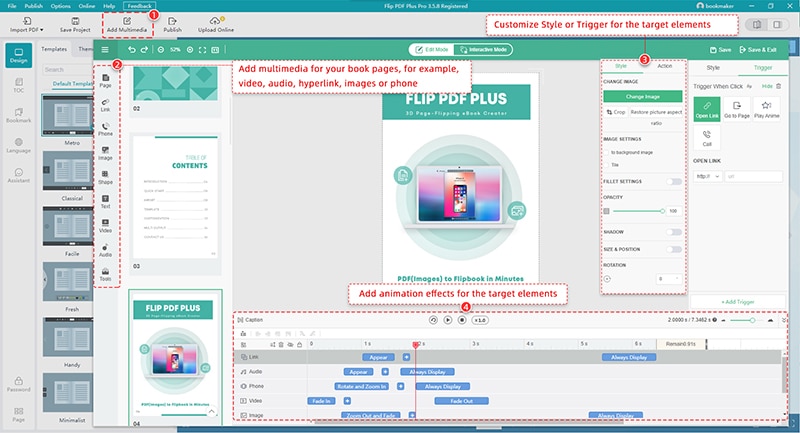
The multimedia editor: element buttons on the left (Link, Phone, Image, Shape, Text, Video, Audio), style and trigger settings on the right, and the animation timeline along the bottom. FlipBuilder publishes this screenshot for the Mac edition. It shows an older version (3.5.8).
Trigger actions that make pages clickable
Flip PDF Plus Pro attaches an action to any element: open a link, go to a page, make a phone call, pop up a window, image, video or message, play an animation or audio, show or hide another element, or run JavaScript. A product photo in a catalog can open its shop page, and a "Watch" button can pop up the demo video without the reader leaving the book.
200+ animation effects on a timeline
Flip PDF Plus Pro has hundreds of entrance, attention and exit effects (rotate, zoom, bounce and more). The animation timeline sets when each effect starts and how long it runs by dragging a slider, and you can select several elements to paste, align or remove their effects in one go.
Conversion, templates and navigation
Flip PDF Plus Pro converts one PDF, merges several PDFs into one book, batch-converts a set of PDFs, or builds a book from images. It has 23 templates, 20 themes and 17 animated scenes, adds a table of contents, bookmarks and a 19-language toolbar, and its voice assistant reads pages aloud with synchronized scrolling text. Save your settings as a template to give a whole series the same look.
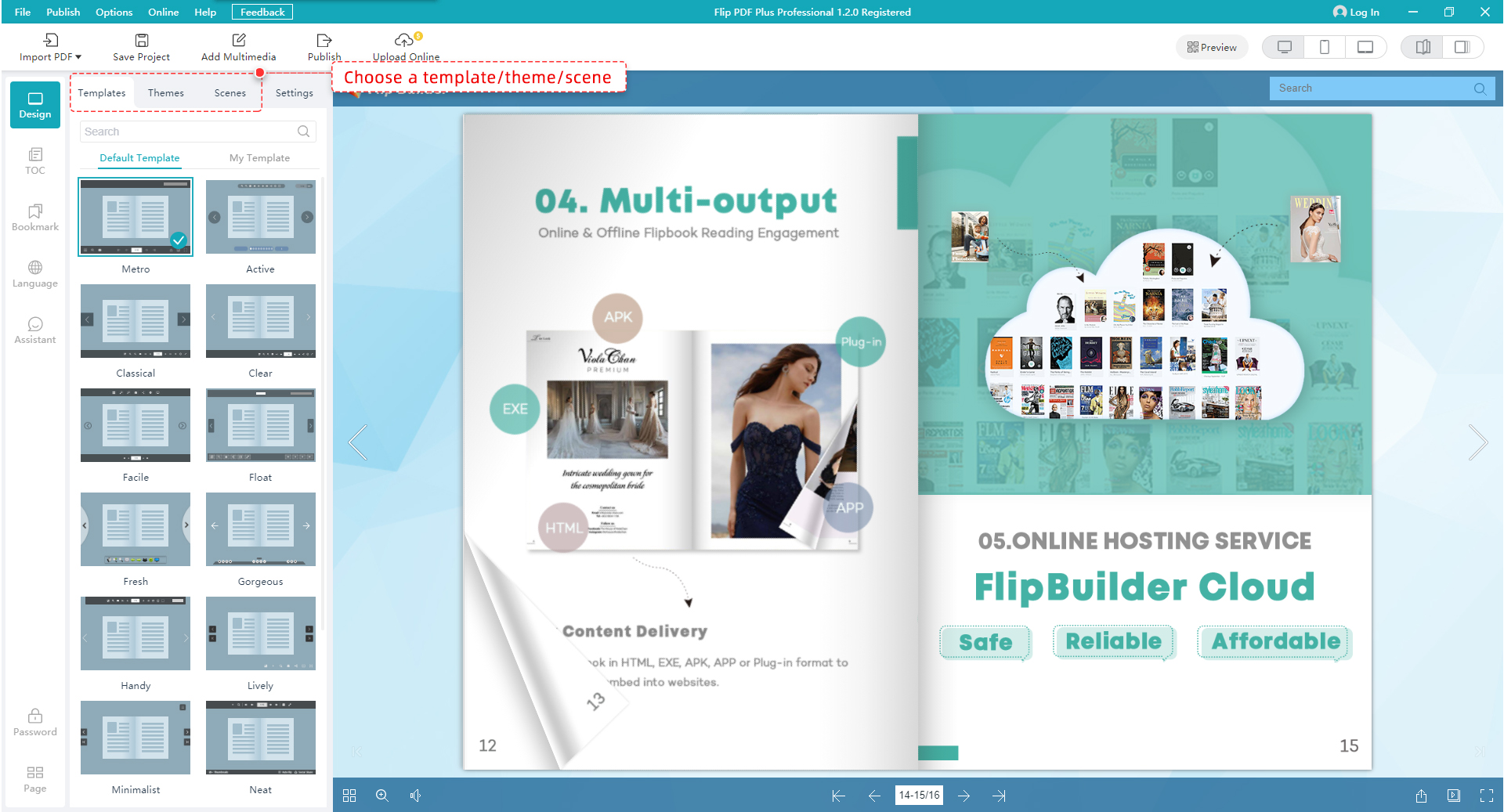
The Design view with the Templates, Themes, Scenes and Settings tabs and a live preview of the book. FlipBuilder's screenshot was taken on Windows. The Mac version uses the same layout.
Branding, analytics and selling
Flip PDF Plus Pro puts your logo on the book and the bookcase, shows a loading logo or video, and tracks every page in Google Analytics 4 (traffic, page views, time on page, bounce rate and events). You can set prices and add a shopping cart to sell ebooks from the bookcase, which uses the included hosting.
Publish online or offline, and protect it
Flip PDF Plus Pro for Mac publishes an HTML folder for your own web server, a ZIP, a WordPress plug-in, a double-click Mac app or a Windows EXE. With the included hosting you upload in one click, get an embed code for your site, and store the books on Amazon S3. HTML books adapt to computers, phones and tablets, readers can share them to Facebook and Twitter, and one or several passwords (or per-reader authorization IDs) keep private books private.
Benefits
The point of the Pro edition is engagement you can measure. A video that plays on the page keeps readers in your catalog instead of sending them off to YouTube, and a button that calls your sales line or opens the product page turns browsing into a lead. Google Analytics then shows which pages earned attention.
It's also a one-time cost. Online flipbook services charge every month and keep your books on their platform, while Flip PDF Plus Pro runs on your Mac, converts without limits, and lets you self-host the HTML wherever you like after the free hosting year ends.
Real-World Uses
- Product catalog: import the print catalog, add a demo video on each product spread and an "Open Link" trigger on every item, then embed the book on your site.
- Training manual: pop up short how-to videos next to each step and use "Go to page" buttons as a clickable index.
- Children's or language book: use the voice assistant to read pages aloud with scrolling text, and add sound effects on tap.
- Real estate or event brochure: add a photo slideshow, a phone-call button and a QR code that opens the booking page.
- Paid ebook: publish to the bookcase, set a price and let readers buy through the shopping cart.
Who It's For, and Who Should Skip It
Flip PDF Plus Pro for Mac fits Mac-based designers, marketers, publishers and teachers who publish several flipbooks a year and want video, links and animation on the pages, especially small teams who can use the second license seat.
Skip it if your PDFs already say everything they need to: the $149 Flip PDF Plus does the conversion, branding and analytics without the multimedia editor. Skip it too if you need Android APK output (Windows only), if you work on both a Mac and a PC (licenses are per operating system), or if you make one flipbook a year, where a monthly online flipbook service may cost less. Mac purists who expect a native macOS interface may find the FlipBuilder layout foreign.
Usage Guide
- Install: download the free trial DMG (about 394 MB), open it, install Flip PDF Plus Pro and launch it.
- Import: click Import PDF, browse to your file (or choose Import Multi-PDF or Import Image), pick a page range, and tick Import TOC, Import Links and Allow Search if your PDF has them.
- Design: in the Design view, choose a template, theme and scene, then set the logo, toolbar buttons, cover and sharing in Settings.
- Enrich: open the Multimedia Editor, drag videos, audio, images, buttons or shapes onto pages, give them trigger actions, and set animation timing on the timeline. Save and exit.
- Publish: click Publish, choose HTML, ZIP, APP, EXE or Plug-in, set the folder and the page title, keywords and description, then Confirm. Or use Upload Online to put it on FlipBuilder's hosting.
- Register: enter your license code to remove the watermark and the 12-page limit.
Before you buy
- Buy the Mac edition only if you'll design on a Mac. The 2 seats are for 2 computers on the same operating system, so a Mac license won't activate the Windows version.
- Hosting is free for one year only. After that it's $99 a year or pay-as-you-go, and the bookcase shopping cart and one-click uploads depend on it. Self-hosting the HTML on your own server stays free.
- Use the trial on your real document. The 12-page import is enough to test a catalog spread with a video and a few buttons before you pay.
Where it falls short
- Updates can break things. The 7.2.9 update fixed projects that wouldn't open after updating ("Failed to read the configuration"), copy and paste in the multimedia editor, local videos that couldn't be inserted, and editor text showing in the default font in Safari and Firefox. Keep a backup of your project files before you update.
- License activation is the most common support case. Many Trustpilot reviews are from buyers who needed help with a license code or an activation limit, and version 7.1.11 fixed an offline activation error ("License code has been revoked, errorcode: -408").
- Exported HTML is hard to edit elsewhere, and there's no EPUB3 export, so the books live in FlipBuilder's format.
- The interface takes time to learn, and some templates look dated, according to Capterra reviewers.
What Users Say
Few reviews mention the Mac edition by name, so most of what follows covers Flip PDF Plus and FlipBuilder in general. FlipBuilder has a TrustScore of 5.0 out of 5 from 339 Trustpilot reviews (92% five-star, 4% one-star), and Flip PDF Plus averages 4.5 out of 5 from more than 100 reviews on Capterra.
Capterra (reviews of Flip PDF Plus)
"Exceptional interactive PDF presentation system." (5 out of 5)
Pros: "It's stable and feature-rich, and does far more than I initially planned for online PDF presentations."
Cons: "It's a little complex to learn all the features, in part due to a slightly unconventional user interface."
Allen C., Technology Strategy Consulting, Publishing
"Love this product" (5 out of 5)
Pros: "I love the one time fee and unlimited usage, the option to host my own flipbooks with my own URL and without the FlipBuilder watermarks makes my flipbooks more professional."
Darren G., Managing Director, Printing
"Long Time User" (5 out of 5)
Pros: "I like Flip Builder's straightforward UI and robust publishing options. I like being able to own the software instead of a subscription."
Cons: "Templates are a bit outdated looking. I like that Google Analytics can be integrated but would rather have GTM."
Lisa F., Owner, Design
"Epub3 export functionality" (4 out of 5)
Pros: "The Android APK export is so helpful. The Windows and Mac executables too are good for desktop users."
Cons: "My only disappointment with it is the omission of the epub3 export and also the exported HTML 5 format is almost unmodifiable in other HTML applications."
Anthony A., CEO, Online Media
Trustpilot: the praise
Cengizhan özmen (5 stars, September 8, 2026, "Excellent customer support!"): "I had an activation issue with Flip PDF Plus Pro and the support team (Ashley) resolved it very quickly." "The response was swift, professional, and helpful."
Martin (5 stars, August 21, 2026, about FlipPro Plus): "The support team responded almost immediately despite the time difference and quickly resolved the problem."
hsiang tse miao (5 stars, October 6, 2026): "The software is practical and easy to use, and after-sales issues are resolved quickly and efficiently."
Kassia Seyb (5 stars, July 1, 2026, "Excellent software and outstanding support"): "What impressed me the most is the customer support." "Every time I had a question, the team responded quickly, professionally, and with genuine willingness to help."
THOMAS R (5 stars, May 18, 2026): "I have been using a Flipbuilder product for many years now and have seen a lot of progress in the easy of use."
Trustpilot: the criticism
kind.being (2 stars, July 2021, "A great idea that doesn't really work."), about the earlier Mac edition: "I have had FlipBuilder's Flip PDF Professional (Mac) for several years." "When it works, it is amazing." "Problem is, it more often doesn't work." "If your problem is easy, Flipbuilder (Lynn Tang) is pretty quick to respond and provide support." "However, if your issue is too complicated they just ignore you, literally."
Peter B (1 star, June 2023), a reader of someone else's flipbook: "The book is unreadable as FlipBuilder keeps appearing in the middle of the screen and cannot be disabled!"
Jake Anderson (1 star, January 2020): "I created a digital brochure with Flip Builder, and it's been one bug and problem after another." "My brochure doesn't work anymore, and their support is useless."
The recurring themes: buyers like the one-time price, unlimited conversions and the professional look of the books, and recent Trustpilot reviews are dominated by thanks for fast help with license codes and activation. The complaints are the learning curve, dated templates, a format that's hard to edit outside FlipBuilder, and, in older reviews from 2020 and 2021, bugs and slow support. Almost nothing is specific to the current Mac version, so test the trial on your own Mac.
Comparisons
Flip PDF Plus Pro vs Flip PDF Plus for Mac
Flip PDF Plus for Mac ($149, 1 computer) converts and styles PDFs as page-flip books with branding, analytics, passwords and every output format, but has no multimedia editor and no free hosting. Pro adds the editor, triggers and animation timeline, 6 more templates, a second seat and a hosting year worth $99. If you only need your PDF to flip, Plus is enough.
Mac vs Windows edition
Both cost $399 for 2 computers and share the multimedia editor. The Windows version adds Android APK output, 5 widepage cut modes and the Ghostscript render engine. The Mac version adds a custom icon for exported EXE files. Readers see the same books on any device, so buy the one for the computer you design on.
Editions and Pricing
| Edition |
Price |
Computers |
Online hosting |
Adds |
| Flip PDF Plus |
$149 once |
1 |
Paid add-on ($9.99/month or $99/year) |
PDF to flipbook, 17 templates, branding, analytics |
| Flip PDF Plus Pro (this listing, Mac) |
$399 once |
2 (same OS) |
1 year free, then $99/year |
Multimedia and animation editor, 23 templates |
| Flip PDF Plus Corporate |
$699 once |
4 (same OS), $50 per extra seat |
2 years free, then $99/year |
Everything in Pro, more seats and hosting |
FAQs
Does Flip PDF Plus Pro for Mac run on M1, M2 and later Macs?
Yes. Flip PDF Plus Pro for Mac runs on Apple Silicon, and version 7.2.9 (October 26, 2026) optimized the Flip PDF Plus series for M-series chips. Install the latest version if you're on an M-series Mac.
Can I use one Flip PDF Plus Pro license on a Mac and a Windows PC?
No. A Flip PDF Plus Pro license activates 2 computers on the same operating system, and the Mac and Windows editions are bought separately. Two Macs, or two PCs, are fine.
What happens to my flipbooks when the free hosting year ends?
Flip PDF Plus Pro's free hosting year can be renewed for $99 a year or on a pay-as-you-go plan. If you'd rather not pay, publish as HTML and upload the folder to your own web server, which costs nothing extra.
Is Flip PDF Plus Pro for Mac a subscription?
No. Flip PDF Plus Pro for Mac is a one-time $399 purchase with unlimited conversions. Only FlipBuilder's optional hosting after the first year is a subscription.
Can I upgrade from Flip PDF Plus to Pro later?
Yes. FlipBuilder lets Flip PDF Plus owners upgrade to a higher edition by paying the difference. Contact FlipBuilder to arrange it.
Can readers open a Flip PDF Plus Pro flipbook on an iPhone or Android phone?
Yes. HTML flipbooks from Flip PDF Plus Pro open in the browser on computers, phones and tablets with nothing to install. The Mac version just can't package a book as an Android app (APK).
Can I get a refund on Flip PDF Plus Pro?
Yes. FlipBuilder offers a 60-day money-back guarantee on Flip PDF Plus Pro.
What's the biggest PDF Flip PDF Plus Pro can import?
Flip PDF Plus Pro imports PDFs of up to 1,000 pages and 1 GB per flipbook. Split a longer document into volumes.
System Requirements
- Operating system: macOS 10.9 or later, Intel or Apple Silicon
- Memory: 4 GB RAM
- Download: about 394 MB DMG installer
- Input: PDF files or images, up to 1,000 pages and 1 GB per book
- Readers: any modern browser on Windows, Mac, iPhone, iPad or Android for HTML books
Conclusion
Flip PDF Plus Pro for Mac is worth $399 if you publish catalogs, brochures or course books regularly and want them to play video, link to your shop and track readers: you pay once, convert without limits, get two Mac seats and a year of hosting. The one reason to buy it over the $149 Plus edition is the multimedia and animation editor. The main reasons not to are if a page-flip version of your PDF is all you need (buy Plus), you need Android app output (Windows only), or you want a native-looking Mac app. Test the 12-page trial on a real document, and keep backups of your projects before each update.
Download Free TrialBuy Now