Flip PDF Plus for Windows: Turn PDFs into Page-Flipping Books, Apps and EXEs
Flip PDF Plus for Windows is a $149 one-time Windows program from FlipBuilder that converts PDF files into realistic page-flipping HTML5 books for your website, plus offline Windows EXEs, Mac apps and Android APKs. It's for marketers, print shops, publishers and schools who want catalogs, brochures and magazines that read like real books instead of plain PDF downloads.
Picture a 60-page product catalog. As a PDF it's a download link most visitors never click. As a flipbook it opens straight in the browser, turns its pages with a sound, shows your logo and a table of contents, and works on a phone without any app. Flip PDF Plus makes that conversion in a few clicks, and you pay for it once.
Quick facts
- Version: 8.2.5, released October 26, 2026
- Developer: FlipBuilder
- Runs on: Windows 7 or later, 64-bit, with 4 GB RAM. The Mac version is sold separately.
- Price: $149, one-time payment, license for 1 computer
- Output: HTML, ZIP, Windows EXE, Mac app, WordPress plug-in and Android APK
- Limits per flipbook: up to 1,000 pages and 1 GB
- Free trial: every feature, but flipbooks carry a FlipBuilder watermark and you can import only 12 pages
- Online hosting: not included. FlipBuilder's Hosting Add-on costs $9.99 a month, $99 a year, or $1.10 per book per month.
- Guarantee: 60-day money-back guarantee
What we checked: the 213 MB Windows installer (Flip_PDF_Plus_x64.exe), which reports product version 8.2.5, and the price of Flip PDF Plus for Windows on the order page ($149.00, lifetime license), both on October 27, 2026. We read the trial limits on FlipBuilder's purchase page and didn't build a flipbook ourselves.
Download Free TrialBuy Now
Overview
Flip PDF Plus works in three stages. You import a PDF (or several PDFs, or a set of images), design the book with a toolbar template, a color theme and a background scene, and publish it in the format you need. During import you choose the page range and whether to bring along the PDF's table of contents and links and make its text searchable inside the flipbook.
The Windows edition is the more complete of the two platforms. It's the only one that can publish an Android APK, it has 5 widepage cut modes for splitting double-page spreads (the Mac version has 3), and it offers the GPL Ghostscript render engine as an alternative way to convert difficult PDFs. FlipBuilder keeps it updated often: version 8.1.8 (October 7, 2026) shrank the EXE installer and upgraded the flipbook core and templates, and 8.2.5 fixed project import and settings problems.
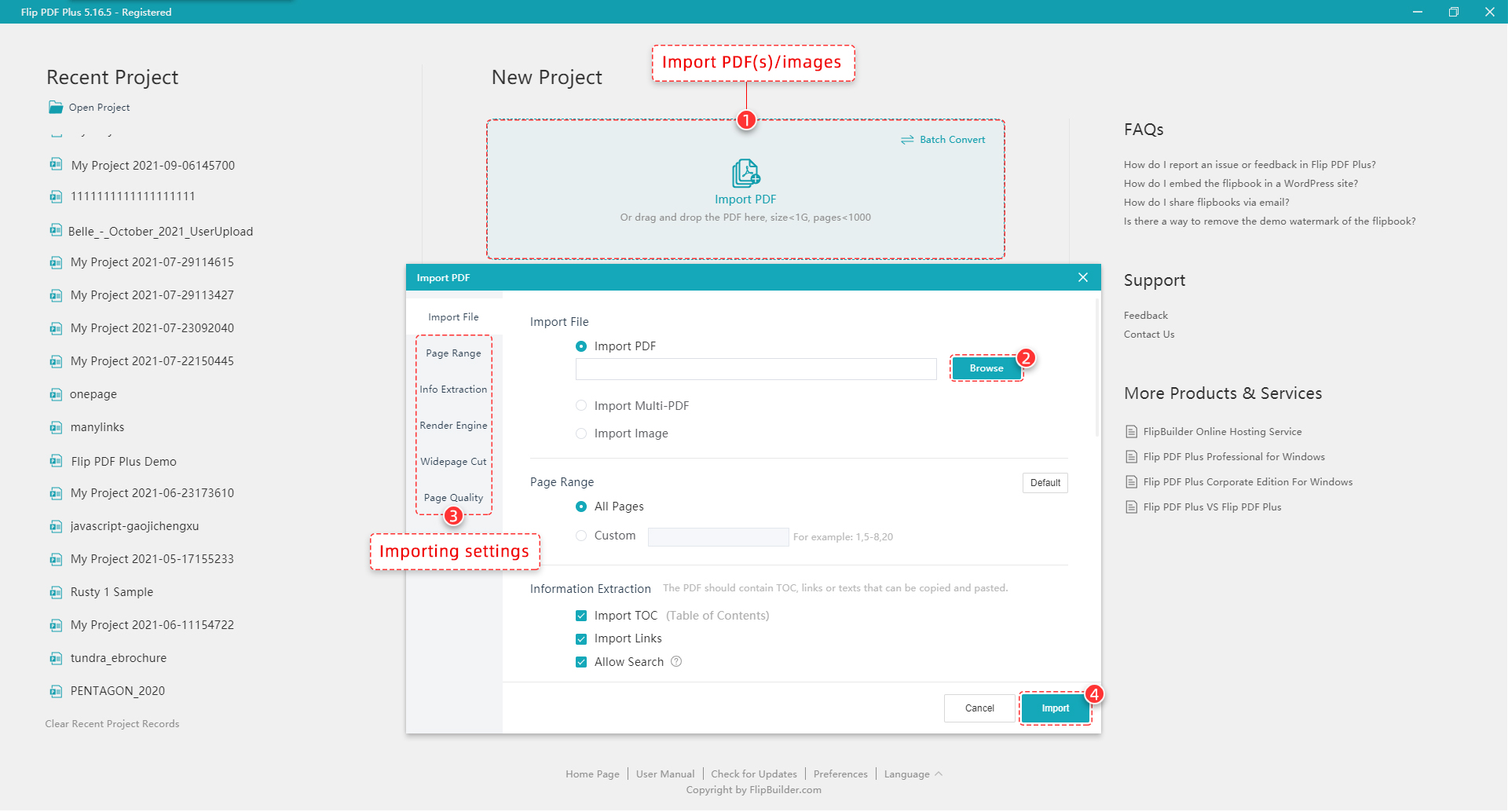
The start page with recent projects and the Import PDF dialog: import one PDF, multiple PDFs or images, choose a page range, import the TOC and links and allow search. Importing settings for render engine, widepage cut and page quality sit in the left column. Shown in an older version (5.16.5).
Features
Convert one PDF, merge several, or batch a whole folder
Flip PDF Plus for Windows converts a single PDF in minutes, merges several PDFs into one book, or batch-converts a set of PDFs into separate flipbooks. It can also build a book from images. Import settings let you split double-page spreads with the widepage cut modes and switch render engines when a PDF's fonts or graphics don't convert cleanly.
17 templates, 20 themes and animated scenes
Flip PDF Plus includes 17 toolbar templates, 20 themes and dynamic background scenes such as snow and rain. Once a book looks right, save your toolbar, theme, logo, background sound, TOC, languages and password as your own template, and every future issue of a newsletter or catalog will match.
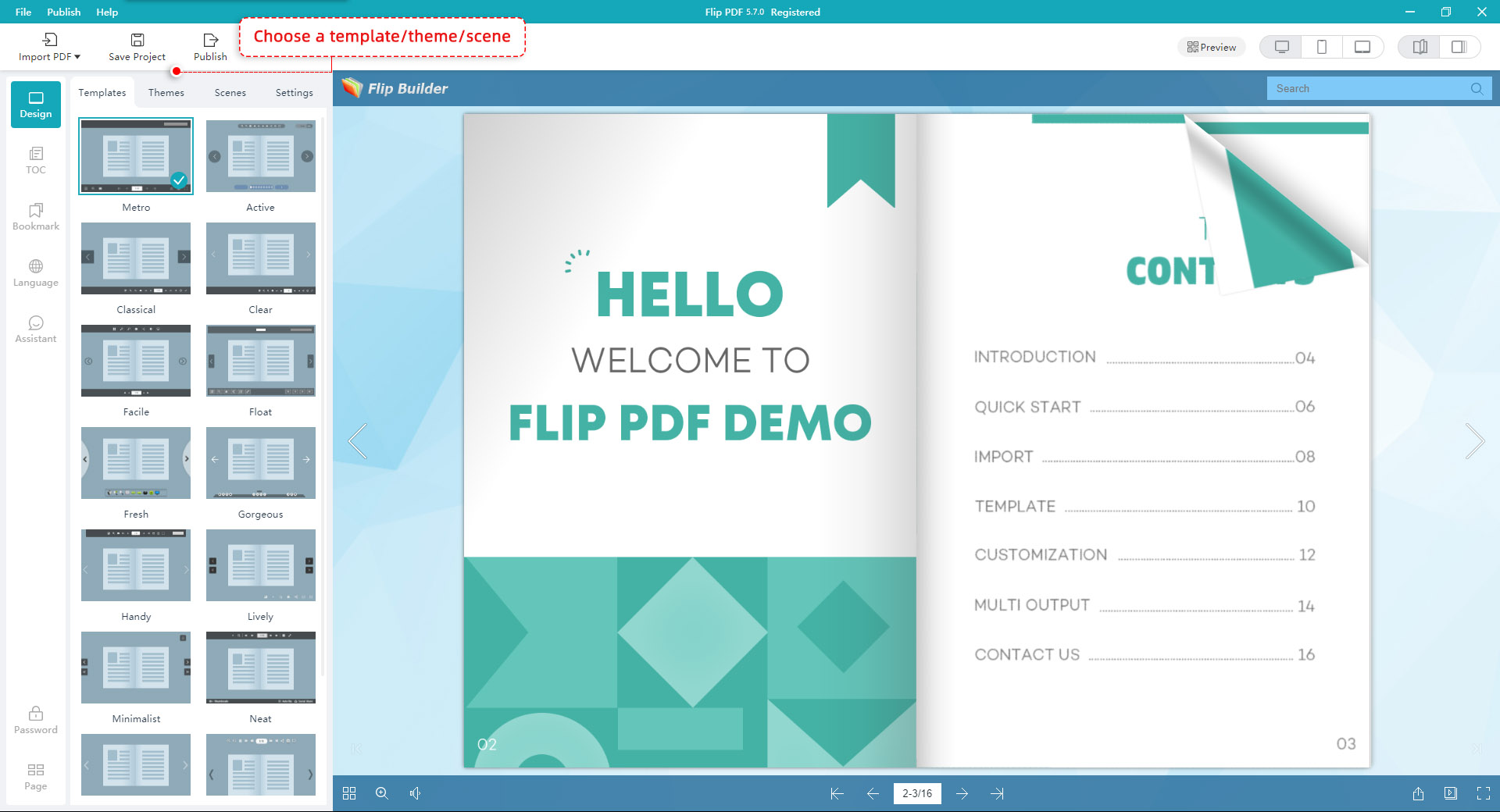
The Design view: Templates, Themes, Scenes and Settings tabs, side tabs for TOC, Bookmark, Language and Assistant, and a live preview with desktop, tablet and phone layouts. The title bar shows Flip PDF 5.7.0, an older release of the same program.
Branding, background and sound
Flip PDF Plus lets you add your logo, a soft or hard cover, a background color, gradient or image, a page-flip sound and background music, and preloader, toolbar and display settings. You can also show a loading logo or video while the book opens and choose from 19 toolbar languages for your readers.
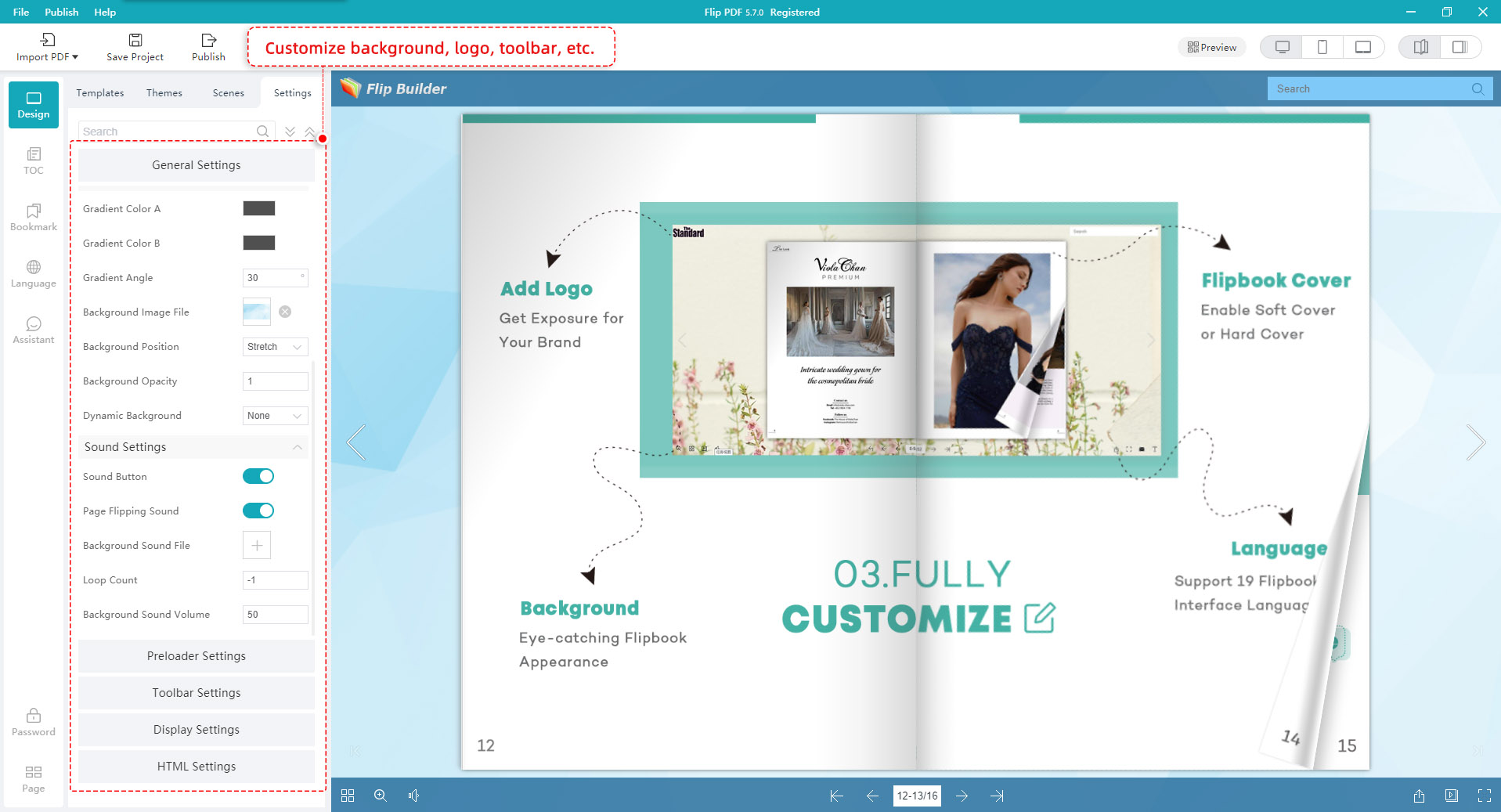
The Settings tab: gradient colors, background image and opacity, sound button, page-flipping sound and background sound file, with Preloader, Toolbar, Display and HTML settings below. Shown in version 5.7.0.
Navigation, narration and analytics
Flip PDF Plus adds a table of contents even when the PDF has none, plus bookmarks and full-text search. Its voice assistant attaches audio to pages with synchronized scrolling text, useful for children's books and language lessons. Every book can report page views, time on page and bounce rate to Google Analytics 4, and a built-in shopping cart lets you sell an ebook from the flipbook itself.
Six ways to publish, including Android apps
Flip PDF Plus for Windows publishes HTML for your own web server, a ZIP, a WordPress plug-in, an offline Windows EXE, a Mac app and an Android APK. The HTML books adapt to computers, phones and tablets with nothing to install, readers can share them to Facebook and Twitter, and you can lock private books with one or several passwords or limit them to your own domain when embedded.
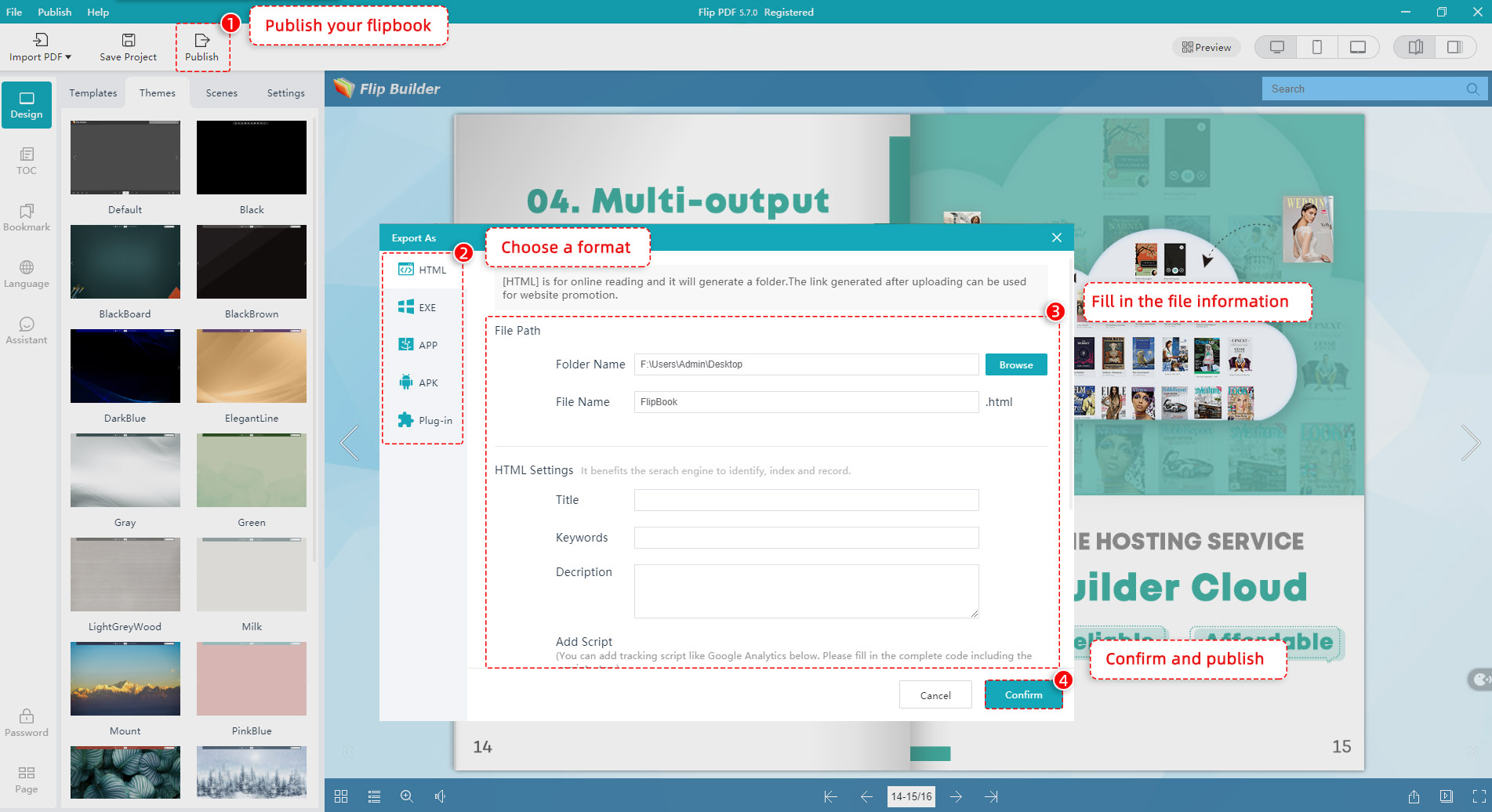
The Export As dialog: HTML, EXE, APP, APK and Plug-in formats on the left, folder and file name, and the HTML title, keywords, description and tracking-script fields. Shown in version 5.7.0.
Benefits
The first gain is attention. A flipbook looks finished and branded, opens instantly and keeps readers on your site instead of sending them off with a download. With analytics on every page, you also find out which pages of a catalog actually get read, which a PDF download never tells you.
The second is cost control. $149 once covers unlimited conversions, and if you host the HTML on your own website there's no monthly fee at all. Online flipbook services usually charge every month, and their prices climb with the number of books.
Real-World Uses
- A trade-show catalog on the company website, with the PDF's links kept clickable and GA4 showing which product pages get read.
- A sales brochure as an Android app that field reps install on tablets and open with no internet connection.
- A training manual as a Windows EXE, handed out on a USB stick at a workshop.
- A school yearbook published as HTML with a password for families only.
- A monthly magazine batch-converted from the printer's PDFs, with a saved template keeping every issue identical.
Who It's For, and Who Should Skip It
Flip PDF Plus for Windows fits anyone who publishes PDFs regularly and wants polished flipbooks without a subscription: marketing teams, print shops, publishers, schools, associations and small businesses. It's best value when you already have a website to host the HTML, and it's the right platform if you need Android APK output.
Skip it if you want videos, audio clips, links, shapes and animations placed on the pages: that multimedia editor is only in Flip PDF Plus Pro ($399). Skip it if you design on a Mac, since this license won't run there. And if you publish one flipbook a year, a pay-per-book online service will likely cost less than $149.
Usage Guide
- Install and launch. Download the 64-bit installer, run it, and open Flip PDF Plus.
- Activate. After buying, enter the license code from your order email in the activation window. Offline PCs can activate with a verification file.
- Import. Click Import PDF, browse to the file (or choose Import Multi-PDF or Import Image), set the page range, and tick Import TOC, Import Links and Allow Search.
- Design. Pick a template, theme and scene, add your logo, TOC and bookmarks, and check the preview in desktop, tablet and phone layouts.
- Publish. Click Publish, choose HTML, EXE, APP, APK or Plug-in, fill in the folder, file name and HTML title and description, and confirm.
- Put it online. Upload the HTML folder to your web server, or use FlipBuilder's paid Hosting Add-on to upload it in one step and get a link and embed code.
Before you buy
- Buy the right edition. Plus converts and styles your PDFs. If you need video or interactive elements on the pages, buy Pro instead: upgrading later means contacting FlipBuilder to pay the difference.
- One computer, one platform. The license covers 1 Windows PC. A Mac needs a separate Mac license.
- Hosting is extra. Plus includes no FlipBuilder hosting, but self-hosting the HTML is free.
- The trial shows only 12 pages with a watermark, so test the design, not your full book.
Where it falls short
- It's a big download. The installer is about 213 MB because the program is built on Electron, the same framework as many web-based desktop apps.
- Frequent updates bring frequent fixes. FlipBuilder's update log for October 2026 alone lists fixes for projects that wouldn't import, project files that wouldn't open after updating, offline activation errors and a flipbook render engine that failed. Keep a copy of your projects before updating.
- A learning curve. Reviewers like the results but say there are many settings and the interface is a little unconventional.
- Templates look dated to some users, there's no EPUB export, and the exported HTML is hard to edit in other web tools.
- Activation problems come up often in reviews. Support usually fixes them quickly, but you'll need to contact them when you move to a new PC.
What Users Say
Capterra: Flip PDF Plus rated 4.5 out of 5 from 107 reviews
"Exceptional interactive PDF presentation system." (5 out of 5)
Pros: "It's stable and feature-rich, and does far more than I initially planned for online PDF presentations."
Cons: "It's a little complex to learn all the features, in part due to a slightly unconventional user interface."
Allen C., Technology Strategy Consulting, Publishing
"Love this product" (5 out of 5)
Pros: "I love the one time fee and unlimited usage, the option to host my own flipbooks with my own URL and without the FlipBuilder watermarks makes my flipbooks more professional."
Darren G., Managing Director, Printing
"Long Time User" (5 out of 5)
Pros: "I like Flip Builder's straightforward UI and robust publishing options. I like being able to own the software instead of a subscription."
Cons: "Templates are a bit outdated looking. I like that Google Analytics can be integrated but would rather have GTM."
Lisa F., Owner, Design
"Epub3 export functionality" (4 out of 5)
Pros: "The Android APK export is so helpful. The Windows and Mac executables too are good for desktop users."
Cons: "My only disappointment with it is the omission of the epub3 export and also the exported HTML 5 format is almost unmodifiable in other HTML applications."
Anthony A., CEO, Online Media
Trustpilot: FlipBuilder rated 5.0 out of 5 from 339 reviews
FlipBuilder's Trustpilot reviews are almost all about customer support, and almost all 5 stars. Most describe a problem (activation, a registration code, software that wouldn't open) fixed quickly by email.
Katherine Johnson (5 stars, September 2026) got a fast reply about "the issue with my registration code."
Cengizhan özmen (5 stars, September 2026) had "an activation issue with Flip PDF Plus Pro", which support resolved quickly.
Patrick Lam (5 stars, September 2026), "Great support and very easy to use.", describes "excellent support and quick response times."
Mustafa Küçük (5 stars, October 2026) praises "the quick response, the swift resolution of the problem."
These Trustpilot excerpts were read through a summarizer, so treat the wording as close but not guaranteed exact. The score covers all FlipBuilder products.
The critical side
The less happy Capterra and GetApp reviews describe slow technical support handled overseas, a buyer who couldn't get a flipbook onto their website and didn't get a refund, confusion over which upload or publish mode to choose, unclear explanations of hosting credits, unreliable sound-file integration, and a program logo added to new flipbooks by default until you switch it off.
The recurring themes: people love the one-time price, unlimited conversions and the professional look of the books, and Android APK output is a specific reason Windows users choose it. FlipBuilder's support gets steady praise for fixing license and activation problems fast. The complaints are about the learning curve, dated templates, missing EPUB export and the occasional support case that didn't end well.
Comparisons
Flip PDF Plus vs Flip PDF Plus Pro
Flip PDF Plus converts and styles your PDFs as page-flip books. Flip PDF Plus Pro ($399, 2 computers) adds a multimedia and animation editor with links, audio, videos, trigger actions, 40+ hotspots, 70+ buttons, 13 slideshow styles and 90+ shapes, 6 more templates, and one year of FlipBuilder hosting. Choose Plus if your PDFs already contain everything you want readers to see.
Windows vs Mac
Both cost $149 for 1 computer. The Windows version adds Android APK output, 5 widepage cut modes instead of 3 and the Ghostscript render engine. The Mac version can set a custom icon on exported EXE files, which Windows can't yet. Buy the one for the computer you design on: your readers can open the books on any device.
Editions and Pricing
| Edition |
Price |
Computers |
Online hosting |
Adds |
| Flip PDF Plus (this listing, Windows) |
$149 once |
1 |
Paid add-on ($9.99/month or $99/year) |
PDF to flipbook, 17 templates, branding, analytics, all output formats |
| Flip PDF Plus Pro |
$399 once |
2 (same OS) |
1 year free, then $99/year |
Multimedia editor, 23 templates |
| Flip PDF Plus Corporate |
$699 once |
4 (same OS), $50 per extra seat |
1 year VIP membership, up to 1,000 books |
Everything in Pro, commercial-use assets |
FAQs
Is Flip PDF Plus for Windows a one-time purchase or a subscription?
Flip PDF Plus for Windows is a one-time purchase: $149 for 1 computer, with unlimited conversions and no expiry. Only FlipBuilder's optional online hosting is a subscription.
Can Flip PDF Plus turn a PDF into an Android app?
Yes, on Windows. Flip PDF Plus for Windows publishes a flipbook as an Android APK that readers install and open offline. The Mac version can't create APKs.
Does Flip PDF Plus for Windows run on a 32-bit PC?
No. FlipBuilder's current Windows installer is 64-bit (Flip_PDF_Plus_x64.exe), so you need 64-bit Windows 7 or later with 4 GB of RAM.
Do I need FlipBuilder's hosting to put my flipbook online?
No. Flip PDF Plus publishes an HTML folder you can upload to any web server for free, or a WordPress plug-in for a WordPress site. FlipBuilder's paid Hosting Add-on just makes uploading and embedding a one-click job.
Can I move from Flip PDF Plus to Pro later?
Yes. FlipBuilder lets Flip PDF Plus owners upgrade to a higher edition by contacting them and paying the difference. Owners of the older Flip PDF get 30% off an upgrade to Flip PDF Plus.
How do I move my Flip PDF Plus license to a new PC?
Contact FlipBuilder support. The license is for 1 computer, and reviewers on Trustpilot report quick help resetting registration codes and activations when they changed computers.
Can I get a refund if Flip PDF Plus doesn't suit me?
Yes. FlipBuilder offers a 60-day money-back guarantee on Flip PDF Plus. Try the free version on a short PDF first so you know what you're buying.
How large a PDF can Flip PDF Plus convert?
Flip PDF Plus imports PDFs of up to 1,000 pages and 1 GB per flipbook. Split a longer document into several books, or merge smaller PDFs into one.
System Requirements
- Operating system: Windows 7, 8, 10 or 11, 64-bit
- Memory: 4 GB RAM
- Disk: about 213 MB for the installer, plus space for your projects
- Readers: any modern browser on Windows, Mac, iPhone, iPad or Android for HTML books
Conclusion
Flip PDF Plus for Windows is worth $149 if you turn PDFs into catalogs, brochures or magazines more than a few times a year: you pay once, convert without limits, self-host for free, and get the widest set of output formats FlipBuilder offers, Android apps included. The one reason to buy it is that one-time price for professional, trackable flipbooks. The main reason not to is if you need on-page video and interactive elements, which only Pro has. Try the free version on a 12-page sample first, and if the look fits, the license removes the watermark and the page limit.
Download Free TrialBuy Now