Short answer: install Flip PDF Plus Pro for Windows, click Import PDF, pick a template in the Design view, add videos, links or buttons in the Multimedia Editor, then click Publish and choose HTML (for your own website), the WordPress plug-in, or Upload Online for a ready-made link and embed code. Pro costs $399 once, covers 2 computers and includes a year of free hosting. If you only need page-flipping copies of your PDFs with no video or buttons, the $149 Flip PDF Plus edition does the conversion part for less.
At a glance
| Question |
Flip PDF Plus Pro |
| Price | $399 at checkout, one-time payment |
| Runs on | Windows 11, 10, 8 and 7 (Mac version sold separately) |
| Computers per license | 2, on the same operating system |
| Free trial | ✓ All features, but only 12 pages and a FlipBuilder watermark |
| Largest PDF | 1,000 pages and 1 GB per flipbook |
| Video, audio and clickable buttons | ✓ Multimedia Editor with 200+ animation effects (not in Flip PDF Plus) |
| Output formats | HTML, WordPress plug-in, FlipBuilder hosting, EXE (Windows), APP (Mac), APK (Android) |
| Online hosting | 1 year free for up to 1,000 books, then $99 a year or pay-as-you-go |
| Money-back guarantee | 60 days |
What we checked
- The current installer: version 7.1.11 (222 MB), released October 8, 2026, and its What's New notes.
- The price on the order page: $399.00 for Flip PDF Plus Pro for Windows.
- FlipBuilder's edition comparison: what Flip PDF Plus, Pro and Corporate each include, their prices, seats and hosting terms.
- The publishing options and settings shown in FlipBuilder's own screenshots and user manual.
- Reviews on Capterra, G2 and Trustpilot, for what goes well and what goes wrong.
What we checked: installer version 7.1.11 downloaded from FlipBuilder on October 16, 2026, and the checkout price of $399.00 and all three editions' prices on October 16, 2026. We compared features, prices and publishing options; we didn't publish a full-length flipbook with a paid license, so we can't speak to conversion quality on your particular PDF. The free trial is the way to check that.
Flip PDF Plus Pro for Windows
Flip PDF Plus Pro for Windows by FlipBuilder turns a PDF into a page-turning digital book that opens in any web browser, then lets you put video, sound, links and animated buttons on the pages.
- Price: $399, one-time, 2 computers
- Platform: Windows 11, 10, 8 and 7; flipbooks read on PC, Mac, iPhone, iPad and Android
- Best for: catalogs, brochures, magazines, training manuals and ebooks you want people to click through, not just scroll
Flip PDF Plus Pro keeps your PDF's layout exactly as designed, because each page is built from the PDF itself. What it adds is everything a PDF can't do: realistic page turns, a searchable table of contents, a YouTube video on a product page, a "Call us" button, a pop-up gallery, background music and page-by-page Google Analytics 4 statistics. Version 7.1.11 added a preview for YouTube videos inside the editor and a smaller installer.
Step 1: Import your PDF
Flip PDF Plus Pro opens on a start screen with a large Import PDF area. Click it (or drag your PDF onto it) and the Import PDF window opens. Three choices matter here:
- Import PDF, Import Multi-PDF or Import Image. Multi-PDF merges several files into one book, which suits a catalog built from separate section PDFs. Batch Convert (top right of the import area) turns a folder of PDFs into separate books in one run.
- Page Range. All pages, or a custom range such as 1,5-8,20.
- Information Extraction. Tick Import TOC, Import Links and Allow Search. Your PDF's bookmarks become the flipbook's table of contents, its links keep working, and readers can search the text. This only works if the PDF has real text, bookmarks and links in it; a scanned PDF has none of them.
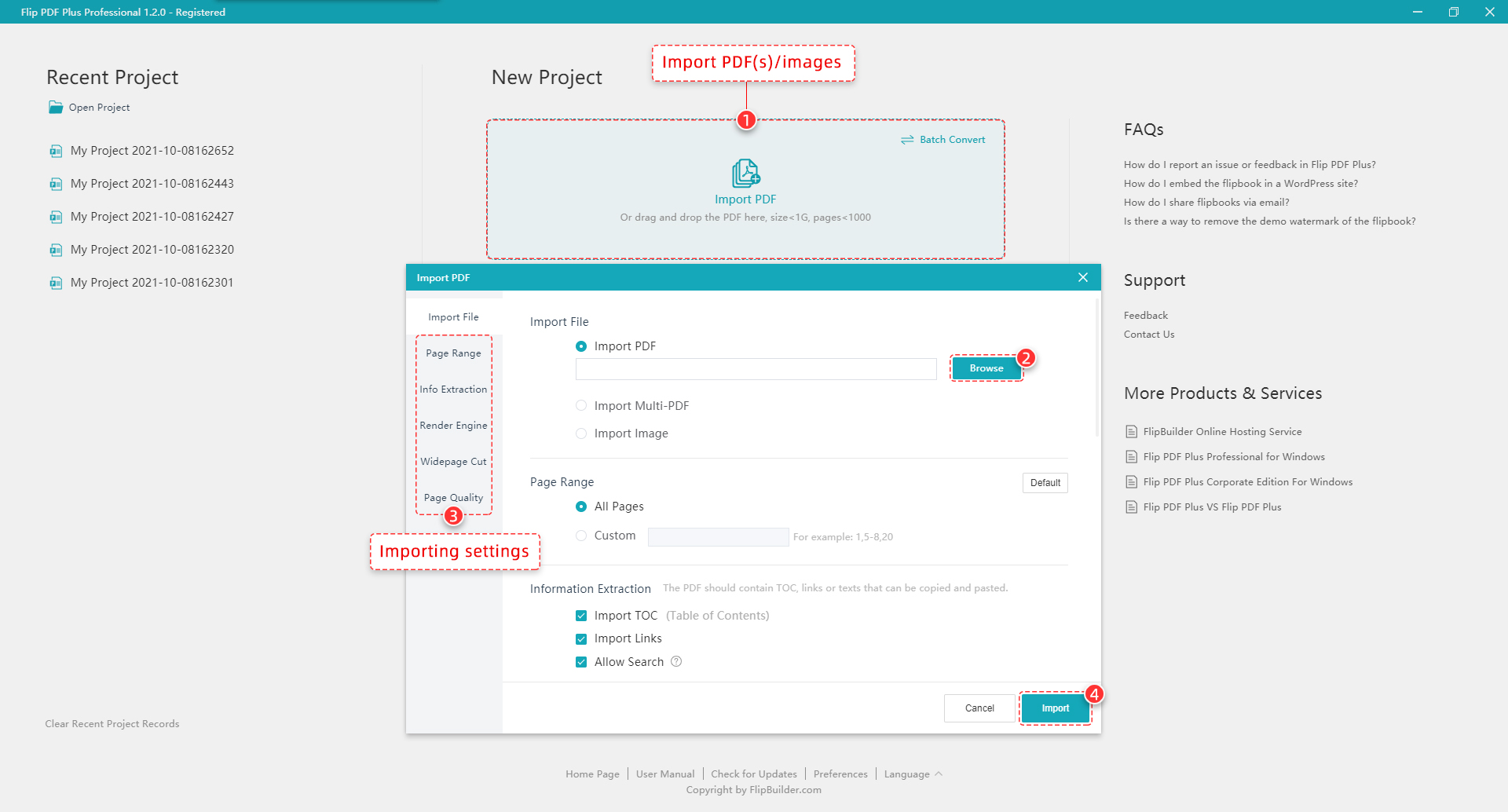
The start screen and Import PDF window, with the Page Range, Import TOC, Import Links and Allow Search options (FlipBuilder screenshot from an earlier version).
The import window also has Render Engine and Page Quality settings. FlipBuilder's January 2026 update (6.9.9) raised the default clarity of its New Engine, so the defaults are a sensible place to start; raise the quality only if small print looks soft in the preview.
Step 2: Design the book
Flip PDF Plus Pro's Design view shows your book on the right and four tabs on the left: Templates (the toolbar layout around the book), Themes (background and colors), Scenes (animated backgrounds such as snow or clouds) and Settings. Pro has 23 templates, 20 themes and 17 scenes.
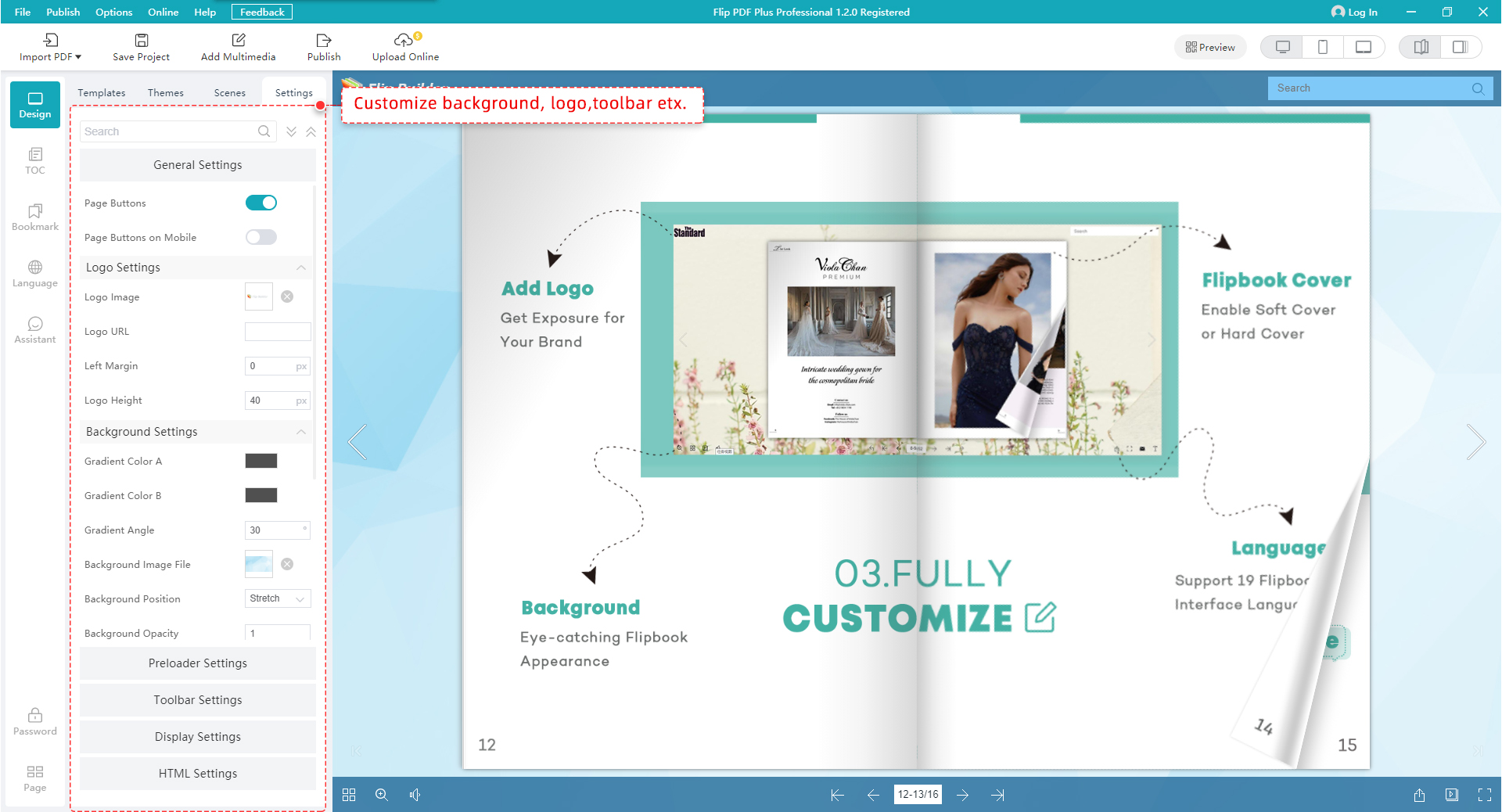
The Settings tab: page buttons, Logo Settings and Background Settings on the left, with Preloader, Toolbar, Display and HTML Settings below (FlipBuilder screenshot from an earlier version).
In Settings, the ones worth your time first:
- Logo Settings: your logo, and a Logo URL so clicking it opens your website.
- Toolbar Settings: which buttons readers get. Turn Download and Print off if you don't want readers walking away with the PDF.
- Background Settings: colors, an image or background music.
- Preloader Settings: a loading logo or loading video while the book opens.
The left-hand rail adds a TOC, Bookmarks, several Languages, the voice Assistant that narrates pages, and a Password. When the setup looks right, save it as your own template: every future book then starts with your logo, toolbar and colors.
Step 3: Add video, links and buttons in the Multimedia Editor
The Multimedia Editor is what you pay the extra $250 over Flip PDF Plus for. Click Multimedia Editor (shown as Add Multimedia in older versions) and a separate editing window opens with your pages down the left side.
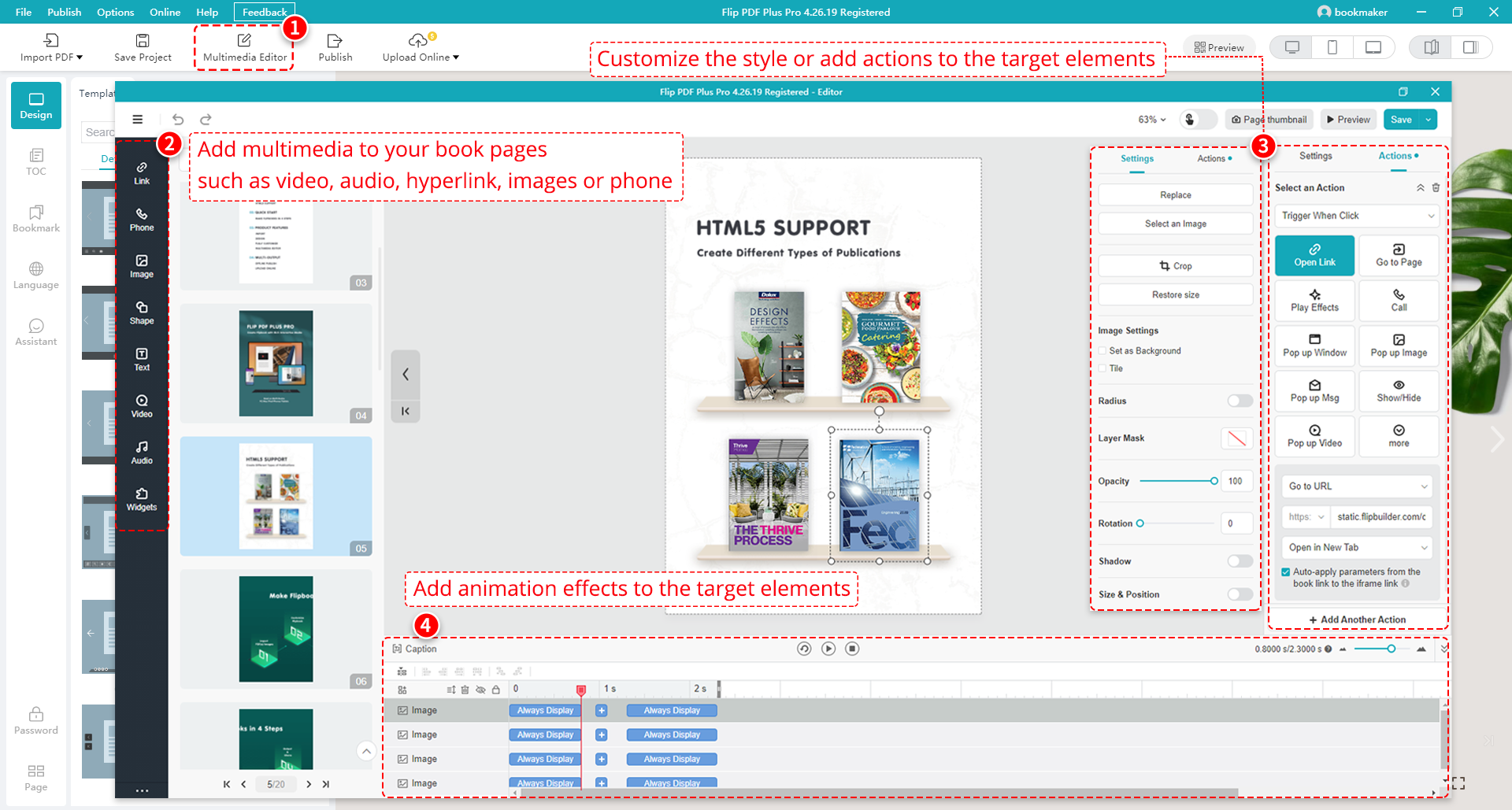
The Multimedia Editor in version 4.26.19: Link, Phone, Image, Shape, Text, Video, Audio and Widgets tools on the left, the Actions panel (Open Link, Go to Page, Call, Pop up Window, Pop up Image, Pop up Video) on the right, and the animation timeline along the bottom.
- Add an element. Pick a tool on the left (Link, Phone, Image, Shape, Text, Video, Audio, Widgets) and drag it onto the page. Video takes a YouTube or Vimeo ID, an online video link or a local file. Pro also has 40+ dynamic hotspots, 70+ ready-made buttons, 13 slideshow styles and 90+ shapes.
- Give it an action. Select the element, open Actions on the right and choose what a click does: Open Link (your store page), Go to Page, Call (dials your number on a phone), Pop up Window, Pop up Image, Pop up Video, Show/Hide another element, play an animation or audio, or run JavaScript.
- Animate it. Add entrance, attention or exit effects (200+ of them), then drag their bars on the timeline at the bottom to set when each one starts and how long it runs.
- Save, then Preview in the desktop, tablet and phone layouts (the buttons at the top right of the main window).
Tip: put the action where the reader decides
In a catalog, make each product photo an Open Link to its store page and put a Call button on the back cover. In a training manual, put a Pop up Video next to the step it explains. A few well-placed actions beat an animation on every page, and they're what your Google Analytics 4 page statistics can measure.
Step 4: Publish and put the flipbook on your website
Click Publish and Flip PDF Plus Pro offers five formats on the left of the Publish As window, plus Upload Online on the main toolbar. Which one you pick depends on where your readers are.
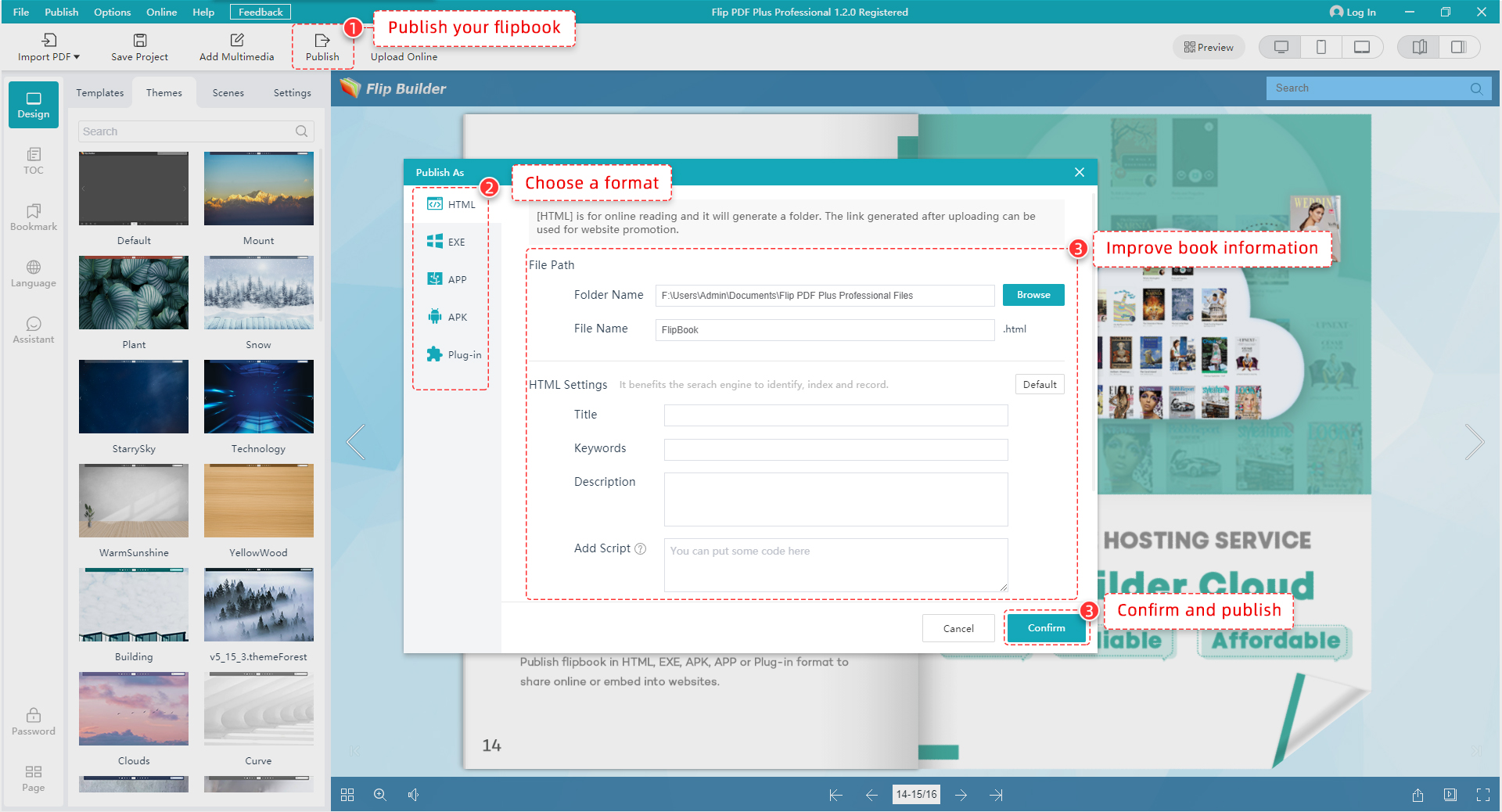
The Publish As window: HTML, EXE, APP, APK and Plug-in on the left, the output folder and file name, and the HTML Settings for Title, Keywords, Description and Add Script (FlipBuilder screenshot from an earlier version).
| Your goal |
Choose |
What you get |
Ongoing cost |
| A link and embed code, no server work | Upload Online | The book on FlipBuilder's servers (Amazon S3), a link and an embed code | Free for 1 year with Pro, then $99 a year |
| The book on your own website | HTML | A folder you upload to your web server; the .html file is the book's address | Your own hosting only |
| A WordPress site | Plug-in | A WordPress plug-in that puts the book in a post or page | Your own hosting only |
| Offline reading on a laptop or USB stick | EXE or APP | A program that opens the book on Windows (EXE) or Mac (APP) without internet | None |
| An app on Android tablets | APK | An Android app with your own icon | None |
For HTML, fill in the Title, Keywords and Description under HTML Settings before you click Confirm. They become the book page's title and description in search results. Then upload the whole output folder (not just the .html file) to your server and link to it, or put it on a page in an iframe.
For Upload Online, sign in to your FlipBuilder account in the program first, upload, and you get the book's link straight away. Copy the embed code and paste it into your web page so visitors read the book without leaving your site. When you fix a typo later, choose Overwrite an Existing Flipbook: the link and embed code stay the same, and since version 6.8.15 you can keep the original title, description and keywords too. Uploading a second copy instead gives you a new link, and every place you shared the old one keeps showing the old version.
Which edition do you need?
FlipBuilder sells Flip PDF Plus in three editions, and the conversion and publishing steps above work in all of them. The difference is the Multimedia Editor in Step 3, the number of computers and the free hosting.
| Edition |
Price (one-time) |
Computers |
Multimedia Editor |
Free hosting |
| Flip PDF Plus | $149 | 1 | ✗ | None ($9.99 a month or $99 a year) |
| Flip PDF Plus Pro | $399 | 2 | ✓ | 1 year |
| Flip PDF Plus Corporate | $699 | 4 ($50 per extra seat) | ✓ plus 30,000+ free commercial images | 2 years |
Three-year cost with FlipBuilder hosting (USD)
Flip PDF Plus ($149 + 3 years at $99)$446
Flip PDF Plus Pro ($399 + 2 years at $99)$597
Flip PDF Plus Corporate ($699 + 1 year at $99)$798
License price plus FlipBuilder's yearly hosting add-on after any free years, from FlipBuilder's order page on October 16, 2026. If you host the HTML output on your own website, the hosting part drops to $0 for every edition.
The free hosting narrows the gap: over three years on FlipBuilder's hosting, Pro costs $151 more than Flip PDF Plus, not $250, and you get the Multimedia Editor and a second computer for it.
| Your situation |
Pick |
Why |
| Catalogs or brochures with product links, videos or a call button | Pro | Clickable products, video and phone buttons all need the Multimedia Editor |
| A newsletter or report that only needs to look good and turn pages | Flip PDF Plus | Same conversion, TOC, links from the PDF and all output formats for $149 |
| You work on a desktop and a laptop | Pro | One Pro code activates 2 Windows computers |
| A marketing team of 4 or more | Corporate | 4 seats for $699 is cheaper than two Pro licenses, with 2 years of hosting |
What we like
- Pay once, no subscription for the program itself
- Six output formats from one project, including offline EXE and Android APK
- Real interactivity: trigger actions, phone buttons, pop-ups and a full animation timeline
- Imports your PDF's table of contents, links and searchable text
- The 12-page trial has every feature, so you can test your own document
Watch out for
- Windows only; the Mac version is a separate purchase
- The editor takes time to learn, and some reviewers find the interface unusual
- The HTML output is hard to edit in other web tools
- No ePub export
- Hosting costs $99 a year after the free year
What users say
Flip PDF Plus has an average rating of 4.5 out of 5 from more than 100 reviews on Capterra. FlipBuilder has 4.3 out of 5 from 31 reviews on G2, and a TrustScore of 5.0 from 337 reviews on Trustpilot, where most reviews are about quick help from support rather than the software itself.
"Exceptional interactive PDF presentation system." (5 out of 5)
Pros: "It's stable and feature-rich, and does far more than I initially planned for online PDF presentations."
Cons: "It's a little complex to learn all the features, in part due to a slightly unconventional user interface."
Allen C., Technology Strategy Consulting, Publishing (review of Flip PDF Plus on Capterra)
"Long Time User" (5 out of 5)
Pros: "I like Flip Builder's straightforward UI and robust publishing options. I like being able to own the software instead of a subscription."
Cons: "Templates are a bit outdated looking. I like that Google Analytics can be integrated but would rather have GTM."
Lisa F., Owner, Design (review of Flip PDF Plus on Capterra)
"Epub3 export functionality" (4 out of 5)
Pros: "The Android APK export is so helpful. The Windows and Mac executables too are good for desktop users."
Cons: "My only disappointment with it is the omission of the epub3 export and also the exported HTML 5 format is almost unmodifiable in other HTML applications."
Anthony A., CEO, Online Media (review of Flip PDF Plus on Capterra)
"Ashley was super helpful and VERY quick…" (5 out of 5)
"Ashley was super helpful and VERY quick to get a response to me about the issue with my registration code."
Katherine Johnson, on Trustpilot, September 21, 2026
What commonly goes wrong
- Judging the product by a watermarked trial book. The Flip PDF Plus Pro trial imports only 12 pages and stamps a FlipBuilder watermark on every book. Test with a 12-page sample of your real document, and don't send a trial book to customers.
- Expecting the free hosting to switch on by itself. FlipBuilder asks Pro and Corporate buyers to contact it after purchase to activate the complimentary hosting. Do that before you plan to use Upload Online.
- Importing a scanned PDF. Import TOC, Import Links and Allow Search need real text, bookmarks and links inside the PDF. A scan gives you page images with no search and no table of contents, so export from the original layout file instead.
- Uploading only the .html file. The HTML output is a folder of files, and the book won't load without all of them. Upload the whole folder.
- Re-uploading instead of overwriting. A fresh upload gets a new link. Use Overwrite an Existing Flipbook so shared links and embeds keep working.
- Planning to edit the HTML afterwards. Reviewers find the exported HTML5 very hard to change in other web tools. Make every change in Flip PDF Plus Pro and publish again.
- Going past the limits. Each flipbook can hold up to 1,000 pages and 1 GB. Split an annual catalog into volumes, or reduce image size in the PDF first.
- Registration code trouble. Several recent Trustpilot reviews are from buyers who needed support's help with a license or registration code. Version 7.1.11 fixed an offline activation error ("License code has been revoked, errorcode: -408"), so install the latest version before you register.
FAQs
Can I turn a PDF into a flipbook for free?
You can try it for free: the Flip PDF Plus Pro trial has every feature, but it imports only 12 pages and adds a FlipBuilder watermark. A clean, full-length flipbook needs a license, starting at $149 for Flip PDF Plus.
Do readers need to install anything to view the flipbook?
No. A Flip PDF Plus Pro flipbook published as HTML or uploaded online opens in any modern browser on PC, Mac, iPhone, iPad and Android. Only the offline EXE, APP and APK versions are installed or opened as programs.
Can Google index the text in my flipbook?
Flip PDF Plus Pro lets you set the HTML title, keywords and description when you publish as HTML, and Allow Search makes the text searchable inside the book. For a page you want to rank, add your own text on the web page that embeds the flipbook too, since search engines read a normal page more reliably than a book viewer.
What happens to my hosted flipbooks after the free year?
FlipBuilder's hosting add-on for Flip PDF Plus Pro costs $99 a year after the free first year, or you can pay as you go at $1.10 per book per month. If you'd rather not pay for hosting, publish as HTML and put the books on your own website.
Can I use Flip PDF Plus Pro on a Mac?
Not with the Windows license. FlipBuilder sells a separate Mac version, and the Pro license's 2 computers must run the same operating system. Flipbooks made on Windows still open on a Mac, in the browser or as an APP file.
Can I upgrade from Flip PDF Plus to Pro later?
Yes. FlipBuilder lets you upgrade to a higher edition by paying the difference, arranged through its contact form. So starting with the $149 Flip PDF Plus doesn't lock you out of the Multimedia Editor later.
Can I sell an ebook with Flip PDF Plus Pro?
Yes. Flip PDF Plus Pro can put a price on books in an online bookcase with a shopping cart, but that needs FlipBuilder hosting (free for the first year with Pro). Readers can preview pages and buy without leaving the bookcase.
Can I stop readers from downloading or sharing my flipbook?
Partly. Flip PDF Plus Pro can hide the Download and Print buttons, protect a book with one or more passwords, and restrict an embedded book to the domains you choose. None of that stops someone from taking screenshots, so don't publish anything you can't afford to have copied.
Conclusion
Flip PDF Plus Pro for Windows is the edition to buy when your flipbook has a job to do: sell products, train staff or keep readers watching. FlipBuilder says a basic book takes under 10 minutes, the Multimedia Editor is where the $399 goes (and where the learning time goes), and the year of free hosting covers the first year of links and embeds. If your books only need to look good and turn pages, save $250 and get Flip PDF Plus instead. Either way, run your own document through the 12-page trial first.
Download Flip PDF Plus Pro Free TrialBuy Flip PDF Plus Pro