Nero DuplicateManager: Clear Out Duplicate Photos, Music and Videos
Nero DuplicateManager 2027 is a $47.95 one-time-purchase Windows 10 and 11 tool that finds exact duplicate photos, songs and videos, plus similar photos such as burst shots, edited copies and resized versions, and lets you review them side by side before deleting. It's made by Nero AG and is licensed for 1 PC.
Years of phone backups, camera imports and "copy of" folders leave most photo libraries with the same picture three or four times over. DuplicateManager scans the folders you pick, groups the copies and look-alikes, and suggests which ones to keep.
Quick facts
- Version: 2027 (Nero 2027 release, build 29.5.30000)
- Developer: Nero AG, Germany
- Platform: Windows 11 and Windows 10
- Price: $47.95, one-time purchase, 1 PC
- Finds: exact duplicate images, audio and video files; similar images
- Image formats: BMP, JPEG, PNG, TIFF and camera RAW
- Guarantee: 30-day money-back guarantee from Nero
- Also in: Nero Platinum Suite 2027
- What we checked: the order page lists "Nero DuplicateManager 2027" at $47.95 as a lifetime license, and the trial button on Nero's download page delivers an 8 MB web installer named Nero-DuplicateManager-Photo-2026-3.0.2.18.exe, which we inspected, including its optional SearchOnSite Chrome extension offer, on November 13, 2026. We didn't scan a photo library with it.
Before you buy
Similar-match detection works on photos only. For music and video, Nero DuplicateManager finds exact duplicates (the same file content, whatever the name), not different encodes or edits of the same song or clip. And if you'd use any other Nero programs, Nero Platinum Suite 2027 ($59.95 a year) already includes DuplicateManager.
Download Free TrialBuy Now
Overview
Nero DuplicateManager started as a photo-only tool, DuplicateManager Photo, and the name still shows in its installer. The 2026 release added exact-duplicate detection for audio and video files, which carries into the 2027 version. The workflow is three steps: pick the folders, let it scan, then review results grouped under Duplicate Images, Duplicate Audios, Duplicate Videos and Similar Images.
It compares file content rather than names, so "IMG_4474.JPG" and "holiday-01.jpg" are still caught when they're the same picture. It marks the copies it suggests removing in red and the keepers in green, and you can change any mark with a click.
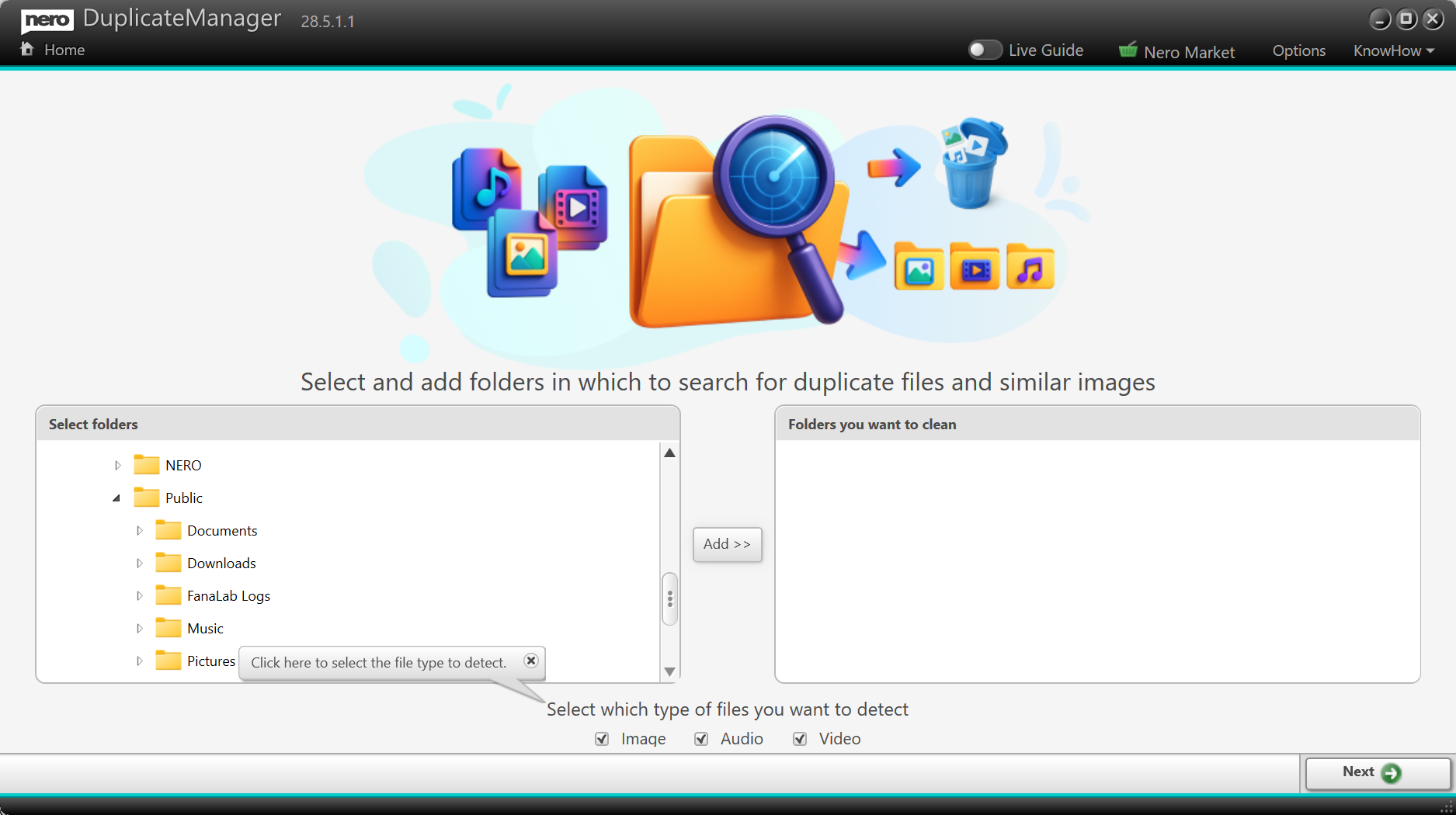
The start screen of DuplicateManager 28.5.1.1 (the 2026 version): a folder tree on the left, "Folders you want to clean" on the right, and Image, Audio and Video checkboxes at the bottom.
Features
Exact duplicates of photos, songs and videos
Nero DuplicateManager finds files with identical content across all the folders and drives you add, including external drives, and whatever they're called. Each group shows how many copies there are, their total size and which to keep or remove. You can preview photos, play videos and listen to audio inside the program before deciding. Nero lists MP4, AVI, MOV, MP3, FLAC and WAV among the supported media formats.
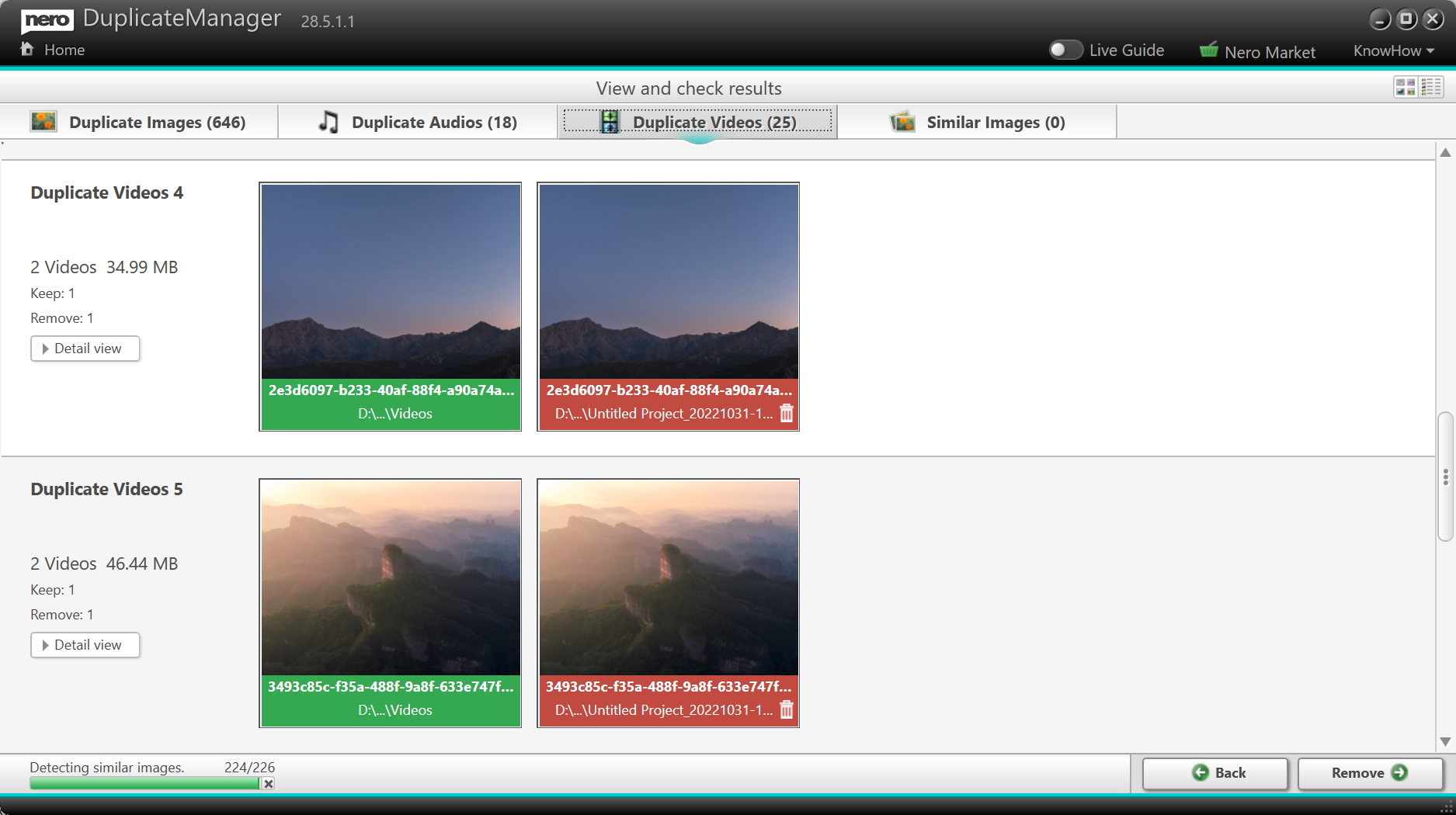
Results in DuplicateManager 28.5.1.1: 646 duplicate images, 18 duplicate audio files and 25 duplicate videos, each video pair with one copy marked to keep (green) and one to remove (red).
Similar photos, sorted by why they're similar
Nero DuplicateManager's Similar Images view groups look-alike photos into tabs: Formats (the same shot saved as JPEG and PNG, for example), Places, Series and Motive (burst shots, HDR versions and filtered edits), Resized (the smaller copies you made for sharing) and Other. A Detail view lets you compare two candidates closely before choosing the best one.
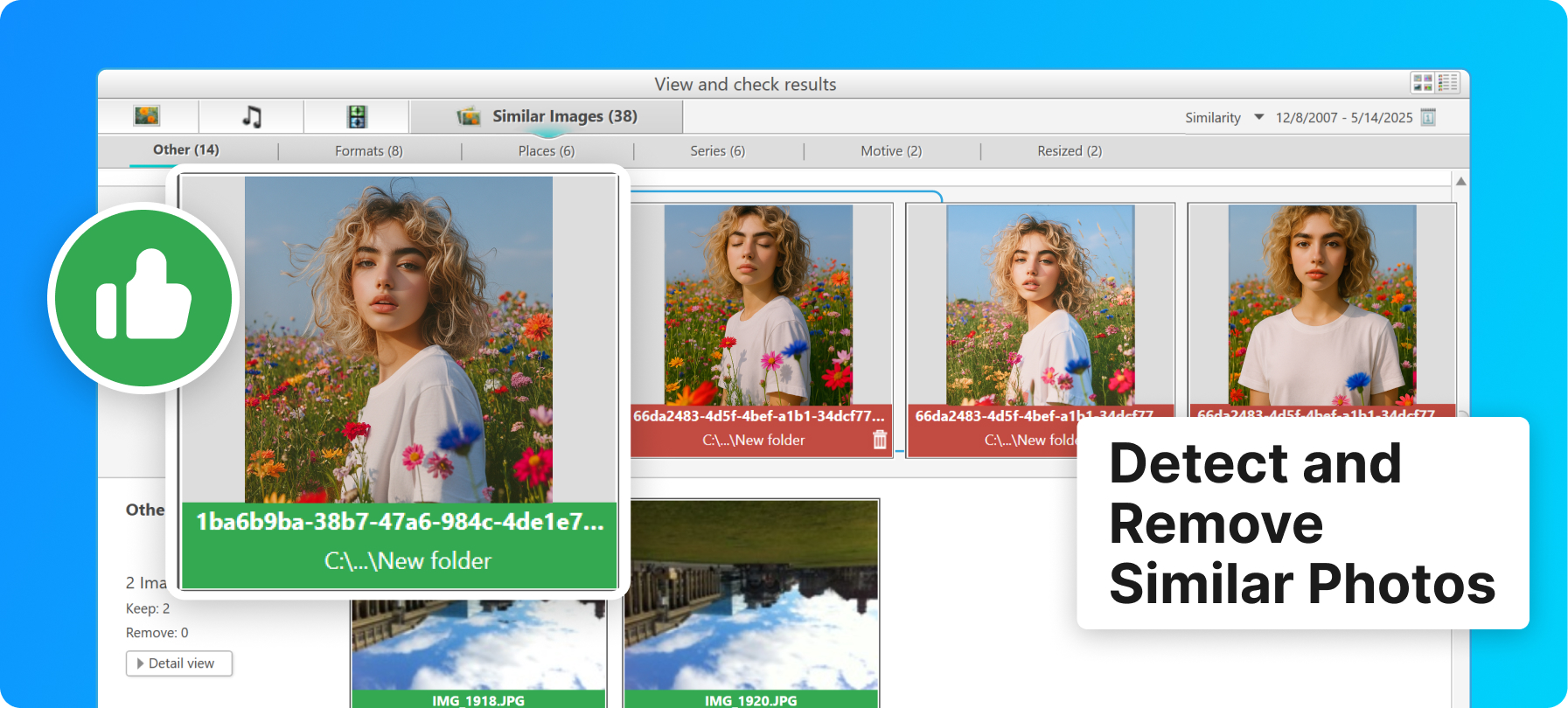
Nero's product image of the Similar Images results: 38 similar images split into Other, Formats, Places, Series, Motive and Resized tabs, with one photo kept (green) and its look-alikes marked red.
RAW photo support
Nero DuplicateManager reads camera RAW files alongside BMP, JPEG, PNG and TIFF, so photographers can clear duplicate RAW imports, where every duplicate costs a lot of space. Nero recommends 64-bit Windows and a 6th-generation Intel Core or newer processor for RAW scanning.
A safety net when you delete
Nero DuplicateManager always keeps at least one copy of each file when it marks duplicates automatically. Removed files go to the Windows recycle bin, and the final summary page shows how much space you freed, how many exact duplicates remain, and offers to restore what you removed.
Benefits
- Smaller, faster backups. Every duplicate you remove is one less file to copy to your backup drive or cloud.
- A photo library you can browse. Fewer near-identical shots means you find the good one faster.
- Pay once. Unlike many Nero products, DuplicateManager 2027 is a one-time purchase with no renewal.
- You stay in control. Nothing is deleted until you've seen it, and deleted files can be restored.
Real-World Uses
- Merging phone backups: you imported your phone to the PC three times over the years. Add all three folders and remove the repeats in one pass.
- Burst-shot cleanup: after a sports day, the Series tab gathers the 20 near-identical frames of each moment so you can keep the sharpest.
- A music folder built from CDs and downloads: find the same MP3 or FLAC files stored in several album folders.
- A full external drive of video exports: spot the identical project renders saved in two places.
Who It's For, and Who Should Skip It
DuplicateManager suits home users with large, messy photo libraries, especially ones mixing phone pictures, camera RAW files and edited or resized copies, who want a visual, click-to-mark tool rather than a list of file paths.
Skip it if you need to find duplicates among documents, archives or other non-media files; it's built for photos, music and video. Skip it if you're on a Mac, if you mainly need to match different-quality versions of the same song or video, or if you're happy with a free tool: Czkawka is a free, open-source duplicate finder that also compares similar images. Nero Platinum Suite subscribers already have it.
Usage Guide
- Install: run the trial installer from Nero's download page. On the offers screen, leave the "Yes, please install the Google Chrome Extension SearchOnSite" box unticked unless you want it.
- Open it: launch DuplicateManager from Nero Start.
- Choose what to detect: tick Image, Audio and Video at the bottom of the start screen.
- Add folders: select folders in the tree (or drag them onto the window), click Add, then Next to scan.
- Review: go through the Duplicate and Similar tabs. Click an image to switch it between keep (green) and remove (red); use Detail view when two shots look alike.
- Remove: click Remove or Next. Check the summary, and restore anything you removed by mistake.
Where it falls short
- Limited image formats. Nero's list of supported image formats is BMP, JPEG, PNG, TIFF and RAW. HEIC photos from iPhones and WebP images aren't on it.
- Media files only. There's no general duplicate search for documents, PDFs or ZIP files.
- The installer carries an offer. Nero's web installer includes a checkbox for the third-party SearchOnSite Chrome extension. Read each screen before clicking Next.
- Trial installer naming. The trial on Nero's download page is still the "2026" web installer; it downloads the program from Nero's servers during setup, so you need an internet connection.
- Online license check. Nero's 2027 programs need an internet connection to verify the license.
What Users Say
Independent reviews of DuplicateManager itself are scarce; most coverage is Nero's own how-to material. The broader picture of Nero as a company comes from Trustpilot.
FileHippo editors' review
FileHippo's editors reviewed DuplicateManager Photo in May 2025 under the title "Efficient Duplicate Photo Management Tool". They called it "a powerful system utility designed to help users efficiently manage their photo archives" and singled out restore: "The recovery option ensures that users can retrieve mistakenly deleted files, adding a layer of security to the process."
Trustpilot reviews of Nero (all products)
Nero's Trustpilot page scores 3.0 out of 5 from about 350 reviews: 28% five-star and 49% one-star. The reviews are about Nero as a whole, mostly Nero Platinum Suite.
- Marty Hovey (5 stars, "I Love Nero Platinum Suite"): "I usually try Nero first for a solution to a project."
- Torsten (4 stars, "Initial issues were resolved by Nero Support"): "Nero Support was always friendly and was ultimately able to resolve the issues."
- Robert Plucker (3 stars): "The software works great, but an advertised USB drive that was part of the bundle was not shipped."
- Wayne Lawrence (2 stars, "Nero is great"): "Nero is great, but their payment service not so much."
- Michelle (1 star): "This download is deceptive and requires many purchases to use it."
The pattern: the software itself gets credit for being easy to use, while complaints focus on Nero's sales side, such as bundles, installer offers and billing questions.
Comparisons
DuplicateManager alone vs Nero Platinum Suite 2027
Nero Platinum Suite 2027 costs $59.95 a year and includes DuplicateManager along with Nero Burning ROM, Nero Video, MediaHome, BackItUp, USBxCopy, TuneItUp PRO and the AI photo tools. DuplicateManager on its own is $47.95 once, with no renewal. If cleaning up duplicates is all you need, the single tool is cheaper within the first year and every year after; if you'd use two or three other Nero programs, the suite is better value.
DuplicateManager vs the Duplicate Finder in Nero TuneItUp PRO
TuneItUp PRO also has a Duplicate Finder for video, audio and photo files, shown as a list of file paths. DuplicateManager is the dedicated tool: it adds the similar-photo categories, thumbnails, previews and the keep/remove marking, and it's a one-time purchase instead of a yearly subscription.
Editions and Pricing
| Product |
Price |
License |
PCs |
| Nero DuplicateManager 2027 |
$47.95 |
One-time purchase |
1 |
| Nero Platinum Suite 2027 (includes DuplicateManager) |
$59.95 per year |
Yearly subscription |
1 |
FAQs
Is Nero DuplicateManager 2027 a subscription?
No. Nero DuplicateManager 2027 is a one-time purchase for 1 PC; the order page lists it as a lifetime license with no renewal.
Can Nero DuplicateManager find duplicates on an external drive?
Yes. Nero DuplicateManager scans any folder you add, on internal or external drives, and finds duplicates across different drives in the same scan.
Does Nero DuplicateManager find duplicates with different file names?
Yes. Nero DuplicateManager compares file content, not names, so renamed copies are found.
Can I undo a deletion in Nero DuplicateManager?
Yes. Nero DuplicateManager moves removed files to the Windows recycle bin, and its final overview page offers to restore deleted images and folders.
Does Nero DuplicateManager work with iPhone HEIC photos?
HEIC isn't on Nero's list of supported image formats, which covers BMP, JPEG, PNG, TIFF and camera RAW. Try the trial on a folder of HEIC files before buying if they make up your library.
Is there a Mac version of Nero DuplicateManager?
No. Nero DuplicateManager runs on Windows 11 and Windows 10 only.
Is Nero DuplicateManager included in Nero Platinum Suite?
Yes. Nero Platinum Suite 2027 includes DuplicateManager, so suite subscribers don't need to buy it separately.
Can I get a refund for Nero DuplicateManager?
Nero offers a 30-day money-back guarantee, so you can ask for a refund within 30 days of ordering.
System Requirements
- Windows 11 or Windows 10
- 2 GHz AMD or Intel processor, 1 GB RAM
- For RAW photos: 64-bit Windows and a 6th-generation Intel Core or Xeon processor or newer recommended
- Internet connection for installation and license verification
Conclusion
Nero DuplicateManager is worth $47.95 if your photo library is the problem: its similar-image categories (burst shots, resized and re-saved copies) and click-to-keep review make a big cleanup manageable, and you pay once. The main reason to hold back is format coverage: if your library is mostly iPhone HEIC photos, or you need to find duplicate documents, look elsewhere. Run the trial on one real folder first and decline the installer's extension offer.
Download Free TrialBuy Now