Nero USBxCopy: Copy, Format and Verify Up to 20 USB Drives at Once
Nero USBxCopy 2027 is a $47.95 one-time-purchase Windows 10 and 11 tool that writes the same files, ISO image or Raspberry Pi OS to up to 20 USB flash drives or SD cards at the same time, formats them first if you want, and checks every copy with a SHA256 checksum. It's made by Nero AG and licensed for 1 PC.
If you've ever handed out conference material, product manuals or installer sticks, you know the routine: plug in, drag, wait, eject, repeat. USBxCopy replaces that with one Start button and a status row per drive that turns green when the copy is done and verified.
Quick facts
- Version: 2027 (Nero 2027 release, build 29.5.30000)
- Developer: Nero AG, Germany
- Platform: Windows 11 and Windows 10
- Price: $47.95, one-time purchase, 1 PC
- Drives at once: up to 20 USB flash drives or SD cards
- Sources: a folder of files, an ISO image, or Raspberry Pi OS
- Formats to: FAT32, NTFS or exFAT (quick, full or secure format)
- Verification: SHA256 checksum per drive
- Guarantee: 30-day money-back guarantee from Nero
- Also in: Nero Platinum Suite 2027
- What we checked: the order page lists "Nero USBxCopy 2027" at $47.95 as a lifetime license, and the trial button on Nero's download page delivers an 8 MB web installer named Nero-USBxCOPY-2026-3.0.2.16.exe, which we inspected, including its optional SearchOnSite Chrome extension offer, on November 13, 2026. We didn't run a copy job with real drives.
Before you buy
Your hardware sets the speed. USBxCopy writes to all drives in parallel, but 20 sticks need 20 ports, usually a powered USB hub, and cheap sticks slow the whole batch. Nero Platinum Suite 2027 ($59.95 a year) also includes USBxCopy, so check whether you already have it.
Download Free TrialBuy Now
Overview
Nero USBxCopy has one window. The left panel holds the job: the required space, the number of files and folders, the volume name for the drives, the source (a folder, Raspberry Pi OS or an ISO) and the Function settings for formatting, copying, checksum verification and auto-eject. The right panel lists every connected drive with its letter, file system, used and total space, and live write and read speeds.

USBxCOPY 25.5.1.10: ISO to USB selected with a 5.3 GB source, Quick Format to NTFS and SHA256 verification ticked, and two drives (a FAT32 SanDisk Ultra and an exFAT SD reader) on standby.
Features
Parallel copying to up to 20 drives
Nero USBxCopy detects every USB flash drive and SD card you connect and copies your source folder to all of them simultaneously. You can set one volume name for every drive, and each row shows its own progress bar and speed, so a slow stick is easy to spot and cancel without stopping the rest.
ISO images and Raspberry Pi OS to many drives
Nero USBxCopy writes an ISO image, such as an operating system installer, to multiple USB drives in one run, and creates Raspberry Pi OS on several SD cards or sticks at once from the image files you add. That makes it handy for classrooms, IT departments and Raspberry Pi projects that need identical boot media.
Format and secure erase first
Nero USBxCopy can format every drive before copying, to FAT32, NTFS or exFAT, with a quick format (file system only), a full format that also clears the MBR or GPT, or a secure format that overwrites the data so it can't be recovered. A warning appears before formatting unless you turn it off.
SHA256 verification, color status and auto-eject
Nero USBxCopy checks each copy against a SHA256 checksum after writing, then marks the drive green (finished) or red (failed). Finished drives can be ejected automatically, and a counter keeps track of how many units are done, so you can keep swapping in fresh sticks.
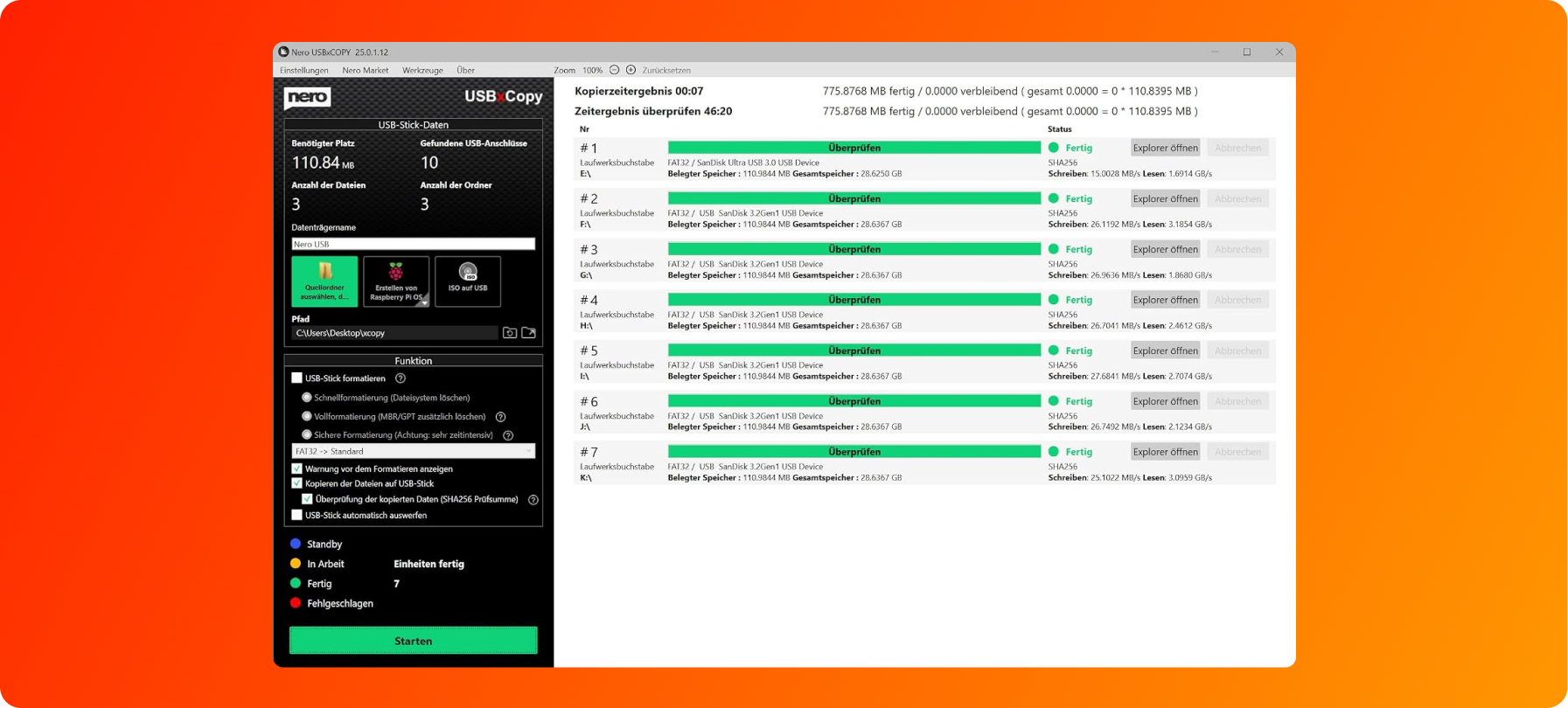
Nero's product image of USBxCOPY 25.0.1.12 (German interface): seven SanDisk drives copied and verified with SHA256, every row green and 7 units finished.
Benefits
- Hours saved on batch jobs. Twenty sticks are written in parallel instead of one after another.
- Identical, checked copies. The checksum step catches a bad stick before it goes out the door.
- Clean drives every time. Formatting and secure erase in the same job mean no leftover files from the last batch.
- Pay once. No subscription for a tool you may only use a few times a year.
Real-World Uses
- Event giveaways: load presentation slides and brochures onto 100 branded sticks in five batches of 20.
- School IT: write a Windows or Linux installer ISO to a set of USB drives for a lab reinstall.
- Raspberry Pi classes: prepare a stack of SD cards with Raspberry Pi OS in one go.
- Retiring old sticks: secure-format a drawer of used flash drives before recycling them.
Who It's For, and Who Should Skip It
USBxCopy suits small businesses, schools, trainers, event organisers and makers who regularly need several identical USB drives or SD cards and don't want to buy a hardware duplicator.
Skip it if you only make one bootable stick now and then: a free single-drive tool such as Rufus does that well. Skip it if you're on a Mac or Linux PC, since USBxCopy is Windows-only, or if you duplicate hundreds of drives a day, where a dedicated hardware duplicator is faster and doesn't tie up a PC.
Usage Guide
- Install: run the trial installer from Nero's download page. On the offers screen, leave the "Yes, please install the Google Chrome Extension SearchOnSite" box unticked unless you want it.
- Connect the drives: plug in your USB sticks or SD cards; they appear in the right panel.
- Choose the source: pick a source folder, Create Raspberry Pi OS, or ISO to USB in the left panel.
- Set the Function options: format type and file system, SHA256 verification and auto-eject.
- Start: click Start and don't remove any drive while it's working. Swap in new drives when rows turn green.
Where it falls short
- Raspberry Pi cards confuse Windows. After creating Raspberry Pi OS on several cards, Windows recognises only the first one when they're all plugged in again; Nero's fix is to delete and recreate the volumes in Disk Management.
- Few public updates. Nero's published USBxCopy release notes stop at version 24.0.1.15 from February 2022, so it's hard to see what changed in later versions.
- Verification takes time. Checking every drive with SHA256 can take much longer than the copy itself; in Nero's own example, a 7-second copy was followed by a long verification run.
- The installer carries an offer. Nero's web installer includes a checkbox for the third-party SearchOnSite Chrome extension. Read each screen before clicking Next.
- Online license check. Nero's 2027 programs need an internet connection to verify the license.
What Users Say
USBxCopy is a niche tool and we found no independent reviews of it. What's available is feedback on Nero as a company.
Trustpilot reviews of Nero (all products)
Nero's Trustpilot page scores 3.0 out of 5 from about 350 reviews: 28% five-star and 49% one-star. The reviews are about Nero as a whole, mostly Nero Platinum Suite.
- Marty Hovey (5 stars, "I Love Nero Platinum Suite"): "I usually try Nero first for a solution to a project."
- Torsten (4 stars, "Initial issues were resolved by Nero Support"): "Nero Support was always friendly and was ultimately able to resolve the issues."
- Robert Plucker (3 stars): "The software works great, but an advertised USB drive that was part of the bundle was not shipped."
- Wayne Lawrence (2 stars, "Nero is great"): "Nero is great, but their payment service not so much."
- Michelle (1 star): "This download is deceptive and requires many purchases to use it."
The pattern: the software gets credit for working, while complaints focus on bundles, installer offers and billing questions.
Comparisons
USBxCopy alone vs Nero Platinum Suite 2027
Nero Platinum Suite 2027 costs $59.95 a year and includes USBxCopy along with Nero Burning ROM, Nero Video, MediaHome, BackItUp, DuplicateManager, TuneItUp PRO and the AI photo tools. USBxCopy on its own is $47.95 once. If multi-drive copying is the only job, buy USBxCopy; if you'd also burn discs, edit video or back up with Nero, the suite gives you more for a yearly fee.
USBxCopy vs a free single-drive tool
Free tools like Rufus write an ISO to one drive at a time. USBxCopy's value is the batch: many drives in parallel, folder copies as well as images, formatting, secure erase and per-drive checksum verification in one job.
Editions and Pricing
| Product |
Price |
License |
PCs |
| Nero USBxCopy 2027 |
$47.95 |
One-time purchase |
1 |
| Nero Platinum Suite 2027 (includes USBxCopy) |
$59.95 per year |
Yearly subscription |
1 |
FAQs
How many USB drives can Nero USBxCopy write at once?
Nero USBxCopy 2027 writes to up to 20 USB drives or SD cards at the same time, limited in practice by your USB ports and hubs.
Can Nero USBxCopy make bootable USB sticks from an ISO?
Yes. Nero USBxCopy's ISO to USB option writes an ISO image, such as an operating system installer, to several USB drives in one run.
Is Nero USBxCopy a subscription?
No. Nero USBxCopy 2027 is a one-time purchase for 1 PC; the order page lists it as a lifetime license.
Does Nero USBxCopy erase the drives before copying?
Only if you choose to. Nero USBxCopy offers quick, full and secure formatting to FAT32, NTFS or exFAT before copying, with a warning first. Leave formatting switched off and the drives aren't formatted.
Does Nero USBxCopy work with SD cards?
Yes. Nero USBxCopy works with SD cards in USB card readers, and its Raspberry Pi OS option is designed for writing several SD cards at once.
Is there a Mac version of Nero USBxCopy?
No. Nero USBxCopy runs on Windows 11 and Windows 10 only.
Can I get a refund for Nero USBxCopy?
Nero offers a 30-day money-back guarantee, so you can ask for a refund within 30 days of ordering.
System Requirements
- Windows 11 or Windows 10
- 2 GHz AMD or Intel processor, 1 GB RAM
- USB ports or a powered USB hub for the target drives
- Internet connection for installation and license verification
Conclusion
Nero USBxCopy is worth $47.95 if you regularly prepare batches of identical USB drives or SD cards: parallel copying, formatting and SHA256 checks in one job turn an afternoon of drag-and-drop into a few button presses, and you pay once. The reason to pass: for the occasional single bootable stick, free tools do the job, and Nero's sparse public update history means you're buying a tool that works rather than one that's actively growing. Try the trial with a few sticks first, and skip the installer's extension offer.
Download Free TrialBuy Now