Coolmuster Data Erasure: Shred Files, Wipe Drives and Clean Free Space on Windows
Coolmuster Data Erasure is a $25.95-a-year Windows program with three tools: File Shredder for individual files and folders, Drive Wiper for whole partitions and external drives, and Free Space Wiper for the leftovers of files you've already deleted. It's for someone retiring a PC or drive, or who regularly handles files that shouldn't linger.
Each tool offers a fast Quick Erase and a three-pass Deep Erase based on the DoD 5220.22-M(E) standard.
Quick facts
- Version: 1.0.46 for Windows, released March 19, 2026
- Developer: Coolmuster
- Erases: files and folders, partitions, external drives, USB sticks, SD cards, free space
- Levels: Quick Erase, and Deep Erase (three passes)
- Price: $25.95 for one year on one PC, $35.95 lifetime
- Platform: Windows only
- What we checked: Windows version 1.0.46 in the vendor release notes, 6.4 MB installer from the vendor (file dated March 19, 2026), checkout price $25.95 on November 10, 2026. We worked from the vendor manual and its screenshots and did not wipe a drive or test whether its data could be recovered afterwards.
Before you buy
- Erasure can't be undone. Pick the drive carefully, because the program asks only for a simple OK.
- On SSDs, overwriting can't always reach every memory cell because of how the drive manages its own storage. For sensitive SSDs, the manufacturer's Secure Erase is the stronger choice.
- The sales page's talk of "government-grade" and "exceeding GDPR/HIPAA" is the vendor's own language. We found no independent certification.
- Coolmuster's refund policy says refund requests for eraser products will not be approved, even though the product page advertises a 30-day guarantee. The one-year plan also renews automatically until you cancel it.
Download Free Trial Buy Now
Overview
Coolmuster Data Erasure opens on a sidebar with its three modes. File Shredder accepts files by drag-and-drop or an Add button. Drive Wiper and Free Space Wiper show your drives as tiles you can tick, so you can select several at once, and you choose between Quick Erase and Deep Erase from a drop-down.
Compared with Coolmuster's phone erasers, this one works on the computer's own disks. The vendor also says it can erase the Windows system drive without bootable media, which is unusual enough that you should check it on a machine you're ready to lose.
Features
Coolmuster Data Erasure's File Shredder targets individual items
Drag files or folders into the window, or use Add File and Add Folder, then click Erase Now and confirm. The list shows name, size, path and date, so you can review it first.
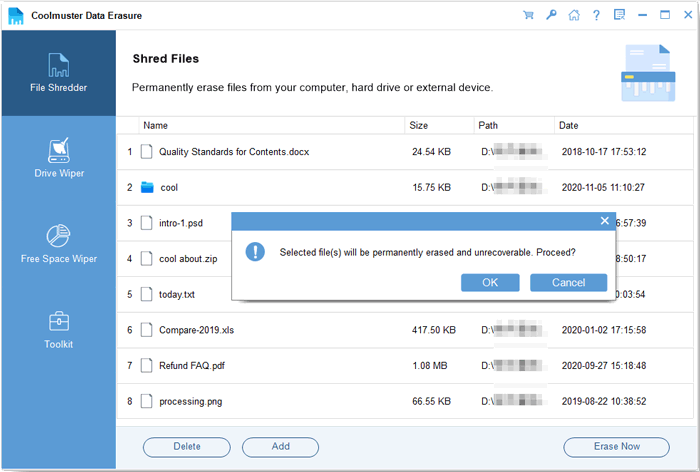
File Shredder with files queued and the final confirmation (from the vendor manual).
Drive Wiper clears whole partitions and external drives
Coolmuster Data Erasure lets you pick a partition or an external device and choose Quick Erase or Deep Erase. Quick Erase shreds existing files and fills free space with zeros, while Deep Erase makes three overwrite passes and takes longer.
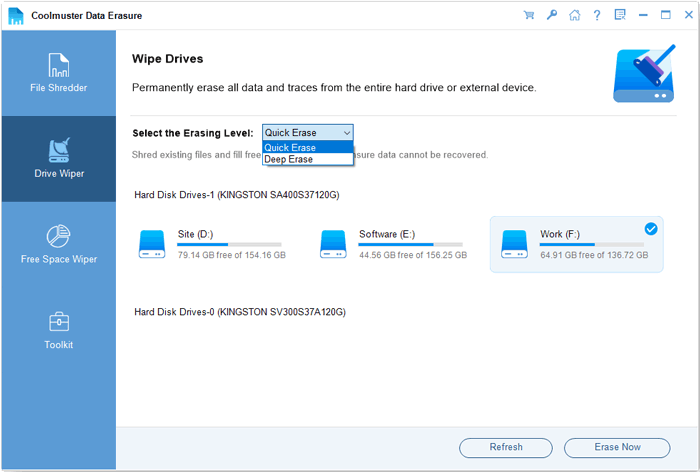
Drive Wiper with the erasing-level drop-down open.
Free Space Wiper cleans up what you've already deleted
Coolmuster Data Erasure can overwrite only the unused space on a drive, destroying the remains of deleted files without touching current ones. It's the mode to use when you can't reformat a drive but want deleted files gone.
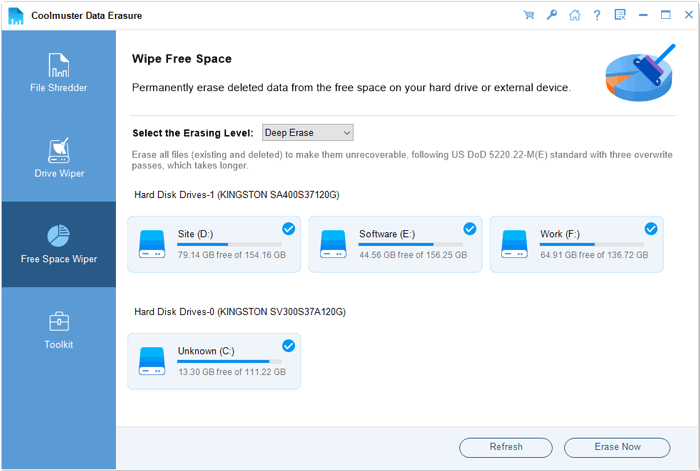
Free Space Wiper with several drives ticked at once.
Handles several drives and removable media
Coolmuster Data Erasure can process multiple drives at once and covers USB drives, SD and TF cards and memory sticks, according to the vendor.
Benefits
- Three distinct tools cover the common situations, from one sensitive file to a whole disk.
- Free Space Wiper lets you clean a drive you're still using.
- Choosing a level is a single drop-down, with no need to understand erase algorithms.
- The installer is small and the interface plain.
Real-World Uses
- You're selling a laptop and want the data drive overwritten first.
- An office has old external drives that held client files.
- You shred tax documents after scanning them.
- You deleted files normally and want the remnants gone from a drive you're keeping.
Who It's For, and Who Should Skip It
It suits Windows users who need to wipe files, partitions or drives without learning a bootable tool.
Skip it if you need a certificate of erasure for an audit, since Coolmuster's page describes none for this product. Skip it for modern SSDs that hold truly sensitive data, where the manufacturer's Secure Erase is the proper route. It's also Windows-only, as one customer points out.
Usage Guide
- Back up what you need, then install and launch the program.
- Choose File Shredder, Drive Wiper or Free Space Wiper in the sidebar.
- Add files, or tick the drives, and pick Quick Erase or Deep Erase where offered.
- Click Erase Now and confirm the warning.
- Wait for the "Done" message.
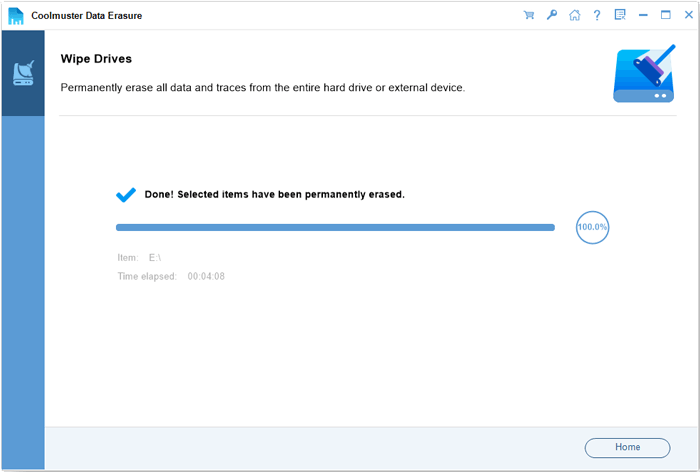
The completion screen shows the elapsed time.
Where it falls short
- No independent test or certification supports the claims of unrecoverable deletion.
- Overwriting can't fully guarantee results on SSDs.
- Windows only, with no Mac edition.
- The product is young, at version 1.0.46, with little public feedback: 25 reviews on the vendor's site.
What Users Say
We found no independent review of this newer product, so these quotes come from Coolmuster's own site. Coolmuster runs a write-a-review-to-win-a-free-license promotion, so read the praise on its own site, and on small blogs, with that in mind.
On Coolmuster's product and review pages (25 reviews shown)
These appear on the vendor's own site.
"After upgrading our office computers, I needed secure data destruction for 30+ old hard drives. Coolmuster's Drive Wiper mode handled batch processing perfectly. The 3-pass overwrite gave me peace of mind about sensitive client information."
Ethan Gallagher, vendor product page
"One drawback: it only supports the Windows operating system."
Qidi F11, October 15, 2026, vendor review page
"I first tested it on a non-critical computer drive, and it worked as expected."
ro-Trace Forge, August 17, 2026, vendor review page
"There was no noticeable lag when handling a 1TB hard drive."
Ana Roa .aT, October 29, 2026, vendor review page
Trustpilot, for the Coolmuster company overall
Coolmuster scores 4.6 out of 5 from 223 Trustpilot reviews, read through a page summarizer. None we read names this product.
"I had issues with registration, I sent an email to the support team"
Kenneth Brooks Jr., July 31, 2026, Trustpilot (excerpt, 5 stars, resolved)
The feedback is short and favorable, mostly about ease of use. With so few reviews, and none independent, treat it lightly.
Comparisons
Data Erasure vs Coolmuster Android Eraser and iOS Eraser
Those wipe phones. Data Erasure wipes the computer's drives and removable storage, and it's the only one of the three that can shred individual files.
Data Erasure vs free tools
Windows can overwrite free space from the command line with the cipher tool, and free shredders exist. Data Erasure's advantage is having all three jobs behind a simple interface.
Editions and Pricing
| Plan | Price | Term | Covers |
|---|
| 1 Year, 1 PC | $25.95 | 1 year, renews automatically | 1 PC |
| Lifetime, 1 PC | $35.95 | One payment, lifetime updates | 1 PC |
| 1 Year, 5 PCs | $35.95 | 1 year, renews automatically | 5 PCs |
| Lifetime, 5 PCs | $45.95 | One payment, lifetime updates | 5 PCs |
| 1 Year, 10 PCs | $65.95 | 1 year, renews automatically | 10 PCs |
| Lifetime, 10 PCs | $85.95 | One payment, lifetime updates | 10 PCs |
If you'll shred files regularly, the lifetime plan at $10 more is the better buy. For a single wipe, the one-year plan is fine once you've cancelled the renewal.
FAQs
Can Coolmuster Data Erasure wipe the Windows system drive?
Coolmuster says Data Erasure can erase Windows system partitions without bootable media. Back up first, and expect the PC to need Windows reinstalled afterwards.
Does Coolmuster Data Erasure work on SSDs?
Coolmuster lists SSDs for Data Erasure, but overwriting is less reliable on SSDs than on hard disks, so use the drive maker's Secure Erase for sensitive data.
Is there a Mac version of Coolmuster Data Erasure?
No. Coolmuster Data Erasure is Windows only.
What's the difference between Quick Erase and Deep Erase in Coolmuster Data Erasure?
Quick Erase in Coolmuster Data Erasure fills space with zeros and is fast, while Deep Erase runs three overwrite passes based on DoD 5220.22-M(E) and takes longer.
Does Coolmuster Data Erasure produce an erasure certificate?
Coolmuster's page for Data Erasure doesn't describe one. It shows a completion message on screen.
Can I get a refund for Coolmuster Data Erasure?
Don't expect one. Coolmuster lists Data Erasure under a 7-day guarantee and says refund requests for eraser products will not be approved.
System Requirements
- Windows 11, 10, 8 or 7
- 1 GHz CPU or faster, 32-bit or 64-bit
- 256 MB RAM, 1 GB recommended
- 200 MB free disk space
Conclusion
A reasonable buy if you want one simple Windows tool for shredding files and wiping hard drives. Having all three jobs in one place, at $25.95, is the appeal.
The main reason not to buy is that the claims of certified, unrecoverable erasure are the vendor's own, and on SSDs a manufacturer's Secure Erase is the better option.
Download Free Trial Buy Now