Nero AI Photo Tagger: Let Local AI Tag and Sort Your Photo Archive
Nero AI Photo Tagger 2027 is a $44.95 one-time-purchase Windows 10 and 11 (64-bit) app that scans your photos with AI running on your own PC, tags them by scene, number of faces and the text they contain, and then saves those tags into your JPEGs or copies the photos into folders by tag. Nothing is uploaded to a cloud. It's made by Nero AG and licensed for 1 PC.
Finding "that photo of the dog at the beach" in 30,000 unsorted files usually means scrolling for half an hour. AI Photo Tagger labels each picture (dog, beach, mountain, food, camping) so you can find it by keyword in Windows Explorer or Nero MediaHome.
Quick facts
- Version: 2027 (Nero 2027 release, build 29.5.30000)
- Developer: Nero AG, Germany
- Platform: Windows 11 and Windows 10, 64-bit only
- Price: $44.95, one-time purchase, 1 PC
- Detection modes: scenes (more than 100), faces, text (OCR)
- AI engine: Intel OpenVINO, runs locally, no cloud upload
- Works with: Nero MediaHome (tags are sent there for albums and search)
- Guarantee: 30-day money-back guarantee from Nero
- Also in: Nero Platinum Suite 2027
- What we checked: the order page lists "Nero AI Photo Tagger 2027" at $44.95 as a lifetime license (the same app costs $59.99 in the Microsoft Store), and the trial button on Nero's download page delivers an 8 MB web installer named Nero-AI-Photo-Tagger-2026-3.0.2.17.exe, which we inspected, including its optional SearchOnSite Chrome extension offer, on November 13, 2026. We didn't run the tagger on our own photos.
Before you buy
Face detection counts people; it doesn't name them. AI Photo Tagger sorts photos into one person, two people or a group, but it won't learn that a face is "Grandma". Saving tags into the files works for JPEG/JPG photos. You also need 64-bit Windows, and Nero recommends 8 GB of RAM and a 6th-generation or newer Intel Core processor. Nero Platinum Suite 2027 ($59.95 a year) already includes AI Photo Tagger.
Download Free TrialBuy Now
Overview
Nero AI Photo Tagger works in three steps: add photos or folders (drag them in or use Add), choose a detection mode and click Analyze, then work with the results in the Detected AI Tags panel on the right. Each tag shows how many photos it matched, and every thumbnail carries its label and a confidence score, such as "Airplane 99%".
The analysis runs on your processor using Intel's OpenVINO toolkit, which is why Nero recommends a recent Intel CPU and why your photos never leave the PC. Nero's own tutorial tagged 23 photos in about 10 seconds.
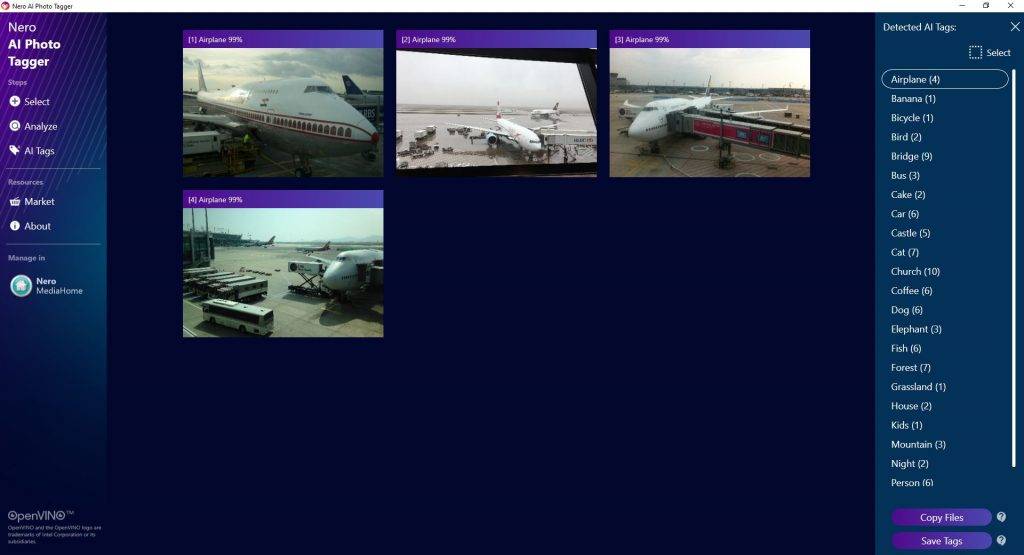
An earlier version of AI Photo Tagger: four photos tagged "Airplane 99%", the Detected AI Tags list (Airplane, Bridge, Castle, Cat, Church, Dog and more, each with a count), and the Copy Files and Save Tags buttons.
Features
Scene detection with more than 100 categories
Nero AI Photo Tagger recognizes more than 100 scenes and objects, grouped under headings such as Animal, Architecture, Document, Food, Fruit, Furniture, Landscape, Party, People, Plant, Show and Sport, and drills down to tags like Cat, Dog, Beach, Mountain, Camping, Hiking or Volleyball.
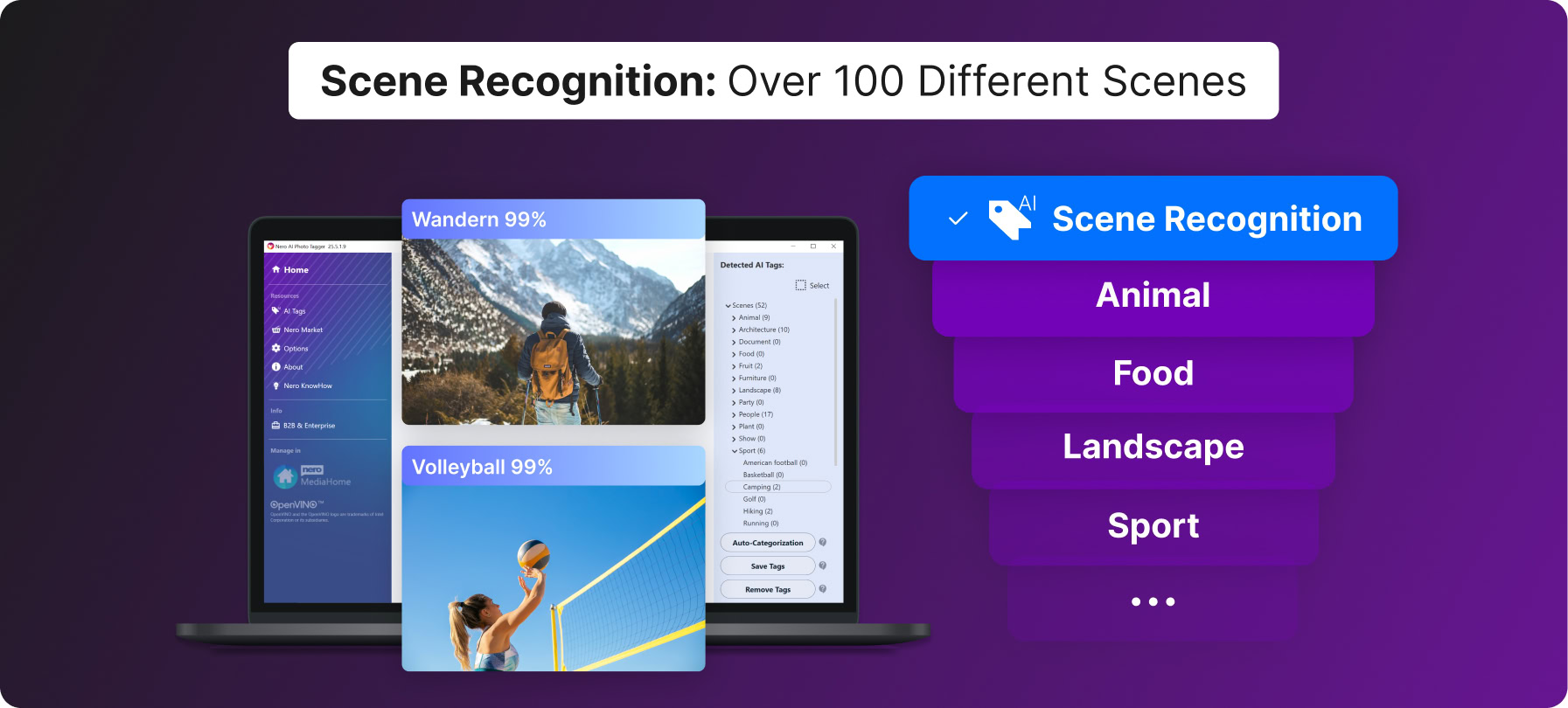
Nero's product image of the current interface: the Detected AI Tags tree with 52 scenes (Animal, Architecture, Landscape, People, Sport and others) and the Auto-Categorization, Save Tags and Remove Tags buttons, with two tagged photos enlarged.
Text detection (OCR) to find photos by words
Nero AI Photo Tagger's text detection lets you type the words you're looking for, then finds the photos that contain them: a sign, a menu, a letter board or a photographed document. Matches appear under a Text tag with the word and a count.
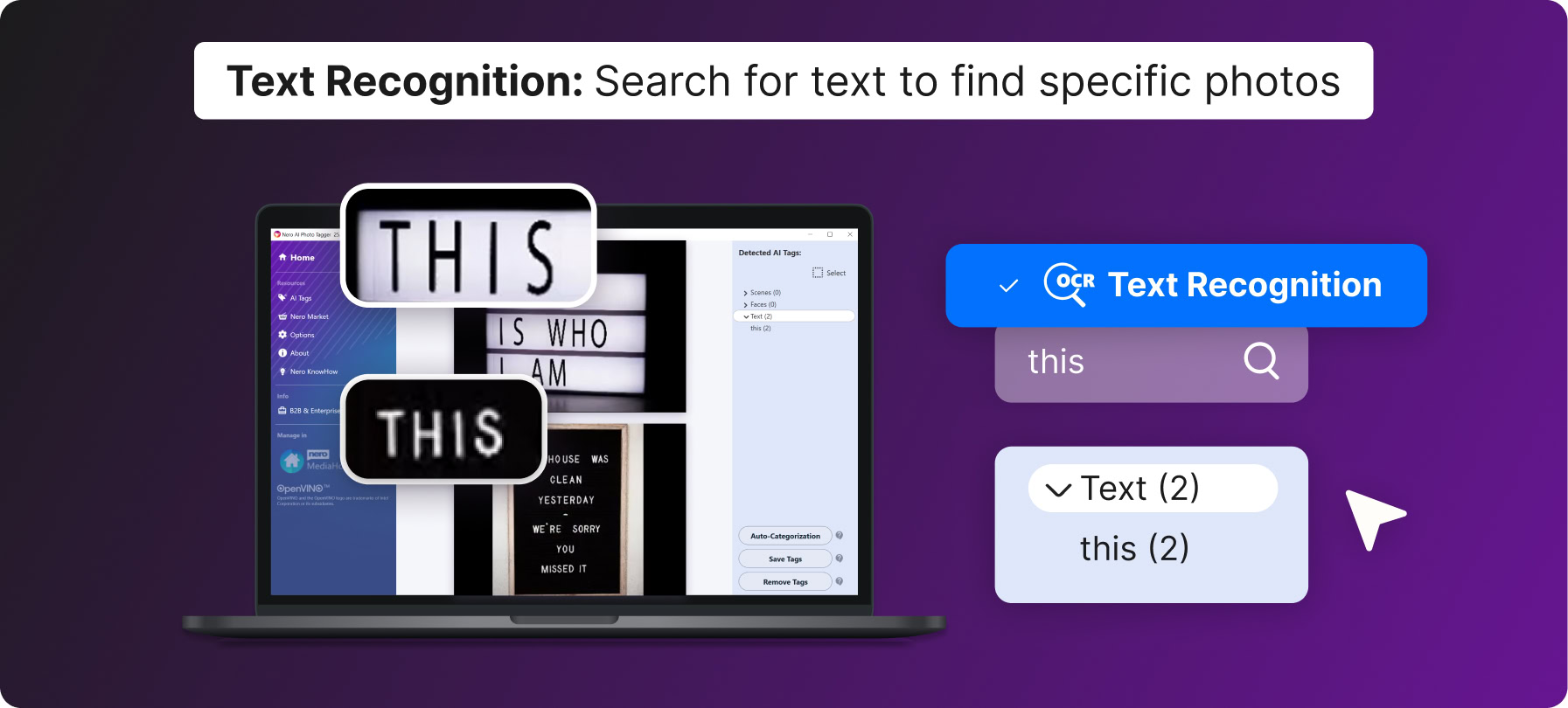
Nero's product image of text recognition: a search for "this" returns two photos of letter boards, listed under Text (2).
Face detection by group size
Nero AI Photo Tagger's face detection sorts photos into one person, two people and groups, which helps separate portraits from group shots and scenery. It doesn't recognize or name individuals.
Save tags, auto-sort into folders, or send to MediaHome
Nero AI Photo Tagger gives you three ways to use the results. Save Tags writes all or selected tags into your JPEG/JPG files, so Windows Explorer shows and searches them. Auto-Categorization (Copy Files in older versions) copies the photos into new sub-folders named after their tags, at a location you choose, leaving the originals in place. And the Nero MediaHome button sends the tags to MediaHome, where you can browse by tag, combine tags with faces and places, and build albums and slide shows.
Benefits
- Privacy. Your family photos are analyzed on your own PC, not on someone else's server.
- Search without a catalog app. Tags saved into JPEGs work in plain Windows Explorer search.
- A first sort in minutes. Auto-Categorization turns one huge folder into Beach, Dog, Food and Mountain folders without manual dragging.
- Pay once. No subscription, and it's cheaper on the order page than in the Microsoft Store.
Real-World Uses
- Years of phone photos dumped on the PC: analyze the whole folder and copy everything into tag folders to see what's there.
- Finding a receipt or document photo: run text detection for a shop name or a word you remember.
- Building a family album: send the tags to Nero MediaHome and make a slide show from every photo tagged Baby or Party.
- Separating portraits from landscapes: use face detection to pull out the group shots for printing.
Who It's For, and Who Should Skip It
AI Photo Tagger suits Windows users with large, unsorted photo archives on their own drives who want automatic keywords without uploading anything, and Nero MediaHome users who want smarter browsing.
Skip it if your photos already live in Google Photos, iCloud or OneDrive, which tag and search them for free. Skip it if you need to identify specific people by name; photo managers with face recognition, such as digiKam, do that. It's also the wrong buy on a Mac or 32-bit Windows, and photographers who need full keyword control in Lightroom are better served there.
Usage Guide
- Install: run the trial installer from Nero's download page. On the offers screen, leave the "Yes, please install the Google Chrome Extension SearchOnSite" box unticked unless you want it.
- Open it: start AI Photo Tagger from Nero Start, signed in to your Nero Account.
- Add photos: drag folders onto the window or use Add.
- Choose a mode and analyze: pick scene, face or text detection (enter your words for text), then click Analyze.
- Use the tags: select tags and click Save Tags to write them into your JPEGs, Auto-Categorization to copy photos into tag folders, or the MediaHome button to send them to Nero MediaHome.
Where it falls short
- A fixed set of tags. It recognizes Nero's built-in categories only. Nero itself has noted that it recognizes "flower" and "tree" but not specific kinds such as a rose or a lily.
- Tags are saved to JPEGs only. Nero documents saving tags into JPEG/JPG files; for other formats, use Auto-Categorization or MediaHome.
- Account and activation hiccups. Nero's knowledge base covers an "AI Photo Tagger is not available" message, caused by not being signed in to Nero Start, an expired trial or a product that needs repair.
- Hardware needs. It requires 64-bit Windows, and older or non-Intel processors may analyze more slowly.
- The installer carries an offer. Nero's web installer includes a checkbox for the third-party SearchOnSite Chrome extension. Read each screen before clicking Next.
What Users Say
Microsoft Store
Nero AI Photo Tagger has been in the Microsoft Store since December 2020 and holds an average of 4.8 out of 5 from 23 ratings. That's a small sample, but a positive one for a paid utility.
Trustpilot reviews of Nero (all products)
Nero's Trustpilot page scores 3.0 out of 5 from about 350 reviews: 28% five-star and 49% one-star. The reviews are about Nero as a whole, mostly Nero Platinum Suite.
- Marty Hovey (5 stars, "I Love Nero Platinum Suite"): "I usually try Nero first for a solution to a project."
- Torsten (4 stars, "Initial issues were resolved by Nero Support"): "Nero Support was always friendly and was ultimately able to resolve the issues."
- Robert Plucker (3 stars): "The software works great, but an advertised USB drive that was part of the bundle was not shipped."
- Wayne Lawrence (2 stars, "Nero is great"): "Nero is great, but their payment service not so much."
- Michelle (1 star): "This download is deceptive and requires many purchases to use it."
We found no independent magazine review of AI Photo Tagger. The pattern across Nero's feedback: the software gets credit for working, while complaints focus on bundles, installer offers and billing questions.
Comparisons
AI Photo Tagger alone vs Nero Platinum Suite 2027
Nero Platinum Suite 2027 costs $59.95 a year and includes AI Photo Tagger along with Nero MediaHome, Burning ROM, Video, BackItUp, DuplicateManager, USBxCopy, TuneItUp PRO and AI Image Upscaler. AI Photo Tagger alone is $44.95 once. Since tags are most useful inside MediaHome, buyers who want the full browse-by-tag experience may get more from the suite; if you only want tags in Windows Explorer and tag folders, the single app is enough.
AI Photo Tagger vs cloud photo services
Google Photos and similar services tag and search photos automatically, often with more categories and named face groups, but they need your photos in their cloud. AI Photo Tagger trades some of that power for keeping everything on your PC.
Editions and Pricing
| Product |
Price |
License |
PCs |
| Nero AI Photo Tagger 2027 |
$44.95 |
One-time purchase |
1 |
| Nero Platinum Suite 2027 (includes AI Photo Tagger) |
$59.95 per year |
Yearly subscription |
1 |
FAQs
Does Nero AI Photo Tagger upload my photos to the cloud?
No. Nero AI Photo Tagger analyzes photos locally on your PC using Intel OpenVINO; it needs the internet only to verify your license.
Can Nero AI Photo Tagger recognize specific people?
No. Nero AI Photo Tagger's face detection groups photos by one person, two people or a group; it doesn't identify or name individuals.
Will the tags show up in Windows Explorer?
Yes, for JPEG/JPG photos. Use Save Tags in Nero AI Photo Tagger and the tags are listed in Windows Explorer, where you can search for them.
Does Nero AI Photo Tagger move or rename my original files?
No. Nero AI Photo Tagger's Auto-Categorization copies photos into new tag folders at a location you choose, so the originals stay where they were.
Does Nero AI Photo Tagger run on AMD processors?
Nero recommends a 6th-generation or newer Intel Core or Xeon processor because the AI runs on Intel's OpenVINO toolkit. Use the trial to check the speed on an AMD PC before buying.
Is Nero AI Photo Tagger a subscription?
No. Nero AI Photo Tagger 2027 is a one-time purchase for 1 PC; the order page lists it as a lifetime license.
Can I get a refund for Nero AI Photo Tagger?
Nero offers a 30-day money-back guarantee, so you can ask for a refund within 30 days of ordering.
System Requirements
- Windows 11 or Windows 10, 64-bit (required)
- 8 GB RAM recommended
- Intel Core or Xeon 6th generation or newer recommended
- Internet connection for installation and license verification
Conclusion
Nero AI Photo Tagger is worth $44.95 if you keep a big photo archive on your own PC and want it searchable without handing it to a cloud service: scene tags, text search and one-click tag folders get a messy archive into shape fast, and you pay once. The main reasons to pass are its fixed tag list and face detection that only counts people. If named faces or deep keyword control matter to you, look elsewhere. Try it on one large folder first, on a recent Intel PC if you have one.
Download Free TrialBuy Now