Nero AI Image Upscaler PRO: Enlarge and Repair Photos on Your Own PC
Nero AI Image Upscaler PRO 2027 is a Windows desktop program that uses AI models to enlarge photos and artwork 2x, 4x or 8x (up to 32K), sharpen and unblur them, and rebuild faces, for $49.95 a year as an automatically renewing subscription. It's for people restoring old family photos, preparing small images for print, or cleaning up product shots and illustrations, who want the work done on their own PC with the option of faster cloud processing.
That 800-pixel scan of your grandparents' wedding photo looks fine on a phone and terrible as an A4 print. Classic resizing just makes the blur bigger; an AI upscaler invents plausible detail instead. This is Nero's desktop tool for that job.
Quick facts
- Developer: Nero AG, Germany
- Version: 29.5.24.0 (Windows installer, released October 27, 2026)
- Platform: 64-bit Windows 10 and 11. Nero sells a separate Mac app
- Price: $49.95 per year at checkout; the subscription renews automatically every 12 months until you cancel
- Included each year: all Pro features, feature updates, and 100 Nero AI credits for cloud processing and Nero's online AI tools
- Upscaling: 2x, 4x, 8x, 2K to 32K, custom size or print size; outputs up to 1,024 megapixels
- Batch: up to 100 images per run
- Formats: JPG, PNG, BMP, WebP and TIFF
- Trial: 7 days, no credit card required
- What we checked: on November 13, 2026 the order page listed "Nero AI Image Upscaler PRO 2027" at $49.95 with a 12-month renewal. The trial download is a 9.4 MB web installer (Nero-AI-Image-Upscaler-x64-Setup-3.0.4.21.exe, dated October 16, 2026). We didn't install it or upscale images with it.
Before you buy
- It's a subscription. The PRO 2027 license renews every year at checkout. Cancel the renewal before the year ends if you only want one year.
- Cloud features use credits. Cloud processing runs on Nero's EU-based cloud GPUs and costs Nero AI credits; the 100 credits a year are shared with Nero's online tools. Nero's June 2026 notes say Sharpen and Unblur currently run on the cloud only.
- Local speed depends on your graphics card. Nero asks for an NVIDIA card with 4 GB of video memory for hardware acceleration (GTX 1080 or higher for good speed); otherwise it runs on the CPU, slowly.
- There's also a free web version. Nero's online upscaler at ai.nero.com lets you try upscaling in a browser; this listing is about the desktop program.
- Platinum Suite includes it. Nero Platinum Suite 2027 ($59.95 a year) includes the Pro version too.
Download Free TrialBuy Now
Overview
The program is one window: a large before-and-after preview, a filmstrip of your images along the bottom, and an Upscale Options panel on the right. You set the upscale size, pick an AI model, switch on face options if there are people in the picture, then click Process to run it on your PC or Cloud to send it to Nero's servers. A slider, split view or single view lets you compare results before you save.
The 2027 generation brought 8x upscaling to 32K, outputs up to 1,024 megapixels, the Sharpen and Unblur models and batches of 100 images. The October 2026 update (version 29.5.24.0) added the Reconstruct model, print sizing in inches, centimeters or millimeters at a chosen DPI, better cropping and a true 1:1 comparison.

Nero AI Image Upscaler with a 640 x 360 photo upscaled 4x to 2560 x 1440: the split preview, the filmstrip, and the Upscale Options panel with the Anime model, Face Options and the Save image button.
Features
Upscale up to 8x, 32K or a print size
Nero AI Image Upscaler enlarges images by 1x, 2x, 4x or 8x, to a target of 2K, 4K, 8K, 16K or 32K on the long side, to a custom width and height, or to a physical print size at the DPI you choose (300 DPI for photo prints, 150 DPI for posters). Outputs can reach 1,024 megapixels.
AI models for different kinds of images
Nero AI Image Upscaler has Standard for scenery, buildings and products; Photograph for smoother portraits and everyday photos; Anime for illustrations and comics; Iris for very small or compressed images with hair, fur and texture; and Reconstruct, which regenerates texture in heavily compressed or vintage photos. You can switch models and compare before processing.
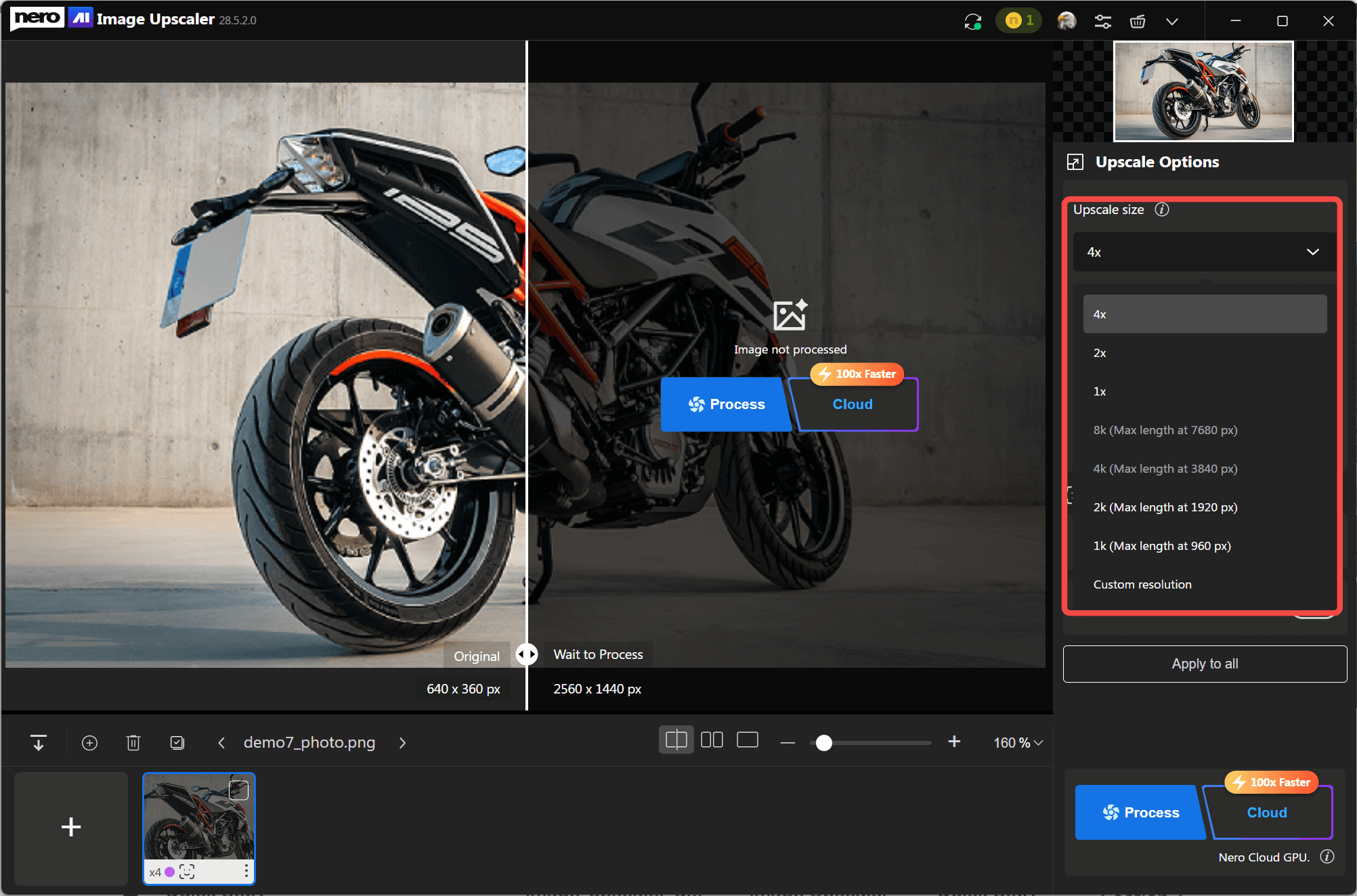
The Upscale size menu (4x, 2x, 1x, 8K, 4K, 2K, 1K and custom resolution) and, in the preview, the image waiting for the Process or Cloud button.
Face Recovery, Skin Retouch, Sharpen and Unblur
Nero AI Image Upscaler's Pro Face Options rebuild blurry faces (Face Recovery) and smooth skin naturally (Skin Retouch), on top of any model. Sharpen crisps up soft images, and Unblur targets motion blur, camera shake and missed focus. Nero says Sharpen and Unblur run on its cloud GPUs for now.
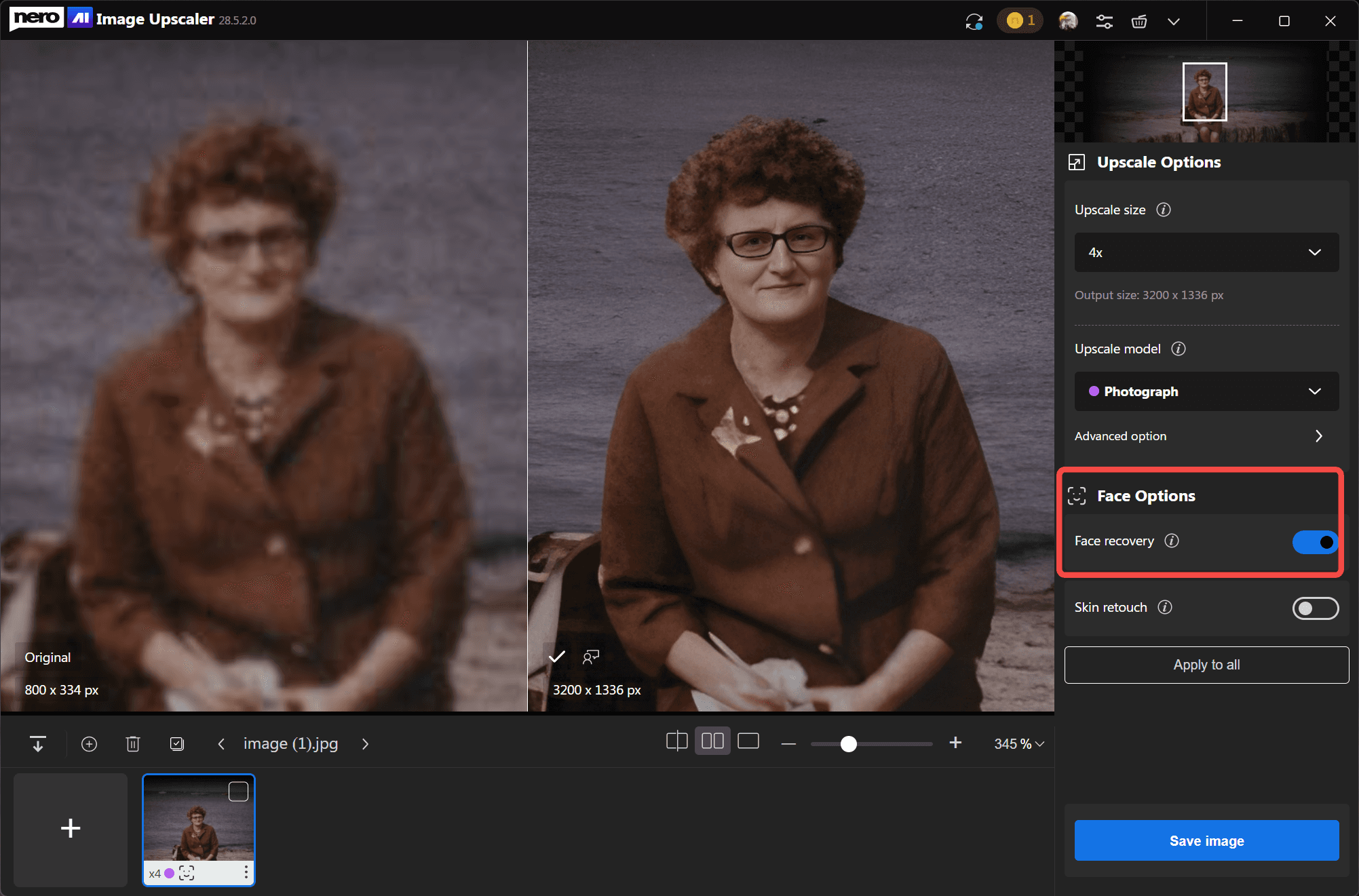
Face Recovery switched on for a small, blurry old portrait, with the original on the left and the enlarged result on the right.
Local or cloud processing, and batches of 100
Nero AI Image Upscaler processes on your own CPU or NVIDIA GPU at no extra cost, or on Nero's cloud GPUs, which Nero says are usually about 10 times faster than a GTX 1080 and about 100 times faster than a CPU, paid with credits. Select up to 100 images, apply the same settings, and process them in one go, then save them all to the source folder or an export folder with the model and resolution in the file name.
Benefits
- Old photos you can print. Small scans and early phone pictures become large enough for an album or a wall.
- Your photos stay home. Local mode never uploads anything; you choose when to use the cloud.
- Speed when you need it. The cloud button turns a long local job into a quick one, without buying a new graphics card.
- Bulk work. A whole folder of product shots or scanned prints gets the same treatment in one run.
Real-World Uses
- Family photo restoration. Scan old prints, run Photograph or Reconstruct with Face Recovery, and print at 300 DPI.
- Online shops. Upscale supplier product photos that arrive too small for zoom views, in batches.
- Artwork and anime. Enlarge illustrations and wallpapers with the Anime model without smearing the lines.
- Posters and banners. Take a 4K image to poster size with 8x upscaling and the print-size setting.
Who It's For, and Who Should Skip It
Good fit: Windows users with an NVIDIA graphics card (or a willingness to use cloud credits) who regularly restore, enlarge or batch-process images and prefer a desktop program to a web tool.
Skip it if: you upscale a few images a year (the web upscaler at ai.nero.com or a one-off purchase elsewhere costs less than a subscription); you're on a Mac (buy Nero's separate Mac app); you dislike subscriptions; or you edit professionally and already own Photoshop's Super Resolution or Topaz Gigapixel.
Usage Guide
- Install. Download the 9.4 MB installer; it fetches the rest of the program during setup. An internet connection is needed to install and to verify the license.
- Add images. Click the plus button or drag JPG, PNG, BMP or WebP files in; several at once is fine.
- Set the size. Choose 2x, 4x or 8x, a target like 4K, a custom resolution, or a print size and DPI.
- Pick a model. Standard, Photograph, Anime, Iris or Reconstruct, and turn on Face Recovery for portraits.
- Process. Click Process to run it locally, or Cloud for speed (uses credits). For many images, select them all and apply the settings to all.
- Compare and save. Use the slider or split view to check details, then Save image, or save all to the source folder.
Where it falls short
- Credits add up. The toolsforhumans review called the credit system "opaque" and said it "adds up quickly if you're upscaling regularly." The 100 yearly credits go fast if you rely on cloud processing.
- Heavy hardware for local work. Nero requires 8 GB RAM, 20 GB of disk space, and an NVIDIA card with 4 GB VRAM for acceleration. AMD and Intel graphics users fall back to the CPU or the cloud.
- AI guesses detail. Upscalers invent texture; faces and text can come out subtly wrong, so check results at 1:1 before printing anything important.
- Renewal. Nero's subscriptions renew automatically, a recurring complaint about Nero on Trustpilot.
What Users Say
Independent reviews of the desktop Image Upscaler are scarce; much of the feedback on Nero's AI apps is about the Video Upscaler. Here's what applies to this product.
toolsforhumans.ai (editorial review, last reviewed March 24, 2026)
Verdict: "Nero AI Image Upscaler is a competent tool with genuinely useful specialised models."
Pro: "Genuinely effective at restoring faded or damaged family photos."
Con: "The credits system is opaque and adds up quickly if you're upscaling regularly." The review also notes that the desktop program "doesn't depend on an internet connection for local processing." (These quotes came to us through a page summarizer.)
Trustpilot (pcai.nero.com, Nero's desktop AI apps: TrustScore 4.6 from 31 reviews, November 13, 2026)
Most of the 31 reviews are about the Video Upscaler, and Trustpilot notes the company hasn't recently invited reviews. The ones about photos:
- Dee (US, 5 stars, October 2026): "Nero AI Image Upscaler is an absolute game-changer for anyone looking to restore and enhance their digital photos."
- LOwKii (US, 5 stars, October 2024, "helpful for history!"): "You've breathed new life into cherished photographs."
- Terri Renneberg (Australia, 1 star, July 2025, about the Video Upscaler): a job "took around 22 hours to upscale and both view exactly the same," a reminder that AI upscaling doesn't always show a visible gain.
Trustpilot (Nero, TrustScore 3.0 from about 350 reviews)
On Nero's main Trustpilot page, a June 2026 reviewer in Canada gave 1 star to Nero's AI photo credits, saying the AI altered old photos by adding and recoloring elements and was "just not working at all right from day 1." Craig (2 stars) warned "Be very wary" about automatic renewal charges in Nero's terms.
The pattern
Users who restore family photos are pleased, and the specialized models get praise. Complaints center on credits, renewals, and AI results that change a photo more than expected. Use the trial on your own hardest images.
Comparisons
Desktop PRO vs Nero's online upscaler
Nero's web upscaler at ai.nero.com runs in a browser on any computer and suits occasional jobs. The desktop PRO program adds local processing (nothing uploaded), batches of 100, print sizing, all models and face options, and its yearly 100 credits also work in the online tools.
Image Upscaler PRO vs Nero Platinum Suite 2027
Nero Platinum Suite 2027 costs $59.95 a year and includes the Image Upscaler with Pro features and 100 credits a year, plus Nero Video, Burning ROM, MediaHome, Recode, the AI Photo Tagger and more. For $10 more a year, the suite is the better deal if you'd use any of those. Buy the Upscaler alone if images are your only interest.
Editions and Pricing
| How you get it | Price at checkout | Edition | Credits and updates |
|---|
| AI Image Upscaler PRO 2027 | $49.95 per year, renews automatically | Pro, all features | 100 credits per year, ongoing feature updates |
| Nero Platinum Suite 2027 | $59.95 per year, renews automatically | Pro, all features | 100 credits per year, plus the rest of the suite |
FAQs
Does Nero AI Image Upscaler upload my photos?
Only if you choose Cloud. Nero AI Image Upscaler's Local Process runs entirely on your PC; Cloud Process sends the image to Nero's EU-based cloud GPUs and uses credits. You still need an internet connection to verify the license.
What happens when the year runs out?
Nero AI Image Upscaler PRO 2027 renews automatically at checkout every 12 months. Cancel the renewal before the year ends if you don't want another year.
Does Nero AI Image Upscaler work with AMD or Intel graphics?
Nero AI Image Upscaler's hardware acceleration needs an NVIDIA card with at least 4 GB of video memory (GTX 1080 or higher recommended). On other graphics it processes on the CPU, or you can use cloud processing.
Can Nero AI Image Upscaler prepare an image for a specific print size?
Yes. Since the October 2026 update, Nero AI Image Upscaler lets you enter a width and height in inches, centimeters or millimeters plus a DPI, and calculates the pixel size for you.
Is there a Mac version?
Yes, Nero sells a separate Nero AI Image Upscaler for macOS 14.1 or later (Apple Silicon or 2017+ Intel, 16 GB memory). This Windows license doesn't cover it.
What are Nero AI credits used for?
Nero AI credits pay for cloud processing in the Image Upscaler and for Nero's online AI tools such as colorizing or restoring photos. The PRO subscription includes 100 a year, and more can be bought in Nero's AI Credit Center.
System Requirements
- Windows 10 or Windows 11, 64-bit required
- 8 GB RAM
- 6th-generation or newer Intel Core or Xeon processor recommended
- NVIDIA graphics card with 4 GB VRAM for hardware-accelerated upscaling
- 20 GB of disk space
- Internet connection to install and verify the license
Conclusion
Nero AI Image Upscaler PRO 2027 is worth $49.95 a year if you regularly enlarge or restore photos on a Windows PC with an NVIDIA card and want a choice of models, face recovery and 100-image batches without uploading your pictures. The reason to buy it: specialized models and print sizing in a desktop program that works locally. The reason not to: it's a subscription with credit-based cloud features, so occasional users pay for more than they use, and Nero Platinum Suite includes it for $10 more a year. Test it on your own photos during the 7-day trial.
Download Free TrialBuy Now