Nero TuneItUp PRO: One-Click Windows Cleanup, Startup Tuning and Program Updates
Nero TuneItUp PRO 2027 is a $64.95-a-year Windows 10 and 11 optimizer for up to 3 PCs that cleans junk files and browser data, trims startup programs and Windows services, uninstalls software, finds duplicate files and keeps your drivers and installed programs up to date. It's made by Nero AG, the German company behind Nero Burning ROM, and there's also a free edition with the basic cleaners.
If your PC takes ages to reach a usable desktop, the disk is mysteriously full, and half your programs nag you about updates, TuneItUp puts all of that on one screen. You press Smart Check, read what it found, and decide what to clean, disable or update.
Quick facts
- Version: 4.1.0.0 (released October 26, 2026, adds Cloud Manager)
- Developer: Nero AG, Germany
- Platform: Windows 11 and Windows 10
- Price: $64.95 per year for 3 PCs, renews automatically each year
- Activation: no serial number; PRO switches on when you sign in to your Nero Account
- Free edition: yes, Nero TuneItUp Free, with the PRO tools locked
- Guarantee: 30-day money-back guarantee from Nero
- Also in: Nero Platinum Suite 2027 (1 PC, yearly)
- What we checked: on the order page the product is listed as "Nero TuneItUp PRO 2027 - 3 PC" at $64.95 with yearly auto-renewal; the trial button on Nero's download page leads to NeroCoreTrial-29.5.10000-Setup.exe (205 MB), and the separate free TuneItUp installer (8.4 MB) was downloaded and inspected, including its optional SearchOnSite Chrome extension offer, all on November 13, 2026. We didn't run a cleanup on a test PC.
Before you buy
TuneItUp PRO is a subscription that renews automatically every 12 months; you can switch auto-renewal off in your account after ordering. And if you already pay for, or plan to buy, Nero Platinum Suite 2027 ($59.95 a year for 1 PC), TuneItUp PRO is already included in it. Buying it separately only makes sense when you want it on 3 PCs or don't want the rest of the suite.
Download Free TrialBuy Now
Overview
Nero TuneItUp is organised as a row of tabs across the top of one window: Smart Check, Uninstall Wizard, Duplicate Finder, Media Files Manager, Smart Disk View, Process Viewer, Clean Keeper, Software Update and Computer Info. Smart Check is the one-click part: it runs the trash cleaner, browser cleaner, registry cleaner, services manager, startup booster and privacy shield, and shows each result as a tile you can open and adjust before anything is deleted.
The rest are tools you open when you need them. The free edition gives you the cleaners; PRO adds the updaters and the extra tools. There's nothing to type in: once you buy, you sign in to your Nero Account and the PRO features switch on.
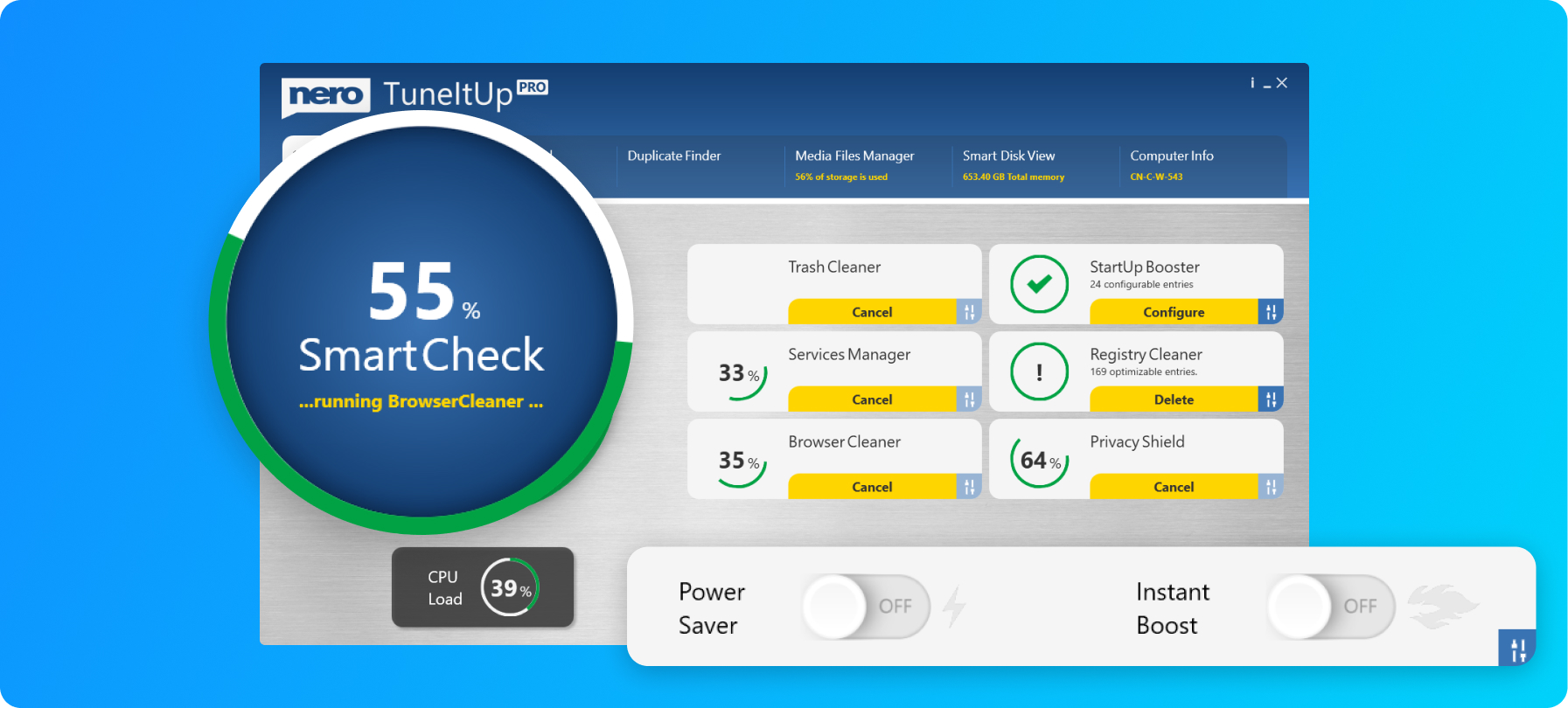
Nero's product image of the Smart Check screen: tiles for Trash Cleaner, StartUp Booster, Services Manager, Registry Cleaner, Browser Cleaner and Privacy Shield, with the CPU load gauge and the Power Saver and Instant Boost switches overlaid.
Features
A faster Windows start
Nero TuneItUp's StartUp Booster lists the programs that load when Windows boots and lets you switch off the ones you don't need every day, while the Services Manager does the same for Windows services that sit idle on a typical home PC. It can also apply Nero's recommended Windows settings for you, and lets you change the most useful ones by hand.
Junk, browser and registry cleanup
Nero TuneItUp's Trash Cleaner removes temporary and leftover files, the Browser Cleaner clears your browsing data after a session, and the Registry Cleaner lists stale registry entries before deleting them. Nero also says it tunes your browsers' internet settings in one click.
Program and driver updates (PRO)
Nero TuneItUp PRO's Software Update tab scans your installed programs, lists those with a newer version (installed version next to current version), and installs the ones you tick, one after another. The driver updater draws on a database of more than 35,000 hardware components. Both need an internet connection, and some updates ask for a restart.
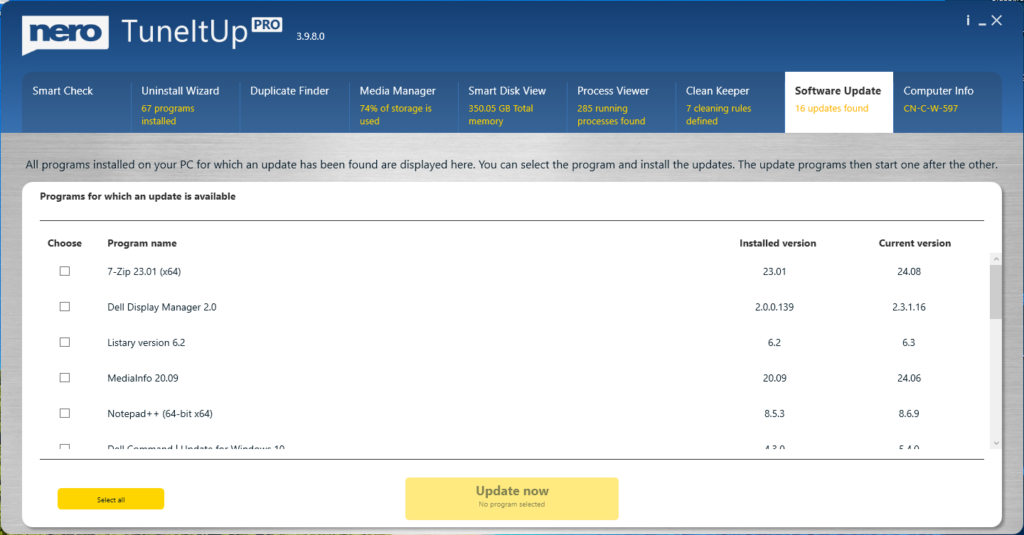
The Software Update tab in TuneItUp PRO 3.9.8.0, showing 16 updates found (7-Zip, Notepad++, MediaInfo and others) with installed and current version numbers.
Uninstall Wizard
Nero TuneItUp's Uninstall Wizard lists every installed program in categories with the real disk space each one uses, so you can tick several and remove them in one guided pass.
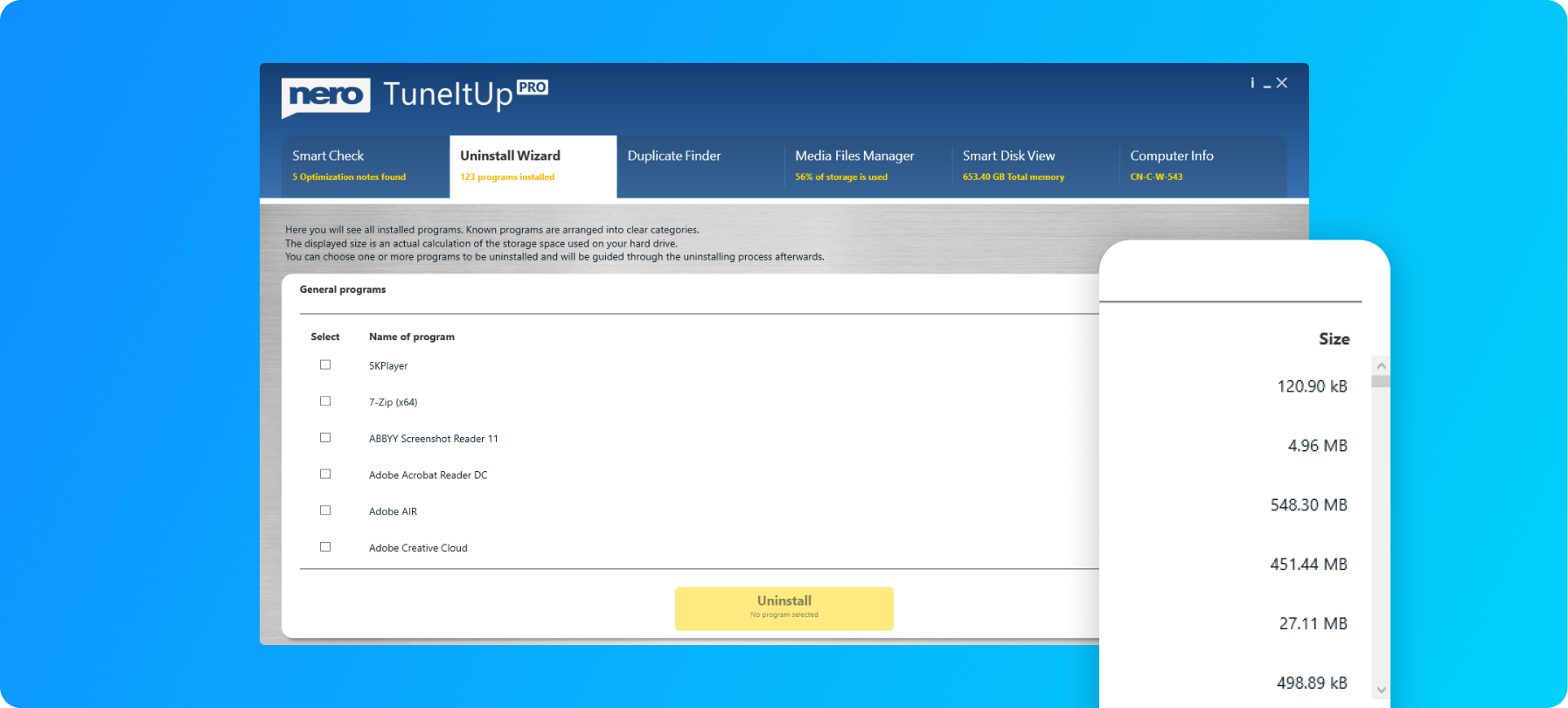
The Uninstall Wizard with 123 programs installed, each with a checkbox and its calculated size.
Duplicate Finder, Media Files Manager and Smart Disk View
Nero TuneItUp's Duplicate Finder searches a folder and its subfolders for copies of the same video, audio or photo file and lets you tick the copies to delete. The Media Files Manager finds the big media files, and Smart Disk View draws your drive as a map so the folders eating the most space stand out.
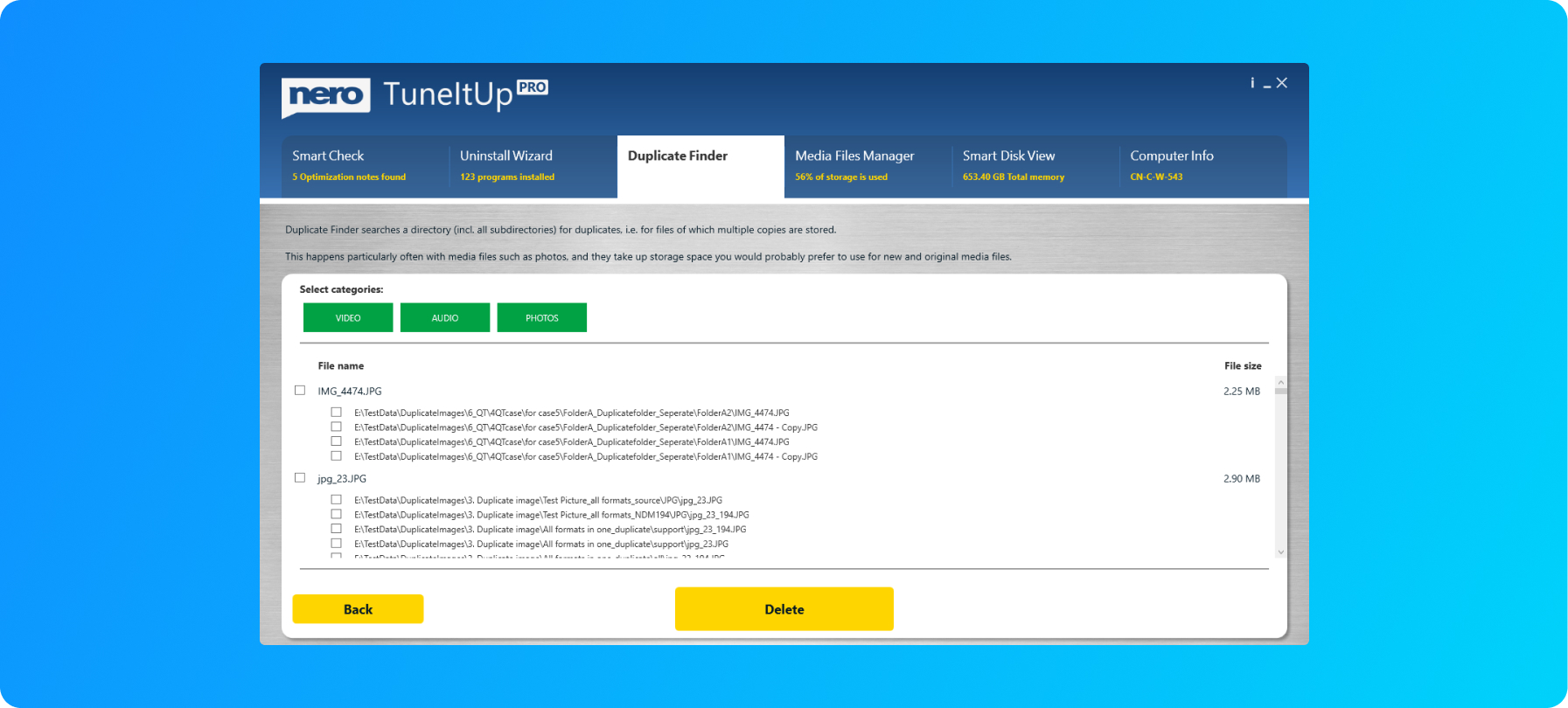
Duplicate Finder with Video, Audio and Photos categories, listing each duplicate JPG with every path it was found in.
Cloud Manager for Dropbox, OneDrive and Google Drive
Nero TuneItUp 4.1.0.0 added Cloud Manager: you sign in to a Dropbox, OneDrive or Google Drive account, then filter files by size, run a duplicate scan and delete unwanted files in batches. A Smart View shows which file types use the most cloud space. Deleted files go to the cloud provider's own trash, so they can be restored within that provider's retention period.
Power Saver and Instant Boost
Nero TuneItUp has two switches on the main screen: Power Saver, which Nero says cuts energy use and extends a notebook's battery life, and Instant Boost for maximum performance when you need it.
Benefits
- One place for routine upkeep. Cleanup, startup control, uninstalling and updates live in one window, so you don't need four separate utilities.
- Fewer outdated programs. The software updater is the PRO feature most people will notice: old versions of everyday programs are a common security hole, and checking them one by one is tedious.
- You see before you delete. Each Smart Check tile opens to a list, so you can keep a file or startup entry you actually want.
- Three PCs on one license. One subscription covers a desktop, a laptop and a family PC.
Real-World Uses
- A slow family laptop: turn off the trial apps and updaters that start with Windows, clear several gigabytes of temp files and browser cache, and uninstall the programs nobody uses.
- Update day: open Software Update once a month, tick everything, and let TuneItUp install new versions of 7-Zip, Notepad++, your PDF reader and the rest in one queue.
- A full drive: use Smart Disk View and the Media Files Manager to find the forgotten video exports and duplicate photo folders taking up the space.
- A crowded OneDrive: sign in with Cloud Manager, sort by size, and delete duplicate uploads without downloading anything.
Who It's For, and Who Should Skip It
TuneItUp PRO suits home users with two or three Windows PCs who want a simple, guided maintenance tool and especially an automatic program updater, and existing Nero customers who like having everything under one Nero Account.
Skip it if you only need occasional cleanup: Windows' own Storage Sense, Disk Cleanup and Startup Apps settings cover much of what the free tiles do, and Nero TuneItUp Free handles the rest. Skip the standalone subscription if you already have Nero Platinum Suite, which includes it. Mac users are out of luck: TuneItUp is Windows-only. And if you dislike yearly subscriptions, a PC optimizer sold with a one-time license fits you better.
Usage Guide
- Install: run the installer from Nero's download page. On the offers screen, leave the "Yes, please install the Google Chrome Extension SearchOnSite" box unticked unless you want that extension.
- Sign in: start the program from Nero Start and sign in to the Nero Account that bought PRO. The PRO lock disappears automatically.
- Run Smart Check: press the big button, wait for the scan, then open each tile to review what it wants to clean or disable.
- Update programs: open Software Update, tick the programs, click Update now, then Next. You can skip an update that hangs.
- Free space: use Duplicate Finder, Media Files Manager and Smart Disk View for the big wins, and the Uninstall Wizard for programs you no longer use.
Free edition vs PRO
Nero TuneItUp Free installs the same program, with the PRO tools locked behind a PRO button. Software Update, for example, shows the list of outdated programs but covers it with a lock until you upgrade.
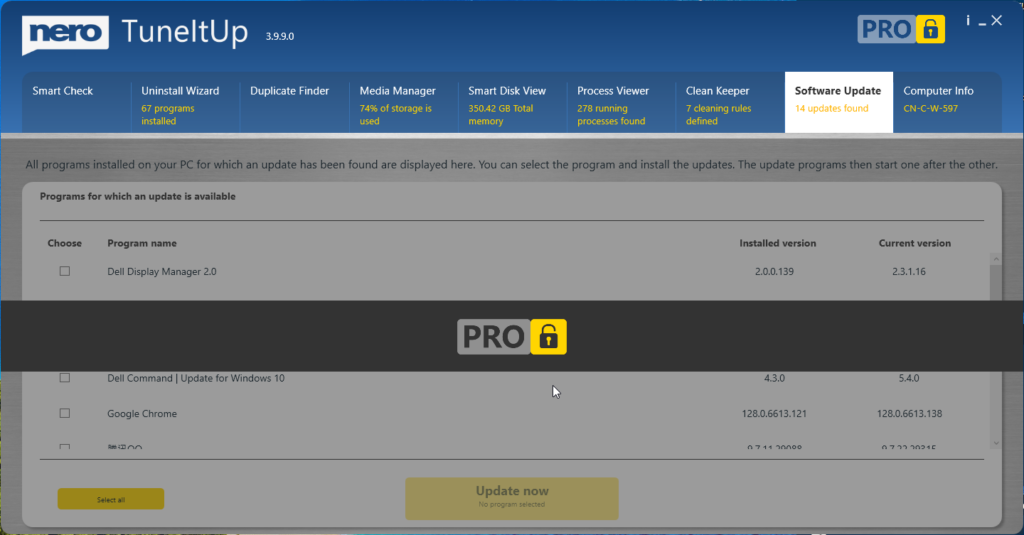
TuneItUp 3.9.9.0 without PRO: the Software Update tab finds 14 updates but stays locked.
Where it falls short
- Security tools may flag it. Malwarebytes detects Nero TuneItUp as PUP.Optional.NeroTuneItUp, its label for a potentially unwanted program, and blocks the installer. That's a category judgment about PC optimizers in general, not a malware finding, but you may need to allow it.
- The installer carries an offer. Nero's installer includes a checkbox for the third-party SearchOnSite Chrome extension. Read each screen before clicking Next.
- Price. At $64.95 a year it costs more than several rivals, a point TechRadar also made. The suite with TuneItUp included is cheaper for a single PC.
- Registry cleaning won't make an old PC new. Removing registry entries and temp files frees space but rarely changes everyday speed much; the real gains come from startup control and removing unused programs.
- An account is required. PRO works only while you're signed in to a Nero Account, and the license is checked online.
What Users Say
TechRadar review of Nero TuneItUp PRO
Stefan Ionescu reviewed TuneItUp PRO for TechRadar in March 2022 and rated it 4.5 out of 5. He liked how simple it is:
"TuneItUp Pro is structured such that any layman can pick it up and understand. This user-friendliness is the main point we're highlighting in this review."
Getting started was less smooth: "We found Nero TuneItUp Pro pretty easy to download, but installing and activating it was a bit cumbersome." He also wasn't impressed by every tool, writing of Computer Info: "Your computer has similar in-built functionality, so it's not that special."
His verdict: "In the sea of PC optimization tools out there, Nero TuneItUp Pro is a good one to pick. It offers practical features to help maintain and improve your PC's performance. However, we note that it's more expensive than many similar tools and may not be a cost-effective choice." (Prices in that review are from 2022 and have since changed.)
Trustpilot reviews of Nero (all products)
Nero's Trustpilot page scores 3.0 out of 5 from about 350 reviews, and opinion is split: 28% give five stars and 49% give one star. The reviews cover Nero as a whole, mostly Nero Platinum Suite, rather than TuneItUp alone.
- Marty Hovey (5 stars, "I Love Nero Platinum Suite"): "I usually try Nero first for a solution to a project."
- Torsten (4 stars, "Initial issues were resolved by Nero Support"): "Nero Support was always friendly and was ultimately able to resolve the issues."
- Robert Plucker (3 stars): "The software works great, but an advertised USB drive that was part of the bundle was not shipped."
- Wayne Lawrence (2 stars, "Nero is great"): "Nero is great, but their payment service not so much."
- Michelle (1 star): "This download is deceptive and requires many purchases to use it."
The recurring themes: people find TuneItUp easy to use and like having everything in one place, while the complaints are about price, the subscription and account model, add-on offers in Nero's installers, and slow answers on billing questions.
Comparisons
TuneItUp PRO alone vs Nero Platinum Suite 2027
Nero Platinum Suite 2027 costs $59.95 a year and includes TuneItUp PRO alongside Nero Burning ROM, Nero Video, MediaHome, BackItUp, DuplicateManager, USBxCopy and the AI tools, but only for 1 PC. TuneItUp PRO on its own is $64.95 a year for 3 PCs. If you want TuneItUp on one computer and would use any of the other Nero programs, the suite is the better deal; if you need it on three PCs and nothing else, buy TuneItUp PRO.
TuneItUp PRO vs TuneItUp Free
The free edition is enough for cleaning junk and browser data. PRO is worth it mainly for the software and driver updaters and the locked extra tools, and for covering three PCs.
Editions and Pricing
| Edition |
Price |
License |
PCs |
What you get |
| Nero TuneItUp Free |
$0 |
Free |
Not stated |
Basic cleaners, PRO tools locked |
| Nero TuneItUp PRO 2027 |
$64.95 per year |
Yearly subscription, auto-renews |
3 |
All tools, software and driver updates, Cloud Manager |
FAQs
Does Nero TuneItUp PRO renew automatically?
Yes. Nero TuneItUp PRO is sold as a 12-month subscription and the order page asks you to agree to auto-renewal. You can turn automatic billing off afterwards so the license simply ends after a year.
How do I activate Nero TuneItUp PRO? There's no serial number.
Nero TuneItUp PRO has no serial number. Sign in to Nero Start with the email address you used to order; the account is created from that address, and TuneItUp switches to PRO by itself.
Can I use one Nero TuneItUp PRO license on several computers?
Yes, Nero TuneItUp PRO 2027 covers 3 PCs with one yearly subscription.
Is Nero TuneItUp included in Nero Platinum Suite?
Yes. Nero Platinum Suite 2027 includes TuneItUp PRO in its 1 PC, 1-year version, so suite subscribers don't need to buy it again.
Does Nero TuneItUp work on a Mac or on Windows 7?
No. Nero TuneItUp PRO 2027 is for Windows 11 and Windows 10 only.
Why does my antivirus warn about Nero TuneItUp?
Some security products, Malwarebytes among them, classify PC optimizers including Nero TuneItUp as potentially unwanted programs. Download it only from nero.com and decline the optional browser extension offer during setup.
Can I get a refund for Nero TuneItUp PRO?
Nero offers a 30-day money-back guarantee on its software, so you can ask for a refund within 30 days of ordering.
Does Nero TuneItUp need an internet connection?
Nero TuneItUp needs the internet to verify your license and for Software Update, driver updates and Cloud Manager. The local cleaners themselves run on your PC.
System Requirements
- Windows 11 or Windows 10
- 2 GHz AMD or Intel processor, 1 GB RAM
- Internet connection to verify the license and to download updates
- A Nero Account for the PRO features
Conclusion
Nero TuneItUp PRO is a tidy, easy maintenance tool that's worth it for a household with two or three Windows PCs, mainly for its program and driver updater and the convenience of having cleanup, startup control and uninstalling in one window. The main reason to pass: the yearly price is high for what Windows partly does for free, and if you only need it on one PC, Nero Platinum Suite 2027 includes it for less. Try the free edition first, watch the installer's extension offer, and buy PRO if the updater earns its keep.
Download Free TrialBuy Now