Reg Organizer: Uninstaller, Cleaner, Startup Manager and Registry Editor in One
Reg Organizer is a Windows maintenance suite from Chemtable Software that removes programs together with their leftovers, cleans junk files, controls what starts with Windows and gives you a far more capable registry editor than regedit. A Home License for 2 PCs costs $35.25 on the order page with the 25% code CHT-25 (regular price $47), and it's yours to keep, with one year of updates included.
If your PC has collected years of programs that never uninstalled cleanly, a startup list you no longer recognize and a C: drive that keeps shrinking, Reg Organizer puts all three problems on one screen, and it has been doing so since 2001.
Quick facts
- Developer: Chemtable Software (the installer is signed by Software Solutions 365 LLC)
- Latest version: 9.96, released October 20, 2026
- Platform: Windows 11, 10, 8 and 7, 32-bit and 64-bit
- Price: Home License, 2 PCs: $35.25 with code CHT-25 ($47 without); Home License, 5 PCs: $79.50 with the code ($106 without)
- License: lifetime use, one year of updates and priority support; renewals are sold for later updates
- Trial: 30 days, with some functions blocked until you enter a key
- Guarantee: 30-day money-back guarantee
- What we checked: the installer from files.chemtable.com (26 MB, file version 9.96.0.0, dated October 20, 2026, signed by Software Solutions 365 LLC), the version history back to 9.89, and the order page prices for the 2-PC and 5-PC Home licenses with and without code CHT-25 on November 15, 2026. We didn't run a registry cleanup or an uninstall with it.
Before you buy
- The buttons on this page add code CHT-25 to the order page for you. If you reach the order page another way and see $47, type CHT-25 into the "I have a coupon code" box.
- The license never stops working, but updates end after a year unless you buy a renewal. Reg Organizer reminds you at startup when that year is over.
- The 30-day refund covers orders placed with Chemtable's own store, which is where the order page sends you. Chemtable excludes refunds claimed over price differences between regions or resellers.
- The portable version (run from a USB stick without installing) is licensed only with the 5-PC Home License.
Download Free TrialBuy 2-PC Home License ($35.25)Buy 5-PC Home License ($79.50)
Overview
Reg Organizer started life on September 25, 2001 as a registry editor and grew into an all-round maintenance tool. The tools are split into three groups. For all users holds Express Check, System Cleanup and Private Data Cleanup, the one-click jobs. For advanced users holds Startup Applications and the Applications uninstaller, and a Miscellaneous tools group holds the registry editor, important registry parts, tweaks and registry snapshots.
Chemtable updates it often: seven releases between January 20 and October 20, 2026. The biggest of them, version 9.90, added a Community-Driven Cleanup tool built on the open Winapp2 database, and later versions reworked forced uninstalls, added drivers to the leftover search and redesigned the startup manager.
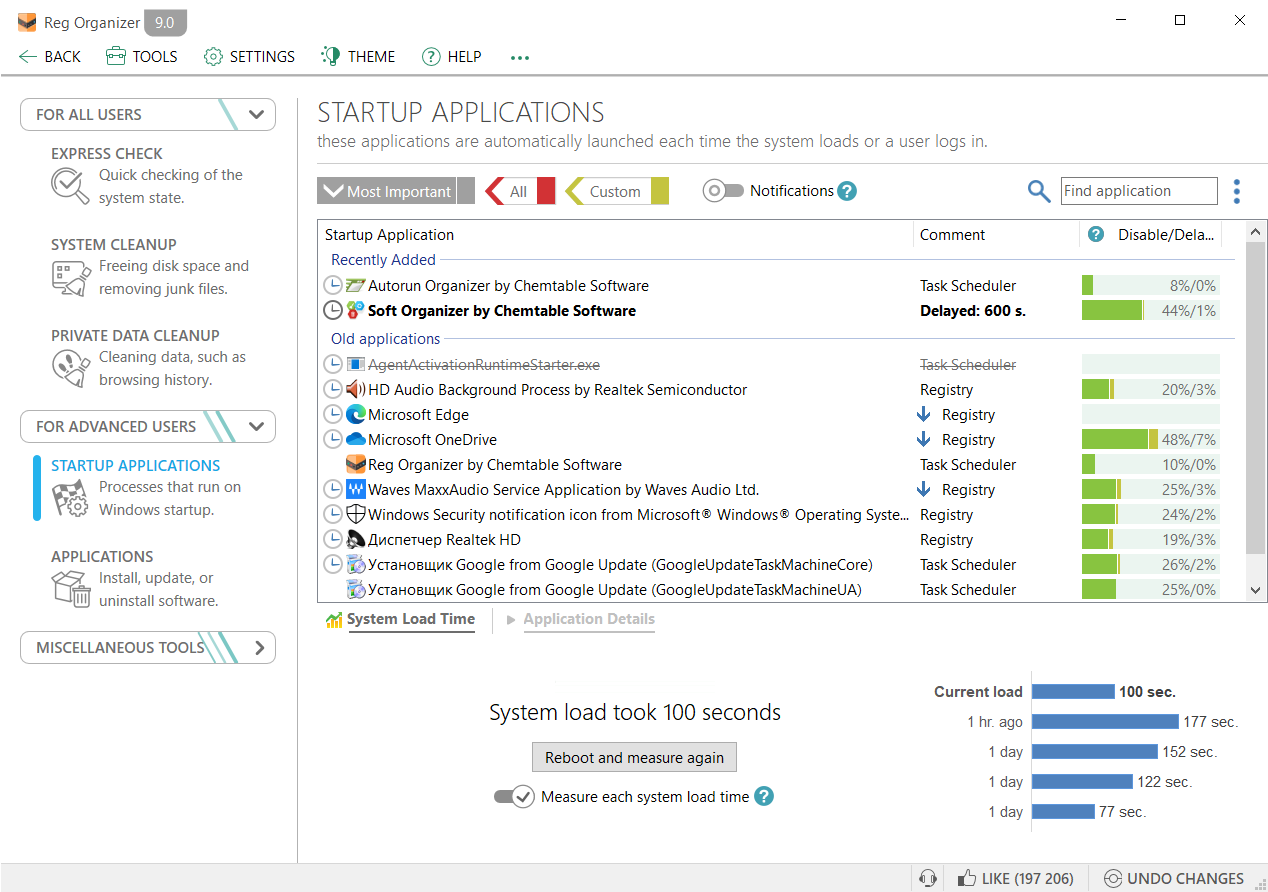
Reg Organizer 9's Startup Applications tool: each entry shows where it starts from (Registry, Task Scheduler), a bar for its share of boot load, and one delayed by 600 seconds. Below, the last five boot times are measured.
Features
Uninstalls that also remove the leftovers
Reg Organizer runs a program's own uninstaller, then searches the registry, the file system and startup entries for what it left behind, using Chemtable's Full Uninstall technology. You see the list of traces before anything is deleted and can keep items you want. Since version 9.93 the search also finds drivers an application installed, and since 9.92 a forced removal closes the processes and services that block an uninstall and offers to delete locked files at the next reboot.
You can also install a program with tracing, so every change it makes is recorded and can be undone exactly later, and find traces of programs you already removed some other way. Microsoft Office updates and service components are sorted into a separate "System and Service" section to keep the main list short.
System cleanup, plus 3,500 community cleanup routines
Reg Organizer's System Cleanup frees space taken by temporary files, caches, old Windows updates and previous Windows versions, and Private Data Cleanup clears browsing history and similar traces. Browser support covers Chrome, Edge, Opera, Yandex, Brave, Opera GX and Vivaldi.
The Community-Driven Cleanup tool (version 9.90) adds the open Winapp2 database, over 3,500 cleanup routines for individual applications maintained by volunteers. Chemtable labels it clearly as a third-party database, so check what's selected before you run it.

The Community-Driven Cleanup tool in a 9.90 beta, with 3,715 cleanup locations from Winapp2 database version 251109 and a warning that the database is maintained by the community.
A startup manager that measures boot time
Reg Organizer's Startup Applications tool lists everything that runs at boot or logon, from the registry, the startup folders and the Task Scheduler, with a bar showing each item's share of the load. You can disable an entry, remove it, or delay it so it starts a few minutes after Windows instead of competing with it. The tool times each boot so you can see whether a change helped. Version 9.94 moved the actions into the list itself.
A registry editor built for people who use regedit
Reg Organizer's registry editor does everything regedit does and adds favorites, key cloning and a fast search and replace that shows every match in one list, so you can delete or change them all at once, which is how you clean up after a program that had no uninstaller. Since 9.92 it can also delete locked keys in Windows 11 that regedit refuses to touch.
Around it sit a .reg file editor that can build one file from keys in different branches, a .reg viewer that shows a file as a tree before you import it, registry snapshots you can compare to see what an installer changed, and a key tracker.

The registry editor in Reg Organizer 8 (older interface), with Favorites, Create and a search box, and the Important Registry Parts, Tweaks and Registry Snapshots tools in the left menu.
Express Check, tweaks and an undo center
Reg Organizer's Express Check scans for junk files, startup items that can be optimized and private data in one pass, and the license includes a background system check that tells you when space can be freed or installed programs have updates (it waits while a game or full-screen app is running). The Tweaks tool switches undocumented Windows settings on and off, including two Windows 11 tweaks added in 9.90 that hide the Start menu's Recommended section and the "Learn about this picture" desktop icon. Changes go through an Undoing Changes Center, so you can roll them back.

Express Check in Reg Organizer 8 (older interface): 1008 MB of useless files found, one startup item to optimize and private data in several apps, each with its own Run the Scan button.
Benefits
- One tool instead of four. Uninstaller, cleaner, startup manager and registry editor share one window and one undo center.
- You stay in control. Every cleanup and leftover list is shown before deletion, with restore points created when traces are removed.
- A lifetime license. You pay once; the program keeps working after the update year ends.
- Two PCs from the start. The cheapest license already covers a desktop and a laptop.
Real-World Uses
- Removing a stubborn security suite or driver package whose uninstaller fails: forced removal stops its services, deletes what it can and schedules the rest for reboot.
- Getting back space on a full C: drive after a Windows feature update, by removing the previous Windows version, old updates and caches.
- Finding out why boot got slow: compare boot times, delay the heavy startup entries and measure again.
- Testing software cleanly: install it with tracing, try it, then undo every change it made.
- Bulk registry edits: replace an old path in hundreds of values after moving a program folder.
Who It's For, and Who Should Skip It
Reg Organizer suits Windows users who install and remove a lot of software, people who look after family PCs, and power users who live in regedit and want a better one. The 5-PC license with the portable version is handy if you fix other people's computers.
Skip it if you only want a free uninstaller: Chemtable's own Soft Organizer has a free edition that removes programs and their traces. Skip it too if you're hoping a registry cleaner will make an old PC noticeably faster: the gains from cleaning registry entries are small; Reg Organizer's value is in the uninstaller, disk cleanup and startup control. There's no Mac or Linux version.
Usage Guide
- Download reg-organizer-setup.exe (about 26 MB) and install it; it needs administrator rights.
- Start with Express Check to see how much junk and what startup items it finds, then open each result to review it before cleaning.
- For a program you want gone, open Applications, select it and choose uninstall. When its own uninstaller finishes, review the traces Reg Organizer found and confirm.
- Open Startup Applications, turn on boot-time measurement, delay or disable entries you don't need, and reboot to compare.
- To activate, buy a license, then enter the key from the confirmation email in the program.
Where it falls short
- Background resident process. The background check and notifications keep a Reg Organizer process running; one Snapfiles reviewer on version 8.55 uninstalled it over memory use. Version 9.89 at least stops its notifications from interrupting games and full-screen apps.
- Registry editing can break things. The editor and search-and-replace are powerful, and a careless bulk delete can damage Windows. Use the snapshots and the undo center.
- Community cleanup isn't Chemtable's code. Winapp2 routines are written by volunteers; Chemtable asks you to report problems after cleanup.
- Small independent review base. Most published praise is on Chemtable's own site, and the main download sites carry only a handful of user ratings.
What Users Say
Snapfiles (2 user reviews)
Nelson-Carvalho, "Secure registry editor", September 18, 2023, version 9.21: "Reg Organizer is a mature, secure software with powerful features to tinker with the Windows registry. Like any Windows registry editor, some technical knowledge is required. However, the software allows you to make a backup before carrying out any operation. Reg Organizer also has some extra features that may be of interest to all users, such as software update control. It is reliable software and is worth purchasing."
dsbluecoffee443, "Uses too much memory problem", September 20, 2020, version 8.55: "I was very happy to find REGISTRY ORGANIZER as it cleaner out and improved my registry which my other utility misses. The ONE PROBLEM is USING TOO MUCH MEMORY (SO I UNINSTALLED this program)." The reviewer explains that the process ran all the time and that they found no option to turn it off.
Trustpilot and TechSpot
Chemtable Software has a TrustScore of 4.3 from 14 reviews on Trustpilot, with no 1- or 2-star ratings. Sandra Knapp's 5-star review from February 2026 is titled "I've been using Reg Organizer for years" and says it keeps her PC running smoothly. The only 3-star review shown, from October 2025, says the reviewer liked the program until an intruder on their PC began changing programs; it doesn't describe a fault in Reg Organizer.
On TechSpot's download page, Reg Organizer has a user rating of 4.4 out of 5 from 11 votes.
Quoted on Chemtable's testimonials page
Softpedia: "An excellent and powerful program. It deserves to be downloaded and put to good use."
Gerald McQuaid, Toronto: "I’m very careful about these type of programs as there are so many out there that end up screwing up your whole computer. Reg Organizer is the best one that I have used. It found 4955 problems fixed them all and not one thing was screwed up on my computer."
Vasiliy Khandogiy: "It is excellent as a registry editor. Modify, clean, save, or make snapshots of the registry – that is just the tip of the iceberg." These come from the vendor's own page, so they're the positive side only.
The recurring themes: long-time users trust it not to break Windows and like the registry tools most, while the one recurring complaint is the always-running background process. Independent, in-depth reviews of recent versions are scarce.
Comparisons
Reg Organizer vs Soft Organizer Pro
Both use Chemtable's Full Uninstall technology, and both remove programs, Windows Store apps and traces, install with tracing and find traces of programs already deleted. Soft Organizer Pro stops there and costs less. Reg Organizer adds the system and private data cleaners, the startup manager, the registry editor with search and replace, .reg tools, tweaks, important registry parts and registry snapshots. Buy Soft Organizer Pro if you only want clean uninstalls; buy Reg Organizer if you also want the cleanup and registry tools.
Reg Organizer vs Windows' own tools
Windows already has Apps & features, Storage Sense and Disk Cleanup, Task Manager's Startup tab and regedit. Reg Organizer goes further on each: leftovers after uninstalling, delayed startup with boot timing, per-application cleanup routines, and a registry editor with search and replace and snapshots. If the built-in tools already keep your PC tidy, you don't need it.
Editions and Pricing
| License | Price with CHT-25 | Regular price | PCs | Includes |
|---|
| Home License (2-PC) | $35.25 | $47.00 | 2 | Lifetime use, 1 year of updates and priority support, cloud features, background system check |
| Home License (5-PC) | $79.50 | $106.00 | 5 | Everything in the 2-PC license plus use of the portable version |
Each button below orders that license, with code CHT-25 already added. Prices were checked on the order page on November 15, 2026.
Buy 2-PC Home License ($35.25)Buy 5-PC Home License ($79.50)
FAQs
Does Reg Organizer stop working after the first year?
No. A Reg Organizer license gives lifetime use. After one year you stop getting new versions and priority support unless you buy a license renewal; the version you have keeps working.
Is Reg Organizer free?
No. Reg Organizer is a 30-day trial with some functions blocked until you enter a license key. Chemtable's free tools are Soft Organizer (uninstaller) and Registry Life (registry cleaner).
Can I use one Reg Organizer license on a desktop and a laptop?
Yes. The Home License covers up to 2 PCs, so a desktop and a laptop are fine. For three to five computers, the 5-PC Home License is cheaper per PC.
Is there a portable version of Reg Organizer?
Yes, Reg Organizer Portable runs without installation, for example from a USB stick, and its use is licensed with the 5-PC Home License.
Can I undo what Reg Organizer changed?
Yes. Reg Organizer records its changes in the Undoing Changes Center, and it can create a system restore point before removing program traces. Registry snapshots let you compare the registry before and after.
Does Reg Organizer work on Windows 11?
Yes. Reg Organizer 9.96 supports Windows 11, 10, 8 and 7, and recent versions added Windows 11-specific features such as deleting locked registry keys and Start menu tweaks.
What if I lose my Reg Organizer key?
Chemtable has a key recovery page on its website that resends the license key to the email address used for the order.
System Requirements
- Windows 11, 10, 8 or 7, 32-bit or 64-bit
- 256 MB RAM or more
- 50 MB of disk space
- Administrator rights
Conclusion
Reg Organizer is worth $35.25 if you install and remove a lot of software or want a serious registry editor: its leftover-aware uninstaller, boot-timed startup manager and search-and-replace registry editor do real work, and the license covers two PCs for life. It's actively maintained, with releases every month or two. The main reason to pass is if all you want is a clean uninstall, which the cheaper Soft Organizer Pro or free Soft Organizer already handle, or if you expect a registry cleaner to speed up an old PC.
Download Free TrialBuy 2-PC Home License ($35.25)Buy 5-PC Home License ($79.50)