Soft Organizer Pro: Uninstall Windows Programs and Every Trace They Leave
Soft Organizer Pro is a Windows uninstaller from Chemtable Software that removes a program and then hunts down the files, registry entries, startup items, services and drivers its own uninstaller left behind. A Home License for 2 PCs costs $18.75 on the order page with the 25% code CHT-25 (regular price $25), and it's a lifetime license with a year of updates. A free edition covers the basics.
Most programs don't clean up after themselves. Uninstall a game launcher, a printer suite or a trial antivirus and you're often left with folders in AppData, keys in the registry and a service that still starts with Windows. Soft Organizer's job is to make sure "uninstalled" really means gone.
Quick facts
- Developer: Chemtable Software (the installer is signed by Software Solutions 365 LLC); the product was called Full Uninstall until 2013
- Latest version: 10.50, released June 16, 2026
- Platform: Windows 11, 10, 8 and 7, 32-bit and 64-bit
- Price: Home License, 2 PCs: $18.75 with code CHT-25 ($25 without); Home License, 5 PCs: $26.25 with the code ($35 without)
- License: lifetime use, one year of updates and priority support
- Free edition: yes, the same download; a license key turns on the Pro functions
- Guarantee: 30-day money-back guarantee
- What we checked: the installer from files.chemtable.com (17 MB, file version 10.50.0.0, dated June 16, 2026, signed by Software Solutions 365 LLC), Chemtable's free-versus-Pro feature list, and the order page prices for the 2-PC and 5-PC Home licenses with and without code CHT-25 on November 15, 2026. We didn't uninstall a program with it.
Before you buy
- Try the free edition first. It already uninstalls with a leftover search, traces installations and removes Store apps. Pay only if you need the three Pro functions listed below.
- The buttons on this page add code CHT-25 to the order page. If you see $25 instead of $18.75, type CHT-25 into the "I have a coupon code" box.
- After a year, the program keeps working but new versions need a license renewal.
- The 30-day refund applies to orders from Chemtable's own store, which is where the order page sends you.
Download Free TrialBuy 2-PC Home License ($18.75)Buy 5-PC Home License ($26.25)
Overview
Soft Organizer looks like a plain list of installed programs: pick one, click Uninstall. Behind that list sits Chemtable's Full Uninstall technology, the same engine Reg Organizer uses. It works two ways. If a program's installation was traced, Soft Organizer recorded every file and registry change at install time and can reverse them exactly. If it wasn't, Soft Organizer runs the program's own uninstaller and then does a deeper scan of the system for what's left.
The list adds context you don't get in Windows Settings: filters for large, new, frequently uninstalled and rarely used programs, install dates and sizes, a startup "speedometer" icon on programs that launch with Windows, and a rating based on how many other users removed a program soon after installing it.
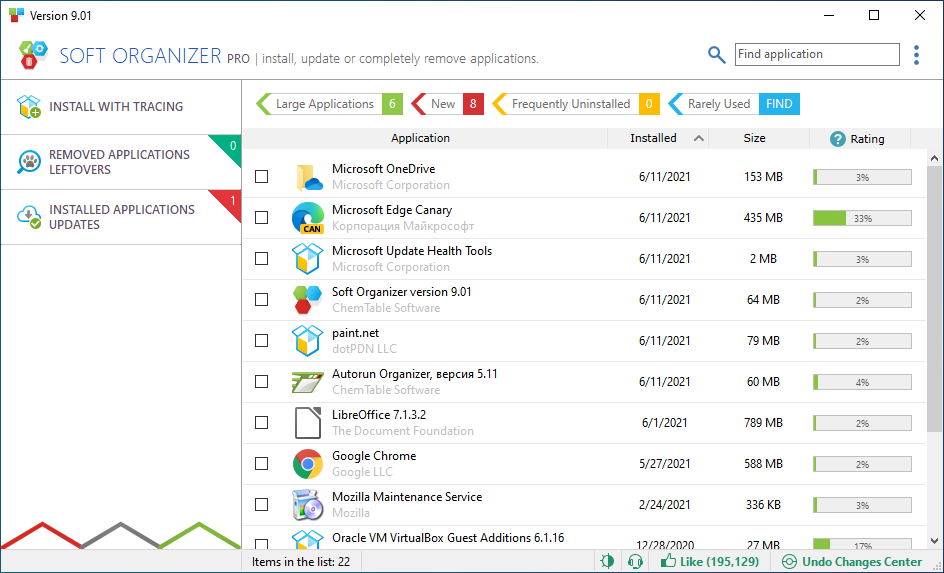
Soft Organizer Pro 9.01's main window: filters for large, new, frequently uninstalled and rarely used programs, then each program with install date, size and the share of users who removed it. Install with Tracing, Removed Applications Leftovers and Installed Applications Updates sit on the left.
Features
Leftover search after every uninstall (free and Pro)
Soft Organizer finds what a program's uninstaller missed: files and folders, registry keys, startup items and, since version 10.50, drivers the program installed. You see the list before anything is deleted, and Soft Organizer makes a backup when it removes traces. Since 10.40 a forced removal stops the processes and services that block an uninstall and deletes locked files at the next reboot, and it can clear locked registry keys in Windows 11.
Install with tracing for a perfect undo (free and Pro)
Soft Organizer can watch an installation and log every change, so the later uninstall removes exactly what was added. Since version 10.30 the trace also catches drivers, services and other startup entries an installer creates, groups helper components under their parent program, and shows how many files, registry entries and startup items were created. Snapfiles notes that it detects many common installers and offers to start tracing automatically.
Leftovers of programs you already removed (Pro)
Soft Organizer Pro scans for traces of programs that are already gone, uninstalled with Windows Settings or another tool months ago, and offers to clean them up in one pass. This is the main reason to buy Pro on a PC that's been in use for years.

An older Soft Organizer version finding leftovers of removed applications (Ace Stream Media, Adobe Flash Player Plugin, Dropbox), each with a View leftovers link, and a Remove Leftovers button.
Updates for installed programs and silent installs (Pro)
Soft Organizer checks installed programs for newer versions in both editions; Pro offers to install the update in one click (not every program supports it). Pro also runs silent installations, installing setup packages that support it with no questions asked.
Store apps, batch removal and Steam awareness
Soft Organizer removes Windows 8/10/11 Store apps as well as desktop programs, uninstalls several selected programs in one go, and exports the program list to HTML for a support request. Version 10.10 learned to measure Steam games and warns you before you uninstall Steam while games installed through it are still there.
Benefits
- A cleaner system over time, without leftover services and startup entries from software you stopped using.
- Safe to try things. Traced installs make test software fully reversible.
- Cheap and permanent. $18.75 once covers two PCs for life.
- No feature bloat. It's an uninstaller, not a suite of cleaners competing for your attention.
Real-World Uses
- Removing a trial antivirus or VPN whose uninstaller fails or leaves a driver and service behind.
- Cleaning up an older PC by sweeping leftovers of dozens of programs removed over the years (Pro).
- Testing a new tool with a traced install, then removing it without a trace if you don't keep it.
- Freeing space by sorting the list by size and spotting the large, rarely used programs.
- Keeping software current by updating outdated programs from one list (Pro).
Who It's For, and Who Should Skip It
Soft Organizer Pro suits people who install and remove software often, anyone looking after a family PC, and helpdesk-minded users who like knowing exactly what an installer did. The 5-PC license is only $7.50 more than the 2-PC one.
Skip Pro if you rarely uninstall anything: the free edition handles leftover search and traced installs on its own. If you also want junk-file cleanup, a startup manager and a registry editor, Chemtable's Reg Organizer includes the same uninstaller plus those tools. There's no Mac version.
Usage Guide
- Download soft-organizer-setup.exe (about 17 MB) and install it with administrator rights. It starts as the free edition.
- To remove a program, select it in the list (or several) and click Uninstall. Let the program's own uninstaller finish, then review the traces Soft Organizer found and confirm.
- To install something you may want to remove later, use Install with Tracing and pick the setup file.
- After buying, open the menu (≡) at the top right, choose "Enter the License Key..." and paste the key from the email to switch on Pro.
- In Pro, open Removed Applications Leftovers to clean traces of programs uninstalled earlier.
Where it falls short
- Leftover scans are judgment calls. A deep scan can list a shared file or key another program still uses. Look through the list and untick anything you're unsure of; the automatic backup is there if you get it wrong.
- Update prompts. One user on Chemtable's own testimonials page complained that the app pushes updates of installed programs, which hurts on a metered connection.
- Few independent reviews. Snapfiles and SourceForge list it without user reviews, so most published feedback is on Chemtable's site.
- One-click updates don't cover every program. Chemtable says so itself.
What Users Say
Snapfiles
Snapfiles' editors describe Soft Organizer as a tool that "can help you completely remove programs from your computer, even if the provided uninstaller leaves traces behind", and add: "The program uses real-time disk monitoring, which makes it a quite a bit faster than similar applications that usually need to create and compare a before/after snapshot."
MalwareTips forum
When Soft Organizer Pro was given away in December 2025, members of the MalwareTips forum commented. ChoiceVoice: "i have used this software for many years and have no complaints." Dave Russo: "Thanks,had this program years ago,its good ,for free +++"
Quoted on Chemtable's testimonials page
Paul Full (5 stars): "This app works well not to clutter up you windows 11 with uninstall leftovers. Highly recommended."
ChazBo: "One of the best uninstallers I have used, and I have tried many working in IT Helpdesk for 13 years"
Geoff (5 stars): "It does what it says, what more can you want?"
Samuel Baidoo, the critical one: "it a good and nice program, however your app forces someone to updates the installed applications, which is very wrong considering the data strength of that person to the internet, or maybe he or she is on a metered connection."
The pattern: long-time users like how thoroughly it removes programs and how simple it stays, and the one complaint is about update prompts. Independent, detailed reviews are scarce, so the free edition is the best way to judge it yourself.
Comparisons
Soft Organizer Free vs Soft Organizer Pro
Both editions uninstall with a leftover search, remove Store apps, trace installations and remove traced programs, remove several programs at once, check for new versions, and back up removed traces. Pro adds three things: cleaning leftovers of programs that were already uninstalled, silent installs, and one-click updates of installed programs.
Soft Organizer Pro vs Reg Organizer
Reg Organizer contains the same uninstaller and leftover search, and adds system and private-data cleanup, a startup manager, a registry editor, tweaks and registry snapshots for $35.25 (2 PCs, with the same code). Choose Soft Organizer Pro if uninstalling is all you want; choose Reg Organizer for an all-in-one maintenance tool.
Editions and Pricing
| Edition | Price with CHT-25 | Regular price | PCs | Includes |
|---|
| Soft Organizer (free) | Free | Free | Any | Uninstall with leftover search, traced installs, Store apps, batch removal |
| Pro Home License (2-PC) | $18.75 | $25.00 | 2 | Pro functions, lifetime use, 1 year of updates and priority support |
| Pro Home License (5-PC) | $26.25 | $35.00 | 5 | Same as the 2-PC license, for five computers |
Each button below orders that license, with code CHT-25 already added. Prices were checked on the order page on November 15, 2026.
Buy 2-PC Home License ($18.75)Buy 5-PC Home License ($26.25)
FAQs
Do I need to reinstall to upgrade from Soft Organizer free to Pro?
No. Soft Organizer free and Pro are the same program; entering the license key from the menu (≡ then "Enter the License Key...") turns on the Pro functions.
Is Soft Organizer the same as Full Uninstall?
Yes. Soft Organizer is the renamed and further developed version of Chemtable's Full Uninstall, renamed in 2013 when its features outgrew the old name.
Does Soft Organizer Pro stop working after a year?
No. A Soft Organizer Pro license is for lifetime use. The year refers to updates and priority support; after that, the installed version keeps running.
Can Soft Organizer remove built-in Windows 11 apps?
Soft Organizer removes universal Windows 8, 10 and 11 apps installed from the Microsoft Store, alongside regular desktop programs.
Can I undo a Soft Organizer cleanup?
Yes. Soft Organizer creates a backup automatically when it removes program traces, and changes are listed in its Undo Changes Center.
What if I lose my Soft Organizer Pro key?
Chemtable's key recovery page emails the key automatically to the address you used when ordering.
System Requirements
- Windows 11, 10, 8 or 7, 32-bit or 64-bit
- 256 MB RAM or more
- 50 MB of disk space
- Administrator rights
Conclusion
Soft Organizer Pro is a fair buy at $18.75 for two PCs if you want the leftovers of years of past uninstalls cleaned out and like one-click updates; it's a focused, actively maintained uninstaller with traced installs that make removal exact. The reason not to buy: the free edition already does the core job, so many people will never need Pro, and anyone who wants cleanup and startup tools as well is better served by Reg Organizer.
Download Free TrialBuy 2-PC Home License ($18.75)Buy 5-PC Home License ($26.25)